Telemedicine App Development Guide: Key Features, Costs, and What Patients Actually Want

TL;DR / Key Takeaways

  • This Telemedicine app development guide breaks scope into MVP, v1, and enterprise, allowing you to deliver faster while not compromising patient trust, reliability, or compliance.
  • Telehealth is no longer a side channel. According to the AMA, in 2024, 71.4% of physicians utilized telehealth weekly, compared with 25.1% in 2018. It’s a testament to why virtual care is now a key component of the healthcare product strategy.
  • MVPs are mostly around scheduling, video visits, secure messaging, payments (if applicable), and visit summaries. v1 introduces integrations and admin controls. Enterprise adds SSO, RBAC at scale, advanced analytics, multi-location workflows, and SLAs.
  • Patients usually do not ask for more features first. They seek quicker appointments, clear provider credentials, transparent pricing, stable calls in bad network conditions, privacy measures, accessibility support, and next steps following the visit.
  • Compliance is not a checkbox at the end. PHI data flow mapping, access control, audit logs, encryption, vendor BAAs (if necessary), risk analysis, retention rules and incident response readiness are all required for a healthcare product.
  • A practical custom build budget for a/an MVP is $80k-$180k, v1 is $180k-$400k and enterprise scope is $400k-$1.2M+ depending on video infrastructure, integrations, depth of compliance, QA, and support model.

Healthcare teams don’t fail at telemedicine because they lack video. They fail because patients can’t get to a first appointment fast, can’t trust what happens next, or hit friction at the exact moment they need care. This Telemedicine app development guide is set up to help you avoid all that. It translates real patient expectations into product requirements, cost decisions, compliance must-dos, and technical choices your engineering team can actually ship.

If you are thinking of developing a telemedicine product, you likely have three questions on your mind: what should the product be, how can you afford it, and what will patients do with it? This guide gives you a practical, build-ready view of product scope, from care model selection and MVP planning to video architecture, integrations, launch readiness, and post-launch improvement.

What This Telemedicine App Development Guide Covers (and Who It’s For)

Our Telemedicine app development guide is meant to reduce ambiguity. Most telemedicine projects stall due to lack of stakeholders’ consensus on the care model, compliance limits, and what “done” looks like within the first release. After you’re done, you ought to be able to lock scope, estimate timelines and understand what unknown risks are to be expected before development begins.

You’ll also find out where teams typically over spend, such as creating custom video infrastructure too early, and where they under invest, such as onboard, connection recovery, audit logs, etc.

Whether you’re going through the vendor selection process, internal approval or even a build-vs-buy scenario, this guide provides you with language and artifacts to be reused: feature tiers, integration maps, a compliance checklist, and a vendor evaluation scorecard.

What This Telemedicine App Development Guide Helps Teams Decide

  • Which care model you’re supporting (urgent care, specialty, RPM companion, teletherapy, employer portal)
  • What your MVP must prove (activation, first completed visit, clinical workflow fit, payment viability)
  • Which telemedicine app features belong in MVP vs later releases (to control cost and risk)
  • Whether to build or integrate video, chat, notifications, identity verification, and analytics
  • What “HIPAA-ready” means in architecture terms: PHI mapping, access control, auditability, vendor BAAs

Who Should Use This Guide: Founders, PMs, and Healthcare IT Leaders

  • Startup founders trying to validate product-market fit and reimbursement pathways
  • SaaS product managers who are scoping v1 for pilots and enterprise readiness
  • Provider organization leaders who want to modernize patient access while maintaining compliance
  • Enterprise IT teams working on aligning security, integration, and vendor governance with clinical needs

Telemedicine vs Telehealth (and Why It Changes Your Product Scope)

Teams often use “telemedicine” and “telehealth” interchangeably, but scoping gets messy fast when those words mean different things to different stakeholders. The fastest way to blow a timeline is to discover mid-build that “telehealth” for one person meant RPM devices, care programs, and an employer portal, while another person meant only video visits.

Usually, telehealth app development is broader than a visit-only telemedicine product given real world scenarios. HHS defines telehealth as the delivery of services via telephone, video, secure messaging, and technology to assist patients in sharing health data (e.g., blood pressure). Such a broad definition usually expands your data model, integration needs, user roles, consent flows, and compliance surface area.

In case you’re pitching internally, define the term you’re building for in writing and then map it to real feature sets. It prevents scope creep by vocabulary.
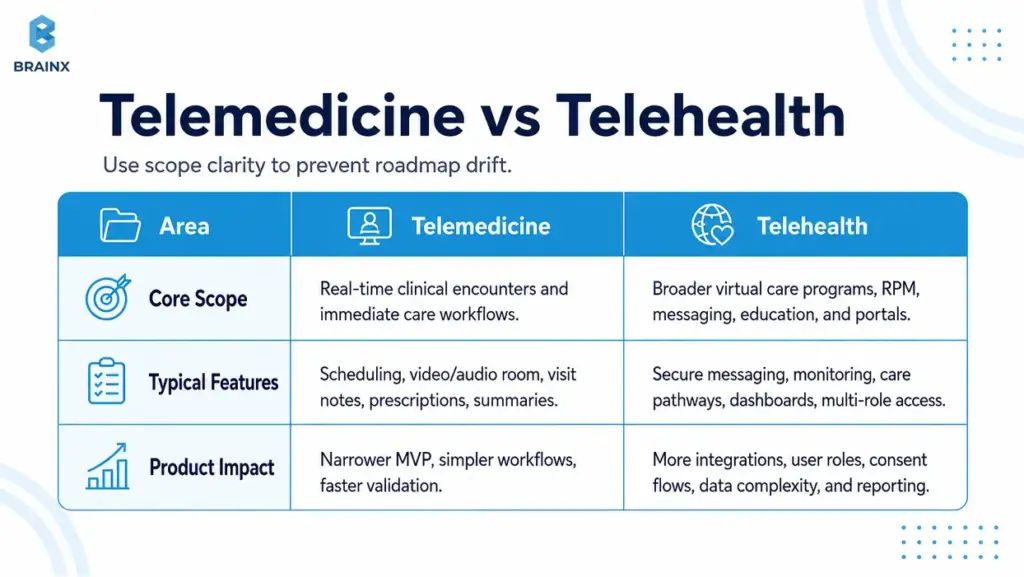
Telemedicine vs telehealth comparison chart showing scope, features, and product impact in virtual care app planning.

How Telehealth App Development Changes Product Scope

When you move from “telemedicine visits” to broader telehealth, you often add:

  • Asynchronous care (store-and-forward, secure messaging triage)
  • Remote patient monitoring programs (vitals, device ingestion, alerts)
  • Care pathways (education, tasks, follow-ups, longitudinal plans)
  • Multi-role portals (care teams, case managers, employer admins)
  • Advanced analytics and population-level reporting

Each of these adds requirements around consent, retention, reporting, escalation, and integration with EHR or care management systems.

Where Telemedicine Stops and Broader Telehealth Begins

A practical boundary many teams use:

  • Telemedicine: Clinical encounters in real time and instant supporting workflows (scheduling, video, notes, prescriptions workflow, post-visit summary).
  • Telehealth: All of the above, plus longitudinal programs, device-connected care, non-visit interactions and administrative/benefit experiences.

Your product can be either—just don’t treat them as the same thing in planning, budgeting, or compliance conversations.

Common Types of Telemedicine Apps (Pick Your “Care Model” First)

Your care model determines the workflow, monetization, compliance posture, and even UI layout. Before you finalize screens or architecture, pick the clinical and operational “shape” of your product. This is where Common Types of Telemedicine Apps becomes more than taxonomy—it becomes your roadmap.

Different models also imply different risk points. Urgent care needs tight queuing and fast identity intake. Teletherapy needs continuity, privacy cues, and a calmer interface. Specialty care may need photo capture, structured intake, and referrals.

If you support all models from the beginning, the MVP is not an MVP anymore. Select one, strengthen its core, then expand with a structured growth plan.

Common Types of Telemedicine Apps for Live Video Care

These are “visit-first” products, where success is measured by completed appointments:

  • On-demand urgent care (queue + triage + visit)
  • Scheduled primary care (calendar + reminders + continuity)
  • Specialty consults (structured intake + document exchange + visit)

Revenue commonly comes from per-visit payments, memberships, or provider contracts.

Asynchronous Care (Store-and-Forward, Secure Messaging)

Async models reduce clinician load and can improve access in low-bandwidth environments:

  • Symptom intake + clinician review later
  • Secure messaging with response SLAs
  • Image-based consults (e.g., dermatology)

Async often needs strong expectation-setting (“you’ll hear back within X hours”) and careful messaging around emergency scenarios.

Remote Patient Monitoring (RPM) Companion Apps

RPM companion apps support chronic care and post-discharge monitoring:

  • Device ingestion (BP cuffs, glucose meters, pulse oximeters)
  • Patient-reported outcomes (PROs)
  • Alerts and escalation workflows

RPM brings extra integration and data quality considerations—plus program design (thresholds, clinician review cadence).

Teletherapy/Behavioral Health

Teletherapy products tend to win on trust and continuity:

  • Recurring scheduling
  • Stable video, minimal friction
  • Privacy cues (headphones reminders, discreet notifications)
  • Progress tracking and care plans (optional)

Depending on jurisdiction and provider model, licensing checks and documentation workflows can be significant.

Specialty Telemedicine (Derm, Urgent Care, Women’s Health)

Specialty apps often need domain-specific modules:

  • Dermatology: photo capture guidance + structured questionnaires
  • Women’s health: labs, longitudinal tracking, sensitive privacy UX
  • Urgent care: triage rules, quick prescriptions workflow, follow-up instructions

Specialty scope is where templates, clinical content, and integrations can become differentiators.

Employer/Insurance Telehealth Portals

Portals are often “access + navigation” products:

  • Eligibility checks
  • Provider directories
  • Visit booking and benefits explanation
  • Reporting for employers/payers

These tend to require SSO, role-based access, and analytics earlier than consumer-first apps.

What Patients Actually Want From a Telemedicine App (Non-Negotiables)

Patients rarely judge your product by your tech stack. They judge it by whether they got help quickly, understood what happened, and felt safe sharing sensitive information. If you want retention, reduce no-shows, and build trust, you need to translate patient expectations into specific telemedicine app features and operational behaviors.

The “non-negotiables” below are also where many apps lose people: long verification flows, unclear pricing, unreliable calls, confusing post-visit steps, and accessibility issues. Fixing these early is cheaper than trying to patch churn later.

This is also where research-backed product decisions matter. HHS highlights faster appointments, time savings, and more provider choice as practical telehealth benefits. In product terms, that means patients are not just looking for access to a video room. They are looking for less waiting, fewer unclear steps, and a care journey that feels safe from booking to follow-up.

Use patient research when you can—survey data, usability tests, support ticket analysis, and drop-off metrics. Then bake those findings into requirements and acceptance criteria.
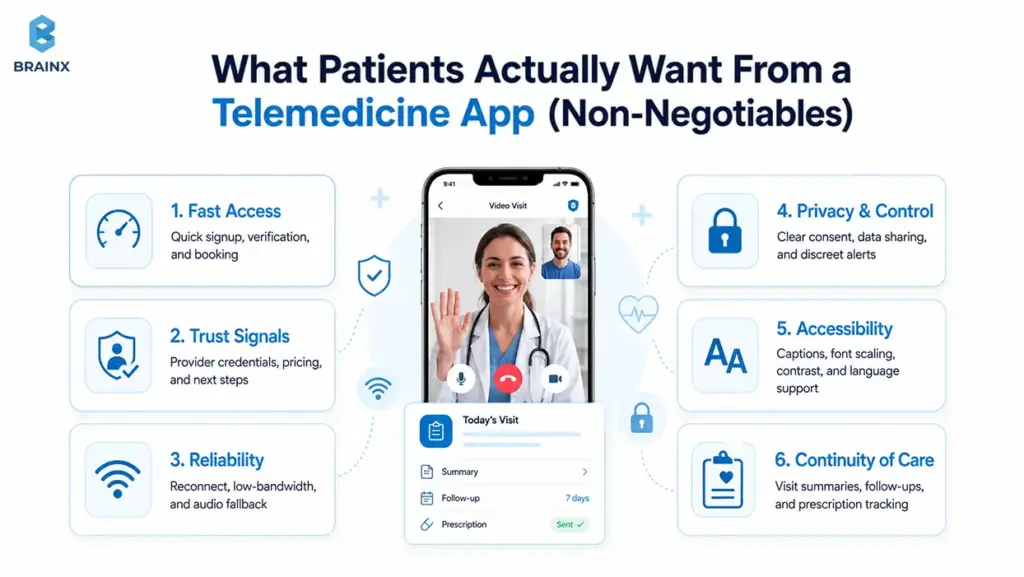
Infographic showing patient priorities in telemedicine app features, including access, trust, privacy, and follow-up care.

Fast Access: Signup, Verification, and First Appointment in Minutes

Patients want to complete the first meaningful action—booking or joining a visit—without a multi-day setup process.

Product requirements that support this:

  • Progressive onboarding (collect only what’s needed to book)
  • Smart defaults (auto time zone, remember preferred pharmacy if applicable)
  • “Continue later” for non-critical profile steps
  • Clear eligibility guidance (especially if insurance is involved)

A common pattern: allow booking after phone/email verification, then collect additional clinical intake before the visit.

Trust Signals: Provider Credentials, Transparent Pricing, Clear Next Steps

Trust is UX. Patients need to know who they’re seeing, what it costs, and what happens after.

Build trust with:

  • Provider profiles (credentials, languages, specialties, availability)
  • Clear pricing and refund policies (or benefit explanation)
  • Pre-visit expectations (duration, what to prepare)
  • Post-visit “what now” steps (meds, follow-ups, red flags)

If you have variable pricing or coverage, show ranges and clearly explain what’s estimated vs confirmed.

Reliability: Low-Bandwidth Mode, Reconnect, Audio Fallback

In real life, visits happen in cars, rural areas, and busy homes. Reliability needs explicit design.

Requirements that matter:

  • Connection quality indicator (simple, not technical)
  • Auto-reconnect with a visible timer
  • One-tap audio-only fallback
  • Resume without losing context (chat summary, visit notes draft)

If your app fails during a visit, the patient’s trust resets to zero—plan for graceful degradation.

Privacy and Control: Consent, Data Sharing Clarity, Discreet Notifications

Privacy isn’t just compliance; it’s perceived safety.

Patient-first privacy controls:

  • Clear consent screens (what data, why, who can see it)
  • Granular notification settings (SMS vs push, content redaction)
  • Discreet app icon/name options where appropriate (use cautiously)
  • Easy access to data export and deletion requests (within policy)

Make privacy settings discoverable—not buried.

Accessibility: WCAG Basics, Captions, Font Scaling, Language Support

Accessibility isn’t optional in healthcare. It’s also a growth and trust factor because patients may be older, stressed, using small screens, relying on assistive technology, or joining from low-quality devices.

Baseline requirements:

  • Dynamic type and font scaling
  • High-contrast support
  • Screen reader labels for key actions
  • Keyboard-accessible web flows where relevant
  • Captions for video when feasible
  • Multilingual UI and interpreter workflows if your market requires them
  • Simple language for consent, pricing, prescriptions, and next steps

WCAG 2.2 includes guidance for making content more accessible across disabilities and device types. It also expects text to resize up to 200% without loss of content or functionality, and includes live caption requirements at Level AA. In a telemedicine product, that translates into readable intake forms, clear visit instructions, scalable text, accessible controls, and support for patients who cannot rely only on audio or small visual cues.

Even small changes, like readable consent screens and larger tap targets, can reduce abandonment.

Continuity of Care: Follow-Ups, Prescriptions, Care Plans, Summaries

A visit is a moment; healthcare is a process. Patients want to leave with clarity.

Continuity features that drive satisfaction:

  • Visit summary (diagnosis, instructions, next steps)
  • Follow-up scheduling prompts
  • Prescription status tracking (where applicable)
  • Secure channel for clarifying questions (with clear response expectations)

This is also where clinician efficiency improves: fewer repeat questions and fewer avoidable follow-up calls.

Must-Have Telemedicine App Features (MVP vs v1 vs Enterprise)

Feature lists are easy. Prioritizing them is where most teams struggle. The goal here is to define telemedicine app features by tier so your team can ship a safe, usable product without dragging in every “nice-to-have” from day one.

This section also covers Features of a Telehealth App on the provider and admin sides—because telemedicine products fail when they only optimize the patient experience and ignore clinical workflows.

A good rule: every feature should map to a measurable outcome (activation, show-up rate, clinician throughput, reduced support tickets, compliance requirement).

Patient-Side Telemedicine App Features for MVPs (Account, Onboarding, Scheduling, Video Visit, Chat, Payments, Visit Summary)

An MVP should prove that patients can book, attend, and complete care with minimal friction.

MVP patient-side essentials:

  • Account creation + verification (email/phone; optional ID verification by risk profile)
  • Profile basics + medical intake (progressive, not all upfront)
  • Provider search or “next available” matching
  • Scheduling + calendar integration + reminders
  • Video visit join flow + pre-call device checks
  • Secure in-visit chat (for links, instructions, backup communication)
  • Payments (if direct-to-consumer) and receipts
  • Visit summary + next steps

MVP exclusions that often wait: complex care plans, advanced analytics dashboards, multi-language content libraries (unless required), and deep EHR integration (unless your model demands it).

Provider-Side Features of a Telehealth App (Availability, Patient List, Notes, Prescriptions Workflow, Messaging)

Provider workflows determine throughput. If clinicians hate it, adoption stalls.

Provider-side essentials:

  • Availability management + appointment list
  • Patient profile view (intake + prior visits within your system)
  • Documentation (structured notes + templates)
  • Orders/prescriptions workflow (or integrated eRx where required)
  • Secure messaging with patients (and internal notes if needed)
  • Post-visit actions: follow-up, referrals, summaries

Design tip: providers need speed and minimal clicks; patients need clarity and reassurance.

Admin Console Features (User Management, Roles, Audit Logs, Content/Templates)

Even early-stage products need basic admin control to support operations and compliance.

Admin essentials:

  • User management (patients, providers, support staff)
  • Roles and permissions (basic RBAC)
  • Audit logs (logins, record access, message access where applicable)
  • Content/templates (visit summary templates, intake forms)
  • Support tools (account recovery, appointment overrides with logging)

Admin capability often reduces “engineering as support” later.

Enterprise Features (SSO, Advanced Analytics, Multi-Location, SLAs, RBAC at Scale)

Enterprise adds governance and scale requirements:

  • SSO (SAML/OIDC) and SCIM provisioning
  • Advanced RBAC (location, department, care team)
  • Multi-location scheduling rules and routing
  • Analytics for operations (show-up rate, time-to-first-visit, clinician utilization)
  • SLA readiness: monitoring, incident response, uptime reporting
  • Multi-tenant architecture (if selling to multiple orgs)

Enterprise scope is less about flashy UI and more about auditability, resilience, and predictable operations.

HIPAA-Compliant Telemedicine App: What You Actually Need to Build

A HIPAA compliant telemedicine app is not “HIPAA certified” because a vendor says so in a pitch deck. It is a product with well-defined PHI data flows, security safeguards, policies, vendor agreements, and operational controls that match HIPAA Security Rule and Privacy Rule expectations.

HHS says the HIPAA Security Rule requires appropriate administrative, physical, and technical safeguards to protect electronic protected health information. In product terms, that means you need to know where PHI is created, stored, processed, transmitted, logged, backed up, and accessed.

Your job as a product team is to design the system so compliance is feasible and provable. You should be able to explain who can access PHI, why they can access it, how access is logged, which vendors touch PHI, what happens during an incident, and how data is retained or deleted.

This section is practical build guidance, not legal advice. Confirm your exact obligations with qualified legal and compliance professionals.

HIPAA Compliant Telemedicine App Data Flows: PHI Mapping + Where It’s Stored/Processed

Start with a PHI map. If you can’t diagram it, you can’t protect it.

Document:

  • What data is PHI (intake forms, visit notes, recordings if any, messages, prescriptions)
  • Where it’s created (mobile app, web app, provider console)
  • Where it travels (API, video provider, notifications, analytics)
  • Where it rests (databases, object storage, logs, backups)

Then define your “PHI boundary”—what systems are allowed to handle PHI and what systems are explicitly prohibited.

Encryption, Key Management, Secure Media (Video/Chat)

Encryption is table stakes, but details matter:

  • TLS in transit for APIs and web apps
  • Encryption at rest for databases and object storage
  • Key management via a managed KMS where possible
  • Secure handling of media streams and chat data

Decide early whether you will allow recordings; recordings increase risk and storage/compliance burden.

Access Control: RBAC, Least Privilege, Session Management

HHS guidance connects access control to the need to authorize ePHI access only when it is appropriate for a user’s role. For the product team, that means support staff, clinicians, admins, and patients should not see the same data by default.

Build this into the app through:

  • Role-based access control
  • Least-privilege permissions
  • MFA for providers and admins
  • Session expiry and device/session management
  • Logged support actions
  • “Break glass” access only if your operating model truly needs it

Access should feel invisible to users, but it should be visible and reviewable to your security and compliance teams.

Audit Trails + Monitoring (Who Accessed What, When)

Auditability is often the difference between “we think we’re compliant” and “we can demonstrate safeguards.”

HHS identifies audit controls as part of the technical safeguards for systems that use or contain ePHI. So audit trails should not be treated as a hidden backend detail. They should help your team answer practical questions: who accessed a record, when they accessed it, what changed, which role they used, and whether the action looked unusual.

Log:

  • Authentication events
  • PHI access events (read/write, by user, timestamp, IP/device where appropriate)
  • Admin actions (role changes, exports, deletions)
  • Security alerts and anomaly signals

Make logs tamper-resistant and set retention aligned with policy.

BAAs and Vendor Management (Video, SMS, Email, Analytics)

Your vendors can become your biggest compliance risk because many telemedicine products depend on third-party services for cloud hosting, video, SMS, email, analytics, support, file storage, or identity verification.

If a vendor creates, receives, maintains, or transmits ePHI on your behalf, HHS guidance makes BAAs and appropriate safeguards important. That does not mean every tool automatically needs a BAA, but it does mean your team must know exactly what data each vendor touches.

For any vendor that touches PHI, evaluate:

  • Will they sign a BAA where required?
  • What data do they process, and where?
  • Do they support encryption, access controls, and audit logs?
  • What are their incident notification terms?
  • Can you limit what data reaches that tool?

Be cautious with SMS and email content. Often the safer approach is notification only, with no PHI, and a prompt that brings users back into the app for details.

Retention, Deletion, Backups, Incident Response Readiness

Operational readiness is part of compliance:

  • Define retention periods for records, messages, and logs
  • Provide deletion workflows where appropriate (and document exceptions)
  • Backup strategy with encryption and access controls
  • Incident response plan: detection, containment, notification, recovery
  • Regular access reviews and security testing cadence

If you’re selling B2B, expect security questionnaires—prepare evidence early. Also review analytics and tracking tools carefully. HHS has warned that tracking technologies on regulated websites and mobile apps can create HIPAA issues when sensitive health information is disclosed to third parties. 

For telemedicine products, analytics should measure product performance without casually leaking appointment, condition, prescription, or provider details into external tools.

Video Consultation App Development: Architecture and Build Options

Video consultation app development is a product decision as much as a technical one. The best choice depends on your timeline, compliance needs, expected volume, support model, and where you want differentiation.

WebRTC is the foundation under many real-time communication products. MDN describes WebRTC as a technology that enables web apps and sites to capture and stream audio/video media and exchange data between browsers. In simple terms, it makes real-time voice, video, and data communication possible inside modern web experiences.

For most teams, the early question is not “Do we need video?” It is “How much of the real-time stack should we control?” Many teams should integrate a proven SDK early, then revisit custom infrastructure only when scale, cost, or control makes it worth the added engineering and DevOps complexity.

Video also affects support load. A slightly more expensive video provider can be cheaper overall if it reduces failed visits, refunds, reschedules, and support escalations.

Video Consultation App Development: Build vs Integrate (Twilio/Vonage/WebRTC SDKs)

Most teams choose between two paths:

  • SDK integration: Faster to ship, better operational maturity, known scaling patterns, and vendor compliance options depending on the provider and plan. This is usually the better MVP and v1 path.
  • Custom WebRTC stack: More control, more customization, and possibly better economics at very high scale, but it also brings higher engineering, security, monitoring, and DevOps complexity.

A practical approach for many products:

  1. Launch MVP with a trusted SDK.
  2. Validate workflows, completion rate, support load, and unit economics.
  3. Reassess build vs integrate once volume and requirements are clearer.

If your differentiation is clinical workflow, patient trust, or provider efficiency, do not sink the early roadmap into building your own video infrastructure too soon.

Handling Poor Connections (Adaptive Bitrate, Reconnect, Audio-Only)

Reliability features should be in scope, not “nice-to-haves”:

  • Adaptive bitrate and resolution changes
  • Auto-reconnect with session continuity
  • Seamless fallback to audio-only
  • Pre-call network test with user-friendly guidance
  • Provider-side indicators (so clinicians can adapt)

Also plan operationally: what happens if video fails—does the visit continue by audio, phone, or reschedule with a documented trail?

Security Considerations for Real-Time Communications

Key security requirements include:

  • End-to-end protections appropriate to your model (at minimum, encrypted transport)
  • Token-based session access (short-lived, scoped)
  • Waiting rooms or controlled join links
  • Controls for screen sharing (if enabled)
  • Safe handling of chat attachments (scanning, type restrictions)

Also decide whether any media is stored; storage expands compliance needs significantly.

Cross-Platform Considerations (iOS/Android/Web)

Cross-platform decisions affect time-to-market:

  • Native iOS/Android can offer best performance and device integration
  • Web can reduce friction for one-off visits and enterprise rollouts
  • Many products do a hybrid: mobile-first for patients, web-first for providers/admins

Make sure your device matrix is defined early (older Android devices and low-end networks can change implementation details).

Integrations That Make or Break Telehealth Products (EHR, FHIR, Payments, eRx)

Integrations are where timelines go to die unless you treat them as first-class scope. In broader telehealth app development, integrations often determine whether your product becomes a true workflow tool or just a standalone experience with manual workarounds.

FHIR is one of the most important standards to understand here. HealthIT.gov describes FHIR as a widely used API-focused standard for representing and exchanging health information, including clinical and administrative data. ONC has also reported that a majority of digital health companies integrating with EHRs use the FHIR standard.

That does not mean FHIR makes integration effortless. You still need to plan around stakeholder approvals, sandbox access, scopes, authorization, data mapping, terminology differences, rate limits, testing, rollout, and what happens when an integration fails.

This section focuses on the integrations most likely to affect architecture, cost, and user experience.

EHR Integration Basics (FHIR, HL7—What to Expect)

Most modern EHR integration conversations start with FHIR, but real delivery is still mixed. FHIR gives teams a cleaner API-focused resource model for common health data, but every implementation still has local constraints.

What to expect:

  • FHIR APIs for demographics, appointments, medications, allergies, conditions, and observations, depending on the EHR setup
  • HL7 v2 still appearing in event-driven workflows
  • SMART on FHIR or OAuth-style authorization patterns
  • Data mapping work across codes, local fields, and terminology systems
  • Sandbox limitations and approvals before production access
  • Retry, queue, and reconciliation logic for failed syncs

Also decide whether your app is the system of record or a workflow layer that syncs key data back to the EHR. That one decision changes the whole architecture.

ePrescribing and Pharmacy Workflows (Where Applicable)

eRx can be complex depending on geography and controlled substances rules.

Common approaches:

  • Integrate with an eRx network/vendor (often with certification steps)
  • Use EHR-native prescribing where your provider users already work inside an EHR
  • Start with “prescription request” workflow and expand later (if clinically acceptable)

Define what “done” means: sent to the pharmacy, confirmed, received, patient notified, and documented.

Insurance/Eligibility, Billing, Claims (If in Scope)

If you’re billing insurance, scope increases quickly:

  • Eligibility checks (real-time or batch)
  • CPT/ICD coding workflows
  • Claims submission, remittance, reconciliation
  • Patient balances and statements

If you’re not ready for full billing, many teams start with self-pay and add insurance once operations stabilize.

Notifications (Push/SMS/Email) + Consent Implications

Notifications drive show-up rates, but they can create privacy risks.

Best practices:

  • Keep notification content generic (no PHI)
  • Explicit consent for SMS/email
  • Quiet hours and preference controls
  • Delivery tracking and fallback logic

Also document which notification vendor touches what data, and whether a BAA is required.

Analytics That Won’t Violate Compliance Expectations

Analytics is important, but be deliberate:

  • Separate product analytics from PHI where possible
  • Avoid sending PHI to third-party analytics tools
  • Use self-hosted or HIPAA-ready analytics patterns if you must analyze PHI-adjacent events
  • Define event naming that doesn’t encode sensitive details

A safer baseline: measure funnel events (signup complete, appointment booked, visit started) without capturing medical specifics.

Telemedicine App Development Cost (2026 Ranges + What Drives the Budget)

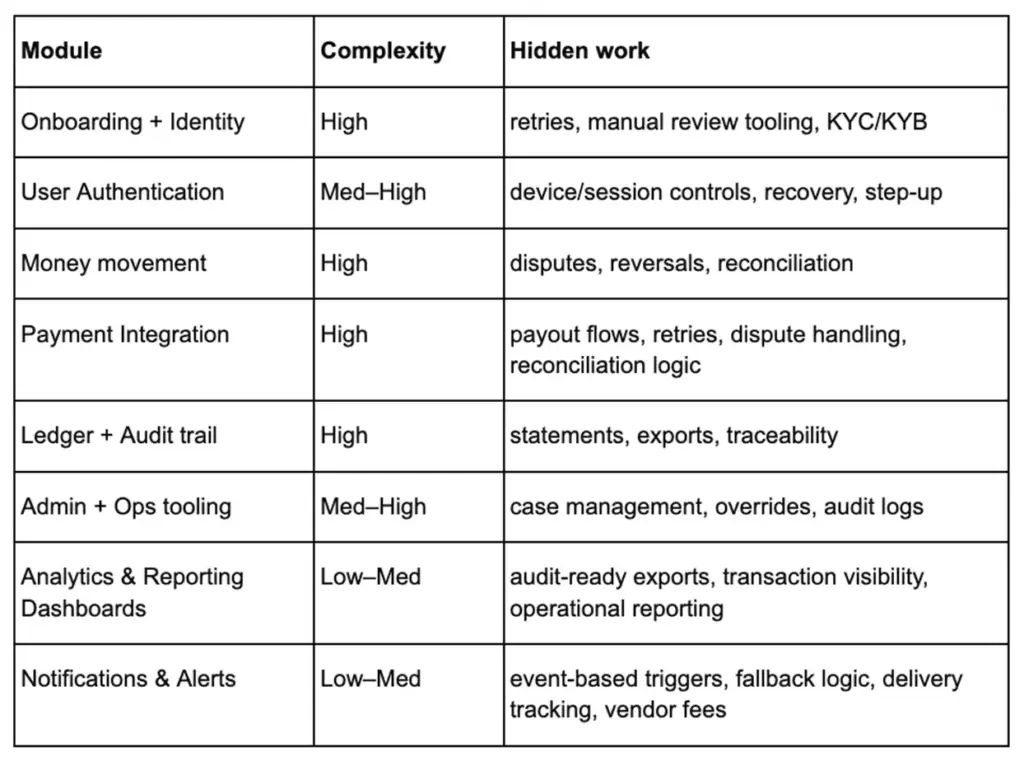
Budgeting becomes easier when you tie scope to modules and risk. Telemedicine app development cost is less about the number of screens and more about video reliability, integrations, compliance hardening, QA depth, and operational readiness.

The ranges below are planning estimates for custom builds in 2026, not universal benchmarks. Your actual price depends on whether you are building one narrow workflow or a multi-system product with enterprise controls.

If you want a tighter estimate, define your care model, must-have features, integration targets, compliance boundaries, and launch platform first.
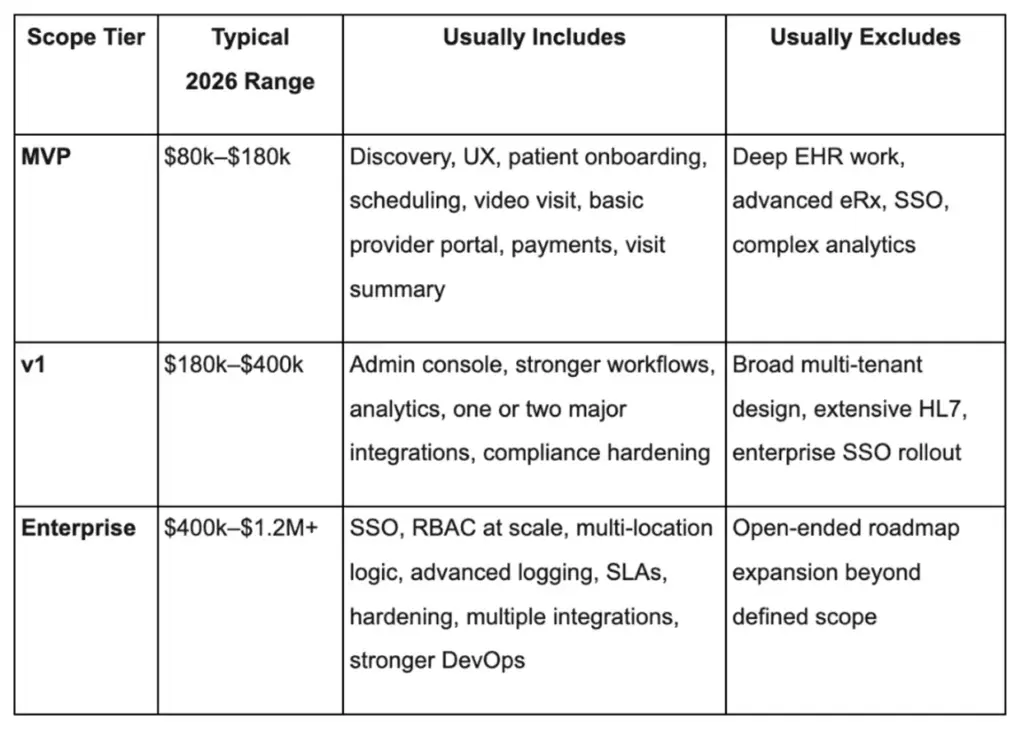
Telemedicine app development cost table showing 2026 MVP, v1, and enterprise budget ranges and included features.

Telemedicine App Development Cost Range for MVPs (What’s Included / Excluded)

MVP cost stays lower when you pick one care model, one patient journey, one provider workflow, and minimal integrations. The goal is not to build every feature. The goal is to prove that patients can book, attend, complete care, and understand what happens next.

What usually drives MVP variance:

  • One platform vs two (web + mobile)
  • Video SDK integration complexity
  • Identity verification needs
  • Basic admin and support tooling

Usually excluded: deep EHR integration, enterprise SSO, advanced analytics, multi-tenant controls, and heavy customization for multiple clinics.

v1 Cost Range (Integrations, Admin, Analytics)

v1 rises once the product needs operational tooling, analytics, care-plan logic, templates, stronger admin controls, and real interoperability work. At this stage, the “real-world” requirements are added to make the product operational:

  • EHR/FHIR integration (partial)
  • Stronger admin controls + audit log review tools
  • Analytics and reporting
  • Better provider workflows and templates
  • Expanded notification logic and consent management

The main multiplier is integration complexity and stakeholder coordination with provider orgs.

Enterprise Cost Range (SSO, Compliance Hardening, Multi-Tenant)

Enterprise budgets increase because reliability, documentation, access controls, uptime expectations, security reviews, environment management, and cross-system orchestration all become first-class deliverables.

  • SSO + SCIM, advanced RBAC
  • Formal security processes, threat modeling, pentest remediation
  • Multi-tenant architecture, SLAs, monitoring, incident response
  • Data retention tooling and export controls
  • Advanced analytics with compliance constraints

At this level, you’re paying for reliability engineering and compliance operations as much as feature work.

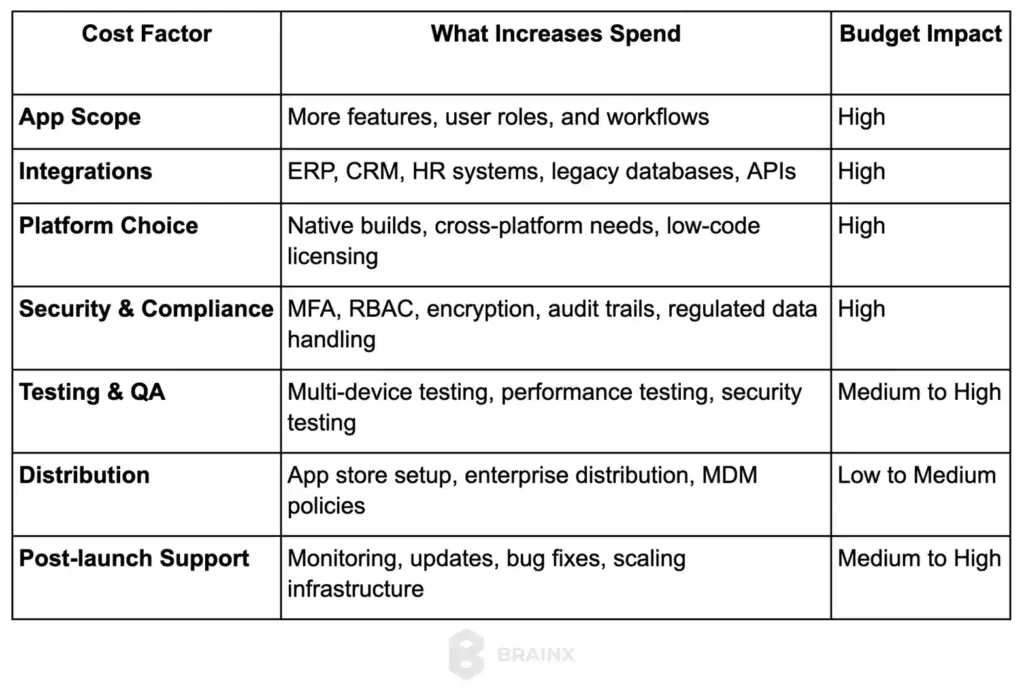
Major Cost Drivers (Video, Integrations, Compliance, QA, Hosting, Support)

The biggest cost drivers are usually:

  • Video + real-time reliability (especially if not using a managed SDK)
  • EHR/FHIR integrations (mapping, auth, testing, stakeholder approvals)
  • Compliance hardening (audit trails, access controls, policies, vendor BAAs)
  • QA depth (device matrix, network simulation, load testing)
  • Operational tooling (support workflows, monitoring dashboards)

When budgeting, include time for “integration unknowns”—they are rarely linear.

Ongoing Costs (Cloud, Support, Monitoring, Security, Vendor Licenses)

Do not ignore these recurring costs that typically include:

  • Cloud hosting (compute, storage, bandwidth)
  • Video vendor fees (often usage-based)
  • SMS/email delivery costs
  • Monitoring/logging platforms
  • Security tools and periodic testing
  • Support and on-call coverage

Many teams under-budget operating cost even when their initial build estimate looks reasonable. Plan for ongoing improvement work too. Healthcare products are never “done,” especially as regulations, devices, and clinical workflows evolve.
Telemedicine App Development Best Practices (From Discovery to Launch)

Execution quality is your moat. Telemedicine app development best practices are about de-risking the build: validating workflows early, catching compliance gaps before they’re expensive, and launching with operational readiness.

If you treat this as a standard mobile app, you’ll pay for it later in failed visits, provider complaints, and security rework. If you treat it as a healthcare workflow product from day one, you’ll ship fewer features—but the right ones.

Below is a practical plan from discovery through post-launch iteration.

Telemedicine App Development Best Practices for Discovery: Clinical Workflow Mapping + Patient Journey

Discovery should produce artifacts engineering can build from:

  • Care model definition (who does what, when)
  • Patient journey map (from intent → booking → visit → follow-up)
  • Provider workflow map (intake → visit → documentation → next steps)
  • Risk register (compliance, integration unknowns, operational constraints)

Include frontline clinicians and support staff early. Their “small” constraints (like how they document) often shape your entire UX.

Prototype & Usability Testing (Patient + Provider)

Before building full systems, validate the hardest UX flows:

  • Signup and first booking
  • Joining a visit and recovering from bad connectivity
  • Provider documentation and post-visit actions
  • Consent and privacy settings comprehension

Run usability tests with representative patients (including accessibility needs) and providers with real time pressure. You’ll get more value from 8–12 quality sessions than 100 internal opinions.

Security/Compliance Baked Into Sprint Rituals

Compliance is a workflow, not a phase.

Operational practices that work:

  • Define PHI boundaries and enforce them in code reviews
  • Threat modeling for major features (video, messaging, file uploads)
  • Security acceptance criteria in stories (logging, RBAC checks)
  • Vendor reviews and BAA checks before integration goes live

This reduces “surprise rework” right before launch.

QA Strategy (Device Matrix, Network Simulation, Load Testing)

Telemedicine QA needs more than happy-path testing.

Include:

  • Device coverage (older Android, smaller screens, tablets if providers use them)
  • Network simulation (3G, spotty Wi‑Fi, packet loss)
  • Load testing for scheduling and session creation
  • Regression suites for critical flows (booking, join visit, payments)

Also test operational scenarios: rescheduling, refunds, appointment disputes, and support escalations.

Launch Checklist (App Store Privacy, Policies, Support Ops)

Launch is part product, part operations.

Checklist items:

  • App store privacy disclosures aligned with actual data use
  • Clear user policies (cancellation, refunds, emergencies)
  • Support playbooks (failed visits, billing issues, account recovery)
  • Monitoring dashboards and alerting thresholds
  • Incident response readiness and escalation contacts

A smooth launch reduces churn more than adding another minor feature.

Post-Launch Iteration (Metrics: Activation, Show-Up Rate, Repeat Visits)

Measure what matters:

  • Activation: signup → booked appointment
  • Show-up rate: booked → completed visit
  • Time-to-first-visit
  • Visit failure rate (and root causes)
  • Repeat visits / retention
  • Support tickets per 100 visits

Then iterate with a bias toward reliability, clarity, and continuity—not just adding modules.

Key Benefits of Telehealth App Development

The business case is important, particularly for the stakeholders who are providing funding for the build. The Key Benefits of Telehealth App Development typically tend to be access expansion, operational efficiency and continuity.

Importantly, benefits differ by buyer. Startups want distribution and repeatable care delivery. Providers want capacity and reduced administrative load. Member experience and cost containment are priorities for enterprises and payers.

As you develop your ROI model, make sure to connect each benefit to a measurable metric (e.g., show-up rate, utilization, time-to-care, support costs, clinician throughput).

Key Benefits of Telehealth App Development for Startups: Faster Distribution, New Care Models, Revenue Streams

Startups commonly benefit from:

  • Faster market entry via an MVP-first approach
  • New care models (subscriptions, bundles, async-first triage)
  • Geographic expansion where regulations allow
  • Better unit economics through async workflows and smart routing

The “win” is repeatable operations: consistent outcomes with predictable clinician time.

For Providers: Capacity, Follow-Ups, Chronic Care Efficiency

Provider org benefits often show up as:

  • More completed visits per clinician day (when workflows are tight)
  • Better follow-up adherence through reminders and summaries
  • Reduced administrative burden with templates and structured intake
  • Chronic care efficiency via RPM and async check-ins (when appropriate)

Telehealth works best when it reduces friction, not when it adds another disconnected tool.

For Enterprises/Payers: Cost Containment, Member Experience, Data Visibility

Enterprises and payers often prioritize:

  • Lower avoidable utilization (when telehealth diverts non-emergent cases appropriately)
  • Improved member experience and access
  • Better visibility into engagement and outcomes (within compliance boundaries)
  • Standardized care pathways across locations or populations

These buyers will also look closely at and scrutinize a vendor’s security position and governance.

Choosing a Telemedicine App Development Company (Evaluation Checklist)

Do not evaluate a telemedicine partner like a general mobile app studio. A telemedicine app development company must demonstrate regulated product delivery, integration maturity, and the ability to design for patient trust and clinical workflow realities.

The aim is to minimize delivery risks such as non-compliance, integration delays, unreliable video, and poor handover. The right partner will guide you through the scoping phase realistically and will challenge you when your backlog poses a direct threat to patient safety or viability of the launch.

Here’s a practical checklist that you can use when interviewing vendors and scoring them.
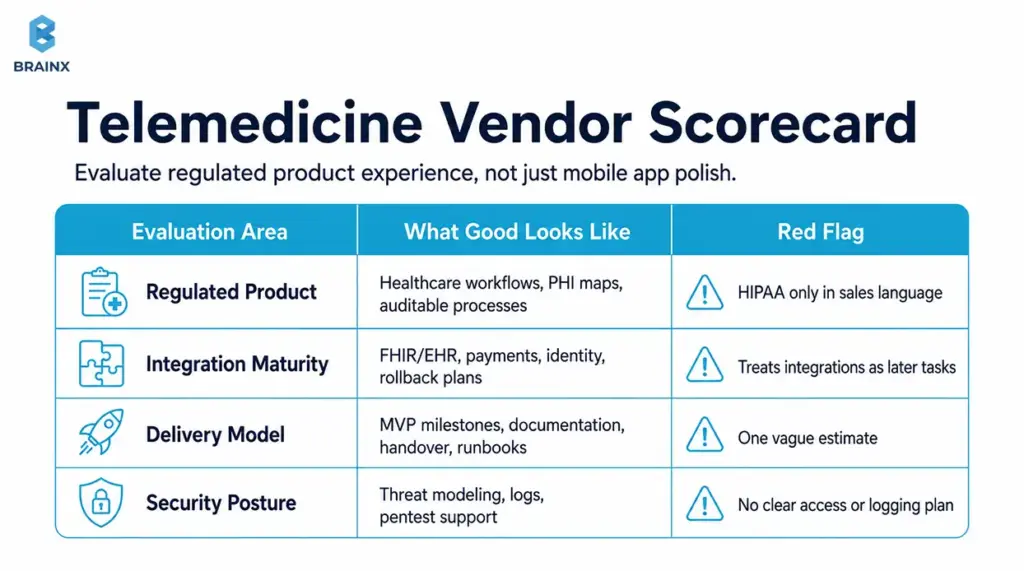
Telemedicine vendor scorecard comparing regulated experience, integration maturity, delivery, and security.

How to Evaluate a Telemedicine App Development Company for Regulated Product Experience

Look for evidence of:

  • Healthcare workflow products shipped (not just “health apps”)
  • Security-by-design practices (threat modeling, secure SDLC)
  • Experience with HIPAA-adjacent architecture patterns and auditability
  • Clear documentation and QA discipline
  • Ability to collaborate with compliance, legal, and IT stakeholders

Ask for concrete artifacts: sample audit log approach, sample PHI map, sample release checklist.

Integration Experience (FHIR/EHR, Payments, Identity)

Integration maturity is a major differentiator.

Assess:

  • Past FHIR/HL7 projects and how they handled data mapping
  • Approach to sandboxing, testing, and rollback
  • Payments experience (if DTC) with secure tokenization patterns
  • Identity verification and fraud prevention (if relevant)

A strong team will talk about “unknowns” early instead of promising a fixed timeline without discovery.

Delivery Model (MVP-First, Milestones, Documentation, Handover)

Operational clarity matters as much as code quality.

Evaluate:

  • MVP-first planning with measurable outcomes
  • Milestone-based delivery with demos and acceptance criteria
  • Documentation quality (architecture, runbooks, API docs)
  • Post-launch support options and knowledge transfer

You should know exactly what you’ll own at the end: repos, infra access, CI/CD pipelines, and runbooks.

Security Posture (Threat Modeling, Pentest Support, Logging)

Security posture isn’t a slide—it’s a process.

Confirm:

  • Secure coding standards and review process
  • Logging/audit strategy baked into requirements
  • Support for third-party pentests and remediation
  • Secrets management, access reviews, and environment controls
  • Incident response readiness (who does what)

It is a red flag if a vendor cannot explain how they deal with logs and PHI boundaries.

Questions to Ask on the First Call (Scope, Risks, Timeline)

Use these to surface maturity quickly:

  1. “What are the top three risks you see in our scope, and how would you de-risk them in the first 2–3 weeks?”
  2. “Which vendors typically require BAAs, and how do you validate that?”
  3. “How do you test video reliability under weak networks?”
  4. “What’s your approach to PHI mapping and audit logs?”
  5. “What does your MVP exclude, and what metrics define success?”

Good partners are comfortable saying “not yet” to features that don’t serve the MVP goal.

How BrainX Helps With Telemedicine App Development

BrainX Technologies is here to help build patient-first, security-conscious, and ready-to-go telemedicine solutions. We tend to start early when scope is still not set in stone and help choose the correct care model, define MVP boundaries and finalize the technical approach before costs start to stack up.

When teams come to BrainX after a first failed build, the issues are usually the same like unclear workflows, under-designed provider tooling, and compliance bolted on late. Our process is designed to prevent those problems.

Discovery & Product Strategy (Patient + Provider Workflow Mapping)

We run structured discovery to produce build-ready outputs:

  • Care model definition and workflow mapping
  • Patient journey friction analysis (activation → visit → follow-up)
  • MVP scope and phased roadmap (what to prove first)
  • Risk register for integrations, compliance, and reliability

This keeps stakeholders aligned and reduces rework.

UI/UX for Clinical-Grade Experiences

Our UX work focuses on the moments that drive outcomes:

  • Fast booking and low-friction onboarding
  • Clear consent and privacy controls
  • Reliability cues and failure recovery (reconnect, audio fallback)
  • Provider workflows optimized for speed and accuracy

We also support usability testing so decisions are grounded in patient/provider feedback.

HIPAA-Minded Architecture + Secure Development

We design with compliance realities in mind:

  • PHI mapping and data boundary definition
  • Secure auth patterns, RBAC, and audit logging
  • Vendor evaluation for BAAs and compliant data handling
  • Security testing support and remediation planning

The goal is a system you can explain and defend—not just one that “seems secure.”

MVP to Enterprise Scaling (DevOps, Monitoring, Reliability)

Reliability and operational readiness become the product as you keep scaling.

We help with:

  • CI/CD pipelines, environment strategy, and observability
  • Performance and load planning (especially for scheduling and session initiation)
  • Incident response readiness and runbooks
  • Scaling patterns for multi-location and enterprise governance

Engagement Models (Team Augmentation vs End-to-End)

Depending on your team and timeline, BrainX can support:

  • End-to-end delivery (strategy → design → engineering → QA → launch)
  • Team augmentation (specialists embedded into your squad)
  • Hybrid models for faster MVP delivery with internal ownership

If you share your care model and target launch window, we can propose a phased plan with deliverables: MVP scope, timeline, and a budget range.

Conclusion: A Practical Next Step (Pick Your Type, Define MVP, Validate With Patients)

A telemedicine product succeeds when it is scoped to a specific care model, designed around real patient friction, and built with reliability and auditability from the start. Use this Telemedicine App Development Guide to choose your app type, define an MVP that proves value quickly, and validate workflows with patients and providers before scaling features and integrations.

If you want a second set of eyes on scope, compliance boundaries, or cost drivers, BrainX Technologies can help you turn your requirements into a phased delivery plan with clear milestones.

FAQs About Telemedicine App Development

What Is Included in a Telemedicine App Development Guide for Startups?

A strong guide includes care model selection, MVP feature tiers, compliance requirements, and cost drivers tied to real architecture decisions. It should also cover video build options, integration expectations (like FHIR/EHR), and a launch checklist that includes operational readiness. 

The best guides translate “patient experience” into specific requirements like onboarding time, reconnect behavior, and post-visit continuity. This is exactly what a Telemedicine App Development Guide should help you finalize before you commit a budget.

What Are the Must-Have Telemedicine App Features for an MVP?

Most MVPs need patient onboarding, scheduling, a reliable join flow for video visits, secure messaging, and a post-visit summary. If you’re direct-to-consumer, payments and receipts are usually required in v0–MVP. 

You’ll also want minimal admin tools for user management and support workflows, plus basic audit logging if PHI is involved. The goal is to prove that patients can book and complete care with low friction and that providers can document outcomes efficiently.

How Do You Build a HIPAA Compliant Telemedicine App (and What Should Be Outsourced vs In-House)?

Start by mapping PHI data flows, then design access control, encryption, audit logs, retention policies, vendor governance, and incident response around that map. Most teams outsource commodity components like video infrastructure, SMS/email delivery, cloud services, and identity verification, but only to vendors that meet security needs and sign BAAs where required.

Core logic that reflects your clinical workflow and product differentiation is usually best kept in-house or built with a dedicated product partner under your ownership. Confirm requirements with qualified legal and compliance advisors before launch.

What Is the Typical Telemedicine App Development Cost for MVP vs Enterprise?

Typical telemedicine app development cost planning in 2026 often lands around $80k–$180k for an MVP, $180k–$400k for a more complete v1, and $400k–$1.2M+ for enterprise-grade scope.

The difference is usually less about the number of screens and more about integrations, reliability expectations, security hardening, QA depth, documentation, and support requirements.

What’s the Best Approach for Video Consultation App Development: Build WebRTC or Use an SDK?

For most teams, video consultation app development moves faster with a trusted SDK because it reduces operational complexity and accelerates reliability.

Building deeper on WebRTC makes more sense when you need unusual customization, tighter media control, or long-term platform economics at scale. A practical strategy is to integrate an SDK for MVP or v1, learn from real usage, then revisit build-vs-buy once demand and constraints are clearer.

How Do I Choose a Reliable Telemedicine App Development Company?

Choose a partner with evidence of healthcare workflow delivery, not just general app experience. Look for strong discovery practices, integration maturity (FHIR/EHR), and a security posture that includes threat modeling, audit logging, and support for third-party pentests. 

Ask how they test weak networks for video visits and how they document PHI boundaries and vendor BAA requirements. Finally, evaluate handover quality—repos, infrastructure access, CI/CD, and runbooks—so you’re not locked in.

TL;DR / Key Takeaways

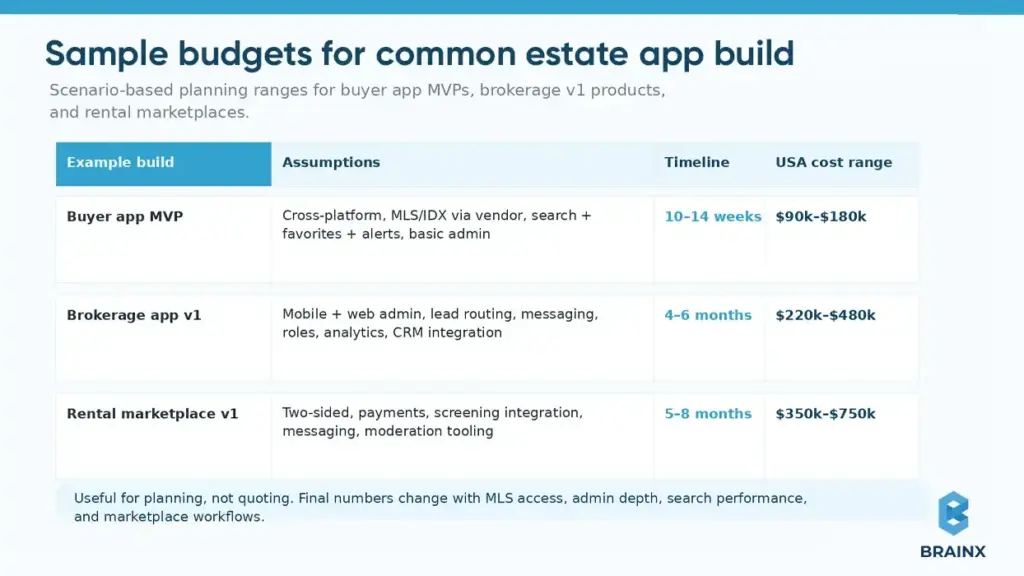
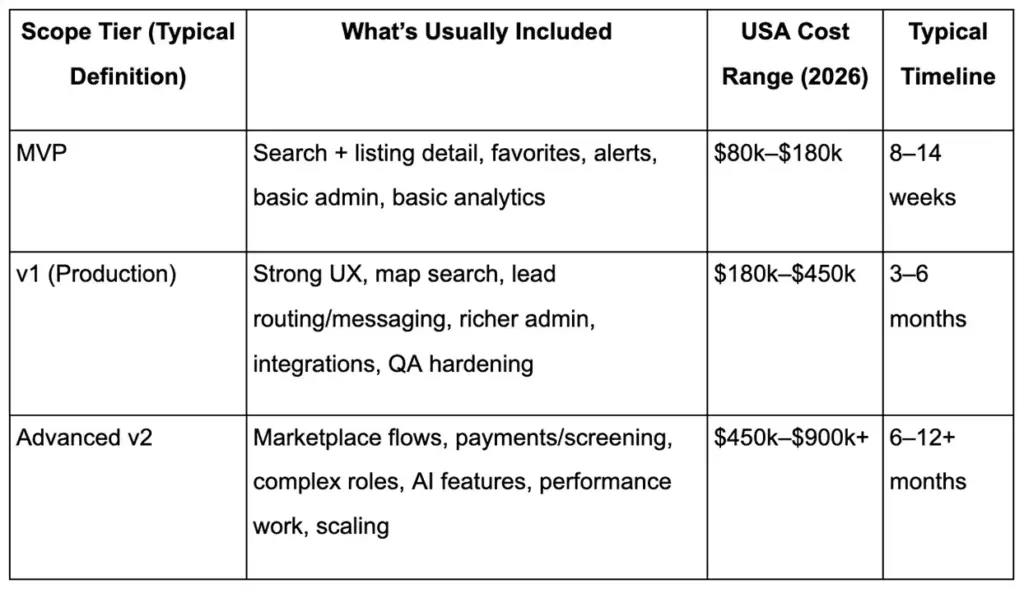
  • Real estate app development cost for production-grade products, in the USA (2026), typically falls into these ranges: MVP: $80k–$180k, v1: $180k–$450k, Advanced v2: $450k–$900k+ (highly dependent on MLS/IDX scope, admin tooling, and media/UX depth).
  • Typically, your largest cost drivers are MLS/IDX approvals + rules, search + map experience, admin/back-office workflows, messaging/lead routing, and QA across devices.
  • Many teams can save on initial build cost with cross-platform, but integrations, performance requirements (maps/media), and roadmap (AI customization, offline, deep device functionality) can change the best option.
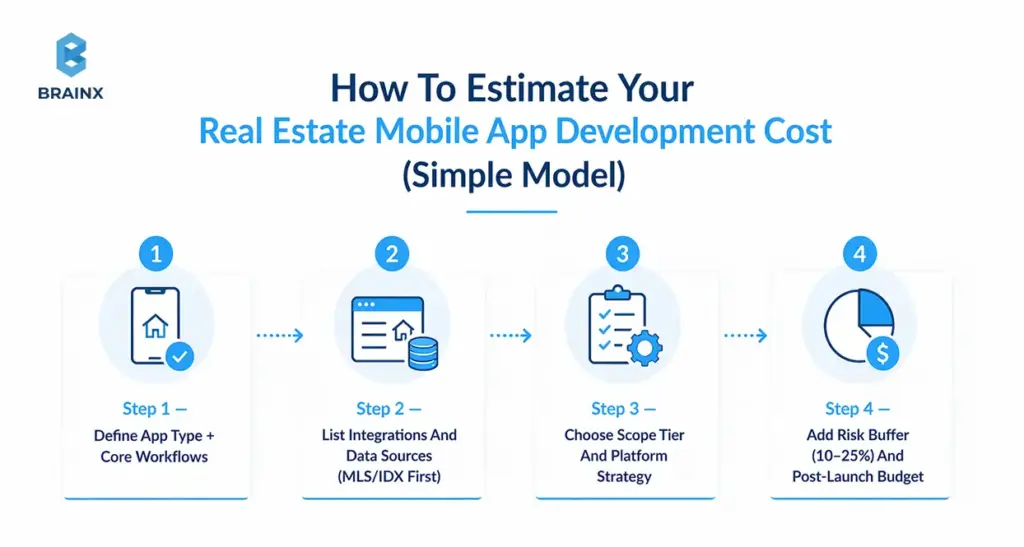
  • Use a simple estimator: (scope tier) + (platform strategy) + (integrations) + (risk buffer 10–25%) + (post-launch ops).
  • Planning to expand after launch: hosting, storage/CDN, third-party APIs, monitoring, security and maintenance can increase build cost by 15-35% per year, particularly for marketplace and integration intensive applications.
  • To achieve quicker, less expensive iteration, combine a focused MVP with a discovery phase that validates workflows and access to data.

Budgeting a real estate app in the US isn’t hard because of “coding”—it’s hard because scope, data access (MLS/IDX), and go-to-market timelines quietly change the numbers. This guide breaks down real estate app development cost for 2026 with clear ranges, assumptions, and a repeatable way to estimate your build before you request proposals.

That challenge matters in a market where property search is already deeply digital. NAR reports  that 43% of buyers said their first step was looking for properties online. While Zillow found that in 2025, 81% of recent renters searched on a mobile website and 73% searched on a mobile app.

Whether you’re planning an MVP, upgrading an internal brokerage tool, or launching a two-sided rental marketplace, this guide will help you understand realistic pricing bands, the cost drivers that actually matter, and the questions to answer before you walk into vendor conversations.

Also Read: Fintech App Development Cost Guide With Detailed Breakdown

Real Estate App Development Cost In 2026: Quick USA Ranges

Most teams asking about cost want a fast baseline they can take to finance, leadership, or investors. The ranges below are designed to be scannable and defendable, based on typical US delivery models in 2026.

Assumptions used for the ranges (so you can compare apples-to-apples):

  • Team mix: product + UX/UI + mobile + backend + QA + DevOps (part-time roles included where typical)
  • US market pricing: blended delivery rates often span $60–$180/hr depending on team location mix, seniority, and engagement model [CITE: 2026 US software dev hourly rate benchmarks from multiple sources (e.g., Clutch, Accelerance, Gartner/IDC)]
  • Platforms: iOS + Android, either via cross-platform or two native apps
  • Backend: API + database + admin panel (even minimal builds need admin)
  • Compliance & security: baseline secure auth, logging, and privacy controls (no “prototype-only” shortcuts)

Cost Range Table (MVP vs v1 vs Advanced v2)

Cost comparison table showing real estate app development cost ranges for MVP, v1, and advanced v2 builds.

These numbers are a useful starting point, but your real estate app development cost changes most when data access and workflows get real—especially if you need MLS/IDX plus brokerage-grade admin processes.

Also Read:  AI App Development Cost Guide: How Much Does AI App Development Cost?

Cost By Scope Tier (MVP vs v1 vs v2)

MVP: Designed to validate demand and acquisition channels, not to cover every edge case.
Typical MVP scope includes:

  • Listing discovery (feed/search), listing detail
  • Favorites and saved searches
  • Basic push/email alerts
  • Minimal admin controls (approve content, manage users, basic CMS)

v1: Where most real estate products become commercially viable.
Common additions:

  • Map-first search with polygon/draw tools
  • Lead capture forms + routing rules
  • Messaging, scheduling, and richer analytics
  • More robust admin tooling, moderation, and QA coverage

v2: Where complexity compounds.
Typical v2 adds:

  • Two-sided marketplace capabilities (landlords/tenants, agents/buyers)
  • Payments, screening, identity checks
  • AI personalization and content automation
  • Scaling work (caching, search infra, observability, SRE practices)

A practical way to think about it: scope tiers don’t just add screens—they add systems (approval flows, routing logic, audit trails, permissioning), and those systems are what move budgets.

Cost By Platform (iOS, Android, Cross-Platform)

Platform decisions change the budget in two ways: initial build and long-term iteration.

  • iOS-only (rare for broad consumer real estate): lower initial cost, faster launch, but limits demand capture.
  • Android-only: similar economics, different device fragmentation and QA patterns.
  • Cross-platform (Flutter/React Native): one shared codebase for many features; can reduce time-to-market for MVP/v1.
  • Two native apps: higher upfront cost, but can win on performance for heavy map/media and deep OS integrations.

For many 2026 launches, cross-platform is viable—until you combine complex map interactions + high media volume + multiple integrations, where native performance tuning may become a priority.

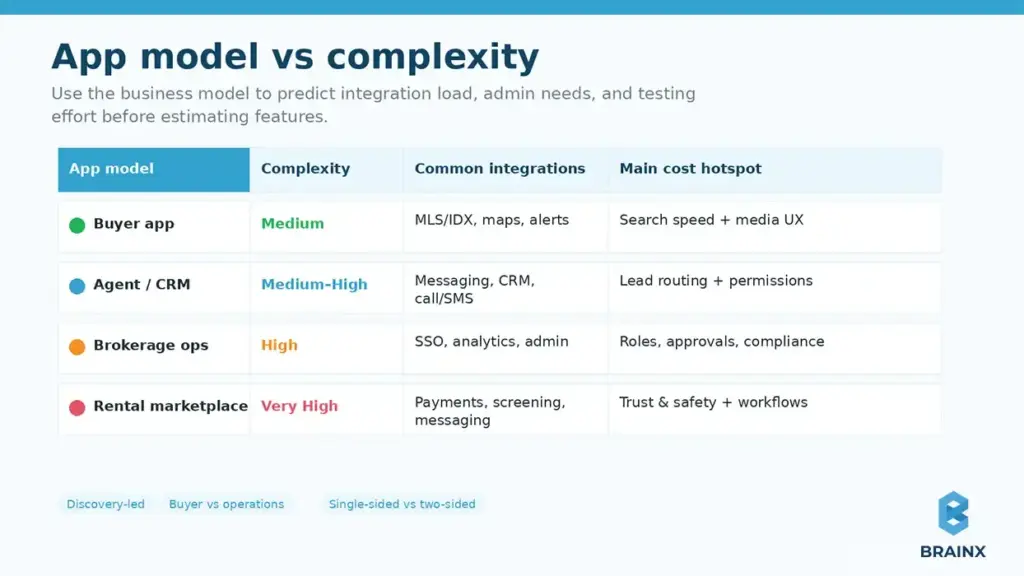
Cost By App Type (Agent App, Brokerage App, Buyer App, Rental Marketplace)

Your “app type” determines not only features, but also who needs admin power and what risks exist.

  • Agent/CRM companion: heavier on lead routing, tasks, messaging, and permissions.
  • Buyer/seller search experience: heavy on discovery UX, maps, performance, and retention features.
  • Brokerage operations app: heavy on roles, approvals, compliance, analytics, and integration breadth.
  • Rental marketplace: adds payments, screening, disputes, and two-sided trust/safety features.

The same feature list can cost very differently depending on the model, because the workflow complexity behind it is not the same.

What Type Of Real Estate App Are You Building? (Cost Changes By Model)

Before you estimate anything, align on the business model and primary workflow. Two apps can both be “real estate apps,” yet one is a lead-gen product and the other is an operations platform with compliance constraints.

One easy way of self-identification is to ask:

  • Is the app primarily discovery (search homes) or operations (manage leads, listings, agents)?
  • Is it single-sided (one user type) or two-sided (marketplace)?
  • Does it rely on MLS/IDX or proprietary inventory?
  • Do you need payments, screening, or other regulated flows?

Once that’s clear, it’s easier to predict the integration load, admin requirements, and the testing scope that moves pricing.

Comparison chart showing real estate app models by complexity, integrations, and cost factors.

Agent/Broker CRM Companion Apps

These apps support agents in day-to-day selling, so they tend to be workflow-heavy and integration-heavy.

Common characteristics:

  • Lead capture + routing rules
  • Follow-up tasks, reminders, pipeline stages
  • Messaging and call/SMS tracking
  • Admin controls for teams and brokerages

Cost tends to rise due to permissioning, analytics, and reliable communication tooling. The UX also matters: if agents don’t adopt it, the app fails regardless of feature count.

Buyer & Seller Apps (Search + Saved Homes + Tours)

These are typically consumer-facing and UX-dependent.

Expect workload around:

  • Fast search + filters (including “sticky” preferences)
  • High-quality listing detail pages (photos, tours, neighborhood info)
  • Saved searches and alerts
  • Tour scheduling and inquiry flows

Budgets are driven by performance (maps + media), QA across many devices, and retention features that reduce churn.

Rental Marketplaces (Two-Sided, Payments, Screening)

Rental marketplaces behave more like fintech-enabled marketplaces than “listing apps.”

Typical adds:

  • Applications, document upload, and verification
  • Application fees or rent payments
  • Background/credit checks and screening workflows
  • Trust & safety: reporting, moderation, dispute handling

Cost increases because you’re building more back-office workflows and taking on more security/compliance requirements.

New Construction / Developer Showcase Apps

Such apps often look simpler but can become content and media-heavy quickly.

Common needs:

  • Unit availability, floor plans, interactive galleries
  • Appointment booking and lead capture
  • Content management and brand-grade UI polish
  • Integration with CRM/marketing automation

The surprise driver here is usually the CMS/back office and the media pipeline (video, 3D/AR, virtual tours).

Factors Affecting the Cost of Real Estate Application Development

Even within the same budget range, two real estate apps can end up costing very differently. That is because pricing is shaped by more than screen count. The real estate app development cost usually rises or falls based on how complex the workflows are, how many systems need to connect, and how polished the final product needs to feel.

This is also why early estimates often shift once teams move from idea to implementation. A simple search app, an agent workflow tool, and a rental marketplace may all look similar at a high level, but their technical depth, admin requirements, and long-term operating needs are not the same.

1. Complexity And Feature Set

Feature depth is one of the biggest cost drivers in any real estate product. A basic MVP with listing discovery, saved properties, alerts, and inquiry forms will cost far less than an app that includes polygon search, tour scheduling, lead routing, payments, screening, or AI-powered recommendations.

Complexity also increases when features are connected to business rules. For example, “messaging” may sound simple, but once you add role-based access, conversation history, response tracking, and escalation logic, it becomes a much larger system. In real estate apps, cost grows when features stop being standalone screens and start becoming connected workflows.

2. Platform Choice

Your platform strategy affects both upfront budget and long-term maintenance. A single-platform launch can reduce initial cost, but it may limit reach. A cross-platform build can speed up development for iOS and Android, especially for MVP and v1 launches, because more code is shared across devices.

At the same time, some real estate products need stronger performance optimization. If the app depends heavily on map interactions, media-rich listing pages, background processes, or device-specific behavior, native development may become the better fit. In other words, real estate mobile app development cost is not only about how many platforms you support, but about what level of performance you need on each one.

3. UI/UX Design Requirements

Real estate apps are highly visual and decision-heavy. Users compare listings, revisit properties, scan photos, check maps, and move between search, saved homes, and inquiry flows. That means design work has to support both clarity and trust.

Costs increase when the product requires custom search experiences, polished listing layouts, advanced filters, map-list synchronization, interactive galleries, or stronger accessibility support. Good UI/UX is not just about appearance here. It reduces friction, improves lead conversion, and makes the app easier to use across buyers, renters, agents, and admins.

4. Backend Infrastructure And Integration Needs

Behind every smooth front-end experience is a backend that handles listings, users, permissions, alerts, media, admin actions, and data syncing. Even a relatively focused real estate app needs APIs, a database, admin controls, and secure user management.

The cost rises when backend logic becomes more operational. That includes syncing external property feeds, handling saved searches and notifications at scale, managing listing status changes, supporting moderation, or preparing for marketplace workflows. A stronger backend may cost more upfront, but it often prevents expensive rework later when the app grows.

5. Development Team Location And Experience

Who builds the app also changes the budget. Rates vary widely by region, but cost should not be judged on hourly price alone. A more experienced team may look expensive at first, yet still reduce total spend by improving estimation, avoiding rework, and handling architecture decisions better from the start.

This matters even more in real estate, where data sources, compliance concerns, and admin workflows can create hidden complexity. A team with relevant product experience is often better at spotting risk early, defining a focused MVP, and planning the right trade-offs between speed, quality, and scalability.

6. Third-Party Integrations

Third-party services can speed up development, but they also add build effort, testing, and recurring costs. Real estate apps commonly depend on mapping tools, messaging platforms, analytics systems, payment providers, identity tools, and MLS/IDX-related services.

Each integration adds its own requirements. Some need custom data mapping. Some have approval processes. Others add usage-based pricing after launch. This is why integrations can quietly become one of the biggest budget variables. The more external systems your product relies on, the more important it becomes to validate them early and include both implementation and ongoing operating cost in the estimate.

Essential Features For A Real Estate App (A Cost Breakdown)

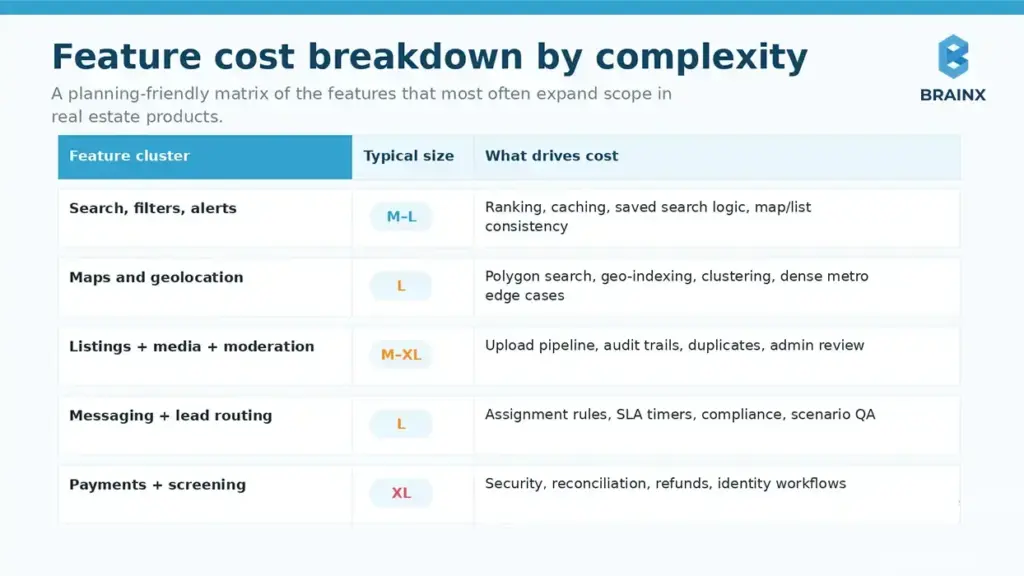
If you want an estimate you can defend internally, break the build into features and assign complexity bands (not just “screen count”). This section ties real functionality to cost logic, using practical ranges teams use for planning.

In most proposals, real estate mobile app development cost expands when features require (1) non-trivial backend logic, (2) third-party integrations, (3) admin workflows, and (4) extensive QA due to device fragmentation and edge cases.

Below is a feature-oriented model you can use in planning workshops and vendor conversations.

Feature cost breakdown table for real estate app search, maps, listings, messaging, and payments.

How to read the bands

  • S (Small): mostly UI + simple API work; minimal edge cases
  • M (Medium): multiple states, backend rules, moderate QA
  • L (Large): major workflows, complex rules, heavy QA/integration
  • XL (Extra Large): multi-system coordination, compliance/security, performance engineering

Core Features (Search, Filters, Favorites, Alerts)

These look “basic,” but they define user value, so quality matters.

Typical complexity drivers:

  • Advanced filters (price history, school zones, commute time)
  • Saved search logic + alert throttling
  • Personalization rules (e.g., suggest similar listings)
  • Search performance and caching strategy

Cost often rises when search must be fast under load and consistent across map/list views, with reliable alert delivery.

Maps & Geolocation (Polygon Search, Draw-On-Map)

Map features are among the most expensive parts of real estate UX because they combine UI performance with geo queries.

Work that adds cost:

  • Draw polygon / boundary tools
  • Cluster markers, smooth pan/zoom, and intelligent loading
  • Geo-indexing in the backend
  • Handling edge cases like zoom thresholds and dense metros

If map interactions are central to the product, plan time for performance profiling and device-specific tuning.

Listings Management (Create/Edit, Media, Status, Moderation)

This area is often underestimated because teams think “it’s just CRUD.”

Real drivers:

  • Media upload pipeline (compression, retries, ordering)
  • Status transitions and audit trails (draft → published → under contract)
  • Moderation tools for flagged content
  • Bulk edits and import flows

If your inventory is user-generated (agents/landlords), the admin and moderation workflows become a real product—budget accordingly.

Messaging + Lead Routing (Agent Assignment, Response SLAs)

Lead routing is not “a chat widget.” It’s business logic that impacts revenue.

Common complexities:

  • Routing rules (zip code, round-robin, availability)
  • SLA timers and escalation paths
  • Conversation history + attachments
  • Compliance/audit requirements for brokerage operations

This is also where QA expands—because you must test numerous routing scenarios and fallbacks.

Scheduling (Tours, Calendar Sync, Reminders)

Scheduling looks small until you include real-world calendars and rescheduling logic.

Typical scope:

  • Tour requests + agent confirmation
  • Calendar sync (Google/Microsoft)
  • Reminders and cancellations
  • Admin visibility and reporting

If you need marketplace-style scheduling (multiple agents, time windows, routing), complexity jumps.

Payments (Rent, Application Fees) & Escrow/Mortgage Touchpoints

Payments introduce security, dispute cases, and reconciliation.

Cost drivers include:

  • Payment provider integration (Stripe, Adyen, etc.)
  • Refunds, chargebacks, receipts, reporting
  • Identity verification requirements (sometimes)
  • Escrow or mortgage “touchpoints” (often informational, but can be workflow-based)

Even if payments are “phase 2,” design your data model early so you don’t refactor core flows later.

Admin Panel & Back Office (Roles, Content, Approvals, Analytics)

Admin work is one of the most consistent budget multipliers in real estate builds.

Expect needs like:

  • Role-based access control (agents, brokers, admins, support)
  • Content approvals and moderation queues
  • User support tooling and audit logs
  • Funnel analytics, lead reporting, and export

If your admin panel is treated as an afterthought, you’ll pay later in rework and operational friction.

Integrations That Can Make Or Break Cost (MLS/IDX + Data Providers)

Integrations are where budgets swing the most—especially MLS/IDX. Unlike a typical SaaS API, MLS ecosystems involve approvals, rules, and varying technical standards across markets.

This is also where real estate app development cost becomes unpredictable unless you map constraints up front: which MLSs, what data fields, update frequency, branding/display rules, and whether your business qualifies for access.

MLS/IDX Basics: Approval, Fees, Rules, Timelines

MLS access isn’t purely technical—there’s a process.

Plan for:

  • Eligibility: Often requires broker sponsorship or membership
  • Paperwork + approvals: Timelines vary widely by MLS
  • Fees: Setup and recurring costs can apply
  • Display and compliance rules: Branding, attribution, disclaimers, refresh frequency

These constraints can affect UX and even your roadmap (e.g., what can be shown publicly vs behind login).

RESO Web API Vs Other MLS Feeds (Impact On Dev Effort)

Standards reduce friction, but reality varies by MLS.

  • RESO Web API: More standardized, modern patterns; can reduce custom parsing work.
  • RETS (legacy) or custom feeds: Often require more custom handling, mapping, and maintenance.
  • IDX vendor intermediaries: Can simplify approvals and data normalization, but add vendor costs and constraints.

Your integration approach impacts:

  • Data mapping and normalization effort
  • Sync strategy (polling vs push)
  • Error handling and reconciliation tooling
  • Ongoing maintenance as MLS fields evolve

Maps (Google Maps/Mapbox) Cost Considerations

Maps are both a product feature and a recurring cost center.

Budget impacts come from:

  • API usage pricing (tiles, geocoding, places, routing)
  • Overuse due to inefficient loading (can inflate monthly bills)
  • Offline/low-connectivity handling (more engineering)
  • Custom styling and performance tuning

A good engineering team will instrument map calls and reduce unnecessary requests early—this is one of the easiest ways to avoid post-launch surprises.

Identity, Communications, Analytics (Auth0, Twilio, Segment, Etc.)

These tools speed delivery, but they introduce recurring fees and integration effort.

Common categories:

  • Auth: Auth0, Cognito, Firebase Auth (MFA, SSO for enterprises)
  • Messaging/voice: Twilio, Vonage (SMS, call masking, notifications)
  • Analytics/CDP: Segment, Amplitude, Mixpanel
  • Push + email: Braze, OneSignal, SendGrid

The cost lever isn’t just “integration time”—it’s also the operational work: template management, deliverability, event taxonomy, consent, and logging.

Design, UX, And Conversion: Why Real Estate UI Costs More Than “Standard Apps”

Real estate is a high-consideration purchase. That means users don’t forgive confusing flows, missing trust cues, or slow listing detail pages. UX work here is not decoration—it directly affects lead conversion and retention.

Where teams under-budget design:

  • Complex browsing behavior: users compare, revisit, and share listings repeatedly
  • Content-heavy screens: photos, maps, tours, floor plans
  • Trust requirements: verification, attribution, reporting, privacy

Done well, UX reduces support load, increases inquiry rates, and improves agent responsiveness.

Key User Journeys (Buyer, Agent, Admin)

You’re typically designing at least three products in one:

  • Buyer journey: search → shortlist → compare → inquire → schedule → follow up
  • Agent journey: receive lead → respond fast → schedule → track outcomes
  • Admin journey: manage inventory/users → monitor quality → handle disputes → report

Each journey requires different information density, controls, and error handling—especially on mobile.

Accessibility & Trust Design (Reviews, Verification, Safety)

Trust design is a real cost driver because it involves policy and workflow, not just UI.

Examples:

  • Verified agents/landlords badges and verification flows
  • Review moderation and reporting tools
  • Privacy controls for location and contact details
  • Accessibility standards (contrast, font scaling, screen reader support)

If you operate a marketplace, trust & safety becomes a product area with ongoing iteration.

Content-Heavy UI (Photos, Video, Virtual Tours)

High media volume affects:

  • Design (gallery patterns, progressive loading, skeleton states)
  • Engineering (caching, compression, CDN strategy)
  • QA (device memory constraints, slow networks)

If you plan to support 3D tours or video walkthroughs, align early on the media pipeline and hosting strategy to avoid late-stage redesign.

Tech Stack Choices And Their Cost Impact (2026-Ready)

Tech stack doesn’t just affect build speed—it affects how expensive your roadmap becomes. The best stack for a real estate app is the one that keeps iteration fast while staying stable under map/media load and integration growth.

This section is where real estate mobile app development cost often diverges across vendors, because teams make different assumptions about native vs cross-platform, backend architecture, and how much will be “custom” vs managed.

Native Vs Cross-Platform: When Each Wins In Real Estate

Native (Swift/Kotlin) tends to win when you need:

  • Best-in-class map performance and smooth gestures
  • Heavy media and device-level optimizations
  • Complex background behavior and OS-specific features
  • Long-term platform differentiation

Cross-platform (Flutter/React Native) tends to win when:

  • You need iOS + Android quickly with shared UI/logic
  • Your MVP/v1 focuses on core flows and integrations
  • You want a single team to ship consistent UI across platforms
  • You’re optimizing for cost and speed early

Performance gaps have narrowed by 2026, but map-heavy experiences and deep OS behaviors still benefit from native expertise.
Backend Options (Custom Vs BaaS) And Pricing Implications

Backend choices influence both build cost and operational complexity.

  • Custom backend (e.g., Node/.NET/Go + Postgres + Redis + search): higher upfront, best control for MLS normalization, complex workflows, and scaling.
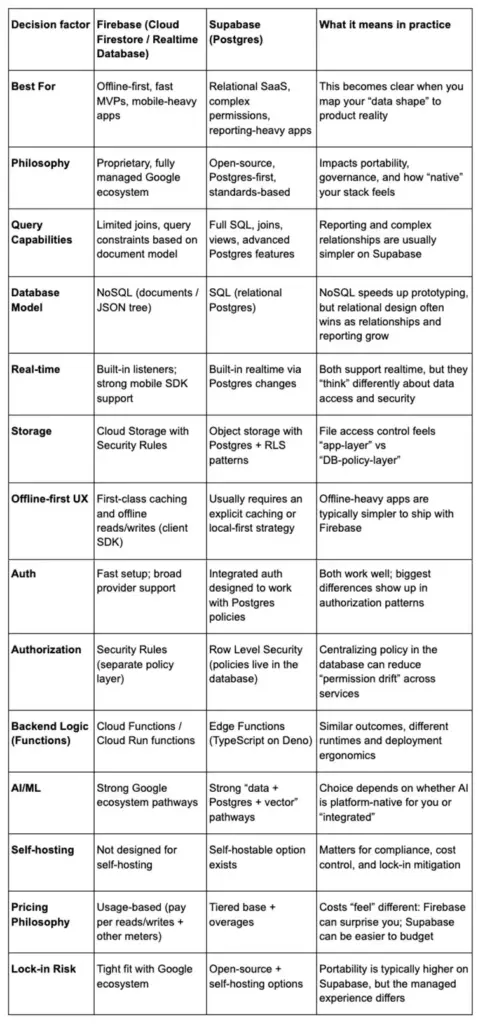
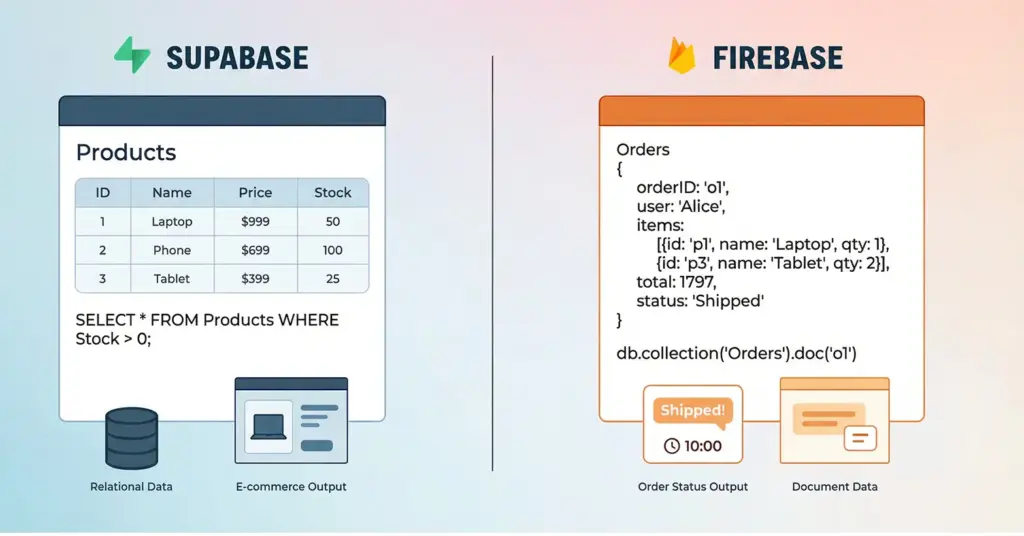
  • BaaS (Firebase/Supabase/etc.): faster MVP delivery, but can become costly or limiting with complex permissioning, heavy search requirements, and multi-tenant admin models.
  • Hybrid: BaaS for auth/notifications + custom services for MLS sync and search.

In real estate, search, indexing, and data normalization often justify custom components earlier than in simpler apps.

AI Features (Recommendations, Chat, Image Tagging) And Cost Considerations (Optional/Advanced)

AI can improve conversion and ops—but it’s rarely “cheap add-on” work.

Common AI features:

  • Personalized recommendations (“homes you’ll likely save”)
  • Semantic search (“2-bed near good schools under $X”)
  • Image tagging and quality scoring (flag duplicates, detect low-quality images)
  • Agent-assist chat for lead qualification (with compliance-aware logging)

Budget drivers:

  • Data readiness (clean events, labeled images, feedback loops)
  • Model strategy (hosted models vs custom fine-tuning)
  • Guardrails, monitoring, and evaluation
  • Ongoing inference costs

If AI is on your roadmap, design your event taxonomy and content pipeline early to avoid rebuilding later.

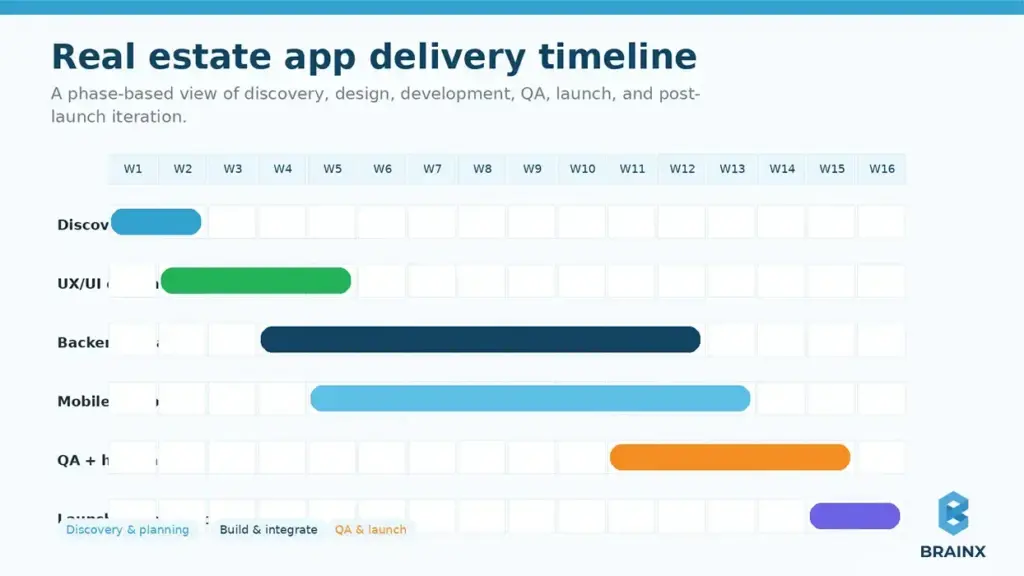
Real Estate App Development Process (Timeline To Budget Mapping)

Time and money are coupled: longer timelines mean more labor, more coordination, and more opportunity for scope changes. But “fast” isn’t always cheaper if it creates rework.

Use this section to translate delivery phases into budget planning and stakeholder expectations. For many teams, controlling real estate app development cost is really about controlling phase gates and acceptance criteria.

Real estate app development timeline showing discovery, UI/UX, backend, mobile, QA, and launch phases.

Discovery & Estimation (What You Get)

Discovery is where accurate estimates are made—not guessed.

Deliverables that reduce risk:

  • Workflow maps (buyer/agent/admin)
  • Integration plan (MLS/IDX, maps, auth, messaging)
  • Feature list prioritized by value vs effort
  • Data model outline and admin requirements
  • Release plan (MVP → v1 → v2)

This phase is also where teams confirm MLS eligibility and identify “unknown unknowns” before they become ‘change orders’.

UX/UI Design Sprint

A strong design sprint creates:

  • Clickable prototype (key journeys)
  • Design system foundations (typography, components, states)
  • Content strategy for listing media and metadata
  • Accessibility requirements and trust cues

Real estate UI has many states (empty results, low connectivity, map/list sync), and designing them early saves expensive engineering iteration.

Development & QA (Sprints, Environments)

A typical production approach includes:

  • Sprint-based delivery (2-week cadence)
  • Separate environments (dev/staging/prod)
  • Automated testing where practical + manual device QA
  • Analytics instrumentation and event validation

QA scope grows with maps, media, and device fragmentation—plan it, don’t squeeze it.

Launch, App Store Review, And Post-Launch Iteration

Launch is not a finish line; it’s a handoff into measured iteration.

Budget time for:

  • App Store / Play Store review buffers
  • Release checklists (privacy labels, permissions, crash monitoring)
  • Post-launch bug fix sprint
  • Data-driven improvements (conversion funnel tuning)

Teams that plan a post-launch iteration window avoid “panic rebuilds” after user feedback arrives.

Hidden Costs To Budget For (Beyond Development)

Even a well-built app can become expensive if you only budget for development. Real products carry recurring costs such as infrastructure, third-party tools, compliance, and ongoing engineering.

When teams model total cost of ownership early, they make better scope decisions and avoid painful mid-year budget surprises.

A practical planning benchmark is to reserve roughly 15–35% of the initial build cost per year for maintenance, infrastructure, monitoring, security, and third-party services, with higher ranges common for marketplace and integration-heavy apps.

Infrastructure (Hosting, Storage, CDN, Database)

Typical cost areas:

  • Hosting (containers/serverless)
  • Database and read replicas
  • CDN for images/video
  • Search infrastructure (Elasticsearch/OpenSearch or managed search)
  • Observability (logs, metrics, traces)

Media-heavy apps can see storage and CDN costs rise quickly if images and tours aren’t optimized.

Third-Party Fees (Maps, SMS, Email, MLS/IDX)

Recurring fees often include:

  • Maps/geocoding usage [CITE: vendor pricing references]
  • SMS/voice (per message/minute)
  • Email delivery (volume-based)
  • MLS/IDX access fees and vendor subscriptions [CITE: IDX/MLS vendor fee references where applicable]

A common mitigation: instrument usage early and set budget alerts, especially for maps and messaging.

Maintenance, Monitoring, And SLA Support

Plan ongoing budget for:

  • OS updates and device compatibility
  • Bug fixes, security patches, dependency upgrades
  • Monitoring and incident response
  • SLA support hours (especially for marketplace apps)

If you’re handling payments or screening, downtime costs more than engineering time—SLA planning is part of the product.

Security & Privacy (Pen Testing, Logging, Incident Response)

Security is not optional, especially when handling identity documents, payments, or sensitive contact data.

Budget items can include:

  • Penetration testing and remediation
  • Secure logging and audit trails
  • Key management and secrets rotation
  • Privacy compliance work (consent, retention policies, user data export/delete)

Common Mistakes That Inflate Real Estate App Development Cost

Mobile app interface with icons showing common mistakes that increase real estate development costs.

Most cost overruns are not caused by “unexpected code complexity.” They’re caused by avoidable planning mistakes—especially around data access, admin tooling, and MVP discipline.

Use the checklist below as a risk filter before you commit to a timeline. It’s one of the fastest ways to reduce real estate app development cost without reducing product quality.

Starting Without Validated Scope And Data Access Approvals

If you start building before confirming:

  • which MLSs you can access,
  • which data fields you will receive,
  • and what display rules apply,

…you may redesign major UX and data models mid-build. Approval timelines alone can force idle time or rushed workarounds.

Overbuilding Before Product-Market Fit (MVP Bloat)

Common MVP bloat patterns:

  • Complex profiles and social features before retention is proven
  • Multi-market expansion features before one market works
  • Advanced AI before you have clean events and feedback loops

A disciplined MVP protects budget and accelerates learning.

Underestimating Admin Tools And Moderation Workflows

If your listings, users, or messages can be created by others, you need:

  • moderation queues,
  • role permissions,
  • audit logs,
  • and support tooling.

Skipping this in v1 often means building it under pressure after launch—more expensive and riskier.

Choosing Stack Without Considering Future Integrations

Teams sometimes choose stack based solely on MVP speed, then struggle when they add:

  • Additional MLS sources
  • Payments/screening
  • CRM integrations
  • Enterprise SSO

Make sure your stack supports your 12–18 month roadmap, not just the next 8 weeks.

Cost-Saving Tips For Real Estate App Development

Cost-saving strategies reducing real estate mobile app development cost through scalable infrastructure, APIs, and MVP planning.

Reducing cost does not mean stripping quality from the product. In most real estate builds, the smartest savings come from better scope control, better technical choices, and fewer avoidable rebuilds later. The goal is not to make the app “cheap.” The goal is to spend where it creates value and avoid spending where it creates complexity too early.

Select Scalable Cloud Infrastructure

Infrastructure choices affect both launch cost and long-term efficiency. A setup that is too heavy for an early-stage product can increase unnecessary spending, while a setup that is too limited can force expensive changes later.

A scalable cloud approach helps teams start lean and expand as usage grows. That is especially useful for real estate products where media storage, search load, maps, and notifications can increase quickly once traction builds.

Prioritize Features And Functionalities

One of the fastest ways to control budget is to focus only on the features that support the app’s main user journey. For most real estate products, that means getting core workflows right before adding “nice-to-have” enhancements.

This keeps the team focused on what drives adoption first. It also reduces design, engineering, and QA time across features that may not matter in the first release.

Open-Source Technologies And Frameworks

Open-source technologies can reduce licensing costs and give teams more flexibility during development. They are especially useful when the product needs reliable foundations without unnecessary vendor lock-in early on.

That said, cost savings only happen when the team chooses mature, well-supported tools. Unsupported or poorly matched frameworks can create maintenance problems later, so this should be a strategic choice, not just a budget shortcut.

Plan For Future Updates And Scaling

Many expensive rebuilds happen because the first version was scoped only for launch and not for the next stage of growth. Even if the MVP is intentionally small, the architecture should still account for likely future needs.

That includes things like added markets, more listings, richer admin workflows, or heavier integrations later. Planning for growth early does not mean overbuilding. It means avoiding decisions that make future expansion harder and more expensive.

Integrate Ready-Made APIs

Not every feature should be built from scratch. Using ready-made APIs for things like maps, messaging, authentication, analytics, or payments can reduce development time and shorten launch timelines.

The key is to use them where they remove low-value custom work. This lets the team focus more of the budget on product-specific functionality instead of rebuilding capabilities that established tools already handle well.

Use Cross-Platform Frameworks

Cross-platform development can be a practical way to reduce initial build cost when the product needs both iOS and Android support. Shared code and shared UI patterns often make MVP and v1 delivery faster.

This approach works best when the app’s core experience is similar across platforms. If the product becomes highly performance-sensitive later, the team can decide whether deeper native optimization is needed based on actual usage and roadmap priorities.

Use The MVP Approach

A focused MVP is still one of the strongest ways to save money without sacrificing learning. It helps teams test demand, validate workflows, and gather user behavior before committing to a larger build.

In real estate apps, that often means starting with one core audience, one market, and one primary workflow instead of trying to support every user type or every transaction scenario from the beginning.

Partner With Experienced Development Teams

Choosing the lowest-cost team often leads to more expensive outcomes if scope is weak, QA is rushed, or architecture decisions do not hold up under real growth. An experienced team may not have the lowest hourly rate, but it often delivers better total cost control.

That matters even more in real estate, where integrations, admin workflows, and approval-dependent data sources can introduce hidden risk. Teams with relevant experience usually make better trade-offs earlier and reduce avoidable rework.

How To Estimate Your Real Estate Mobile App Development Cost (Simple Model)

This is the practical framework you can reuse with internal stakeholders and vendors. It’s intentionally simple: define workflows, integrations, scope tier, platform strategy, and then apply a risk buffer.

In real planning, real estate mobile app development cost depends less on “number of features” and more on integration count + workflow complexity + admin depth.

To keep the estimate stable, write down assumptions in plain language (what’s in/out, which markets, which MLSs, expected traffic). Then vendors can quote against the same baseline—reducing pricing noise.

Step-by-step framework showing how to estimate real estate mobile app development cost using scope, integrations, platform, and risk buffer.

Step 1 — Define App Type + Core Workflows

Document your primary workflow in 5–10 steps:

  • Buyer: search → filter → view → save → inquire → schedule
  • Agent: receive lead → qualify → respond → schedule → track status
  • Admin: approve listing → handle reports → manage users → export analytics

If you can’t write this clearly, the estimate will drift later.

Step 2 — List Integrations And Data Sources (MLS/IDX First)

For each integration, capture:

  • Vendor/source (MLS name, IDX provider, maps vendor, messaging)
  • Authentication method (API key, OAuth, SSO)
  • Data frequency (real-time, daily, hourly)
  • Approval requirements and timelines
  • Ongoing costs

MLS/IDX belongs at the top because it can dictate UX constraints and schedule risk.

Step 3 — Choose Scope Tier And Platform Strategy

Pick one of these as your baseline:

  • MVP (validate)
  • v1 (commercially viable)
  • v2 (scale + marketplace/AI)

Then choose platform:

  • iOS only (rare)
  • Android only (rare)
  • Cross-platform
  • Dual native

Be explicit about what you’re trading: speed vs optimization vs long-term flexibility.

Step 4 — Add Risk Buffer (10–25%) And Post-Launch Budget

Risk buffer is not padding—it’s realism.

Typical buffer guidance:

  • 10%: well-known scope, known integrations, single market
  • 15–20%: MLS dependencies, multiple roles, richer admin workflows
  • 25%: marketplace + payments + screening + multi-market expansion

Also allocate a post-launch budget for the first 60–90 days of fixes and iteration; that’s when real user behavior shows up.

Cost Benchmarks Table (Sample Budgets For Common Real Estate Builds)

The table below gives scenario-based budgets with assumptions—because “$X to $Y” ranges without context aren’t useful. Use these as planning references and adjust based on your integrations, admin needs, and quality bar.

These examples also show how real estate app development cost changes when you move from lead-gen UX into operations, messaging, and marketplace requirements.

Sample real estate app budget table comparing MVP, brokerage, and rental marketplace costs.

Example 1 — Buyer App MVP (Search + Favorites + Alerts)

Good fit when: you need to validate acquisition channels and retention before expanding.
Typical scope:

  • Listing search + filters
  • Listing details with rich media
  • Favorites + saved searches
  • Alerts (push/email)
  • Minimal admin tools and analytics

Main cost swing: MLS/IDX approach and map-first UX depth.

Example 2 — Brokerage App v1 (CRM + Lead Routing + Admin)

Good fit when: you’re improving agent productivity and lead conversion.
Typical scope:

  • Lead intake + routing rules + SLA timers
  • Agent messaging/inbox
  • Pipeline stages and tasking
  • Admin roles, reporting, exports
  • CRM/marketing integrations

Main cost swing: routing complexity, permissions, and enterprise requirements (SSO, audit logs).

Example 3 — Rental Marketplace v1 (Payments + Screening + Messaging)

Good fit when: your business requires transactions and trust & safety.
Typical scope:

  • Landlord and tenant onboarding
  • Listings + availability + applications
  • Payments (fees or rent) + receipts/refunds
  • Screening provider integration
  • Moderation and dispute workflows

Main cost swing: compliance, security, and operational tooling depth.

How BrainX Helps With Real Estate App Development Cost (And Accurate Estimation)

Accurate budgeting requires more than a feature list. At BrainX Technologies, we focus on turning scope into a defendable estimate with explicit assumptions, integration discovery, and a delivery plan you can socialize internally.

If your main concern is controlling real estate app development cost while still shipping a product users trust, the key is to reduce unknowns early and ship in phases that match your commercial milestones.

A practical example is BrainX’s LevelUp real  estate web and mobile apps, built for Coldwell Banker Select to standardize agent onboarding, coaching, communication, and performance tracking across web and mobile. The product included features such as agent onboarding, training modules, task assignment, and goal tracking, and later expanded with multi-tenant functionality as adoption grew. 

Such kind of delivery experience helps us estimate more realistically, especially when scope includes role-based workflows, admin complexity, and phased product growth.

Whether you are planning a full scale real estate platform or expanding an existing product into a property super app, BrainX can guide you through the decisions that matter and help you build a platform people trust with their property journey.

Discovery Workshop That Produces A Defendable Estimate

Our discovery workshops typically produce:

  • Workflow maps (buyer/agent/admin) with acceptance criteria
  • Integration plan (MLS/IDX, maps, messaging, analytics)
  • Prioritized backlog with effort bands and dependencies
  • Release plan (MVP → v1) plus risk register
  • Clear assumptions (markets, MLS coverage, data fields, non-goals)

That means your estimate isn’t a guess—it’s a plan.

Build Options (MVP, Phased Rollout, Platform Strategy)

We help teams choose the build strategy that matches constraints:

  • MVP-first for fast validation
  • Phased rollout by market (especially when MLS access varies)
  • Cross-platform vs native based on UX/performance needs
  • Backend architecture that won’t collapse under integration growth

The goal is predictable delivery and an app you can evolve.

Transparency: Scope, Assumptions, And Change Control

Cost control comes from clarity:

  • What’s in/out of the release
  • What’s fixed vs variable (especially integrations)
  • How change requests are handled
  • How we track progress (burnup, demos, acceptance criteria)

This approach protects both timeline and budget when reality shifts.

Next Step: Get A Tailored Estimate For Your App

By telling us about your target markets, your MLS/IDX plan (even if unknown), and desired scope of MVP/v1, we can assist you in mapping a realistic budget and delivery plan, without going to the features you do not need at this time.

BrainX Technologies can support discovery, design, development and post-launch iteration to help your team go through from estimates to launch with fewer surprises.

FAQ Section

What is the average real estate app development cost in the USA in 2026?

For a production-grade build in the US market, the real estate app development cost commonly falls between $180k and $450k for a solid v1, with MVPs often landing $80k–$180k and advanced marketplace-style apps reaching $450k–$900k+. The biggest variables are MLS/IDX scope, map-first UX complexity, admin/back-office depth, and integrations like messaging and payments. If you want an “average” that’s actually useful, define your app model (buyer search vs brokerage ops vs rental marketplace) and your data access plan first. Without that, averages are misleading.

How does real estate mobile app development cost differ for iOS vs Android vs cross-platform?

Real estate mobile app development cost is typically lowest for a single-platform launch, higher for two native apps, and often most efficient for cross-platform when your feature set is largely shared. Cross-platform can reduce duplicated UI and feature work across iOS and Android, but map-heavy performance, media pipelines, and OS-specific behavior can narrow the savings. Two native apps may cost more upfront but can reduce long-term friction for advanced UX and platform-specific optimizations. The most cost-effective choice depends on your roadmap (e.g., marketplace features, AI, offline support) and quality bar.

What’s the cheapest way to build a real estate app MVP without sacrificing quality?

Keep the MVP focused on one primary journey (usually search → save → alert → inquire), limit markets/MLS scope initially, and avoid building complex admin tooling you don’t need on day one—while still including essential moderation and analytics. Choose proven third-party services where they reduce risk (auth, push, basic messaging), and invest in a short discovery phase to validate workflows and data constraints. Use a phased rollout: ship the MVP, measure funnel performance, then add map depth, messaging, and scheduling based on real usage. “Cheap” becomes expensive when it creates rework, so prioritize clean architecture and clear acceptance criteria.

How long does it take to build a real estate app (and how does timeline affect cost)?

An MVP commonly takes 8–14 weeks, a robust v1 takes 3–6 months, and advanced builds can take 6–12+ months, depending on integrations and marketplace complexity. Timeline affects cost because longer projects require more engineering and QA hours, more coordination overhead, and more change management as stakeholders learn. MLS approvals can also extend schedules, which can create idle time or force parallel workarounds. The best way to manage timeline-driven cost is to lock an MVP scope, confirm data access early, and plan post-launch iteration explicitly.

What ongoing costs should I expect after launch (maintenance, hosting, third-party fees)?

Plan for infrastructure (hosting, database, CDN/storage, search), third-party services (maps, SMS/email, analytics, MLS/IDX fees), and ongoing engineering for OS updates, bug fixes, and security patches. If you run a marketplace or handle payments/screening, budget for monitoring, incident response, and stronger support coverage. Many teams also add periodic pen testing and compliance work as the product scales. A practical approach is to model operating costs monthly and set alerts for usage-based services like maps and messaging.

Key Takeaways

  • Fintech app development cost starts around in the tens of thousands for a narrow MVP and rises to $1M+ for enterprise-grade products as compliance, integrations, and security scope expand.
  • In this guide, typical MVP budgets include:
    Wallets and Payment apps: $50K–$150K
    Lending apps: $70K–$180K
    Wealth / Investing apps: $100K–$250K
    Neobank / Banking apps: $120K–$300K
  • A realistic budget is not just build cost. Engineering can take 40–60% of spend, QA and hardening 15–30%, security 5–20%, and year-one maintenance often adds 15–25% annually.
  • KYC, money movement, audit trails, and admin tooling usually push budgets up fastest because they add edge cases, operational workflows, and audit-ready requirements.
  • If a quote falls far below the planning ranges, it often means critical work like security testing, QA hardening, ops tooling, or partner readiness has been left out.

Estimating fintech app development cost is not just about choosing a number from a pricing range. It is about budgeting for product scope, compliance exposure, third-party integrations, and the long-term operating reality after launch.

It matters even more in a market Mordor Intelligence values at USD 320.81 billion in 2025 and expects to reach USD 652.80 billion by 2030, with digital payments and mobile applications leading a large share of fintech activity. 

Line chart showing global fintech market growth from 2025 to 2030 with steady year-by-year increase.

In other words, cost planning now sits inside a fast-scaling, mobile-first, integration-heavy environment. 

This guide explains where budgets typically go, how costs shift across fintech categories, and which modules tend to push spend up fastest, from KYC onboarding to money movement, audit trails, and risk controls.

Fintech App Development Cost: What You’re Actually Paying For

Budgeting gets easier when you separate what you build, what you must prove, and what you must run.

The Three Layers Of Fintech Cost

  • Build effort – The visible work: mobile apps, backend services, admin tooling, and QA cycles. This is core feature development (logic, UI, databases, APIs, integrations). For example, Andersen finds core dev often takes ~45–55% of the budget. Underestimating it leads to scope creep; clarifying platforms (iOS vs Android vs web) and integration count is key.
  • Compliance/Security effort – The “must-have” layer that protects financial data and satisfies regulators or partners. This includes requirements like encryption, KYC/AML flows, audit logs, and penetration testing. These tasks aren’t optional extras – they’re integral. For instance, many teams reference OWASP’s MASVS as a baseline for mobile fintech security. Ignoring these adds “future rework tax.” Modern Treasury warns that “audit trails take engineering cycles that could go toward features”, so it pays to build security within now (e.g. threat modeling, penetration tests, and remediations upfront). This layer can easily add 20–30% extra to the baseline budget.
  • Operational run rate – Post-launch costs like hosting, monitoring, on-call support, and recurring vendor fees. These scale with usage. For example, identity checks or payment transaction fees are typically per-use. If Stripe Radar fraud screening costs ~$0.05–$0.10 per transaction, a higher transaction volume directly increases your monthly bills. Set aside a budget for cloud infrastructure (auto-scaling, logging), ongoing regulatory reports, and vendor subscriptions. Andersen notes maintenance often ends up ~15–25% of the initial build cost annually. Vendor fees (per-check or per-user) will also rise as customers grow.

For context, vendor hourly rates vary widely by region (e.g. roughly $20–$50/hr in India/Eastern Europe vs. $100–$200/hr in North America). This is why specifying scope and deliverables matters more than quoting any “average rate.” If a fintech quote looks unusually low, ensure it hasn’t excluded essential work (like security testing or administrative tooling).

Why Fintech Estimates Vary More Than “Regular Apps”

Fintech products have a larger risk surface: identity, fraud, and money movement add edge cases (fails, retries, disputes, reversals) plus back-office ops.

Regulatory expectations around AML/CFT are influenced by global standards such as the FATF Recommendations (updated in October 2025). 

Identity is also deeper than “email + password.” NIST’s digital identity guidelines (SP 800-63-4) describe technical requirements for identity proofing and authentication assurance, which shapes how strict onboarding and login flows must be. 

What To Collect Before Estimating

Before asking vendors for a number, gather a clear scope brief. A practical rule: if a quote seems “too good,” check what’s excluded. Prepare a one-page project brief including:

  • Primary user journeys & edge cases – List core flows and failure states (e.g. login, transfer, payout, and what happens on error).
  • Launch regions & regulations – Target countries and data residency rules (this determines KYC rules, currency support, etc.).
  • Money movement scope – Will you transfer funds, issue cards, or just display account data? The more movement and PCI scope (card payments) you include, the higher the cost.
  • Integration list – Enumerate needed third parties (payment processors, banking APIs, KYC/AML providers, fraud engines, messaging/analytics tools). Each integration adds effort and testing.
  • Non-negotiables – Any fixed requirements, e.g. compliance baseline (PCI, SOC 2), uptime targets, or a strict launch timeline.

How Much Does It Cost to Build a FinTech App?

Before diving into the details, let’s start with a general cost overview for building a FinTech app. These estimates are based on previous project experience and calculated using an average hourly rate of $50, which is common in Central and Northern Europe. They represent rough MVP budget ranges for some of the most common FinTech app categories, including banking, lending, investment, insurance, and personal finance.

The table below provides approximate time and cost ranges for different types of FinTech apps, giving you a practical baseline before moving into the detailed breakdowns.

Also Read:  How Much Does AI App Development Cost?

Types of Fintech Applications and Their Cost Estimates

Infographic showing types of fintech applications including banking, lending, personal finance, insurance, and investing.

Category benchmarks help you sanity-check quotes—then ask why your scope is above or below the baseline.

Several 2026-focused fintech guides describe MVPs starting in the tens of thousands of dollars and scaling into the hundreds of thousands (or more) as you add regulated onboarding, money movement, and heavier controls. 

Fintech App Development Costs by Solution Type And Complexity Tier

Fintech app cost breakdown table by solution type, complexity tier, and estimated project timeline.

Note: Use the table as an early-screen tool—not a quote. If a fintech app development cost quote is far below these ranges, it often means key work is excluded (security testing, QA hardening, ops tooling, or partner readiness).

Wallets, Payments and Money Transfer Apps (Money Movement + Fraud Controls)

Money movement and fraud controls are key here. Expect an MVP wallet app in the $50K–$150K range, growing to $150K–$350K+ as you add multiple currencies, higher volume, or PCI-level card flows. For example, Andersen notes simple payment apps often start ~$40–90K MVP, before scaling.

If a quote is far below these ranges, it usually means critical work (like fraud handling or compliance) was omitted.

Lending (Underwriting Workflows + Data Providers)

Loans and credit apps need underwriting workflows and many data providers. A basic lending app (e.g. simple loan offers) might be $70K–$180K for MVP. Full-featured lending (with credit scoring algorithms, bank API checks, extensive KYC/AML) often runs $180K–$450K or more.

Our sources show average lending apps from ~$40K up to $400K+ depending on complexity. Key cost drivers are credit bureau integrations and regulatory/legal review. 

Neobank/Digital Banking (Core Banking Dependencies + Higher Integration Load)

Such digital-only banks connect to core banking systems and have many integrations. Even an MVP neobank app can be $80K–$150K, with a production-grade solution easily exceeding $200K–$300K. 

The main costs: core banking integration, compliance (KYC, reporting), multi-account logic, and often multiple platform support.

Personal Finance Apps

Personal finance apps usually sit at the lower end of the fintech range. A basic budgeting or expense-tracking MVP can fall around $45K–$75K, while more advanced personal finance products often move into the $130K–$270K range.

Costs rise when you add bank account aggregation, recurring sync, bill reminders, AI-driven spending insights, shared planning features, or investment tracking. Since these apps usually focus more on visibility and planning than regulated money movement, they often carry less compliance weight than payments, lending, or neobank products.

Wealth / Investing Apps (Real-Time Data + Suitability/Audit Trails)

Real-time data feeds and suitability/audit features dominate. Expect $100K–$250K for a secure trading or robo-advisor MVP, scaling to $250K–$600K+ for a polished brokerage-grade platform. 

High-frequency updates and regulatory filings (like automated audit logs for trades) add complexity.

Insurtech / Insurance Apps (Claims/Document Workflows + Partner Systems)

Claim/document workflows and back-end partner integrations drive costs. A simple insurance quote-and-claim MVP might be $80K–$200K, but a full insurance management system can go $200K–$500K+. 

Handling all claim edge cases and legacy policy systems typically pushes insurance apps toward the higher end.

Web3 / Cryptocurrency Apps  (Custody Model + Key Management Implications)

Wallet custody and key management are costly. Crypto/Web3 MVPs often start around $80K–$220K, rising to $220K–$600K+ for exchange/custody features.

The security model (custodial vs non-custodial) and blockchain integrations determine much of the cost. For example, hardware-level encryption and multi-sig wallets can significantly raise development effort.

Factors That Influence Fintech App Development Cost

Infographic showing factors that influence fintech app development cost, including UX, features, maintenance, and tools.

No single variable decides fintech app budgets. Cost usually shifts based on scope, platform decisions, compliance exposure, delivery model, and the long-term support the product will require after launch.

Product Requirements And App Complexity

Scope is still the biggest cost driver. A fintech app with one core journey and a limited integration set will cost far less than a product with multiple user roles, money movement, auditability, and exception-heavy workflows.

Platform Choice And UI/UX Scope

Platform decisions change both build effort and QA scope. A single-platform MVP is easier to fund than launching on iOS, Android, and web together, especially when biometrics, secure storage, and recovery flows are involved.

Compliance, Regulations, And Security Level

The more regulatory exposure a product carries, the more it costs to build and validate. KYC, AML, PCI scope, audit trails, and security testing all increase effort, but leaving them vague usually creates more expensive rework later.

Development Partner Location And Team Model

Rates vary by region, but the cheapest team does not always produce the lowest total cost. Delivery experience, planning quality, and ownership model often matter more than hourly price alone.

Tech Stack And Advanced Technologies Used

The stack affects both delivery speed and long-term maintainability. AI features, blockchain integrations, real-time analytics, and advanced fraud tooling can improve capability, but they also raise implementation and testing effort.

Top Technologies in Fintech Application Development

Common technologies in fintech app development include:

  • AI and machine learning for fraud detection, risk scoring, and personalized financial insights
  • Blockchain for custody models, transaction verification, and crypto-focused product flows
  • Biometric authentication for stronger login security and identity verification
  • Real-time analytics for dashboards, reporting, and operational visibility
  • Cloud-native infrastructure for scalability, availability, and long-term operational control

These technologies can strengthen product capability and user trust, but they also tend to increase implementation effort, testing scope, and long-term maintenance requirements.

Also Read: Flutter vs Native App Development: Choosing The Right Technology

Post-Launch Support And Maintenance

The budget does not stop at launch. Monitoring, infrastructure, vendor changes, security patches, and ongoing support all add recurring cost, which is why maintenance should be planned as part of the original budget. 

Fintech App Development Cost Breakdown By Phase And Deliverables

A clear phase-based breakdown ties budget to real deliverables (not just hours). Rough percentage ranges (subject to project specifics):

Fintech app development cost breakdown table by phase, budget share, and key deliverables.

  • In Discovery, the goal is clarity. Deliverables should include a complete requirements spec (PRD/SRS) and user flows with failure states, as well as a backlog of features/tasks. This “DNA” of the project greatly reduces rework.
  • In Design, outputs that cut build time are a living design system, full-fidelity prototypes (for core and error flows), and detailed states (e.g. confirmations, error messages). These ensure developers don’t waste time on UI guesswork.
  • In Engineering, clarify scope early (how many platforms, how many dev/test environments, how automated your pipeline is). More backend complexity (multiple services, high volumes) increases cost. Setting up CI/CD and staging environments here saves headaches later.
  • In QA, deliverables include a formal test plan, coverage matrix (OS/devices), and automation scripts for regression. Don’t skimp on security testing. Use OWASP MASVS/MASTG to define mobile security test cases. Early automation of critical flows (in CI) cuts long-term maintenance costs.
  • Finally, include a handover package: technical documentation, API docs, deployment/runbook, and training for operational teams.

Vendor Quote Checklist: When comparing quotes, ensure each lists the above deliverables, plus assumptions/exclusions (platforms, environments, deliverable definitions). 

How Much Do Fintech Software Development Key Features Cost?

For fintech budgeting, modules that touch identity, money movement, and auditability tend to inflate budgets because they create edge cases and operational workflows. In practice, fintech app development cost increases fastest when these modules require manual review tooling and audit-ready records.

Quick Cost Heatmap

Fintech app cost heatmap showing module complexity and hidden development work.

Each of the above modules should prompt a cost discussion. For instance, integrating a KYC provider not only costs in initial dev, but also requires building UI for exceptions (failed matches) and infrastructure for identity data. Likewise, “money movement” might seem simple, but dispute and chargeback handling can double the work. Always evaluate these modules as multi-step features, not just “one-off” forms. Let’s discuss them a little further.

Onboarding + Identity 

NIST’s digital identity guidelines describe identity proofing and authentication requirements; in product terms, that becomes doc capture quality checks, selfie/liveness steps, retries, and fallbacks. 

Many providers price per completed verification; Stripe Identity publishes pay-as-you-go per-verification pricing. 

User Authentication

Authentication cost is mostly recovery + session security. OWASP MASVS is often used as a baseline to turn those needs into verifiable mobile controls. 

Money Movement

Money movement needs safe retries, clear transaction states, reversals, and dispute workflows. Platform models can add ongoing fees (per active user / per payout), affecting unit economics. 

Payment Integration

Payment integration is rarely just one API connection. Costs usually grow with payout flows, retries, dispute handling, reconciliation logic, and support for multiple rails or processors, which is why this module often becomes one of the heavier build areas in a fintech product.

Ledgering + Audit trail

Ledger costs rise when you need statements, exports, reconciliation, and immutable “who changed what” history for investigations. This module alone can shift budget forecasts because reporting requirements are rarely “one and done.”

Admin Console & Ops tooling

Admin tooling is the bridge between “edge cases” and reliable operations. SOC 2 is commonly used to communicate internal control assurance, which makes permissions and audit logs core scope. 

Analytics & Reporting Dashboards

Analytics and reporting dashboards cost more when the product needs audit-ready exports, transaction visibility, operational reporting, and admin-side decision support instead of basic charts. A light dashboard may stay manageable, but deeper financial reporting usually increases backend logic, data modeling, and QA scope.

Notifications & Alerts

Notifications look simple, but they add cost once the product needs event-based triggers, delivery tracking, fallback logic, and compliance-aware messaging. They also create recurring run-rate impact, since tools like SMS and email providers typically charge by usage, and those “small fees” scale with customer activity over time. 

Compliance & Security Workstreams That Must Be Budgeted Explicitly

If your estimate doesn’t separately budget compliance and security, it’s probably incomplete. Key items to account for:

  • When PCI DSS applies – Any cardholder data (even tokenized) triggers PCI scope. PCI DSS brings technical requirements (data encryption, strict access controls, network segmentation) and audit obligations. For a fintech MVP that touches cards, plan for building all PCI controls and paying for an assessor. Industry sources note annual PCI compliance can run tens of thousands per year (e.g. ~$15K–$50K). Even using third-party payment processors, you’ll likely need a QSA review at some threshold. Importantly, tokenization or vaulting must be done correctly to shrink scope, otherwise you still pay.
  • OWASP MASVS as a baseline – For mobile fintech apps, many teams treat OWASP MASVS as a de facto checklist. MASVS covers secure storage, strong crypto, reverse engineering resistance, and more. Planning to meet MASVS (and its companion MASVS Testing Guide) from day one helps avoid costly late fixes. For instance, embedding SSL pinning and hardware-backed key storage will add initial cost but save expensive refactoring.
  • Security testing line items – Explicitly include threat modeling and penetration testing in your quote. Threat modeling (often a workshop or review) can catch architectural flaws early at low cost. At minimum, budget one formal pentest cycle (coding fix + retest). For fintech, two pentests (pre-launch and post-launch) are common, plus vulnerability scanning. Each cycle (with a reputable firm) can cost several thousand dollars, plus your dev hours to fix issues. Andersen’s analysis shows that QA/security can take ~20% of a project’s effort.
  • Compliance as a timeline risk – Regulatory approvals and audits can delay a project independently of coding. Collecting compliance evidence (e.g. audit logs, traceability matrices) takes time. For example, Deloitte notes that fintech companies now face intensive operational audits and must build formal risk programs. Factor these into your schedule: e.g. obtaining certification (PCI/SOC2) may require working through an external checklist.

Compliance Scope Checklist

As a practical aid, clarify upfront:

  • Payments scope (PCI) – Will your app store/transmit card data? If yes, what PCI level certification is needed?
  • Identity depth (KYC/KYB + AML) – What ID verification level is required for your user base? How many screening checks per user?
  • Audit requirements – Do regulators or partners demand detailed logs and retention? (e.g. 5+ years of transaction history.)
  • Security baseline – Are there known controls or standards (MASVS, OWASP Top10, privacy laws) you must implement and prove?

Integrations And Vendor Stack Costs

Integrations often determine final cost because they add both development effort and recurring expenses. Key areas are as follows:

  • Banking/Payment Rails & Aggregators – Each bank API or payments platform (ACH, SWIFT, card issuer) requires separate integration, testing, and monitoring. Andersen highlights that “integration count multiplies QA and maintenance” (each service’s updates and quirks cost in the long run). Also consider usage pricing: many partners charge monthly or per-transaction. For instance, some embedded accounts platforms may charge per active user or per payout. These fees directly add to your run-rate. Planning tip: start with essential rails and design your code so you can add more integrations later without rewriting core logic.
  • Identity/KYC Vendors & AML Screening – Implementation vs per-check fees. Account for both: it might cost ~$15K–$30K to integrate a KYC SDK, plus ~$1–$2 per identity verification. Similarly, AML screening services charge per check (often a few cents each). Don’t forget monthly minimums or verification timeouts. Over time, high-volume clients can spend heavily on identity checks, so treat this as an ongoing cost.
  • Fraud & Risk Tooling – Tools like Sift, ThreatMetrix, or device intelligence APIs usually price per transaction or as a subscription. Integrating a fraud rules engine also involves dev work (setting rules, training the model). For example, Stripe’s Radar is ~$0.05–$0.10 per transaction screened, plus ~$25 per dispute handled. Factor these into your per-transaction cost model. Remember that tuning fraud systems (minimizing false positives) can be an iterative cost after launch.
  • Messaging, Analytics, and Support Tools – These are the “small fees” that compound. Twilio/SMS, SendGrid/email, analytics platforms (Mixpanel), and customer support tools all typically charge by usage. For example, Twilio may charge ~$0.01–$0.05 per SMS. While trivial initially, these costs scale linearly with users. Budget them as a percentage of server/cloud spend, and plan to review actual usage after launch.

Vendor Strategy Tip: Start with the minimum viable stack. Abstract vendor-specific code behind interfaces (so you can switch providers if terms change). Ensure each integration has a clear owner and a rollback/alternate plan.

Team Model, Platform Choices & Delivery Approach

Team model drives fintech app development cost variance because it changes speed, quality, and predictability. The same scope can cost very different amounts depending on in-house vs agency vs hybrid delivery.

Typical Team Roles By Stage 

Lean fintech builds still need product, design, mobile, backend, QA, DevOps, and security. Rate benchmarks vary, but Clutch’s 2026 guide reports many app development companies in a $25–$49/hour band and emphasizes scope as the main driver. 

Platform Strategy Tradeoffs (iOS/Android/Native Vs Cross-Platform)

Native can reduce platform risk for performance/security-critical features but costs more if you build iOS and Android separately. Cross-platform can reduce duplicated UI work, yet you still need platform-specific QA and secure storage integrations.

Agile Vs Fixed-Scope For Fintech

Fixed-scope estimates can break when partner onboarding or compliance requirements surface late. Agile delivery improves reliability when milestones are defined as testable deliverables. DevOps guidance around deployment frequency often highlights that smaller, more frequent releases reduce risk per change and speed feedback loops. 

This is why teams often treat fintech app development cost as a sequence of milestones, not a single quote.

How To Read A Proposal And What “Maintenance” Really Includes

Watch for hidden exclusions (security testing, app store release overhead, SLAs) and vague “maintenance” definitions. If “AI acceleration” is promised, treat it as tooling—not a replacement for governance. GitHub’s Copilot research highlights productivity benefits, while NIST provides an AI Risk Management Framework for thinking about AI-related risks in development workflows. 

Practical tip: Ask for a written assumptions list (what’s included vs excluded), a test strategy summary, and a handover plan. The said three artifacts prevent “quote drift” when requirements evolve. Also confirm who owns store submissions, security retesting, and on-call coverage—these items often slip between “build” and “run” responsibilities upfront and in writing.

Post-Launch Costs, Publishing Requirements, And Maintenance Planning

The initial build is only part of the fintech app development cost picture. You also need a budget for publishing, operations, and ongoing maintenance.

App Publishing Prerequisites As Checklist Items (Apple Developer Program, Google Play Console)

Publishing fees are small but predictable:

  • Apple Developer Program: 99 USD per membership year. 
  • Google Play Console: US$25 one-time registration fee. 

Beyond fees, you must budget developer time for store compliance i.e. preparing privacy disclosures, security statements, and responding to review feedback, etc. 

While release overhead (store policies, privacy disclosures, QA cycles) is usually the larger cost. 

Monitoring And Incident Response

Fintech apps typically promise high availability (finance users expect instant responses). Plan for continuous monitoring (logs, alerts) and an incident response framework. 

Google’s SRE practices are a good model: define error budgets, set up on-call rotations, and practice postmortems. 

Having basic SLAs and real-time alerts (for failed transactions or downtime) should be in your plan. While initially “only” a few percentage points of effort, this can save huge costs from undetected issues later.

Maintenance Categories

Post-launch, the budget falls into categories: OS and dependency updates (new iOS/Android versions), security patching, regulatory changes (e.g. new AML rules), performance tuning, and minor enhancements. 

Standards like ISO/IEC 14764 (Software Maintenance) even outline that maintenance should be planned as part of the project lifecycle. 

Andersen data confirms that annual maintenance is often ~15–25% of the original build cost. So if your project was $100K, expect $15K–$25K/year in upkeep under normal growth.

Recap of Hidden Fintech App Development Costs To Watch For

Don’t forget periodic audits (PCI DSS, SOC 2, GDPR reports). Infrastructure scaling: e.g. AWS/Azure costs can grow non-linearly with a user base. Vendor fees: every identity check, SMS message, and analytics event is paid per use. And support tools (like CRM seats, Sentry/Datadog plans) rise with team and usage. These often hide in “Opex” but should be planned.

How to Build a Fintech Application? A Practical Step-by-Step Process for Building a Fintech App

A fintech app build usually moves faster and more cleanly when the team treats it as a sequence of milestones instead of one large delivery block. The goal is to define risk early, keep the first release narrow, and avoid expensive rework once integrations, compliance, and launch requirements start expanding.

Discovery & Research (3–5 days)

This stage is about getting the brief right before development starts. The team defines the core user journey, maps edge cases, confirms launch regions, lists integrations, and identifies the compliance and security assumptions that will shape the rest of the build.

UI/UX Design (10–15 days)

Once the scope is clear, the next step is to design the core flows and the states around them. In fintech, that usually means not just primary screens, but also retries, failures, approvals, locked states, and recovery journeys that reduce confusion later in development and QA.

MVP Development (30–50 days)

This is where the first working version takes shape. The team builds the core product flow, connects the required integrations, sets up environments, and focuses on the features that prove the main use case without expanding into unnecessary modules too early.

Testing & Quality Assurance (5–10 days)

QA should validate more than basic functionality. For a fintech MVP, testing should cover critical flows, integration behavior, edge cases, security-sensitive scenarios, and release readiness so the product does not reach launch with unstable logic or avoidable compliance gaps.

Launch & Support (ongoing)

Launch is the start of the operating phase, not the end of the project. Once the product is live, the focus shifts to monitoring, incident response, fixes, dependency updates, vendor changes, and small improvements that keep the app stable as usage and operational demands grow.

Challenges in Fintech App Development Process

Fintech products are harder to build than standard apps because the challenge is not just shipping features. Teams also have to manage compliance exposure, integration risk, security expectations, and the operational demands that come after launch.

Regulatory Complexity And Changing Requirements

Regulatory scope can change the build more than teams expect. A product may begin with a narrow feature set, then expand once KYC depth, auditability, data handling, or regional compliance requirements become clearer.

That usually affects both timeline and cost. What looked like a simple product flow can quickly turn into a regulated workflow with more validation, documentation, and review points.

Third-Party Dependency And Integration Risk

Many fintech apps depend on payment processors, banking APIs, KYC vendors, fraud tools, and messaging platforms. Each dependency adds implementation work, but it also adds failure states, monitoring needs, and long-term maintenance.

This creates delivery risk as well. A strong internal build can still get delayed if a vendor changes requirements, has unstable documentation, or needs more testing than expected.

Security, Fraud, And Trust Expectations

Fintech users expect the product to feel secure from the first interaction. That means teams have to think beyond login screens and cover encryption, session controls, fraud signals, permissions, and audit-ready access patterns.

The challenge is that security work often cuts across the whole product. It is not one feature to “add later,” which is why weak early planning usually becomes expensive rework.

Testing Edge Cases In Money Movement Workflows

Money movement creates more exceptions than most app teams expect. Retries, failed states, reversals, disputes, duplicate actions, and delayed confirmations all need to be handled clearly across both product logic and user experience.

That makes QA harder too. Teams are not just testing happy paths. They are testing what happens when real financial actions fail, repeat, or arrive out of sequence.

Balancing Speed To Launch With Compliance Readiness

Most teams want to move fast, especially at MVP stage. The challenge is deciding how lean the first release can be without creating a product that has to be reworked once security, compliance, or partner expectations catch up.

The best fintech builds usually do not start with the biggest scope. They start with a narrower flow that still preserves a compliant path forward.

Scaling Operations After Release

Launch does not remove complexity. It shifts it into operations, where uptime, support, monitoring, vendor coordination, and incident response start affecting the real cost and reliability of the product.

As usage grows, small operational gaps become bigger problems. That is why fintech teams need to plan for scale, not just in infrastructure, but also in workflows, ownership, and support readiness.

Tips and Tricks to Reduce the Fintech App Development Cost

Reducing fintech app development cost is not about cutting critical work. It is about making better decisions early, keeping the first release focused, and avoiding choices that create rework once compliance, integrations, and scale become more demanding.

Prioritize App Features

Not every feature belongs in the first release. The smartest way to control budget is to identify the features that directly support the core user journey and delay lower-impact modules until the product proves traction.

This matters even more in fintech, where each extra feature can add testing effort, operational workflows, and compliance implications. A smaller but better-scoped feature set usually leads to a more stable and cost-efficient launch.

Focus on MVP Development

A narrow MVP is one of the most reliable ways to reduce cost without weakening the product. It helps teams validate the core use case first instead of funding a broader roadmap before the market has confirmed what users actually need.

The key is to keep the MVP lean without breaking the future path. If the first version still respects security, compliance, and integration realities, it is far easier to expand later without paying a rebuild cost.

Choose the Framework Wisely

Framework and platform choices affect both build speed and long-term maintenance. In some cases, cross-platform development can reduce duplicated UI work and shorten early delivery, while in other cases native development is the safer choice for performance, device-level security, or platform-specific features.

The cost-saving decision is not always the cheapest stack on paper. It is the one that supports your product goals without creating unnecessary complexity or future migration pressure.

Strategic Team Collaboration

Budget efficiency improves when the right people are involved at the right stage. Clear coordination across product, design, engineering, QA, DevOps, and security reduces misalignment and helps teams catch scope or delivery issues before they turn into expensive delays.

This is especially important in fintech, where a missed dependency or vague requirement can affect more than one workstream at once. Better collaboration usually means fewer handoff gaps, cleaner execution, and more predictable delivery.

Adopt Agile Development Process

Agile delivery helps control cost by breaking the build into smaller milestones instead of treating the project as one fixed block. That gives teams more room to validate assumptions early, adjust priorities, and catch complexity before it spreads across the whole roadmap.

For fintech products, that flexibility is valuable because requirements often shift once integrations, partner reviews, or compliance details become clearer. Smaller releases and milestone-based planning usually make costs easier to manage than rigid scope assumptions.

Conclusion

Fintech app development cost is not a fixed number. It is the result of scope, integrations, compliance exposure, security requirements, and ongoing operational run rate. 

The more clearly you define those variables early, the easier it becomes to compare vendor quotes, defend budget decisions, and avoid hidden costs later. 

Instead of chasing the cheapest estimate, focus on deliverables, risk coverage, and long-term maintainability. 

A well-scoped roadmap, the right vendor stack, and early investment in security usually lead to a more predictable and sustainable fintech build.

How can BrainX Help in Fintech Application Development?

Fintech projects get expensive when scope, compliance, and vendor decisions stay vague for too long. Our leading fintech app development service company helps teams turn those variables into a clearer delivery plan through structured discovery, secure architecture thinking, and realistic milestone planning. The goal is not just to estimate faster but to reduce hidden costs, avoid rework, and move toward launch with better budget control.

Ready to build the next breakthrough in Fintech

Connect with our experts today to explore more!

FAQs For Fintech Budgeting And Estimates

What’s the minimum budget for a fintech MVP?

The minimum budget for a fintech MVP depends on how narrow the first release is. A lower-cost MVP usually assumes one core user journey, limited integrations, a smaller launch region, and only the compliance controls needed for that product scope. As soon as you add KYC, money movement, fraud checks, or deeper admin tooling, the budget increases.

What is fintech app development cost per month?

Fintech app development cost per month depends on the stage of the product. During development, monthly costs usually include design, engineering, QA, DevOps, security work, cloud infrastructure, and vendor tools. After launch, monthly spend typically shifts toward maintenance, monitoring, support, usage-based vendor fees, and ongoing product updates.

How long does it take to build a fintech app?

The timeline depends on scope, integrations, compliance requirements, and testing depth. A lean MVP can move faster, but production-ready fintech products usually take longer because partner onboarding, security reviews, and release preparation often add more time than teams expect.

Does publishing a fintech app add extra cost?

Yes, but the account fees are usually the smallest part of the expense. The larger cost usually comes from release preparation, store compliance, privacy disclosures, QA cycles, and the developer time needed to handle submission requirements and review feedback.

What does annual fintech app maintenance usually include?

Annual maintenance usually covers OS updates, dependency upgrades, security patches, infrastructure updates, vendor API changes, monitoring, bug fixes, and smaller product improvements. It should also include the time and budget needed to keep the product stable as compliance, platform rules, and user expectations evolve.

  • Mobile app development for enterprise provides ROI, enhancing productivity, accelerating decision-making, and eliminating friction in operations.
  • Strong outcomes start with defined business goals, actual user needs and well-documented requirements and integrations.
  • Choose the right build strategy (native, cross-platform, or low-code) based on performance goals, time-to-market, and team constraints.
  • Enterprise success relies on the user-focused UX, scalable cloud-based architecture, and security-by-design throughout the entire lifecycle.
  • Treat launch as a milestone and not the finish line by monitoring usage, iterating updates, and planning long-term scalability and support.

Modern businesses are turning enterprise mobile apps into a strategic imperative. Founders of startups, product managers, and IT executives are all interested in optimizing their work, empowering staff and acquiring a competitive advantage using custom mobile solutions. In this guide, we demystify mobile app development for enterprise as it takes you through all of the steps, starting with planning and ending with deployment, with practical insights and AI-powered suggestions inspired from BrainX’s experience.

Mobile App Development for Enterprise & Why It Matters

Enterprise mobile apps generate quantifiable business value. They improve productivity, simplify workflows and place real-time information at the fingertips of employees. Research indicates that enterprise applications can boost employee productivity by more than 34 percent.

Mobile apps provide real-time access to business-critical information, which allows teams to make decisions faster. In fact, 77% of enterprises believe the access to real-time data is essential. Mobile access leads to efficiency and cost-saving as one survey suggests that digital transformation (which mobile apps can drive) can reduce operational expenses by as much as 40 percent.

Additionally, enterprise apps improve team collaboration and engagement with customers. They can be integrated with the existing systems (CRM, ERP, etc.) to achieve data silos elimination and regular tasks automation, thereby minimizing errors and enabling employees to focus on more valuable activities. That’s not all because these applications are also improving customer-facing experiences by creating personalized and instant customer support. 

In short, mobile app development for enterprise facilitates growth. It enhances productivity, costs less, and improves retention. For example, companies having employee-facing apps usually experience increased satisfaction and loyalty; whereas customer apps are likely to provide new channels of sale and services. Enterprise mobile apps can be strong drivers of ROI and competitive advantage when built with clear business goals.

[ Also Read: How to Outsource Mobile App Development

Must-Have Features in Enterprise Mobile App Development Software

Choosing the right platform is not just about building screens faster. Enterprise teams need software that can automate workflows, connect with core business systems, protect sensitive data, support employees in low-connectivity environments, and scale without adding unnecessary complexity. That is why the best enterprise platforms now prioritize governance, offline capability, integrations, and cloud-ready deployment as core features rather than optional extras.

1. Workflow Automation and Process Management

A strong enterprise platform should help teams replace slow manual work with structured digital processes. Features like approvals, task routing, notifications, and workflow automation make it easier to standardize operations across departments and reduce delays in day-to-day execution. This is especially important for enterprises that want mobile apps to improve internal efficiency, not just digitize forms.

2. Role-Based Access, Security, and Governance

Enterprise apps often handle sensitive employee, customer, or operational data, so security controls must be built into the platform from the start. Look for support for role-based access, connector governance, policy controls, and data protection guardrails that help IT teams manage risk while still enabling app innovation across the business.

3. Offline Access and Reliable Data Sync

Many enterprise users work in warehouses, hospitals, field environments, or remote locations where internet access is unreliable. A capable enterprise platform should let users continue working offline, store data locally on the device, and sync changes automatically when connectivity returns. This keeps productivity high without forcing teams to depend on a stable connection at all times.

4. Seamless Integrations with Enterprise Systems

No enterprise app should operate in isolation. It should connect smoothly with tools like CRM, ERP, HR systems, databases, and cloud services so information can move across the business in real time. Platforms with strong API and connector support reduce data silos and make mobile apps far more useful in practical business environments.

5. Analytics and Operational Visibility

Enterprise apps should do more than collect inputs. They should also help teams understand performance, identify bottlenecks, and make faster decisions. Built-in analytics, usage tracking, and operational monitoring can give stakeholders a clearer view of how the app is performing and where improvements are needed after launch.

6. Low-Code Speed with Customization Flexibility

Speed matters, but so does control. The best enterprise platforms support faster delivery through low-code tools while still allowing developers to extend functionality when the app requires custom logic, advanced integrations, or a more tailored user experience. This balance helps enterprises move quickly without limiting future growth.

7. Scalable Deployment and DevOps Readiness

What works for one team should still work when adoption spreads across regions, departments, or business units. Enterprise-ready platforms should support cloud-native deployment, CI/CD practices, flexible hosting options, and the ability to scale without rebuilding the application from scratch. That makes long-term maintenance and expansion much easier for growing organizations.

Key Benefits of Enterprise Mobile Apps

Illustration showing key benefits of enterprise mobile apps, including real-time data, productivity, and cost savings.

Enterprises invest in mobile apps to gain the following tangible advantages:

1. Real-Time Data & Faster Decisions: Mobile applications allow access to critical data (reports, dashboards, notifications) on the employee devices in real-time. Researchers discovered that 77 percent of enterprises consider real-time access of data as critical. The immediacy of data access and prompt decision making speeds up approvals, issue resolution, and market responsiveness.

2. Boosted Productivity: Staff members can be productive anywhere with mobile CRMs, inventory monitoring applications, or field service apps. Enterprise apps, according to one report, have the potential to increase the productivity of employees by 34% or higher. Employees spend less time on paper work or desktop sign-ins and can concentrate on core tasks.

3. Remote Work Enablement: Enterprise applications support secure remote and field work. Field technicians dispatch and report using mobile apps, sales teams keep the pipelines updated on the go and managers keep in touch with distributed teams. The flexibility has now become critical to the modern work-forces.

4. Improved Engagement: In the case of employees, the convenient application translates into simpler operations and higher satisfaction. Enterprise mobile apps provide a personalized experience (e.g. customized notifications, loyalty programs) to customers, increasing retention and brand-loyalty. Mobile push notifications and in-app chat can enhance the level of engagement by providing users with information and keeping them engaged.

5. Streamlined Operations & Cost Savings: With the help of apps, routine activities (inventory checks, time tracking) can be automated and various systems (ERP, CRM, databases) can be connected to reduce the number of manual errors and administrative costs. Mobile-led digital transformation has been found to reduce operational expenses by up to 40 percent. As an example, a tablet-based data collection app can be used instead of paper forms to save the costs of printing and data entry.

6. Competitive Advantage: The early adopters of enterprise mobile solutions gain a leg up right away. Mobile applications make companies more responsive, in the sense that they can roll out new services or access distant markets quicker. They also encourage innovation (e.g. AR training apps or IoT monitoring tools) that competitors may lack.

Overall, enterprise mobile apps provide high levels of return on investment through centralizing data, automation, and user engagement. It is because firms that embrace strategic mobile app development have continued to record high productivity, efficiency, and increased revenues.

Also Read: Why Should You Go for Cross-Platform Mobile App Development?

Various Types of Enterprise Applications Essential for A Range of Businesses

Illustration of enterprise app types, including employee portals, CRM/ERP apps, field service, and automation.

Enterprise mobile applications are available in numerous forms, while each addresses particular business problems. Typical applications are: 

  • Employee portals
  • Mobile HRM/CRM/ERP apps
  • Field service applications
  • Workflow automations, etc. 

Such apps can be classified as employee-facing, department-specific, and organization-wide. For example:

  • Employee Productivity & Collaboration Apps: Apps such as Slack or Microsoft Teams (mobile versions) can ensure that employees are in touch and stay engaged. Project collaboration on the go can be achieved through task management apps (e.g. Asana). An internal application may be a custom one that consolidates HR self-service (payroll data, time off requests) or makes corporate announcements. By putting workflows in employees’ pockets, these apps drive efficiency.
  • CRM & Sales Enablement: The mobile CRM applications (Salesforce Mobile, Microsoft Dynamics) allow the sales and support team to update leads, verify customer details, and log activities when they are on the road .Mobile surveys or help-desk applications are also integrated to enhance customer communication by providing service representatives with the necessary information in real-time.
  • ERP and Inventory Management: ERP systems such as SAP or Oracle usually contain mobile components (SAP Fiori, Oracle ERP Cloud). Through mobile, field workers can scan barcodes, provide asset data, or make purchase orders. It guarantees real-time inventory monitoring and removes office-bound system delays.
  • Field Service & Logistics Apps: Mobile applications can be utilized by companies to dispatch technicians, monitor equipment, and lead maintenance operations. Apps such as ServiceMax assist in route management and enable technicians to submit job reports/photos in the field enhancing accuracy and response time.
  • Business Intelligence (BI) & Analytics: Mobile dashboards (Power BI, Tableau Mobile) give managers insights on the go. Sales executives are able to see real time performance metrics on their phones, while operations are able to track KPIs of the supply chain. Mobile access to analytics facilitates making quick decisions based on data.
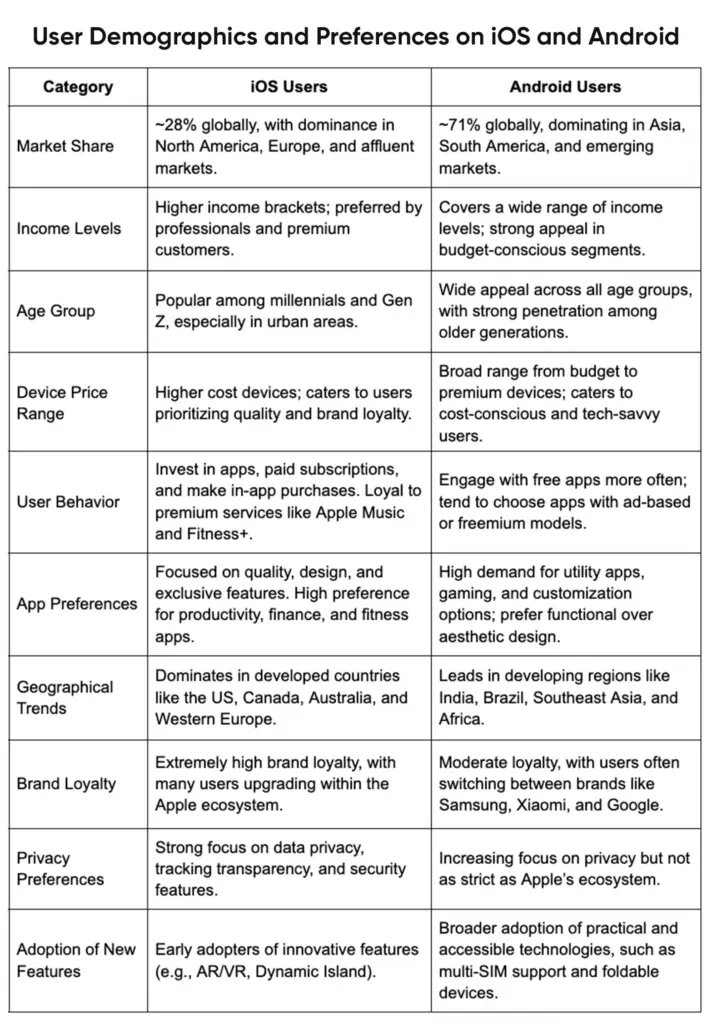
These varied use cases demonstrate how a mobile app for enterprise development can tailor solutions to needs. It might be a basic internal portal or a technical B2B application, but its purpose is to address obvious areas of pain, such as increasing field productivity or enhancing customer service. Enterprises can also adjust the type of app based on the roles of the users (e.g. HR vs. finance vs. sales) to make sure that every solution is as impactful as it can get.

A Step-by-Step Walkthrough of the Mobile App for Enterprise Development Process

Enterprise mobile apps are not built in one sprint. They move through a clear, repeatable flow that keeps business goals, security, and user adoption aligned from day one.

In the next sections, we’ll break down the process step by step, starting with planning and requirements, then moving into design and UX, followed by development and integrations, testing and QA, and finally deployment, launch, and ongoing maintenance.

Planning Your Enterprise Mobile Application Development Project 

Planning is critical before one is even able to write a single line of code. The planning phase provides the groundwork for the goal definition, requirements, and approach. Overlook this and projects tend to fail, get it straight and you can save on development and expensive re-work.

Infographic showing key planning steps in the enterprise mobile app development process.

1. Define Business Objectives & User Needs

Start by clarifying the app’s purpose. What problem it will be solving, and for whom. Gather stakeholders to outline business goals (e.g. increase sales, improve compliance, reduce costs) and link them to app features. 

Identify end users (employees, customers or partners) and trace their workflow and different pain points. User personas and journey maps come to the rescue, an example is that a sales rep and a warehouse manager will have different needs. 

Make sure that the app supports corporate strategy, such as, in case digital transformation is the priority, show how this app supports this agenda. In this point, metrics are important so establish goals (e.g. cut time of orders by 20 percent and/or reach level 80 percent of users in 3 months). The clarity of the objectives helps to keep the project on track.

2. Gather Requirements and Integrations

Record all functionality (features and user cases) as well as technical requirements early. Some functional requirements may be offline access, push notifications, biometric entry. The non-functional requirements may include performance, level of security, compliance (GDPR, HIPAA), and scalability. 

Determine systems the app has to be connected to, like CRM, ERP, databases, third-party APIs, IoT platforms, and so on.This integration planning is essential as most enterprise applications can only be useful when they have connectivity with the backend systems. Determine data flow diagrams so you are aware of where we get data from, how it is updated. An example is that assuming inventory data is stored in a premise ERP, consider connecting real-time (via APIs) or using a sync service.

Record everything in a Requirements Specifications document so developers and QA know exactly what to build and test against.

3. Choose the Right Development Approach

Select a strategy for development depending on your needs:

  • Native Apps: iOS (Swift) and Android (Kotlin) apps can be developed individually, which provides the best performance, use of all features of the device, and a platform-specific UX.Native is the best when your application is graphical intensive or you need the highest possible performance (e.g. AR, real-time video). However, it is costlier and takes longer as you’re actually building two separate apps.
  • Cross-Platform Frameworks: Tools like Flutter or React Native let you write one codebase for both iOS and Android. It speeds up development and lowers the maintenance costs in the long term. While performance is slightly below pure native, modern frameworks are very capable and often our recommended approach for typical enterprise apps. Using our blog on cross-platform frameworks can help you evaluate options. In case time-to-market and budget are constrained, cross-platform is the more appealing option.
  • Low-Code/No-Code Platforms: Platforms like OutSystems, Mendix, or Microsoft PowerApps allow rapid development through visual interfaces. They are able to empower citizen developers and minimize the necessity of deep technical expertise. Low-code can be used to build internal tools or when the needs are simple. Mobile app development software for enterprise frequently has built-in powerful enterprise systems connectors that accelerate integration. The tradeoff is reduced flexibility in UI/UX and possibly a higher cost of licensing for enterprise scale apps. Look at low-code when you have a small team of IT specialists and require a quick turnaround on simple applications.

4. Budget and Timeline Considerations

Estimating cost and schedule for an enterprise app requires thinking through complexity. Simple apps (basic features, one platform) may cost as little as $50K at BrainX, and more often enterprise-scale solutions (multi platform, deep integrations, advanced features) may cost between $150K and $500K+. 

Timelines are similarly scaled. A simple MVP can be finished in several months, whereas complex projects require time ranging between 9 and 18 months or even more. Some of the factors influencing cost/timeline are:

  • number of platforms
  • UI complexity
  • Integration points
  • Security/compliance requirements
  • Team size/location

Make a rough budget that accounts for design, development, quality assurance, and project management. Allocate around 40 or 50 percent of the budget for development work, along with time to plan and test. Build in contingency and consider an MVP approach so you can launch core features first (to users who provide feedback) and then iterate. Document milestones (such as wireframes done, prototype review or beta launch) in a project timeline. Clear budgeting assists the stakeholders and provides the project support throughout all phases.

Design & User Experience for Enterprise Apps

Exceptional UX is essential to adoption, particularly in the implementation of enterprise software. However strong an application may be, it will not go down well with users when it is bulky or difficult to understand. During this phase, UX/UI designers create a user-friendly interface and a powerful architecture to make the app user-friendly and scalable.

Wireframing and Prototyping

The wireframes (plain black-and-white layouts) describe the position of the elements on every screen. These low-fidelity designs allow the stakeholders and end-users to visualize the app at an early stage. 

The next step would be to make interactive prototypes to simulate app navigation (with tools such as Figma or Adobe XD). Prototyping provides answers to most of the questions that have a what-if, Does this button fit here? Is that form field needed? When the prototypes are tested on real users (or client stakeholders), you get feedback prior to commencing the coding process. It is an iterative design model that is time saving. It helps in spotting problems easily at the early stage rather than to correct the code at a later stage. One example of this is, you might find out a two-step checkout makes no sense and replace it with a single screen.

User-Centric UI/UX Design

Enterprise apps are designed with principles that focus on simplicity and consistency. Make it easy to navigate (use tab bars or menus) to ensure that even non technical employees can use the app with minimum training. Minimize clutter of interfaces as enterprise applications tend to be loaded with features, and advanced controls are often hidden among menus or progressive disclosure. 

Ensure accessibility (large tap targets, readable fonts) since your users may vary in tech-savviness. Consistency across platforms is key. Follow iOS Human Interface Guidelines and Android Material Design where possible, so users feel at home. Incorporate familiar icons (e.g. a gear for settings, a home for dashboard) and adhere to your company’s branding (colors, logos) for a unified experience.

  • Design for ease of use. Include straightforward labels, tooltips, and help text.
  • Localize and internationalize if needed (e.g., multilingual support).
  • Prototype key screens (login, dashboard, critical form) and refine based on usability tests.

The difference between an app that people use and don’t use is in its engaging UI/UX design. As BrainX emphasizes, “great products begin with great user experiences”. Prioritize a user-centric approach and your enterprise app will gain traction quickly.

Scalability & Architecture Planning

Behind the scenes, the app’s technical architecture must scale with your business. Design a modular, cloud-based backend (for example, microservices on AWS or Azure) so you can easily expand functionality over time. As one expert notes, enterprise apps “have to be designed with high security and scalability in mind”. By leveraging cloud services, the app will be able to support increasing amounts of data and traffic. For example, use cloud databases (Firebase, AWS Amplify, Azure SQL) and storage for large data sets with elastic scaling.

Think about splitting the backend into microservices, i.e. independent services for authentication, data processing, notifications, etc., so that you can upgrade or scale components of the app without any downtime. Cloud-native design (with Kubernetes, serverless functions, etc.) allows the most flexibility. You have the ability to adjust capacities when there are heavy workloads, and only pay for what you use.

Through scalability planning, you make sure that the app will be fast and reliable as it scales up with the increase in the number of users. Architect the flow in such a way that the new features (adding an AI module, etc.) are connected to the existing services. In short, a cloud-backend with microservices means your enterprise app is future-proof – ready to expand without a major rewrite.

Development & Integration (Building the App)

Now that there is a plan and design is ready, it is time to build. We recommend Agile methodology for enterprise projects:

  • Break work into short sprints
  • Deliver a minimum viable product (MVP) quickly
  • Iterate based on user feedback

An Agile process (with daily standup meetings, two-week sprints, etc.) keeps development on track and responsive to change. Conducting regular demos of working app increments are a good way to prove that you are fulfilling user requirements at each step. This way, you can adapt scope or fix issues before they snowball.

Backend Integration & APIs

As development proceeds, focus on connecting the app to enterprise systems. 

  • Use APIs or middleware platforms to interface with CRM, ERP, databases, and other services.
  • In the event that the legacy systems do not have modern APIs, you might have to create connectors or use an Enterprise Service Bus (ESB).
  • Make sure data flows are bidirectional. E.g., when the sales order is registered on the mobile it must be reflected in the main ERP instantaneously, and vice versa. This would often need a centralized back end which federates information across multiple sources.
  • Implement robust error handling, so when an API request fails, the application should not ignore the issue and send the request again or put it in a queue for later. It is wise to log all the API interactions as it aids in debugging and auditing.

 Keep in mind, it is essential to have seamless integration until many business users trust and use the app. They will not accept it when it does not display the “single source of truth” data from enterprise systems.

Security and Compliance (DevSecOps)

Security is everything when it comes to enterprise apps. Follow best DevSecOps practices to integrate security at every development phase. Here’s what you should do:

  • Encrypt all data that is sensitive (and use AES or RSA, and HTTPS/TLS for data during transit). 
  • Enforce strong authentication (e.g. OAuth 2.0, Single Sign-On or SSO with corporate directory) and role-based access control so users see only what they’re permitted.
  • Regularly update dependencies to patch vulnerabilities. 
  • Be conscious about compliance. E.g. in case your application processes personal data or health records, make sure that there are GDPR or HIPAA controls (data anonymization, consent form, audit log) in place.
  • Carry out code reviews and static analysis to catch issues early on. One security report states that 24,000 malicious mobile applications are blocked daily, so it is obvious that security should be a priority.
  • Use DevSecOps to automate security scans (vulnerability scanners, SAST/DAST tools) in your CI/CD pipeline. 
  • Catch and fix security bugs during development as it is far cheaper than patches done post-launch. 
  • Embed security tests (pen tests, encryption checks) in each sprint.

Performance Optimization

As you build, write efficient code and optimize data usage. Use best practices like:

  • Lazy loading (fetch data only when needed) 
  • Background synchronization to reduce perceived latency

For database-heavy apps, implement caching layers or use CDNs to serve static assets. If running on cloud infrastructure, take advantage of autoscaling groups to meet demand spikes.

Monitor key metrics (response time, CPU/memory usage) in development to catch slow operations early. For example, an enterprise chat app will need to provide close to real-time messaging so verify and optimize message serialization and network requests.

In short, treat performance as a first-class concern, especially since enterprise apps often serve many users with heavy data or images. Clean, scalable architecture (as mentioned before in its relevant section) will naturally help performance in production.

Testing & Quality Assurance

Quality assurance is critical for enterprise apps, where bugs or downtime can cost real money. A rigorous testing process will ensure that the app itself is reliable, secure, and actually addresses the business issue before launch.

Functional & Usability Testing

Check every feature and ensure that it is tested against given requirements. Create test cases of all user stories (log In, data entry, reporting, and so on). Use a mix of automated tests (unit tests, integration tests) and manual tests (especially for UI). 

Importantly, engage actual users in usability testing. A pilot group of employees or customers should try the app in real world scenarios, because their feedback might uncover issues like confusing workflows or missing features. For example, if an employee portal’s expense form is unclear, a pilot user will point it out. Validate that the app truly addresses the original goals defined in planning. 

Usability tests should also check that even non-technical staff can navigate the interface. Document bugs and iterate, all the while expecting that this phase might need multiple rounds. BrainX’s QA process emphasizes “extensive testing to ensure the app runs smoothly across all platforms, devices, and scenarios”. 

In practice, testing covers all combinations of device types, screen sizes, and network conditions (offline mode, poor connectivity). Achieving high reliability is worth the effort as it develops user trust in the new app.

Performance & Security Testing

Beyond functionality, test for load handling and security robustness. Run load tests to simulate many concurrent users or data volume, ensuring the app and backend can handle peak enterprise usage. Identify bottlenecks (e.g. slow API endpoints) and optimize them. 

On the security side, conduct vulnerability scans and penetration tests. Try common attacks (SQL injection, XSS, broken auth) to verify your protections. 

For mobile apps, test device-specific issues (e.g. data leakage between apps, secure local storage). 

Compliance testing is vital if regulated – ensure data flows meet regulatory requirements. This thorough “stress test” makes sure the app meets enterprise-grade standards before thousands of users rely on it.

Automation & CI/CD in Testing

Automate wherever possible. Use automated test suites (unit, integration, UI tests) that run on every code change. Integrate them into a CI/CD pipeline: 

  • Whenever developers push code
  • The system automatically 
    • builds the app
    • runs tests
    • reports issues

This catches regressions early. For example, automating push-notification tests ensures that changes don’t break a key feature. Automated testing speeds up QA cycles and ensures consistency. Combine it with continuous delivery: small, frequent releases of the app through a beta channel let you deploy improvements quickly. 

Many enterprises today use mobile CI/CD tools (e.g. Bitrise, Jenkins, Azure DevOps) to streamline testing and deployment, dramatically reducing time-to-fix.

Deployment & Launch

With a polished, tested app ready, it’s time to launch. Deployment strategies differ based on the audience:

  • App Store vs. Enterprise Distribution: For customer-facing enterprise apps, you’ll publish on public app stores (Apple App Store, Google Play). This requires compliance with store guidelines, and an app submission process (review, approval, etc.). For internal apps, companies often use Mobile Device Management (MDM) or private enterprise app stores. MDM solutions (like VMware AirWatch, Microsoft Intune) let IT push the app to employee devices securely. Internal distribution avoids public listing and allows tight access control. Plan for both if needed (e.g. a B2B app might be listed only for select partners). Whichever path you choose, prepare launch assets: app descriptions, screenshots, user guides, and support contacts. BrainX can assist in [mobile app development company] launching and maximizing visibility through App Store optimization and deployment best practices.
  • Change Management & User Training: Introducing a new enterprise app often requires change management. Before rollout, create training materials (guides, video demos) and schedule training sessions or webinars. Provide a sandbox or pilot release to a small group for final feedback. Address concerns proactively (data privacy, usage instructions) and highlight benefits (“this app will cut your approval time by half”). Support channels (help desk, chat, email) should be ready to handle questions. Positive user onboarding is key – ensure users know how to access support and report issues. High adoption depends on making the transition smooth and rewarding.
  • Monitoring and Launch Feedback: Once live, monitor analytics and user feedback closely. Integrate crash reporting tools and mobile analytics (e.g. Firebase Crashlytics, Google Analytics) to track app performance and usage patterns. Watch for any spikes in errors or abandonment. Gather qualitative feedback through surveys or focus groups. Did users find a key feature missing? Is onboarding confusing? Use this data to iterate rapidly. A modern app launch is not “release and forget” – it’s a cycle. The faster you respond to post-launch insights, the faster the app will reach its full potential. For example, if analytics show low use of a feature, you might improve its discoverability.

Post-Deployment Maintenance & Optimization

Launching the app isn’t the final step – ongoing maintenance is crucial for long-term success. Plan to support and improve the app continually:

  • Regular Updates and Improvements: Allocate budget and resources for continuous updates. Mobile platforms evolve (new iOS/Android versions, security patches) and your app must keep pace. Release periodic updates for compatibility and to refine features based on real-world use.

For example, if user feedback suggests a better navigation layout, incorporate that in the next update. Also, consider enhancements like new AI-driven features or integrations that become viable over time. BrainX recommends a proactive update cycle: even small updates (security patches, minor UI tweaks) every few months signal to users that the app is reliable and current.

  • Support & Issue Resolution: Set up clear support channels. This may include an internal help desk, support ticketing, or even a dedicated Slack/Teams channel. Ensure bugs found in production are triaged and fixed quickly. Enterprise agreements often specify Service-Level Agreements (SLAs) for bug fixes (e.g. critical issues fixed within 24 hours). Having a maintenance team or contract in place prevents small issues from festering. 

For example, if a login problem emerges after a platform update, rapid support minimizes downtime. Good support also involves keeping documentation up to date (FAQs, release notes) so users have self-service help.

  • Scalability Planning: Finally, keep an eye on growing usage and be ready to scale. Monitor server load and database usage; if user numbers double, you may need to increase server capacity or add new instances. Cloud platforms make scaling easier – just add resources in response to demand spikes. 

Also consider licensing or subscription scaling (e.g., adding more user seats in your CRM integration as your company grows). Forecast future growth and prepare. Ensuring the app scales seamlessly with your organization makes it a lasting asset rather than a one-time project.

How Much Can Custom Enterprise App Development Services Cost?

The cost of a custom enterprise app depends on far more than design or coding hours. Pricing is shaped by the app’s business scope, number of user roles, integrations with internal systems, security and compliance requirements, supported platforms, and post-launch maintenance plan. 

Current market data shows that most mobile app projects reviewed on Clutch fall in the $10,000 to $49,999 range, with many development companies charging around $25 to $49 per hour, but enterprise-grade apps often exceed those averages because they usually require more complex architecture, governance, and testing.

[ Also Read: Fintech App Development Cost Guide With Detailed Breakdown ]

Project Scope and Complexity Drive the Core Budget

A small internal workflow app will cost much less than a business-critical enterprise solution used across multiple teams or locations. Costs rise when the app includes advanced user roles, offline functionality, analytics dashboards, approval flows, custom admin controls, or deep integrations with ERP, CRM, HR, or legacy systems. In most cases, the more business processes the app touches, the more planning, development, and QA effort it requires.

Your Development Approach Also Changes Total Cost

The build approach has a direct impact on both upfront budget and long-term operating cost. Native development can require more platform-specific work, while cross-platform development can reduce duplication when you need both iOS and Android. Low-code platforms can speed up delivery for internal tools, but they may also add recurring licensing costs. For example, Microsoft lists Power Apps Premium at $20 per user/month, with a $12 per user/month option for organizations buying at least 2,000 seats.

Distribution, Compliance, and Security Add Important Costs

Enterprises also need to budget for how the app will be distributed and controlled. On Apple’s side, the standard Apple Developer Program is $99 per year, while the Apple Developer Enterprise Program is $299 per year for qualifying internal distribution use cases. Google states that 97% of developers distribute at no charge, and among those who do pay service fees, 99% are eligible for 15% or less depending on the program and billing model. These fees are usually smaller than development costs, but they still matter when planning the full launch budget.

Post-Launch Maintenance Is Part of the Real Cost

The first release is only part of the investment. Enterprise apps usually need ongoing monitoring, bug fixes, OS compatibility updates, analytics reviews, security patches, and feature improvements after launch. If the app is built on a licensed low-code platform, subscription costs may continue as adoption grows. That is why the most accurate way to estimate cost is to look at the full app lifecycle, not just the initial build.

Enterprise App Cost Factors at a Glance

Table showing enterprise app cost factors, including scope, integrations, security, testing, and support.

For most enterprises, the smartest way to control cost is to start with a focused MVP, prioritize the most valuable workflows first, and expand in planned iterations instead of trying to launch every feature at once.

Future Trends and Innovations in Enterprise Mobile Apps

Enterprise mobile development continues to evolve, and forward-thinking organizations are already adopting new trends to stay ahead:

1. AI and Machine Learning Integration: AI/ML features are becoming standard in enterprise apps. Chatbots and virtual assistants (e.g. an AI helpdesk bot) can automate routine queries. Predictive analytics can surface insights (e.g. forecast sales or detect anomalies) directly in the app. Personalization engines can tailor content and recommendations to each user’s role and behavior.
Enterprises should explore integrating AI into their apps – for instance, a service app that uses ML to predict equipment failures before they happen. BrainX specializes in AI development services to embed smart capabilities in your mobile apps.

2. Cloud & SaaS Platforms: The shift to cloud backends and SaaS accelerates development. Using Mobile Backend-as-a-Service (MBaaS) platforms like Firebase or AWS Amplify offloads infrastructure management. SaaS components (e.g. Salesforce Mobile, Microsoft Power Platform) offer ready-made enterprise features. This trend means internal IT teams can focus on app logic instead of servers.
Enterprises should evaluate which parts of their mobile app can leverage existing SaaS: maybe use Auth0 for authentication, or Twilio for notifications. By composing apps from cloud services, companies save time and gain enterprise-level reliability.

3. Internet of Things (IoT) and AR/VR: Mobile apps increasingly connect with IoT devices. For example, logistics firms use mobile apps paired with IoT sensors for asset tracking. Field technicians use AR headsets or smartphone AR apps for on-site training and diagnostics. While still emerging, integrating IoT data into mobile apps provides real-time visibility (think utility meters or manufacturing equipment dashboards). AR/VR can enhance training apps or remote assistance.
Forward-looking enterprises are piloting these technologies: a warehouse app might use AR overlays to guide pickers, or a maintenance app might use VR walkthroughs for complex repairs.

4. Low-Code Development Tools: To speed up development, low-code/no-code platforms are on the rise. These let business analysts or “citizen developers” create apps visually.
Gartner predicts that a large portion (75%) of apps will be built this way soon. Low-code tools (like Mendix or Appian) now include mobile app features and integrations for enterprise data. While not suitable for all use cases, low-code can empower teams to deliver internal tools rapidly. 
Enterprises should consider hybrid approaches: use low-code platforms for standard workflows (forms, approvals) and custom code for unique features. BrainX can help integrate or extend your low-code solutions as needed.

With these innovations, enterprise mobile apps will become smarter, faster to build, and more capable than ever. By leveraging AI, cloud services, IoT, and low-code, companies can future-proof their mobile strategy and maintain a competitive edge.

Conclusion and Next Steps

Developing enterprise mobile apps is a journey that spans planning, design, development, and beyond. By following a structured approach – defining clear objectives, choosing the right technology stack (native, cross-platform, or low-code), and rigorously testing – organizations can build secure, scalable apps that transform operations. Remember to invest in user-centric design and to plan for ongoing maintenance and growth. The ROI of enterprise mobile app development is high – modern apps enhance productivity, collaboration, and customer engagement.

With the right strategy and partner, the process becomes manageable and rewarding. Consider BrainX as your full-cycle development ally. We offer enterprise mobile app development services and AI-driven expertise to guide you from concept to launch. Our cross-functional teams ensure your app is tailored, secure, and future-proof. Ready to get started? Let’s build an enterprise mobile solution that drives real business results together.

Top FAQs on Building Enterprise Mobile Apps

Q1. What is mobile app development for enterprise, and how is it different from a consumer app?

Enterprise apps are built to support business workflows, employees, partners, or large customer bases. They usually require deeper security, role-based access, audit logs, and integrations with systems like CRM/ERP. Consumer apps focus more on broad usability and growth, while enterprise apps prioritize reliability, compliance, and operational efficiency.

Q2. How long does it take to build an enterprise mobile app from planning to deployment?

Timelines vary by scope, but a typical range is 10–24+ weeks. A focused MVP may take 8–12 weeks, while a larger app with complex integrations, offline support, and compliance can take 4–6 months or more. Discovery, integrations, QA, and approvals often drive the schedule more than UI screens.

Q3. How do I choose between native, cross-platform, and low-code for an enterprise mobile app?

Pick based on outcomes, not trends:

  • Native (iOS/Android): best for top performance, device features, and strict UX control.
  • Cross-platform (Flutter/React Native): great for faster rollout and shared code while keeping strong UX.
  • Low-code/mobile app development software for enterprise: ideal for internal tools, rapid prototypes, and workflow apps, but may hit limits for complex UX, offline-first, or heavy integrations.
    A common strategy is cross-platform for speed, then native modules only where needed.

Q4. What security and compliance requirements should an enterprise mobile app follow (GDPR, HIPAA, role-based access)?

Start with “security by design.” Most enterprise apps need strong authentication (SSO/MFA), role-based access control (RBAC), encryption in transit and at rest, secure session handling, and device/app hardening. Compliance depends on industry: GDPR for data privacy and user rights, HIPAA for protected health information, plus internal policies like audit trails and retention rules. DevSecOps practices help keep security continuous, not a last-minute patch.

Q5. Should we publish on app stores or use enterprise distribution (MDM/private app store) for internal apps?

If the app is customer-facing, app stores are usually best for reach and updates. For employee/internal apps, enterprises often prefer MDM (Mobile Device Management), private app stores, or managed distribution to control access, enforce policies, and reduce data risk. Many organizations use a hybrid approach: public store for customers and managed distribution for internal teams.

  • Supabase vs Firebase mostly comes down to your data shape:
    SQL relational integrity (Supabase) vs NoSQL document flexibility (Firebase).
  • Firebase’s SDK model is typically faster to ship if offline-first and mobile realtime UX is core.
  • Supabase’s Postgres + RLS is often easier to scale safely in case you need multi-tenant roles, reporting, and complex permissions.
  • For backend logic, both work yet you should choose based on what your logic wraps:
    Firebase-native events (Cloud Functions) vs Database-centric workflows (Supabase Edge Functions).
  • Cost behavior differs as Firebase’s per-operation billing can spike with heavy reads, while Supabase’s base plan + overages is usually easier to forecast.

Supabase vs Firebase – How to Choose the Right Backend Platform in 2026

Backend-as-a-service isn’t just about “not running servers” anymore. In 2026, product teams and founders require a backend platform that includes authentication, data, file storage, backend logic, and real-time UX, while it must remain secure, scalable, and financially stable.

When considering Supabase vs Firebase with a new product, the best choice is rarely about deciding it through one killer feature. It’s about how the platform’s database model, authorization style, and pricing behavior match your roadmap as you move from MVP to growth. 

This guide breaks down the practical tradeoffs between two of the most discussed options: Supabase (Postgres-first) and Firebase (a managed platform owned by Google). When you are choosing what to base your next product on, the goal is to match the platform’s strengths to your data model, team skills, and scaling path. 

A Quick Overview of Supabase vs Firebase Comparison 

If you need a “boardroom-ready” snapshot, here’s the Firebase vs Supabase view that most decision-makers care about.

This Supabase vs Firebase comparison is intentionally high-level — the deeper sections later in this guide explain what changes in your architecture, security posture, and cost profile.

Supabase vs Firebase comparison table showing database, pricing, real-time, auth, and self-hosting differences.

Want the short version? For many teams, Supabase vs Firebase comes down to whether you want your data layer to behave like a conventional SQL database from day one, or whether you prefer Firebase’s client-centric realtime and offline model. 

What is Firebase?

Firebase is a managed platform owned by Google that bundles backend capabilities for building and operating web and mobile apps, including databases, authentication, storage, and serverless backend logic. 

Two database options sit at the center of Firebase: Cloud Firestore (a document-oriented NoSQL database) and Firebase Realtime Database (a JSON-based realtime database with offline persistence via SDKs). 

Around the databases, Firebase includes “app runtime” and “app growth” tooling — such as Authentication, Cloud Storage for files, Analytics, and products like Crashlytics and Remote Config. 

For many product teams, the Supabase vs Firebase choice becomes clearer once you list your “future features” (auditing, billing, reporting, role-based access) and ask which data model makes those features cheaper to build and safer to operate. 

Firebase also integrates with Google Cloud services — including exporting Firebase product data (like Analytics, Crashlytics, and others) into BigQuery for deeper analysis. 

What is Supabase?

Supabase positions itself as a Postgres development platform: start with a Postgres database, then add Authentication, instant APIs, Edge Functions, realtime subscriptions, and storage as needed. 

The defining idea is that your “source of truth” is a full Postgres database. Instead of learning a proprietary database model, you build on SQL tables, foreign keys, indexes, and transactions — and Supabase layers developer experience on top (instant APIs, client libraries, and a dashboard). 

This Postgres-first base is typically the main determinant of Supabase vs Firebase comparisons when SaaS teams already use SQL as their analytics, support and operational workflow tool.

Supabase is an open-core project and integrates closely with open tools and open-source parts. Its primary project and most of its core services are publicly developed, while self-hosting is available using containers and community stacks. (Its open repos on GitHub are a useful signal of this governance model.) 

Key Supabase vs Firebase Differences 

Below is the Supabase vs Firebase comparison most teams wish they had before they made an irreversible call. Instead of marketing checklists, these sections focus on how day-to-day engineering changes depending on your choice. 

To keep things grounded, we’ll use a simple rule: the more your product resembles “a web app on top of a database,” the more your database model, authorization approach, and cost model will dominate the decision. 

Core Architecture & Data Handling

Database Type & Database Model: SQL vs NoSQL

Supabase SQL table vs Firebase NoSQL document example showing relational rows and JSON fields.

Cloud Firestore is document-oriented, and you can store documents in collections (NoSQL). Firebase Realtime Database is a database that synchronizes the changes in real time to its connected clients and stores data in the form of JSON.

Supabase is the opposite as you start with relational tables in Postgres. Your schema tends to be explicit, and relationships are modeled with foreign keys rather than document nesting. 

In Supabase vs Firebase architecture discussions, this is the foundational question: are you optimizing for a flexible document model, or for relational integrity and SQL query power? 

Where this difference hits hardest: 

  • Data relationships: relational joins vs composing related data with multiple reads and app-side logic (Firestore has no native joins, so teams often denormalize or split reads). 
  • Reporting: revenue dashboards, cohort-style analytics, and admin filtering are often easier to express as SQL queries than as client-assembled documents. 
  • Data integrity: Postgres-style constraints (foreign keys, uniqueness, transactions) are designed into the relational model. 

Performance and Query Capabilities

Performance is not a single number — it’s “how efficiently your platform supports your workload.” 

When teams talk about Supabase vs Firebase differences in performance, they usually mean “how hard is it to express the query we need” and “how many paid operations does it generate,” not just raw latency. 

Firestore supports expressive querying, but documented restrictions exist for certain compositions (for example, limits around OR/disjunction structures and combinations of operators). In practice, this nudges teams toward careful data modeling and sometimes denormalization when “relational-style” traversal is required. 

Supabase inherits the Postgres approach: SQL joins, subqueries, transactions, and indexes are normal tools. Supabase’s own comparison explicitly contrasts “no native joins” in the Firestore data model with Postgres’s ability to do complex joins and transformations in SQL. 

If you’re deciding for analytics-heavy workloads, the question is often “how many round-trips and workarounds do we need to ship an accurate answer?” A relational backend can answer complex questions in fewer queries and with database-level constraints that keep results consistent. 

Structured vs Unstructured Data

NoSQL fits unstructured or evolving data. If your objects change frequently or you want flexible shapes, Firestore can be easier.

Postgres fits structured data. It performs well when you want predictable schemas, constraints, and strong consistency across related tables.

In practice, SaaS products usually drift toward structure over time.

Transactions & ACID Support

Firestore supports transactions, but it shines most when your operations are document-focused and your constraints fit the NoSQL model.

Postgres is designed for ACID transactions and relational integrity. If you care about strict consistency across multiple entities, it becomes a strong advantage for Supabase.

This matters for billing logic, role changes, and any workflow that cannot tolerate partial updates.

SDK & API Access Patterns

Firebase leans heavily on client SDKs. You often connect apps directly to Firestore with Security Rules controlling access.

Supabase supports client SDKs too, but the mental model tends to be database-first. You can build a clean policy layer with Row Level Security and keep data rules close to the database.

Both approaches can be secure. The difference is where your team prefers to express rules and how much logic you want in the client.

Authentication, Authorization & Security

Supabase vs Firebase overview of serverless functions and file storage options in a side-by-side graphic.

Firebase Authentication provides backend services and SDKs for common sign-in methods (email/password, phone, anonymous auth, and popular federated identity providers) and can be extended via an Identity Platform upgrade for additional enterprise features. 

Firebase authorization is commonly enforced via Firebase Security Rules, which determine who can read/write and are evaluated server-side for services like Realtime Database (and similarly for other products). A key operational reality is that rules are a separate policy layer you must design, review, and test. 

Supabase’s posture is database-native authorization. Supabase emphasizes Postgres Row Level Security (RLS), where policies are written in SQL and can integrate with Supabase Auth helper functions such as auth.uid() for per-user or per-tenant enforcement. 

That “policy location” difference extends into realtime. Supabase documents that client access to Realtime Broadcast and Presence can be controlled with RLS policies on the realtime.messages table, and that permissions are computed when clients connect to a channel. 

Backend Logic & Serverless Functions 

Cloud Functions vs Edge Functions

Firebase backend code runs as Cloud Functions, and in the modern second-generation world this is closely tied to Cloud Run functions terminology and infrastructure. HTTPS requests along with a large number of background events can trigger functions and the 2nd gen model is described as being powered by Cloud Run and Eventarc.

If your roadmap includes lots of event-driven glue code, Supabase vs Firebase here is mostly about operational preference: Google-managed functions with deep Firebase triggers, or edge-deployed TypeScript functions that sit closer to a Postgres-first backend. 

Supabase provides Edge Functions designed to run TypeScript on a Deno-based runtime, with features like global distribution and Node/NPM compatibility when needed. 

A practical rule is to anchor your decision on where your logic “lives”:

  • If your logic is mostly responding to Firebase-native events (Firestore writes, auth lifecycle, storage triggers), Cloud Functions remain extremely ergonomic. 
  • If your logic mostly enriches, validates, or orchestrates work around a relational database, Edge Functions + SQL often produce simpler code paths. 

Language Support & Runtime Environment

Firebase supports multiple runtimes depending on the service, with strong Node.js support and broad ecosystem compatibility.

Supabase Edge Functions typically align with modern JavaScript and TypeScript workflows. The benefit is speed and simplicity. The tradeoff is fewer runtime options compared to a full cloud platform.

Extensibility & Custom Logic

Firebase is flexible when you already live in the Google ecosystem and want to extend with GCP services.

Supabase is flexible when you want to extend inside Postgres. You can use SQL, extensions, and database functions to keep logic near the data.

Choose the style that matches your team’s strengths and operational comfort.

Real-Time Sync and Offline Support

Firebase’s realtime story is mature. Cloud Firestore uses realtime listeners and caches actively used data so apps can read, write, listen, and even query while offline; Realtime Database also stays responsive offline because its SDK retains data on the disk and resynchronizes when connectivity returns. 

In Supabase vs Firebase, this is one of the clearest day-one product UX differences: Firebase gives you offline-friendly sync by default, while Supabase typically asks you to design it deliberately. 

Supabase also offers realtime, but it’s built around Postgres change delivery. Under the hood, Supabase Realtime can acquire a Postgres logical replication slot and stream changes (from WAL/logical replication) out to subscribed clients over websockets. 

Offline-first behavior is a key divergence. According to Supabase’s own comparison, offline access generally requires your own caching strategy, and the ecosystem often combines Supabase with local-first solutions (such as RxDB) to synchronize client-side databases with Supabase and allow offline work.

Offline Sync Behavior (Cache & Sync Strategy)

With Firebase, offline behavior is often handled through SDK-level caching and sync. It can feel automatic once you set it up correctly.

With Supabase, teams commonly implement a local database and manage sync cycles. This approach is powerful when you need custom conflict resolution, partial sync, or strict data boundaries.

Sync Performance & Reliability

Firebase tends to be reliable for real-time and offline sync at scale when your data model and rules are well designed.

Supabase reliability depends heavily on how you design subscriptions, indexes, and query patterns. When built well, it can be excellent. It simply asks for more database thinking.

Storage & File Management

File Storage Architecture

Firebase Storage is tightly integrated with Firebase apps. It fits well when you want a simple file pipeline with predictable patterns.

Supabase Storage works well when you want file management aligned with database rules and user access models.

Security & Access Controls

Firebase uses Security Rules to control access to files.

Supabase can align file access with Row Level Security patterns and database relationships. This can simplify permission logic for SaaS workflows like team spaces or tenant libraries.

CDN & Scalability

Both can serve files at scale. The key difference is how you manage access control and how closely you want it tied to your data model.

AI/ML & Integrations

Built-in AI Capabilities

Firebase’s advantage often comes from ecosystem alignment. If your team already uses Google services, AI add-ons and workflows can be smoother to adopt.

Supabase’s advantage often comes from data proximity. If your AI use case depends on querying product data, logs, and embeddings together, a Postgres-first base can be very convenient.

AI Tooling & Ecosystem (OpenAI, Gemini, Vertex AI)

Firebase is a natural fit for teams that want to integrate with Google’s AI tooling and managed services.

Supabase integrates well with external AI providers too. Many teams use it as the secure data layer while calling AI APIs from serverless functions.

Pick based on where your AI stack will live long term.

Vector Search & RAG Support

Supabase can support vector search patterns through Postgres options and extensions. This is useful for retrieval workflows and RAG systems that sit close to application data.

Firebase can still power AI apps, but vector workflows often live in additional services. That is fine, but it increases system complexity.

Pricing Structure and Cost Scalability

Supabase and Firebase pricing cards showing free and paid tiers, highlighting fixed plans vs pay-as-you-go billing.

At this point, many teams feel the utmost difference. Firebase offers two billing options, a free version (Spark), and a pay-as-you-go plan (Blaze). Past the free quotas, you pay for usage — including database reads/writes, storage, functions, and network egress depending on the product.

Supabase vs Firebase pricing table comparing cost sensitivity, predictability, scaling behavior, and common traps.

One up-to-date detail worth noting in 2026: In the Supabase vs Firebase cost discussion, storage can be a hidden constraint. Firebase has made changes to Cloud Storage for Firebase default buckets that require projects to be on the Blaze plan to maintain access to certain default buckets after the published cutoff dates (including loss of read/write access if not upgraded by the stated deadline). 

Supabase typically feels more like “a base plan + overages.” Supabase’s own comparison describes tiered pricing and notes there are no charges for API requests (while usage is tracked around resources like storage, compute, and bandwidth). 

Firebase’s database cost model can be very sensitive to access patterns, because Firestore billing is explicitly based on reads, writes, deletes, and storage, with pricing varying by location. 

For most teams, Supabase vs Firebase pricing comes down to whether “per-operation” billing is acceptable for your usage pattern. If every user journey triggers lots of reads and realtime listeners, you can pay more simply because the model charges per document operation. 

A simple budgeting framework: 

  • If your app’s core interaction is “many small document reads on every screen,” costs can climb as you scale. 
  • If your app’s core interaction is “fewer, richer queries,” a relational model can reduce app-side composition and can shift the cost conversation from “operations” to the predictable resources you provision and tune. 

Open-Source Community vs Proprietary Ecosystem

Firebase is a proprietary managed platform. While parts of the ecosystem are open, Firebase’s core managed services are not self-hostable (you run them as cloud services inside the Google ecosystem). 

Supabase is explicitly built as a collection of open-source tools and supports running locally and self-hosting via containers. If self-hosting matters, that usually means Docker-based operations and infrastructure choices your team controls. 

Note: If your org standardizes containers, the “self-hosting via Docker” story can be a meaningful governance advantage.

Postgres Extensions vs Firebase Ecosystem

Supabase benefits from the Postgres world, including extensions, mature tooling, and decades of database reliability.

Firebase benefits from the Google ecosystem, including integrations across analytics, messaging, and cloud services.

While this is also one of the more underappreciated Supabase vs Firebase differences: “Can we exit if we need to?” is easier to answer when the core of your system is standard Postgres plus open tooling. 

So, choose based on which ecosystem you want to bet on for the next few years.

Community Support & Documentation

Firebase has strong documentation and a very large community, especially for mobile developers.

Supabase has fast-growing documentation and community support, plus the advantage of Postgres familiarity across engineering teams.

Deployment, Self-Hosting & Lock-In Risk 

Self-Hosting Flexibility

Firebase is not built for self-hosting. If you need strict infrastructure control, it can be limiting.

Supabase can be self-hosted. This can help with compliance, data residency, and long-term portability.

Managed Infrastructure

Firebase is a clean managed experience. It is hard to beat for speed and simplicity.

Supabase managed options can feel more database-centric. If your team is comfortable with Postgres, it can be a strong operational fit.

Vendor Lock-In Considerations

Firebase lock-in usually comes from proprietary data models, rule systems, and platform-specific patterns.

Supabase reduces lock-in risk because Postgres is portable and widely supported. Lock-in can still happen through platform choices, but it is usually easier to unwind.

Integration and Tooling Ecosystem

Firebase’s ecosystem strength is breadth: analytics, crash reporting, feature management, push messaging, and deep integration with Google Cloud. Exporting raw Firebase data into BigQuery is a well-documented path when teams outgrow product dashboards and need SQL-level analytics. 

Supabase’s ecosystem strength is adjacency to Postgres tooling. Supabase documents auto-generated REST APIs via PostgREST, and PostgREST itself describes how database constraints and permissions shape API behavior — which is one reason SQL-first teams like it. 

Supabase also exposes platform management tooling: Postgres extensions are supported and documented, and Supabase provides a Terraform provider for version-controlling and provisioning platform resources. 

From a workflow perspective, it tends to look like: 

  • Firebase wins when your app needs many “productized” capabilities out of the box and you want them to interoperate inside one console. 
  • Supabase wins when your team already speaks SQL and wants APIs, auth, and realtime layered on top of Postgres — with standard database tooling close at hand. 

Key Supabase vs Firebase Similarities

Even though Supabase and Firebase differ in how they model data and enforce access, they overlap heavily in what you get “out of the box” as a modern backend platform. 

In practice, both can take you from prototype to production faster by bundling the core primitives you’d otherwise assemble yourself (database, auth, realtime, functions, and local tooling).

Both Reduce Backend Time-to-Ship

Both platforms remove a lot of backend scaffolding by giving you ready-made client integration paths and an opinionated “happy path” to CRUD and user flows. 

Firebase pushes you quickly via SDK-first patterns and straightforward getting-started flows for building and viewing data in the console, while Supabase accelerates shipping by auto-generating a REST API directly from your database schema when you want to move fast without building endpoints. 

If your goal is to validate a feature end-to-end in days (not weeks), either works—just make sure you also set up local workflows early so you can test safely before production.

Both Support Auth + Role-Based Access Patterns

Both give you a first-class authentication layer so you can implement common sign-in methods quickly without rolling your own identity system. 

Firebase supports role-based strategies by attaching server-defined custom claims to user accounts and checking them in Security Rules, while Supabase bakes auth into the platform with client SDKs and multiple auth methods (including password, magic link/OTP, social login, and SSO). 

If your product roadmap includes “roles” or tiered access, treat roles as backend-owned state (not client-owned) and design them as a system you can test and audit, not just UI toggles.

Both Enable Real-Time Experiences

Both can power live-updating UIs where the app reacts instantly to data changes rather than polling. 

Firebase supports realtime listeners for documents and queries (e.g., snapshot listeners), and Supabase supports realtime subscriptions driven by database change events delivered over websockets. 

If realtime is central to your product, plan for “realtime hygiene” early—limit over-broad subscriptions, model events intentionally, and think through how permissions behave when a client stays connected.

Both Support Serverless Backend Logic

Both platforms let you run backend code without managing servers for the typical “glue work” you need in production: webhooks, background jobs, scheduled tasks, and secure server-side validation. 

Firebase’s Cloud Functions run code in response to events and HTTPS requests in a managed environment, while Supabase Edge Functions give you server-side TypeScript functions you can deploy globally and use for integrations and webhooks. 

In case your app has non-trivial business logic, keep the core rules centralized in server-side code (or data-layer policy), and use functions as the boundary where you validate inputs and protect sensitive operations.

Both Fit Modern Product Teams (MVP → Scale)

Both ecosystems include the guidance and tooling you need to mature from “it works” to “it’s reliable,” especially once traffic, queries, and permissions become more complex. 

Firebase publishes operational best practices (for example around indexes and write patterns), and Supabase ships a production-ready database foundation plus platform observability options (metrics/logs) so you can actually measure what your backend is doing.

If you want smooth scaling, the shared lesson is the same: treat the platform as an accelerator, but invest in the fundamentals—indexes, load patterns, permission testing, and monitoring—before growth forces your hand.

Supabase vs Firebase for Mobile App Development

On mobile, your backend choice shows up quickly in developer workflow, iteration speed, and how smoothly you can ship across platforms. Both ecosystems support common mobile stacks, but the “easy path” is different depending on how you build and release apps. 

Next, use the comparisons below to evaluate fit for React Native, Flutter, and native iOS/Android delivery. 

Supabase vs Firebase for React Native

Firebase is often the default for React Native apps when offline-first and real-time are core. The tooling and community patterns are mature.

Supabase works well when your app’s data model is relational and you want SQL power behind the scenes. For offline behavior, teams usually implement local storage and sync strategies more deliberately.

Choose Firebase if you want speed and offline maturity. Choose Supabase if your app behaves like a SaaS product with relationships and permissions.

Supabase vs Firebase for Flutter

Firebase has a strong Flutter ecosystem and common templates for auth, messaging, and real-time experiences.

Supabase can be a great choice for Flutter apps that need structured data and role-based access control. It can also help when your team wants the database to stay the source of truth.

If your Flutter app is highly interactive and sync-heavy, Firebase often wins early. If your Flutter app is data-heavy and permission-heavy, Supabase becomes very attractive.

Supabase vs Firebase for iOS & Android Apps

Firebase shines when you need offline-first UX on native platforms and want a polished, well-documented path.

Supabase shines when your native app is one of several clients around the same relational data. This is common for SaaS products with web admin panels and reporting dashboards.

A simple rule works well here. If offline sync is your biggest requirement, start with Firebase. If data rules and relationships are your biggest requirement, start with Supabase.

Supabase vs Firebase for Startups, SaaS, and Enterprise

Your requirements will change as you move from MVP to real customers. The best choice is the one that stays aligned with your growth path, not just your first launch. This section helps you think in stages, speed now, flexibility later, and the operational realities that arrive once multiple teams and stakeholders depend on the platform. 

Now, go through the following to compare time-to-market, portability, and long-term scalability pressure points.

Time to Market: Firebase vs Supabase

Firebase is hard to beat for speed. You can ship auth, database, and real-time features quickly with a strong developer experience.

Supabase is also fast, especially when your team already understands SQL and Postgres. The “fast” part often comes from not fighting the data model later.

If you need a prototype tomorrow, Firebase is usually faster. If you need a product that becomes complex quickly, Supabase can save time later.

Vendor Lock-In and Portability

Firebase lock-in risk increases when your data model, rules, and app logic become tightly coupled to Firebase patterns.

Supabase is built on Postgres, which is portable and widely supported. That makes it easier to move if your strategy changes.

If portability is a business requirement, Supabase has a natural advantage.

Long-Term Flexibility and Scalability

Firebase can scale very well when your data model and access patterns are designed correctly. The challenge is that cost and query limits can become more noticeable as complexity grows.

Supabase often scales naturally for SaaS workflows because relational queries, reporting, and permission systems are a native fit. The tradeoff is that you need more database discipline.

For enterprise needs like compliance, auditing, and strict tenant boundaries, Supabase tends to align better. For mobile-first products with offline requirements, Firebase remains a strong choice.

Enterprise Scalability and Workloads 

At enterprise scale, the real question is not just traffic. It is how well the platform handles multi-tenant rules, audits, and heavy reporting.

Firebase scales well for real-time, mobile-heavy workloads with predictable access patterns. It gets harder when you need complex joins, advanced reporting, and deeply layered permissions.

Supabase fits enterprise SaaS workloads that depend on relational data and strict access control. PostgreSQL, SQL, and Row Level Security keep governance and scalability cleaner as complexity grows.

Migrating from Firebase to Supabase

Teams often start with Firebase for speed, then reconsider when they hit one of three inflection points: the data model becomes relational, cost becomes harder to forecast because pricing is sensitive to reads/writes, or the organization wants more portability/self-hosting options. 

If you’re planning a transition, treat your initial data mapping as a design exercise — a second Supabase vs Firebase comparison, but focused purely on your real entities, relationships, and permission rules. 

One of the most common Supabase vs Firebase differences you’ll feel during migration is data modeling: moving from denormalized documents to relational tables is less about “copying data” and more about defining relationships, constraints, and query paths. 

A pragmatic migration pattern looks like this: 

  • Export and map your data: Firestore collections often map to entities/tables; exports can be loaded into analytical systems (like BigQuery) for transformation and auditing during migration. 
  • Bridge with JSONB: a common strategy is importing documents into JSONB columns first, then normalizing over time as relationships stabilize. 
  • Replace auth carefully: preserve identity (email/phone/providers) and plan for token/session handling differences. 
  • Translate authorization: Security Rules logic usually becomes database policies (RLS) plus role-based patterns. 
  • Run systems side by side: the “two phases” approach (side-by-side, then incremental swapping) is explicitly recommended in Supabase’s migration-oriented guidance. 

Use Cases and Recommendations for Firebase vs Supabase 

If you only remember one thing from the Firebase vs Supabase decision, let it be this: the “best” backend is the one that matches your product’s data shape and your team’s operational reality. 

Applications of Supabase and Firebase

Both platforms can power a wide range of apps, but certain archetypes tend to favor one over the other. In general, mobile apps with heavy offline or real‑time needs often lean Firebase, whereas relational, data‐driven backends usually lean Supabase. The bullets below outline common app categories and which platform typically fits best, with simple “If X → Y” heuristics to guide you.

Also Read : What Are The 13 Main Advantages of Mobile Apps for Business?

Real-time Chat & Collaboration Apps

Apps like chat systems, live dashboards or collaborative editors need instant sync. Firebase’s real‑time database and offline features make it a popular choice. If instant updates and built‑in presence are key, choose Firebase (it handles real-time sync and offline caching out of the box). Supabase can do real-time too, but if every user’s view must update without extra effort, Firebase usually feels more “plug-and-play.”

Data-Driven SaaS & Dashboards

Think admin panels, analytics dashboards or CRM tools that heavily query data. Supabase’s PostgreSQL shines here because you can run complex SQL queries and joins directly. If your app needs lots of data analysis, filters, or cross-table joins, choose Supabase. The structured SQL database will make reporting and analytics much simpler. (Firebase can work, but you’d end up building extra data pipelines or Cloud Functions to compensate.)

Multi-Tenant Enterprise Software

If you’re building an app that serves multiple organizations or roles (project management, ERP, multi-tenant CRM), security and data isolation are critical. Supabase offers row-level security (RLS) and full SQL, which makes per-tenant access rules and cross-tenant reporting straightforward. If you need strict data separation and complex transactional workflows for each customer, choose Supabase. Firebase can support multi-tenancy (e.g. tagging docs by org), but enforcing it with rules and queries is more work. Supabase’s SQL policies and ACID transactions make enterprise workflows (like audits and bulk updates) cleaner to implement.

E-commerce & Transactional Apps

Online stores, marketplaces or any app with orders and payments need reliable transactions. Supabase’s PostgreSQL is designed for atomic operations, so you can update inventory and create orders in one transaction. If your app must maintain consistency across related tables (products, orders, inventory), choose Supabase. It handles ACID transactions natively. Firebase can power a simple shop, but as business logic grows (promotions, inventory constraints, refunds, etc.), the limits of NoSQL become apparent. Supabase’s SQL model will save you from many workarounds down the line.

Mobile Games & Live Consumer Apps

Games, social mobile apps or any consumer app that benefits from built‑in analytics and real-time features often do well on Firebase. For example, many mobile games use Firebase for leaderboards, chat, push notifications and crash reporting. If your app needs quick realtime sync and you want managed analytics/crash tools, choose Firebase. Its SDKs make it easy to sync game state or send notifications. Supabase can support these too, but you’d be assembling more pieces (you’d need separate analytics services, etc.). Firebase’s first-party mobile services give it an edge for live consumer experiences.

Content & Social Platforms (CMS, Blogs, Social Apps)

Websites or platforms that manage user‑generated content—blogs, news sites, social feeds—benefit from a relational model for comments, likes, tags, etc. Supabase’s SQL database and storage are a good match. If you’re building a CMS, forum or social media app with structured posts and user profiles, choose Supabase. Its relational schemas make it easy to query content (e.g. “show me all posts by user X with tag Y”), and its object storage can serve media alongside the DB. (Firebase hosting can serve static content well, but for complex content queries or multi-table data models, Supabase simplifies the logic.

Table comparing Supabase vs Firebase recommendations by app type, with brief rationale for each platform.

In each case, these are guidelines rather than hard rules. You can build almost any app on either platform, but your engineering effort will differ. If instant sync or rich mobile toolchains are your top priority, Firebase often accelerates delivery. If complex data relationships, strict consistency or portability are top concerns, Supabase usually pays off in the long run. Tailor your choice to your app’s core needs, and you’ll maximize development speed and avoid surprises later.

When to Choose Firebase (Ideal Scenarios) 

Firebase shines when you want to ship quickly with minimal backend surface area and your core experience benefits from realtime + offline support. 

Firebase is often a great fit for: 

  • Consumer mobile apps where offline caching and fast realtime UX are central. 
  • MVPs in which the data model is still not completely defined and you want to avoid designing a strict schema early on.
  • Teams that enjoy the advantage of having app-quality tooling (Crashlytics) and product analytics within a single console.
  • Products that anticipate exporting data for warehouse-grade analysis (BigQuery export flows are well documented). 

If your product’s early success story depends on “we shipped in weeks, not months,” Firebase can be hard to beat. 

When to Choose Supabase

Ideal Scenarios

Supabase tends to be the better fit when you’re building a database-centric product and your future features will demand relational modeling, complex authorization, and reporting. 

Supabase is often a great fit for: 

  • B2B SaaS products with workspaces, roles, permissions, and multi-tenant isolation enforced close to the data (RLS). 
  • Apps that need relational queries, transactions, and strong integrity constraints. 
  • Teams that want SQL tooling, Postgres extensions, and infrastructure-as-code workflows (for example, Terraform). 
  • Products where budgeting and portability matter, including the option to self-host when regulatory or cost constraints demand it. 

If your roadmap includes serious reporting, compliance, or “enterprise-ish” data controls, a Postgres-first platform usually aligns better. 

Conclusion: Final Thoughts on Supabase vs Firebase

Supabase vs Firebase isn’t a “winner takes all” debate — it’s a choice about tradeoffs. Firebase is optimized for client-friendly realtime and offline-first development with a wide set of app services. Supabase is optimized for Postgres-first development where your database, policies, and query power become a long-term asset. 

A well-informed decision comes down to a few questions: Is your product offline-first? Is your data model relational by nature? Do you need database-native authorization? Will costs be sensitive to per-operation pricing? And do you want the option to self-host later?

Choose the Right Backend Platform With BrainX

At BrainX, we help teams make the right backend decision before they commit. When comparing Supabase vs Firebase, we will map your product roadmap with the data model, security strategy, real time requirements, and cost-profile. Once done with that we propose a platform that will scale without issues. After you take your pick, we design and develop your app from one end to the other, including architecture, auth, database design, migrations, and performance tuning. It allows you to ship faster and avoid expensive rewrites later.

FAQs on the Firebase vs Supabase Debate

Q1: Which platform is safer for multi-tenant authorization?
A: In Supabase vs Firebase, multi-tenant authorization is typically easier to reason about when policies live close to the data (for example, database Row Level Security), but Firebase Security Rules can be equally strong when your rules model is well designed and reviewed. 

Here’s a practical tip: no matter which platform you pick, define your “non-negotiables” early like data residency, auditability, predictable costs, offline UX, and how fast you need to ship. Such limitations will guide the right technical choice more effectively than feature checklists. 

Q2: Can Supabase support offline mode like Firestore?
A: Firestore supports offline persistence in its client SDKs, caching data and syncing changes when the device reconnects, while Supabase offline behavior usually requires an explicit caching or local first sync layer in your app.

Q3: Why do Firebase bills spike with real time listeners?
A: Firestore charges by document reads and listening to a query can bill a read when documents in the result set are added, updated, or removed due to changes, so chatty screens can get expensive at scale.

Q4: How do costs scale differently on Supabase vs Firestore?
A: Firestore billing is driven by document reads, writes, deletes plus storage and bandwidth, while Supabase charges for compute hours per project and applies plan quotas with overages for usage items like egress.

Q5: Can I self host Supabase, and what does it take?
A: Yes, Supabase documents a Docker based self hosting setup, but you should plan for running Postgres plus the enabled services, and handling updates, security, and backups like any production stack.

By 2025, the mobile application market will reach over 935 billion due to the number of more than 6.8 billion users around the globe and the blistering development of AI, 5G, AR/VR, and cross-platform frameworks. Android controls the largest share of the world market, but iOS controls the high-end users market. In this space, special attention should be paid to planning, designing as a user, high-performance, and optimization of the space after launch. The collaboration with BrainX Technologies guarantees that your app is up to date and fits all modern standards scalable, safe, and with the highest impact in various platforms.

Mobile apps rule the world today, and tomorrow they are only going to become smarter. Today, we already have over 500 million mobile apps downloaded each day. There is just nothing else that could be better in future.

Complex is what rapidly changes the demands of tech demand from businesses, developers, and users, making decisions on which platforms to use-the iOS vs. Android debate-very complex.

Is the debate between iOS vs. Android overwhelming?

Well, do not worry! Our guide breaks it all down step by step. It explains best practices, technologies, and techniques to successful app development in 2025.

So, let us get started with making 2025 your year for building extraordinary apps.

Overview of the Mobile App Market in 2026

The global app market is expected to reach revenues of more than $935 billion by 2025. Key growth drivers include:

  • More than 6.8 billion users worldwide use mobile apps for work, leisure, and connection.
  • 5G Connectivity: Faster speeds enable better performance for data-heavy applications, like streaming and gaming.
  • Users demand personalized, secure, and immersive apps.

Key 2026 Statistics

  • Android leads with 71%, while iOS dominates the premium segment.
  • More than 250 billion app downloads are expected this year.
  • Users spend an average of 4 hours 20 minutes daily on apps.

How to Plan Your App Development Journey

Steps to plan your app development journey in 2025, covering research, UI/UX, testing, deployment, and maintenance.

App development requires careful planning for success. Follow this approach to excel with the process.

1. Define Your App’s Purpose and Objectives

The app will first focus on the definition of the problem it solves or the need that it addresses. From here, one will define very clear and measurable objectives guiding the development process and how the outcome will be measured after launching.

2. Thorough Market Research

Understand the current market scenario, who is the target audience, the competition, and gaps that might exist in the market. It will be beneficial for choosing which features and what aspects your app has that stands apart from all that other people’s apps.

3. Select the Right Development Method

Decide between native and cross-platform development based on the target audience and resource availability. Native development ensures optimal performance tailored to a particular platform, whereas cross-platform development allows for the same code base across multiple platforms, which may also save time and cost.

4. Assemble a Skilled Development Team

Gather a team with expertise in your chosen development approach. For native development, this includes proficiency in Swift for iOS and Kotlin for Android. For cross-platform development, experience with frameworks like Flutter or React Native is essential.

5. Develop a Detailed Project Plan

Establish a detailed roadmap which defines each development phase, timelines, milestones, and deliverables. This roadmap shall be used as a guide for checking what is in progress and leading on to the same target.

6. Design User-Centric Interfaces

Create intuitive and engaging user interfaces (UI) which give and render a seamless user experience (UX). Take into consideration platform-specific guidelines to meet what users expect on your application on iOS and Android.

7. Implement Robust Testing Procedures

Conduct thorough testing, including functional, usability, and performance checks to ensure smooth operation across devices.

8. Plan for Deployment and Marketing

Acknowledge the submission guidelines of Apple App Store and Google Play Store before launching your app. Device a marketing plan accordingly to promote your app and attract users for targeted number of downloads. 

9. Set up Post-Launch Support and Maintenance

Set up ongoing support to address feedback and release updates. Continuous improvement is vital to maintain user satisfaction and app relevance in a dynamic market.

Also Read: Why is AI in Mobile Apps the Key to Staying Ahead

Design and UI/UX Best Practices

Intuitive UI and seamless UX are critical to app success. Adherence to platform-specific guidelines and best practices aids usability and user experience.

The following represent the main points in effective UI/UX design:

1. Compliance with Platform-Specific Design Guidelines

Adhere to Apple’s HIG for iOS and Google’s Material Design guidelines for Android to enforce consistency and enhance user trust .

2. Simplification and Clarity as First Priority

Clean and simple designs help in navigation and interaction. White space, clear typography, and intuitive icons guide the user to the important functions.

3. Consistent Navigation

Maintain uniform navigation patterns by standardizing bars, tabs, and gestures that each platform is familiar with, which makes the experience much simpler for the user.

4. Responsive Layout

Design a responsive layout that can seamlessly adapt to multiple screen sizes and resolutions. This will help attain a uniform look and feel across multiple devices.

5. Design Touch-Friendly Interfaces

Apply appropriately sized interactive elements with adequate spacing to avoid tapping errors and increase accessibility.

6. Apply Color and Typography Thoughtfully

Use brand-aligned color schemes and readable typography. Make sure that contrast and font sizes are adequate to be readable for all users, including visually impaired ones.

7. Provide Feedback and Affordances

Provide instant visual or haptic feedback for any interaction, such as button press or form submission, to assist users effectively.

8. Performance and Speed

Optimize design for fast loading and smooth transitions to improve user satisfaction and engagement.

9. Test and Refine Designs

Test prototypes with users regularly to identify and correct issues. Use feedback to align the design with user expectations.

Also Read: What Are The 13 Main Advantages of Mobile Apps for Business?

Key Differences Between Apple App Store and Google Play Store Requirements in 2026

Comparison table of Apple App Store vs Google Play Store requirements for mobile app development in 2025.

App Store Optimization (ASO) For Discoverability

ASO tools will be necessary to optimize an app’s visibility and performance on both the Apple App Store and Google Play Store.

Here are some notable ASO tools tailored for each platform:

ASO Tools for Google Play Store

1. AsoSpy

A Chrome extension that integrates mobile app analytics into the Play Store, offering instant access to installs, release dates, and updates.

2. Best ASO Tools for Google Play Store

A free Chrome extension with features like keyword checks, graphic downloads, reviews tracking, rank tracking, and version update history.

3. ASOTools

A platform providing app ranks, Facebook ad insights, review trends, keyword research, and other tools tailored for Android app markets.

ASO Tools for Apple App Store

1. ASO Tool by appAhead

A Chrome extension that lets users preview any app’s Apple App Store page across countries and languages for competitive ASO insights.

2. AppTweak

An all-in-one platform offering ASO, ad, and market intelligence. It uses machine learning for keyword research and actionable insights to boost app rankings.

3. AppFollow

A tool for effective keyword research, text and graphic improvements, and app ranking growth. It tracks keyword trends, conversion rates, and downloads.

Factors Affecting The Timeline Of Development

Table showing factors affecting mobile app development timelines in 2025, including complexity, platform, and testing.

Android App Development Trends, Tools, and Innovations

Key Tools for Android Developers

  • Kotlin: The preferred language for its simplicity, safety features, and seamless compatibility with Java.
  • Jetpack Compose: Continues to revolutionize UI development with its declarative syntax.
  • Android Studio Giraffe: The latest version of Android Studio offers features like live updates, better performance monitoring, and enhanced AI-powered code suggestions.

New Trends in Android Development

  • Foldable and Multi-Screen Apps
    Foldable devices, such as the Samsung Galaxy Fold have become popular over a couple of years. Developers now need to create apps optimized for different screen modes.
  • Android Automotive OS
    With smart vehicles on the rise, Android Automotive is yet another focus for developers targeting the automotive market.
  • Edge Computing and IoT
    Android apps are increasingly incorporating edge computing to power IoT devices. This reduces latency and enhances user experience for connected gadgets like smart speakers and home systems.
  • AI-Powered Personalization
    Android apps now heavily leverage AI for features like predictive analytics, voice recognition, and real-time customization.

Best Practices in Android Development

  • Optimize for Battery Life: Use tools like Battery Historian to identify energy-consuming processes.
  • Implement Material Design 3: The latest Material Design’s latest version “You “allows more dynamic, color-theming capabilities to personalize app experiences.
  • Test for Multiple Devices: Android’s fragmented ecosystem demands thorough testing across devices, using emulators and tools like Firebase Test Lab.

iOS App Development: What’s New in 2026

iOS app development tools in 2025 shown with Swift 6.0, SwiftUI enhancements, and Xcode Cloud around an iPhone.

Tools Dominating iOS App Development

  • Swift 6.0: The latest version focuses on improved concurrency and faster runtime, making it a game-changer for performance-critical apps.
  • SwiftUI Enhancements: Apple’s declarative UI framework now supports advanced animations and multi-device previews, streamlining the design process.
  • Xcode Cloud: Apple’s cloud-based CI/CD platform simplifies collaborative development and automated testing.

Emerging Trends in iOS Development

  • Dynamic Island Features
    Introduced with the iPhone 14 Pro, the Dynamic Island has inspired developers to create more engaging, interactive notifications and shortcuts.
  • Focus on Wearables
    Developers are expanding apps for Apple’s wearables, like the Apple Watch Ultra, focusing on fitness, health, and productivity tracking.
  • AR-Powered Apps
    With Vision Pro around the corner, iOS developers are preparing for the next wave of AR applications. From immersive games to virtual collaboration tools, ARKit 7 offers improved spatial mapping.

Best Practices for iOS Development

  • Optimize for the Apple Ecosystem: Seamless functionality across iPhones, iPads, Apple Watches, and even Apple TVs.
  • Adhere to Privacy Guidelines: Strict App Tracking Transparency (ATT) policies from Apple demand full transparency in data collection.
  • Leverage Accessibility Features: Apps for differently-abled users are unique and resonate with the core values of Apple.

Cross-Platform Development: Pros/Cons and Best Practices

  • Cross-platform frameworks have become more advanced. Developers can create apps for both Android and iOS without duplicating efforts.
  • Frameworks Set up in 2025
  • Flutter: Have near-native performance features; supports web, mobile, as well as desktop apps. The “hot reload” feature it boasts about has become a favorite among developers.
  • React Native: Ideal for apps with strong community support, when native performance is a must-have with JavaScript flexibility.
  • Unity leads in gaming and AR/VR development due to its powerful 3D rendering features.

Best Practices for Cross-Platform Apps

  • Use Platform Specific APIs: Although frameworks abstract a lot, special, platform specific code ensures better user experience.
  • Optimize UI for Each OS: Steer clear of the “one-size-fits-all” design and instead tweak your UI to follow the guidelines set by the platform (Material Design for Android, Human Interface Guidelines for iOS).

Top iOS and Android App Development Technologies in 2026

Top iOS and Android app development technologies in 2025 including AI, AR/VR, blockchain, and wearable IoT apps.

1. Artificial Intelligence & Machine Learning

AI and ML are highly used for developing mobile apps in 2025. Features like chatbots, fraud detection and personalized recommendations have made them preferable for all apps. You can leverage TensorFlow Life to seek assistance with ML integrations to your app. 

2. Augmented Reality & Virtual Reality

AR and VR are equally dominating healthcare, real estate and EdTech. Using ARKit for iOS and ARCore for Android can help developers create immersive experiences for business apps.

3. Blockchain

Blockchain provides secure app transactions with decentralized data storage. Apps such as mobile wallets and NFT platforms rely heavily on this technology.

4. Wearables and IoT Apps

Apps connected to wearables or internet of things, be it a fitness track, a smart home controller, are revamping user experiences.

Monetization Strategies: How Apps Make Money in 2025?

  • Subscriptions: Netflix thrives from subscription-based models.
  • Freemium: Provides free access while offering optional paid features.
  • In-App Ads: Native and rewarded ads dominate the mobile ad revenue streams.

7 Tips for Developers and Business Owners

Building a successful application is more about integration between sound coding skills and smart business techniques. During app creation, developers may focus primarily on the coding, but business people must ensure the app relates to their brand and offers actual value to users. These useful tips will help you plan your app development effectively.

1. Set Clear Goals

Start with a clear vision of what you want the app to accomplish. Is it to drive sales, enhance engagement with customers, or streamline some internal process? Specific objectives define the path of your app towards success.

2. Understand Your Target Audience

Take the time to understand the user’s preferences, pain points, and daily habits. This will help you design an app that resonates with them and meets their needs.

3. Prioritize UX/UI Design

A well-designed app is the difference. The users remain engaged and happy when an application is intuitive and visually appealing. Work closely with designers to ensure that your app not only looks great but also stands user-friendly and reflects your brand identity.

4. Choose the Best Development Partner

Identifying the perfect developer is where success lies for your app. You should collaborate with reliable, experienced developers such as those at BrainX Technologies to guide you through the process from idea generation to releasing your mobile application.

5. Monetization Planning

A monetization plan will help you decide how your app will make money. Should it include advertisements, subscriptions, or in-app purchases? Ensure your monetization model complements your overall business strategy.

6. Maintain the Momentum

Launching the app is the initial step; allocate resources to it for future updates, new features, and the great customer service. This makes your app superior compared to competitors, and its users will continually return.

7. Improving with Analytics

Use the likes of Google Analytics or Firebase to track users interacting with the application. Using such insights improve the performance and quality of your application to suit a better audience experience.

[ Also Read: Mobile App Development for Enterprise Explained: From Planning to Deployment ]

User Demographics and Preferences on iOS and Android

iOS vs Android user demographics comparison table showing market share, behavior, and preferences in mobile app development 2025.

Conclusion

The future of mobile application development in 2025 is everything to be flexible, intelligent and user friendly. With time, changing devices and structures, and user demands, developers and businesses need to create applications that are not only operational but also future ready. It is the combination of innovation and usability that is going to work in either iOS versus Android or cross-platform.

Develop Your iOS and Android Apps with BrainX in 2025 

BrainX Technologies is a leading name in SaaS companies. Our seasoned team follows an efficient process for delivering scalable and user-friendly app solutions. We follow this 5 step process to provide transparency, efficiency and innovation from idea till launch. 

  1. We collaborate closely with the client for Requirement Gathering to understand app goals, target audience and features. 
  2. Our creative team builds Designs and Prototypes that highlight your brand identity and enhance user experience.
  3. The BrainX team uses Agile methodologies for the Development of scalable and secure apps.
  4. We follow a rigorous Quality Testing process to make your app bug-free for a successful launch. 
  5. Our post launch Deployment and Maintenance services keeps your app upgraded. 

Partner with BrainX Technologies to build high-performance mobile apps that scale!

Contact BrainX Technologies today! 

Frequently Asked Question (FAQs)

1. What are the key mobile apps trends in 2025?

The future of mobile app development is being influenced by the integration of AI, cross-platform features, AR/VR features, and compatibility of wearable devices. The developers are also considering better privacy, real-time analytics, and optimization of 5G.

2. What platform is the best to select, iOS or Android?

It will be based on what you need. iOS reaches out to high-value customers who are design and monetization oriented, and Android offers coverage worldwide and flexibility to a variety of users. The cross platform development is now being adopted by many businesses to reach both effectively.

3. What influences the schedule of the app development?

Some of the factors are the complexity of the app, features, the expertise of the team, the choice of a platform, and the requirement to test. Simple applications can be developed in 3 to 6 months and complex and feature rich applications can take over 9 to 12 months.

4. What is the effect of UI/UX design on the success of an app?

Responsive and intuitive design makes the interface more usable and enjoyable. Adhering to the Apple Human Interface Guidelines and Google Material Design can provide the guarantee of compatibility and user confidence among the devices.

5. Why should BrainX Technologies be chosen as a mobile app developer?

BrainX Technologies is a provider of secure, scalable, and user-friendly mobile applications based on innovative frameworks such as Flutter, React Native, Swift, and Kotlin. Our process encompasses the ideation and design process as well as the deployment and maintenance of the application all the way to the end to make sure that your application runs perfectly in the digital ecosystem that continues to develop.

Mobile applications have ceased to be optional, as they are necessary to the expansion of business in 2025. With 4.8 billion smartphone users in the world, apps provide deeper customer engagement, brand awareness, sales, analytics, and customer retention opportunities that websites do not have the ability to offer to their customers. Mobile apps, whether it is push notifications and geotargeting or in-app purchases and customer service integration, give users an uninterrupted, personalized experience. Regardless of whether you are a startup or an enterprise, investing in a business app will keep you competitive, enhance customer satisfaction, and create a long-term profitable position.

Mobile applications are a great way to add value to your business in terms of employee productivity, customer interaction, and profit-making. In a world where smartphones are essential, apps have become what webpages were back then and are the primary surfacing mechanisms providing content and services. 

Originally, small business owners thought it was more of a trend to invest in the development of an app. Still, now we know that apps increase the engagement of the seller and the customer contributing to increased traffic and sales. If you are a business owner and want to reach out to your target audience, this is one of the best things you can get for yourself developed, which would benefit each end. 

Entrepreneurs can get their mobile presence and start the development process to achieve scale by defining what they believe their app is all about. This article will explain to you the 14 main advantages of mobile apps for business.

So, let’s get started with….

What Are Mobile Apps?

Person holding smartphone showing social media apps, representing mobile apps for business growth.

There are currently about 3.8 billion people worldwide having smartphones, and an astounding 87% of these users spend their time using mobile applications. These applications are submitted as software intended for use on small, portable, often wireless communication devices such as cell phones and tablets as opposed to wired computers and laptops.

Mobile apps can be classified into two main categories: web applications and native applications running on smart devices and the Internet. Nonetheless, there is the third most popular type of application and it is called the hybrid application which at the same time shares similarities with both native and web applications. These applications are integrative to our communication with advanced technology, and they include social, entertainment, productivity, and business domains.

Also Read: Why is AI in Mobile Apps the Key to Staying Ahead?

How Are Mobile Apps Developed?

Mobile applications are developed for some specific mobile operating systems, like iOS, Android, and Windows Phone. Once the downloading and installation processes have been done, this app is automatically stored within the memory of the device and can be directly managed by the operating system.

An app engages with the device’s operating system and integrated components after being initiated by a user. It helps applications gain access to hardware features such as cameras, GPS, and the internet to provide its users with functions and services. The app uses the information for functions and services users have to get.

13 Advantages of Mobile Apps for Business

Statista has indicated that approximately 4.88 billion people across this world own a smartphone; showing an increase of 635 million new users from 2023 to 2024. What does it reflect? Smartphone addiction is a fact. No other portable device is so popular, hence this excellent interest for businesses to invest in mobile app opportunities to make customer experiences more engaging. 

Your website should be friendly to mobile users, yes, but there is no better way of interacting with your business than through an app.

Apps are less distracting and easy to navigate with push notifications for geotargeting. If you need further assurance about developing a mobile app for your business, check out these benefits that will make you understand the value it will add to your business.

Also Read: How to Outsource Mobile App Development 

1. Maximize customer engagement

Businesses should make use of this to reach a maximum number of customers. Mobile applications are more engaging to users compared to any standard website. A properly developed, easy-to-use mobile app ensures high visibility and reaches as many customers as possible.

2. Brand Awareness and Recognition

An app is easily linked by a user to a brand, and the experience they get never leaves them, hence the importance of creating a great app. A mobile app keeps users engaged with the brand through push notifications. They will regularly view the app icon in their application list even if they are offline or are using other apps. This would always keep the vendor at the forefront of customers’ minds.

3. Location-based tracking

Location tracking is indispensable for app development, as it offers different ways of targeting customers for various marketing campaigns and drives increased action from them. Most successful shopping apps will use a location-based notification to alert you of the latest discounts and offers in your nearby stores.

4. Increase product value

Mobile apps are also handy for rendering products and services more efficiently and timely. They highlight valuable aspects of products or services with the applications and boost the effectiveness of those aspects using tailored options and features.

5. Faster and seamless experience

Apple and Google both require minimum speeds just to list a mobile app. Ensuring the experience is swift and seamless makes way for more user action with higher levels of engagement. More frequent and considerate testing is the secret to providing an experience that remains best-in-class, attracting and converting users. Regular, thoughtful testing helps maintain this high-quality experience, making the apps more appealing and effective in converting users.

6. New revenue streams

Many ways of making money using an app lie outside the core reasons. In-app advertisement and sponsorship methods may be used to create apps that generate some cash from third-party users. The introduction of in-app purchases is another avenue to monetize an app. However, the customer’s convenience or the core purpose of the application should not be sacrificed on the altar of side earnings.

7. Increase brand image

Mobile application is also evidence of the contemporary and progressive approach of your business. It proves your firm is still progressive in terms of technology, and this is vital if you are targeting the young savvy clientele. Above all, it gives you a competitive edge against rivals without the application. It makes it easier for the customers to get all the relevant information with regards to your business for instance your business location, contacts, and working times among others. The ease with which customers can make choices through your mobile application enhances their satisfaction, leading them to prefer doing business with your company over others.

8. Makes it easier to promote products

This is one of the main advantages of mobile apps for businesses as it sets companies apart from those without one, leaving a lasting impression on customers. By regularly updating the app, businesses can cultivate customer interest in their products. Moreover, this approach proves to be cost-effective, eliminating the need for traditional promotional methods like newspaper ads and billboards.

9. Increased and faster sales

Mobile applications serve as a valuable asset for boosting sales by engaging and retaining customers. To effectively meet sales targets through apps, businesses can leverage push notifications to inform customers about special promotions, bonuses, and discounts, thereby incentivizing them to make a purchase. These notifications can be strategically targeted to reach a wide audience across specific geographic locations, time frames, and durations. By offering time-sensitive promotional coupons through a mobile app, businesses can drive sales and enhance brand visibility.

10. Analytics made easy

Marketing strategy absolutely must not be devoid of analysis. Mobile app technology is also relevant to optimizing the data collection on the customers’ behavior, spending patterns, and other parameters that are vital to enhancing business performance. Mobile applications are useful for tracking download, usage, and sales of various products which can help the businesspeople to align their stock to suit the consumers.

11. Build a stronger brand identity

A mobile application has the potential to enhance your business’s brand image. By employing effective design and communication strategies, a mobile app can act as a constant brand representative. Moreover, it enables your company to offer timely and personalized services to customers, thereby ensuring consistent delivery of your brand’s value proposition.

12. Personalize a marketing channel

Marketing proposals for each user of the app can be viewed as targeted and delivered on a large scale due to the availability of mobile-optimized targeting tools. Mobile apps also provide broad-based choices such as the shopping history of the particular buyer, discounts offered to the particular buyer only, and many more. Furthermore, through a mobile app, it does become remarkably easy for a business to congratulate their clients on certain events in their lives like; anniversaries, birthdays, holidays, etc.

13. Social Media Integration

Mobile apps offer a significant advantage by enabling connectivity to various online services, such as social media platforms. Businesses can leverage social networks’ APIs to seamlessly integrate social experiences within their apps, fostering user-generated content and effortless social sharing. Additionally, customers can conveniently seek assistance through Twitter or Facebook Messenger using an in-app browser.

Different Types of Mobile Apps for Business

Person using smartphone app interface with analytics and product dashboard, mobile apps for business growth.

Irrespective of the industry and scale of your company, you have the option to utilize any of the 10 different types of mobile apps for business.

1. Task management apps

Such apps help your users accomplish their tasks or get services that your company offers remotely and conveniently. Task resolution is one of the essential elements in most mobile applications. Task management apps on mobile devices help you to track all your daily tasks and finish them within time, be it personal or professional.

2. Loyalty apps

Loyalty apps can be an amazing way to boost dependability among your clients. Brands like ASOS and Starbucks run dependability programs and offer motivating forces to compensate ‘good customers.’ As a result, the clients keep coming back to the brand in trade for those benefits.

3. Entertaining apps

Apps aren’t always aimed at performing tasks alone. By engaging your clients through your brand’s app, you can moreover keep the larger part of your clients snared, indeed without through and through advertising motivations. Coca-Cola and Ruddy Bull do so productively with their Coca-Cola Free-form and Ruddy Bull TV apps.

4. Customer service apps and chatbots

These apps follow the basic communication model. They serve as a bridge between brand workers or computer programs and clients for investigating purposes. The clients can report the issues they’re confronting and discover arrangements, whereas, on their portion, the brands can inform clients of overhauls and new services.

5. Content apps 

Content apps provide access to wide sets of visual and textual content in the form of videos, photos, and documents. These apps are used by celebrities and service experts to share their content digitally on different platforms. Instagram can be an example of a content app since it contains video, images, and tutorials published by various celebrities, field experts, and other users. 

6. Finance Apps 

Finance applications refer to programs that one could use on a browser or substantially on a handheld device for any sort of finance-related assistance. They usually do not require one to be technologically or financially literate to manage. One and many organizations offer these applications including the banks and building societies, credit unions, and stockbrokers. These are web-based applications that can be run through the web interface or are downloadable applications for tablets or smartphones and have simple-to-use interfaces.

7. Lifestyle Apps 

According to the research, the market for lifestyle apps is expected to grow at the rate of 9,04% growing to a projected size of US$ 10. 06 billion by 2027. These apps are created to enhance the standard of living among their users. They offer services and features based on the users’ choices, behaviors, and schedules. Lifestyle applications include; fitness applications, diet & nutrition, fashion, travel, and home improvement applications.

8. Business Apps

A business app has a set of elements to make businesses functional and they can be used inside the company, outside the company, or with other applications of the business. These apps can be developed for different business components that are similar to each other. For instance, order management, inventory management, and billing are business applications that could incorporate individual components.

Also Read: Mobile App Development for Enterprise Explained: From Planning to Deployment

What Is The Future of Mobile Apps?

Business professional using smartphone to demonstrate mobile app development benefits for businesses.

Shopping malls and heavily trafficked areas were popular among both large and small brands since they knew that money chased after the people. But people no longer flock to malls because there are new online stores to purchase from. Hence a new trend of developing mobile apps is emerging as a result of the disruption of traditional e-commerce sites.

Statista has reported that more than 57% of internet users have expressed a preference to do their online activities on their phones than computers. Such statistics point to the opportunities of having a mobile application for your enterprise. As you choose to affect mobile apps, you are improving the brand experiences you are offering your customers. However, it should also be remembered that most of your competitors are already actively working on creating their applications for mobile platforms. Therefore, you must introduce an app that can make you stand out from the competition and scale your business.

In a Nutshell!

Mobile apps have much more to offer business other than convenience. They produce a more powerful customer experience, enhance brand awareness, increase sales and give assets in the form of analytics. Apps provide businesses with a chance to provide personalized experiences, which cannot be achieved through websites, with their features including push notifications, geolocation, and loyalty programs.

Nowadays, in the mobile-first world, a business app is not something extra, it is something essential. Mobile apps keep any business competitive, any business, be it a startup or an established company, will help you to meet the demand of the changing customer expectations and also open long term growth opportunities.

BrainX Can Build, Launch & Scale Mobile Apps for Your Business!

Our professionals know about helping with everything from scratch till the very end. We can help with servers, app architecture, databases, and even monetization of your mobile app. Our user-friendly, scalable, and robust technologies are capable of accommodating a vast user base and increasing data demands. It helps in making sure an optimal performance for your app that would not deteriorate as your business grows and audience expands. Should you need a more customized solution, our seasoned professional mobile app developers will make an application that fits your needs. If you are ready to gauge the advantages of a mobile app for your business then book an appointment with the team, and we can start brainstorming right away.

FAQs

Business owner thinking about mobile app development advantages for business growth.

Q1. What are the main benefits of mobile apps in the business?

Mobile apps enhance customer interaction, brand awareness, new stream of revenues, better analytics, and more sales via personalized marketing and flawless user experiences.

Q2. Are mobile apps as helpful to small businesses as they are to large companies?

Yes. Small businesses can use mobile apps to reach their customers directly, advertise products and compete with bigger brands by providing convenience and individualization.

Q3. Is the use of mobile applications superior to web pages to interact with the customers?

They are essential both, however, the features of push notifications, geolocation, and offline access are more direct, engaging, and personalizable on an app, which is not always possible on a web page.

Q4. What are the ways of businesses to monetize mobile apps?

Depending on your business model and target population, monetization can be in-app purchases, ads, sponsorships, subscription, and loyalty programs.

Q5. In what industries are mobile apps the most usable?

Almost all industries such as eCommerce, finance and healthcare to education, lifestyle and entertainment use mobile app to scale operation, improve customer experience, and brand identity.

On-demand development has shifted how enterprises engage with their consumers; it’s convenient and efficient. As more people get busier, the apps provide services at the user’s doorstep—anything from food to shopping, transportation, and beauty services. Businesses are investing in on-demand app development to expand markets, increase revenue, and improve customer satisfaction.

These applications bridge the gap in business by streamlining operations, information collection, and offering real-time input between businesses and clients. Equipped with search filters and order tracking, on-demand apps simplify customer experiences. They also enable notifications, supporting long-term growth.

 As the popularity of such applications grows, let’s learn more about on-demand apps benefits and applications to make them work for your business.

Top Benefits of On-Demand Apps to Businesses

Top Benefits of On-Demand Apps to Businesses

On-demand apps have evolved as crucial tools for businesses in fast-evolving marketplaces where corporations compete to uplift customer experience. These applications offer advantages ranging from operational fixes to personalized experiences wherein growth is implicated. These 7 major on-demand apps benefits help to provide and develop a successful business model.

1. Flexibility

From healthcare and travel to food, banking, eCommerce, education, and different sectors await matchless flexibility, offered by on-demand apps. This opens up the route for companies of any scale to diversify and expand their services. It helps them cater to customer needs, thereby spurring growth and adaptability. The huge market for on-demand apps cuts across many industries, giving businesses avenues for scaling and testing new revenue streams.

Companies can build solutions that exactly meet customer demand. They can hire app developers to optimize their operations and increase customer satisfaction. These apps are a robust tool in terms of growth since they enable businesses to be competitive and responsive within the evolving market.

2. Scalability

Businesses hire on-demand app development companies on a minimal budget to offer unrivaled value and solutions to customers. On-demand apps present businesses with long-term, cost-effective solutions because they enable them to build and create features according to their desires to enhance user experience and engagement.

It starts with a simple on-demand app and grows with your needs. These apps grow with your business, adjusting to meet market demand. They enable firms to adapt to new technologies and challenges for sustainable growth and increased customer satisfaction.

3. Security

Unlike CMS-based, ready-made applications, an on-demand app offers enhanced security for users and businesses. It fully secures sensitive customer data related to their names, services availed, and payment particulars, while you have full control over your app’s data and database. Moreover, there are secure cloud services that keep all your data in a centralized but protected place.

Regular updates address vulnerabilities, while privacy compliance ensures responsible data handling. Access control and activity monitoring add extra layers of security, and remote data wiping protects information on lost or stolen devices

4. Affordability

On-demand apps benefits include enabling businesses to offer unique, valuable, and cost-effective services to their customers. Even for small businesses, hiring a reliable on-demand app development company has become pretty affordable. Additionally, a custom app will prove the most effective among other solutions.

They can include features designed for user engagement and customer experience improvement. On-demand applications are long-term efficient compared to the cost of development; hence, businesses of any size should invest wisely in them. No matter how big or small, all businesses find them a better functional option with more flexibility than traditional applications.

5. Higher Demand

Demand for personalized apps has been increasing since the post-pandemic era. These days, people prefer getting everything delivered to their doorstep rather than going to stores  in person That’s why these apps have grown in great demand with each passing day.

Companies working in industries related to taxi services, beauty, food delivery, cleaning, and home services are integrating on-demand apps in their customer service to meet customer expectations and create competition. On-demand apps benefits include providing a smooth and hassle-free experience for doorstep delivery or ride-hailing. Thus, they have become essential for businesses trying to capture more customers and build better engagement in the digital market.

6. Data for Customer Profiling

Customer data helps enterprises get an insightful overview of consumer preferences and challenges. Such knowledge helps extend and improve operations that render better customer service. Traditional collection methodologies through online surveys and emails are quite cumbersome and time-consuming.

On-demand apps streamline feedback collection, saving time and gathering large amounts of data. Through proper collection and analysis of customer data, businesses are better positioned to derive insight into purchasing behaviors and preferences. This enables them to refine marketing strategies and enhance the overall customer experience.

7. Permit Customer Feedback

On-demand applications introduce a direct channel for businesses to engage customers by giving them access to various products and services while providing timely updates. These facilitate customer feedback that helps understand how an audience views the company and where to make changes.

They help business entities seek valuable insight into their strengths and weaknesses by allowing them to share their views and experiences. This feedback loop is required to sustain customer satisfaction and improve services. Secondly, on-demand apps enhance reaching targets for improved customer engagement and market presence.

Recommended:  On-Demand App Development: A Complete Guide To Scale Your Brand

6 On-Demand Apps Benefits for Customers 

With the evolution of consumer expectations, on-demand applications offer convenience and efficiency that has never been seen or realized. Following are 6 key on-demand apps benefits for customers, which also help businesses meet modern demands.

1. Easy Availability 

On-demand applications help customers avail themselves of any service just on their fingertips, be it ordering food, rides, or doctor appointments from the comfort of their homes. A few taps on the phone spare them the hassle of long queues and waiting times, thus making life easier and quicker for day-to-day tasks.

2. Personalization

In 2024, the on-demand applications provide highly customized experiences to customers based on their personal preferences and previous behaviors. Be it recommendations of products or special deals, this application lets customers personalize their orders so that they can get exactly what they need, leading to high satisfaction.

3. Real-Time Tracking 

These apps provide real-time tracking, allowing customers to monitor the status of their orders or services, such as delivery or arrival notifications. This transparency builds trust by offering updates and estimated times of arrival, enhancing the overall user experience.

4. Hassle-Free Payments and Discounts

There are some benefits to on-demand apps for customers, such as a secure payment system that is integrated and accommodates multiple payment methods, like wallets. 

Of course, for most applications, there are also other types of single-term incentives; such mixes provide rewards, loyalty points, or even discounts, making the transactions easy and cheaper for them to frequently utilize the products.

5. Accessibility at All Times

Moreover, services offered through on-demand apps are available around the clock; this allows customers to order or book appointments for any time during the day. This is very helpful for working professionals who wish to avail services, outside business hours. It is an effective means of increasing accessibility and making it more convenient for users.

6. Improved Customer Care

Modern on-demand applications are equipped with key features of customer support such as live chat, AI support, and quick problem resolution. This makes it possible to provide help at the right time for a smoother client experience and satisfaction.

Must-Have Features in On-Demand Applications

1. Payment Authentication

Secure authentication is essential during payments, ensuring user trust through encrypted gateways and verification symbols. Offering multiple payment options, including cards, digital wallets, and cash on delivery, caters to a wider audience. Providing transaction confirmations and electronic receipts adds transparency, helping users track their spending securely.

2. Friendly User Interface

Creating a simple, user-friendly interface is essential for any successful on-demand app. Clear navigation and an uncluttered design ensure users can easily access core functions. A seamless onboarding process, including sign-up through social media, email, or phone, and a guest mode option, encourages exploration without requiring immediate registration.

3. Real-Time Trackers

Real-time tracking enables users to follow their orders or services through live GPS updates, fostering trust and satisfaction. Additionally, push notifications provide timely information on orders, promotions, and app updates. Personalized and well-timed notifications further boost user engagement without being intrusive.

4. Review & Rating

Implementing a rating and review system enhances trust and service quality. Allowing users to rate experiences and provide feedback helps improve offerings and boosts credibility. Displaying service provider ratings ensures informed decisions while encouraging providers to maintain high standards for better performance.

5. Smart Algorithm

A smart matching algorithm connects users with the right service providers based on factors like proximity, availability, and preferences. Over time, integrating machine learning refines these matches by analyzing past interactions, leading to improved accuracy, higher satisfaction, and increased likelihood of repeat usage.

6. In-App Messaging

In-app communication, like messaging and calling, allows users to easily connect with service providers without leaving the app, ensuring smooth coordination and quick issue resolution. Additionally, a responsive customer support system offering chat, email, or phone options is vital for addressing user concerns and providing timely assistance.

7. Personalized Recommendations

Personalization boosts user engagement by tailoring the app to individual preferences through customized recommendations and personalized notifications. Offering profile management features, such as viewing order history and updating preferences, empowers users to control their app experience, resulting in a more tailored and interactive user journey.

8. Search & Filter Features

A robust search feature lets clients rapidly discover what they require with channels for categories, costs, and ratings. This improves the overall search experience. By adding voice search, users can navigate the app more conveniently, especially those who prefer hands-free interaction or face typing challenges.

9. Location-Based Services

Geo-fencing enables apps to offer location-specific services, notifying users of nearby deals, services, or promotions for a more personalized experience. Location-based features also enhance safety by verifying a user’s location before starting a service, ensuring requests are accurate and reliable while improving overall convenience and security.

10. Robust Backend

A solid backend is fundamental for supporting big client volumes and transaction data without compromising performance. Scalability ensures the app can grow seamlessly and handle peak traffic. Regular updates and maintenance are critical for smooth operation, addressing bugs promptly, and ensuring security, which top developers prioritize for optimal performance.

11. Loyalty Programs & Discounts

Such features encourage repeated usage by rewarding customers for using the service, giving referral bonuses when they make referrals, and offering special deals. Targeted promotional campaigns can be time-deal offers or seasonal discounts to attract new users and retain existing users. This gives users reasons for choosing your app over the competition.

12. Data Analysis

User behavior analysis forms the basis of preference and pain points understanding. This, in turn, ensures better feature enhancements and guides marketing strategies aptly. It keeps a record of key performance indicators regarding user acquisition, retention rates, and transaction values that form the basis of gauging the success of the app through the identification of areas where improvements can be made. Data-driven insights are a must for continuous growth and optimization.

13. Compliance & Safety

With the concept of on-demand applications, security, and privacy are more hand-in-glove. It integrates tight measures that may involve encryption to secure APIs, frequent auditing for the safety of user data, and building trust among them. Compliance regarding the GDPR and CCPA will be inevitable. The handling of data should be transparent, and user consent must always be obtained. This, in turn, enhances the credibility of the apps and trust in users to use them.

7 On-Demand Applications That Are Changing 2025

According to a survey by PwC, the on-demand economy will reach $335 billion by 2025. As this is a highly evolving game with tremendous growth, companies are either turning to alternative services or custom app development companies for their requirements. Here are some of the leading companies doing huge business through on-demand apps.

1. Uber Eats

Uber Eats is a good food delivery platform in many countries. It helps customers find local restaurants and restaurants from around the world, making it quite possible for people to eat in the comfort of their homes. Due to hundreds of promotions, discounts, and agreements offered, it is a favorite choice when you need food for quicker consumption.

2. Careem

From cars to motorcycles, whatever the ride, Careem has it for all! It is headquartered in Dubai, serving more than 100 cities across the Middle East, Africa, and parts of South Asia, offering rideshare as well as grocery delivery and food services with such lovely rewards and amazing user experience. 

3. Glamsquad

Glamsquad brings beauty services to your door: book hair, makeup, and nail appointments with certified professionals. Starting at $50, with personalized consultations, luxury, and convenience for beauty on the go.

4. Teladoc

Teladoc grants access to certified doctors, available around the clock through phone or video. To date, Teladoc has surpassed 50 million virtual visits, improving access to healthcare, and mental health care especially, where 76% of depressives claim recovery after therapy.

5. Coursera

Coursera is an online learning platform with more than 6,100 courses from top universities across various languages. It offers a range of credentials in multiple languages: certificates, degrees, and sometimes simple learning done for pleasure – all through the app.

6. Amazon Prime

Amazon Prime does so much more than a streaming service. It also allows one to enjoy free shipping on several eligible orders; hence, it is an adaptable on-demand service.

7. Booking.com

Booking.com is one of the easiest ways to travel with its provision of budget accommodation to luxury hotels. The travel app is made quite easy to use, navigate, and compare prices, as well as access deals and manage bookings conveniently on the go.

Want to Get Complete On-Demand App Benefits?

BrainX is your partner to assist you in creating customized solutions that enhance user engagement and simplify operations. From healthcare to E-commerce, BrainX creates adaptive and scalable apps by using next-generation technologies, like AI, IoT, and real-time analytics. BrainX’s agile development process will enable your app to change rapidly according to shifting market needs, transforming complex issues into seamless solutions.

Let’s elevate your business today with an on-demand app.

FAQs

What is an on-demand application? 

An on-demand app is a web or mobile-based platform wherein users can immediately get hold of services or products, and it provides convenience through price comparisons to get the best deal.

How much will it cost to develop an on-demand application?

Cost estimates by type of app:

  • Healthcare Apps: $100,000 to $500,000
  • Beauty Apps: $20,000 to $50,000
  • Education Apps: $25,000 to $350,000
  • Entertainment Apps: $20,000 to $120,000
  • Delivery Apps: $50,000 to $150,000

On-demand app development has reshaped how businesses and customers interact, offering real-time convenience, scalability, and efficiency. From ride-hailing and food delivery to healthcare and e-learning, these apps provide instant solutions that enhance engagement, reduce operational costs, and unlock new revenue streams. While challenges like high development costs and intense competition exist, with the right strategy, features, and technology stack, businesses can build scalable, user-centric apps that drive long-term growth.

Gone are those days when one needed to go out and buy even a single pen. But now everything in the world is just a tap away. Thanks to apps that have enabled users to order anything no matter the distance and pay online. Mobile apps took a major shift during the COVID pandemic when people preferred online shopping rather than stepping out and risking their lives.

From Uber to Foodpanda, to even the startups, all invested highly in their apps and got a fair share of their profit because millions of people used them. It has been believed that the demand for developing on-demand apps grows with each passing day. Developers seem to be enthusiastic about developing them due to their worldwide fame.

What is On-Demand App Development?

On-demand applications cater to the users’ real-time needs, thereby smoothening the interactivity between customers and service providers. These apps include real-time tracking features and secured payment gateways to easily procure services or products.

Examples such as Uber, Ola, DoorDash, and Uber Eats for ridesharing and food delivery; as well as Netflix and Amazon Prime for streaming. On-demand applications use innovative technologies that enhance instant access to whatever the customers want. Generally, on-demand applications help customers to buy something instantly or to get some sort of service instantly.

Features of On-Demand Apps

The on-demand applications have revamped the availing of any service to be more convenient and an instant solution for them. Still, the success of these applications depends on some of the key features, which promise improvement in user experience, smoothing of processes, and assurance of efficiency. Let’s explore must-have features that make on-demand apps indispensable in the fast-paced digital world.

Instant Messaging

Adding an in-app instant messaging feature during a custom on-demand application development can enhance user experience by offering a personal touch. It allows stakeholders to address queries, reduce miscommunication, and resolve issues like payment, order processing, and damaged products. It enables smart assistants to provide real-time data and point-by-point information.

Push Notifications

The app should engage users with product launches, discounts, and order status updates through push notifications. This feature keeps users informed about new arrivals, promotional offers, and service bookings, ensuring regular communication. Push notifications are vital for the success of marketing campaigns and expanding client engagement. They also retain customers and help elevate the open rate as well as user experience.

Reviews & Ratings

Allowing customers to share feedback and reviews helps service providers understand their performance and improve over time. This feature enables users to rate and review providers, guiding future customers in making informed decisions. Feedback not only enhances service quality but also boosts business growth by fostering continuous improvement.

Payment Gateways

On-demand apps should provide multiple secure payment options like internet banking, digital wallets, and credit or debit cards. Offering various payment methods enhances user convenience, boosts confidence, and ensures smooth transactions. For businesses, this reduces cart abandonment and increases successful transactions, attracting a broader, global customer base.

In-app Customer Support

On-demand apps benefit from robust customer support, ensuring users’ queries are addressed promptly. Quick assistance reduces negative feedback, enhances service quality, and boosts customer satisfaction. Easy access to support fosters loyalty as customers feel confident knowing help is available whenever needed, improving their overall app experience.

Sign-up/Login

Registration should be quick and easy. It is the service provider that has to develop accounts using social networking profiles or mobile phone numbers. Users will be able to log in to use all the app’s services with minimal information such as name, email ID, and phone number.

Order Tracking

Delivery apps for ride-hailing, food, groceries, or package services are expected to have real-time tracking features. It keeps customers informed about the location and progress of their orders. GPS monitoring reassures users, enhances transparency, and supports clear cancellation or change policies, ultimately improving service efficiency and customer satisfaction.

Wishlist

Adding a wishlist feature to your on-demand app encourages repeat visits and future purchases. Customers can save their favorite things for later, upgrading their shopping experience. This tool boosts engagement, as users often browse without immediate buying. With push notifications and newsletters, you can convert wishlists into actual sales.

Merits of On-Demand Apps

Merits of On-Demand Apps

On-demand app development works equally effectively for customers, users, and business owners. We use them in our daily lives without even realizing their benefits and increasing needs. On-demand apps attain millions of users and help businesses earn millions of dollars in revenue due to their following benefits.

Boosts Profit

On-demand apps enable companies to expand their customer base and boost profits by offering instant convenience and satisfaction. They improve customer retention and reduce operational costs to drive high sales. Moreover, these apps simplify getting services for a better customer experience which results in more revenue and substantial customer loyalty.

Expand Customer Base

On-demand app development provides businesses with an effective means to broaden their market presence and grow their customer base. On-demand app developers provide flexible, efficient, and personalized services to increase customer satisfaction. They allow companies to provide services more effectively and conveniently. Such apps create new growth opportunities for businesses in this increasingly competitive market.

Also Read: Flutter App Development Pros and Cons for SaaS Businesses and Startups

Highly Scalable

On-demand applications are highly scalable, adapting to business needs with ease. This means these platforms can quickly scale up to widen their services or accommodation for more people. Due to this flexibility, businesses can rapidly scale their offerings, thereby making entry into new markets and meeting the growing customer demands efficiently.

Real-Time Analytics

Only data-driven businesses can outperform their competitors in the market. On-demand apps help them by offering real-time analytics to give valuable insights into user activities, engagement, and performance. In turn, it helps companies leverage valuable data to make informed decisions, refine strategies, and tune operations to grow maximum impact and success.

Less Operational Complexities

On-demand apps reduce human interference and streamline tasks through automated systems. This reduces operational complexities, and overheads, and hence enables one to focus more on strategic growth. According to a report by Grand View Research, on-demand platforms can help reduce the execution time of some tasks by almost 20%, thus enhancing efficiency and productivity.

Increased Customer Engagement

On-demand apps boost customer engagement through intuitive interfaces and secure payment options, making it easy for users to book appointments or order products. This enhanced experience increases repeat business and customer lifetime value (CLV). Features like push notifications, personalized offers, and instant feedback keep customers informed and engaged. 

Note:

Push notifications foster stronger relationships and improve user retention but overusing them can overwhelm users, leading to frustration and decreased retention.

Provide A Competitive Edge

On-demand apps help businesses reflect innovation, keeping them at pace. They enable businesses to use the latest technologies and contrast themselves in the market, satisfy their customers, and set the bar high among their competitors. This allows for flexible, convenient, and personalized experiences that help businesses bring new customers while continuing long-term growth.

Attract More Clients

On-demand apps attract more clients and investors by offering fresh revenue streams and innovative features. In-app purchases, premium options, and subscription models can enhance profitability and help businesses cater to a variety of consumer preferences. A well-designed app ensures customer loyalty and may even attract investors’ interest in expansion.

Cost Effective

On-demand apps save a significant amount of cost for businesses as well as users. The solutions help reduce operational costs for the businesses—why on their part—eliminating the need to maintain a store with staff and other overheads. To customers, therefore, time and money will be saved, which could have been spent on further activities.

Meet Client’s Goals

On-demand solutions precisely meet the demand for immediate gratification and convenience from customers of today. Frictionless, seamless experiences via on-demand apps allow service delivery to be over and above expectations. This adaptability ascertains customer satisfaction and develops loyalty, adding value to the overall user experience in a fast-moving market.

Demerits of On-Demand App Development

High Development Costs

On-demand application development requires great investment in the cases where business needs higher customization and integration with existing systems. High cost becomes a barrier to smaller companies by making it difficult to justify the expense. Proper budgeting and prioritization of features reduce costs but still allow for the delivery of a workable app that needs to be built for achieving business goals.

Intense Competition

The on-demand application market is very competitive, comprising an uncountable number of applications, each of which is struggling to get customers’ attention. No business can easily distinguish its app from such competition. However, with unique features, rich customer experience, and strategic marketing, it becomes easier to outpace the competition.

Technical Complexity

On-demand app development requires specialized technical skills, from coding to integration. Most businesses find a suitable development partner who can handle these complexities. One needs to select an experienced team for development; it will save them from facing delays, cost overruns, and poor-quality apps to make sure the project is efficiently completed to a high standard.

Scalability Issues

Many businesses developing on-demand apps face scalability challenges. For instance, a food delivery app may crash during peak times, causing users to switch to competitors. To prevent this, load balancing, database optimization, and server capacity management are essential. Utilizing cloud platforms, including autoscaling features of AWS or Google Cloud prevent crashes as the users grow.

Lack of Technical Expertise

Without proper technical knowledge, businesses often encounter delays and rising costs when developing on-demand apps. Coding, debugging, and integrating new features are some of the prime aspects that go into creating seamless, user-friendly experiences. An amateur one results in awfully designed apps that fail to meet standards in the market. It was notably observed in the case of Zynga when it struggled to develop games on mobile.

Market Uncertainty

Gaining an in-depth understanding of the market trends and gaps is the key to achieving success with on-demand app development. Misjudging user needs can lead to unnecessary features or missed opportunities, increasing costs and development delays. An example is Google Glass, which failed due to a misjudgment of consumer demand and privacy concerns. Businesses must research target audiences to ensure their app addresses real market gaps and user preferences.

Budget Constraints

Developing an on-demand app requires many resources, with businesses usually miscalculating or underestimating the costs. Budget limitations can affect app quality, updates, and marketing efforts. Effective resource allocation for marketing, infrastructure, legal compliance, and customer support is critical. Without sufficient investment, app performance, user acquisition, and legal considerations may suffer, ultimately hindering the app’s success in a competitive landscape.

Types of On-Demand App Development

Types of On-Demand App Development

The on-demand app development has gradually become the most critical solution for most industries as demand increases with the earliest possible timelines. Such innovation does not only ease users’ lives but also makes business processes simple. Different types of on-demand app development will be analyzed in this section on generating apps that cater to diverse consumer needs.

E-Learning Applications

Education has shifted to various virtual platforms, with individuals creating video tutorials and institutions embracing on-demand app development. Schools and universities now manage admissions, share syllabus materials, track attendance, and maintain records through apps. E-learning on-demand apps also allow students to instantly connect with facilitators, schedule one-on-one tutoring sessions, and access educational resources efficiently.

Financial Applications

It is an on-demand finance mobile application whereby users can be enabled to handle their financial activities in a variety of ways: budgeting, investment, transferring funds, and trading. The app shows advanced features, such as real-time account tracking and financial advice to each user separately, to increase client satisfaction and enhance their knowledge of finance.

Entertainment Applications

COVID-19 enhanced demand for the on-demand entertainment app Netflix since theaters were closed. These apps not only provided a platform for binge-watching but also expanded access to regional content, transcending geographical limits. With the decline of cable, streaming services like Disney+ and HBO Max dominate, making streaming apps a promising investment.

Transportation Applications

Uber is considered a pioneer in on-demand transport apps and has changed the whole system of the taxi world by minimizing the idle time of drivers and giving transparency in pricing to customers. The main appeal of this business model motivates entrepreneurs to create apps that bring together local cabs and other transportation options on a single platform. This benefits drivers and passengers by offering a transparent and fair billing system.

Food Delivery Applications

To help a restaurant expand its customer base, we developed an on-demand food delivery app focused on nutritious breakfast options using Flutter. The app offers weekly and monthly meal plans, order scheduling, and child-friendly options. With the rise of remote work, on-demand food apps like DoorDash and UberEats thrive, benefiting both restaurants and customers through convenience and cloud kitchens.

Home Service Provider Applications

On-demand home service apps have transformed urban access to services like plumbing and beauty by offering a unified platform for individual providers, with regulated pricing and expanded reach. Many app developers have developed Native Android and iOS apps featuring bidding, real-time chat, order management, and matchmaking algorithms. They connect users with service providers for tasks of all sizes, ensuring seamless service delivery.

Grocery Applications

These on-demand grocery apps changed the way one shopped during the COVID-19 pandemic, making everything accessible from home. For consumers, Instacart, Big Basket, and Shipt made it very easy to shop from the comfort of their homes while, for the sellers, it became a sure platform to increase their sales.

Healthcare/ Fitness Applications

On-demand apps have transformed healthcare by way of doctor appointments, online consultations, and personalized health monitoring for diabetes and blood pressure management. Fitness enthusiasts use home-based exercises assisted by digital devices. Regular physical activity among users of fitness apps can be increased, along with an increased frequency of exercise and walking, thereby affecting an improvement in their well-being.

On-Demand App Models

They operate several different ways of business models, which consist of P2P, B2C, and B2B. Every one of them carries out the needs of various consumers ranging from the relationship of an individual with a business to contact with a corporation.

Person-to-Person (P2P) Apps

P2P on-demand applications connect individual providers to customers. Providers create profiles, list services, and price them; customers only need to pick services that solve their particular needs. Examples range from car rides like Uber and Lyft to anything from errands, like TaskRabbit, directly from a person to the user.

Business-to-Consumer (B2C) Apps

B2C on-demand applications allow businesses to be in direct contact with their consumers. These on-demand platforms provide a facility where companies can put up their services and prices for display, making it easier for users to gain access and buy services. Classic examples include well-known services: Postmates, Grubhub, and Instacart-all of these come in food delivery and groceries.

Business-to-Business (B2B) Apps

B2B on-demand applications facilitate businesses to connect with other businesses for miscellaneous services. Examples include Upwork, Fiverr, Freelancer, and others offering on-demand businesses freelance and professional services.

Guide to On Demand App Development Process 

Guide to On-Demand App Development Process

With on-demand applications, there is a surefire way to improve customer retention and business scaling, especially by connecting active users directly to services through their smartphones. Building a successful solution requires strategic planning, precise execution, and thorough testing of every phase from ideation to deployment and maintenance. In this section of our guide, we will discuss key steps that one can take to navigate the process effectively to realize a high-performing on-demand service app.

Ideation

It starts with the definition of the purpose and identification of the target audience for an on-demand app. First of all, it takes place through collaborative brainstorming in which the team of experts communicates to outline what people’s needs have not yet been satisfied and what could answer those needs. One must focus on the changes to let the app quickly resolve the problems. 

Market Research

One must begin by conducting thorough market research to identify trends, analyze competitors, and uncover opportunities for a strong value proposition. This process ensures that the app fills a market gap. It also involves gathering early customer feedback to confirm the concept meets client expectations and aligning the product idea with market needs from the start.

Strategic Planning

The planning stage includes distillation of product concept, development strategy development, and evaluation of technological risks. 

We detail the product specifications, identify necessary resources, and set a development timeline. Once complete, we’ll share the specifications and timeline with you for approval before moving forward with the project.

Prototyping & Designing

The prototypes are then tested on real users to receive feedback and fixes to optimize the design before it goes to development. This will make your product user-friendly and aesthetically pleasing. The professional UI/UX designers in our team focus on creating designs that not only look good but also consider the experience of the user. There will be permission to test interactive prototypes, fine-tune the design, and ensure smooth transitions with intuitive navigation.

Product Development

Next, we begin development, including backend coding, frontend implementation, and third-party API integration. Best practices ensure scalability, maintainability, and security within the entire development cycle of the application. We work on an Agile sprint-based development methodology where iterative builds are made at the end of each sprint.

Quality Testing

We then follow up with a thorough quality assurance and testing process to ensure that the final product meets the requirements of all the expectations and works smoothly. We have both manual and automated testing processes to catch bugs, errors, and usability. By prioritizing quality from the start, we deliver a polished, reliable product tailored to your audience, minimizing risks and future complications.

Market Launch

The product’s market launch marks the seventh step in the development process. After thorough testing and bug fixes, the app is ready for deployment on platforms like the Apple App Store and Google Play. Following store guidelines and implementing ASO techniques guarantee that the app will appear in front of every potential user.

Ongoing Maintenance

Regular maintenance and upgrading are necessary to enable your product to stay relevant and competitive. This includes bug fixing, the implementation of new features, and user feedback. We ensure that your product will evolve with the constantly changing needs of users and ensure it is still functional ahead in the market through continuous listening to customer insights and market trends. Despite being the final stage, our commitment to your product’s success is ongoing.

Let BrainX Empower Your Business with Custom On Demand App Development

Choose BrainX as your trusted partner for on-demand app development, and experience the following benefits:

Comprehensive Expertise

We have immense experience in bringing ideas into digital products in the industries of healthcare, education, real estate, and hundreds more.

Innovative Solutions

Our team develops tailored software solutions to improve user experiences and optimize operations for your on-demand app development.

Proven Success

Projects like Yellper showcase our ability to deliver complete on-demand apps that meet client needs, from mobile and web.

End-to-End Support

Enjoy continuous support with quality assurance, engineering, and dedicated teams to ensure your app’s success.


Mobile applications are the future! Popular websites create special programs so that users can easily use services or choose goods. Creating an application is important for a business to gain more customers and increase brand awareness. However, entrepreneurs need clarification about which platform to choose for creating a robust app. 

The market is teeming with a variety of cross-platform frameworks, such as React Native, PhoneGap, Kotlin Multiplatform, and Xamarin, each bringing its own distinctive set of capabilities to the table.

A great deal of business happens around mobile devices and applications. Even though the mobile application industry is highly competitive today, startups and developers are dedicating their efforts to finding faster, cheaper, and better performance development tools.

One of them is Flutter.

In this article, we will look at the benefits of Flutter apps for your next project. We will investigate what opportunities it can provide for the development of a mobile app.

What is Flutter? 

benefits of flutter apps

Google developed and continues to support the open-source framework Flutter! It was first announced in 2018. It rapidly grew into a real game-changer in app development—from mobile apps to the widest range of platforms, from iOS and Android to web, Windows, macOS, and Linux.

Its ability to have one codebase for building an app on several platforms makes it unique among all its contemporaries. Flutter is more than a framework; it is a fully-fledged software development kit (SDK) with all tools included for front-end and back-end development. On their part, developers create wonderful user interfaces out of its large library of custom-made widgets and reusable UI elements, from buttons to text inputs—everything in one toolkit.

Google developed Dart, another programming language, at the core of Flutter. It is designed particularly for front-end development and takes after JavaScript with its strong typing, trash collection, and asynchronous programming.

With its meteoric rise and stars on GitHub of more than 151k, Flutter keeps getting new cool features and improvements, making it one of the top choices for developers to simplify the process of app development.

Key Components of Flutter

The major components comprise two major parts as follows: 

  • SDK: A set of tools that includes APIs, libraries, documentation, and compilers to compile code into native machine code.
  • Framework: A set of extendable, reusable UI elements to put together exactly what you need.

Besides, it has a huge library of pre-built widgets, covering almost all the aspects of app design, and facilitating immense customization to match your requirements.

What programming language does Flutter use?

Flutter uses Dart, an open-source programming language developed by Google for optimizing client interface development. All the benefits of Dart are realized in Flutter to their fullest potential, including its sound null safety feature. It makes it easier to notice common mistakes called null errors in the code, reducing time on code maintenance and allowing more time for developing apps.

Features of Flutter’s Architecture 

One can describe the architecture of Flutter as being based on a combination of three layers that drive the framework. These layers are described as follows: 

Framework Layer

It consists of all libraries related to the design of a user interface and its subsequent construction, including foundational classes to widgets, plus a rendering system.

Engine Layer

The engine layer, developed in C/C++, provides the foundational infrastructure for Flutter’s core features. It oversees the most crucial tasks concerning graphics, accessibility, text format, and plugin management. It calls back to the framework for code execution and rendering of the UI.

Embedder Layer

This is a platform-specific component and is responsible for bootstrapping the Flutter engine. It provides all the necessary resources so that the display of the user interface can be enabled. The embedded layer enables Flutter apps to work on different operating systems and adjoins the engine layer to the Native platform APIs for better communication.

Evolution of the Flutter Framework

Flutter has evolved significantly over the years; it is no longer just a mobile-focused SDK but has transformed into a framework for building natively on both Android and iOS with a single codebase. 

Following the Flutter 2 release in 2021, it grew to support web and Windows app development. Subsequently, Flutter 3, only recently released in 2022, gave stable support for Linux and macOS on both Intel and Apple Silicon processors, further empowering devs to create UIs across six different platforms.

Other Flutter 3 additions include foldable phone support and the newest version of Material Design, Material Design 3, for building beautiful UIs on Android. It also improved integration of Firebase backend services, something appreciated by Flutter developers.

Flutter 3.3 was launched with incremental updates and provided improved support to desktop platforms, specifically macOS and Linux, while Dart 2.18 added some new features for Objective-C and Swift interoperability. 

Now, the latest release, Flutter 3.7, which went live on January 25, 2023, brings a slew of updates such as WebAssembly support, improved graphics performance, JavaScript and Dart interoperability, and the capability of embedding Flutter elements into web apps.

Advantages of Flutter 

Hot Reload

Among the many brilliant features, one of the most exciting things about Flutter is its ability to update code on the fly. A developer can change code on the go and instantly see the result without the concerned app losing its current state. This boosts the development process immensely.

Single Codebase

Flutter allows sharing the same codebase across multiple platforms, which saves you time and effort by not requiring platform-specific code.

Rich Set of Widgets

Flutter offers rich and highly customizable widgets for the design process of user interfaces so that it can adapt to any design requirement.

Performance

Flutter powers high-performance apps because it gets compiled into native ARM code for fast execution and smooth animations.

Expressive UI

The framework provides an expressive, highly customizable user interface that makes it perfect for designing user-friendly apps.

Native Integration

Flutter provides a seamless way to tap into native device features and APIs directly.  Ensuring you have flexibility in doing what you want to do with an app, all by juicing up completely with the power of the platform.

Strong Community Support

A very energetic and growing developer community characterizes Flutter. The developers are constantly extending the ecosystem with new packages and plugins, increasing its functionality.

9 Benefits of Flutter Apps for Your Business  

The many benefits of Flutter apps include:

Unified Codebase 

Instead of managing distinct codebases for iOS and Android, Flutter streamlines development by letting you maintain just one codebase for both platforms, significantly reducing the time and effort involved.  It not only helps developers save time and effort but it is also an efficient and game-changing solution. 

Instant Development

Flutter’s Hot Reload feature is a lifesaver for the developer community and businesses alike. It speeds up the development process by enabling instant identification of iterations. Developers can instantly find bugs, make changes, and move the project promptly to the next process. 

Seamless User Experience 

Smooth user experience is one of the major factors to consider when building an app. Flutter allows its users to provide fluid user experiences to compete with the rising market standards. Moreover, its native compilation helps excel at handling complex animations to ensure high performance. 

Platform-Specific Plugin 

Flutter’s platform-specific plugins create a seamless connection between Dart code and native platform functionalities, enabling smooth interaction with iOS and Android through Swift and Kotlin/Java, respectively. 

Flutter apps can take advantage of all the features and capabilities of the device’s operating system. It  ensures a high-quality user experience that includes accessing device sensors and utilizing hardware features or integrating with other native apps.

Thriving Community 

The extensive and engaged community offers valuable assistance and resources, enabling developers to tackle challenges more effectively. It allows them to learn new techniques. They can stay updated with the latest advancements in Flutter.

The Flutter ecosystem is rich with a diverse array of packages and plugins. These are pre-built pieces of code. Developers can integrate them into their projects. This adds functionality without building everything from scratch. 

Broad OS Support 

Flutter is versatile in its compatibility, supporting Android devices as far back as Jelly Bean (4.1) from 2012 and iOS devices running iOS 8 or newer, which was introduced in 2014.

With Flutter, you can seamlessly tap into native device features and APIs. Developers don’t have to worry as much about optimizing code for different OS versions. This saves time and effort.

Consistent User Interface 

The advent of different devices has made consistent user interface a priority. With 88% of people spending their time on an app, it is highly recommended to make your platform mobile-responsive. 

Flutter helps businesses achieve this goal with an assortment of highly defined customizable widgets. This way it enables developers to create captivating user interfaces that can adapt to all screen dimensions and types of devices making your business app more accessible.

Faster Time to Market (TTM)

While some apps may still require native code for specific functionalities Flutter covers most common use cases. This includes accessing certain hardware features or optimizing performance. Its tools and libraries reduce the amount of platform-specific code. 

This means that the time from initial planning and development to the final release of the app is significantly reduced. Faster TTM allows businesses to

  • Launch their products sooner
  • Capture market opportunities quickly
  • Start generating revenue 
  • Gaining user feedback earlier
  • Quick Quality Assurance

Since there’s only one codebase QA engineers need to conduct comprehensive testing only once. They can test the app on one system environment like Android. 

Because the codebase is the same across platforms they can be confident that the app will perform similarly on other platforms,for instance, iOS. This reduces the need for redundant testing on each platform and quickens the quality assurance process.

Reduced Cost

Flutter developers can use a unified codebase for both instead of creating separate apps with different codebases for each platform. 

This means fewer developers are needed, and less time is spent on coding and testing across different platforms. As a result, the initial development costs are lower because you’re not duplicating efforts. 

10 Famous Flutter Applications 

Flutter has drastically changed the game for app development in 2024. These apps are at the forefront of technological innovation in the industry. However, multiple renowned businesses adopting Flutter for their platforms have increased their popularity and demand tenfold. Are you curious? 

Let’s discover the 10 famous Flutter applications that are changing the dynamics of business in their niche industries.

     1. Xianyu by Alibaba

Xianyu, Alibaba’s secondhand marketplace, leverages Flutter for seamless cross-platform development, enhancing user experience on Android and iOS. By leveraging Alibaba Cloud’s serverless architecture, Xianyu has achieved swift and reliable development. Flutter’s unified framework and Nexus API streamline the process, setting a new standard for efficient, high-quality app development.

     2. Google Ads Platform

Google Ads is a versatile digital advertising platform, made even more advanced with Flutter. This combination allows businesses to connect with their target audience through search results, partner sites, and apps. Key features include targeted advertising, a pay-per-click model, comprehensive analytics, diversity of ad formats—everything that makes it critical in driving measurable results online.

     3. eBay

eBay is an e-commerce leader that was established in 1995 and united buyers and sellers across the world through numerous pioneering innovations, including auctions, fixed-price selling, and global reach. Flutter’s development tools assisted in enriching the user experience at eBay by simplifying app interfaces and optimizing performance for seamless browsing and transactions.

     4. PostMuse

PostMuse, developed using Flutter, simplifies enhancing Instagram stories with its extensive font, emoji, and design libraries. Flutter’s framework enabled a seamless, user-friendly app experience, updating weekly and ensuring vibrant, engaging stories. With Flutter’s capabilities, PostMuse offers a smooth interface for crafting captivating social media content.

     5. The New York Times

Founded in 1851, The New York Times has built through leadership by reporting on news and doing investigative work. Today, they still push the edge by offering digital access to news through their mobile app and website to new generations. Flutter has enhanced their app’s development, enabling smooth, high-performance experiences for users across platforms.

     6. Google Play

Google Pay, built with Flutter, offers a seamless experience across Android and iOS. Flutter’s cross-platform efficiency ensures a consistent, secure, and feature-rich app, integrating rewards and simplifying payments. This project highlights Flutter’s power in delivering high-quality, scalable applications across multiple operating systems.

     7. My BMW App

BMW’s Flutter-built app offers a unified experience on iOS and Android, enhancing vehicle control, service management, and in-car connectivity. Flutter’s high performance and design versatility ensure a sleek, consistent interface, perfectly aligning with BMW’s luxury and innovation standards.

     8. Toyota App

Toyota utilized Flutter to develop a user-friendly infotainment app offering vehicle diagnostics, eco-driving tips, and a loyalty program. Flutter’s high-performance capabilities enabled Toyota to create a reliable, engaging app that aligns with its values of innovation and customer satisfaction.

     9. Philips Hue

Philips Hue, powered by Flutter, delivers advanced smart lighting with a range of customizable LEDs. Flutter’s capabilities enabled seamless app integration for personalized lighting, smart home connectivity, and enhanced user experiences, transforming spaces with intuitive control and versatility.

     10. Fuse

Fuse uses its unified API to integrate fintech accounts which resolves connectivity issues and strengthens stability. Flutter helped Fuse create a flexible and dependable system for financial market connection across worldwide domains. Through seamless integration fintech companies can concentrate on developing outstanding financial services using improved efficiency while preserving reliable operations.

4 Reasons Why Businesses Choose Flutter for App Development!

The benefits of Flutter apps acknowledged by the biggest names in businesses like Google, Alibaba, and eBay have raised the significance of this framework for business apps. Here are the 4 major reasons why you should consider using Flutter to grow your business:

  • Its versatile cross-platform framework and rich set of UI components streamline the process of building MVPs and prototypes, enabling rapid development and iteration. Its versatile builder tool allows for the efficient creation of functional and visually appealing applications across both Android and iOS.
  • Flutter’s Material Design framework delivers visually appealing and cohesive user interfaces across Android and iOS platforms.
  • Flutter stands out for its impressive performance and ability to create tailored user interfaces, thanks to its rapid rendering capabilities, adaptable layout system, and fluid animation support. These features ensure high-performance apps with engaging visuals, offering a seamless user experience even with complex interfaces.
  • Flutter’s internationalization capabilities make it an excellent choice for creating apps with a global reach. With support for 78 languages and customizable currency, date formats, and right-to-left text, it makes your app accessible and user-friendly worldwide.

Importance of Flutter Apps for Different Industries

Automotive

The automotive industry is touching new heights every year with the advent of advanced and flexible systems that efficiently operate vehicles. With a robust development environment, Flutter is an ideal solution for building digital interfaces. This technology helps businesses in the sector upscale and cater to users across all platforms.

Finance & Banking 

As banks increasingly embrace the digital landscape, leveraging Flutter can provide a substantial edge in their technological strategy.  It ensures secure apps through Dart language and native data format changes, making hacking difficult. 

Its real-time, cross-platform capabilities with hot-reload features streamline development. By achieving 120 FPS, Flutter significantly elevates the quality of the user experience through its high-performance capabilities. Google Pay and Cryptography showcase the expanding fintech scope, offering opportunities in mobile wallets and cryptocurrency.

E-commerce

The eCommerce industry continually evolves with new technologies. Retail traditionally involves physical selling but Flutter offers immense potential for mobile shopping apps. 

With a peak in online shoppers, Flutter enables businesses to provide accessible, robust applications. Its customizable solutions enhance app functionality and help achieve sales targets effectively.

Real Estate 

Leveraging Flutter for real estate apps can significantly enhance your business’s competitive advantage. It offers easye-to-use solutions, an interactive dashboard, and varied listings. With third-party integrations like maps, users can easily navigate locations. 

Flutter’s strong database ensures accurate contact information.

Social Networking 

The social media and entertainment sectors are popular among youth, with apps like TikTok, Postmuse, Hookle, and Hamilton thriving due to Flutter. 

Unlike ancient times, modern social media apps connect people globally and entertain. Flutter provides widget-rich, responsive solutions with creative UI components, enhancing app navigation and user experience.

Supply Chain Management 

Flutter offers significant advantages in the logistics and supply chain industry. Its rapid development and excellent UI/UX capabilities make it ideal for creating user-friendly apps. 

Flutter enables real-time goods tracking and integrates AI tools for predictive analysis. It allows for auto-generating sales reports and managing all departments from a single platform. 

Education

Flutter revolutionizes the EdTech industry with its versatile capabilities. It enables rapid development of cross-platform apps, ensuring consistent user experiences across devices. 

With its rich set of widgets, Flutter enhances interactive learning through engaging interfaces. The framework supports real-time updates and seamless integrations, making it ideal for dynamic educational content and efficient management of educational resources.

Health & Fitness

High-performing healthcare apps enable 24/7 access to doctor services. It allows patients to connect with doctors easily in any emergency. These apps also help locate nearby specialized hospitals, book appointments instantly, and contact ambulances or get medications delivered. They support routine medication, track physical activity, and offer fitness recommendations.

BrainX Can Be Your Go-To Partner for Flutter App Development 

Flutter is the best framework for developing versatile apps, but trusting an expert remains a question for many business owners. BrainX Technologies is a top-tier SaaS company specializing in next-gen web and mobile app development services. Flutter, an open-source SDK that supports iOS & Android platforms, enables us to build dynamic, feature-rich apps for mobile, web, and desktop using a single codebase. Our expert developers craft top-tier solutions that drive success and elevate your business to new heights. Don’t let your ideas stay on the mood board, let BrainX help you innovate in the Flutter ecosystem!