
But is this framework the right choice for your project?
In this comprehensive guide, we explore Flutter app development pros and cons and compare it with other frameworks. By the end, you’ll understand all of its advantages, drawbacks, real-world use cases, and when it makes sense to use Flutter for your product.
A Brief History of Flutter
Flutter is an open-source software development kit developed by Google. It originated as an experiment named “Project Sky” in 2015 with the goal of facilitating high-performance rendering on mobiles.
Google officially released Flutter 1.0 in December 2018 at the Flutter Live event in London, marking its first stable release for building cross-platform mobile apps.
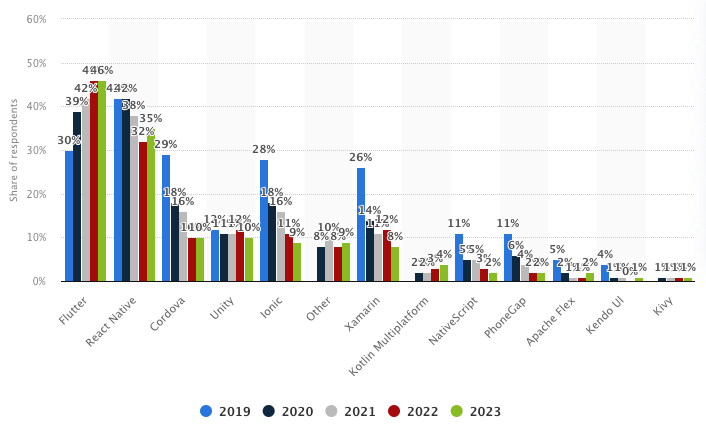
Google expanded it beyond mobile with Flutter 2 (2021), adding stable support for web and desktop applications. The developer community has also grown explosively; by 2021, Flutter had even surpassed React Native to become the number one cross-platform mobile app development framework.
Backed by Google’s long-term support (and even used for Google’s own projects), Flutter quickly became a popular choice for developing modern mobile apps. Its rise in popularity is attributed to the promise of a single codebase for multiple platforms, fast development cycles, and a rich set of customizable UI elements.
Flutter isn’t a programming language; it’s a Google-maintained SDK designed to build and compile apps. With its rendering engine, widgets, testing APIs, and developer tools, it provides everything needed for modern app development. Its architecture is built on three core layers: Framework, Engine, and Embedder.
Let’s dive deeper into each layer to understand how Flutter works.
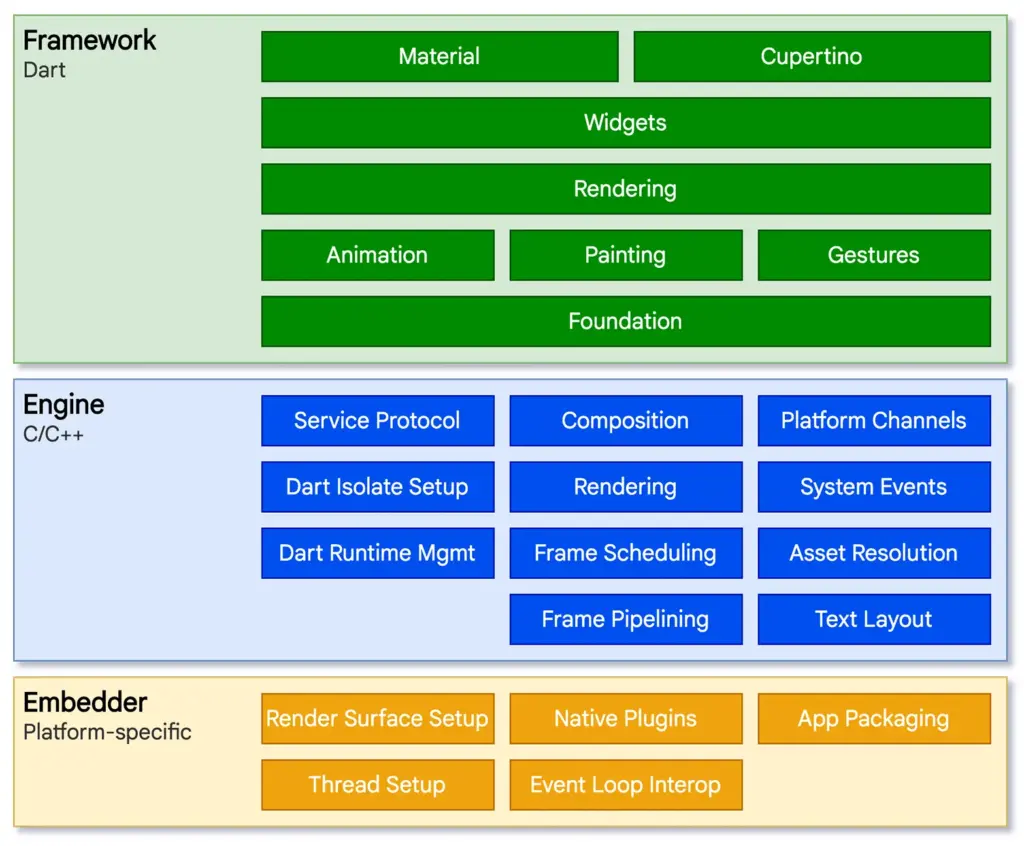
Source: Flutter
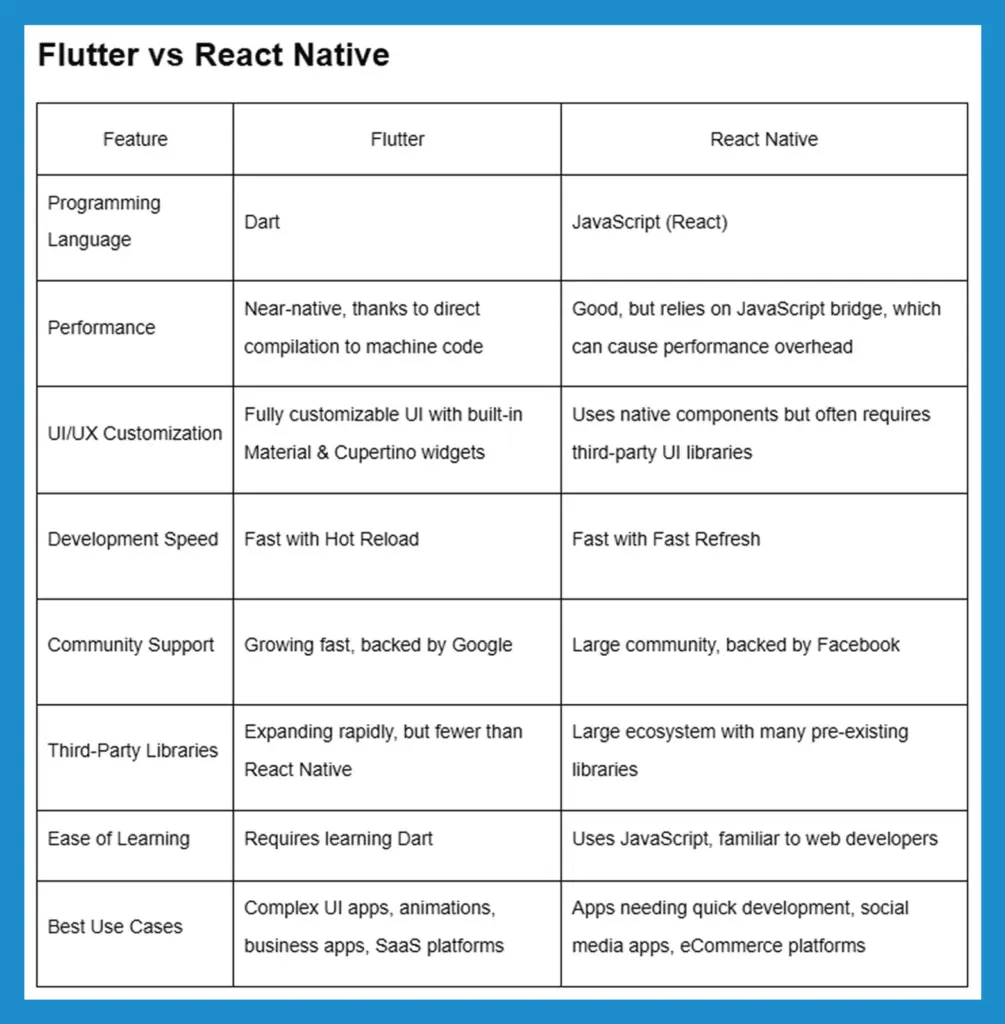
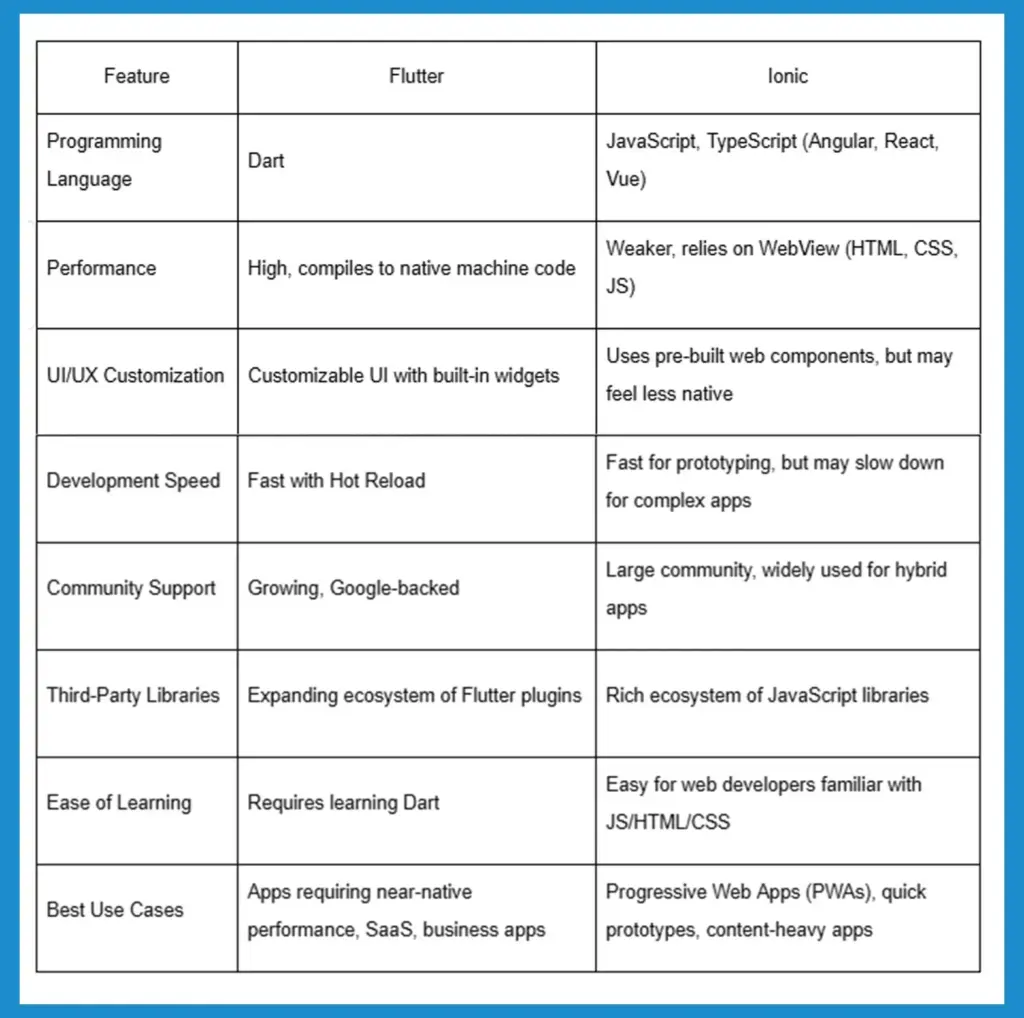
Flutter is not the only cross-platform app development framework. Other widely used alternatives are React Native, Xamarin, and Ionic, each having a varying strategy. These tables present a clear side-by-side comparison of Flutter with popular cross-platform frameworks, enabling businesses and developers to make a well-informed choice based on project requirements.
Flutter vs React Native
Flutter vs Xamarin (.NET MAUI)
Programming Language
-
Flutter: Dart
-
Xamarin (.NET MAUI): C# (.NET)
Performance
-
Flutter: Near-native with direct compilation
-
Xamarin (.NET MAUI): Near-native but can have performance overhead due to .NET runtime
UI/UX Customization
-
Flutter: Highly flexible, custom UI via widgets
-
Xamarin (.NET MAUI): Native UI via Xamarin.Forms, but may need platform-specific code
Development Speed
-
Flutter: Faster with single UI and logic codebase
-
Xamarin (.NET MAUI): Slower, as UI code may differ for iOS & Android
Community Support
-
Flutter: Growing, backed by Google
-
Xamarin (.NET MAUI): Stable, backed by Microsoft
Third-Party Libraries
-
Flutter: Expanding, 25,000+ plugins available
-
Xamarin (.NET MAUI): Large library ecosystem for .NET but fewer mobile-specific packages
Ease of Learning
-
Flutter: Requires learning Dart
-
Xamarin (.NET MAUI): Familiar for .NET/C# developers
Best Use Cases
-
Flutter: SaaS apps, business apps, mobile-first platforms, startups
-
Xamarin (.NET MAUI): Enterprise solutions, apps requiring integration with Microsoft services
Flutter vs Ionic
Recommended: Flutter vs Native App Development: Choosing the Right Technology
Flutter App Development Pros and Cons
Pros of Flutter
The Flutter development toolkit provides numerous attractive advantages which benefit both businesses and developers. The following points represent the major benefits that Flutter provides for applications development:

1. Single Codebase for Multiple Platforms
Developers using Flutter need to create a single codebase which they can deploy on purposes ranging from Android to iOS and web applications alongside desktop platforms. Businesses cut development time along with future maintenance expenses as well as development efforts by using Flutter’s single codebase platform feature.
2. Faster Development with Hot Reload
Programmers benefit from instant updates in their apps through Hot Reload, which allows them to see changes without requiring a restart. The application performs faster debugging along with the development of features and User Interface enhancements and additions.
3. Near-Native Performance
Unicode applications produced through Flutter automatically translate to native ARM machine code, which delivers native app performance, including smooth animations, quick execution, and low lag time.
4. Customizable & Adaptive UI
Pre-built Material and Cupertino widgets offer a consistent and visually stunning user experience. Its flexible UI system allows for custom designs and animations, which makesmaking it ideal for branding.
5. Cost-Effective Development
The elimination of distinct Android and iOS development teams by Flutter enables businesses to cut spending on hiring developers as well as development expenses and routine maintenance costs.
6. Strong Google Support & Growing Ecosystem
The Google-backed support facilitates Flutter to obtain routine software upgrades as well as defect resolutions and improved performance features. The thriving Flutter community both improves the platform through continuous progress and expands its core third-party library collection.
7. Rich Plugin Ecosystem
Offers third-party library packages that exceed 25,000 to help businesses implement features including payments and authentication as well as analytics and maps and push notifications.
8. Seamless Integration with Existing Code
Enables businesses to incorporate its framework into their existing native apps, which helps them convert step by step rather than completely starting afresh.
9. Support for Web & Desktop Applications
Initially built for mobile, Flutter now supports web and desktop platforms, making it an ideal choice for SaaS businesses and cross-platform expansion.
10. High Performance for Complex Apps
The handling capabilities excel at managing both graphics-intensive applications and animated interfaces and data-centric applications, thus providing an excellent user experience.
11. Consistent UI Across Devices
Custom rendering engine (Skia) ensures that the UI looks identical on Android, iOS, web, and desktop, reducing design inconsistencies.
12. Ideal for Startups & MVP Development
With faster development, lower costs, and quick iteration cycles, Flutter is an excellent choice for building Minimum Viable Products (MVPs).
13. Built-in Testing & Debugging Tools
Provides Flutter DevTools, a suite of built-in debugging, profiling, and performance monitoring tools that enhance app stability and optimization.
14. Easier Maintenance & Updates
Since one codebase powers multiple platforms, updates and bug fixes only need to be made once, leading to faster maintenance cycles.
15. Offline Functionality & IoT Support
Supports offline applications and can be used in embedded systems, IoT devices, and smart applications.
16. Support for Third-Party Integrations
The integration of Flutter with Firebase, REST APIs, GraphQL, cloud services and native modules provides enhanced flexibility to improve app capabilities.
17. Strong Security Features
Secure data storage, biometric authentication, and encrypted communication options make it suitable for fintech, healthcare, and enterprise apps.
18. Scalability for Business Growth
Designed for scalability and allows businesses to start with a small app and expand into a full-scale enterprise application without performance issues.
19. Large & Growing Developer Community
Thriving global community contributes to open-source projects, forums, tutorials, and troubleshooting resources, ensuring continued growth and support.
Cons of Flutter
The multitude of benefits associated with Flutter comes with several obstacles to evaluate. The evaluation process of project needs against these negative aspects is crucial.
1. Large App Size
Flutter apps have a larger binary size compared to native apps due to the built-in rendering engine and dependencies, making them less ideal for storage-constrained devices or lightweight applications.
2. Higher CPU & Battery Consumption
Flutter apps consume more CPU and battery compared to native apps, particularly during animations and background processes, requiring additional optimization to improve energy efficiency.
3. Limited Third-Party Libraries
The growth of the Flutter ecosystem remains active but falls behind React Native and native frameworks when it comes to the number of available third-party libraries; thus, developers might need to develop their own integrations.
4. Dart’s Learning Curve
The adoption of Flutter gets slower since the development environment demands developers learn Dart, which stands as a less popular programming language instead of the more widespread JavaScript and Kotlin.
5. Delayed Support for New Native Features
New Android and iOS features are not immediately available in Flutter, meaning developers may have to wait for updates or write native code workarounds.
6. Web & SEO Limitations
Flutter Web apps rely on a canvas-based rendering approach, making them less search engine-friendly and leading to longer load times compared to traditional HTML-based web applications.
7. Limited Support for Wearables & Smart TVs
Flutter provides insufficient support to develop apps for platforms including Apple Watch and Wear OS, along with smart TVs, which makes building for these devices complicated.
8. Requires Platform-Specific Code for Some Features
Some features, like Bluetooth and background services, and hardware integrations in Flutter demand native Swift/Kotlin code, which impairs the full codebase unification benefit of this cross-platform tool.
9. Slower Performance on High Refresh Rate Screens
Flutter struggles to consistently support 120Hz refresh rates, leading to stuttering animations on high-end devices, requiring extra performance tuning.
10. Dependency on Google’s Ecosystem
Flutter’s long-term viability depends on Google’s commitment. While heavily backed now, Google has a history of discontinuing projects, creating uncertainty for long-term Flutter investments.
11. Accessibility Features Require Extra Work
Flutter does not fully comply with native accessibility standards, requiring developers to manually optimize screen readers, high-contrast modes, and touch targets for differently-abled users.
12. Requires More RAM for Development
Hot reload and its rendering capabilities demand significant RAM from development computers, which becomes problematic for entry-level PCs and laptops.
13. Limited Augmented Reality (AR), Virtual Reality (VR) & Gaming Support
AR/VR gaming applications require enhanced optimization, due to which developers should select Unity or Unreal Engine over Flutter.
14. Flutter Web Apps Have Large Bundle Sizes
Compared to traditional web frameworks, Flutter Web apps have larger file sizes, leading to slower initial load times and higher bounce rates on slower networks.
15. Complex State Management for Large Apps
The management of app states in massive Flutter applications remains difficult because the combinations of Provider + Bloc and Redux + Riverpod add increased complexities to scalable architectural maintenance.
16. Debugging Can Be Difficult for Deeply Nested Widgets
Flutter’s widget-based architecture creates deeply nested UI trees, making debugging complex UI issues time-consuming without proper tooling and structured component management.
17. Requires Manual Optimization for Enterprise Apps
While excellent for MVPs, enterprise-level apps may require manual optimization to handle massive user loads, API calls, and background tasks efficiently.
Real Use Cases of Flutter
A good way to measure the quality of a technology is to look at who’s using it. Flutter has found its way into companies ranging from startups to industry leaders. Here are some real-world apps and use cases that demonstrate what Flutter is capable of:
-
Google Ads
Google’s own advertising platform app (Google Ads) is built with Flutter. It allows users to manage ad campaigns on the go with a polished, intuitive interface. The fact that Google trusted Flutter for a flagship, high-traffic app speaks volumes about its capability and performance.
-
Alibaba (Xianyu)
Alibaba, the ecommerce giant, used Flutter to develop its Xianyu app, a massively popular reselling marketplace. This Flutter-powered app serves over 50 million users in China. It provides a smooth shopping experience on both Android and iOS, proving that Flutter can handle large-scale enterprise applications with millions of active users.
-
eBay Motors
Flutter serves as a fundamental component for eBay Motors, which allows users to purchase and exchange cars and automobile components. Through a native-like interface, the app demonstrates photographic vehicle presentations that function effectively across different platforms. Flutter enabled eBay to speed up application development while maintaining performance standards for their photo-intensive interactive platform.
-
Nubank
Nubank selected Flutter as the development platform for their mobile banking app since they operate as a leading fintech and digital bank across Latin America. The framework demonstrated its robust security capabilities, which led Nubank to rely on Flutter for their critical financial services. The app provides a consistent user experience to millions of customers on Android and iOS, all powered by a single Flutter codebase.
-
Reflectly
Originally created by a small startup, Reflectly is a popular journaling and mental wellness app that was built with Flutter. It features a beautiful, award-winning UI with lots of custom illustrations and animations. A small development team proved that Flutter technology allows them to quickly build and release an impressive application for both stores. The success story serves as inspiration to the startup and tech communities because it demonstrates how Flutter enables rapid development along with creative possibilities.
When to Use Flutter?
Flutter is a powerful tool, but the key is knowing when it is the right tool for the job. Using this open-source framework makes a lot of sense in scenarios when you:
- Need to launch a mobile app on both Android and iOS quickly.
- Have a limited budget or a small development team.
- Want a consistent UI/UX across multiple platforms.
- Require native-like performance from a cross-platform framework.
- Plan to expand to web or desktop in the future.
- Need rapid prototyping and frequent iterations.
AI Integration in Flutter: The Future of Smart Applications
Artificial intelligence (AI) and machine learning (ML) technologies have existed in software development since the past decades yet Flutter app development benefits most from current advancements.
Using TensorFlow Lite and Firebase ML Kit frameworks developers add AI capabilities to their apps through easy implementation even when their knowledge of ML remains limited. The access to AI now extends to both startup and corporate businesses, thus allowing them to improve user experiences through predictive analytics and adaptive user interfaces combined with real-time processing capabilities.
The way Flutter apps operate has transformed due to artificial intelligence through its application in both predictive IoT apps and user-adaptive interface designs. Generation of apps has become possible because developers now create applications that understand user preferences along with performing complex operations without hassle
Top AI Frameworks Compatible with Flutter
AI integration is becoming an integral part of contemporary Flutter apps, and a number of frameworks enable developers to integrate intelligent features seamlessly. Some of the most popular AI frameworks used in Flutter development are:
✅ TensorFlow Lite
An AI framework for mobile with reduced weight that is optimized to enable real-time machine learning processes like image recognition, speech recognition, and natural language processing without burdening device resources.
✅ Firebase ML Kit
Google’s plug-and-play AI solution for Flutter apps, with text recognition, face detection, barcode scanning, and object tracking without the need for custom ML models.
✅ Google ML Kit
An independent machine learning API with enhanced AI features such as image labeling, text recognition, and face tracking, optimized for mobile efficiency.
✅ PyTorch Mobile
A flexible AI framework supporting custom machine learning models, ideal for developers who require fine-tuned AI implementations within their Flutter applications.
✅ Google AI Dart SDK
A cutting-edge SDK that enables Google’s generative AI models (like Gemini) in Flutter, supporting text generation, chatbots, and content summarization for intelligent interactions.
How AI is Transforming Flutter Applications
Flutter development achieves remarkable user experience and functionality upgrades through AI integration. AI is changing various key aspects as follows:
1. The adaptive user interfaces in Flutter apps become possible through AI, which analyzes user behavioral patterns to tailor interfaces to individual needs. Online platforms suggest relevant items to their customers through purchase tracking systems, while news aggregation platforms automatically select articles that match user preferences.
2. The combination of artificial intelligence through NLP technology in Flutter apps enables natural dialogues and natural responses from chatbots because of NLP processing capabilities. Clients benefit from easier accessibility because voice assistant technology combines with real-time translation functions that pair with hands-free controls.
3. Visual intelligence and image recognition functions from AI enable applications to perform real-time identification of objects as well as products, landmarks, and facial features. The scanning feature of retail applications makes use of this capability, and AR applications gain better customer engagement through AI-based features.
4. The integration of facial recognition with AI-driven biometric authentication implements better authentication security, which makes Flutter applications more secure while becoming more friendly for users.
5. AI-Powered Optical Character Recognition (OCR) converts documents into digital text.. It This results in automated entry of data and verification of authentication alongside document management for Flutter business applications.
Why partner with BrainX for Flutter development?
Selecting the correct technology is only the starting point; a right development team is what is needed to see success. BrainX is dedicated to Flutter application development, and we offer premium solutions for startups, SaaS companies, and enterprises.
Our skilled Flutter developers ensure optimal performance, scalability, and UI as they deal with platform-specific integration. BrainX operates as a full-service provider that delivers UX/UI design alongside development and testing together with maintenance services.
Our strategic expertise in creating MVPs and implementing enterprise applications and third-party interface solutions guarantees complete implementation success. BrainX is your go-to partner, ensuring transparent communication, timely delivery, and ongoing assistance to keep your application current with the latest from Flutter and the best practices.

Mobile applications have become business fundamentals to boost customer loyalty and optimize functional processes and monetary results. Mobile app development creates powerful effects on business market influence together with operational effectiveness.
Business success and user satisfaction depend on selecting the ideal development pathway since it affects application speed alongside user experience together with operational target fulfillment. Businesses must evaluate their specific requirements together with development period and expenses and scalability needs when deciding between native applications versus Flutter cross-platform development.
The following blog delves into the business-related differences between Flutter vs native app development. The information in this assessment helps businesses select the correct method for their business app development.
Chronological Development of Mobile App Technologies
Since the beginning mobile app development has undergone essential evolutions that are divided into specific phases leading to today’s advanced technological structure.
Native Development Dominance
At the beginning of mobile app development developers implemented separate native programming languages for distinct platforms. The development process utilized Java or Kotlin for Android apps while Swift or Objective-C served iOS applications.
Development by native methods provided excellent system and hardware compatibility which allowed developers to achieve superior application performance together with an uninterrupted user experience. Developing different codebases per platform frequently resulted in longer development duration because it generated additional expenses.
Emergence of Cross-Platform Frameworks
Different programming frameworks appeared to overcome native programming issues because they let developers create one unified programming codebase for platform deployment. Multiple frameworks, such as React Native, Xamarin and Ionic, became favored options because they lowered development time and reduced costs.
A few cross-platform options encountered system speed restraints and challenges obtaining access to platform-specific capabilities that limited their ability to deliver optimal user results.
The Inception of Flutter App Development
Google released Flutter as an open-source User Interface software development kit in 2017 as a tool for building applications that run on multiple platforms. Developers can create natively compiled applications that work for mobile phones and desktop systems and the Web using the same body of code through Flutter.
Developers use Dart alongside its set of pre-designed widgets to create attractive performing applications. Code changes in Flutter applications become possible through the “hot reload” functionality which allows developers to work without application restarts while codes update in real time. The development community has embraced Flutter with enthusiasm because this platform provides efficient delivery of platform-consistent experiences to developers and organizations.
Also Read : How to Outsource Mobile App Development
What is Native App Development?
Native app development involves application development for particular operating systems including iOS and Android. The application gets maximum performance benefits from hardware and software features of the device through this approach.
Key Features of Native Apps
1. High Performance
Native applications use platform-specific coding methods and application programming interfaces which makes them perform optimally for rapid user interface operations.
2. Offline Functionality
Native apps function offline but the permanent installation on devices enables users to get needed functionality every time they need it.
3. Access to Device Features
Native applications enable direct communication with device components that include camera and GPS and microphone and sensors to build high-end applications.
4. Consistent User Interface
Native applications follow platform-specific design guidelines. Thus the users get a familiar and intuitive interface that enhances the general experience of the overall user.
5. Push Notifications
Native apps can send push notifications, keeping users informed and engaged with timely updates and information.
6. Regular Updates
Developers can release updates through official app stores that ensure that the users access the latest features and improvements.
7. Utilization of Platform-Specific Features
Native apps can leverage unique platform features, such as Apple’s ARKit for augmented reality or Android’s Jetpack components, to deliver innovative functionalities.
Common Technologies Used
Developers employ specific tools and languages tailored to each platform:
- iOS Development: It uses Swift or Objective-C as its languages and will use Xcode as its IDE.
- Android Development: It uses Java or Kotlin and is very commonly developed in Android Studio.
Advantages & Disadvantages of Native Apps
Native App Advantages for Businesses
Native mobile applications have a lot of benefits that make them the first choice for businesses to deliver high-quality user experiences. Here is an exhaustive list of the key benefits:
- Enhanced Security: Leveraging platform-specific security features, native apps provide robust protection against data breaches and other security threats.
- Complete Access to Device Features: Native apps can access the camera, GPS, and microphone facilities as well provided by a mobile device to make applications with more features.
- Offline Capability: Such applications can function even when there is no internet connection available. Using these applications, users can access important information and features anytime.
- Less Bugs and Stability : Maintaining isolated codebases for each of the aforementioned platforms reduces those dependencies and bugs and as a result may produce a more stable app.
- Scalability: Native apps provide greater scalability to businesses in terms of adding new features to accommodate increasingly large bases without relying on diminished performance.
- Direct App Store Support: Native apps receive full support from app stores, ensuring timely updates and better visibility, which can lead to increased downloads and user trust.
- Better Integration with Existing Systems: Native apps can easily integrate with existing enterprise systems and databases, ensuring a smooth flow of data and efficient operations.
- App Store Optimization (ASO): More likely to go into the app store where they can be featured with better visibility and credibility that may result in higher download rates.
- Future-Proofing: Native apps are inherently better positioned to cope with new features and updates on platforms.
- Enhanced User Engagement: With capabilities like haptic feedback and in-app purchases, native apps can offer interactive and monetizable experiences.
Native App Disadvantages
While native app development offers numerous advantages, businesses should also consider several potential drawbacks when deciding on their mobile strategy:
- High Development Costs: Developing separate apps for iOS and Android requires distinct teams, leading to increased financial investment.
- Extended Development Timelines: Writing unique code for each platform prolongs development, delaying time-to-market.
- Resource Intensiveness: Maintaining separate codebases demands specialized developers, increasing project complexity and straining resources.
- Complex Maintenance and Updates: Implementing updates separately for each platform leads to higher ongoing maintenance costs.
- Limited Code Reusability: Inability to reuse code across platforms results in duplicated work and inefficiencies.
- Lengthy Download and Installation Process: Multiple steps to download and install native apps may deter users, leading to lower adoption rates.
- Higher Maintenance Costs: Ongoing expenses include app store fees and commissions on in-app purchases, adding to costs.
- Challenges in Achieving Feature Parity: Ensuring consistent features across iOS and Android versions can be challenging, affecting user experience.
What is Flutter?

Source: Flutter
Through its open-source development Google offers Flutter as a UI software development kit which enables developers to generate natively compiled mobile desktop and web applications from one unified codebase. Applications that perform at high speeds and look attractive result from Flutter thanks to its framework built using the Dart programming language.
Key Features of Flutter
- The application development process becomes faster because hot reload shows developers immediate code effects without requiring application restarts.
- Since developers write code from one source only Flutter enables them to create applications for multiple platforms which reduces development time and workload.
- Widgets help create an expressive and flexible user interface which automatically adjusts according to screen sizes and orientations.
- Flutter architecture compiles to native ARM code giving smooth running and fast applications.
- Flutter allows for direct access to native device features and APIs. This means developers can leverage the power of native features and APIs like cameras, geolocation, and sensors.
- The vast number of packages and plugins available through Flutter Package Manager (pub.dev) offer ready-made solutions to most common app requirements.
- Dart programming language is optimized for fast applications running on any platform with sound null safety, reducing common bugs to help enhance code quality.
- Flutter’s widget-based architecture allows for a truly consistent UI across different platforms, enabling developers to create complex UIs with ease.
- Google’s support and open-source community provides Flutter developers with instructional material and third-party components which boosts community learning.
- Developers can smoothly merge Flutter with existing programming codebases to develop new features while utilizing their current applications or migrate their framework at an incremental pace.
Pros and Cons of Flutter for Businesses
Advantages of Flutter for Businesses
1. Faster Development: A single codebase for multiple platforms with hot reload enables rapid iterations, reducing time-to-market and boosting efficiency.
2. Cost Savings: Maintaining one codebase cuts development and maintenance costs, requiring fewer developers and minimizing expenses across platforms.
3. High Performance: Flutter compiles to native ARM code and uses Skia for smooth animations, ensuring a seamless and responsive user experience.
4. Consistent UI: Rich customizable widgets provide visually appealing, uniform designs across platforms, enhancing brand identity and user experience.
5. Scalability: Flutter’s architecture supports future technological advancements, ensuring long-term adaptability for new platforms and business growth.
6. Strong Community Support: Google-backed with extensive developer contributions, providing access to resources, plugins, and troubleshooting solutions.
7. Rich Plugin Ecosystem: Thousands of pre-built plugins simplify integration of features, saving development time and improving functionality.
8. Easier Maintenance: A single codebase enables simultaneous updates, reducing bugs and ensuring consistency across Android, iOS, web, and desktop.
9. Rapid Prototyping & MVPs: Faster development cycles allow quick idea testing, helping businesses validate concepts before full-scale development.
10. Google’s Continuous Support: Regular updates and innovation ensure Flutter stays competitive, providing businesses with a future-proof development framework.
Disadvantages of Flutter for Businesses
1. Flutter apps often have larger file sizes than native apps, potentially deterring users with limited storage.
2. Being relatively new, Flutter’s ecosystem has fewer third-party libraries, possibly requiring more custom development.
3. In complex scenarios, Flutter apps may not match native performance, especially in resource-intensive applications.
4. Dart is less popular than languages like Java or Swift, making it harder to find experienced developers.
5. New OS features may take longer to be supported in Flutter, delaying access to the latest functionalities.
6. Widget-based architecture can lead to deeply nested code, complicating maintenance for large applications.
7. Flutter may not fully support certain platforms like wearables or smart TVs, restricting its applicability.
8. The inherent size of Flutter apps can be a disadvantage, especially for instant apps with strict size limits.
9. The non-native Bluetooth mechanics of Flutter create technical obstacles to link with hardware devices through Bluetooth interfaces.
10. The higher expense of Flutter development occurs due to the necessity of skilled specialists along with technical requirements for maintaining uniformity across multiple platforms.
Detailed Comparison between Flutter vs Native App Development
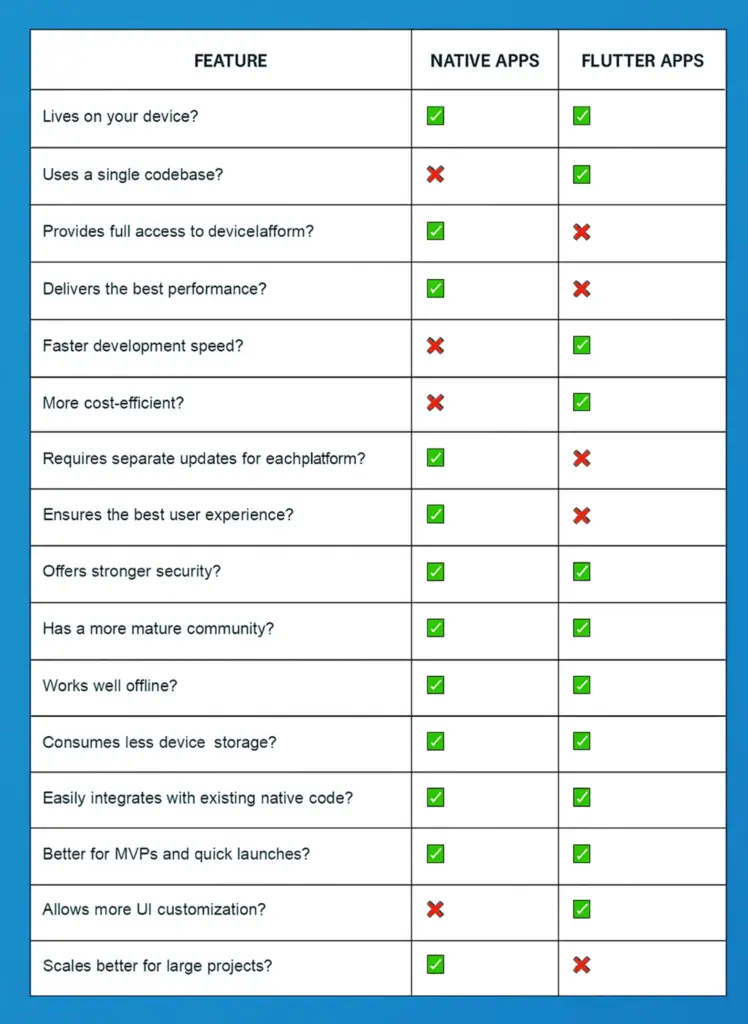
Flutter vs Native App Development: What to Choose?
The selection between Flutter and native development depends heavily on multiple determining elements which include budget requirements as well as project timeline and user experience needs. The following analysis explains in detail what businesses need to know before making their choice.
Cross-Platform Consistency
To deliver a consistent user experience between iOS and Android platforms a business should select Flutter because its single coding foundation maintains design standards and operational consistency.
Rapid Prototyping and MVP Development
Flutter provides entrepreneurs and businesses with an opportunity to develop their concepts swiftly thus enabling them to enter the market quickly and gather customer feedback.
Budget Constraints
When resources are limited, Flutter’s unified development approach reduces the need for multiple teams, leading to significant cost savings.
Complex UIs with Custom Animations
Flutter’s rich widget library and flexible design capabilities make it ideal for applications requiring intricate user interfaces and animations.
When to Choose Native App Development?
High Performance Requirements
For applications demanding optimal performance, such as high-end games or resource-intensive tools, native development offers superior speed and efficiency.
Access to Platform-Specific Features
If your app relies heavily on platform-specific functionalities like advanced camera controls, Bluetooth, or background services, native development provides direct access to these features.
Adherence to Platform Design Guidelines
When aiming to provide a user experience that aligns closely with platform conventions, native development allows for strict adherence to iOS and Android design guidelines, ensuring familiarity for users.
Long-Term Scalability and Maintenance
For large-scale applications anticipated to evolve with complex features over time, native development facilitates better scalability and maintainability, leveraging mature ecosystems and tools.
Examples of Successful Native Apps
1. Mighty Networks
This platform provides creators and brands an opportunity to establish community-based social networks that include courses and live events together with membership options.
2. Discover
The users of this banking application access all account features and bill payment requirements through biometric authorization.
3. Instagram
Instagram is a popular social network which enables users to upload posts while editing their content and real-time interactions.
4. Duolingo
Through its gamified teaching approach and speech recognition functionality and AI-based exercises the app helps people learn languages.
5. Hive
The program enables teams to handle projects by maintaining tasks where users can track due dates while integrating workflows into their processes.
6. Adobe Lightroom
This professional application provides photographers with wild AI technologies along with cloud storage facilities for photo editing.
7. Mint
The personal finance application tracks expenses, generates budgets and safeguarded managers financial goals for its users.
Best Examples of Flutter Applications
eBay Motors
On eBay Motors users can browse and purchase complete vehicles together with their vehicle components along with accessories. The app offers three essential features for automotive enthusiasts which include chat with resellers together with a new listing alert setting and a search bookmarking system.
Google Pay
Google Earth renders a 3D representation of Earth based on satellite imagery. It allows users to enter addresses using a keyboard or mouse and explore any location across the globe.
My BMW
Through the My BMW app, BMW owners gain full vehicle access which includes vehicle status tracking and remote services at the same time as navigation features. Users receive improved driving luxuries due to the personalized services and real-time information delivered by the app.
Realtor.com
The Flutter-based Realtor.com app supports users in their home search through its full property listings. It includes detailed information alongside premium photos and virtual property tours. The app also offers features like mortgage calculators and neighborhood information to aid in the home-buying process.
1. Nubank
Nubank is a leading fintech company in Latin America, offering digital banking solutions. Their Flutter-based app provides users with a range of financial services, including account management, payments, and investment options, all within a user-friendly interface.
2. Google Earth
Google Earth is a computer program that renders a 3D representation of Earth based on satellite imagery. Users can explore the globe by entering addresses and coordinates or by using a keyboard or mouse.
Overcome Flutter vs Native App Development Dilemma with BrainX
Modern organizations face substantial difficulties when developing mobile applications in the current rapidly changing digital world, including:
- Monitoring new development patterns from Android and iOS so their apps stay contemporary and competitive.
- Creating user interfaces must focus on enhancing satisfaction through engaging interfaces which people can easily navigate.
- Ensuring compatibility across a wide range of devices with varying screen sizes and hardware capabilities.
- Seamlessly incorporating third-party APIs to enhance app functionality without compromising performance.
BrainX Technologies focuses on defeating these obstacles by creating special applications using Flutter and native development for various market sectors. Our team dedicates itself to developing user-friendly high-performing apps that exceed market demands.
We all know that feeling when the cravings come hitting hard-especially in the dead of night. Who would bother getting out, right? That’s precisely why on-demand food delivery apps can satisfy all those cravings in just a few taps on your smartphone.
The on-demand food delivery market is growing at an incredible pace. According to Statista, the industry was projected to reach $339 billion in revenue by the end of 2022. With an annual growth rate of 13.68%, the market is expected to surge to $1.45 trillion by 2027.
These numbers make it clear that now is the right time to take your restaurant or food business online and reach a much larger audience. By investing in an on-demand food delivery app, you can streamline your operations and make your menu instantly accessible to customers who value convenience.
At BrainX, we specialize in building powerful on-demand solutions. Our team has delivered white-label platforms for restaurant aggregators, ordering apps, and delivery services—helping businesses modernize their operations and stay ahead in a highly competitive industry.
This blog will be the ultimate guide for business enthusiasts and entrepreneurs. This shall enlighten you about the benefits of on-demand food delivery app development and its scope in the booming IT industry.
15 Benefits of On-Demand Food Delivery App Development

On-demand food delivery app development will benefit businesses to have improved growth, revenue, and customer retention. Here are 15 key benefits that explain how this market can be lucrative for investment and is a very strategic move:
1. Market Scale
The on-demand food delivery app development allows businesses to reach larger customer markets at local and international levels while creating a much larger customer base.
2. Tapping into Growing Demand
Increasing order volumes online and consumers’ penchant for convenience will continue to spur the demand for food delivery, thus opening up further scope for growth.
3. Multi-Angle Revenue Streams
On-demand app development introduces multiple sources of revenue: delivery charges, advertising, partnerships, and subscription-based models, all adding up to a smooth balance of revenues.
4. Growth in Revenue
With digital orders as a channel, companies could reap increased profitability with increased convenience to their customers.
5. Low Entry Barriers
Food delivery apps are not as capital-intensive as traditional businesses. It is, therefore, easier for startups and entrepreneurs to launch such a business.
6. Growing Investor Confidence
The innovative approach of the on-demand food delivery app development aligns well with consumer trends. It also helps attract venture capital and investor interest, thus increasing growth potential.
7. Greater Convenience for Customers
On-demand app development enablesenable users to order food anytime and anywhere, which will answer the call for fast, easy, and reliable solutions.
8. Data-Driven Marketing and Insights
Understanding customer preferences helps businesses create better experiences. They can offer products and services that feel personal. Targeted marketing works better if you want to engage more users and earn loyalty.
9. Efficient Operations
Automation reduces human errors in order-taking, accelerates service delivery, and ensures efficient coordination between restaurants and delivery personnel.
10. Scalability for Growing Demand
On-demand apps are designed to handle growing user numbers and geographic expansions, enabling businesses to scale operations seamlessly.
11. Stronger Brand Visibility
A good app increases a brand’s visibility in the digital space and makes it more accessible to more people.
12. Customer Retention
App-based loyalty programs, promotions, and deals promote order repetition and maintain long-term customer relationships.
13. Customer Feedback and Interaction
Applications make giving reviews easy, which aids businesses in providing better service and maintaining relationships with their customers.
14. Integration with Lifestyle Trends
Let’s be honest: Not only Gen Z but every generation today is fond of mobile-first apps. Such apps serve their purpose correctly and provide personalized customer experiences.
15. Future-Proof Business Model
Investing in a food delivery app positions businesses to be relevant and competitive in a rapidly digital-first world that is sustainable and growing.
3 Most Renowned Business Models for Food Delivery Apps
The choice of the correct business model depends on budget, market reach, and other operational resources that support one’s long-term goals. Right business models simplify operations, and that lays the right foundation for a successful food delivery business. Here are three main business models for food delivery apps available, each designed to meet varying operational needs and target markets.
1. The Order-Only Model
This model focuses solely on connecting customers with restaurants by providing a platform to browse menus, place orders, and complete payments. However, it does not handle the delivery process. Instead, restaurants manage their logistics to fulfill customer orders.
This model is cost-effective and suitable for startups looking to act as intermediaries without investing in delivery infrastructure.
Key Examples
Just Eat and Grubhub are successful platforms that have adopted this model by acting as a digital bridge between customers and restaurants.
2. Order-and-Delivery Model
In this model, the food delivery platform handles both order processing and delivery logistics. The platform acts as a hub that coordinates between customers, restaurants, and delivery personnel. By managing the entire process, this model ensures a streamlined experience for all parties involved.
This model requires more operational complexity and resources but has a complete solution. Because of this, it remains very popular among entrepreneurs, who seek to gain an increased market share.
Key Examples
Uber Eats, DoorDash, and Deliveroo are companies operating on the model described above. For customers, this means accessing a diverse restaurant choice and reliable delivery services.
3. The Fully Integrated Model
The fully integrated model offers end-to-end control over the entire process of meal preparation to doorstep delivery. Businesses under this model own every aspect of the value chain, including cooking, packaging, and logistics. This approach ensures a consistent customer experience but requires significant investment and infrastructure.
Virtual or cloud kitchens are cost-effective alternatives to the fully integrated model for new businesses. This would allow restaurants to start small without having overhead costs for physical dining spaces.
Key Examples
It is useful for Domino’s and McDonald’s since it allows them to maintain control over their brand and delivery operations, providing a seamless experience for their customers.
8 Revenue Models for Food Delivery Apps

The most significant thing in the development of a successful on-demand food delivery platform is having a sound monetization strategy. The businesses can get profitability through various revenue streams while ensuring value to the users and partners. Below are some of the most effective and widely adopted revenue models for food delivery apps:
1. Delivery Charges
One of the most straightforward revenue models is charging customers for delivery services. These charges can be:
- Fixed: A set fee is applied to every delivery.
- Dynamic: Adjusted based on factors like distance, delivery time, or order size.
Dynamic pricing ensures fair compensation during peak demand or for longer delivery routes. Additionally, platforms can attract loyal users by offering subscription plans that waive delivery fees, increasing customer retention.
2. Commission from Restaurants
Another common strategy is to get into partnerships with restaurants and offer a commission for each completed order.
- Flexible Rate Commission: This can range from restaurant size, volumes of orders, or high demand.
- Win-Win Model: the platform takes in steady revenue, and at the same time, restaurant owners get a chance for increased visibility and order volume.
Offer discounts to attract new or smaller restaurants that are in the growth cycle.
3. Paid Ads
A steady income stream can be derived by selling advertising space to restaurants or other businesses through a food delivery platform.
Restaurants can pay for:
- Increase visibility.
- Be at the top of search results.
- Run promotional campaigns within the app.
- This model will allow smaller establishments to compete with larger ones while allowing the platform to generate revenue without interfering with primary operations.
4. Membership Subscriptions
Subscription-based models allow customers to enjoy exclusive perks such as:
- Free deliveries.
- Access to special deals and discounts.
- Priority customer support.
- Platforms can establish a recurring revenue stream through the periodic charging of a monthly or yearly fee.
5. Surge Pricing
Surge pricing is one way in which to maximize revenue, especially during high-demand times.
Platforms can increase delivery charges during the following:
- Holidays.
- Weekends.
- Adverse weather conditions.
- This model boosts revenue and motivates delivery personnel to work during busier times.
6. Aggregator Commission
In the aggregator model, platforms deduct a commission directly from the payments received for orders.
- Process: The platform holds a pre-set percentage of the total payment and the remaining amount is sent to the restaurant.
- Advantage: This makes collecting revenues easy and ties the commissions directly to the order value.
7. Promotions and Marketing Campaigns
Restaurants often pay extra for the visibility of getting ahead of their competition.
Platforms can offer:
- Promotional spots.
- Featured listings.
- It helps new restaurants to acquire an audience faster and earn supplemental income for the platform.
8. Premium Deliveries
Platforms can now offer premium deliveries at some extra charge.
Some may include:
- Express Delivery in case of rush orders
- Eco-Friendly Packaging for users who wish to use eco-friendly packaging.
- Those premium services cater to those niche markets and give income from a different angle.
10-Step Guide to Creating an On-Demand Food Delivery App

Developing an application to provide food can revolutionize how people consume meals in this advanced era. However, creating an application requires a lot of planning, a great understanding of what the user needs and the right features added. The following steps can help you take a better start:
Step #1 Create a Minimum Viable Product (MVP)
An MVP is an efficient method to test your idea at minimal investment. Focus only on the essential features that include order placement, processing of payment, and monitoring of delivery. This allows you to gauge customer interest and refine your app based on real-world feedback.
Step #2 Define Your Business Model
The business model dictates how your app generates revenue and connects with users. Common options include:
- Commission-based: Charging restaurants a fee per order.
- Subscription-based: To offer features for continual charges to users who subscribe to the premium version.
- Advertisement-based:Generating income through in-app ads.
For example, Grubhub’s commission-based model provides sustainable revenue, while Uber Eats targets urban professionals with features tailored to their needs, demonstrating how aligning your model with your audience drives success.
Step #3 Identify and Understand Your Target Market
- Comprehending your audience is essential.
- Conduct demographic research, pinpoint geographical focus areas.
- Consider cultural preferences.
For instance, Uber Eats thrived by catering to busy urban professionals and prioritizing swift delivery from diverse restaurants. This understanding helped them design features and services tailored to their audience’s expectations.
Step #4 Conduct Market Research
Thorough market research reveals opportunities and challenges within the competitive landscape.
- Competitor Analysis:Examine successful apps to identify trends and gaps.
- User Feedback: Find out how users are interested in aspects like fast delivery or real-time tracking.
- Trend Monitoring: Monitor emerging technologies and changing needs in the market.
DoorDash’s success came because they addressed local-market needs not being fulfilled and created a service that filled those needs.
Step #5 Design the App for an Outstanding User Experience
- An intuitive, visually appealing design is crucial.
- Keep it minimal enough to maintain user-friendliness.
- Incorporate engaging visuals and clear layouts.
- Make your app friendly to various devices and screen sizes.
Zomato makes it easy for customers to browse and order their favorite dishes with unique interfaces.
Step #6 Develop a Standard Client App
Your app must satisfy all key stakeholders within the food delivery ecosystem; that includes your customers, restaurants, and delivery personnel.
- Customer Features: Menu browsing, order tracking, and diverse payment options.
- Restaurant Features: Tools for managing orders, updating menus, and analyzing performance.
- Delivery Personnel Features: GPS navigation, real-time order status updates, and communication tools.
- This modular design ensures every user has a tailored experience that meets their unique needs.
Step #7 Partner with a Reliable Development Team
- Select the right tech partner.
- Choose a team experienced in developing food delivery apps, with strong client testimonials and expertise in scalable technology integration.
For instance, McDonald’s partnership with Capgemini produced a seamless app experience, significantly increasing their digital sales.
Step #8 Test and Launch Strategically
Testing ensures your app operates flawlessly and securely. Focus on:
- Functional Testing: Verifying the performance of key features.
- User Experience Testing: Assessing usability and customer satisfaction.
- Security Testing: Safeguarding user data against breaches.
When launching, start strategically in a specific market. Build a strong local presence before gradually expanding. DoorDash’s city-by-city rollout exemplifies this approach, allowing them to adapt effectively to specific market needs.
Step #9 Leverage Marketing and Feedback
Apply the following strategies for engaging more users and retain them:
- Social Media Campaigns: Drive awareness and engagement.
- Special Offers: Attract new users and retain existing ones.
- Partnerships: Collaborate with popular restaurants or influencers.
- Post-launch: Actively gather user feedback to continuously improve the app.
Companies like Uber Eats and Zomato excel by incorporating user suggestions into regular updates, enhancing their platforms’ appeal.
Step #10 Focus on Long-Term Maintenance and Scalability
Sustained success requires maintaining and scaling your app effectively.
This involves:
- Routine Updates: Upgrade your app with the latest features for better performance.
- Customer Support: Provide timely assistance to users.
- Performance Monitoring: Quickly identify and resolve any issues.
For instance, Talabat updates its application continuously, so that new features may be added to improve customer experience. As a result, the firm maintains its market leader status in the Middle East.
Features of On-Demand Food Delivery Apps

Incorporating the above, a successful on demand food delivery application must consider implementing features to serve consumer interests, restaurant needs, and couriers’ demands. Below is an in-depth detail of some of the fundamental features that should be represented for each user group accompanied by real-life examples from high-ranking food delivery apps across the globe.
Consumer Apps
1. User-Friendly Interface
An intuitive design that makes navigation, ordering, and account management easy.
Example: Uber Eats has a very simple, clean interface, making it easy for users to browse and order.
2. Real-Time Order Tracking
This feature gives the user live updates of an order’s status from preparation to delivery.
Example: Deliveroo allows real-time order tracking to keep its users updated on the order’s location, and estimated delivery time.
3. Multiple Payment Options
This feature accepts various forms of payment, including credit/debit cards, digital wallets, and cash.
For instance: Zomato accepts more than one payment mode; hence, the service would cater to a wide category of users in India.
4. Personalized Suggestions
Promotes restaurants and dishes according to individual preference through user data.
Example: A Swiggy uses an algorithm created by machine learning to personalize the food recommendation
5. Reviews and Rating
Ratings for dining or takeaway experience are encouraged to ensure quality improvement.
Just Eat Example: The same Just Eat enables one to post ratings and reviews on platforms to aid other people in the decision-making process.
Restaurant Apps
1. Order Management System
Orders intake, and manages and monitors orders.
Example: Grubhub has an entirely different application where restaurants handle incoming orders.
2. Analytics and Reporting
The application gives insight into sales, customer preference, and operational performance.
Example: Postmates allows restaurants to analyze trends and behavior by customers.
3. Promotion Management
Restaurant facilitates in designing and managing special offers or discounts.
Example: Foodpanda allows restaurants to create promotional campaigns using its partner interface.
4. Customer Feedback Integration
It gathers and displays user reviews so that restaurants can refine their offerings.
Example: Talabat offers a feedback system that helps restaurants in addressing customer complaints.
Courier Apps
1. Delivery Assignment and Routing
It assigns the orders and suggests the optimal routes for delivery.
Example: Glovo uses sophisticated algorithms to assign deliveries and provide efficient routes.
2. Earnings and Performance Tracking
It allows couriers to track their earnings, delivery history, and performance metrics.
Example: Rappi offers couriers a dashboard to view earnings and statistics.
3. In-App Communication
Allows direct communication between couriers, customers, and support teams.
Example: GrabFood offers an in-app chat for real-time communication.
4. Availability Scheduling
Allows couriers to set their work availability and even schedule shifts.
Example: SkipTheDishes allows couriers to set and customize their working hours.
5. Safety and Compliance Features
Offers incident reporting, access to support, and regulatory compliance.
For example: Menulog provides Australia’s couriers with safety resources and support features.
Key Players in the Food Delivery App Market of On-Demand
There are a few big companies in the food delivery market with their own strengths and market valuations worth hundreds of billions of dollars:
Uber Eats
Valuation: By November 2024, Uber and its Uber Eats division were valued at approximately $90 billion.
Overview: This organization connects with more than 6,000 cities across 45 nations by leveraging Uber’s logistics network.
DoorDash
Valuation: $30 billion (November 2024).
Overview: Has owned 67% of the US food delivery market and also provides facility for grocery and convenience deliveries
Delivery Hero
Valuation: $15 billion (November 2024)
Overview: Provides services in over 50 countries, dominating in Asia, Europe, and the Middle East
Meituan
Valuation: $150 billion (November 2024).
Overview: Meituan China’s biggest food delivery app is dominating with its 70% market share.
Swiggy
IPO Valuation: $12 billion in November 2024
Overview: Expanding into quick commerce with Instamart grocery deliveries.
Zomato
IPO Valuation: $8 billion (November 2024)
Overview: Leader in India, also expanding into grocery delivery through the acquisition of Blinkit.
GrabFood
IPO Valuation: Part of Grab Holdings’ $14 billion valuation
Overview: Southeast Asian players, integrated within Grab’s super-app ecosystem
Revenue Models for Current Food Ordering Applications
Modern food delivery applications sustain operations and garner revenue through a combination of the following revenue models:
1. Commission-Based Model
A percentage charge on each restaurant order (15-30%).
2. Delivery Fees
Users pay based on the distance, size of the order, or demand of the order.
3. Subscription Services
Free deliveries and other discounts in return for recurring fees.
4. Advertising and Promotion Fees
Places through the application are sold as advertising space and in a pay-per-listing format to maximize view reach.
5. Data Analytics Service
The platforms analyze customer behavior and preferences, based on which actionable insights are provided to partner restaurants.
Transform Your Food Delivery Vision with BrainX Technologies
The success of an on-demand food delivery app depends upon how the technical challenges are resolved. It ranges from making a seamless user experience to a robust backend. At BrainX Technologies, we can offer services in web and mobile development, AI integration, and blockchain solutions, ensuring scalable and secure applications. Connect with our experts today to take the first step towards achieving your dream on demand food delivery app.

On-demand app development has reshaped how businesses and customers interact, offering real-time convenience, scalability, and efficiency. From ride-hailing and food delivery to healthcare and e-learning, these apps provide instant solutions that enhance engagement, reduce operational costs, and unlock new revenue streams. While challenges like high development costs and intense competition exist, with the right strategy, features, and technology stack, businesses can build scalable, user-centric apps that drive long-term growth.
Gone are those days when one needed to go out and buy even a single pen. But now everything in the world is just a tap away. Thanks to apps that have enabled users to order anything no matter the distance and pay online. Mobile apps took a major shift during the COVID pandemic when people preferred online shopping rather than stepping out and risking their lives.
From Uber to Foodpanda, to even the startups, all invested highly in their apps and got a fair share of their profit because millions of people used them. It has been believed that the demand for developing on-demand apps grows with each passing day. Developers seem to be enthusiastic about developing them due to their worldwide fame.
What is On-Demand App Development?
On-demand applications cater to the users’ real-time needs, thereby smoothening the interactivity between customers and service providers. These apps include real-time tracking features and secured payment gateways to easily procure services or products.
Examples such as Uber, Ola, DoorDash, and Uber Eats for ridesharing and food delivery; as well as Netflix and Amazon Prime for streaming. On-demand applications use innovative technologies that enhance instant access to whatever the customers want. Generally, on-demand applications help customers to buy something instantly or to get some sort of service instantly.
Features of On-Demand Apps
The on-demand applications have revamped the availing of any service to be more convenient and an instant solution for them. Still, the success of these applications depends on some of the key features, which promise improvement in user experience, smoothing of processes, and assurance of efficiency. Let’s explore must-have features that make on-demand apps indispensable in the fast-paced digital world.
Instant Messaging
Adding an in-app instant messaging feature during a custom on-demand application development can enhance user experience by offering a personal touch. It allows stakeholders to address queries, reduce miscommunication, and resolve issues like payment, order processing, and damaged products. It enables smart assistants to provide real-time data and point-by-point information.
Push Notifications
The app should engage users with product launches, discounts, and order status updates through push notifications. This feature keeps users informed about new arrivals, promotional offers, and service bookings, ensuring regular communication. Push notifications are vital for the success of marketing campaigns and expanding client engagement. They also retain customers and help elevate the open rate as well as user experience.
Reviews & Ratings
Allowing customers to share feedback and reviews helps service providers understand their performance and improve over time. This feature enables users to rate and review providers, guiding future customers in making informed decisions. Feedback not only enhances service quality but also boosts business growth by fostering continuous improvement.
Payment Gateways
On-demand apps should provide multiple secure payment options like internet banking, digital wallets, and credit or debit cards. Offering various payment methods enhances user convenience, boosts confidence, and ensures smooth transactions. For businesses, this reduces cart abandonment and increases successful transactions, attracting a broader, global customer base.
In-app Customer Support
On-demand apps benefit from robust customer support, ensuring users’ queries are addressed promptly. Quick assistance reduces negative feedback, enhances service quality, and boosts customer satisfaction. Easy access to support fosters loyalty as customers feel confident knowing help is available whenever needed, improving their overall app experience.
Sign-up/Login
Registration should be quick and easy. It is the service provider that has to develop accounts using social networking profiles or mobile phone numbers. Users will be able to log in to use all the app’s services with minimal information such as name, email ID, and phone number.
Order Tracking
Delivery apps for ride-hailing, food, groceries, or package services are expected to have real-time tracking features. It keeps customers informed about the location and progress of their orders. GPS monitoring reassures users, enhances transparency, and supports clear cancellation or change policies, ultimately improving service efficiency and customer satisfaction.
Wishlist
Adding a wishlist feature to your on-demand app encourages repeat visits and future purchases. Customers can save their favorite things for later, upgrading their shopping experience. This tool boosts engagement, as users often browse without immediate buying. With push notifications and newsletters, you can convert wishlists into actual sales.
Merits of On-Demand Apps
On-demand app development works equally effectively for customers, users, and business owners. We use them in our daily lives without even realizing their benefits and increasing needs. On-demand apps attain millions of users and help businesses earn millions of dollars in revenue due to their following benefits.
Boosts Profit
On-demand apps enable companies to expand their customer base and boost profits by offering instant convenience and satisfaction. They improve customer retention and reduce operational costs to drive high sales. Moreover, these apps simplify getting services for a better customer experience which results in more revenue and substantial customer loyalty.
Expand Customer Base
On-demand app development provides businesses with an effective means to broaden their market presence and grow their customer base. On-demand app developers provide flexible, efficient, and personalized services to increase customer satisfaction. They allow companies to provide services more effectively and conveniently. Such apps create new growth opportunities for businesses in this increasingly competitive market.
Also Read: Flutter App Development Pros and Cons for SaaS Businesses and Startups
Highly Scalable
On-demand applications are highly scalable, adapting to business needs with ease. This means these platforms can quickly scale up to widen their services or accommodation for more people. Due to this flexibility, businesses can rapidly scale their offerings, thereby making entry into new markets and meeting the growing customer demands efficiently.
Real-Time Analytics
Only data-driven businesses can outperform their competitors in the market. On-demand apps help them by offering real-time analytics to give valuable insights into user activities, engagement, and performance. In turn, it helps companies leverage valuable data to make informed decisions, refine strategies, and tune operations to grow maximum impact and success.
Less Operational Complexities
On-demand apps reduce human interference and streamline tasks through automated systems. This reduces operational complexities, and overheads, and hence enables one to focus more on strategic growth. According to a report by Grand View Research, on-demand platforms can help reduce the execution time of some tasks by almost 20%, thus enhancing efficiency and productivity.
Increased Customer Engagement
On-demand apps boost customer engagement through intuitive interfaces and secure payment options, making it easy for users to book appointments or order products. This enhanced experience increases repeat business and customer lifetime value (CLV). Features like push notifications, personalized offers, and instant feedback keep customers informed and engaged.
Note:
Push notifications foster stronger relationships and improve user retention but overusing them can overwhelm users, leading to frustration and decreased retention.
Provide A Competitive Edge
On-demand apps help businesses reflect innovation, keeping them at pace. They enable businesses to use the latest technologies and contrast themselves in the market, satisfy their customers, and set the bar high among their competitors. This allows for flexible, convenient, and personalized experiences that help businesses bring new customers while continuing long-term growth.
Attract More Clients
On-demand apps attract more clients and investors by offering fresh revenue streams and innovative features. In-app purchases, premium options, and subscription models can enhance profitability and help businesses cater to a variety of consumer preferences. A well-designed app ensures customer loyalty and may even attract investors’ interest in expansion.
Cost Effective
On-demand apps save a significant amount of cost for businesses as well as users. The solutions help reduce operational costs for the businesses—why on their part—eliminating the need to maintain a store with staff and other overheads. To customers, therefore, time and money will be saved, which could have been spent on further activities.
Meet Client’s Goals
On-demand solutions precisely meet the demand for immediate gratification and convenience from customers of today. Frictionless, seamless experiences via on-demand apps allow service delivery to be over and above expectations. This adaptability ascertains customer satisfaction and develops loyalty, adding value to the overall user experience in a fast-moving market.
Demerits of On-Demand App Development
High Development Costs
On-demand application development requires great investment in the cases where business needs higher customization and integration with existing systems. High cost becomes a barrier to smaller companies by making it difficult to justify the expense. Proper budgeting and prioritization of features reduce costs but still allow for the delivery of a workable app that needs to be built for achieving business goals.
Intense Competition
The on-demand application market is very competitive, comprising an uncountable number of applications, each of which is struggling to get customers’ attention. No business can easily distinguish its app from such competition. However, with unique features, rich customer experience, and strategic marketing, it becomes easier to outpace the competition.
Technical Complexity
On-demand app development requires specialized technical skills, from coding to integration. Most businesses find a suitable development partner who can handle these complexities. One needs to select an experienced team for development; it will save them from facing delays, cost overruns, and poor-quality apps to make sure the project is efficiently completed to a high standard.
Scalability Issues
Many businesses developing on-demand apps face scalability challenges. For instance, a food delivery app may crash during peak times, causing users to switch to competitors. To prevent this, load balancing, database optimization, and server capacity management are essential. Utilizing cloud platforms, including autoscaling features of AWS or Google Cloud prevent crashes as the users grow.
Lack of Technical Expertise
Without proper technical knowledge, businesses often encounter delays and rising costs when developing on-demand apps. Coding, debugging, and integrating new features are some of the prime aspects that go into creating seamless, user-friendly experiences. An amateur one results in awfully designed apps that fail to meet standards in the market. It was notably observed in the case of Zynga when it struggled to develop games on mobile.
Market Uncertainty
Gaining an in-depth understanding of the market trends and gaps is the key to achieving success with on-demand app development. Misjudging user needs can lead to unnecessary features or missed opportunities, increasing costs and development delays. An example is Google Glass, which failed due to a misjudgment of consumer demand and privacy concerns. Businesses must research target audiences to ensure their app addresses real market gaps and user preferences.
Budget Constraints
Developing an on-demand app requires many resources, with businesses usually miscalculating or underestimating the costs. Budget limitations can affect app quality, updates, and marketing efforts. Effective resource allocation for marketing, infrastructure, legal compliance, and customer support is critical. Without sufficient investment, app performance, user acquisition, and legal considerations may suffer, ultimately hindering the app’s success in a competitive landscape.
Types of On-Demand App Development
The on-demand app development has gradually become the most critical solution for most industries as demand increases with the earliest possible timelines. Such innovation does not only ease users’ lives but also makes business processes simple. Different types of on-demand app development will be analyzed in this section on generating apps that cater to diverse consumer needs.
E-Learning Applications
Education has shifted to various virtual platforms, with individuals creating video tutorials and institutions embracing on-demand app development. Schools and universities now manage admissions, share syllabus materials, track attendance, and maintain records through apps. E-learning on-demand apps also allow students to instantly connect with facilitators, schedule one-on-one tutoring sessions, and access educational resources efficiently.
Financial Applications
It is an on-demand finance mobile application whereby users can be enabled to handle their financial activities in a variety of ways: budgeting, investment, transferring funds, and trading. The app shows advanced features, such as real-time account tracking and financial advice to each user separately, to increase client satisfaction and enhance their knowledge of finance.
Entertainment Applications
COVID-19 enhanced demand for the on-demand entertainment app Netflix since theaters were closed. These apps not only provided a platform for binge-watching but also expanded access to regional content, transcending geographical limits. With the decline of cable, streaming services like Disney+ and HBO Max dominate, making streaming apps a promising investment.
Transportation Applications
Uber is considered a pioneer in on-demand transport apps and has changed the whole system of the taxi world by minimizing the idle time of drivers and giving transparency in pricing to customers. The main appeal of this business model motivates entrepreneurs to create apps that bring together local cabs and other transportation options on a single platform. This benefits drivers and passengers by offering a transparent and fair billing system.
Food Delivery Applications
To help a restaurant expand its customer base, we developed an on-demand food delivery app focused on nutritious breakfast options using Flutter. The app offers weekly and monthly meal plans, order scheduling, and child-friendly options. With the rise of remote work, on-demand food apps like DoorDash and UberEats thrive, benefiting both restaurants and customers through convenience and cloud kitchens.
Home Service Provider Applications
On-demand home service apps have transformed urban access to services like plumbing and beauty by offering a unified platform for individual providers, with regulated pricing and expanded reach. Many app developers have developed Native Android and iOS apps featuring bidding, real-time chat, order management, and matchmaking algorithms. They connect users with service providers for tasks of all sizes, ensuring seamless service delivery.
Grocery Applications
These on-demand grocery apps changed the way one shopped during the COVID-19 pandemic, making everything accessible from home. For consumers, Instacart, Big Basket, and Shipt made it very easy to shop from the comfort of their homes while, for the sellers, it became a sure platform to increase their sales.
Healthcare/ Fitness Applications
On-demand apps have transformed healthcare by way of doctor appointments, online consultations, and personalized health monitoring for diabetes and blood pressure management. Fitness enthusiasts use home-based exercises assisted by digital devices. Regular physical activity among users of fitness apps can be increased, along with an increased frequency of exercise and walking, thereby affecting an improvement in their well-being.
On-Demand App Models
They operate several different ways of business models, which consist of P2P, B2C, and B2B. Every one of them carries out the needs of various consumers ranging from the relationship of an individual with a business to contact with a corporation.
Person-to-Person (P2P) Apps
P2P on-demand applications connect individual providers to customers. Providers create profiles, list services, and price them; customers only need to pick services that solve their particular needs. Examples range from car rides like Uber and Lyft to anything from errands, like TaskRabbit, directly from a person to the user.
Business-to-Consumer (B2C) Apps
B2C on-demand applications allow businesses to be in direct contact with their consumers. These on-demand platforms provide a facility where companies can put up their services and prices for display, making it easier for users to gain access and buy services. Classic examples include well-known services: Postmates, Grubhub, and Instacart-all of these come in food delivery and groceries.
Business-to-Business (B2B) Apps
B2B on-demand applications facilitate businesses to connect with other businesses for miscellaneous services. Examples include Upwork, Fiverr, Freelancer, and others offering on-demand businesses freelance and professional services.
Guide to On Demand App Development Process
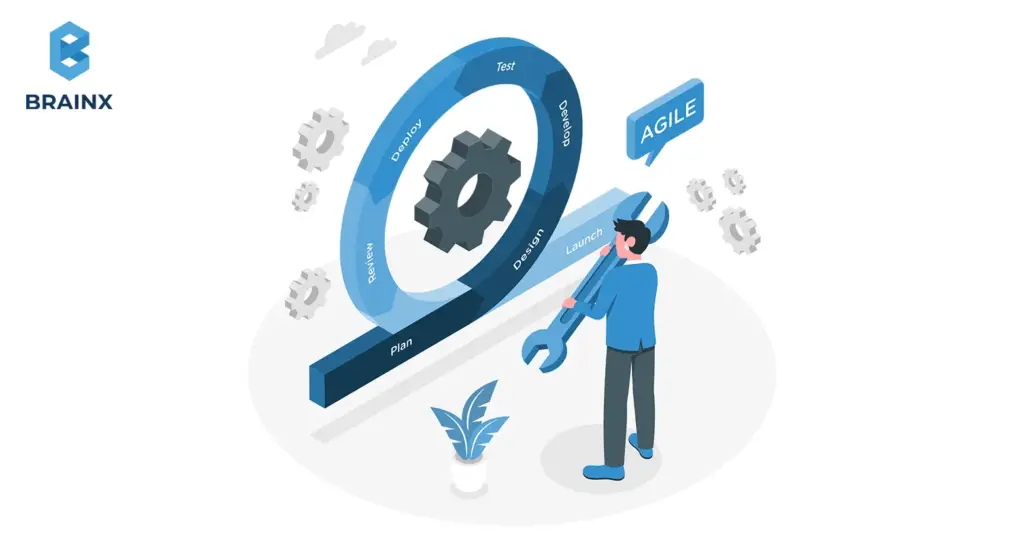
With on-demand applications, there is a surefire way to improve customer retention and business scaling, especially by connecting active users directly to services through their smartphones. Building a successful solution requires strategic planning, precise execution, and thorough testing of every phase from ideation to deployment and maintenance. In this section of our guide, we will discuss key steps that one can take to navigate the process effectively to realize a high-performing on-demand service app.
Ideation
It starts with the definition of the purpose and identification of the target audience for an on-demand app. First of all, it takes place through collaborative brainstorming in which the team of experts communicates to outline what people’s needs have not yet been satisfied and what could answer those needs. One must focus on the changes to let the app quickly resolve the problems.
Market Research
One must begin by conducting thorough market research to identify trends, analyze competitors, and uncover opportunities for a strong value proposition. This process ensures that the app fills a market gap. It also involves gathering early customer feedback to confirm the concept meets client expectations and aligning the product idea with market needs from the start.
Strategic Planning
The planning stage includes distillation of product concept, development strategy development, and evaluation of technological risks.
We detail the product specifications, identify necessary resources, and set a development timeline. Once complete, we’ll share the specifications and timeline with you for approval before moving forward with the project.
Prototyping & Designing
The prototypes are then tested on real users to receive feedback and fixes to optimize the design before it goes to development. This will make your product user-friendly and aesthetically pleasing. The professional UI/UX designers in our team focus on creating designs that not only look good but also consider the experience of the user. There will be permission to test interactive prototypes, fine-tune the design, and ensure smooth transitions with intuitive navigation.
Product Development
Next, we begin development, including backend coding, frontend implementation, and third-party API integration. Best practices ensure scalability, maintainability, and security within the entire development cycle of the application. We work on an Agile sprint-based development methodology where iterative builds are made at the end of each sprint.
Quality Testing
We then follow up with a thorough quality assurance and testing process to ensure that the final product meets the requirements of all the expectations and works smoothly. We have both manual and automated testing processes to catch bugs, errors, and usability. By prioritizing quality from the start, we deliver a polished, reliable product tailored to your audience, minimizing risks and future complications.
Market Launch
The product’s market launch marks the seventh step in the development process. After thorough testing and bug fixes, the app is ready for deployment on platforms like the Apple App Store and Google Play. Following store guidelines and implementing ASO techniques guarantee that the app will appear in front of every potential user.
Ongoing Maintenance
Regular maintenance and upgrading are necessary to enable your product to stay relevant and competitive. This includes bug fixing, the implementation of new features, and user feedback. We ensure that your product will evolve with the constantly changing needs of users and ensure it is still functional ahead in the market through continuous listening to customer insights and market trends. Despite being the final stage, our commitment to your product’s success is ongoing.
Let BrainX Empower Your Business with Custom On Demand App Development
Choose BrainX as your trusted partner for on-demand app development, and experience the following benefits:
Comprehensive Expertise
We have immense experience in bringing ideas into digital products in the industries of healthcare, education, real estate, and hundreds more.
Innovative Solutions
Our team develops tailored software solutions to improve user experiences and optimize operations for your on-demand app development.
Proven Success
Projects like Yellper showcase our ability to deliver complete on-demand apps that meet client needs, from mobile and web.
End-to-End Support
Enjoy continuous support with quality assurance, engineering, and dedicated teams to ensure your app’s success.

Mobile applications are the future! Popular websites create special programs so that users can easily use services or choose goods. Creating an application is important for a business to gain more customers and increase brand awareness. However, entrepreneurs need clarification about which platform to choose for creating a robust app.
The market is teeming with a variety of cross-platform frameworks, such as React Native, PhoneGap, Kotlin Multiplatform, and Xamarin, each bringing its own distinctive set of capabilities to the table.
A great deal of business happens around mobile devices and applications. Even though the mobile application industry is highly competitive today, startups and developers are dedicating their efforts to finding faster, cheaper, and better performance development tools.
One of them is Flutter.
In this article, we will look at the benefits of Flutter apps for your next project. We will investigate what opportunities it can provide for the development of a mobile app.
What is Flutter?

Google developed and continues to support the open-source framework Flutter! It was first announced in 2018. It rapidly grew into a real game-changer in app development—from mobile apps to the widest range of platforms, from iOS and Android to web, Windows, macOS, and Linux.
Its ability to have one codebase for building an app on several platforms makes it unique among all its contemporaries. Flutter is more than a framework; it is a fully-fledged software development kit (SDK) with all tools included for front-end and back-end development. On their part, developers create wonderful user interfaces out of its large library of custom-made widgets and reusable UI elements, from buttons to text inputs—everything in one toolkit.
Google developed Dart, another programming language, at the core of Flutter. It is designed particularly for front-end development and takes after JavaScript with its strong typing, trash collection, and asynchronous programming.
With its meteoric rise and stars on GitHub of more than 151k, Flutter keeps getting new cool features and improvements, making it one of the top choices for developers to simplify the process of app development.
Key Components of Flutter
The major components comprise two major parts as follows:
- SDK: A set of tools that includes APIs, libraries, documentation, and compilers to compile code into native machine code.
- Framework: A set of extendable, reusable UI elements to put together exactly what you need.
Besides, it has a huge library of pre-built widgets, covering almost all the aspects of app design, and facilitating immense customization to match your requirements.
What programming language does Flutter use?
Flutter uses Dart, an open-source programming language developed by Google for optimizing client interface development. All the benefits of Dart are realized in Flutter to their fullest potential, including its sound null safety feature. It makes it easier to notice common mistakes called null errors in the code, reducing time on code maintenance and allowing more time for developing apps.

Features of Flutter’s Architecture
One can describe the architecture of Flutter as being based on a combination of three layers that drive the framework. These layers are described as follows:
Framework Layer
It consists of all libraries related to the design of a user interface and its subsequent construction, including foundational classes to widgets, plus a rendering system.
Engine Layer
The engine layer, developed in C/C++, provides the foundational infrastructure for Flutter’s core features. It oversees the most crucial tasks concerning graphics, accessibility, text format, and plugin management. It calls back to the framework for code execution and rendering of the UI.
Embedder Layer
This is a platform-specific component and is responsible for bootstrapping the Flutter engine. It provides all the necessary resources so that the display of the user interface can be enabled. The embedded layer enables Flutter apps to work on different operating systems and adjoins the engine layer to the Native platform APIs for better communication.
Evolution of the Flutter Framework
Flutter has evolved significantly over the years; it is no longer just a mobile-focused SDK but has transformed into a framework for building natively on both Android and iOS with a single codebase.
Following the Flutter 2 release in 2021, it grew to support web and Windows app development. Subsequently, Flutter 3, only recently released in 2022, gave stable support for Linux and macOS on both Intel and Apple Silicon processors, further empowering devs to create UIs across six different platforms.
Other Flutter 3 additions include foldable phone support and the newest version of Material Design, Material Design 3, for building beautiful UIs on Android. It also improved integration of Firebase backend services, something appreciated by Flutter developers.
Flutter 3.3 was launched with incremental updates and provided improved support to desktop platforms, specifically macOS and Linux, while Dart 2.18 added some new features for Objective-C and Swift interoperability.
Now, the latest release, Flutter 3.7, which went live on January 25, 2023, brings a slew of updates such as WebAssembly support, improved graphics performance, JavaScript and Dart interoperability, and the capability of embedding Flutter elements into web apps.
Advantages of Flutter
Hot Reload
Among the many brilliant features, one of the most exciting things about Flutter is its ability to update code on the fly. A developer can change code on the go and instantly see the result without the concerned app losing its current state. This boosts the development process immensely.
Single Codebase
Flutter allows sharing the same codebase across multiple platforms, which saves you time and effort by not requiring platform-specific code.
Rich Set of Widgets
Flutter offers rich and highly customizable widgets for the design process of user interfaces so that it can adapt to any design requirement.
Performance
Flutter powers high-performance apps because it gets compiled into native ARM code for fast execution and smooth animations.
Expressive UI
The framework provides an expressive, highly customizable user interface that makes it perfect for designing user-friendly apps.
Native Integration
Flutter provides a seamless way to tap into native device features and APIs directly. Ensuring you have flexibility in doing what you want to do with an app, all by juicing up completely with the power of the platform.
Strong Community Support
A very energetic and growing developer community characterizes Flutter. The developers are constantly extending the ecosystem with new packages and plugins, increasing its functionality.
9 Benefits of Flutter Apps for Your Business
The many benefits of Flutter apps include:
Unified Codebase
Instead of managing distinct codebases for iOS and Android, Flutter streamlines development by letting you maintain just one codebase for both platforms, significantly reducing the time and effort involved. It not only helps developers save time and effort but it is also an efficient and game-changing solution.
Instant Development
Flutter’s Hot Reload feature is a lifesaver for the developer community and businesses alike. It speeds up the development process by enabling instant identification of iterations. Developers can instantly find bugs, make changes, and move the project promptly to the next process.
Seamless User Experience
Smooth user experience is one of the major factors to consider when building an app. Flutter allows its users to provide fluid user experiences to compete with the rising market standards. Moreover, its native compilation helps excel at handling complex animations to ensure high performance.
Platform-Specific Plugin
Flutter’s platform-specific plugins create a seamless connection between Dart code and native platform functionalities, enabling smooth interaction with iOS and Android through Swift and Kotlin/Java, respectively.
Flutter apps can take advantage of all the features and capabilities of the device’s operating system. It ensures a high-quality user experience that includes accessing device sensors and utilizing hardware features or integrating with other native apps.
Thriving Community
The extensive and engaged community offers valuable assistance and resources, enabling developers to tackle challenges more effectively. It allows them to learn new techniques. They can stay updated with the latest advancements in Flutter.
The Flutter ecosystem is rich with a diverse array of packages and plugins. These are pre-built pieces of code. Developers can integrate them into their projects. This adds functionality without building everything from scratch.
Broad OS Support
Flutter is versatile in its compatibility, supporting Android devices as far back as Jelly Bean (4.1) from 2012 and iOS devices running iOS 8 or newer, which was introduced in 2014.
With Flutter, you can seamlessly tap into native device features and APIs. Developers don’t have to worry as much about optimizing code for different OS versions. This saves time and effort.
Consistent User Interface
The advent of different devices has made consistent user interface a priority. With 88% of people spending their time on an app, it is highly recommended to make your platform mobile-responsive.
Flutter helps businesses achieve this goal with an assortment of highly defined customizable widgets. This way it enables developers to create captivating user interfaces that can adapt to all screen dimensions and types of devices making your business app more accessible.
Faster Time to Market (TTM)
While some apps may still require native code for specific functionalities Flutter covers most common use cases. This includes accessing certain hardware features or optimizing performance. Its tools and libraries reduce the amount of platform-specific code.
This means that the time from initial planning and development to the final release of the app is significantly reduced. Faster TTM allows businesses to
- Launch their products sooner
- Capture market opportunities quickly
- Start generating revenue
- Gaining user feedback earlier
- Quick Quality Assurance
Since there’s only one codebase QA engineers need to conduct comprehensive testing only once. They can test the app on one system environment like Android.
Because the codebase is the same across platforms they can be confident that the app will perform similarly on other platforms,for instance, iOS. This reduces the need for redundant testing on each platform and quickens the quality assurance process.
Reduced Cost
Flutter developers can use a unified codebase for both instead of creating separate apps with different codebases for each platform.
This means fewer developers are needed, and less time is spent on coding and testing across different platforms. As a result, the initial development costs are lower because you’re not duplicating efforts.
10 Famous Flutter Applications
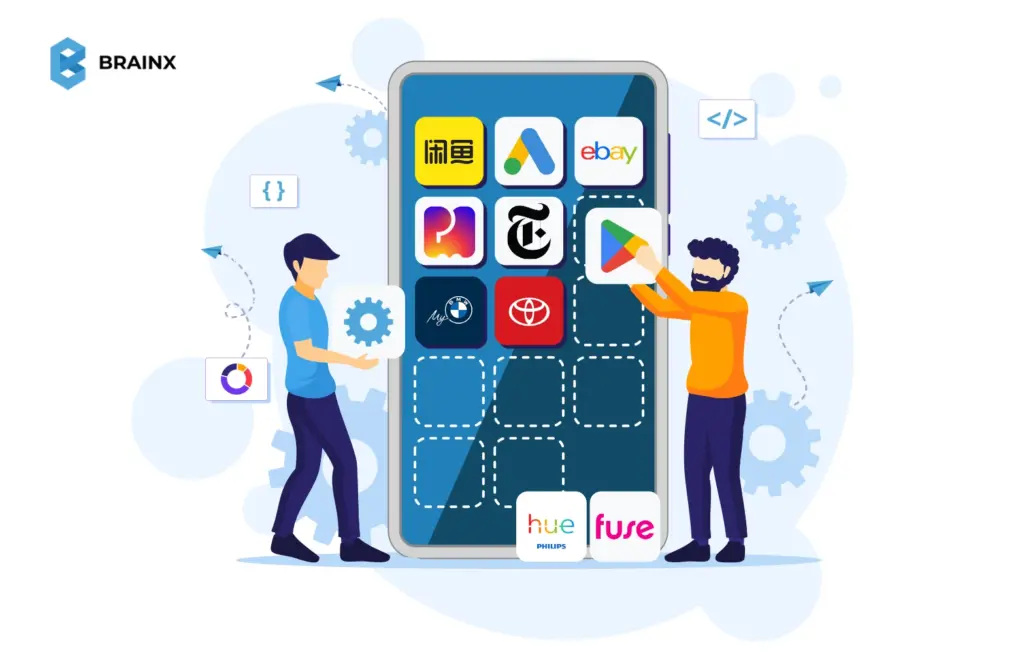
Flutter has drastically changed the game for app development in 2024. These apps are at the forefront of technological innovation in the industry. However, multiple renowned businesses adopting Flutter for their platforms have increased their popularity and demand tenfold. Are you curious?
Let’s discover the 10 famous Flutter applications that are changing the dynamics of business in their niche industries.
1. Xianyu by Alibaba
Xianyu, Alibaba’s secondhand marketplace, leverages Flutter for seamless cross-platform development, enhancing user experience on Android and iOS. By leveraging Alibaba Cloud’s serverless architecture, Xianyu has achieved swift and reliable development. Flutter’s unified framework and Nexus API streamline the process, setting a new standard for efficient, high-quality app development.
2. Google Ads Platform
Google Ads is a versatile digital advertising platform, made even more advanced with Flutter. This combination allows businesses to connect with their target audience through search results, partner sites, and apps. Key features include targeted advertising, a pay-per-click model, comprehensive analytics, diversity of ad formats—everything that makes it critical in driving measurable results online.
3. eBay
eBay is an e-commerce leader that was established in 1995 and united buyers and sellers across the world through numerous pioneering innovations, including auctions, fixed-price selling, and global reach. Flutter’s development tools assisted in enriching the user experience at eBay by simplifying app interfaces and optimizing performance for seamless browsing and transactions.
4. PostMuse
PostMuse, developed using Flutter, simplifies enhancing Instagram stories with its extensive font, emoji, and design libraries. Flutter’s framework enabled a seamless, user-friendly app experience, updating weekly and ensuring vibrant, engaging stories. With Flutter’s capabilities, PostMuse offers a smooth interface for crafting captivating social media content.
5. The New York Times
Founded in 1851, The New York Times has built through leadership by reporting on news and doing investigative work. Today, they still push the edge by offering digital access to news through their mobile app and website to new generations. Flutter has enhanced their app’s development, enabling smooth, high-performance experiences for users across platforms.
6. Google Play
Google Pay, built with Flutter, offers a seamless experience across Android and iOS. Flutter’s cross-platform efficiency ensures a consistent, secure, and feature-rich app, integrating rewards and simplifying payments. This project highlights Flutter’s power in delivering high-quality, scalable applications across multiple operating systems.
7. My BMW App
BMW’s Flutter-built app offers a unified experience on iOS and Android, enhancing vehicle control, service management, and in-car connectivity. Flutter’s high performance and design versatility ensure a sleek, consistent interface, perfectly aligning with BMW’s luxury and innovation standards.
8. Toyota App
Toyota utilized Flutter to develop a user-friendly infotainment app offering vehicle diagnostics, eco-driving tips, and a loyalty program. Flutter’s high-performance capabilities enabled Toyota to create a reliable, engaging app that aligns with its values of innovation and customer satisfaction.
9. Philips Hue
Philips Hue, powered by Flutter, delivers advanced smart lighting with a range of customizable LEDs. Flutter’s capabilities enabled seamless app integration for personalized lighting, smart home connectivity, and enhanced user experiences, transforming spaces with intuitive control and versatility.
10. Fuse
Fuse uses its unified API to integrate fintech accounts which resolves connectivity issues and strengthens stability. Flutter helped Fuse create a flexible and dependable system for financial market connection across worldwide domains. Through seamless integration fintech companies can concentrate on developing outstanding financial services using improved efficiency while preserving reliable operations.
4 Reasons Why Businesses Choose Flutter for App Development!
The benefits of Flutter apps acknowledged by the biggest names in businesses like Google, Alibaba, and eBay have raised the significance of this framework for business apps. Here are the 4 major reasons why you should consider using Flutter to grow your business:
- Its versatile cross-platform framework and rich set of UI components streamline the process of building MVPs and prototypes, enabling rapid development and iteration. Its versatile builder tool allows for the efficient creation of functional and visually appealing applications across both Android and iOS.
- Flutter’s Material Design framework delivers visually appealing and cohesive user interfaces across Android and iOS platforms.
- Flutter stands out for its impressive performance and ability to create tailored user interfaces, thanks to its rapid rendering capabilities, adaptable layout system, and fluid animation support. These features ensure high-performance apps with engaging visuals, offering a seamless user experience even with complex interfaces.
- Flutter’s internationalization capabilities make it an excellent choice for creating apps with a global reach. With support for 78 languages and customizable currency, date formats, and right-to-left text, it makes your app accessible and user-friendly worldwide.
Importance of Flutter Apps for Different Industries
Automotive
The automotive industry is touching new heights every year with the advent of advanced and flexible systems that efficiently operate vehicles. With a robust development environment, Flutter is an ideal solution for building digital interfaces. This technology helps businesses in the sector upscale and cater to users across all platforms.
Finance & Banking
As banks increasingly embrace the digital landscape, leveraging Flutter can provide a substantial edge in their technological strategy. It ensures secure apps through Dart language and native data format changes, making hacking difficult.
Its real-time, cross-platform capabilities with hot-reload features streamline development. By achieving 120 FPS, Flutter significantly elevates the quality of the user experience through its high-performance capabilities. Google Pay and Cryptography showcase the expanding fintech scope, offering opportunities in mobile wallets and cryptocurrency.
E-commerce
The eCommerce industry continually evolves with new technologies. Retail traditionally involves physical selling but Flutter offers immense potential for mobile shopping apps.
With a peak in online shoppers, Flutter enables businesses to provide accessible, robust applications. Its customizable solutions enhance app functionality and help achieve sales targets effectively.
Real Estate
Leveraging Flutter for real estate apps can significantly enhance your business’s competitive advantage. It offers easye-to-use solutions, an interactive dashboard, and varied listings. With third-party integrations like maps, users can easily navigate locations.
Flutter’s strong database ensures accurate contact information.
Social Networking
The social media and entertainment sectors are popular among youth, with apps like TikTok, Postmuse, Hookle, and Hamilton thriving due to Flutter.
Unlike ancient times, modern social media apps connect people globally and entertain. Flutter provides widget-rich, responsive solutions with creative UI components, enhancing app navigation and user experience.
Supply Chain Management
Flutter offers significant advantages in the logistics and supply chain industry. Its rapid development and excellent UI/UX capabilities make it ideal for creating user-friendly apps.
Flutter enables real-time goods tracking and integrates AI tools for predictive analysis. It allows for auto-generating sales reports and managing all departments from a single platform.
Education
Flutter revolutionizes the EdTech industry with its versatile capabilities. It enables rapid development of cross-platform apps, ensuring consistent user experiences across devices.
With its rich set of widgets, Flutter enhances interactive learning through engaging interfaces. The framework supports real-time updates and seamless integrations, making it ideal for dynamic educational content and efficient management of educational resources.
Health & Fitness
High-performing healthcare apps enable 24/7 access to doctor services. It allows patients to connect with doctors easily in any emergency. These apps also help locate nearby specialized hospitals, book appointments instantly, and contact ambulances or get medications delivered. They support routine medication, track physical activity, and offer fitness recommendations.
BrainX Can Be Your Go-To Partner for Flutter App Development
Flutter is the best framework for developing versatile apps, but trusting an expert remains a question for many business owners. BrainX Technologies is a top-tier SaaS company specializing in next-gen web and mobile app development services. Flutter, an open-source SDK that supports iOS & Android platforms, enables us to build dynamic, feature-rich apps for mobile, web, and desktop using a single codebase. Our expert developers craft top-tier solutions that drive success and elevate your business to new heights. Don’t let your ideas stay on the mood board, let BrainX help you innovate in the Flutter ecosystem!
While scratching your head to create the best digital appearance for your business, the first decision matters a lot.
With people spending over 16 billion hours on their mobile apps, you still have to compare Mobile Apps vs Web Apps – what suits your business needs?
Here’s the thing, not always obvious is the right choice. Determine whether you need a mobile or a web application depending on your business needs, target audience, and budget.
Mobile apps are available for download and installation on handsets, while web applications are accessed through browsers; therefore, they are more broadly accessible. Both have an advantage, but which satisfies your business needs? This all breaks down for you in deciding what best suits your brand and customers.
Ready to know which one works best for your business? Read on to make an informed decision that drives results!
What Are Mobile Apps?
Mobile applications are software developed only for devices like smartphones and tablets. They assist companies in communicating with users and make the process of task completion relatively easier for users. Developing a mobile app is far more complicated than developing a web application and requires a specific skill set, tailored to each platform.
Mobile apps are downloaded and installed directly from app stores from Apple or Google Play Store right onto a user’s device. They run smoothly and access the native features of any device, such as accessing GPS, camera, use of notifications, and address books. This kind of integration allows for a very harmonious user experience and individuality through intuitive functionality.
Native apps are the two major types of mobile apps that you choose from based on your desired purpose. Such apps are specifically developed with a single codebase either for iOS or Android and require access to the complete features of a device. This makes them faster and more efficient but comes with higher costs and longer development time if apps are needed for multiple platforms. Hybrid apps are cost-effective and are developed using a shared codebase that can function across multiple platforms, namely Android and iOS.
Such apps are beneficial for SaaS businesses in multiple ways. They act as a magnet for users to engage them and help businesses meet client’s expectations. However, this hustle would go to waste without properly aligning the app and business goals to provide value to the users.
The Native Apps vs. Hybrid Apps Debate
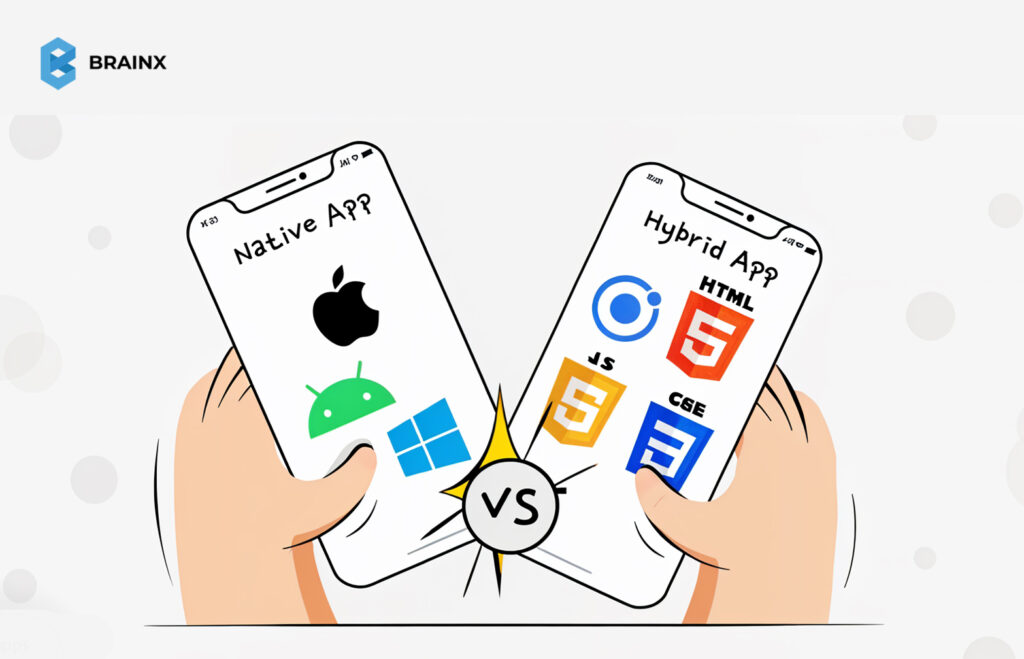
Native apps are suitable when you want your apps to work on only one specific platform with a specified programming language for each, for instance, Swift for iOS and Kotlin for Android. Thus, native apps are tailor-made to the operating system; therefore, they use the maximum features that a device can provide, from a camera and GPS up to an accelerometer or Bluetooth.
Native apps are the best performers in terms of speed and response time. They also happen to be very optimized towards the platform they are to be deployed on, making their user experience very smooth and fluid. This does indeed come at a cost since native apps for multiple platforms can have separate codebases for different platforms, increasing not only time but also money.
You might choose a native app if:
- You want your app to be downloaded from Google Playstore and Apple Store.
- Need a high-performing app and responsive app for enhanced user satisfaction.
- The app requires extensive use of native device features, such as GPS, notifications, or cameras for core functionality.
- Your revenue model relies on generating income through paid downloads or in-app purchases.
Hybrid apps combine features of native apps and web apps. They are developed using HTML, CSS, and JavaScript technologies. Such apps access features like hardware, calendars, and notifications, just like a native app would.
Benefits of Hybrid Apps:
- One code base that runs across multiple platforms, saving time and money.
- Access to app stores for greater visibility and discoverability.
- Integration with native features of the device for an all-around seamless experience. Development cost is also relatively lower compared to natively developed applications.
What Are Web Apps?
Web applications are software applications using technologies, such as HTML, CSS, and JavaScript. These web-based programs have been designed to be launched or operate right within a web browser from virtually any device that has an active Internet connection. Because of such convenience, web applications have remained the favorite among various business organizations searching for easy-to-implement, efficient, and cost-effective yet highly scalable solutions. Being applications other than mobile applications, it does not need downloading and installation. One just needs a URL to access.
There is a use of the so-called frameworks, such as React or Vue.js, to create very advanced applications by rendering complex web applications, advanced function webs, and server technologies: the use of PHP, Node.js, or Ruby on Rails would enhance web applications to work dynamically with a database toward more personalized content and easy user experience. Apps in this class of application approximate features of mobile apps, like click-to-call and location-based mapping, but they run within a browser.
Responsive web apps have become the gold standard in modern web design. They not only guarantee compatibility with different screen sizes but also provide a smooth, touch-friendly interface for handheld devices. These apps can display text, images, videos, and even interactive features like location-based services or click-to-call buttons, providing a near-native experience without requiring installation.
Web apps are a great fit for SaaS businesses that have to deliver functionality and access to a large audience. Scalability, cost-effectiveness, and cross-platform compatibility make web apps an invaluable tool for businesses targeting engagements across devices.
Mobile Apps Advantages and Disadvantages
Advantages:
- Designed to operate swiftly, providing a seamless user experience.
- Utilize device-specific features, resulting in faster performance compared to web applications.
- Many mobile apps offer functionalities that can be accessed without an internet connection, ensuring continuous usability.
- Push notifications enable direct communication with the users for better engagement and retention.
- Access to Native device functionalities, i.e. camera, GPS, and contact lists, make mobile apps enhance user experience.
- Mobile applications tailor content and experiences according to user behaviors.
- Increase brand visibility through unique app icons for loyalty and recognition.
- In-purchases, subscriptions, and ads open new revenue streams for businesses.
Disadvantages:
- Developing mobile apps for multiple platforms can be expensive and time-consuming.
- Ensuring a uniform app functionality across different devices can be difficult.
- Mobile apps can be vulnerable to security breaches, and hence require robust measures to protect user data and privacy.
- Submitting apps to platforms like the Apple App Store or Google Play Store involves approval processes that can delay deployment.
- With numerous apps available, attracting and retaining users requires effective marketing and continuous value addition.
- To keep users satisfied and maintain compatibility with new devices and OS versions, apps require frequent updates, adding to maintenance efforts.
- Users may be reluctant to download apps that consume significant storage space on their devices.
Also Read: Fintech App Development Cost Guide With Detailed Breakdown
Advantages and Disadvantages of Web Apps
Advantages:
- Run smoothly across all platforms, be it iOS, Android, or Windows.
- Accessed directly through the browser without downloading or installing the application.
- Less expensive compared to native applications, with one version catering to all the platforms, development and maintenance costs are reduced.
- They have all updates done centrally, and it does not even require manual intervention to obtain the latest version for the users.
- Maintenance and updation of web apps with a unified codebase become easier; hence, for the developers, it becomes a very straightforward process.
- Such apps can be used on all internet-enabled devices.
- Easily scalable to meet higher user loads, making it suitable for growing businesses.
Disadvantages:
- Access to web applications depends on stable internet connectivity.
- Might show poorer performance compared to native apps due to the limitations imposed by the browser and reliance on the internet.
- May not utilize all the native capabilities of the device and, hence may not be as strong as native applications.
- Vulnerable to security risks if accessed over the internet. They, therefore, need strong protection to ensure that user data is not compromised.
- The way different browsers interpret web applications may result in different experiences among users on various platforms.
- Not as engaging as native applications since they lack features such as push notifications.
Web Apps vs Mobile Apps – Differences & Similarities
Similarities
- Focus on UX and UI design to make the interactions intuitive and engaging.
- Accessible to the users with internet-enabled devices to reach a large audience.
- Aim to provide specific functionalities or services to the users such as communication, entertainment, or productivity tools.
- Need robust security measures to protect user data and ensure privacy.
- Designed to run across multiple platforms and devices with enhanced user accessibility.
- Require routine updates to add new functionality, enhance performance, and patch security holes.
- May have to be connected to the internet to work at maximum capacity, though some features are available offline.
- Both can use modern frameworks and tools to make development smoother.
- Interact and engage users through interactive elements, personalized content, and responsive designs.
- Measured in terms of performance metrics such as load time, responsiveness, and user satisfaction.
Differences between Mobile Apps and Webs Apps
Web Apps
- Accessed via web browsers; no installation required.
- Platform-independent; accessible across various devices with internet connectivity.
- Performance depends on the browser’s capabilities and internet speed.
- A single codebase simplifies development and updates.
- Typically requires an internet connection to function.
- User experience may vary across different browsers and devices.
- Does not fully access GPS, camera, sensors, or other device features.
- Accessible via URLs; no need for app store approval.
- Security depends on web protocols and can be more susceptible to certain vulnerabilities.
- Using a single codebase for multiple platforms makes them cost-effective.
- Allow users to get the latest version without manual intervention.
- Not listed in app stores; discoverability depends on search engines and marketing efforts.
- Limited engagement features; lacks push notifications and may have less direct interaction with users.
- Monetized through ads and subscriptions and is less on in-app purchases.
- Built using web technologies like HTML, CSS, and JavaScript; lacks standardized SDKs.
- No approval process; developers have full control over deployment.
Mobile Apps
- Installed on devices through app stores; requires download and installation.
- Developed for specific platforms i.e. iOS or Android.
- Often offers superior performance due to direct integration with device hardware.
- Increase development and maintenance efforts with separate codebases for different platforms.
- Provides offline for certain features.
- Provides a consistent and tailored user experience optimized for specific devices.
- Full access to native device functionalities, enhancing interactivity.
- Distributed through app stores, requiring adherence to specific guidelines and approval processes.
- Benefits from inherent security features of the operating system and app stores.
- Can be more expensive as separate versions may be needed for different platforms.
- Users need to download updates from app stores; this may lead to version fragmentation if users don’t update.
- Listed in app stores, which can aid in discoverability but also requires adherence to store guidelines.
- Can utilize push notifications and other engagement tools to maintain user interaction.
- Ensure monetization through in-app purchases, subscriptions, and ads.
- Developed using platform-specific SDKs and programming languages, providing robust development support.
- Subject to app store approval processes, which can delay deployment.
When to Choose Mobile Apps and Web Apps
Now that we have already discussed at length about mobile apps vs web apps. It’s time to understand when to decide which one you need the most. Have a look at these factors that will help you decide better:
Choose a Mobile App When:
- Your application requires deep integration with device features such as the camera, GPS, or push notifications.
- You need your users to be able to access certain features without an internet connection.
- You want high performance, speed, and responsiveness for user satisfaction.
- You will monetize through app store downloads or in-app purchases.
- You want to reach users across multiple devices and operating systems without developing separate versions.
- You have a tight budget and demand a cost-efficient answer with a single code base.
- You enjoy having all updates central rather than asking users to come in and download new versions.
- Driving increased visibility through the organic results of search engines is part of your strategy.
Choose a Web App When:
- You aim to reach users across various devices and operating systems without developing separate versions.
- Budget constraints necessitate a more cost-effective solution with a single codebase.
- You prefer centralized updates without requiring users to download new versions.
- Improving visibility through search engines is a key component of your strategy.
Leading Examples of Web Apps
Web applications are integral parts of our daily digital interactions. They have made it easier to increase productivity, improve communication, and enhance entertainment. Here are some of the top examples:
1. Google Docs
Google Docs is a cloud-based word processor for creating, editing, and saving documents. Not just that but it also allows document sharing and collaboration online to facilitate teamwork.
2. Notion
Who doesn’t demand an all-in-one workplace experience? Notion brings it to its users by allowing them to take notes, manage projects, and collaborate with teams. It enhances productivity and helps streamline workflow by creating customizable pages and databases.
3. Asana
A web app that lets teams organize, track, and manage their work. Asana equips teams with planning, assignment, and tracking of work across projects to increase team efficiency.
4. Spotify
Spotify is the leading music streaming application. It has millions of songs, as well as millions of tracks of podcasts. This music-streaming web application lets people listen to content from within their browsers without a separate application for a desktop.
5. Canva
This is an application that allows the development of visual content easily. Canva web app provides thousands of templates as well as a variety of design tools, so it suits beginners and experts alike.
Leading Examples of Mobile Apps
1. Instagram
With billions of users worldwide Instagram has gained fame as an ideal social media platform for sharing photos and videos. It helps users to connect with friends, create communities and access content from across the globe. Instagram’s business accounts are helping multiple e-stores thrive by engaging well with their customers.
2. TikTok
In this day and age of influencer marketing, video content creators find TikTok helpful. With this application, one can create very short videos and share them on the entire globe while discovering many ideas from other creators.
3. Spotify
Spotify depicted an increment of 7 million users in the second quarter of 2024. Being a leading music streaming service, Shopify offers a vast and versatile music library, podcasts, and playlists for its users.
4. WhatsApp Messenger
A cross-platform messaging app that enables users to send text messages, voice notes, and images, and make voice and video calls.
5. CapCut
A user-friendly video editing app that provides a range of tools and effects for creating high-quality videos, popular among content creators.
The Future of Both Mobile Apps vs Web Apps
As a result of multiple improvements in frameworks like React, Angular, and Vue.js, web apps are expected to become robust and versatile. Additionally, PWAs will bring further transformation by adjoining mobile and web experiences. They will have offline functionality, push notifications, and home screen installation without needing to download from the app store. Web apps will use AI and ML to provide customized and dynamic experiences. Cloud computing and edge technology will further scale up the application for seamless functionality across devices.
Mobile apps are entering a new era of high interactivity and integration. AR, VR, and IoT technologies will redefine app experiences by becoming even more immersive and connected with the real world. Native apps will continue to be strong in performance-critical use cases. We know that Flutter and React Native cross platform development tools are a savior for mobile app development. But, features like AI-powered voice assistants and predictive analytics are further enhancing the user experience. They will advance it more with the latest upgrades expected in the future.
Making the Right Choice for Your Business
Choosing between mobile apps vs web apps requires careful thought. Here’s how you can decide.
Assessing Your Business Needs
Evaluate if your app’s goal is to boost engagement or ensure wide accessibility. A retail business may prioritize rich customer experiences through a mobile app, while a service provider might benefit from an accessible web app.
Budget Considerations
Smaller budgets may favor web apps due to their affordability and quicker development. But, larger businesses benefit from investing in mobile apps for branding opportunities.
Future Growth and Scalability
If your business plans to scale rapidly, analyze the ease of adding new features to the chosen platform. Web apps are generally more scalable due to their flexibility.
Build Smart, Intuitive Apps with BrainX Technologies!
The decision between Mobile Apps vs Web Apps depends on your goals, audience, and budget. BrainX Technologies has been expertly delivering mobile and web app development solutions for the past 7+ years. We take pride in building custom solutions for your unique business needs. The BrainX team goes the extra mile to ensure user-friendliness, high performance, and scalability. With us resolving the debate of mobile apps vs web apps you’ll get a result-driven solution. We use futuristic tech stacks including Flutter, React, and AI for developing seamless, future-ready apps.
Moreover, you can rest assured of intuitive designs that engage users and drive growth. Our proven track record ensures quality, efficiency, and innovation from development to deployment.
In 1993, IBM created the first mobile app with SIMON, a touchscreen smartphone with ten built-in apps. The applications included Email, Calendar, Address Book, notepad, and Calculator. Since then, and to this day in 2024, the mobile app market has advanced significantly and is increasingly becoming essential in our daily lives.
Applications have become the primary way we interact with our devices, access information, and engage with services. But the first big dilemma for businesses and entrepreneurs diving into app creation is Native vs hybrid app development. While native apps are built specifically for one platform (iOS or Android) using that platform’s programming languages and tools. Contrastingly, hybrid applications combine elements of native and web applications with functions on multiple platforms.
The platform dichotomy is merely the tip of the iceberg; numerous intriguing aspects beckon exploration! We aim to provide details of native vs hybrid vs cross-platform app development, offering a comprehensive overview of their advantages and disadvantages in this blog.
Native App Development
Native applications are meticulously built for specific platforms with programming languages that are native to that platform e.g. Java or Kotlin for Android and Swift or Objective-C for iOS. They leverage the full potential of each platform’s hardware and software. Unlike web apps you access through a web browser, these applications are downloaded and installed directly onto your device.
Native App Examples
Some of the famous native app examples include:
- Snapchat, a multimedia messaging app, is developed as a native app for both iOS and Android.
- Google Maps is a navigation and mapping app that’s a native experience through platform-specific features.
- The Facebook application is native to iOS and Android devices and it is tailored to each platform’s design principles and functionalities.
Advantages of Native Apps
From optimizing the user experience to commendable hardware utilization, native apps have proven to be an appealing choice for businesses due to their following advantages:
Performance
Native applications perform well due to their optimized code for a particular platform. According to a study by Compuware, 85% of users prefer native apps for superior performance.
User Experience
Research by UserTesting suggests that 79% of users prefer apps that are easy to use. Platform-specific design guidelines can be leveraged to enable native applications to offer an intuitive and engaging user experience.
Access to Device Features
Native development grants direct access to device features, such as GPS, camera, and push notifications, fostering richer functionalities within the app.
Advanced Security
Native mobile applications get compiled into assembly language, which gives them an inherent advantage in securing codes.
Disadvantages of Native Apps
With numerous advantages, one might wonder why native apps aren’t the perfect choice for all. The answer lies in the considerable limitations they pose. While native apps come with a collection of benefits, it’s also crucial to acknowledge and weigh their disadvantages.
Development Time and Cost
Creating separate codebases for different platforms elongates development time and increases costs significantly.
Maintenance
Maintaining multiple codebases for each platform demands dedicated resources and time, potentially leading to a synchronization issue.
Complex Updates
The inherent need to build distinct applications for various platforms, each requiring its own frameworks, tools, and technical elements. All of these substantially contribute to the complexity of updates.
Hybrid App Development
Hybrid applications combine web-based technologies with the look and capabilities of native apps. They leverage web technologies like HTML, CSS, and JavaScript encapsulated within a native shell, enabling deployment across various platforms. Hybrid applications are developed in two parts:
- Backend code to connect web-based functionalities and native app capabilities, offering a unified experience.
- Use a Native shell to get access to device hardware and features to run seamlessly without any glitches on multiple platforms.
Hybrid App Examples
Some of the famous hybrid app examples include:
- Instagram has transformed some parts of its functionality according to the hybrid approach.
- Uber has multiple elements of the driver interface built using web technologies within a native shell.
- Twitter X’s mobile app employs a hybrid approach for parts of its user interface.
- Evernote, the note-taking app, is another example of a hybrid app.
Advantages of Hybrid App Development
Hybrid apps take less time to develop because they use a single codebase and have become a trend nowadays. The recent stats reveal that such apps shatter platform walls, doubling your potential user base with a 70% increase in reach compared to single-platform apps. However, developers and business owners alike get multiple more benefits from these applications listed below:
Scalable to Different Platforms
Hybrid mobile applications are convenient to customize for several operating systems by cutting down the effort of a developer to build the application again during the scaling process.
Cost and Time Efficiency
According to Clutch statistics for 2023, Hybrid applications reduce development time by 50% compared to building separate native versions that make them budget-friendly.
Simplified Maintenance
Updates and modifications can be applied uniformly across platforms, streamlining the maintenance process.
Broader Reach
With a single codebase, hybrid apps ensure wider accessibility across multiple platforms, catering to a larger audience.
Constant Updates
Continuous updates are part of a proactive approach that ensures users benefit from the latest versions.
Disadvantages of Hybrid Apps
We have always heard that everything comes with an expiry date. Similarly, despite all the remarkable advantages they provide, one must not disagree with the disadvantages of hybrid apps before making a final decision.
Performance Limitations
Hybrid apps may get performance bottlenecks due to the additional layer between the code and the device’s functionalities.
Limited Access to Device Features
Integration with device-specific features might be limited compared to native apps, affecting the overall user experience.
User Experience Differences
Achieving a consistent and seamless user experience across different platforms can be challenging in hybrid apps, as they may not fully adapt to the native design principles of each operating system.
Difficulty in Achieving a Native Look and Feel
While frameworks like React Native or Ionic aim to bridge the gap between web and native development, they often struggle to replicate the seamless integration with the underlying operating system that native apps effortlessly achieve.
Low-Quality Graphics
Hybrid applications sometimes suffer from subpar graphics quality. Developing such apps necessitates more effort as compared to native.
Content Glitches
Content loading in hybrid apps may have glitches, resulting in less functionality. However, there are some methods available to mitigate these issues.
Tiring Debugging Process
Coding for multiple platforms increases the likelihood of bugs and errors in hybrid app development. Debugging gets challenging as developers strive to identify and address specific issues.
Cross-Platform App Development
Time and budget-conscious? Cross-platform apps get you there quickly, but performance and functionality might need compromise. Developers use this app development framework to achieve the native-like look for multiple platforms like iOS and Android with a single codebase. But the most amazing thing is that it is built on sharable codes that accelerate development. Java, Javascript and Ruby are the commonly used programming languages for Cross-platform app development. Similarly, Kotlin Multiplatform and Flutter are commonly used frameworks for such apps.
Cross-Platform Apps Examples
Some of the famous cross-platform apps include;
- Microsoft Teams uses the Xamarin framework and is built using a single codebase to run seamlessly on iOS, Android, and Windows devices.
- Dropbox is based on React Native in its mobile application for smooth file access and sharing across various devices.
- Slack utilizes JavaScript, HTML, and CSS frameworks to allow users to collaborate and communicate across various platforms.
Advantages of Cross-Platform Apps
Cross-platform apps offer the following advantages over traditional native app development.
Code Reusability
A shared code base reduces repetition, speeding up development compared to platform-specific apps. Avoiding native code for each OS and learning multiple tools streamline development. Bugs and enhancements can be addressed simultaneously across platforms, reducing effort and costs.
Budget-Friendliness
Cross-platform development offers significant cost savings by allowing simultaneous multi-platform apps creation with a unified team. This mitigates the need for specialized OS knowledge, streamlines development with tools, and facilitates market testing for strategic decision-making.
Fast Development Cycle
By utilizing frameworks like Flutter and React Native, cross-platform app development minimizes the time required for product deployment and development lifecycle. It allows quicker responsiveness to customer feedback and market shifts, streamlining maintenance and support efforts across different operating systems.
Enhanced Brand Uniformity
Cross-platform development streamlines brand consistency across iOS and Android apps, minimizing maintenance efforts. While navigation may vary, overall interaction and brand image remain coherent, enhancing authenticity and reliability perception among customers.
Cross-Platform Apps Disadvantages
Cross-platform apps may suffer from limitations in accessing platform-specific features, performance issues compared to native apps, and delays in incorporating new OS features, frustrating users. We have discussed some more disadvantages of cross-platform apps below that you must consider before choosing.
Compromised UI/UX Quality
Cross-platform app development employs a unified codebase for both platforms, potentially limiting access to device-specific features. While this may impact user experience, depending on your app’s requirements, separate native apps could be beneficial for accessing all necessary features.
Integration Issues
Building a cross-platform app has perks, but integrating it with platform-specific features like local settings, notifications, and preferences can get challenging. This “one-code-for-all” approach often requires compromises. While third-party cloud services seem like a fix, they raise security concerns.
Update Lag
When an operating system introduces new features, they may not be promptly accessible on any cross-platform framework. You’ll need to wait for the framework to be updated before you utilize these features. This delay can disappoint users accustomed to immediate access to new updates and features.
Missing Features
Cross-platform app development is convenient, but sacrificing unique features can be a trade-off. However, some frameworks might not serve the purpose if your app requires advanced hardware features like camera control, precise GPS, or complex notifications. While rare, this lack of full hardware support is a potential downside to focus on before choosing a cross-platform approach.
Performance Impact
Building for multiple platforms presents several challenges. Issues vary by OS and device, and leveraging cutting-edge features is tricky due to compatibility concerns. Unsolvable glitches impacting small user segments can arise (e.g., partially hidden buttons). Effective cross-platform development requires a dedicated and skilled QA team for problem detection.
Are Hybrid Apps Useful for All Businesses?
Choosing hybrid mobile development depends on each company’s different business requirements. Nevertheless, such applications are highly in demand in small and medium-sized businesses that don’t require high app performance.
Opting for a hybrid application proves advantageous for startups. It offers swift development, streamlined server communication, and enhanced compatibility and is particularly well-suited for content-centric and local-focused products and services.
For the development tasks of large enterprises, choosing a hybrid solution can be a strategic move when initiating an MVP. For instance, when launching a new product or service with uncertain market demand, a hybrid approach facilitates rapid MVP development, allowing companies to test hypotheses efficiently.
Do All Businesses Find Value in Using Native Apps?
The suitability of native apps for businesses depends on various factors. Unlike Hybrid apps, native applications are more suitable for companies working on high-performance, complex projects. Seamless integration with device features and native UI makes them an ideal option for projects requiring highly customized and platform-specific user experience.
Small businesses looking for a quick market impact might not get many benefits from native apps nevertheless they excel at meeting the complex requirements of large enterprises. Besides, such developments are done for projects that demand integration with various backend systems and third-party services.
What is the main problem of cross-platform apps?
A common issue in cross-platform development revolves around achieving consistent performance across diverse platforms. Native applications perform better than cross-platform ones, particularly in tasks demanding substantial resources. Developers must delicately manage the trade-off between maximizing code reuse and optimizing performance.
Flutter vs Flutter Alternatives in Cross-Platform App Development
According to Google, Flutter is used by almost 2 million developers since the launch of its first version back in 2018 till date. Flutter is a widely used option for cross-platform projects in comparison to other alternatives due to the following reasons;
- Flutter compiles native ARM code, eliminating performance overhead from a JavaScript bridge like React Native.
- It ensures a consistent UI with customizable widgets, offering pixel-perfect designs across platforms.
- The extensive UI components, animations, and flexibility provided by Flutter help developers create visually stunning apps.
- The Flutter SDK supports iOS, Android, web, and desktop, enabling cross-platform development with a single codebase.
- The vast Flutter community enables developers to get diverse plugins, packages, and libraries for extended functionality.
- Dart in Flutter has modern tools and docs to streamline development with robust typing and hot reload.
Native vs Hybrid Apps vs Cross-Platform Apps vs Progressive Web Apps
The choice between web apps and native apps depends on factors such as project requirements, target audience, and development goals. Each category of apps has its unique advantages and limitations that we have discussed below:
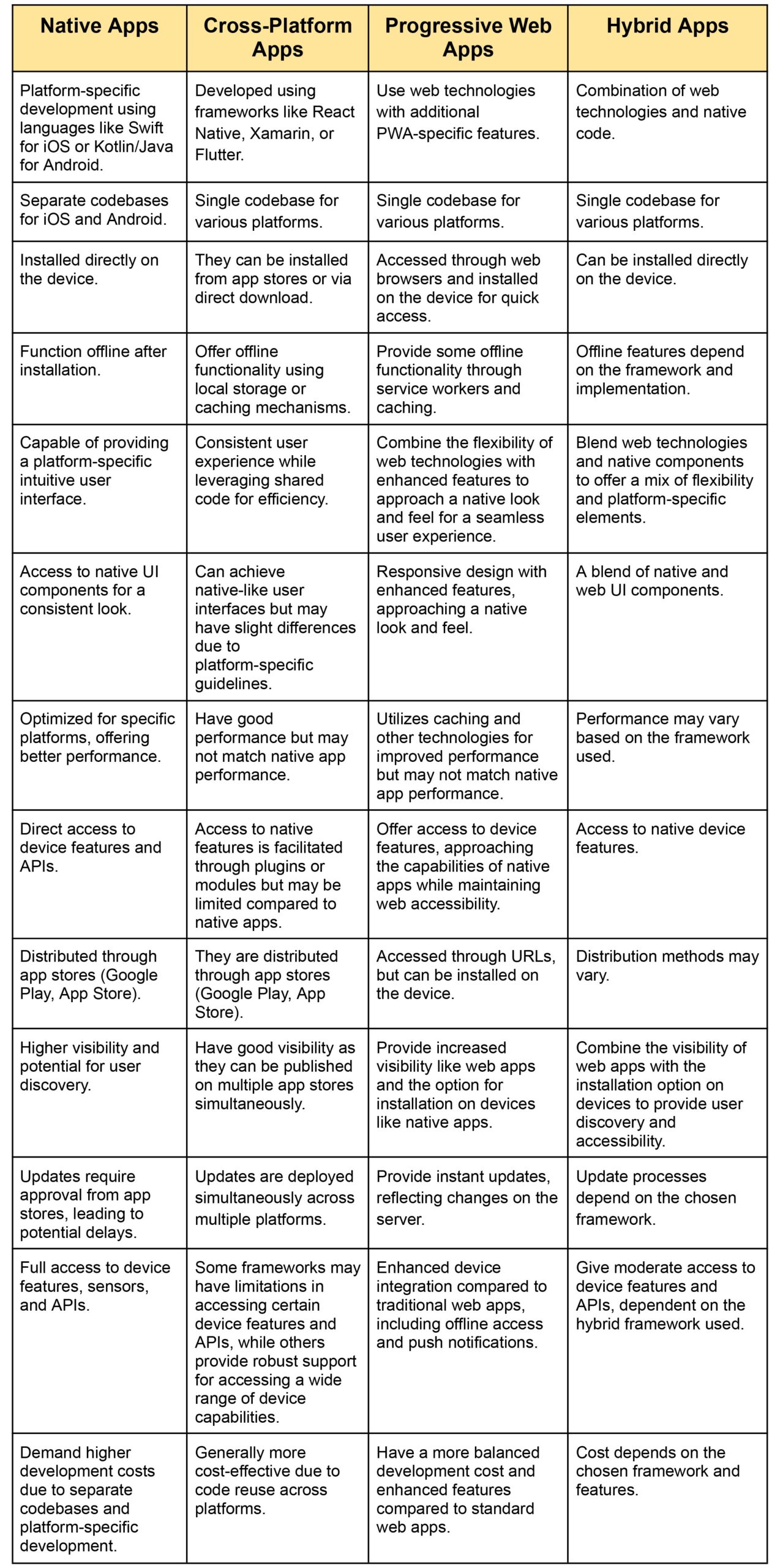
Native vs Hybrid App Development: 10 Key Questions to Ask!
You can never come out of the native vs hybrid app development without ticking a few boxes to determine the need. Here are the top 10 questions you must ask yourself before making a pick!
- What are the particular requirements of your app?
- What functionalities do you want to incorporate into your app?
- How important is it to deliver a good user experience?
- Which operating systems (iOS, Windows, Android) do you want to run your application?
- What is your expertise level in native and hybrid development?
- Does your app require integration with third-party services or APIs?
- How critical is data protection for your app?
- Does user acquisition strategy align with the app’s platform compatibility?
- Do you need a uniform look and feel across all platforms?
- Are you planning to migrate your app to other platforms in the future?
Different Ways of Testing Hybrid, Cross-Platform Apps & Native Applications
Testing Hybrid Applications
Businesses need scalability and robustness, and bug-free hybrid applications can guarantee high performance and a better user experience. Considering this, development companies pay extra attention to their testing process to catch every bug to prevent disruptions. These are some testing procedures for hybrid app developers to deliver quality.
Compatibility Testing
Check if all functions of your application are properly working across different devices, operating systems, and browsers.
Performance Testing
Evaluate your app’s responsiveness, speed, and overall performance under various conditions to ensure all features work as intended.
Usability Testing
Assessing user interface (UI) and user experience (UX) is imperative before deploying to check if it aligns with the project requirements.
Security Testing
Identify and address vulnerabilities in the hybrid app to ensure data security.
Cross-Platform Testing
Verify the app’s consistency and functionality across multiple platforms using hybrid frameworks.
Automation Testing
Implement automated testing tools to streamline repetitive testing tasks and ensure quicker feedback.
API Testing
Validate the communication between the app and external services or APIs.
Testing Native Applications
Unit Testing
Test individual components or units of code in isolation to ensure they function as intended.
Integration Testing
Validate the interactions and interfaces between different components or modules of the app.
Functional Testing
Confirm that the app’s functions and features work according to the specifications.
Regression Testing
Ensure that recent changes are not having adverse effects on the existing functionalities.
Performance Testing
The app’s speed, responsiveness, and resource usage are tested under multiple circumstances to evaluate functionality.
User Interface (UI) Testing
Verifying visual aspects is mandatory via a user interface testing phase to provide a seamless and appealing user experience.
Security Testing
Identify and address potential security vulnerabilities to safeguard user data.
Usability Testing
Assess the overall user experience, including navigation and user interface design.
Localization Testing
Verify the app’s functionality and appearance when adapted to different languages and regions.
Device-Specific Testing
Test the app on different devices and screen sizes to ensure compatibility.
Testing Cross-Platform Apps
Manual Testing
Manual testing is required to ensure a cross-platform app’s performance and functionality across multiple devices and platforms. It helps detect any problems or discrepancies in functionality, user interface, or user experience.
Automated Testing
This approach aids in promptly detecting bugs and maintaining uniform functionality. Automated testing tools help mimic user interactions on various platforms.
Device Emulators/Simulators
Developers can test cross-platform apps effectively using emulators and simulators to replicate physical devices in a controlled environment, ensuring accurate performance assessment.
Cloud-Based Testing Services
Using cloud-based testing platforms tests the app across diverse genuine devices and operating systems, providing insights into compatibility and performance issues.
Beta Testing
Engaging beta testers from diverse platforms and demographics helps assess real-world performance, gather valuable feedback, and identify platform-specific issues or usability concerns.
Compatibility Testing
Ensuring a consistent user experience across platforms requires compatibility with various browsers, operating systems, screen sizes, and resolutions.
Performance Testing
This process involves assessing performance metrics such as load times, responsiveness, and resource usage across different platforms to improve efficiency and responsiveness.
Security Testing
Conduct security evaluations to detect vulnerabilities and ensure compliance with security standards across all platforms, safeguarding user data and privacy.
Is it expensive to develop native applications compared to hybrid apps?
Regarding expenses, native apps cost more because they need separate codebases for each platform, while hybrid applications reduce development costs by allowing code sharing.
Is Flutter native or hybrid?
Flutter is a cross-platform platform that is neither Native nor Hybrid. Its code is written in the Dart programming language and gets converted to the native ARM code. This process ensures native-like performance and appearance on both iOS and Android platforms. However, it does not rely on a web view to render UI like most conventional hybrid platforms.
Why are hybrid apps slower than native apps?
Hybrid applications need additional resources, like internet connectivity for specific features, plugins, web resources, etc. to run smoothly. In contrast, native apps can operate offline, mitigating the influence of network latency.
Native vs Hybrid vs Cross-Platform Apps: It’s Time to Make A Pick!
In between the native apps vs hybrid vs cross-platform apps development debate, the most important thing to keep in mind is your project requirements.
- Developers working on native apps must redesign all functionalities using the platform’s specific development language. Whereas, with a hybrid app, developers can develop the app’s functionality using a unified codebase.
- Native apps offer better performance due to direct access to device-specific functionalities. Contrastingly, Hybrid apps suffer performance bottlenecks due to additional connections between code and device functionalities.
- Cross-platform applications balance the development efficiency and app performance, suitable for a wide range of applications.
- Adherence to the design guidelines is a crucial factor to focus on when differentiating between native vs hybrid vs cross-platform apps. The one mentioned formerly provided an intuitive interface while the other replicates the native structure and provides a consistent experience.
- Native apps can directly access a device’s hardware and functionalities for enhanced user engagement. On the other hand, hybrid applications have access to limited functionalities that impact the user experience. But cross-platform apps
- Native apps require separate updates for each platform, but Hybrid apps having a single codebase allow for uniform updates across multiple platforms.
- Cross-platform apps may require platform-specific tweaks for optimal performance or to access platform-specific features.
Additional Factors
Consider the following factors when deciding on picking the best from native vs hybrid vs cross-platform apps;
- Project requirements (performance, user experience, feature set)
- Budget constraints
- Time to market
- Development team expertise
- Long-term maintenance and scalability needs
Native, Hybrid, or Cross-platform? Get a Custom Mobile App Crafted by BrainX!
BrainX Technologies elevates businesses by providing cutting-edge mobile app development services, offering custom-made apps for start-ups, mid-scale, and large enterprises. At BrainX, we focus on your business objectives to provide innovation-driven solutions tailored to your requirements. Our tech consultants and project managers always work round the clock to guarantee high-quality results for optimizing your business.
The decision to choose either a hybrid, native, or cross-platform application depends on the goals and priorities of your project. However, if you are spending too much time struggling with your decision on mobile app development, reach out to the adept consultation team at BrainX to get over the challenges and make a well-informed decision.