

 December 4, 2025 -
  5 minutes read

This blog will demonstrate how to make a sentiment-analysis application with the OpenAI API and Node.js. Prompt-based classification (zero- or few-shot) instead involves text Prompts to classify text Positive, Negative or Neutral, but does not involve traditional model training.
You’ll:
- Install a Node.js application with Express, dotenv, and OpenAI SDK.
- Write an assistant that will be used to write text to the API with prompts that will force the 3 sentiment categories.
- Add a path (/analyze-sentiment) to which POSTs will be sent, the input will be checked, the sentiment function will be invoked and the results will be presented.
- Test it using curl or Postman
- Deploy on systems such as Vercel, Heroku or AWS.
- Compare this method to conventional ML and additional cloud text-classification services, trade-offs (cost, latency, control, data privacy).
How to use OpenAI API to Build a Sentiment Analyzer in a Node.js App is not just a technical tutorial, but also an invitation to the world of learning to understand the way customers feel on a large scale. In the current era of digital marketing, where more than 90 percent of all consumers read online reviews prior to making purchases, the skill to categorize feedback as positive, negative, or neutral is growth-critical.
Sentiment analysis conventionally referred to the construction of bespoke machine learning models using a lot of data and considerable effort. Today, the OpenAI API allows developers to make use of advanced AI representations of language to understand the tone and context with amazing precision. Together with Node.js which is fast and efficient, you are able to process feedback in real time and directly add sentiment analysis to your applications.
It can be product reviews, support tickets, or social media chatter, but however you use it, this tutorial will step you through the process How to use OpenAI API to Build a Sentiment Analyzer in a Node.js App, starting with the setup to the deployment stage.
What is Sentiment Analysis?
Sentiment analysis is an exercise of identifying the tone of the writing, both in the sense of emotion and context. It categorizes feedback as positive or negative or neutral and even effective to understand the slightest changes like sarcasm, ambivalent opinions, or strong emotions. It is used to track customer satisfaction, analyze social media discussion as well as enhance the products or services experience by the companies.
Sentiment analysis works roughly like this: given unstructured text, such as a review or tweet, sentiment analysis will convert it into structured data, upon which decisions can be made.
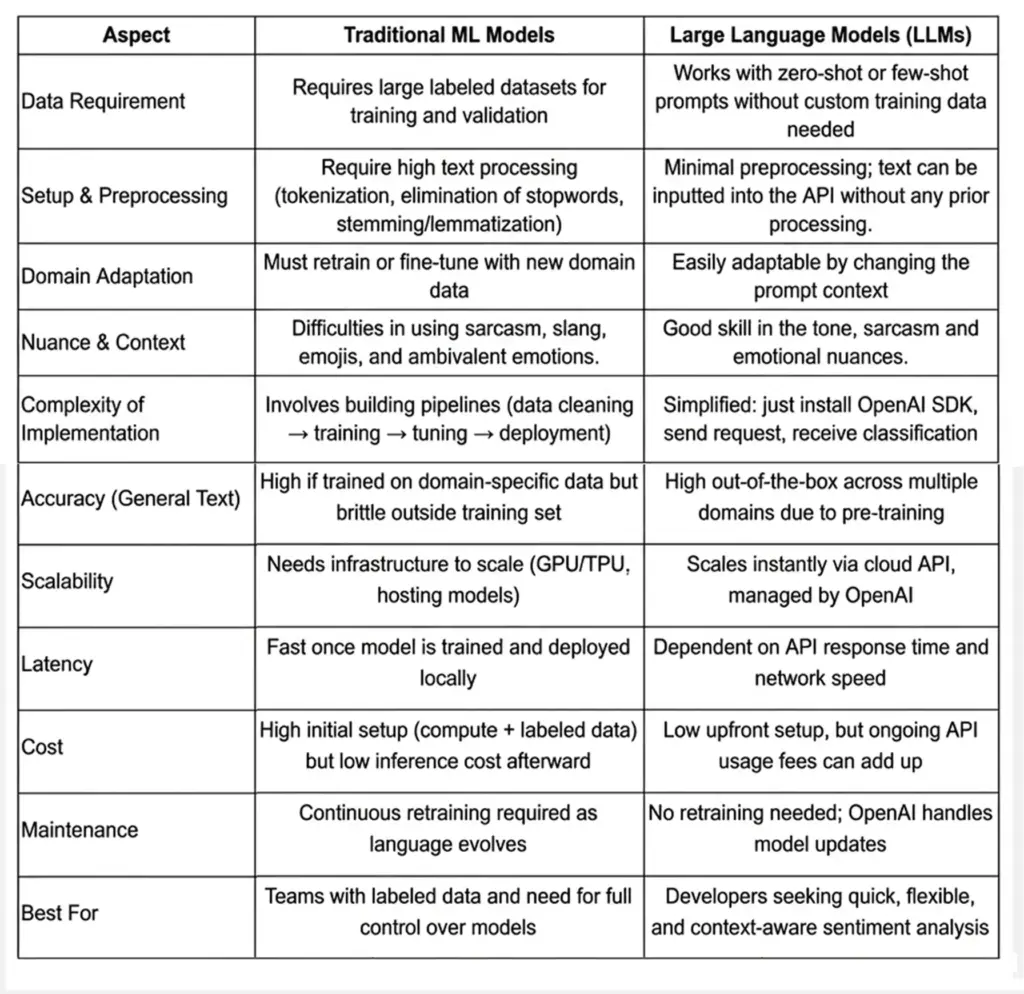
Traditional Machine Learning vs. Large Language Models
Benefits and Limitations of Using OpenAI API
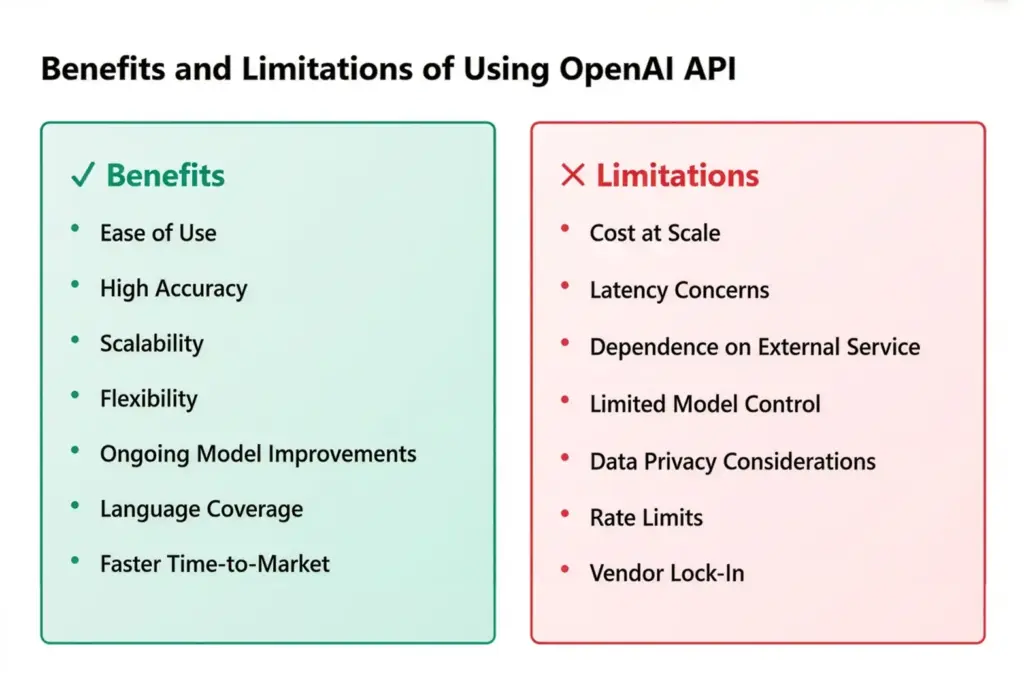
✅ Benefits
- Ease of Use:
No need to collect massive datasets, build pipelines, or host ML models. With the OpenAI API, you send a request and get instant results.
- High Accuracy in Context:
LLMs interpret sarcasm, slang, and complex sentence structures better than rule-based models like VADER. This makes them more reliable across industries.
- Scalability:
Supports NODE backends, serverless functions or microservice environments. You are able to scale hundreds of requests to thousands an hour.
- Flexibility:
You can reuse the same model on other tasks, and classify reviews, analyse tweets, process support tickets without retraining with prompt engineering.
- On-going Model Improvements:
OpenAI performs regular releases of new models, providing developers with the best of state-of-the-art performance, and their models do not need to be manually updated.
- Language Coverage:
Multi-lingual and therefore fits all over the world as opposed to English language only.
- Faster Time-to-Market:
Good when you have a team that needs to roll out sentiment analysis as a speedy orchestration not connected to the creation of special AI infrastructure.
❌ Limitations
- Cost at Scale:
While affordable for small projects, costs can rise quickly for large-scale applications with millions of requests.
- Latency Concerns:
Since requests depend on the API’s response time and internet connectivity, there may be delays in real-time systems.
- Dependence on External Service:
Needs internet connectivity, API quota, and depends on the availability of OpenAI.
- Limited Control Over Model:
You can’t fully retrain or fine-tune the base models (unless using fine-tuning endpoints), which may restrict customization.
- Data Privacy Considerations:
Confidential information should be forwarded to the OpenAI servers, which can be a compliance issue in certain sectors, such as healthcare or finance.
- Rate Limits:
APIs have usage caps per minute or per account, requiring batching or multiple keys for high-volume apps.
- Vendor Lock-In:
Applications become tied to OpenAI’s ecosystem; switching providers may require re-engineering.
Prerequisites & Setup of How to use OpenAI API to Build a Sentiment Analyzer in a Node.js App
You should have the right development environment in place before you start developing your sentiment analyzer. You can get an idea into a working prototype within an hour or so and it only requires a few tools.
1. Install Node.js and npm
You will also require Node.js ( Node.js version 16 or above is suggested ) and npm, which is packaged with Node. You can download both from Node.js official site. Confirm your installation by running:

This makes sure that your environment is set up to take care of dependencies and scripts.
2. Create a New Project Folder
To start your project with:

This will create a package.json file in which all the relevant data on your settings and dependencies will be printed.
3. Install Required Dependencies
In this project, you are going to require three basic packages:
- express – To set up a lightweight API server.
- dotenv – To securely load your API key from environment variables.
- openai – The official OpenAI Node.js client for making requests.
Install them with:

4. Get Your OpenAI Account and API Key
- Go to the platform of OpenAI and obtain a free account.
- After logging in, visit the API keys page to create a new key.
- Integrate this key to a .env file in your project's root.

Never hardcode your key directly into your codebase; keeping it in .env ensures security.
Why Node.js for AI Apps?
Node.js is very popular and is supported by a wide variety of features as well as being lightweight and event-driven, which makes it a good option in the creation of AI-driven apps with OpenAI. You can use Node.js to scale request processing whether you are analyzing a customer review, creating a chatbot or adding sentiment detection to mobile applications.
After getting done, you will be able to set up an environment, connect your app to OpenAI and analyze text.
Step-by-Step Guide on How to use OpenAI API to Build a Sentiment Analyzer in a Node.js App
You have now prepared your environment and therefore it is time to go into the implementation. In this section, you will be taken through the process of How to use OpenAI API to Build a Sentiment Analyzer in a Node.js App. In the end, you will be able to have a working sentiment analyzer API that will categorize text as Positive, Negative or Neutral.
1. Integrating an Application on Node.js to the OpenAI API
Begin with setting up the OpenAI client to send and receive requests using your app. Inside your project, create a new file called app.js (or server.js if you prefer).
Add the following code:
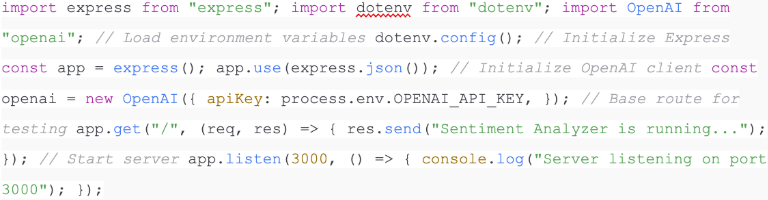
Explanation
- dotenv loads your API key securely from .env.
- express creates a lightweight API server.
- OpenAI client handles communication with the API.
At this stage, you can run:
node app.js
Visit http://localhost:3000/ in your browser, and you should see “Sentiment Analyzer is running…”
2. Write the analyzeSentiment Function
Next, create a helper tool to send user text to OpenAI and classify the responses (Positive, Negative, Neutral).
This code should be added to your app.js:
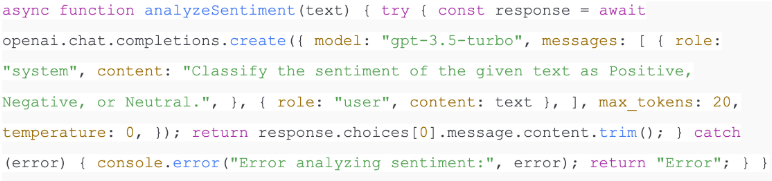
Explanation
- This system message informs the model that it must give responses from only 3 categories i.e. positive, negative, or neutral.
- The user message is the text input.
- temperature: ensures deterministic results, reducing randomness.
- The function returns the model’s classification.
3. Create the /analyze-sentiment Endpoint in Express
Now let’s expose this function via an API endpoint so external apps can send requests.

Explanation
- The endpoint accepts POST requests with a text field in JSON format.
- It validates the input and calls analyzeSentiment.
- The response is structured as JSON, returning both the input text and the sentiment classification.
4. Test the Sentiment Analyzer with Curl or Postman
With your server running, you can now test the endpoint.
Using curl

Expected output:

Using Postman
- Open Postman.
- Make a new POST to localhost:3000/analyze-sentiment.
- Header Content-Type: application/json.
- Add body:

- Send request and check response.
Expected output:

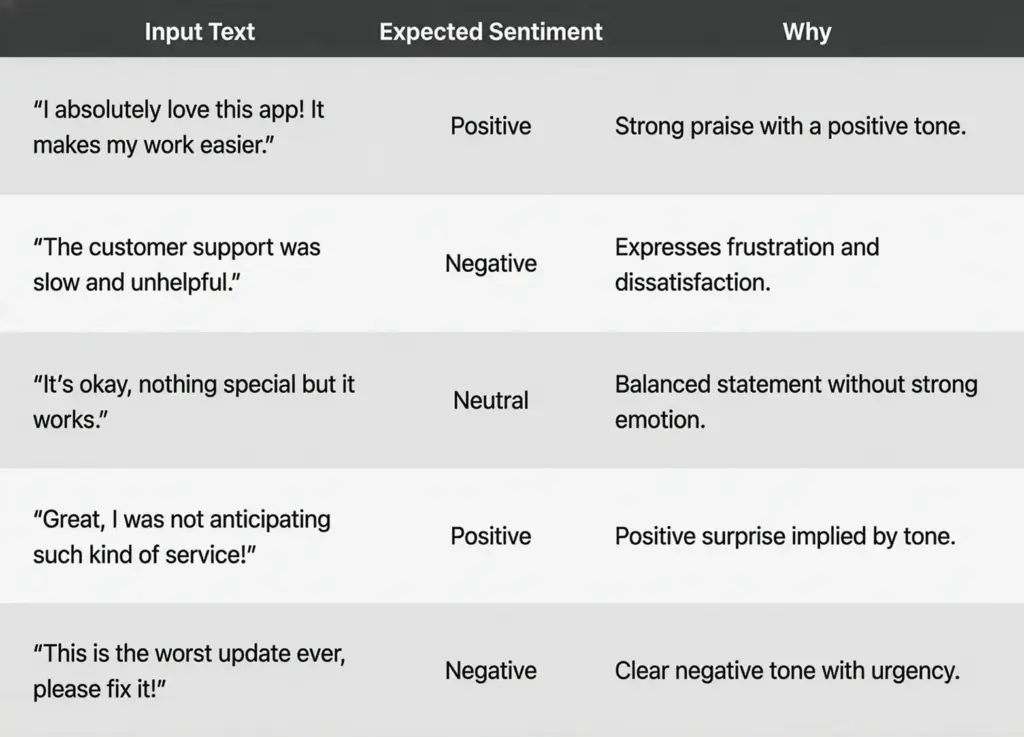
Example Inputs and Outputs
Here are a few sample results you can try:
Improving the Function for Real Use Cases
You may want to expand your analyzer beyond a simple three-class classification. Some possible improvements:
- Confidence Scores: Ask the model to return a percentage confidence for each classification.
- Multi-language Support: Add prompts to tell the model to classify sentiment using other languages.
- Detailed Labels: You can either use a simple Positive or use different classes such as Strongly Positive, Mildly Negative or Mixed Sentiment.
- Text Processing Batch: Let arrays of text be able to analyze a whole batch of data within a single request.
For example, you could modify your prompt:

Enhancements & Best Practices
Your sentiment analyzer works, however, in the real world, you need more than a single classification endpoint. Some typical difficulties and mitigations are presented in the form of questions that companies tend to have when expanding AI-based systems below.
How can I analyze multiple texts at once (batch processing)?
When you have to make many hundreds or thousands of requests, you cannot send only one request per text. Rather, they can be batch requested, and an array of texts can be passed and looped.
For example:

Batching reduces overhead and lets you scale sentiment analysis for datasets like product reviews or survey responses. For very large datasets, consider chunking them into smaller groups to stay within API rate limits.
How do I cache results to reduce costs?
If your app repeatedly analyzes the same text (e.g., a product review viewed by multiple users), caching prevents unnecessary API calls. You can store results in:
- In-memory caches (e.g., Node’s Map, Redis, or Memcached).
- Database fields (store sentiment alongside original text).
Checking the cache should be the first thing when a request is received. In case of finding, save the obtained result, otherwise, ask OpenAI and save the answer. This approach improves speed and significantly lowers costs.
What should I do if requests fail (retries)?
APIs occasionally fail due to network hiccups or rate limits. To handle this gracefully:
- Implement retry logic with exponential backoff (wait 1s → 2s → 4s before retrying).
- Use libraries like axios-retry to simplify error handling.
- Log failures for monitoring.
Retries ensure reliability without overwhelming the API.
How do I improve accuracy in sentiment analysis?
Accuracy depends on your prompt design. Instead of a vague instruction, give the model explicit rules.
Basic Prompt:

Improved Prompt (Few-Shot):
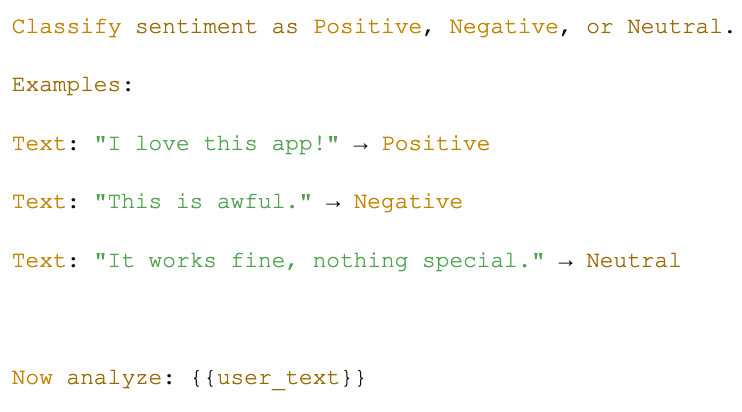
By providing examples, you guide the model’s behavior and reduce misclassifications. For domain-specific cases (like medical reviews or financial comments), tailor examples to that field.
Can I add confidence scores to results?
Yes. Instead of returning only a label, ask the model to output a classification with confidence.

Sample output:
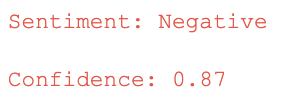
This is valuable when displaying results in dashboards or when filtering borderline cases that need human review.
How do I handle errors and timeouts?
Production systems must plan for failures. Common strategies include:
- Timeouts: There is a time limit on the maximum wait time on API responses (e.g. 10 seconds).
- Graceful degradation: In case OpenAI is not accessible, respond to a fallback message such as "Sentiment unavailable".
- Detailed logging: Log successful and unsuccessful requests.
These protection measures enhance the user experience as it eliminates crashes or infinity loading screens.
How do I scale sentiment analysis for thousands of users?
Scaling requires balancing performance with API restrictions. Consider these practices:
- Rate limiting: Observe the OpenAI restrictions on requests per minute.
- Request queueing: Bottleneck is a throttling library to use in Node.js.
- Parallel requests: Divide traffic into several workers or instances.
- Background processing: In the case of non-real-time analysis (e.g. bulk reviews), process jobs are asynchronously handled using a queue system such as RabbitMQ, Kafka or Bull in Node.js.
Combined, these strategies will enable you to scale sentiment analysis without going beyond the limit or complexity.
What about multi-language sentiment analysis?
The OpenAI API supports multiple languages out of the box. You can expand your analyzer by adding a language hint:

This is particularly useful for global applications dealing with multilingual reviews or social media.
5. Deployment & Integration
When you have a sentiment analyzer working on your computer, all you need to do is to deploy it. Running your Node.js app on a cloud allows access by users, mobile applications or other services.
Deployment (Vercel, Heroku, AWS Lambda)
- Vercel: Ideal when deployments need to be done fast. The push-to-GitHub, push-to-Vercel setup would have your Express app online in minutes. Perfect in small-scale projects.
- Heroku: Easy to use, and easy to command. Deploy with git push heroku main. Good at prototyping and small-scale applications.
- AWS (Elastic Beanstalk / Lambda): Better control and scalability. Useful when you assume that traffic will be heavy or require the serverless function of AWS Lambda.
Integration with Frontend & Mobile Apps
Your API may very easily be linked to:
- React or Vue frontends: Visualize the real-time results of a sentiment analysis within dashboards.
- React Native or Flutter mobile applications: Incorporate an AI-powered sentiment analysis application to review or customer feedback using which users can see insights immediately.
- Support tools/chatbots: Add into current customer service processes so as to identify mood and priority cases.
6. Alternatives & Comparisons
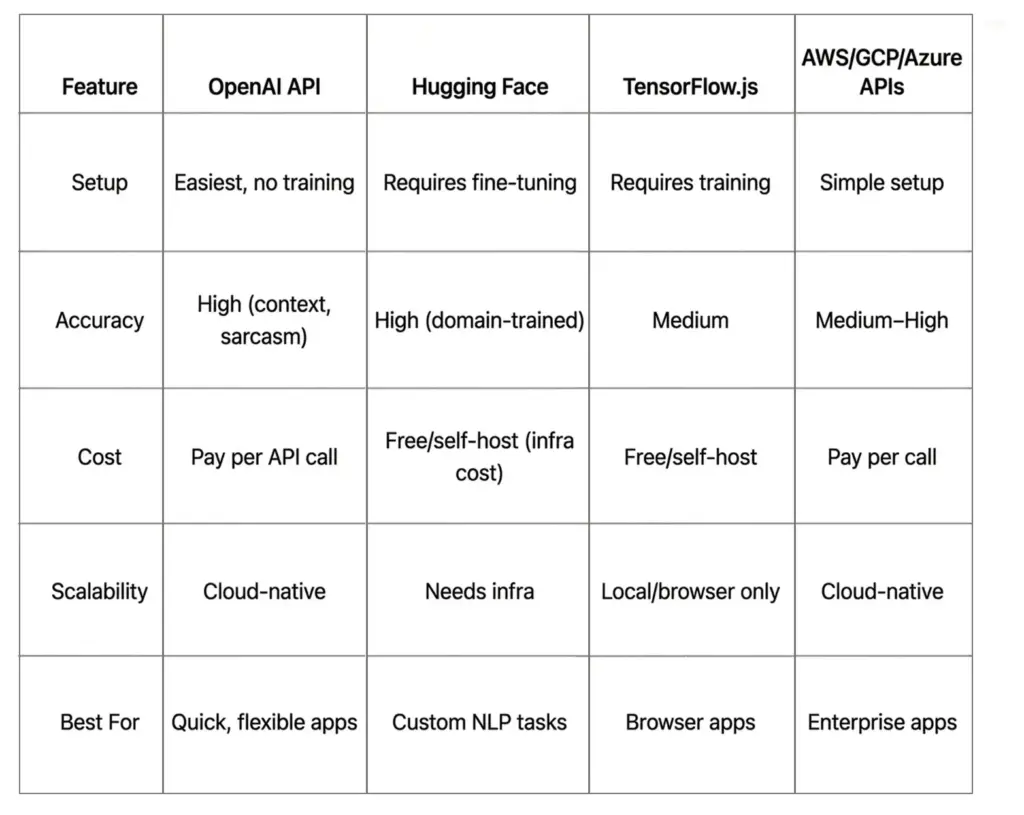
While the OpenAI API offers simplicity and accuracy, other approaches exist for sentiment analysis.
Traditional/Local Approaches
- TensorFlow.js: Enables you to train and run models directly in JavaScript. Good for browser-based apps but requires datasets and training effort.
- Hugging Face Models: Provides off-the-shelf transformers such as BERT or DistilBERT, which are sentiment-fined tuned. Scalable and powerful with the need of infrastructure hosting.
Cloud Provider APIs
- AWS Comprehend: Provides sentiment analysis and entity extraction.
- Google Cloud Natural Language API: Strong for text classification with integration into Google Cloud ecosystem.
- Azure Cognitive Services: Offers sentiment and key phrase detection.
Comparison Table
Use Cases in Real Apps
Sentiment analysis is not theory alone, and it is the driver of real-life applications that enhance customer experience and decision-making.
- Social Media Monitoring Applications.
Determines the mood of the audience in real-time on a platform like Twitter or Instagram.
Track brand reputation and respond to negative comments quickly.
- Customer Support Analysis
Integrate into support tickets or chatbots to gauge frustration levels. An AI customer service app can prioritize angry customers for faster human response.
- E-Commerce Product Reviews
Classify thousands of reviews to highlight trending issues or positive features. This can be particularly helpful in an AI-based sentiment analysis review program to increase the visibility and trust of a product.
Conclusion
In this tutorial, you learned how to use OpenAI API to build a Sentiment Analyzer in a Node.js Apps app from setting up your environment to writing the analyzeSentiment function, creating an Express endpoint, and testing real examples.
We also reviewed such best practices as batching, caching, and immediate tuning, and explained deployment on Vercel, Heroku, or AWS. You also got an idea of how the system would compare to other programs such as TensorFlow.js or Hugging Face and how it can be used in the real world, such as social media monitoring, e-commerce, and customer service.
Next steps? Upgrade the analyzer to a full dashboard, connect with a mobile application, or proceed to aspect-based sentiment analysis with more detailed information.
Check out more guides and tutorials by subscribing to this guide or taking the template up to a tutorial and completing your own AI project.
FAQs
Q1. What’s the best OpenAI model for sentiment analysis?
In the majority of instances, gpt-3.5-turbo should do, it is fast and low-cost. To be more accurate or deal with more complex cases, GPT-4 should be used.
Q2. How much does it cost per request?
Costs vary by model. For gpt-3.5-turbo, it’s a fraction of a cent per request, while GPT-4 is more expensive. Pricing depends on tokens processed (input + output).
Q3. Can I use embeddings for sentiment analysis?
Yes. OpenAI embeddings can cluster texts by similarity, which can indirectly reveal sentiment patterns. However, for direct classification, chat completions are simpler.
Q4. Is Node.js suitable for AI apps?
Absolutely. Node.js can process multiple API calls concurrently, which is why it is a good option to use in lightweight AI back ends. Combine it with such frameworks as Express or Next.js to create a full-stack application.
Q5. What are the weaknesses of OpenAI sentiment analysis?
- Costs can rise at scale.
- Latency depends on internet/API speed.
- Limited control compared to custom ML models.
- Sensitive data must be sent to external servers.
Q6. Can it handle multiple languages?
Yes. OpenAI models support sentiment classification in many languages, making it useful for global businesses.
Ready to turn feedback into actionable intelligence?
At BrainX, we help businesses build robust, scalable sentiment-analysis platforms from prototype to production. Through the use of modern LLMs and prompt engineering, our team creates systems where text gets automatically categorized as positive, negative, or neutral, and allows keeping your data safe and cost-effective.
Through customer reviews, social media chatter or customer support tickets, or any other type, we custom build sentiment analyzers to meet your precise domain, volume, language and integration requirements. We are going to make your trip quicker: insights at a faster pace, decisions made faster, and comprehension of your customers.
Contact BrainX today to get your custom sentiment solution rolling.