Why Businesses Hire an Offshore Development Team for Scalable Growth

Key Takeaways

  • Businesses should not hire offshore development team members when the direction of the product is uncertain, but when they already have a roadmap and require additional capacity to deliver.
  • A dedicated offshore team is ideal in long term product development where continuity, ownership, and predictable output during sprints is important.
  • Direction of the product can be kept in house while execution can be outsourced with a clear definition of architecture, QA and reporting ownership.
  • The most common offshore failures are due to the ineffective governance, inadequate vetting, and lack of clarity in the design of communication rather than due to the geography.
  • The safest way of testing the fit of the team, model, and operating rhythm to your business is through a 90-day pilot.

Businesses are under great pressure in today’s time to release quicker, scale smarter, and manage development costs without compromising on quality. One powerful growth strategy is to hire offshore development team support. Through access to talented engineers in all parts of the world, firms are able to decrease delivery schedules and develop scalable engineering capacity that can meet the demand.

Indeed, according to industry analysts, it is estimated that offshore software development market will grow from about $122 billion in 2024 to roughly $283 billion by 2032. The booming market indicates the fact that organizations make use of offshore teams not only to reduce costs, but to gain other advantages as well. Businesses can access difficult to find skills, reduce time to market, and free their in-house team to work on strategy and innovation.

Instead of relying solely on local hiring, savvy companies now expand their talent pool worldwide. are able to work across time zones, niche technologies (AI, cloud, security, and more), and scale up or down as required.

The strongest offshore relationships are not built around cheap delivery. They are built around speed, capacity, and better use of internal leadership. When the model is right, offshore teams help companies move faster without forcing every roadmap decision through slow local hiring cycles. When the model is wrong, they create confusion, weak accountability, and expensive rework.

Today’s blog is designed as a decision framework, not another generic offshore guide. It will help you in deciding when you can hire offshore, when it makes sense to have a dedicated team, what to keep in-house, what red flags you would want to identify early, how to run a 90-day pilot and how to compare regions in terms of cost and development time.

When to Hire an Offshore Dedicated Software Development Team 

The offshore model does not fit all projects. To determine whether a dedicated offshore team (long-term, exclusive) would be suitable to you, use the following criteria:

  • Long-term Project Roadmap: If your product development is ongoing (new features, maintenance, iterative upgrades) rather than a one-off project, a dedicated team excels. These teams become extensions of your company, preserving knowledge between sprints and releases. Conversely, very short-term, narrowly scoped tasks may be cheaper on a fixed-price basis.
  • Rapid Skill Needs: Are there technical areas you can’t staff locally fast (e.g. AI, cybersecurity, cloud architects)? Offshore teams often have these skills readily. If you need to scale a multidisciplinary team quickly, a dedicated model is ideal. It lets you “instantaneously add talent to accelerate your roadmap”.
  • Budget Constraints with Growth Goals: When you must grow but have tight budgets, offshoring stretches funds. Verified analysts note that offshore projects still cut costs by ~40–70% even after considering all overhead. If freeing the budget to reinvest in your product is a priority, offshore is attractive. However, if budget is ample and speed less critical, onshore might suffice.
  • Need for Control and Security: Dedicated offshore teams provide more client control than generic outsourcing. You hire the team and manage it, maintaining IP ownership and process standards. It is essential when your product processes sensitive information or has proprietary technology. In contrast, when outsourcing entire projects to agencies (without dedicated personnel) there is a risk of losing some control and knowledge.
  • Company Size and Execution Focus: Larger companies and scale-ups often have the processes to integrate offshore teams, whereas small startups might find it challenging. That said, even startups use offshore squads for MVPs. The key is whether you have internal dev leads who can coordinate a remote team.

If these conditions align, hiring an offshore dedicated software development team is likely a smart move. But just to make sure you’re on the right track, you have to consider the following next.

Also Read: IT Staff Augmentation in Software Development – Smart Way to Upscale!

Should You Hire Offshore Development Team Right Now?

Before you compare regions or vendors, you need to answer one question clearly: are you ready to hire offshore development team capacity now, or are you just reacting to delivery pressure?

The choice is best when your business has a stable direction and just requires assistance with implementation. If your roadmap is clear, your product owner is active, and your internal team is stretched, offshore can increase throughput quickly. If your company is still changing direction every week, offshore will amplify the disorder.

You Are Likely Ready If:

  • You have a documented roadmap for at least the next two quarters
  • Your core product requirements are reasonably stable
  • You need skills that are slow or expensive to hire locally
  • Your internal team is spending too much time on maintenance and not enough on roadmap delivery
  • You have a product owner, CTO, or engineering lead who can guide priorities and review outcomes

You May Not Be Ready If:

  • Your product vision changes constantly
  • No one internally owns the backlog
  • You need constant same-room collaboration to make progress
  • You want the offshore team to figure out product strategy for you
  • You do not yet know which roles you actually need

A useful test is this: if you answered “no” to roadmap clarity, internal ownership, and process readiness, pause before you hire offshore development team support. In that case, a smaller advisory engagement or a short-term specialist may be a better first move.

When a Dedicated Offshore Team Is the Right Model

Not every offshore model serves the same purpose. Some are designed for fixed-scope delivery. Others are designed for long-term product execution. If your goal is scalable growth, the most effective structure is usually the dedicated model.

When you hire offshore dedicated software development team support, you are not buying a one-off project. You are building a remote extension of your engineering function. That team works on your backlog, follows your priorities, and stays aligned with your product over time.

A Dedicated Team Makes Sense When:

  • Your roadmap extends beyond a single release cycle
  • Knowledge retention matters to long-term product quality
  • You need consistent sprint velocity instead of ad hoc task delivery
  • Architecture continuity is important
  • You want engineers to become familiar with your users, workflows, and internal standards

Dedicated Team vs. Project Outsourcing
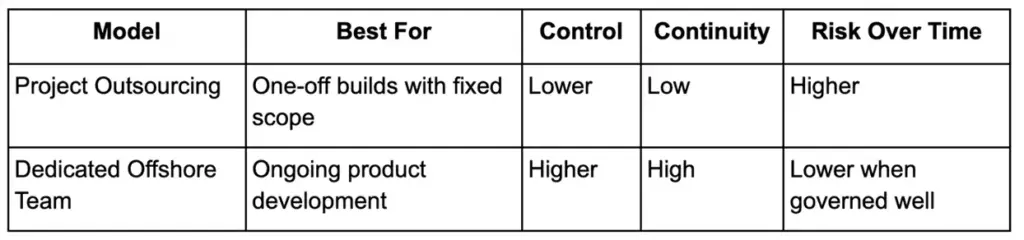
Comparison table of dedicated offshore team vs project outsourcing by control, continuity, and long-term risk.

A project outsourcing model can work for a standalone microsite, migration task, or internal utility. It becomes far less effective when your product needs monthly releases, evolving priorities, and long-term maintenance. In those cases, a dedicated structure creates better accountability and far less context loss.

Who Owns What? Product, Architecture, QA, and Delivery

One of the most common reasons offshore initiatives fail is simple: nobody defines ownership properly.

Before you hire offshore development team members, decide which responsibilities stay close to the business and which can be distributed.

Product Ownership

This should remain in-house. Your internal leadership should own:

  • Vision
  • Roadmap prioritization
  • Customer context
  • Feature definition
  • Acceptance criteria

Offshore teams can execute product decisions. They should not be expected to invent your product direction.

Architecture

Architecture should be shared, but not delegated blindly. A strong setup usually looks like this:

  • Internal CTO or lead engineer sets architectural direction
  • Offshore technical lead handles implementation discipline
  • Major system decisions are reviewed together

This prevents a situation where speed wins in the short term but technical debt grows quietly underneath.

QA and Testing

QA can be led offshore if standards are defined clearly. That includes:

  • Test coverage expectations
  • Regression cycles
  • CI/CD checks
  • Bug severity definitions
  • Release readiness criteria

This is where a strong written process matters. Offshore QA works well when quality is treated as a system, not a person.

Delivery and Sprint Execution

Day-to-day delivery can be managed offshore, but visibility must remain shared. It means, you should have:

  • Daily standups with clear overlap time
  • Transparent sprint planning
  • Delivery dashboards
  • Weekly reviews
  • Written handoffs and documented decisions

IP, Code, and Access Control

This part should never be vague.

Before any delivery begins, your contracts and operating setup should make these points clear:

  • All work product belongs to your company
  • Your company controls the repository
  • The team works inside your GitHub or GitLab organization
  • Access is role-based and revocable
  • Exit procedures are documented before the engagement starts

If a vendor resists this level of control, treat it as a serious warning sign.

Risks and Red Flags to Watch For

The decision to hire offshore development team support carries real risks, but most of them are predictable. The goal is not to avoid all risks. The goal is to catch the wrong fit early.

Strategic Risks

These come from your side of the engagement:

  • No internal product owner
  • Undefined KPIs
  • No clear sprint rhythm
  • Constant priority changes
  • A vague “let’s just see what happens” mindset

Vendor Red Flags

These are often visible during the first few calls:

  • No transparent pricing structure
  • No direct access to the actual engineers you may hire
  • No documented security or IP process
  • No clear replacement policy if a team member leaves
  • No examples from companies similar to your size or stage

Common Operational Failure Patterns

These usually appear after the contract starts:

  • The senior people from the pitch disappear after signing
  • Overlap hours slowly shrink and feedback cycles become too slow
  • Developers say yes to unclear requirements instead of asking questions
  • Documentation is weak, so every issue becomes a meeting
  • Code quality varies because standards were never defined early

Offshore teams do not fail because they are offshore. They fail because governance is weak.

How to Hire Offshore Development Team or Partner

Follow these action steps to go from “maybe offshore?” to having a productive team working for you:

Step 1 – Define Project Scope and Team Needs

Product team planning project scope and developer roles around a whiteboard in a strategy meeting.

Defining project scope and outlining your needs for an offshore development team should take first priority.

Clarify Goals

Start by explicitly defining why you want an offshore team. Is it to speed up an upcoming release, add specialized skills, or extend coverage to 24/7? Write down the project’s vision, key features, timeline, and expected outcomes.

Identify Roles and Skills

List the exact tech skills required (e.g. “5 front-end developers with React,” “2 cloud engineers with AWS expertise”). Outline deliverables for at least the first 3–6 months. This clarity will help vendors propose the right team size and mix.

Set Success Metrics

Define what success looks like (e.g. “Launch X by date”, “Improve release cadence by 50%”). Tying the offshore team’s work to business KPIs keeps everyone focused.

Step 2 – Set Budget and Engagement Model

Once goals, roles and targets are determined, it’s time to move towards finalizing your budget and the engagement model.

Calculate Total Cost

Besides developer salaries, include project management, communication tools, possible travel for visits, and any third-party services. Also allow a buffer (typically 10–20%) for overhead or scope changes.

Choose Engagement Type

Based on scope and flexibility needs:

  • Dedicated Team: Pay a predictable monthly rate per role. Best for long-term, evolving projects. Offers maximum flexibility (you can shift priorities mid-project).
  • Staff Augmentation: Similar to dedicated, but often managed partly by your in-house lead.
  • Fixed-Price Contract: If scope is very clear-cut and unlikely to change, you can negotiate a fixed bid. This shifts scope-change risk to the vendor but reduces your control.
  • Time & Material (T&M): Pay for actual hours used. Useful if requirements are fuzzy, but requires diligent time tracking.

Also Read: Detailed IT Staff Augmentation Handbook: On Benefits, Process, And More
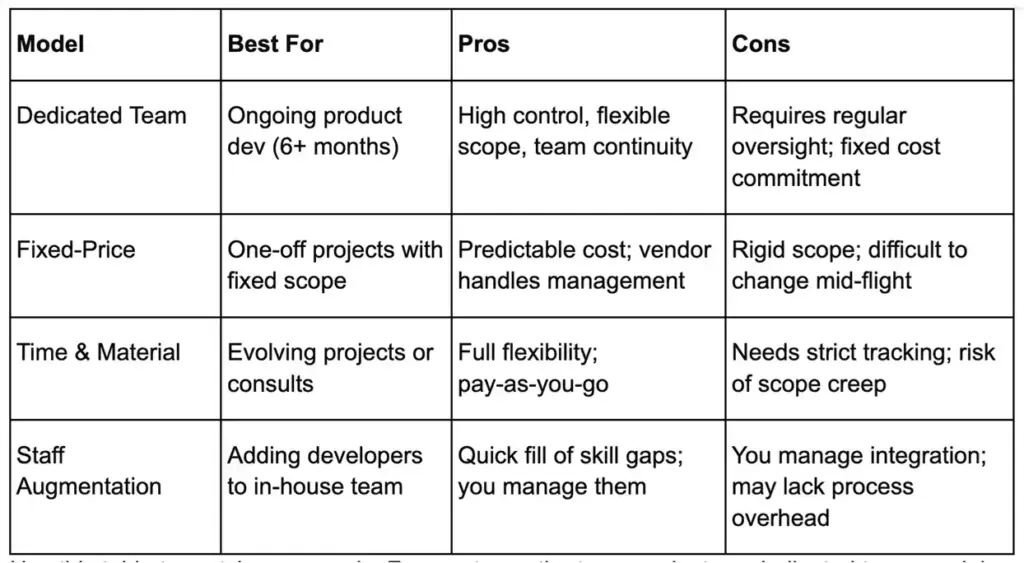
Comparison table of dedicated team, fixed-price, time and material, and staff augmentation models.

Use this table to match your needs. For most growth-stage products, a dedicated team model (or staff augmentation) is recommended, as it balances control with scalability.

Step 3 – Select Location and Partner

Business team reviewing global vendor options and hiring regions for an offshore development team.

At this point, you should evaluate all the different regions. Consider cost vs. time overlap vs. language. Verified data shows:

  • Eastern Europe: Strong English skills, EU-friendly laws, 3–6 hours ahead of US, rates ~$25/hr. Great for EU and US companies alike.
  • Latin America: Small time difference with US, moderately high English, growing tech hubs. Rates ~$30–$35/hr (higher than Asia, but still 30–50% less than US).
  • Asia (India, Vietnam, Philippines, Pakistan): Very low costs (starting around ~$15/hr) and a huge talent pool. The time zone difference is large (US companies manage via overlapping mornings/evenings). Philippines offers good English, India has vast skills and Pakistan can be cost effective while offering all the things mentioned before for its competitors.
  • Others: The Philippines and Eastern Europe are top choices now, per Deloitte and IDC. Africa (Kenya, Egypt) is emerging for Europe, Canada remains top-tier (onshore), etc.

Check Legal/IP Framework

Favor countries with clear IP laws and stable business environments. For example, EU countries (Poland, Romania) follow EU IP directives. India’s legal system enforces contracts well. Vendor Screening: Choose providers (agencies or consultancy firms) that specialize in your tech stack. Look for:

  • Established track record (case studies, client reviews)
  • Strong internal processes (e.g. Agile, quality assurance)
  • Good communication (responsiveness in initial discussions)

On shortlist, conduct technical tests or trial projects. Ensure the vendor can assemble the roles you need (frontend, backend, QA, etc.) within your timeline.

Step 4 – Vet and Onboard the Team
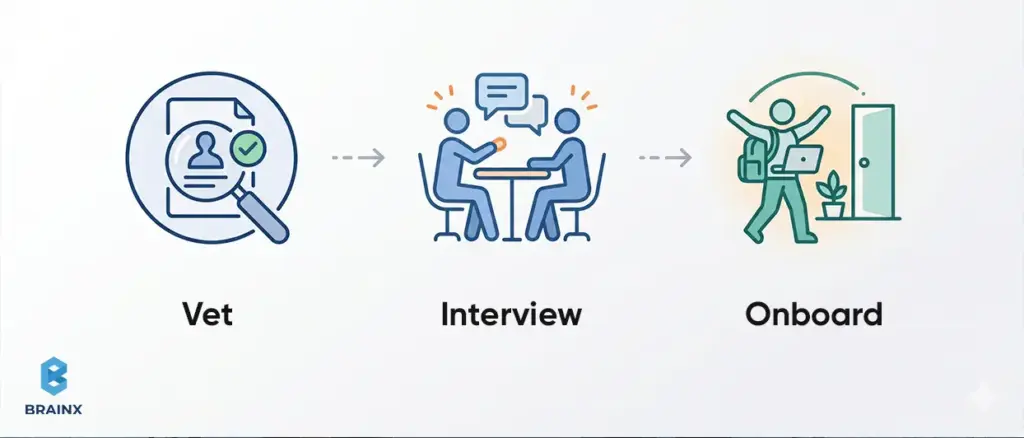
Illustration of developer vetting, interview, and onboarding steps for building a software team.

A very important step is to thoroughly vet, interview and on board your new tech partner or team members.

Technical Vetting 

Conduct interviews or coding assessments for candidates. Test real-world problems to gauge skill level. Also assess communication: can they explain solutions clearly? Ideally, include both technical leads and product owners in interviews.

Background Checks

Verify work history and references, especially for key roles (team lead, architect). Ensure their English proficiency meets requirements.

Contracts & Legal

Sign detailed contracts/Master Service Agreements. Include:

  • IP Assignment clauses (all code and work-products belong to you)
  • Non-Disclosure Agreements (NDA)
  • Data Protection clauses (GDPR/CCPA compliance if relevant)
  • Termination terms and exit transition (knowledge transfer responsibilities)
    These safeguards are crucial. As one whitepaper notes, explicitly addressing IP and security in contracts is a must.

Knowledge Transfer & Tools

Plan a thorough handoff. Provide documentation of existing systems, design specs, and coding standards. Give the team access to code repositories, dev environments, and project trackers. Arrange onboarding sessions where senior local developers explain architecture to the offshore team.

First Project

If possible, start with a small pilot feature or a short proof-of-concept. This lets both sides adjust processes before committing to major deliverables. More details on that. Let’s discuss the final step of hiring offshore developers.

Step 5 – Manage and Scale Ongoing

Business leader pointing at rising bar chart to represent scaling offshore development operations.

Here are the factors that you need to keep constant watch on to manage your projects flawlessly and keep on scaling without any hiccups.

Agile Processes

Run your offshore team in your chosen Agile framework. Hold regular sprint planning, demos, and retrospectives. Use shared project management tools (Jira, Asana). Track burndown charts and velocity to spot issues early.

Communication

Maintain daily or bi-weekly standups (overlap hours) to synchronize. As one analysis emphasizes, “everything important needs written documentation” to bridge distance. After meetings, circulate summaries and updates in chat or email. Encourage questions in writing to avoid misunderstandings.

Integration with Onshore Team

Treat offshore developers as teammates. Include them in all relevant meetings (demo days, design reviews). Organize occasional virtual team-building (online games, coffee chats). If budget allows, occasional in-person offsites or visits can cement relationships.

Quality and Security

Enforce coding standards and mandatory code reviews for all commits. Build CI/CD pipelines and automated tests that the whole team adheres to. For security and IP: use version control with access control, require secure VPNs, and rotate credentials. Regularly remind the team of NDAs and compliance policies.

Scalability

Monitor workload and cycle times. As needs grow, promptly onboard additional developers via the same partner. Conversely, if a project winds down, gracefully sunset extra roles.

[Read more about these steps in: Why Offshore Software Product Development Is Growing in 2026]

The 90-Day Pilot: Test Before You Commit

Long contracts should not be part of your first move. 

If you are still deciding how to hire offshore development team support the right way, a 90-day pilot is the smartest path. It gives both sides enough time to test real work, while still protecting you from a bad long-term fit.

Days 1–30: Setup and Integration

Use the first month to test fundamentals, not volume. Focus on:

  • Contract finalization and IP safeguards
  • Tool access and environment setup
  • Architecture walkthroughs
  • Backlog alignment
  • A small, low-risk sprint scope

The goal here is not speed. It is communication quality, responsiveness, and working rhythm.

Days 31–60: Execution Validation

Now move into real delivery. Use this period to assess:

  • Sprint predictability
  • Code quality
  • QA reliability
  • Documentation habits
  • Ability to handle feedback without drift

Assign work that matters, but not the most fragile part of your roadmap.

Days 61–90: Scale Decision

By the final month, you should have enough data to make a real decision. Evaluate:

  • Cost efficiency
  • Feature throughput
  • Defect rates
  • Team fit
  • Management overhead
  • Confidence in scaling the model

At the end of the pilot, you usually have three outcomes:

  • Scale up if delivery is strong and coordination is healthy
  • Adjust the team shape if the model works but the role mix is wrong
  • Offboard cleanly if the fit is weak

The pilot phase should leave you with no hesitations as it is a practice for disciplined buying.

Cost vs. Development Time by Region

Companies often compare offshore regions by rate alone. That is the wrong lens.

A lower hourly rate can still cost more if handoffs are weak, overlap is limited, or rework slows delivery. A better question is to ask, “Which region gives us the best output for our product type?
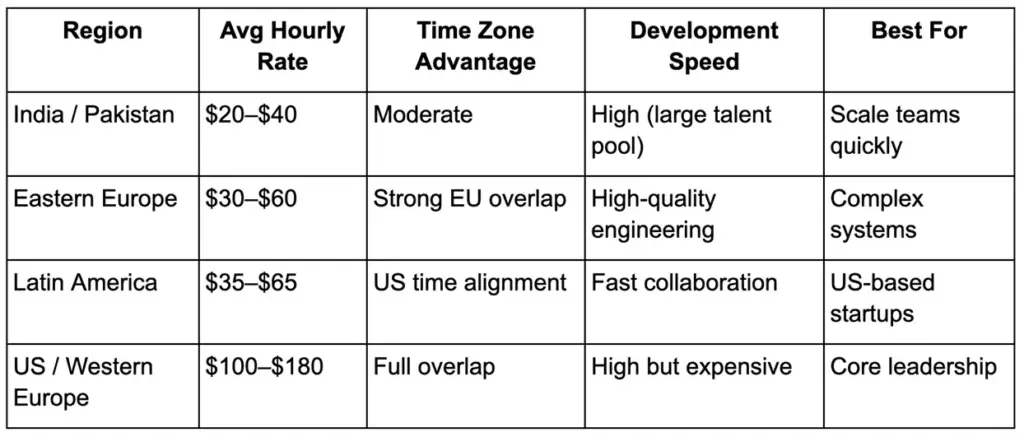
Regional comparison table of offshore development rates, time zone overlap, and delivery speed.

How to Read This Table

Choose based on delivery pattern, not just price.

  • If your product needs real-time collaboration and fast decision loops, Latin America can justify a higher monthly cost.
  • If you need strong engineering quality with reasonable overlap, Eastern Europe is often a strong fit.
  • If you are scaling support functions, maintenance, or large execution capacity with disciplined async processes, South and Southeast Asia can be highly efficient.

The real metric is not hourly rate, it is cost per feature shipped well and on time.

Final Decision Checklist Before You Hire Offshore

Use this before you sign anything.

  • Do we have a clear roadmap?
  • Do we know which roles we need?
  • Do we have internal product ownership?
  • Are we ready to manage sprint cadence and reviews?
  • Have we defined who owns product, architecture, QA, and delivery?
  • Are our IP, code access, and exit terms documented?
  • Are we willing to validate the relationship through a 90-day pilot?
  • Have we chosen a region based on delivery fit, not just lower rates?

If most of these answers are yes, the decision to hire offshore development team support is likely grounded in execution logic rather than urgency.

Conclusion

Companies do not scale well just by hiring more engineers. They scale by building better delivery systems.

That is why the best offshore setups in 2026 are not built as cost experiments. They are built as structured operating models with clear ownership, strong communication design, measurable pilot periods, and disciplined partner selection.

If you choose to hire offshore development team support, do it with the same seriousness you would bring to building any other core business capability. Get the model right, and offshore becomes more than a staffing move. It becomes a practical engine for growth.

FAQs

How Much Does It Cost To Hire An Offshore Development Team?

The cost depends on region, seniority, team size, and engagement model. A small dedicated team will usually be more expensive than a few freelancers on paper, but often more efficient over time because it reduces re-onboarding, quality drift, and delivery inconsistency. Contact our team and find out what it can cost you to hire offshore developers for your project?

What Is An Offshore Dedicated Software Development Team?

It is a team of developers, testers, and related specialists based in another country who work exclusively on your product over an ongoing period. Unlike project outsourcing, the team is aligned to your backlog, your roadmap, and your operating process.

What Industries Benefit Most From Offshore Development?

SaaS, fintech, healthtech, ecommerce, logistics, and enterprise software teams often benefit the most because they need steady product iteration, engineering specialization, and scalable delivery support.

What Are Common Challenges When Working With An Offshore Team?

The most common challenges are weak communication design, unclear ownership, poor documentation, low overlap hours, and inconsistent quality controls. These issues are manageable when governance is strong.

Is A Dedicated Offshore Team Right For Startups?

Yes, but only when the startup already has product clarity and someone internally who can guide execution. For very early-stage startups with shifting priorities, a smaller advisory or specialist model may be the better first step.
Key Takeaways

  • IT services for manufacturing help reduce downtime, protect uptime, and keep critical production systems running smoothly.
  • They improve visibility across networks, devices, applications, and integrations that support modern manufacturing operations.
  • Strong support models help manufacturers secure IT/OT environments, manage vendor access, and reduce operational risk.
  • Standardized IT practices across plants, shifts, and sites make it easier to scale, support teams, and maintain consistency.
  • A well-managed approach combines monitoring, recovery planning, and continuous improvement to strengthen long-term resilience.

Introduction

Modern plants run on interconnected systems—ERP and MES workflows, shop-floor networks, industrial PCs, supplier integrations, and remote access for technicians and OEMs. When any part fails (or is compromised), downtime, quality issues, and missed shipments compound fast. 

That’s why IT services for manufacturing have evolved from “fix it when it breaks” support into proactive, production-aligned operations: designing resilient networks, securing IT/OT boundaries, standardizing devices across sites, and modernizing legacy apps without disrupting the line. 

Today’s guide explains what a complete managed IT model includes, the benefits and risks, and how to select a partner and service levels that match real manufacturing constraints—shifts, safety, compliance, and continuous improvement. 

Why IT Services For Manufacturing Matter In 2026

In 2026, “uptime” isn’t just an operations metric—it’s the output of tightly coupled IT, OT, suppliers, and security decisions. OT environments are more interconnected than ever because plants need efficiency, integration, and real-time visibility—but that same connectivity expands the attack surface and raises the consequences of failure. 

IT/OT Convergence – Why The Factory Floor And Front Office Now Share Risk (And Responsibility)

IT and OT used to be treated like separate worlds. Today, they share identity systems, remote access pathways, shared networks, and data flows that support analytics and continuous improvement—so risks cross boundaries quickly. Modern OT guidance stresses that cybersecurity decisions must account for safety, reliability, and operational continuity—not just confidentiality. 

A practical way to think about convergence is “control vs. observe.” Current OT connectivity guidance explicitly recommends ensuring monitoring/analytics/business systems do not have direct control capabilities over OT assets; they should be designed to observe and analyze, not command operations. This helps protect safety and reduces the blast radius of compromise. 

Downtime Economics – How Small Outages Cascade Into Quality And Delivery Pain

A five-minute shop-floor outage is rarely “just five minutes.” It triggers scrap risk, rework, line rebalancing, missed changeover windows, rushed QA, and rescheduling across labor and logistics. That cascading effect is exactly why advanced manufacturing programs emphasize reducing downtime and improving overall equipment effectiveness—not as abstract KPIs, but as a direct productivity lever. 

From a service design perspective, downtime economics changes how you prioritize fixes. A minor issue on a back-office device might wait; a flaky switch feeding a cell, a failed industrial workstation image, or a broken vendor access path becomes an incident that can stop revenue-generating operations. OT security guidance also highlights that cyber incidents can create physical harm or environmental impact, which raises the “cost of downtime” beyond dollars. 

Security-Driven Urgency (What’s Changed Since 2024)

The threat trend line since 2024 has reinforced an uncomfortable truth: attackers don’t need exotic techniques when factories run a large, distributed footprint with varied patch levels, remote access tools, and third-party connections.

In the Verizon 2025 DBIR executive summary, ransomware is present in 44% of reviewed breaches (up from 32%), and exploitation of vulnerabilities is a growing initial access vector (reaching 20%).  That matters for manufacturers because plants tend to have a long tail of edge devices, VPNs, and special-purpose endpoints that are harder to standardize. 

The same report highlights supply chain and third-party exposure: breaches involving a third party doubled from 15% to 30%.  In manufacturing environments, those “third parties” often include OEMs, integrators, and remote maintenance vendors—exactly the access paths OT guidance calls out as compounding risk. 

The Critical Role Of Managed IT Services In The Manufacturing Industry

In manufacturing, managed IT isn’t an “outsourced help desk.” It’s a delivery system for plant stability: standardized configurations, predictable support during shifts, measurable incident response, and security controls that don’t break production constraints. OT security guidance repeatedly emphasizes making risk-informed decisions, documenting them for auditability, and designing connectivity so compromise is harder and less impactful. 

Managed vs. Break/Fix vs. Co-Managed – What Each Looks Like In A Plant Context

Break/fix is reactive: something fails, you open a ticket, someone shows up. That model tends to optimize for short-term ticket closure—not for preventing recurring outages, reducing configuration drift, or building recovery readiness. 

Managed services are proactive and measured: monitoring, patch and configuration management, backup validation, security controls, and regular reporting against defined KPIs. These are the disciplines that turn “we think we’re stable” into “we can prove we’re stable.” 

Co-managed is common in mature plants: your internal team retains ownership of plant applications, priorities, and governance, while a partner runs defined operational functions (monitoring, endpoint management, off-hours coverage, documentation, and escalation). This aligns well with OT guidance’s emphasis on clear accountability and auditable decisions. 

Manufacturing IT vs OT

OT environments carry unique constraints: performance impacts, strict change windows, and the reality that safety, reliability, and uptime often outweigh “best practice” security defaults. 

That’s why good manufacturing operating models define, in writing:

  • Who owns what (IT owns identity? OT owns PLC network changes? shared decisions for remote access?).
  • What approvals are required (especially for changes near control systems).
  • How escalation works (24/7 routes, plant-on-call, vendor involvement, and safety sign-off). 

For a structured way to map responsibilities, many teams align operational controls to the NIST Cybersecurity Framework 2.0 functions (Govern, Identify, Protect, Detect, Respond, Recover). It’s a practical vocabulary for cross-functional teams. 

What “Production-Aligned SLAs” Actually Mean 

A plant SLA is different from an office SLA because “severity” is defined by production impact. A true production-aligned model typically includes:

  • Coverage that matches shift patterns and maintenance windows.
  • A clear “stop-the-line” severity tier with fast triage and escalation.
  • On-site response options and spare/replace strategies for critical endpoints. 

Service desks are designed as a single point of contact and communication hub, which is especially important when multiple teams must coordinate during an incident (IT, OT, maintenance, and vendors). 

Key Components Of Manufacturing IT Services In A Managed Model

A completely managed scope should be easy to visualize: 

  • What’s covered at the plant edge
  • What’s covered in corporate systems
  • What’s covered in the integration layer that connects them

That is the practical core of manufacturing IT services—and it’s how you compare providers without getting trapped in vague promises. 

Manufacturing IT Services Checklist (Coverage Across Plant, Edge, Cloud & Corporate IT)

A useful checklist starts with outcomes and not tools. At minimum, you want defined accountability for:

  • Asset inventory and configuration baselines
  • Monitoring and alerting
  • Identity and access controls
  • Patch and vulnerability management (with OT-safe constraints)
  • Backup and recovery testing
  • Incident response procedures and reporting 

If a provider can’t clearly describe what happens in the first 30–90 days—discovery, stabilization, and baseline reporting—that’s a red flag. OT guidance emphasizes documenting architecture and making risk-informed decisions auditable; your rollout plan should reflect that. 

Network Management And Security For Plants, Warehouses, And Remote Sites

Plant networks must be designed so compromise is contained. Modern OT connectivity guidance recommends strong boundary controls that reside in a separate network segment—often called a DMZ—to isolate external-facing systems (like remote access gateways) from the core OT network. 

Segmentation goes beyond “IT vs OT.” Guidance highlights zoning, micro-segmentation, and enforcing least-privilege traffic paths to reduce lateral movement and limit exposure—especially when legacy systems must remain in place. 

Endpoint + Identity Management For Shared Workstations & Industrial PCs

Manufacturing endpoints behave differently:

  • Shared workstations with shift handoffs
  • Industrial PCs with specialized drivers and long replacement cycles
  • “Shadow” endpoints owned by vendors or embedded into equipment 

Security guidance for ransomware defense repeatedly emphasizes phishing-resistant MFA for key services, especially email and VPNs, alongside identity and access management controls.  In plants, this often requires designing authentication and privilege models that don’t disrupt production roles (e.g., fast re-auth patterns, kiosk policies, segregated admin accounts). 

Cloud/Hybrid Operations For ERP/MES Integrations & Standardized Tooling

Cloud isn’t the goal; stable integrations are. Industry 4.0 programs highlight how connected technologies (IoT, analytics, AI) can reduce downtime and improve quality—but only if data collection, storage, and transmission are designed securely and operationally. 

The practical managed-services question is: who owns the integration reliability between plant systems and enterprise workflows, and how is it monitored? If you can’t detect broken interfaces quickly, you end up treating symptoms (late shipments, manual re-entry) rather than restoring the system behavior. 

Backup, Disaster Recovery, And Recovery Testing For Production Continuity

Backup is not “set it and forget it.” The #StopRansomware guidance explicitly recommends maintaining offline, encrypted backups and regularly testing their availability and integrity—because ransomware actors often target accessible backups to make recovery impossible without paying. 

In manufacturing, it’s not enough to back up files. You also need recoverable system states: golden images for critical servers, workstation images for production roles, and validated restore procedures aligned to the plant’s recovery priorities. 

Help Desk + Field Support – How To Structure Triage For Manufacturing Severity Levels

A production-aware service desk does three things well:

  1. Captures context fast (site, line, safety impact, current shift constraints)
  2. Routes correctly (IT vs OT vs vendor vs facilities)
  3. Communicates clearly (operators don’t want “ticket updates”—they want time-to-recovery) 

That’s why a well-run service desk is defined as the central point for incidents, service requests, and communication between teams—especially during high-severity events. 

Challenges Faced By Manufacturing Companies

The biggest mistake manufacturers make is assuming the constraints they live with—legacy equipment, vendor access, multi-site variation—are “unique.” They’re common, predictable, and manageable, but only if your operations model acknowledges them explicitly. 

Legacy Systems & Long Equipment Lifecycles – Why Patching Is Different In OT

OT environments frequently contain obsolete products due to extended lifecycles, and guidance warns that obsolete products may no longer receive security updates and may lack modern mitigations. 

This changes patching behavior. You often need compensating controls—segmentation, hardened boundary controls, and tightly restricted access—while you plan realistic replacement timelines. OT cybersecurity guidance explicitly frames segmentation as a temporary measure alongside a roadmap for asset replacement. 

Vendor & OEM Remote Access (The Hidden Attack Surface Most Teams Underestimate)

Remote access is a productivity enabler—but it’s also a common abuse path. #StopRansomware guidance notes the malicious use of remote access and remote monitoring/management software and recommends auditing tools and logs to detect abnormal use. 

Modern OT connectivity guidance advises hardening the OT boundary with a DMZ that isolates external-facing systems such as remote access gateways and vendor portals from the core OT network. This architecture reduces the chance that a gateway compromise directly exposes OT assets. 

Change Management On The Shop Floor: Training, Adoption & Operational Disruption Risks

Even “small” IT changes can disrupt production, like:

  • Authentication prompts that slow operators
  • Endpoint agents that affect performance
  • Network rule changes that break machine-to-system communication

That’s why OT guidance calls for testing controls before deployment and for evaluating the operational impacts of security mechanisms, including latency and performance trade-offs. 

Challenges in Integrating IT Support for Manufacturing

The integration challenge is organizational as much as technical. The 2025 DBIR highlights the growing role of third parties in breaches, reinforcing why plants must treat vendor access paths as governed, monitored, and auditable—not casual “log in whenever you need.” 

A high-functioning model documents who can approve connectivity, which systems are in scope, and how isolation will work in an incident—because OT guidance treats these as “end states” you should design toward. 

Managed IT Services For Manufacturing Companies

When buyers search for IT services for manufacturing, they’re usually trying to answer one question: “Can you keep operations stable while we modernize?” The best providers can describe coverage for the manufacturing stack, the site standardization approach, and a lifecycle plan that’s realistic for plant constraints. 

Typical Manufacturing Stack Coverage – ERP, MES, SCADA, Historians, Data Pipelines

Manufacturing environments span enterprise planning down to shop-floor control. The International Society of Automation ISA-95 model describes layered levels from physical processes through sensing/control up to enterprise planning and logistics—useful context when defining what belongs in IT vs OT scope. 

At the OT layer, NIST OT security guidance explicitly covers common OT components such as SCADA systems, PLCs, and DCS environments, and emphasizes that security controls must fit operational realities. 

Multi-Site Standardization – How Managed Services Reduce Variability Across Plants

Variability is risk. Different switch configurations, inconsistent endpoint images, and “one-off” vendor remote access setups create fragility. OT connectivity guidance encourages centralizing and standardizing network connections to limit exposure and improve control. 

Standardization also makes monitoring meaningful. If every plant reports incidents differently, your MTTR and uptime metrics become storytelling instead of management. The NIST CSF 2.0 emphasizes consistent outcomes and communication across stakeholders, which is exactly what multi-site reporting should enable. 

Building A Lifecycle Plan: Asset Inventory, Refresh Cycles, And Supportability

A lifecycle plan starts with “what do we have?” and “what does it depend on?” That aligns with the Identify and Govern concepts in CSF 2.0, which exist to make risk management and prioritization explicit rather than informal. 

For OT, you also need to identify what’s obsolete or unsupported and treat those items as higher-risk, then decide which compensating controls (segmentation, restricted access) apply until replacement. 

Benefits Of Managed IT Services For Manufacturing Companies

Smart factory dashboard showing security, uptime, and monitoring benefits of manufacturing IT services.

The real ROI of IT services for manufacturing shows up in fewer “surprise” outages, faster recovery when incidents happen, safer modernization, and clearer accountability between IT, OT, and vendors. OT guidance frames resilience as raising the threshold needed to cause disruption—managed operations is how you do that consistently. 

Uptime & Faster MTTR – Operational Continuity Outcomes Leadership Cares About

Leadership cares about outcomes: stable throughput, predictable delivery, and fewer escalations. A service desk model that’s designed to manage incidents and communication is foundational to reducing time-to-recovery—especially when multiple teams must coordinate. 

Security reporting reinforces this need: ransomware appears in a large share of breaches, and vulnerability exploitation continues to rise as an entry path. Faster detection and response reduces downtime—even when prevention isn’t perfect. 

Predictable Costs And Scalable Coverage Across Sites And Shifts

Predictable cost isn’t about cheaper IT—it’s about fewer cost spikes from emergency incidents, rushed replacements, and unplanned downtime. A managed model makes work visible: what is included, what is out of scope, and what a “major incident” costs. 

Scalability matters because manufacturing is multi-site by nature. When practices are standardized (monitoring, patch cadence, access controls), new plants or lines can be onboarded to the same baseline rather than reinvented. 

Stronger Cybersecurity Posture With Monitoring, Response & Recovery Readiness

The 2025 DBIR shows that third-party involvement in breaches doubled to 30%, reinforcing why monitoring, access governance, and incident readiness must include vendor ecosystems. 

Ransomware defense guidance emphasizes MFA, least privilege, and backup testing—controls that only work when services are actually operated day-to-day (enrollment, audits, restore drills), not when they’re “planned.” 

Compliance Readiness: Turning Service Reports Into Audit Evidence (Without Heavy Jargon)

Compliance is easier when reporting is disciplined. If you can show patch cadence exceptions, access reviews, backup test results, and incident timelines, audits often become verification rather than archaeology. 

Many organizations build their security management systems around standards like International Organization for Standardization ISO/IEC 27001, which describes an information security management system approach.  A managed services partner won’t “make you compliant,” but they can provide the operational evidence your governance program needs. 

Productivity Gains For Engineering, Operations & Back Office Via Standardized Tools

Industry 4.0 programs emphasize that connected technologies can improve quality, shorten downtimes, and improve overall equipment effectiveness. Those gains depend on stable networks, reliable devices, and data pipelines that are supported like production systems—not like side projects. 

Standardization also reduces “tribal knowledge” risk: fewer custom fixes, more repeatable onboarding, and clearer documentation for shift-to-shift continuity. 

Managed IT Services for Manufacturing Use Cases

The best way to evaluate IT services for manufacturing is to map them to real plant scenarios. If a provider can’t explain how they handle segmentation, shared devices, vendor access, and recovery priorities, their playbook is probably office-first. 

Plant Network Reliability & Segmentation

Segmentation is a reliability strategy as much as a security strategy. OT guidance recommends zoning, separation of duties, and boundary controls (like DMZs) to prevent a compromise or misconfiguration from becoming a plant-wide event. 

For a widely used reference model, the Purdue architecture is often used to reason about separating industrial control networks from corporate networks and the internet. A U.S. Department of Energy topic paper describes it as a framework for segmentation and notes its use as a baseline for OT security approaches. 

End-User Support For Production Roles 

Production support is about speed and clarity. Shared workstations and constrained environments need fast user restoration patterns and clear escalation to OT or vendors when symptoms point outside typical IT scope. 

This is where a mature service desk matters: it’s the communication hub that logs, prioritizes, and coordinates incident resolution, which reduces confusion during multi-team incidents. 

Predictive Maintenance Enablement 

Predictive maintenance only works when the boring layers work first: reliable connectivity, consistent data capture, secure remote monitoring, and clear ownership of data pipelines. OT guidance explicitly lists benefits like predictive maintenance and remote monitoring as drivers of connectivity—while warning these introduce risks. 

Industry 4.0 guidance similarly points to IoT, analytics, and AI as enablers of efficiency and reduced downtime, but it also emphasizes that cybersecurity can’t be ignored as interconnectivity rises. 

Supply Chain Visibility & Integration Reliability 

Supply chain visibility is often an integration story: EDI/API flows, portals, supplier status feeds, and shared scheduling data. When those connections are unstable, people revert to spreadsheets and phone calls—slowing response times and increasing error rates. 

Third-party risk trends—like DBIR’s rise in third-party involvement—underscore why these integrations should include access governance and monitoring rather than “set it up once.” 

Quality Control And Traceability (Data Integrity + Retention + Access Controls)

Traceability depends on data integrity: accurate timestamps, controlled access, and retention policies that match regulatory or customer requirements. Controls like identity management and access control are explicitly part of the Protect function in CSF 2.0. 

For OT-adjacent systems, you also need to ensure security controls don’t degrade operational performance or create unsafe behavior—an explicit trade-off OT security guidance addresses. 

Business Continuity And Disaster Recovery

Ransomware guidance is clear: keep offline encrypted backups and test them.  OT-aware recovery adds another layer: restore order matters (identity, remote access gateways, production apps, then “nice to have”), and isolation plans must be defined so you don’t re-infect clean systems during recovery. 

Real World Examples Of How Managed IT Services Help Manufacturers

The scenarios below are composite examples based on common manufacturing failure modes and the control patterns recommended in modern OT and ransomware guidance. 

Example 1: Reducing recurring downtime via monitoring + root-cause fixes (not just ticket closure)

A plant experiences recurring micro-outages every week—short, inconsistent, and hard to diagnose. A managed team implements baseline monitoring, correlates incidents to network events, and identifies a misconfigured boundary rule that intermittently drops a critical path. A permanent fix is validated during a planned window, and the pattern disappears. 

The key difference is operational discipline: detect, analyze, fix root-cause, and standardize—rather than repeatedly closing similar tickets. That approach aligns with CSF’s Detect/Respond outcomes and the broader push toward measurable resilience. 

Example 2: Securing vendor remote access without blocking maintenance windows

A manufacturer relies on multiple OEMs for urgent remote diagnostics. Instead of allowing direct VPN access into the plant network, the environment is redesigned so remote access terminates in a DMZ buffer zone, with controlled pathways into OT networks and comprehensive logging. 

This reflects current OT connectivity principles: harden the OT boundary, limit exposure, and ensure all connectivity is logged and monitored to make compromise detection easier. 

Example 3: Standardizing multi-plant IT operations (shared baselines, shared reporting)

A multi-site manufacturer grows by acquisition and inherits unique setups in each location. A managed model establishes standard endpoint images, identity policies, backup validation routines, and a uniform incident taxonomy so leadership gets comparable KPIs across all sites. 

The security payoff follows the operations payoff: consistent controls reduce unknown gaps—an organizational factor ransomware research suggests contributes to incidents. 

Steps To Successfully Implement & Integrate Managed IT Services In Manufacturing

Engineer monitoring factory equipment during managed IT services implementation in a manufacturing facility.

A good rollout plan prioritizes stability and safety first, then security hardening, then standardization and continuous improvement. OT guidance repeatedly emphasizes auditable decisions, boundary hardening, logging, and isolation planning—so implementation should mirror those priorities. 

Step 1: Discovery And Baseline (Asset Inventory, Dependency Mapping, Risk Snapshot)

Start by building a clear system map: critical assets, network paths, integrations, and key vendor access routes. If you can’t diagram it, you can’t defend it—especially when guidance emphasizes documenting architecture and making decisions auditable. 

This is also where you establish current KPIs: incident frequency, top recurring issues, current restore times, and known end-of-life assets. 

Step 2: Stabilize First (Monitoring, Backups, Identity, Top Recurring Incidents)

Stabilization is the foundation: monitoring coverage, backup validation, and identity hygiene. Ransomware guidance stresses offline encrypted backups with regular testing and strong MFA practices—these are “first 30–60 days” controls, not year-two improvements. 

In OT-adjacent environments, ensure monitoring agents and scanning approaches are tested so they don’t degrade device performance or disrupt production systems. 

Step 3: Secure the IT/OT Boundary (Segmentation, Remote Access, Logging)

This is where IT services for manufacturing become unmistakably different from office IT. You implement boundary controls (DMZ), restrict paths, and enforce least-privilege connectivity so a compromise doesn’t become a safety or uptime incident. 

You also formalize logging and monitoring rules because OT guidance treats monitoring as the “last line of defense” and explicitly links logs to anomaly detection and faster compromise identification. 

Step 4: Standardize Across Plants (Tooling, Patch Cadence, Documentation)

Standardization reduces variability risk. OT connectivity principles recommend centralizing and standardizing connections, while CSF 2.0 emphasizes structured outcomes and consistent risk management. 

Documentation is not bureaucracy—it’s operational memory. Build runbooks for common incidents, vendor procedures, and recovery sequences, and keep them accessible during outages. 

Step 5: Continuous Improvement (Monthly Ops Review + Quarterly Security Review)

Sustained results come from routine governance: monthly operational reviews, quarterly security reviews, and periodic recovery exercises. This maps directly to CSF’s Govern and Recover concepts and to ransomware guidance emphasizing testing and lessons learned. 

A simple cadence is often enough: update the risk register, review major incident trends, verify backup test results, and track standardization progress. 

Challenges Of Managed IT Services In The Manufacturing Industry

Technician inspecting factory machines during managed IT challenges in manufacturing.

Managed services can fail in manufacturing when governance is unclear, tooling becomes a black box, or the provider applies a generic MSP playbook that ignores OT constraints. The solution isn’t avoiding managed services—it’s designing the engagement to fit plant reality. 

Loss Of Control Concerns – Governance Models That Keep Accountability Internal

If your leadership worries about “losing control,” define what cannot be outsourced: production priorities, safety sign-off, OT change approvals, and final decision rights for connectivity. CSF 2.0’s Govern function is a useful lens here: the business must own risk expectations and oversight. 

The provider’s job is to execute within that governance: measurable operations, transparent reporting, and agreed escalation paths. 

Service Gaps – How To Spot “Generic MSP Playbook” Risk Early

If a provider can’t explain how they handle DMZ design, OT boundary hardening, or performance-safe monitoring, they may not be ready for plant environments. OT guidance is explicit on boundary controls and the need to consider operational constraints. 

A second warning sign is vague security posture claims without evidence. You want routine backup test proof, MFA enforcement reporting, and logged/monitored connectivity—because those are repeatedly recommended in ransomware and OT guidance. 

Onboarding Friction – Plan For Brief Interruptions And Access Transitions

Onboarding always causes some turbulence: privilege handovers, tooling deployment, documentation gaps, and changes to how people request support. The right move is to plan onboarding around production windows and to test controls in non-critical areas first to avoid disruption. 

Clear communication reduces resistance: what changes, why it changes, and how escalation works during a major incident. 

Tooling Transparency & Exit Planning (Prevent Lock-In From Day One)

Lock-in is usually a documentation and access problem, not a technology problem. Require:

  • Named admin access policies (who owns credentials, rotation, break-glass)
  • Exportable logs and reports
  • Runbooks and diagrams stored in your systems
  • Clear separation of duties so vendors can’t become single points of failure 

This also aligns with OT guidance that emphasizes auditable reasoning and centrally stored documentation for connectivity decisions. 

8 Critical Requirements Of Managed IT Services For Manufacturing Companies

If you’re evaluating IT services for manufacturing companies, focus on requirements that predict success under real plant constraints: safety, uptime, vendor access, and operability across sites. Use this as a scorecard for RFPs and shortlist decisions. 

1. Understanding of Industrial Controllers

You don’t need a provider to program controllers, but they must understand operational sensitivity: why certain endpoints cannot be scanned aggressively, why patching is constrained, and why changes must align to maintenance windows. 

Look for evidence they understand performance trade-offs and the safety implications of cyber incidents, which OT security guidance treats as core risk factors. 

2. Knowing CAD/CAM and PLM-Adjacent Workflows

Engineering toolchains can be storage- and network-intensive, and performance issues can quietly become production issues (delayed revisions, wrong versions, missed changeovers). A strong provider treats these workflows as critical services, not “power user” exceptions. 

The practical question: can they monitor performance end-to-end and prove improvements over time? 

3. Comprehending Shop-Floor Realities

Plant support is a human system. Providers must show how they handle shift handoffs, shared devices, and high-severity incidents during nights/weekends. The service desk’s communication role becomes central here. 

They should also demonstrate a safety-aware mindset—because OT cybersecurity decisions must account for potential human and environmental impacts. 

4. ERP and MES Competence

ERP/MES stability is often the hidden limiter on throughput and traceability. A qualified partner can describe how they monitor interface health, manage access controls, and prioritize recovery sequences in disruptive events. 

Ask how they prevent “fixes” that unintentionally break integrations across plants or suppliers. 

5. Great Skills At Hardening Your Network

This is table stakes. Modern OT connectivity guidance is explicit about boundary controls (DMZ), segmentation, and comprehensive logging and monitoring to make compromise detection easier. 

Also validate they can support segmentation without disrupting operations—micro-segmentation and protocol-aware controls are powerful, but they require careful design. 

6. Modernization Roadmap 

The best partners don’t just operate systems; they bring a modernization roadmap grounded in measurable outcomes: reduced recurring incidents, improved recovery times, reduced downtime drivers, and safer connectivity patterns. 

A roadmap should be realistic about legacy timelines and should treat segmentation as part of a broader lifecycle plan—not as a permanent substitute for modernization. 

7. Proven Incident Response + Recovery Testing Capability

Ransomware guidance emphasizes tested backups, isolation, and recovery discipline. A partner should be able to show how often recovery tests run, how results are documented, and how lessons learned feed into improvements. 

Also ask how they handle vendor access during incidents—because you may need to shut down connectivity to contain spread while still preserving a path for safe recovery actions. 

8. Reporting Discipline

Reporting is where managed services either create trust or erode it. Require clear KPIs (uptime, MTTR, backup test pass rate, patch cadence exceptions, access review cadence) and plain-language executive summaries. 

This also supports governance expectations in CSF 2.0, where oversight and communication are part of making cybersecurity a managed business risk. 

IT Services Manufacturing: Operating Models, SLAs & Pricing

When you evaluate IT services manufacturing, you’re not buying tools—you’re buying an operating model. The simplest way to avoid disappointment is to define what “done” means in SLAs, how escalations work during production, and which metrics will be reported monthly. 

IT Services Manufacturing Pricing Models 

Different service models fit different manufacturing environments, so the right choice depends on your plant footprint, support scope, and uptime requirements.

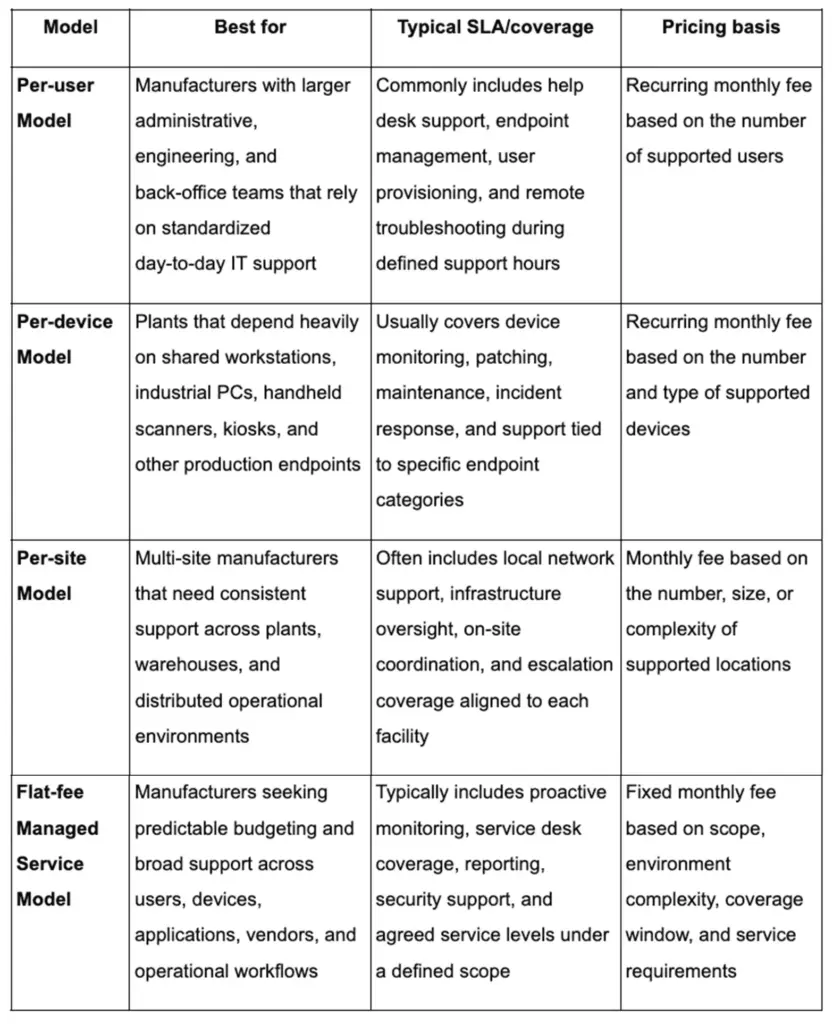
Common pricing models include:

Table showing common managed IT pricing models for manufacturers, including per-user, per-device, per-site, and flat-fee.

The key is mapping pricing units to manufacturing reality: include industrial PCs, shared workstations, network gear coverage expectations, and onsite response assumptions. 

Service Levels That Match Manufacturing Reality

Manufacturing service levels often require:

  • 24/7 or near-24/7 coverage aligned to shifts
  • Defined major incident process
  • On-site dispatch options for critical failures
  • Vendor coordination playbooks for specialized equipment 

If you have multiple sites, require clarity on who is “first responder” vs “escalation” and how cross-site incidents are managed. 

KPI Requirements In Contracts 

A practical KPI set should include:

  • Incident response time by severity
  • MTTR for production-impact incidents
  • Patch cadence and exceptions list (with OT-safe rationale)
  • Backup test frequency and pass rate
  • RPO/RTO targets aligned to production priorities 

This aligns with CSF’s emphasis on readiness across Respond/Recover tracks—not just “security controls exist.” 

How To Avoid Lock-In

To prevent lock-in, you require:

  • Documentation stored in your repository
  • Admin access and credential governance defined contractually
  • Exportable reports/logs
  • Clear separation of duties and boundary control principles 

OT connectivity guidance reinforces the value of standardized, centrally stored decisions and documentation; that mindset should apply to vendor relationships too. 

Trends Shaping The Role Of IT Services In Smart Manufacturing

Robotic arm operating on a smart factory floor with technicians monitoring connected manufacturing systems.

Plants are becoming software-defined environments—driven by sensors, connected systems, analytics, and increased automation. Industry 4.0 guidance explicitly frames this shift as automation using technologies like IoT, big data analytics, and AI, with benefits that include shorter downtimes and improved quality. 

Edge Computing And Real-Time Analytics

Edge computing is best understood as moving computers closer to data sources to improve responsiveness and bandwidth efficiency. IBM describes edge computing as bringing enterprise applications closer to data sources such as IoT devices or local edge servers, enabling faster insights and improved response times. 

In manufacturing, edge helps when latency and connectivity constraints are real (workcells, vision, near-real-time alarms). It’s noise when it becomes a branding exercise without clear ownership, monitoring, and recovery plans. 

AI-Assisted Monitoring & Maintenance (Realistic Operational Use Cases)

Engineer monitoring industrial machine with tablet for AI-assisted maintenance in a manufacturing facility.

Security reporting in 2026 increasingly highlights AI-accelerated attacks and a rise in exploitation of public-facing systems—pressuring defenders to use automation and analytics efficiently. 

In operations, the “real” AI wins are often narrow: anomaly detection that reduces false positives, predictive flags that improve maintenance planning, and analytics that make root-cause work faster. Industry programs emphasize that data analytics and AI can support smarter decisions, but only when data collection and monitoring are reliable. 

Security Frameworks Becoming Operational Requirements 

Standards and frameworks are becoming operational requirements because audits, customers, and insurers increasingly ask for demonstrable security practices. The ISA/IEC 62443 framework is explicitly lifecycle-oriented and designed for industrial automation and control systems, including zones/conduits and service provider responsibilities. 

At the enterprise level, CSF 2.0’s Govern/Identify structure helps align plant security decisions to business risk and supply chain relationships—valuable when third-party involvement in breaches is rising. 

Resilience-First Architecture – Recovery Testing & Segmentation Becoming “Table Stakes”

Resilience is increasingly defined by two operational truths: 

  • Assume incidents will happen (including ransomware and vendor compromise paths).
  • Design networks so incidents are contained and recovery is practiced. 

That’s why offline backup testing and boundary/segmentation controls are moving from “nice to have” to “expected.” OT guidance reinforces DMZ boundary patterns and monitoring as core defenses, while ransomware guidance emphasizes tested, offline backups. 

How BrainX Comes Into The Picture

BrainX fits best when manufacturers need more than an MSP. For organizations aligning IT services for manufacturing with modernization goals, BrainX supports custom application modernization, ERP/MES integration stability, DevOps-led reliability, and long-term support without disrupting operations.

Engagements can range from project delivery with a controlled cutover plan to ongoing maintenance and operational support. 

For a productive first call, bring your system map, downtime history, security constraints, and success metrics. 

BrainX even follows an ISO 27001-aligned information security approach, which matters when manufacturing environments involve sensitive IP, regulated data, or complex access requirements.

To learn more, see our case studies and service pages (e.g. our DevOps services and software maintenance and support), which show how we’ve helped other manufacturers bridge IT and OT with minimal disruption

FAQs

What do IT services for manufacturing typically include?

A well-scoped package usually includes network operations, endpoint and identity management, monitoring, incident response workflows, backup and recovery testing, and governance around remote access and third-party connectivity. OT guidance emphasizes boundary controls, logging/monitoring, and risk-informed connectivity decisions, while ransomware guidance emphasizes offline backup testing and MFA. 

How are managed IT services for manufacturing different from standard office IT?

Manufacturing managed services must work under safety and uptime constraints, where some security actions can’t be deployed “like IT” without testing performance impacts. OT security guidance discusses the need to consider latency, reliability, and safety trade-offs when implementing controls, and OT connectivity guidance emphasizes boundary hardening and segmentation to reduce operational disruption risk. 

What does co-managed IT look like for manufacturing plants?

Co-managed IT usually means your internal team retains governance, production priorities, and OT change approvals, while a partner runs defined operations (monitoring, help desk, patching processes, documentation, reporting, and off-hours coverage). Using CSF 2.0 language, your organization retains Govern accountability while the partner executes parts of Identify/Protect/Detect/Respond/Recover. 

How much do managed IT services cost for manufacturers?

Pricing varies based on coverage hours, number of sites, endpoint types (including industrial PCs), on-site response needs, and security scope (remote access governance, logging, recovery testing). For reliable expectations, require a clear service catalog and SLA metrics that reflect plant operations, plus evidence-based security and recovery practices (like tested offline backups). 

What should we demand in an SLA for multi-shift production?

At minimum: severity definitions based on production impact, 24/7 escalation paths aligned to shifts, response/restore targets, backup test cadence, and clear ownership of vendor coordination and OT boundary controls. OT connectivity guidance stresses boundary hardening and monitored connectivity, and CSF 2.0 emphasizes readiness across Respond/Recover. 

A complete approach to IT services for manufacturing should make plant reliability predictable: standardize what can be standardized, secure what must be connected, and practice recovery so incidents become manageable events—not existential outages.

Key Takeaways

  • The hardest coding language relies on whether you prioritize raw difficulty, practical use, or a major shift in mindset.
  • Assembly and C++ are among the hardest useful languages because they demand deep control over memory, performance, and system behavior.
  • Haskell, Prolog, and Lisp mainly feel difficult because they force you to think in completely different programming paradigms.
  • Esoteric languages like Malbolge and Brainf*ck are extreme examples of difficulty but they offer little real-world value in the job market.
  • Learning difficult languages can strengthen problem-solving, fundamentals of computer science, and mastery over easier languages with no headaches later on.

Introduction

The hardest coding language depends on how difficulty is measured. Malbolge is often considered the hardest coding language overall because it was deliberately designed to be extremely confusing, while Assembly and C++ are among the hardest practical programming languages used in real-world software development. Assembly demands direct control over hardware and memory, whereas C++ combines low-level programming, complex syntax, memory management, templates, and concurrency.

In the world of programming, “hard” rarely means just one thing. A language can feel hard because it has complex syntax, because it exposes memory and hardware details, or because it forces a completely different way of thinking. For that reason, the hardest coding language for one software developer may not be the same for another. 

Even so, difficult languages are often worth learning. They sharpen problem-solving, deepen software engineering fundamentals, and make mastering easier languages feel effortless later. 

In this guide, you will see a practical ranking, a comparison table, and a decision framework that helps you judge which hard language is worth your time and which one is simply painful without much payoff.

What Is the Hardest Coding Language to Learn? Short Answer and How We Judge

There is no single answer that fits every programmer. If you mean the hardest language in absolute terms, esoteric languages like Malbolge sit at the extreme end. If you mean the hardest useful language for real software engineering, Assembly and C++ are usually the strongest contenders. That is because they combine low-level control, high risk of mistakes, and a steep learning curve.

What Is The Hardest Coding Language To Learn For Most Developers

For most developers, the hardest coding language is usually the one that removes the safety nets they are used to. A Python or JavaScript developer often struggles when moving into Assembly, C++, or Rust because the language suddenly demands precise control over memory, data flow, and performance.

C++ is especially tough because it mixes object oriented programming, low-level memory management, templates, concurrency, and decades of language evolution. Assembly is harder in a different way. It strips away abstraction and makes you think like the processor.

Why There Is No Universal Hardest Language

Difficulty is contextual. A game developer may find C++ natural but struggle with Haskell. A mathematically minded engineer may enjoy Haskell yet dislike pointer-heavy systems code. A researcher in AI may find Prolog intuitive while a web development specialist sees it as alien.

The hardest programming language depends on your background, your goals, and your mental model. Some difficult languages are hard because they are close to hardware. Others are hard because they are far from mainstream thinking.

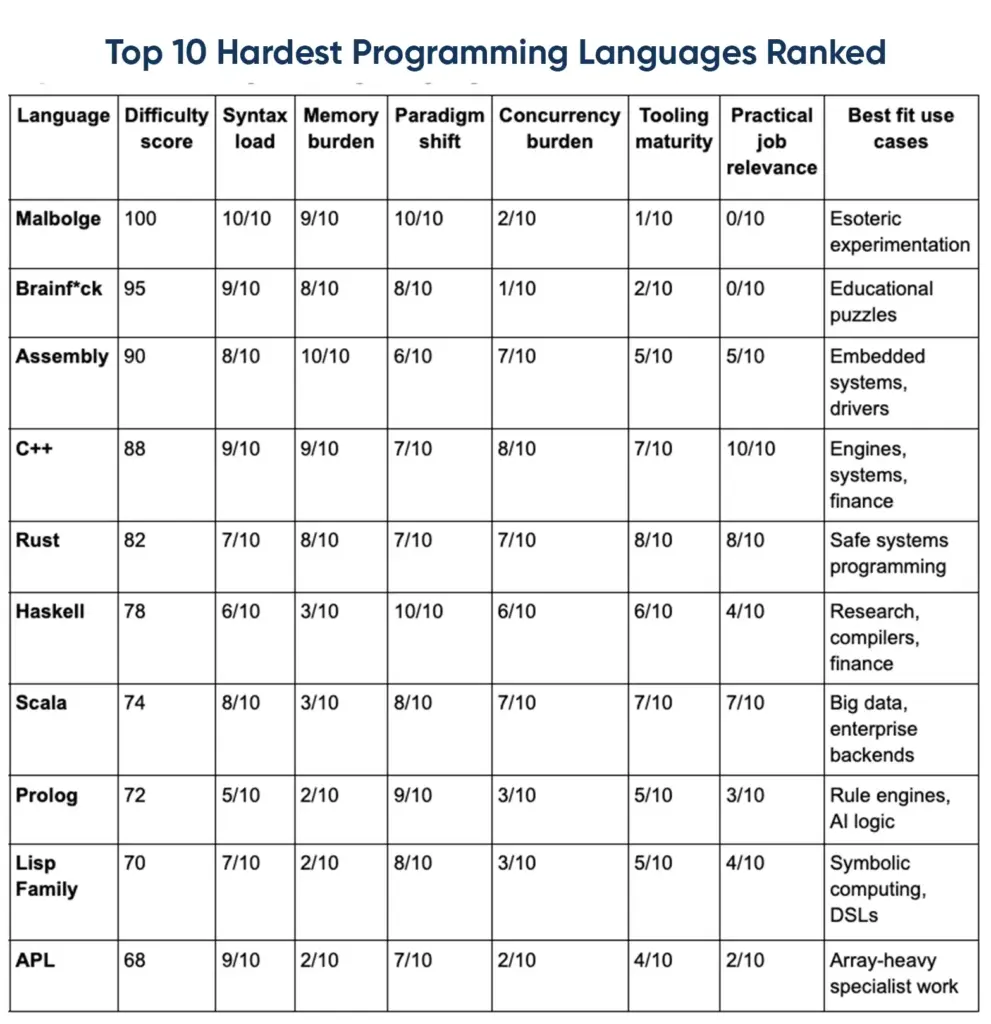
The Scoring Method Used In This Comparison

To make the ranking fair, this article uses one consistent rubric:

  • Syntax load: How dense, irregular, or mentally expensive the language syntax feels.
  • Memory burden: How much manual control you need over memory, ownership, or lifetimes.
  • Paradigm shift: How far the language moves away from mainstream imperative or object-oriented thinking.
  • Concurrency burden: How difficult it is to reason about threads, shared state, or parallel execution.
  • Tooling maturity: How much friction comes from compilers, debuggers, setup, and ecosystem complexity.
  • Practical job relevance: How valuable the language is in real products and careers.

This approach keeps the article from turning into opinion alone. It also helps separate “hard but useful” from “hard just to be hard.”

Decoding Hard Coding Languages: Why They Feel So Difficult

Before ranking anything, it helps to understand why certain programming languages feel so much harder than others.

Syntax Complexity And Mental Overload

Some languages create friction before you even solve the problem. Dense punctuation, unusual grammar, verbose boilerplate, or overloaded features all increase mental load. C++ is a classic example. A beginner can write simple code, but complex syntax appears quickly once templates, references, and advanced standard library features enter the picture.

Hard syntax matters because your brain ends up tracking language rules instead of solving the business or engineering problem.

Memory Management And Low-Level Control

Languages become harder when they expose the machine directly. Manual allocation, pointers, lifetimes, raw memory access, and undefined behavior all add risk. In C and C++, one small mistake can lead to leaks, crashes, or corrupted data. Assembly is even closer to the metal, where every move is explicit.

Rust tries to solve this with ownership and borrowing, but that also creates a steep learning curve. The language is safer, but the rules are strict.

Paradigm Shifts And Abstraction Depth

Some languages are hard not because they are low-level, but because they force a new mindset. Haskell emphasizes pure functions and strong types. Prolog makes you describe logic and relationships instead of step-by-step instructions. Lisp family languages push symbolic thinking, recursion, and macros.

This kind of difficulty feels deep. You are not just learning syntax. You are relearning how to think.

Concurrency And Parallelism Complexity

Concurrency makes many programming languages harder. Once threads, async tasks, locks, shared memory, or distributed execution enter the picture, bugs become subtle and difficult to reproduce. Even strong developers can struggle here.

That is why languages designed for systems programming or distributed software engineering often feel difficult long after the basics are learned.

Tooling, Debugging, And Ecosystem Friction

A language is not experienced in isolation. Toolchains, compilers, package managers, debuggers, and error messages all shape difficulty. A language with decent syntax can still feel punishing if build systems are fragile or debugging is painful.

This is one reason some niche languages stay hard. The ecosystem around them never became smooth enough for mainstream adoption.

Hello World Difficulty Vs Real-World Difficulty

Many languages look easy in tutorials. Real-world difficulty appears later. Printing text is not the same as managing state across threads, debugging a memory issue, or building a production-ready service.

That is why this guide ranks languages based on practical complexity, not just how simple the first ten minutes feel.

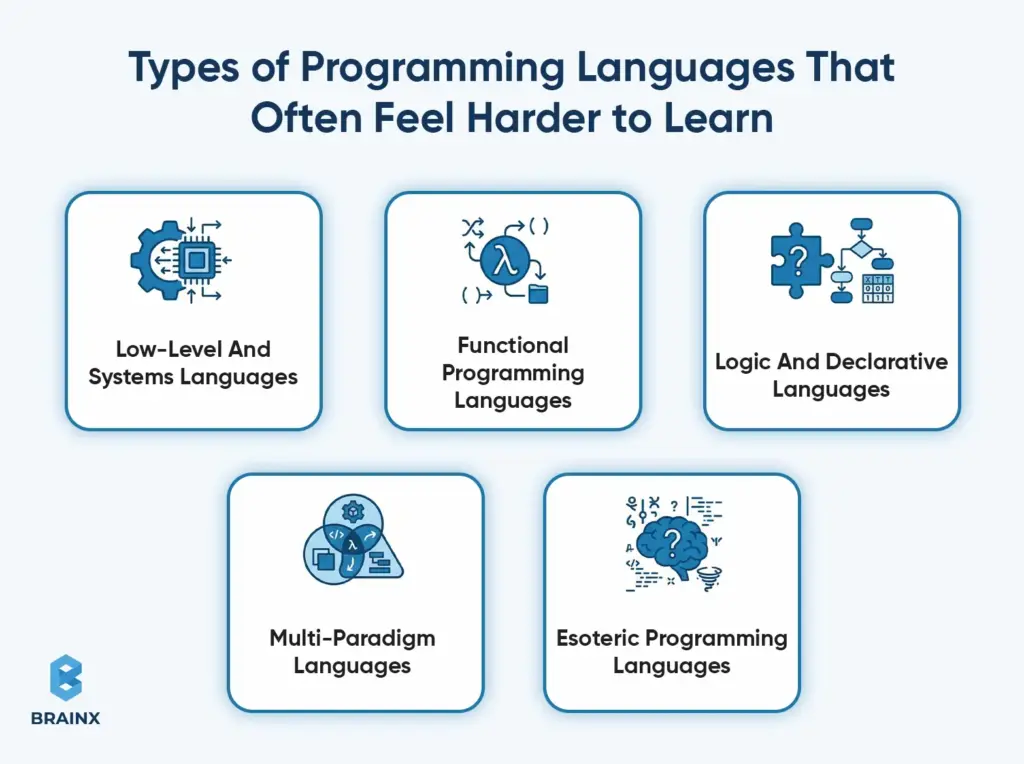
Types of Programming Languages That Often Feel Harder to Learn

Diagram showing categories of programming languages that are harder to learn, including low-level, functional, declarative, multi-paradigm, and esoteric.

Not all difficult languages are difficult for the same reason. Different categories tend to create different forms of pain.

Low-Level And Systems Languages

These include Assembly, C, C++, and Rust. They often feel like the hardest programming language to learn because they force you to care about performance, memory, and machine behavior. They are common in operating systems, embedded systems, engines, and performance-heavy software.

Functional Programming Languages

Haskell and parts of the Lisp family fall here. These languages are difficult because they move away from mutation-heavy thinking and reward abstraction, recursion, and composable functions.

Logic And Declarative Languages

Prolog is the main example. It feels difficult because you stop telling the computer how to do something and instead describe rules and facts. That mental switch is powerful but unfamiliar.

Multi-Paradigm Languages

Scala and C++ are classic cases. They support many styles at once, which sounds flexible but increases complexity. A beginner may face functional concepts, object oriented programming, type-level thinking, and concurrency patterns in the same codebase.

Esoteric Programming Languages

Brainf*ck, Malbolge, and INTERCAL are hard by design. They are usually not practical languages to learn for work. They exist more as thought experiments, puzzles, or commentary on the world of programming.

Hardest Programming Language to Learn: Technical Drivers by Category

The hardest programming language to learn changes depending on where you are starting and what you want to do next.

Hardest Programming Language To Learn After Beginner-Friendly Languages

After Python, JavaScript, or other beginner friendly tools, the hardest jump is usually to a systems language. C++ and Rust feel brutal because you go from fast feedback and flexible syntax to strict rules, explicit types, and much greater responsibility.

Hardest Programming Language To Learn For Systems Programming

For systems programming, Assembly is usually the hardest. C++ sits right behind it because it gives huge power with very few guardrails. Rust is also difficult, but its safety model makes the difficulty feel more structured than chaotic.

Hardest Programming Language To Learn For Abstract Problem Solving

For abstract reasoning, Haskell and Prolog stand out. Haskell is difficult because of functional purity, type systems, and laziness. Prolog is difficult because declarative problem solving feels unnatural to many developers at first.

Hardest Programming Language To Learn When Debugging Is Already A Challenge

If debugging already frustrates you, C++ can feel like the most difficult programming language because bugs may not fail cleanly. Memory corruption, undefined behavior, or subtle template issues can waste hours. Esoteric languages are even worse because the debugging support is almost nonexistent.

Most Difficult Programming Language: Ranked List With Difficulty Scores

This ranking blends practical and extreme cases so readers can see both ends of the spectrum.

Most Difficult Programming Language Ranking Rules And Score Weights

The scores below weigh syntax load, memory burden, paradigm shift, concurrency burden, tooling maturity, and practical job relevance. Higher scores mean the language is harder to learn and use well over time.

Top 10 Hardest Programming Languages Ranked

Ranking table of hardest programming languages including Malbolge, Brainf*ck, Assembly, C++, Rust, and Haskell with difficulty scores.

Difficulty Bands: Expert-only, Advanced, Niche & Esoteric

  • Expert-only: Assembly, C++
  • Advanced: Rust, Haskell
  • Niche but valuable: Scala, Prolog, Lisp Family, APL
  • Esoteric: Brainf*ck, Malbolge

The Top Contenders: Deep Dives Using One Consistent Template

We have analyzed every language with the same template so you can compare fairly. Comparison includes why it’s hard, its features and applications, who uses it, what beginners struggle with, and best ways to start learning.

Assembly

Assembly programming language text graphic on light background.

Why It Is Hard

Assembly is hard because it maps directly to a machine’s instruction set. You must manage registers, stack frames, memory addressing, and calling conventions yourself. The Intel manuals illustrate how much detail lies beneath high-level languages: dozens of instructions, manual memory layout, and low-level debugging constructs. One wrong register reference or stack misuse can crash the program.

Features And Applications

Assembly is used for “close to the metal” tasks: microcontrollers, boot loaders, device drivers, and performance-critical hot spots where every cycle counts. It gives maximum performance and minimal overhead, at the cost of huge code size and complexity.

Who Uses It

Embedded engineers, systems programmers, and reverse-engineers use Assembly, often alongside C or C++. Many security researchers and performance engineers learn Assembly to understand hardware-level behavior. It’s generally a specialized skill rather than a main application language.

What Beginners Struggle With

Beginners struggle with invisible state and lack of feedback. Assembly has no debugger telling you what the bug is; you step through instructions and examine registers or memory manually. Missing one increment or using the wrong register can crash, and symptoms may appear far from the root cause.

Best Way To Start Learning It

Start with a simulator or assembler for a single architecture (like x86-64 or ARM). Learn registers, the stack/heap difference, and calling conventions. Write very small programs (loops, math, string output) and step through them in a debugger so you build intuition about how instructions change machine state.

C++

C++ programming language logo used in systems programming and performance-critical software development.

Why It Is Hard

C++ is hard because it’s powerful and permissive. You can write code that compiles but still triggers undefined behavior, meaning the standard places no restrictions on what happens if you break key rules. It combines low-level memory control with high-level abstractions, so the same programmer can make errors at multiple layers.

Features And Applications

C++ remains dominant in performance-sensitive areas: game engines, simulation, graphics, large infrastructure, and system tools. It offers fine control over memory layout and resources, and a vast ecosystem (Standard Library, Boost, etc.). Its templates and zero-cost abstractions enable both low-level and high-level programming, which also contributes to its learning curve.

Who Uses C++

Any team where latency, throughput, or resource control matter uses C++. Its continued prominence shows up in popularity indexes (again, popularity ≠ difficulty, but it indicates relevance). Many large codebases in finance, engineering, and OS kernels use C++.

What Makes Mastery Different From Basic Use

Writing basic C++ code is easy – many beginners “get it to compile.” Mastery means “I can predict its behavior”: you must understand object lifetimes, copy vs move semantics, exception safety, and the memory model for threads. Sanity-checking bugs often requires compilers’ sanitizers and profilers. In short, “it compiles” is not enough – you must ensure correctness and performance.

Memory, Templates, And Undefined Behavior

Modern C++ emphasizes RAII (Resource Acquisition Is Initialization) to manage memory: tie each resource (file handle, memory) to an object’s lifetime. That reduces leaks, but you must learn how constructors/destructors work. Templates in C++ enable powerful generic code and even compile-time computation (template metaprogramming), but they add another layer of complexity. Misusing templates can lead to baffling compiler errors.

Where To Learn And How To Practice

Learn C++ progressively: (1) Basics (syntax, std::vector/string), (2) RAII and smart pointers, (3) Templates/generics, (4) Concurrency primitives (mutexes, atomics), (5) Tools (sanitizers, debuggers, profilers). Practice by writing incrementally more complex projects: start with a CLI tool, then a small multithreaded server, etc..

Rust

Rust programming language name displayed in bold text on a gray background.

Why It Is Hard

Rust is hard because the compiler enforces memory and concurrency safety through strict rules, pushing complexity to compile-time. Beginners feel “blocked” early because the compiler requires you to reason about ownership, borrowing, and lifetimes before you can run the code.

Ownership And Borrowing

Ownership is a central concept: each piece of data has a single owner, and Rust’s borrowing rules let you reference data under conditions the compiler checks. This ensures memory safety without a garbage collector, but it means you have to learn Rust’s borrowing semantics and lifetime annotations, which many find non-intuitive at first.

How Rust Differs From C And C++

Safe Rust is designed to prevent most memory errors by construction. You can still write unsafe code to do things like call external functions or dereference raw pointers, but that’s explicitly marked and isolated. The Rust Book emphasizes that even unsafe blocks retain Rust’s core ownership checks elsewhere. Unlike C++, Rust does not have undefined behavior in safe code. In exchange, you must write more upfront, and the borrow checker can feel like an extra challenge.

Real-World Use Cases

Rust is increasingly popular in systems and security contexts. Open-source trends and developer surveys (GitHub, JetBrains) show high interest in Rust, even if industry adoption is still growing. Companies use Rust in performance-sensitive services, embedded devices, and tools where reliability is critical.

Best Learning Path

Learn Rust in layers: start with the official Rust Book for ownership and borrowing, then practice error handling with Result/Option. Learn about lifetimes after you’re comfortable with basics, and pick up concurrency with Mutex and async separately. Treat unsafe as an advanced topic you only explore after mastering the safe subset. Build small projects (a CLI parser, file reader) to solidify each concept.

Haskell

Haskell programming language logo featuring stylized lambda symbol in purple.

Why It Is Hard

Haskell is hard because it is purely functional and abstraction-heavy. It emphasizes immutability and lazy evaluation, which fundamentally change how you write and debug programs.

Functional Purity And Type Systems

Haskell’s purity means functions have no side effects by default; this leads to elegant code but requires a mindset shift (using monads or applicatives for I/O, for example). Its strong static type system catches many errors at compile time and encourages precise domain modeling. This yields very reliable code, but can increase upfront design work.

Where It Is Used

Haskell is mostly used in niche areas that reward correctness and abstraction: compilers, financial systems, research, and analytics tools. It’s not common in mainstream app stacks, but its influence appears in other languages (Monads, Algebraic Data Types, etc.).

Who Should Learn It

Learn Haskell if you want to boost your abstraction skills and “type-driven” thinking. It makes you a better problem solver by forcing clear separation of concerns and encoding invariants in types. Many learn Haskell to improve their programming “mindset” even if they won’t use it daily.

Where To Learn It

Use official community resources (the Haskell report, Haskell wiki) and functional programming books. Don’t just do toy exercises—write something with real I/O or parsing so you see lazy evaluation in action. Communities like /r/haskell or functional programming meetups can help when you get stuck.

Prolog

Prolog programming language label used in logic-based software development.


Why It Is Hard

Prolog is hard because it’s declarative: you define facts and rules instead of step-by-step commands. Execution relies on unification and backtracking, which can feel unintuitive if you expect procedural logic.

Declarative Problem Solving

This model is powerful for certain problems (search, constraint solving): you describe what is true, and Prolog’s engine explores possibilities. For example, instead of writing a loop to solve a maze, you state the maze layout and a goal, and Prolog finds the path via search.

Applications And Niche Use Cases

Prolog (e.g. SWI-Prolog) is often taught in AI courses and used in research. It’s used in some natural language processing, theorem proving, and configuration systems. The language’s standard libraries include backtracking and constraint libraries, but its ecosystem is much smaller than imperative languages.

What Makes The Mindset Shift Difficult

In Prolog, a variable starts “unbound” and can unify with values, then potentially backtrack. When backtracking, bindings revert to previous states. This reversibility and search-based flow is very different from languages with assignment. Beginners often find it hard that you don’t explicitly control the search.

Lisp Family

Lisp family programming language logo representing symbolic and functional programming concepts.

Why It Is Hard

Lisp (and its descendants like Common Lisp or Scheme) can be hard because of its unfamiliar syntax and powerful macros. Lisp code is made of lots of parentheses, and macros allow you to programmatically transform code. You have to reason about code that writes code, not just values.

Macros, Recursion, And Symbolic Thinking

In Lisp, defmacro lets you create new language constructs, blurring the line between language and program. This symbolic metaprogramming power comes at the cost of complexity: reading some Lisp code means mentally expanding macros. Lisp’s emphasis on recursion and lists also requires a shift from iterative thinking.

Historical Importance And Modern Relevance

Lisp pioneered many ideas (interactive development, garbage collection, symbolic AI). Today it’s mostly niche (AI research, some finance), but its concepts live on (e.g. Clojure on the JVM). Learning Lisp teaches “code-as-data” thinking, which can make you a better programmer in any language.

Who Benefits From Learning It

Lisp is valuable if you work on compilers, domain-specific languages, or any field that benefits from metaprogramming. Even in modern engineering, understanding Lisp macros can clarify how modern frameworks work under the hood.

Scala

Scala programming language logo representing the multi-paradigm language used in big data and enterprise software.

Why It Is Hard

Scala can be hard because it fuses functional and object-oriented styles with an advanced type system. A Scala codebase might mix many paradigms, so reading others’ code can be challenging. It’s often cited in hardest language lists because of its rich feature set.

Multi-Paradigm Complexity

Scala was designed to unify Java’s OOP model with functional concepts (map/filter, pattern matching). While that’s powerful, it increases the number of concepts you need to master. Research papers note that Scala’s flexibility is both its strength and its complexity.

Big Data And Enterprise Relevance

Scala’s main relevance comes from the JVM ecosystem: it runs on Java’s platform and libraries. It’s popular in big data (Spark is written in Scala) and certain enterprise backends. That means its complexity often comes into play in domain-specific ways (e.g. streaming, distributed systems).

Common Learning Barriers

Learners often stumble on advanced type features (higher-kinded types, implicits in older versions / givens in newer Scala), and dense compiler error messages. In practice, Scala is usually learned within a specific tech stack, which can mitigate some complexity.

Brainf*ck

Brain icon representing Brainf*ck programming language known for extreme minimal syntax and difficulty.

Why It Is Hard

Brainf*ck is hard because it removes almost all abstraction. It has a tiny set of commands (+ – < > . , [ ]) that manipulate a data tape and pointer. Its creator explicitly said it was not meant for serious use.

Minimal Commands And Extreme Verbosity

Without any variables or functions, even simple tasks become very long sequences of pointer moves and increments. That’s why Brainf*ck programs are extremely verbose. It’s technically Turing-complete, but writing anything nontrivial is arduous.

Educational Value Only

Its main value is educational: Brainf*ck forces you to see how higher-level constructs (like loops or variables) can be built from very primitive operations. It’s often used to teach or demonstrate how interpreters and compilers work.

Why It Matters In “Hardest” Discussions

Brainf*ck highlights an important distinction: a language can be “hard” because it’s low-level (like Assembly) or because it lacks abstraction. Brainf*ck is the extreme of the latter: it’s only “hard” because it provides virtually no abstractions at all.

Malbolge

Malbolge programming language logo representing one of the most extreme esoteric coding languages.

Why It Is Hard

Malbolge is hard by design. Its specification defines a bizarre system: a ternary (base-3) virtual machine, encrypted instructions, and self-modifying code. It was created to be as confusing as possible.

Self-Altering Behavior At A High Level

In Malbolge, the instruction you execute can change its own code and the next instruction (through encryption). This breaks a fundamental assumption: the code does not stay the same as it runs. That makes reasoning and debugging essentially impossible.

Why It Has Almost No Practical Use

Because Malbolge’s difficulty is the point, it has no real jobs or mainstream uses. It’s purely a curiosity in esolang circles. Any work in Malbolge is academic or for fun puzzles.

Is It The Hardest Coding Language Or Just The Most Extreme?

Malbolge is the most extreme “hard by design” case. If you define hardest purely as “intended to be impossible,” Malbolge wins. But if you mean “hardest useful language,” Malbolge isn’t that, since it’s not used. The “hardest practical language” title stays with languages like Assembly/C++.

Other Hard Languages Worth Mentioning

Some other notable difficult languages (often cited by enthusiasts) include:

INTERCAL

INTERCAL was created as a parody language. Its manual jokes that it has “no sense,” deliberately using confusing constructs. It’s hard because it’s a satire of difficult languages, not because of practical features.

Erlang

Erlang can feel hard because it normalizes concurrency with lightweight processes and message passing. Its documentation emphasizes functions like spawn, send, and receive as core, which means you must think in terms of asynchronous message flows instead of shared state.

OCaml

OCaml has a concise syntax and powerful type system. It requires you to be precise: pattern matching and modules are common, so small mistakes lead to errors. The language encourages correctness (e.g. most values are immutable by default), which can feel strict but teaches rigor.

Java

Java is generally easier at the syntax level than C++, but it can still be challenging in concurrency. The Java Language Specification’s “happens-before” model is complex, and learning why volatile and synchronized work as they do requires time. But everyday Java writing is mostly straightforward.

APL

APL is often considered hard because its core primitives are unique symbols instead of words (e.g. ⍴). This let APL express array operations very concisely, but it raised the bar: early adopters needed special keyboard support. Reading APL code feels like learning a mathematical notation.

Why Bother Learning Them? The Benefits of Learning Hard Coding Languages

Choosing a hard language isn’t for bragging rights – it’s a lever for deeper understanding. The right hard choice can upgrade your mental models around correctness, performance, and abstraction.

Better Problem-Solving Ability

Hard languages train precision. They force you to reason clearly about state, structure, and tradeoffs.

Stronger Computer Science Fundamentals

They teach fundamentals that many easier languages hide. Memory, evaluation models, abstraction, concurrency, and computation become much more concrete.

More Confidence With Easier Languages Later

After difficult languages, high-level tools often feel far more approachable. You understand what the abstractions are saving you from.

Career Value In Specialized Domains

Some difficult languages are highly valuable in niches such as data science infrastructure, game development, compilers, distributed systems, and performance-heavy software engineering.

Hardest vs Easiest Coding Languages: What This Means for Your Learning Path

A smart learning path uses “bridge languages” and staged goals. Chasing difficulty too early can stall you, but picking up harder languages at the right time can accelerate your growth.

When The Hardest Coding Language Is The Wrong First Choice

If you are still learning basic programming logic, starting with the hardest coding language is usually the wrong move. It slows down feedback and raises frustration.

When A Hard Language Is The Right Move

A hard language is the right move when your goals demand it. Systems programming, performance-sensitive work, compilers, and certain research paths justify the extra effort.

Easiest Coding Language To Learn First Before Harder Ones

Python and JavaScript remain strong first languages because they are beginner friendly, have huge communities, and give fast visible results.

Bridge Languages That Make Harder Languages Easier Later

Good bridge languages include C before C++, or a typed but more approachable language before Rust or Scala. Bridge languages reduce the shock.

Things to Know Before Starting to Learn Any Programming Language

Before committing to a difficult language, build a foundation so you can spot true language difficulty vs missing fundamentals. If you need guidance, see our software development roadmap.

Should You Learn Algorithms And Data Structures First?

Learn them in parallel with a language. Algorithms and data structures only make sense when you implement them and see them run. Reading about them abstractly doesn’t stick as well as coding them and debugging their behavior.

Should You Directly Jump Into Coding?

Yes, and keep feedback loops short. Write small programs immediately (even while reading about the language). Surveys indicate many developers learn directly from documentation and trial (rather than from courses), so get used to reading docs and trying code examples from day one.

What Besides Programming Languages Should You Learn To Become A Strong Computer Science Engineer?

Learn debugging, Git, testing, system design basics, operating system concepts, and how software actually runs in real environments.

How Much Time Does It Take To Learn Coding Basics?

“Basics” means: variables, control flow (if/loops), functions, simple data structures, and debugging. Time varies widely, but consistent practice (even an hour a day) is more effective than all-nighters. Building small projects will solidify basics faster than mindless tutorials.

Factors That Make a Programming Language Easier or Harder to Learn

In general, difficulty depends on design and ecosystem factors: how predictable a language is, how many “invisible rules” it has, and how well-supported it is.

Factors Making A Programming Language Easier To Learn

A language gets easier when it has:

  • Clear syntax
  • Fast feedback loops
  • Good documentation
  • Helpful errors
  • Strong community support
  • Safe defaults

Factors Making A Programming Language Harder To Learn

A language gets harder when it has:

  • Complex syntax
  • Manual resource control
  • Hidden runtime failure modes
  • Weak tooling
  • Major paradigm shifts
  • Sparse learning material

Why Job Relevance And Difficulty Are Not The Same Thing

Popularity does not equate to difficulty. The TIOBE index is explicitly a popularity ranking, not a “best or easiest language” list. A language can be popular and easy (Python) or popular and hard (C++), or niche and hard (APL). So job market needs and learning curve are separate considerations. You want a learning plan that fits both your career goals and your tolerance for complexity.

Time to Learn: Milestones That Make Difficulty Measurable

To make “hard” concrete, define milestones. A language may look easy for “Hello World,” but become hard when you need to ship a service with concurrency and testing. Think in terms of “what can I do in X time.”

First Week Milestones

Can you install the tooling, run programs, understand variables, and write basic logic without constant confusion?

First Project Milestones

Can you finish a small tool, script, or mini-app that reads input, processes data, and handles mistakes?

Production-Readiness Milestones

Can you write maintainable code, debug issues, structure modules well, and handle performance or reliability concerns?

How Much Time Does It Take To Learn Coding At Different Levels?

A useful rule of thumb:

  • Basics: 4 to 12 weeks
  • Small independent projects: 2 to 6 months
  • Comfortable professional use: 6 to 18 months
  • Deep expertise in difficult languages: multiple years

Real Examples That Show Why These Languages Are Hard

Below are concrete patterns and debugging scenarios that expose difficulty: moving across abstraction levels, debugging edge cases, and concurrency reasoning.

One Task Across Three Abstraction Levels

Take the same task such as summing numbers from a file. In Python, it may take a few readable lines. In C++, it takes more structure and explicit handling. In Assembly, even file access and looping become much more manual.

Debugging Examples That Reveal True Difficulty

A simple crash in Python usually gives a helpful traceback. In C++, a memory issue may fail silently or far away from the root cause. In Brainf*ck or Malbolge, the debugging experience becomes almost absurd.

Concurrency Example At A Conceptual Level

Shared state with threads is hard because bugs may appear only under certain timings. This is why concurrency burden matters so much in systems languages.

What Is The Most Difficult Part Of Programming C++?

For many developers, the most difficult part of programming C++ is not syntax alone. It is the combination of memory, templates, undefined behavior, large codebases, and subtle concurrency rules.

Strategies for Success: Techniques to Master the Hardest Coding Languages

Hard languages require a methodical approach. The goal is to reduce cognitive load, get frequent feedback, and practice systematically.

How To Approach Learning A Difficult Language

Use short learn-write-debug cycles. Read about one concept (e.g. pointers, ownership, or a syntax construct), then immediately write a tiny piece of code and break it. Hard concepts only “click” when you encounter a problem and solve it. 

Avoid long passive reading – the moment your code fails, you learn deeper.

How To Break Complex Concepts Into Milestones

Divide topics into small milestones tied to mini-projects: e.g. “I can explain stack vs. heap and allocate on each,” “I can write a thread-safe increment with mutexes,” “I can write a basic Prolog query.”

Each milestone should be testable (pass a unit test or build without errors). Doing all of this turns a steep learning curve into a series of weekly wins.

When To Use Projects Instead Of Theory

Switch to projects as soon as theory stalls you. For example: write a small CLI in Rust (learn parsing and error handling), implement a simple parser in Haskell (immediate feedback on types), or code a graph search in Prolog. Projects force you to handle I/O, errors, and real data, revealing issues you might not see in toy examples.

How To Avoid Quitting Too Early

Track visible progress: list bugs you’ve fixed, concepts you’ve conquered, and programs you’ve written. Hard languages often cause plateaus; seeing concrete achievements reminds you that progress is happening. Many quit only because success seems hidden. 

Keeping a diary or a log of your learning milestones can keep motivation up.

Best Learning Resources And Communities To Use

Favor primary sources like language reference manuals and books (Rust Book, Rustonomicon, Haskell Report, SWI-Prolog manual, CPU ISA manuals). Such sources have authoritative explanations. 

Use community resources (Stack Overflow, Reddit) for clarifying obscure issues once you have grasped the fundamentals. For example, read the official Rust Book first, then ask in forums about specific borrow-checker edge cases.

How to Know Which Programming Language to Use

Choosing a language to learn is different from choosing one for a product. In industry, decisions start from constraints: team skills, project goals, timelines, and maintenance plans. (For help, see our how to choose a programming language guide.)

Intention

Start with your goal. Are you learning for curiosity, employment, product performance, or long-term expertise? 

Use Case

Choose based on what you want to build. Web development, backend systems, mobile apps, compilers, and data science all point to different languages to learn.

[Also Read : Title: How to Outsource Mobile App Development]

Difficulty Level

Match difficulty to timing. The best language is not always the hardest programming language. It is the one that fits your current growth stage.

Learning Resources And Community

A strong ecosystem lowers risk. Documentation and community support matter more than many beginners expect.

Long-Term Career Value

Think about where the language sits in your career path. Specialized hard languages can create leverage if they align with your goals.

Best Programming Languages for Specific Careers

Below we anchor difficulty to common career tracks so you see where hard languages fit in practice.

Web Development

JavaScript and TypeScript dominate. Python, PHP, and Java also matter on the backend. Very difficult languages are usually not the first choice here.

Data Science And Machine Learning

Python leads because of ecosystem strength. Harder languages may appear beneath the surface in performance-critical tooling.

Mobile Development

Swift and Kotlin are practical choices. Lower-level languages matter mainly for performance-heavy modules.

Systems Programming

C++, Rust, and Assembly are the most relevant here. This is where difficult languages have the clearest career value.

Game Development

C++ remains central because performance matters deeply. This is one of the best examples of a hard language still being commercially important.

Which Programming Language Should You Learn Next?

Use this as a decision guide. Your “next” language should give the best return on effort for your target role, not necessarily be the hardest coding language.

If You Want Strong Fundamentals

Pick a “fundamentals amplifier”: Rust (for systems and safety), Haskell (for pure functional abstraction), or Assembly (for machine-level insight). Any of these will deepen your understanding, though not every developer needs all of them.

If You Want Speed And Employability

Pick a mainstream language aligned with common jobs: TypeScript/JavaScript for web, Python for data, or Java/C# for enterprise. These languages aren’t the hardest, but they offer quick employability. Use job-market data (Stack Overflow surveys, job boards) as a signal for what skills are in demand.

If You Want Performance And Low-Level Control

Choose C++ or Rust, and use Assembly as a support tool (e.g. optimize hot loops, understand compiled output). These give you direct access to hardware. However, they require more time investment – so start small, build something real, and lean on community resources for help.

If You Want Niche Expertise

Consider Prolog (constraint solving, AI), Lisp (metaprogramming, AI), Erlang (concurrency, telecom), or APL (array computing). These domains are small but can be rewarding if you’re solving their specific problems. Niche expertise can be valuable, but it pays off only if it matches your domain challenges.

Final Verdict: Choosing Your Challenge For Your Career

If you want the absolute extreme, Malbolge is the hardest coding language in spirit. If you want the hardest useful path, Assembly and C++ are the strongest answers. Rust is close behind and may be the smartest modern choice for many technical teams. 

The right answer is not just about which language is hardest. It is about which challenge gives you the most valuable growth for your career.

FAQs About the Hardest Coding Language

What is the hardest coding language to learn if I already know Python?

Usually C++, Rust, or Haskell. They either introduce low-level responsibility or a major paradigm shift.

Are hard programming languages still worth learning?

Yes, when they connect to your goals. They improve fundamentals and can unlock specialized roles.

Which is the most difficult programming language to learn and why?

Malbolge is the most difficult programming language in extreme terms because it was designed to be hostile. Among practical languages, Assembly and C++ are harder because of low-level complexity and error risk.

What is considered the most difficult computer programming language to learn?

That depends on whether you mean practical difficulty or esoteric difficulty. Malbolge wins the latter. Assembly and C++ dominate the former.

Hardest programming language to learn for beginners

For beginners, C++, Rust, Assembly, and Haskell are among the toughest because they combine conceptual difficulty with weak beginner feedback.

What is the hardest coding language to learn for game development?

C++ is the strongest answer because it is heavily used in engines and performance-critical game systems.

What is the hardest coding language to learn for AI and data work?

In AI and data science, the hardest languages are usually support-layer languages like C++ rather than the day-to-day scripting tools.

Most difficult programming language that is also useful in real jobs

C++ is usually the best answer here. It is difficult and still highly relevant.

Is C harder than C++?

C is smaller, but C++ is usually harder overall because of its larger feature set and deeper complexity.

Is Rust harder than C++?

Rust often feels harder at the start. C++ often feels harder to master fully.

Is Haskell harder than Python?

Yes, for most developers. The paradigm shift is much larger.

Is C++ the hardest programming language?

It is one of the hardest widely used languages, but not the hardest if esoteric languages are included.

Is Java the hardest programming language?

No. Java can be serious and enterprise-heavy, but it is not usually placed among the hardest languages.

What are the top 10 hardest programming languages?

A strong list includes Malbolge, Brainf*ck, Assembly, C++, Rust, Haskell, Scala, Prolog, Lisp Family, and APL.

What are the top 15 hardest programming languages?

Add INTERCAL, Erlang, OCaml, Java, and C to extend the list depending on context.

Which one is the most basic programming language to learn, and why is that?

Python is often considered the most basic language to learn because it is beginner friendly, readable, and supported by a massive learning ecosystem.

Project management in 2025 is more than task tracking; it’s a strategic enabler for SaaS growth. From streamlining teams and reducing costs to adopting AI tools and mitigating risks, its value is unmatched. This article explores why project management matters, trends to watch, essential skills, real-world case studies, and the top tools to use. Master it to stay competitive in the evolving SaaS market.

The importance of project management in 2025 lies at the core of SaaS business success. In a fast-moving digital economy, businesses must balance innovation, customer demands, and tight budgets without missing deadlines. Project management offers the structure needed to deliver results efficiently, scale with confidence, and maintain quality at speed.

Project management in 2025 is the backbone of SaaS success. It enhances team collaboration, improves efficiency, reduces costs, mitigates risks, and supports long-term growth. With AI-driven tools and adaptive frameworks, SaaS businesses gain the agility and control needed to meet customer demands, scale effectively, and stay competitive. This article explores why project management matters more than ever and how to master it in 2025.

The SaaS business environment requires companies to balance innovation creation with meeting customer demands and adhering to budget resources. A proper process structure prevents businesses from facing delayed deadlines and customers’ anger together with increasing costs.

Project management provides the tried-and-tested answer, the platform upon which operational excellence in 2025 will be built. This underlines the growing importance of project management in modern SaaS workflows. It is more than simple task management, allowing SaaS companies to automate processes, reduce budgets, and achieve long-term growth.

This article analyzes the role of project management in 2025 using real-life examples, and upcoming trends.

8 Advantages of Project Management in 2026

Importance of Project Management

1. Enhanced Team Collaboration

Project management in 2025 fosters seamless teamwork by aligning diverse departments like development and marketing. Tools like Asana centralize tasks, reducing miscommunication. A 2024 PMI report shows 85% of high-performing teams use structured collaboration methods, boosting productivity and ensuring SaaS projects stay on track.

2. Improved Efficiency and Productivity

Structured workflows eliminate bottlenecks, speeding up processes like feature releases. Wrike’s 2024 Efficiency Report found a 28% productivity increase with project management tools. For SaaS businesses in 2025, this efficiency accelerates time-to-market, giving a competitive edge in fast-paced industries. It also emphasizes the importance of project management in delivering outcomes faster.

3. Cost Reduction and Resource Optimization

Effective planning minimizes waste, optimizing budgets and staff allocation. PMI’s 2025 Pulse estimates poor management wastes 11.4% of resources. SaaS firms benefit by reducing rework and ensuring developers focus on high-priority tasks, preserving profitability in 2025.

4. Risk Mitigation and Proactive Problem-Solving

Project management in 2025 anticipates risks like scope creep or delays, critical for SaaS deadlines. A 2024 Forrester study notes 60% of project failures stem from unmanaged risks. In 2025, proactive oversight keeps businesses agile and resilient against disruptions. In 2025, the importance of project management lies in proactive oversight that keeps businesses agile and resilient.

5. Strengthened Customer Satisfaction

Timely, quality delivery builds trust, vital for SaaS retention. Companies using project management see a 92% success rate, per PMI 2024. In 2025, meeting customer expectations through reliable updates reduces churn and enhances long-term relationships.

6. Scalability for Business Growth

Project management supports expansion by streamlining new projects or client onboarding. Gartner’s 2025 SaaS Trends predicts 73% of scaling firms will rely on cloud-based tools. SaaS businesses in 2025 can grow confidently with structured processes.

7. Data-Driven Decision Making

Tracking metrics like delivery times empowers informed choices. A 2025 Statista forecast shows 25% growth in AI-driven project analytics. For SaaS in 2025, this advantage optimizes strategies, linking internally to your blog’s metrics section for deeper insights.

8. Adaptability to Market Trends

Flexible frameworks adjust to shifts like remote work or AI integration. Coursera’s 2025 trends highlight adaptability as a top PM skill. SaaS businesses in 2025 stay ahead by pivoting quickly, ensuring relevance in a dynamic market.

Also Read : How Can AngularJS Development Benefit Your Business?

5 Essential Project Management Skills to Learn in 2026

These 5 project management skills will help you navigate competitive IT business landscapes and drive impactful results.

1. Strategic Leadership

Inspiring SaaS teams to align with goals like faster feature launches is vital. Strong leaders drive motivation, clarify priorities, and ensure projects support long-term growth. 

2. Adaptive Problem-Solving

SaaS thrives on agility, shifting priorities and demanding quick pivots. Managers who adapt workflows to new tech or customer needs keep projects on track. This flexibility ensures businesses stay responsive, maintaining relevance in a fast-evolving, innovation-driven market.

3. Effective Communication

Clear, concise communication unites distributed SaaS teams, from coders to marketers. By fostering collaboration and reducing misunderstandings, skilled communicators ensure seamless execution. This ability is critical for syncing global teams and delivering projects with precision.

4. Data-Informed Decision Making

Leveraging metrics like time-to-market or user retention optimizes SaaS projects. Managers who analyze data make smarter choices, boosting efficiency. This skill harnesses analytics to align initiatives with business goals, driving measurable success in a data-centric environment.

5. Tool Proficiency

Mastering platforms like Jira or Asana streamlines SaaS workflows. Tech-savvy managers use automation and integrations to enhance productivity. Proficiency with cutting-edge tools ensures projects run smoothly, keeping pace with the industry’s rapid technological advancements in 2025.

Why the Importance of Project Management Matters for SaaS Businesses

Importance of Project Management

The High Stakes of SaaS Operations

SaaS companies operate in a high-stakes environment where agility and reliability are non-negotiable. The Project Management Institute’s 2024 Pulse of the Profession reveals that 70% of projects fail due to poor management practices. For SaaS firms, this translates to delayed feature releases or broken promises both of which erode customer trust.

Aligning Teams and Objectives

Project management in 2025 ensures that developers, marketers, and support teams work toward a unified goal. It provides clarity, reducing miscommunication and aligning efforts with business priorities.

Preventing Scope Creep

Scope creep uncontrolled project expansion can derail timelines and budgets. Structured oversight keeps deliverables focused, a vital advantage in the fast-paced SaaS sector.

Enhancing Customer Satisfaction

Reliable delivery builds loyalty. In 2025, as subscription models dominate, project management will be essential to maintaining the consistent performance customers expect.

Streamlining Complex Workflows

Efficiency drives SaaS competitiveness. Basecamp, a leader in project management software, reported in 2024 that their structured approach cut product update times by 25%.

Automating Routine Tasks

Tools like Basecamp automate status updates and task assignments, freeing teams to focus on high-value work. Wrike’s 2024 Efficiency Report found a 28% productivity boost with such tools.

Centralizing Communication

Fragmented communication wastes time. Project management platforms consolidate discussions, eliminating the need to sift through emails or chat logs.

Prioritizing Strategic Goals

By highlighting critical tasks like feature launches project management ensures resources target what drives growth, a priority for SaaS firms in 2025.

Reducing Financial Waste

Unmanaged projects lack resources. PMI’s 2025 Pulse of the Profession estimates that poor practices waste 11.4% of budgets.

Minimizing Rework

Early issue detection enabled by clear milestones cuts costly revisions. This is especially critical for SaaS, where rework delays releases.

Optimizing Team Allocation

Project management assigns the right people to the right tasks, preventing overstaffing or burnout. Efficient resource use preserves profitability.

Retaining Customers

Timely delivery reduces churn, a key cost driver in SaaS. In 2025, financial discipline through project management will be a strategic imperative.

Case Studies That Prove It Works

Slack: Accelerating Feature Delivery

Slack’s rapid growth relied on project management. A 2023 Harvard Business Review analysis noted that structured workflows, using tools like Trello, sped feature launches by 30%.

How They Did It

Slack’s teams mapped dependencies and tracked progress in real time, ensuring alignment across departments.

Atlassian: Streamlining Global Development

Atlassian, creators of Jira, used their own tool internally to cut release cycles by 20%, as detailed in a 2024 case study.

Key Takeaway

Global team coordination via Jira improved efficiency, proving project management’s scalability.

The Data Behind Success

PMI’s 2024 report shows a 92% success rate for organizations with mature project management practices, underscoring its impact on SaaS leaders.

Tools That Highlight the Importance of Project Management in 2026

Importance of Project Management
Equipping with the right tools can help you lead in the right direction. Here are the top 9 project management tools you can use in 2025. 

1. Asana

Asana’s user-friendly design suits SaaS teams managing product launches and customer success, offering seamless integrations with Slack.

2. Jira

Jira excels in technical environments, providing sprint planning and bug tracking for SaaS development teams.

3. ClickUp

ClickUp’s AI features like task prediction, cater to growing firms. Gartner’s 2025 SaaS Trends Report notes 73% of SaaS companies use cloud-based tools.

4. Monday.com

Monday.com provides a visual project management interface that allows teams to plan, track, and collaborate on projects. Its flexibility caters to diverse workflows and team structures.

5. Smartsheet

Smartsheet combines the familiarity of spreadsheets with robust project management features, including automation and real-time collaboration, making it ideal for data-driven projects.

6. Teamwork

Teamwork is designed for client work management, offering features like time tracking, billing, and task management, which are particularly beneficial for service-based businesses.

7. Zoho Projects

Zoho Projects offers comprehensive project management tools, including task automation, time tracking, and Gantt charts, suitable for teams seeking an integrated solution.

8. Basecamp

Basecamp focuses on simplicity and team communication, providing tools for task assignments, messaging, and file sharing, making it a go-to for teams emphasizing collaboration.

9. Notion

Notion combines note-taking, databases, and task management into a single platform, allowing teams to customize their workspace to fit various project needs.

12 Common Mistakes SaaS Businesses Make (and How to Avoid Them)

Project management in SaaS is about managing change, scaling efficiently, and delivering real value to users. However, many SaaS teams fall into common traps that slow down growth and waste resources. Here are 12 frequent mistakes and how to sidestep them:

1. Lack of Clear Project Goals

The Mistake: 

Teams dive into development without aligning on objectives or KPIs.

How to Avoid It: 

Start every project with a clear scope, defined deliverables, and measurable goals. Use tools like OKRs to tie projects to business outcomes.

2. Poor Communication Across Teams

The Mistake: 

Developers, marketers, and product managers operate in silos.

How to Avoid It: 

Establish a shared communication hub (e.g., Slack, MS Teams) and hold regular cross-functional standups to ensure alignment.

3. Ignoring Customer Feedback Loops

The Mistake: 

Building features without validating with real users.

How to Avoid It: 

Integrate user feedback at every sprint. Use tools like Hotjar, Intercom, or customer interviews to guide product decisions.

4. Over-Engineering the MVP

The Mistake: 

Teams aim for perfection in the first release, delaying time-to-market.

How to Avoid It: 

Focus on delivering a lean MVP that solves one core problem. Iterate based on user feedback.

5. Underestimating Project Timelines

The Mistake: 

Setting unrealistic deadlines without factoring in technical debt or unforeseen issues.

How to Avoid It: 

Use agile estimation techniques like planning poker and build buffer time into your timelines.

6. Lack of Prioritization

The Mistake: 

Treating every task as equally urgent.

How to Avoid It: 

Use frameworks like MoSCoW (Must-have, Should-have, Could-have, Won’t-have) or RICE scoring to prioritize features and tasks.

7. No Defined Roles or Ownership

The Mistake: 

Ambiguity around who’s responsible for what causes bottlenecks.

How to Avoid It: 

Clearly assign roles using RACI charts (Responsible, Accountable, Consulted, Informed).

8. Not Adapting to Change

The Mistake: 

Rigid plans that don’t evolve with shifting business needs.

How to Avoid It: 

Embrace agile methodologies that promote flexibility and iterative planning.

9. Inadequate Use of Project Management Tools

The Mistake: 

Relying on spreadsheets or fragmented tools.

How to Avoid It: 

Adopt a robust platform like ClickUp, Asana, or Wrike that centralizes workflows, documentation, and communication.

10. Skipping Post-Project Reviews

The Mistake: 

Finishing a project and immediately jumping to the next without reflection.

How to Avoid It: 

Conduct regular retrospectives to analyze what worked, what didn’t, and how to improve next time.

11. Overcomplicating Processes

The Mistake: 

Complex workflows confuse teams and stall progress.

How to Avoid It: 

Streamline project phases and keep processes intuitive. According to Forrester’s 2024 study, 45% of SaaS projects fail due to poor adoption that is often rooted in overly complex systems. 

12. Neglecting Training

The Mistake: 

Teams are handed tools but not shown how to use them effectively.

How to Avoid It: 

Prioritize onboarding and ongoing training. Demonstrating how tools solve real problems boosts confidence, speeds adoption, and ensures your investment pays off.

Project Management Trends: What’s Coming in 2026?

Importance of Project Management

As technology evolves and work dynamics shift, staying ahead means understanding the trends shaping how projects are planned, executed, and delivered. Here’s what to expect in project management for 2025.

1. AI-Driven Automation

AI will revolutionize project management, with Statista forecasting 25% growth in tools offering predictive scheduling by 2025.

2. Remote-First Collaboration

Distributed SaaS teams will rely on platforms optimized for real-time, global coordination.

3. Customer Success Integration

Linking project milestones to churn metrics will provide deeper insights, enhancing strategic decision-making in 2025.

How to Start Project Management in 2026?

Project management is indispensable for SaaS businesses in 2025, delivering efficiency, cost control, and scalability. Follow these steps to get started today.

1. Conduct a Comprehensive Needs Assessment

Evaluate operational inefficiencies, such as delayed product rollouts or misaligned teams, using metrics like sprint completion rates or client feedback. This analysis informs a strategic approach to project management implementation.

2. Select an Appropriate Project Management Tool

Opt for a tool suited to SaaS environments, such as Asana for general coordination or Jira for technical teams. Conduct a pilot to confirm compatibility with existing systems, optimizing workflow efficiency.

3. Pilot a Tool

Test a solution like Asana or Jira with one team. McKinsey’s 2024 High-Performance Teams Report shows 80% of top firms use structured approaches.

4. Set Measurable Goals

Aim for tangible outcomes like a 20% faster launch cycle and track progress to build momentum.

5. Implement Thorough Team Training

Initiate formal training programs to ensure team proficiency with the selected tool. Emphasize benefits, including enhanced task oversight, to foster adoption across your SaaS organization.

6. Initiate a Phased Implementation Strategy

Launch a pilot program with a single team, such as your development unit, before enterprise-wide adoption. Refine processes based on performance data to ensure scalability and long-term viability.

Partner with BrainX Technologies for Expert Project Management!

For SaaS firms seeking expert project management in 2025, BrainX Technologies stands out. Specializing in customized software and consulting, BrainX streamlines workflows, integrates tools like Jira or Asana, and drives measurable growth. 

Our proven expertise, reducing client costs and accelerating timelines makes us a trusted partner. Whether refining operations or scaling strategically, BrainX delivers results tailored to SaaS needs. 

Visit brainxtech.com to discover how we can elevate your project management and fuel success in 2025.

Outsourcing software development can cut costs, accelerate delivery, and drive innovation—but only if done right. Follow these 14 essential rules to outsource a development team, covering everything from choosing the right vendor and pricing models to managing culture fit, documentation, and risk.

Outsourcing has become a key strategy for companies looking to enhance efficiency, reduce costs, and focus on their core competencies. However, building a lasting outsourcing partnership is always tricky and requires effective planning and execution to feel safe and successful. Setting clear guidelines might be what makes the difference between long-term partnerships and costly mistakes.

The best rules to outsource a development team involve choosing the right partner, defining the project scope, and clear communication with the vendor. Observance of these best practices helps organizations maximize the benefits of outsourcing while minimizing risks.

These rules for outsourcing a development team can significantly reduce project risks and help businesses scale faster through trusted external partnerships.

What is Software Development Outsourcing?

Software development outsourcing is the assignment of tasks or total projects to another external third party instead of relying on an in-house team. While in-house development tends to require a long-term internal team, outsourcing benefits from flexibility through its per-project-based hiring options, thereby cutting down on incurring costs in hiring and saving time.

Outsourcing is enabling companies to outsource software development, for specific features to full end-to-end development, by totally entrusting it to external experts. Businesses identify areas that need specialized skills and partner with technology providers to meet those needs. The external team analyzes the requirements and initiates the development process accordingly.

Increasing demand for digital products has made software development outsourcing a very common practice across various industries. It assists companies in bridging technology gaps while:

  • Saving costs
  • Increasing scalability
  • Enhancing existing software to keep abreast of competitors

Whether it’s a small startup or a large enterprise, outsourcing has become a widely adopted strategy for accelerating product development and driving innovation.

Also Read: Backend App Development Company Guide: Services, Tech Stack, and Costs Explained

14 Rules to Outsource A Development Team

Having established the importance of adhering to guidelines in outsourcing, we now turn our focus to the specific rules that can drive successful partnerships. These rules encompass aspects like vendor selection, project management, and communication strategies, ensuring that your outsourcing efforts yield optimal results while mitigating potential challenges.

1. Know What To Outsource & Skip

Knowing the best time to outsource and maintain an in-house team creates balance and drives your project to success. Not everything needs to be outsourced and to know the difference between in-house and outsourced product development is a must. Businesses can maximize outsourcing benefits by identifying which tasks to delegate and which to manage internally. 

It’s best to outsource areas where your expertise is limited, allowing specialists to handle those tasks, while retaining core functions in-house to maintain control and quality. This balanced approach ensures both efficiency and focus on what truly drives your business forward.

2. Choose a Reliable Tech Vendor with Niche Expertise

Apart from being technically competent and located close enough, your vendor ought to have rich expertise in your niche. Industry expertise will equip web, desktop, and mobile app development agencies to address unexpected challenges in the product development process and deliver tailored, high-quality solutions.

Being one of the most effective rules to outsource a development team, it helps businesses find niche expertise and comply with relevant regulatory requirements, especially for highly regulated sectors. But if you opt for an experienced vendor from your specific field, then project development will be more effective with better adherence to industry standards, which eventually leads to smoother project execution and a product that meets market expectations.

3. Check Related Case Studies

To leverage industry-specific expertise, choose an app development company with at least 5+ years of experience in your sector. Review their case studies to understand the company’s role in delivering relevant solutions. Ensure their experts possess industry-relevant skills and offer continuity, which is critical for mobilizing the right expertise when needed. Another one of the key rules to outsource a development team is to validate the provider’s long-term experience in your niche through detailed case studies.

It’s also essential to verify that the company still employs the individuals who worked on similar projects, as expertise can sometimes be lost when key team members move on. Such continuations have a major impact on the success of your app development project.

4. Assess Team Composition and Qualifications

The composition of your app development team is crucial to success, ensuring the right mix of skills. A diverse team should include designers, developers, architects, data scientists, and QA engineers, with expertise in relevant technologies. Review them carefully regarding qualifications, certifications, and experience, especially about areas critical to the success of your project.

For example, when outsourcing the development of mobile applications for payment software, source those developers who are agile in Java/Kotlin (Android) or Swift/Objective-C (iOS), with experience integrating payment APIs. At the same time, make sure security experts with certifications such as CISSP and backend architects can build scalable, compliant infrastructures.

5. Verify Commitment to Skill Development

Assess developers’ seriousness towards continuous training and development of their skill. Examples would be attending industry conferences, and workshops, completing online courses, or other relevant certifications.

For example, locating an iOS developer who is qualified and verified to own certifications like membership to the Apple Developer Program, certification of an Apple-certified iOS developer, or a Swift developer’s certification, would give evidence of their capabilities along with their commitment to keep in step with industry specifications for quality developments.

6. Evaluate Technical Proficiency

Request for a demo and prototype to assess the vendor’s technical proficiency. Following this rule will help you evaluate their strengths and weaknesses and assess their commitment to implementing best industry practices. Reviewing portfolios similar to your project will help you get a better understanding of their quality of work and expertise.

If you’re considering outsourcing mobile application development for banking software, you might start by asking for a prototype of a mobile banking application they’ve worked on. This could include features like account management, transferring funds, and bill payments, among others. You should also ask how they would ensure security, using methods such as two-factor authentication.

7. Conduct Technical Interviews or Assessments

To assess a vendor’s technical expertise, request access to sample code, demos, or prototypes they’ve developed. This gives you firsthand insight into their skills and adherence to best practices in your specific technology. Additionally, reviewing their portfolio of similar projects offers a deeper understanding of their capabilities and work quality.

For example, if outsourcing mobile app development for banking software, ask for a prototype showcasing key features like account management, fund transfers, bill payments, and security measures such as two-factor authentication.

8. Learn The Documents

After discussing the app concept and other key details, it’s important to understand how the development process is documented. Common documents include:

  • Service Level Agreement (SLA): A mini-contract outlining expectations from the vendor and service quality standards.
  • Schedule of Values (SOV): A detailed breakdown of project development stages, thereby enabling you to track their progress from start to finish.
  • Software Requirement Specification: A set of requirements that define how a product should work to express its capabilities.

These documents ensure clear communication and project transparency throughout development.

Also Read: Why Businesses Hire an Offshore Development Team for Scalable Growth

9. Pricing Model

Following are the most popular pricing models that help software development partners collaborate effectively, ensuring success:

  • Time & Material (T&M)
  • Fixed Bid

While a Fixed Bid provides an upfront estimate, it’s crucial to understand the potential costs associated with changing requirements later. This is especially important when using Agile methodologies like Scrum, where requirements often evolve. This can increase the project’s overall cost, and securing additional budget during development can be challenging.

T&M models are flexible and allow businesses to control their outsourcing budget and results. Additionally, ensure your development partner can scale resources up or down as per the dynamic business demands. 

  • What is their pricing model?
  • What is their payment schedule?
  • What is the cost of changing requirements?
  • Do they allow scaling up or down resources according to the dynamic business requirements?

10. Organization & Workplace Culture

While selecting a software development partner to outsource, it is important to look into the vendor’s culture. A service provider who shares the core values of your company will better understand the goals of your organization and be willing to attain them. This cultural alignment fosters stronger working relationships, boosting productivity, improving results, and enhancing retention. Evaluating how the vendor treats employees, their mission, and core values is key to this process. Consider important questions such as: How do their objectives align with yours? What is their management style? Are customer satisfaction and employee development prioritized?Here are some more questions to evaluate your outsourcing partner better:

  • What is the organization’s mission or vision?
  • How well do their business goals align with yours?
  • How highly is customer satisfaction prioritized?
  • What is the management style across the organization?
  • How is the company performing overall?
  • Are the company’s plans and roadmap communicated to employees?
  • What personnel development programs are available?
  • What employee benefits are provided?
  • What systems for rewards and recognition are in place for employees?
  • What is the organization’s attrition rate?

11. Set Software Development Chronology

The development phase, often the longest part of the software lifecycle, is dedicated to building the app architecture and delivering a solution tailored to your requirements. Due to project complexity, you may work with specialists like iOS, Android, or web developers to implement key features. This phase is divided into sprints, typically lasting 10 working days. Each sprint begins with a planning session where the team reviews the workload and sets clear objectives. This structured approach ensures that development progresses efficiently and stays aligned with your project’s goals, promoting smooth collaboration and timely completion.

Here are the important that you must consider while clarifying your software development chronology:

  • No step is finalized without the Project Manager’s supervision. The PM tracks all changes throughout each sprint, documenting new features, bug fixes, and enhancements to existing features.
  • Developers begin building the required features, often collaborating with specialists like iOS, Android, or web developers. Launching across multiple platforms can broaden your product’s reach.
  • QA engineers assess the product’s functionality, report bugs to developers, conduct stress testing to identify breaking points under heavy loads and re-verify the solution to ensure proper functionality.

Also Read: Python vs JavaScript for Web Development: A Practical Comparison

12. Don’t Ignore The Discovery Phase

The discovery phase is important for establishing the crucial foundation for any project’s success. We’ve previously discussed its importance in our tips for CTOs on outsourcing product development. Emphasizing this point, effective collaboration between stakeholders and app development companies can lead to the creation of a detailed roadmap. This phase highlights the project’s scope, aims, and expected technical challenges. This collaborative approach ensures all parties are aligned and prepared. It sets the stage for a successful development process that meets the project’s goals and addresses any anticipated obstacles.

13. Choose the Right Engagement & Delivery Model

A suitable engagement model during software development ensures that the project serves all your requirements, maximizes efficiency, and controls costs, therefore being flexible in collaboration between the client and the outsourced team. The choice of T&M reduces major risks in outsourced projects more than other models because it leaves more control over the scope and budget of a project.

For a detailed look at how staff augmentation works, when to use it, and how it compares to other models, explore our IT Staff Augmentation Handbook.

  • Dedicated Team Model

If you’re looking to hire IT specialists for a specific project, the dedicated team model may be ideal. This approach provides access to a skilled talent pool while allowing you to manage the team effectively. Team members work autonomously, leveraging their expertise to deliver the desired product efficiently.

The dedicated team model is suitable for:

  • Businesses that want to assemble a skilled and cohesive software development team. This team consistently addresses complex challenges and enhances collaborative problem-solving throughout the project.
  • Engaging a dedicated team ensures timely maintenance responses and ongoing support, minimizing downtime and maximizing system reliability. Team members are readily available to tackle any issues that may arise.
  • Businesses can quickly and efficiently adjust team size for new projects or after project completion, avoiding long-term commitments while maintaining flexibility.
  • Hiring a dedicated app development team guarantees consistent progress and focus. This allows team members to deeply understand project intricacies, enhancing efficiency and fostering seamless collaboration.
  • Staff Augmentation Model

IT staff augmentation models suit businesses that want to integrate external resources to improve the performance of their existing in-house team. Instead of enlisting more portable app engineers, architects, or QA engineers, you can select transitory or contract developers. It will help you address particular ability insufficiencies, fulfill venture prerequisites, or oversee increased workloads. Staff augmentation is beneficial for businesses in the following situations:

Short-Term Projects

Helps businesses swiftly integrate external expertise to enhance the performance of their in-house software development team. This allows them to fulfill project needs without the burden of long-term commitments.

Skill Gap

Integrating external specialists with the necessary skills can enhance project capabilities. This approach allows them to access expertise without the extensive training or recruitment efforts typically required for new hires.

Seasonal Workloads

This allows businesses to stay productive and meet deadlines set on projects while still delivering quality outcomes without burdening their in-house team.

Flexible Resource Allocation

With less overhead on hiring full-time employees, organizations could scale up or down with the needs of projects.

  • Offshore Development Center (ODC)

An offshore development center is an extended version of the in-house capability, but with much more cost-effective efficient mobile development outsourcing and access to the right talent, along with all essential infrastructures.

An ODC engagement model is suited for the following:

  • Establishing an ODC allows companies to tap into skilled professionals at competitive rates, cutting development costs while maintaining high-quality standards.
  • By setting up an ODC, businesses gain access to global talent, ensuring the right professionals are available to meet specific project needs.
  • Having an ODC in a different time zone provides continuous development and support, enabling work to progress around the clock and accelerating project timelines.
  • Partnering with an ODC fosters alignment between business goals and offshore expertise, creating a collaborative relationship that drives shared success.

These advanced rules for outsourcing a development team help organizations choose between models like ODCs, dedicated teams, or staff augmentation based on strategic goals.

Also Read: Top 6 Cross-Platform App Development Frameworks

14. Consider Uncommon Software Development Outsourcing Risks 

  • Before considering outsourcing desktop, web, or mobile app development, it is critical to anticipate the potential problems and develop contingency plans.
  • Proprietary algorithms should be strongly protected through measures such as safe contracts, NDAs, and environments. Such preventive measures will hinder misuse and competitive risks.
  • Hidden costs while outsourcing can make a mobile app go over budget and sometimes create strained relationships. Some upfront clarity on pricing, plus clear scope change processes, really help here.

Why Outsource Experts from BrainX Technologies?

Here at BrainX Technologies, we know that every business is different, and its needs vary. That is why we have our team of experts dedicated to helping you achieve operational efficiency and innovation tailored just for you. From what our people have amassed in terms of accumulated experience across many different industries, best practices, and cutting-edge technologies are brought to the table, ensuring you receive only the finest solutions.

Let the experts at BrainX do the outside work. Focus on what you do best. We maintain low operating costs for you while tapping into that global talent pool, including the skills you need to succeed. In full transparency and collaboration, we ensure that you are always in the know, easy for us to work with you toward your goals.

You’re not just outsourcing through a partnership with BrainX Technologies, you’re enabling your organization to increase productivity and propel growth. By following the right rules to outsource a development team, companies working with BrainX unlock high-performance solutions tailored for long-term growth.

A GDPR Perspective: Cross-Border Outsourcing for Businesses is essential as companies move data globally. Under GDPR, transferring personal data outside the EU/EEA requires strict compliance to protect user privacy.

Globalization and technology have transformed the face of doing business in this networked world. Multinationals today stretch across a continent, outsourcing major services such as payroll, accounting, cloud management, and even customer service to cut costs and maximize efficiency. However, the faster information travels, the more complicated it gets to transfer data internationally. The most pressing problem is data privacy. 

Being an integral part of international data privacy law, the GDPR has ensured that personal data is safely transferred beyond the borders of the European Union. It has made it possible in such a way that businesses are compelled to put in place sound compliance mechanisms. The stakes are quite high for this kind of organization because failure to comply may bring about hefty fines and reputational damage.

GDPR Perspective | Cross Border Outsourcing For Business

The Basics: What is GDPR?

Cross-border data requires moving and sharing personal data from the European Economic Area (EEA) to another jurisdiction. In such activity, organizations are obliged to follow the strict rules laid down under the GDPR. It ensures that the personal data of EU citizens is not transferred to countries without equivalent standards for data protection.

It provides complete details about issues of privacy, personal data protection, and information security within the EU as well as within the EEA. The new regulation shall be applied not only to the organizations based in the EU but also to the ones located outside the area who are collecting or processing data on those residing in the EU, usually referred to as “data subjects.”

The foundation of GDPR rests on empowering the data subject with more control over his or her data. It also holds the organization collecting and processing personal data liable to make sure this is done with transparent and lawful practices. A GDPR functions as a unified framework for data protection laws across EU member states.

Another salient focus of the GDPR is the regulation of international data transfers outside the EU and EEA, ensuring this third-party handling of personal data poses the same level of security or compliance as within the EU.

While GDPR certainly provides EU citizens with strong data protection, it does impose conditions on the standard of data protection that organizations around the world must adhere to better protect the privacy of EU citizens.

Cross-border transfers of data should be made to meet the requirements of such a framework in order to continue with compliance.

Also Read: Follow These 14 Simple Rules To Outsource A Development Team

Significance of GDPR in Cross-Border Data Transfer

This means that most business setups adopt outsourcing as part of their means for growth. According to specific needs, three options can be availed: onshoring, nearshoring, and offshoring. The last model seems to be the best in practice due to its cost benefits and access to talent in most parts of the world. 

While outsourcing comes with numerous advantages, it is not without its own set of complexities, particularly when taken in light of regulatory frameworks, such as the General Data Protection Regulation. In this respect, companies dealing in personal data find adherence to such regulations of essence while outsourcing their operations, particularly to third-party entities in other jurisdictions.

Overview of Key GDPR Principles

GDPR Perspective | Cross Border Outsourcing For Business

  1. Transparency: Organizations should inform individuals of the way information about them would be collected, stored, and used.
  1. Accountability: Entities should be able to ascertain compliance with adequate documentation and check for audits periodically.
  1. Data Minimization: An organization may collect and process personal data only to the extent that it is necessary to perform a particular purpose. 
  1. Security of Data: An organization is supposed to take all the technical and organizational measures to prevent data leakage.

GDPR and Outsourcing: A Complex Relationship

The General Data Protection Regulation is a strong framework meant to protect the privacy and security of personal data. It sets out the rules for data controllers: organizations that decide how and why personal data is used, at every stage of data storage, whether local or transferred across borders. 

In GDPR, personal data is information capable of directly or indirectly identifying the data subject, including names, identification numbers, physical locations, or online identifiers. For companies that perform tasks involving personal data on another company’s behalf, strict obligations have been set upon the regulation to ensure their safety.

 When businesses outsource or offshore operations, they often transfer personal data to third-party providers. In such cases too, the company that originally collected the data is responsible for safeguarding it. That means they must actively address risks and ensure that the data is handled securely and lawfully, no matter where or by whom it is processed.

GDPR Impacting Outsourcing Practices

Before GDPR’s enactment, businesses frequently outsourced personal data-related processes without seeking explicit consent or conducting thorough risk assessments. This often led to data breaches, causing harm to individuals and tarnishing corporate reputations. 

The practice of outsourcing has been greatly altered with the advent of GDPR. Now, companies are restricted by very stringent requirements to maintain the security and confidentiality of personal data throughout the lifecycle of outsourcing. Contracts must include the following key elements:

1. System Security

Adequate controls against unauthorized access, data loss, or breach.

2. Third-Party Risk Assessments

Periodic reviews of vendors’ adherence to the standards of GDPR.

3. Roles and Responsibilities

Specific roles of data controllers and processors must be defined in contracts; both parties will be responsible for adhering to the mandates of GDPR.

4. Monitoring and Reporting

Mechanisms should be developed to monitor the usage of data and breach reporting must be prompt.

Cross-Border Outsourcing: Opportunities and Challenges

Opportunities

With these opportunities come significant challenges, especially regarding compliance with regulations and ensuring the safety of data.

1. Cost Efficiency

Outsourcing to countries that offer lower labor costs dramatically decreases operational expenses.

2. Access to Specialized Talent

Companies can access highly qualified people in areas such as IT, HR, and customer support.

3. Scalability

Outsourcing makes it easier for companies to scale up operations based on demand.

Also Read: How AI Chatbots Are Revolutionizing Customer Support and CSAT

Cross-Border Data Transfers Challenges

Indeed, international business activities across borders happen to be inextricably linked to cross-border data transfers because this route allows information to be readily transferrable between borders. These benefits come, however, with a unique set of issues that organizations must work hard at addressing in order to comply and keep data safe.

1. Regulatory Compliance

  • Differing Legal Systems

Every country differs in the rules on data protection. For instance, Europe has a GDPR, while China operates the PIPL. However, both strictly defined how data must be handled and transferred in their area of jurisdiction.

  • Transfer Rules

These rules, like GDPR, demand that there be approved mechanisms to ensure data will be transferred legally, such as SCCs or BCRs.

2. Data Sovereignty and Localization

  • The Local Storage Requirements

Require data about citizens to be stored within borders making it harder to have even limited management globally.

  • Operational Roadblocks

These laws can delay the free flow of information, negatively impacting international business’s operational efficiency.

3. Data Security Risks

  • Greater Exposure

International data transfer exposes businesses to greater threats of cyber-attacks and unauthorized access.

  • Third-Party Issues

Dealing with other countries’ vendors entails additional security concerns arising from different standards and practices.

4. Operational Complexities

  • System Compatibility

The systems and technologies of various countries must be compatible with each other. This can be a challenging task.

  • Coordination Efforts

Data transfer between several regions requires a lot of time, expertise, and resources.

5. Ethical and Consumer Trust Concerns

  • Transparency Expectations

Customers want to know that their data is treated responsibly, regardless of where it is processed.

  • Reputation Risks

Mishandling data or failing to comply with regulations can damage a company’s reputation and erode customer trust.

6. Government Surveillance

  • Government Access

Some countries may demand access to data stored within their borders, potentially conflicting with privacy promises made to customers.  

  • Confidentiality Dilemmas

Companies often face tough decisions when asked to share sensitive information with foreign authorities.

7. International Agreement Uncertainty

  • Divergent Rulebook

Inconsistent international policies on data protection law create ambiguity and increase the chance of non-compliance.

  • Changing Agreements

Legal disputes may render set data transfer frameworks null, making it difficult for organizations to cope with new rules.

Measures to Combat Cross-Border Data Issues

  • SCCs, BCRs, and adequacy decisions ensure cross-border data transfers comply with the law.
  • Shield your data from unauthorized access via strong encryption, setting up access limitations, and routine security audits.
  • Stay abreast of changing data protection laws and international agreements to have an edge over compliance requirements.

Cross-Border Transfers Under GDPR

One of the important things GDPR ensures is that data that leaves the EU/EEA stays protected to the same high standard.

1. Adequacy Decisions

The European Commission declares adequacy when it finds that a non-EU country ensures an adequate level of data protection similar to GDPR. Such countries do not need further protection measures for transfers. Examples of adequacy decisions are those for Japan, New Zealand, and commercial organizations in Canada.

2. Standard Contractual Clauses (SCCs)

SCCs are prior-accepted legal instruments that confirm the implementation of the data transfer according to GDPR rules. SCCs are highly utilized in those countries which have no adequacy decisions.

3. Binding Corporate Rules (BCRs)

BCRs are the internal regulations used by multinational firms to transfer data internally between their groups. Those rules guarantee that any affiliate company located anywhere is covered under the ambit of the rules of GDPR.

4. Derogations

In specified circumstances, GDPR permits data transfers in the following instances: 

  • Where the individual gives his or her explicit consent; 
  • To fulfill a contract to which that individual is a party;
  • When it is necessary to protect another person’s vital interests.

Practical Steps towards GDPR Compliance in Cross-Border Outsourcing


GDPR Perspective | Cross Border Outsourcing For Business

1. Data Transfer Impact Assessment (DTIA)

Before transferring data across borders, businesses have to assess the following:

  • The legal landscape of the recipient country.
  • The risks involved with the transfer.
  • Safeguards are needed to mitigate such risks.

2. Strong Data Processing Agreements (DPAs)

As mandated by Article 28 of GDPR, these DPAs between the data controller and processor must:

  • Clarify the scope and purpose of data processing.
  • Include confidentiality clauses.
  • Specify necessary security measures.

3. Implement Technical Safeguards

  • Encryption

Ensure safe data sharing and transfer.

  • Anonymization

Hide or terminate easily identifiable information.

  • Access Control

Only allow authorized personnel to access data.

4. Monitor Third-Party Compliance

  • Regularly audit outsourcing partners to ensure that they comply with GDPR.
  • Request certification or proof of compliance with the approved codes of conduct.

5. Be transparent to Data Subjects

Inform the individual of cross-border data transfers using clear privacy notices including information about:

  • Why is data being transferred?
  • What safeguards will be used?
  • Rights of the individual under GDPR.

GDPR Compliance Checklist Do’s and Don’ts

Do’s

1. Define Clear Data Protection Goals

State your objectives and set them in line with GDPR principles.

2. Appoint a Data Protection Officer (DPO)

Select a competent person to ensure compliance and provide advisory services.

3. Comprehensive Cookie Policy

Be transparent about data collection and get explicit consent from users.

4. Update Privacy Policies

Make them concise, clear, and user-friendly.

5. Empowerment of users

To allow access, edit, delete, or manage personal data and preferences.

6. Keep Accurate Records

Document all data processing activities to demonstrate compliance.

7. Verify Vendor Compliance

Ensure suppliers and subcontractors adhere to GDPR standards.

8. Enhancement of Security

Use encryption, anonymization, and more means for personal data protection.

Don’ts

1. Only Depend on Certifications

The certifications are the basis but not a guarantee of compliance.

2. Make Unsolicited Contact

Never contact someone without explicit consent.

3. Implementation on Paper

Ensure that compliance measures are not just on paper but implemented in practice.

4. Insufficient Physical Security Measures

Personal data can be prevented from unauthorized access using devices by using physical security measures.

5. Compliance as a One-Time Activity

Compliance is an ongoing process that requires regular updates and reviews.

The Role of Supervisory Authorities and International Agreements

1. Supervisory Authorities

Organizations such as the European Data Protection Board play a significant role in enforcing GDPR. They provide guidelines, audit businesses, and penalize violations.

2. International Agreements

Global trade agreements try to facilitate cross-border data flows. However, to comply with the GDPR, the standards must be aligned with it.

How Companies Can Be GDPR Compliant

“Want to explore smarter ways to scale your team while staying compliant? Check out our Detailed IT Staff Augmentation Handbook for strategic insights.”

1. Data Protection Officer

An individual ensures compliance, advises on the issue, and acts as a contact point for supervisory authorities.

2. Collect Granular Consent

Provide the individual with specific, informed consent over every type of data usage.

3. Map Your Data

Understand and justify what data is being collected, why it’s necessary, and how it is used.

4. Draft a Privacy Policy

Come up with a clear, GDPR-compliant policy that ties all data protection measures together.

5. Draft Data Processing Agreements (DPAs)

Clearly outline roles, responsibilities, and compliance requirements for all involved parties.

6. Be Prepared for Incidents

Have a plan in place to respond quickly in case of any data security incidents.

7. Be Transparent

Communicate with clients openly about the data collected, its purpose, and their rights.

Emerging Trends in Data Protection

1. AI and Data Privacy

As AI is increasingly used in data processing, ensuring GDPR compliance in automated systems is the need of the hour.

2. Blockchain for Security

Blockchain technology has introduced fresh ways of sharing and storing data securely.

3. Global Standards

Increasingly, more nations are adopting frameworks similar to the GDPR, paving the way for unified global data protection standards.

Frequently Asked Questions: GDPR & Outsourcing

1. Why does GDPR matter when outsourcing?

Answer:
When you outsource tasks to another company, especially overseas—you often share personal data. GDPR makes sure that no matter where that data goes, it’s protected. It’s about keeping EU citizens’ privacy intact, even when services are handled abroad.

2. Can I send personal data outside the EU legally?

Answer:
Yes, but you need to follow the rules. GDPR allows international data transfers if the receiving country has strong data protection laws or if you use approved legal safeguards like SCCs or BCRs.

3. If I outsource, am I still responsible for GDPR compliance?

Answer:
Yes. Even if a third-party vendor is handling the data, your company is still on the hook. You’re responsible for making sure that data is processed securely and in line with GDPR.

4. What could go wrong if I don’t follow GDPR when outsourcing?

Answer:
A lot. Data leaks, customer backlash, and even big fines—up to €20 million or 4% of your annual revenue. It’s not just a legal risk, but a trust issue with your users.

5. How do I make sure my outsourcing stays GDPR-compliant?

Answer:
Start by choosing the right partners. Sign solid Data Processing Agreements, use encryption, limit access, and keep your users informed about where their data is going and why.

BrainX: Your Trusted SaaS Partner for GDPR Compliance

At BrainX, we care about your privacy. We are a leading SaaS provider that ensures to follow the stringent requirements of GDPR to handle your data very carefully.

Partnering with BrainX is a way to choose a company dedicated to ethical data management and committed to earning your trust through robust privacy practices.

  • We inform you about how your data is collected, processed, and stored, ensuring full transparency and control.
  • Our platforms make accessing, updating, or deleting your data easy, aligning with GDPR’s user rights.
  • We use advanced encryption, secure access controls, and regular audits to protect your data.

The benefits of outsourcing app development are clear as mobile usage dominates the market, with 63% of purchases now happening through smartphones. In this fast-paced digital environment, companies are under pressure to develop mobile apps that are intuitive, scalable, and user-friendly.

However, not every business has the internal resources, time, or technical skills needed to build such apps from scratch. This is where outsourcing becomes a practical solution.

Outsourcing app development means working with an external team or company to handle part or all of your app project. Instead of building and managing an in-house development team, you collaborate with experienced professionals who bring the right technical expertise, tools, and processes to the table. This approach can save time, reduce costs, and help businesses focus on their core operations while ensuring high-quality outcomes.

In this article, we’ll explore when outsourcing makes the most sense, how it supports companies of all sizes, and what steps you can take to avoid common risks like budget overruns or miscommunication. We’ll also share practical insights on scope and budget management based on real-world experience.

Key Takeaways

  • Outsourcing app development benefits companies that lack in-house technical expertise, want to focus their internal teams on more strategic activities, or need to accelerate time to market.

  • According to Forbes, companies can save up to 70% on development costs by outsourcing—for instance, a $200,000 in-house project in the US might cost just $50,000 with an agency in Eastern Europe or South Asia.
  • Delegating a project to a skilled mobile app development team allows access to specialized talent without the cost or effort of hiring permanent staff.

  • Partnering with vendors in regions like Eastern Europe or South Asia—where tech talent is abundant and costs are lower—can help deliver high-quality results while staying within budget.

In the beginning, the Slack team faced a serious issue. They were interested in creating a high-quality scalable product in a short time without spending all of their money and straining their internal resources. Instead of hiring an expensive in-house team from the get go, Slack made a smart decision. They outsourced parts of their app development to a design and development firm called MetaLab. MetaLab helped refine Slack’s UI, making it both functional and beautiful. The result? A smooth, user-friendly platform that took off fast.

Outsourcing allowed Slack to launch faster, stay agile and focus on growing the business. Slack is now a multi-billion dollar company and outsourcing app development for startups and enterprises can be very powerful. Same with many companies: they outsource to save costs, get access to global talent and accelerate development.

In this guide we will discuss outsourcing app development benefits, and more. Whether you’re a startup or an established company, this might be the key to bringing your app idea to life.

What is Outsourcing?

benefits of outsourcing app development

Developing mobile apps through outsourcing means a company transfers application creation duties to professionals outside their organization instead of using internal personnel. The approach enables companies to take advantage of external specialists together with their resources and technological solutions. The model removes the requirement for substantial organizational investments into internal systems or human resources.

Also Read: Outsourcing Software Development – 10 Critical Mistakes Businesses Should Avoid

Differences Between Outsourcing and In-House Team

A business must pick either outsourcing or in-house development according to its financial capabilities and project difficulty level and extended planning aims. Businesses can use these distinctions to choose decisions which match their operational needs.

Outsourcing

  • A business must pick either outsourcing or in-house development according to its financial capabilities and project difficulty level and extended planning aims. Businesses can use these distinctions to choose decisions which match their operational needs.
  • Outsourcing
  • The costs for wages together with employee benefits along with office maintenance expenses and system infrastructure costs decrease significantly.
  • The practice gives businesses access to remote international specialists who apply their talents across many industries.
  • Business projects can adjust their operational scope with ease due to changing requirements.
  • Project development relies on third-party teams since the organization maintains decreased management authority over development cycles.
  • Communication barriers can occur due to time zone gaps and cultural differences.
  • Fast project delivery is achievable through teams with extensive experience who switch between multiple different projects.
  • Third-party experts enable the company to benefit from current technology platforms and industry developments.
  • Data leaks and IP protection risks can be minimized through the use of Non-Disclosure Agreements and contractual agreements.

In-House Team

  • The engagement necessitates continued investment in staff payments together with training expenses as well as equipment maintenance costs.
  • Project completion remains affected by the specific knowledge available from contracted labor that might need supplemental training.
  • Completely modifying team levels means hiring or dismissing personnel and this process consumes time and incurs financial expenses.
  • Complete oversight of project management, workflows, and development priorities.
  • Seamless real-time collaboration through direct access to team members.
  • More time might be required because organizations need to find new hires and provide necessary training to them.
  • The implementation demands investment for employee skill enhancement and tool advancement from within the company.
  • Better control over sensitive company data and intellectual property.

 Still unsure which model fits your goals? Explore our side-by-side comparison of staff augmentation vs outsourcing to find out.

Overview of Outsourcing Models

benefits of outsourcing app development

  1. Onshore outsourcing refers to hiring service providers from the same country.
  2. Nearshore outsourcing signifies teaming up with companies operating in nearby nations or sharing similar time zone regions.
  3. Offshore outsourcing is the practice of mobilizing remote working teams that belong to distant countries spanning different time zones.

Pros and Cons of Each Model

Onshore

Pros:

  • Shared linguistics and cultural understanding removes communication barriers.

  • Enables workers to conduct genuine meetings alongside real-time team collaboration.

Cons:

  • Typically involves higher labor and operational expenses due to local market rates.

  • Gives access to a smaller pool of specialized skills compared to global options.

Nearshore

Pros:

  • Geographical closeness allows for occasional in-person meetings.

  • Eases scheduling and real-time communication.

  • Potentially lower costs compared to onshore.

Cons:

  • Savings may not be as significant as with offshore options.

  • Despite proximity, there may still be some cultural and language barriers.

Offshore

Pros:

  • Access to lower labor costs in various countries.

  • Ability to tap into a wide range of specialized skills and expertise.

Cons:

  • Time zone and language differences hinder communication.

  • Differences in work culture and practices may affect collaboration.

  • Potential risks in maintaining consistent quality standards.

Comparison between Onshore vs. Nearshore vs. Offshore

Cost

  • Onshore: High

  • Nearshore: Moderate

  • Offshore: Low

Communication

  • Onshore: Excellent (same language and culture)

  • Nearshore: Good (similar time zones, minor cultural differences)

  • Offshore: Challenging (time zone differences, potential language barriers)

Talent Availability

  • Onshore: Limited to local market

  • Nearshore: Broader access within neighboring regions

  • Offshore: Extensive global talent pool

Control

  • Onshore: High (easy to manage and monitor)

  • Nearshore: Moderate (relatively easy to coordinate)

  • Offshore: Variable (requires robust management processes)

Speed to Market

  • Onshore: Fast (no time zone delays)

  • Nearshore: Fast (minimal time zone differences)

  • Offshore: Variable (depends on coordination efficiency)

Key Benefits of Outsourcing App Development

Outsourcing mobile app development offers several advantages for businesses.

Small businesses choose outsourcing their mobile app development to achieve maximized resource utilization, cost reduction with expert professional involvement. The following section analyzes the benefits of outsourcing for app development.

1. Cost Efficiency and Budget Optimization

  • The selection of app developers from areas including Pakistan together with Ukraine and Latin American countries helps businesses minimize their expenses.
  • The business avoids all expenses related to space infrastructure alongside the acquisition of software programs and payments toward employee benefits.
  • Cost-controlled budgets result from three payment structures which combine fixed costs with hourly rates and dedicated team fees.

Secret Moneys to Look Out For

  • Revisions and scope: Revisions or a lack of communication might add expenses by adding functions.
  • Delayed Response Through Time zones: Time difference between different zones may result in a slow response.
  • Post-Launch Maintenance: If you implement updates, and bug fixing, and support, you should note that it also costs you money.

Cost Comparison: In-House vs. Outsourcing

benefits of outsourcing app development

Developer Salaries

  • Outsourced Development: Lower (Pay for actual work done)
  • In-House Development: High (Full-time salaries + benefits)

Infrastructure & Tools

  • In-House Development: Expensive (Software, licenses, office setup)
  • Outsourced Development: Included in outsourcing cost

Time to Hire

  • In-House Development: Months (HR, onboarding, training)
  • Outsourced Development: Weeks (Ready-to-start teams)

Scalability

  • In-House Development: Difficult (Hiring/firing takes time)
  • Outsourced Development: Easy (Scale up/down as needed)

2. Faster Time-to-Market

  • Professional Teams: There is already an available pool of professional teams in form of outsourcing agencies ready to start working at the earliest convenient time.
  • Parallel Workstreams: Coding, UI/UX, and the QA of different teams are streamlined, and timelines are shorter.
  • Quick Development: Difference in time zones can help a team in one country develop continuously, aided by a team in a different country.

3. Access to a Global Talent Pool & Specialized Expertise

  • Businesses can access seasoned app developers including experts in UI/UX and mobile app development.
  • Work with developers having knowledge of multiple industry sectors in order to provide diverse experience.
  • Many organizations offer modern technological solutions including AI/ML, blockchain, cybersecurity and cloud computing.

 Want to dive deeper into team extension and talent scaling? Our Staff Augmentation Handbook covers benefits, processes, and team models.

Best Countries for Outsourcing Mobile App Development

Pakistan

  • Cost-effective, strong engineering talent

Ukraine & Poland

  • High-quality developers, expertise in fintech

Latin America

  • Good time zone overlap with U.S., strong UI/UX skills

4. Scalability and Flexibility

  • Scale Up/Down: Start short-term projects without any need of taking full-time employees.
  • No HR Headaches: No recruitment, training or team growth to handle.
  • Flexibly Adjust Team Size: Ramp up for intensive development phases and scale down post-launch.

5. Focus on Core Business Operations

  • Less Time Managing Development: More focus on marketing, strategy, and customer engagement.
  • Startups Benefit More: Small teams can outsource development while working on fundraising or market expansion.
  • Free Internal Resources: No need to divert in-house employees from critical tasks.

6. Quality Assurance and Risk Mitigation

  • Strict QA processes: Professional firms have dedicated testing teams in place.
  • Automated and Manual Testing: This minimises bugs and makes the app stable.
  • Agile & DevOps Method: The smooth running is guaranteed through continuous testing, integrating, and deployment.

Risk Mitigation Strategies on Outsourcing

  • Signing of NDAs and agreements will protect your intellectual and organizational property.
  • See that the contracts spell that all source codes belong to you.
  • Select outsourcing companies which adhere to international standards of information security (GDPR, ISO 27001).

🛡️ Want to avoid costly mistakes while outsourcing? Read our expert-backed outsourcing pitfalls guide to strengthen your approach.

7. Ongoing Support and Maintenance

  • At regular intervals: New features, security patches, and updates of operating systems compatibility.
  • Bug Fixes and Improv-Improved gameplay when you find bugs after release.
  • User Feedback integration: Ongoing user feedback integration to better the app phrase by phrase.

What is the Correct Way to Outsource App Development?

benefits of outsourcing app development

By outsourcing app development, organizations can tap into specialized expertise while optimizing the use of their in-house resources. Success in outsourcing depends on proper steps for partner selection alongside successful collaboration management and appropriate legal treatment.

Where to Find Reliable Outsourcing Companies?

  1. Clutch enables businesses to check and rate IT service providers thus helping businesses choose the right partners.
  2. Upwork  links business organizations with independent professionals and agencies that operate across multiple industries.
  3. Through its exclusive network Toptal gives businesses access to professional designers alongside developers and financial experts as well as software developers.
  4. GoodFirms uses research-based methods to evaluate IT vendors through client assessment and industry experience assessments.
  5. Users of Fiverr software development projects can choose from multiple developers through its freelancing platform.
  6. Continuous expansion of tech services forms the core service offering at PeoplePerHour which operates as a UK platform dedicated to connecting digital projects with freelance talent.
  7. Companies can locate suitable software development companies through LinkedIn based on user recommendations and company credentials.
  8. Through its worldwide platform Freelancer.com enables businesses to find independent developers and agencies.
  9. The design agency directory at DesignRush provides recommendations of expert developers by evaluating their business field along with customer reviews and geographical area.
  10. The business platform Guru provides companies with access to developer talent with specialization across different sectors.
  11. AppFutura serves as a dedicated marketplace that links businesses with verified developers for outsourcing app development services.

How to Vet an Outsourcing Partner? 

  1. Portfolio Analysis: Analyse the previous projects of the company so as to determine their experience and proficiency in app development.
  2. Client Reviews: Get letters of references or the case studies to get an idea about the reputation of the firm and the level of satisfaction among the customers.
  3. Test Projects: You may want to give them a test in the form of a small project, initially to test the team, their communication and their suitability to your needs.
  4. Industry Certification & Awards: Ensure that the company is certified with ISO, CMMI or any other related certification.
  5. Technological proficiency: Make sure they are experts on programming languages and frameworks in which you need them.
  6. Development Methodology: Select companies that embrace Agile, Scrum or DevOps-values, as they are flexible.
  7. Pilot Project: Produce a prototype project before long term development.
  8. Cultural & Language Compatibility: Uncumbersome communication and matching up of work ethics.
  9. Response Time & Availability: Test their ability to answer the queries and solve the problems in response times.
  10. Code Ownership Agreements: ensure that the agreement states that all intellectual rights to the code are on your side.
  11. Post Development Support: Verify that they offer maintenance, bug updation and future updates.
  12. Security Policies: The team has to adhere to all security policies based on the GDPR, CCPA and OWASP guidelines.

💡 For SaaS teams or tech-led startups, consider CTO outsourcing strategies to maintain agility without hiring full-time leaders.

12 Practices to Manage an Outsourced Development Team

  1. Project scope, goals, and deliverables are to be clearly stated from the start.
  2. Select appropriate communication tools between Slack and Microsoft Teams as well as Google Meet for creating seamless collaboration pathways.
  3. The team should create a project blueprint by transforming tasks into measurable milestones while setting achievable date targets.
  4. Schedule regular check-ins & stand-up meetings to ensure weekly updates to track progress and resolve issues.
  5. Use a shared knowledge base like Google Drive, Notion, or Confluence to store documentation.
  6. Leverage time zone differences  and assign work in shifts to ensure 24/7 productivity.
  7. Centralize project updates in a single project management tool for transparency.
  8. Implement KPIs & performance metrics to track productivity, bug resolution time, and adherence to deadlines.
  9. Encourage collaboration and feedback via open communication between in-house and outsourced teams.
  10. Mitigate risks early to have contingency plans for missed deadlines or unexpected project challenges.
  11. Ensure secure data transfer using VPNs, encrypted file sharing, and secure repositories like GitHub.
  12. Conduct post-project reviews to analyze successes and areas for improvement for future collaborations.

Best Project Management Tools

  1. Jira users can monitor their issues and direct their agile projects and enhance team member coordination.
  2. The Trello platform uses boards combined with cards as its foundational organizational elements for workflow management.
  3. Teams that use Asana for their planning and work organization and tracking experience improved productivity and better communication functions.
  4. Monday.com allows visual project management with automation and tracking features.
  5. ClickUp enables task organization along with time monitoring and goal achievement capabilities.
  6. Basecamp enhances team collaboration, making it particularly effective for remote work settings.
  7. Zoho Projects provides cloud-based project management, featuring task automation and comprehensive reporting capabilities.
  8. Wrike supports Agile teams with Gantt charts and real-time collaboration.
  9. Airtable merges database functionality with a project management interface, allowing for highly flexible organization.
  10. Redmine is an open-source option for IT teams needing issue tracking.
  11. GitHub Projects integrates with repositories for software development workflow management.
  12. Pivotal Tracker offers sprint planning tools for Agile software development.
  13. Smartsheet provides a hybrid of spreadsheets and task automation for structured workflows.

🚀 Tight deadlines ahead? Learn how staff augmentation helps you scale your dev team instantly without long-term hiring commitments.

Effective Communication Strategies to Handle Time Zone Differences

Dialogue effectiveness stands as the prime factor to prevent delays together with alignment issues when managing remote teams operating across various time zones. Here are key steps to maintain seamless collaboration:

1. Establish Core Working Hours

  • Find 2-4 overlapping working hours between the two teams.
  • It is in this time interval that all the necessary meetings, sprint reviews, and just stand-ups are scheduled.
  • If full overlap isn’t possible, rotate meeting times fairly.

2. Rely on Asynchronous Communication

  • Encourage team members to update detailed information rather than waiting up to meetings.
  • Employ well-organized and clear messages to prevent misunderstandings.
  • Write down crucial meetings and give out sum-ups to other people who have not been able to attend.

3. Create a “Work Handover” System

  • Developers are expected to write down their developments and work in progress at every shift.
  • Write clear next steplines to be followed by the next working team.
  • Use a simple handover template that keeps everyone informed.

4. Set Response Time Expectations

  • Set up acceptable response time in various types of communication.
  • Assign the types of labels such as Urgent, For Review or Awaiting Input as a priority.
  • In case of emigrant responses where speed is of the essence, establish an escalation process.

5. Keep Meetings Minimal & Structured

  • Eliminate undesirable meetings by use of written update.
  • A fixed agenda is ideal when meetings need to be held to make them focused and short.
  • Appoint the moderator of the meeting to guarantee time management.

6. Document Everything Clearly

  • Maintain a central document for important discussions, guidelines, and project updates.
  • Make documentation through standardized format in such a way where updating is simply followed.
  • Promote in action written communication but in real short.

7. Rotate Time-Sensitive Responsibilities

  • Dedicate various hours to review the codes, testing or approvals such that a team is not overburdened all the time.
  • Share responsibility so that there is no case of burnout in a single area.

8. Build a Culture of Flexibility & Understanding

  • Be aware of the issues involved working across time zones and be able to adjust timelines when it comes to it.
  • Promote teams to share availability and individual working preferences.
  • Promote a team-oriented and not a transactional type of remote teamwork.

How Much Does It Cost to Outsource App Development?

  • The development rates in both the United States and Canada fall within a scale of $40 to $90 per hour. Due to the complexity of the app system, outsourcing costs within this region become quite expensive.
  • Countries like Poland and the Czech Republic offer competitive rates, with average costs around $25 to $50 per hour. The area offers affordable service prices that match well with project excellence thus attracting numerous outsourcing partners.
  • The IT industry in Pakistan offers mobile application development prices from $8 to $40 per hour with an average charge of $20 per hour. Business partnerships view Pakistan favorably because of its affordable labor costs and its expanding pool of qualified individuals.

Factors Affecting App Development Cost

  • Applications featuring basic features tend to have lower development costs.
  • The development time needed for complex apps escalates alongside added functionalities, connections, and custom features, which drives up the project expenses.
  • Developing an application exclusively for either iOS or Android platforms requires less expense. Building an app for one platform is more budget-friendly than developing for multiple platforms at the same time.
  • Building advanced features like real-time updates, GPS navigation, and AI integration can significantly increase development costs.
  • Complex app requirements need skilled experts that cost more than beginners or mid-level expertise.

Trends in Outsourcing App Development 

The software development outsourcing industry presents emerging trends that will create its future framework.

1. Low-Code/No-Code Development Platforms

Users can now develop applications through no-code and low-code platforms using interface elements, template systems, and drag-and-drop functions without coding.

According to the latest forecasts released by Gartner, 70 percent of all new applications are going to be developed through low/no codes by 2025.

2. Artificial intelligence (AI) and Robotic Processing Automation (RPA)

By the ability to obtain coded code strings and live code enhancement by AI-based apps such as GitHub Copilot or Tabnine, the time expended in the development process is reduced by an area as high as 30 percent.

RPA technology performs repetitive assignments, which allows developers to address complex software development issues.

3. Increased Adoption of Cloud Computing

Various organizations have adopted cloud services extensively because over 90% utilize them to improve their IT outsourcing functions and reduce operational expenditures.

Most enterprises create data security alliances with cloud service providers as an innovative way to defend their information against escalating cyber threats.

4. Data Security

Data security protection measures against cyber threats get stronger through most organizations’ strategic alliances with cloud providers.

5. Business Process Outsourcing (BPO)

BPO market analysts predict that revenue projections will exceed $460.10 billion over the upcoming years as it demonstrates promising market growth from its $261.9 billion start in 2022.

Maximize Outsourcing App Development Benefits with BrainX Technologies

benefits of outsourcing app development

BrainX Technologies offers comprehensive services to transform your innovative ideas into user-friendly, high-performing mobile applications. 

BrainX has completed more than 250 projects since their foundation eight years ago, exceeding the satisfaction of 130+ clients worldwide through their workforce of 120 skilled engineers. Our company specializes in working with seven key areas: healthcare, E-commerce, education, real estate, lifestyle, social networking, travel and tourism, and on-demand services.

Application development at BrainX begins with proper design and extends to development before a final launch stage. Our team develops personalized mobile apps that produce exceptional usability and increase market exposure together with revenue creation possibilities.

Connect with BrainX to get the most out of outsourcing app development benefits.

benefits of outsourcing app development

Outsource mobile app development became a strategic option for businesses that wanted to navigate the tech world in 2025. Statista forecasts that app outsourcing worldwide will generate over $129.90 billion in revenue by 2028. Digital transformation increased creative mobile application demand across various sectors. That’s why many startups and enterprises now choose to outsource mobile app development to stay agile and cost-effective. Companies looking to outsource mobile app development can now access global talent and advanced solutions at a fraction of the traditional cost. Outsourcing mobile app development means hiring an external team or agency to design, build, and deliver a mobile application instead of using in-house resources.

Businesses either have to opt for an in-house team of an external resource. Outsourcing is a good alternative because it is a means of getting able hands, the most advanced techniques and low cost development.

By outsourcing, the quality of the output (creating a new app or upgrading the existing one) can be scaled as well as the costs and time consumed are appropriate.

Fancy being in the list of big names who have embraced outsourcing such as WhatsApp, Skype, Slack, and others? 

This blog walks you through how to outsource mobile app development tailored to your business needs.

Benefits of Outsourcing Mobile App Developers

Outsource Mobile App Development

It could have huge implications for a project-from access to pools of global talent, to enhancement in flexibility and efficiency. In this respect, it would be relevant to refer to the specific benefits of outsourcing mobile app developers and how those can help in the realization of project goals more effectively.

1. Cost-friendly

All this makes outsourcing very cost-effective, as no recruitment, hiring, and management of in-house resources are required to spend upon. The flexible model is also free of the commitments in long term practice, so it is fit in a startup company or in a small company. Offshore outsourcing provides easy access to global talent.

As an example, the development will be incredibly expensive in the US and Europe than outsourcing the process to other regions in Asia, especially in India. The strategy will help achieve efficiency in the development of your application and a high level result, which brings a financial advantage without affecting quality or regulation.

2. Unmatched Flexibility

The outsourcing will give you unparalleled flexibility because you can adjust your development team to the requirements of projects. This flexibility is essential in terms of dealing with the dynamic system of app development. A choice of a development partner who is already familiar with Agile methods such as Scrum or Kanban can be a major step forward. These methodologies divide the development process into workable sprints producing functional features at the end of the sprint.

This framework enables you to make changes easily as the needs change, so that your development team is able to easily find a response to changes. Using these flexible approaches effectively will enable you to deal with the uncertainties of app development and know how to steer the projects to successful conclusions as much as possible.

3. Diverse Skill Set 

With outsourcing, access is opened to the pool of professionals all around the world–from experienced project managers up to highly qualified Chief Technology Officers. These experts leverage deep experience and insights from multiple projects that are very difficult, if not impossible, to replicate in most in-house teams.

Having this huge pool of skills and knowledge in the industry by their side, problems get solved much quicker and more appropriately. In-house teams, on the contrary, demand more manpower as time passes and a very costly and time consuming procedure and outsourcing implies no extra costs nor delays to obtain exactly what one requires in terms of special skill. Such versatility and variety in skills may become a game-changer in the process of creating and achieving your app.

4. Enhanced Efficiency

Outsourcing in mobile app development simplifies the operation by leveraging the knowledge of experienced teams and avoids some common pitfalls that always might turn up, such as miscommunication and resource deficit. That implies speed and quickens the work cycle from conception to transition. This outsourcing helps a business concentrate on its core functions and gives more emphasis to its strategic objectives and optimization of the use of internal resources. Choosing to outsource mobile app development enables startups and enterprises alike to save costs and speed up delivery without sacrificing quality.

Deloitte said that 65 percent of business organizations have said that outsourcing is relevant to enable them to concentrate on major aspects. Other than this, mobile application development companies also offer comprehensive bundles such as market research, marketing, and business analysis. This gives effective backup later on and increases the possibility of the project success in the long run.

Also Read: Mobile App Development for Enterprise Explained: From Planning to Deployment

5. Time-Saving

The outsourcing of mobile application development to a third party may save a lot of time as compared to developing it internally. If you work with an experienced outsourcing team, it saves your time and resources on recruitment, training, and management of staff. In this case, that will surely speed up your project timeline and get your app from concept to market faster.

Professional vendors will give proper estimates about the project, manage resources properly, and accomplish the tasks within time. The merit is that you will acquire a team already in existence which means you will enjoy the benefit of the experience and experience they have and the development process will go on stream and be effective. All in all, outsourcing does not just pass on the cost, but significantly cuts down on the time to market your app.

6. Risk Reduction

The Strengths of outsourcing app development are that it helps in curtailing the management, people, and technology issues. When you outsource mobile app development to experienced teams, you reduce internal risks tied to delays, attrition, or poor execution. When you have a skilled partner, you have a source of dependable decisions to make, thus compromise of project or deadline deadlines are minimised.

When a senior developer suddenly quits, this might create a big mess, but outsourcing companies mitigate such hazards to ensure that all project continuity factors are addressed. They also address risks that occur during the course of the project and the unexpected difficulties, and the Project Managers also evaluate and mitigate the risks. When you use outsourcing, you can be sure that your project has a risk management expertise and steady progress even if there are upheavals within.

Also Read: How Is Outsourcing App Development Beneficial?

7 Guidelines to Outsource Mobile App Development Smartly

Outsource Mobile App Development

This is the point where outsourcing of mobile application development may turn your business around. However, it needs reasonable planning and adequate implementation in order to get it right. Follow these seven essential steps to outsource effectively.

  • Ideate well before you create it

Define your project’s vision before outsourcing app development. Even without a detailed document, having a clear idea will help in briefing developers and setting expectations. This clarity is crucial to avoid miscommunication, especially with individual developers. For further guidance, refer to our article on early product discovery for founders. Before you outsource mobile app development, it’s critical to plan your project goals and delivery expectations carefully.

  • Set up project requirements

Clarify your requirements, scope and a realistic success criteria. Briefly state each milestone and a transparent process to track progress and issues. Communicate properly with everyone. Understanding your needs helps convey them to the software agency and agree on costs and milestones. Assess potential outsourcing partners’ capacity and qualifications before signing up for a contract.

  • Estimate mobile app development costs

Outsourcing is also expensive although it enhances the quality and speed of the produced products. Do not invest all your budget on the initial version since some adjustments can take place. Select good agreeable developers at affordable costs and avoid low prices, which are likely to attract poor outcomes. In order to maximize the value, balance between cost-effectiveness as well as quality should be maintained.

  • Team up with a compatible company

The first step to an adequate team is to look at the companies dealing with early-stage work. Look closely at their portfolio to know how much they are into it. One should not get involved with large companies which are interested in expanding business and you should aim to find partners who share your vision and are able to make it simple for you.

Check how they respond and their expertise in technologies, select those that satisfy your standards in terms of technology, experience, and location, either onshore, nearshore, or offshore because this influences the communication.

  • Choose an appropriate model

Carefully selecting the correct outsourcing model is significant for your app’s success. In deciding between a project-based system where there is a fixed budget and deadline or the dynamic and easy to adapt project based on time and materials, learning the power of each of these two methods will guide you into corresponding more with your objective. We can look at these to discover the one in which you fit best.

    Working without a full-time CTO? Learn how CTO outsourcing can help SaaS founders bridge executive-level tech gaps.

  • Fixed Project

Before commencing work, come to terms with the plan, the budget and a time schedule.

Time and Material Approach

Payment depends on the time and resources; flexible but costs may differ.

  • Make a roadmap

A roadmap is a key component in starting your digital product and a sure way of pointing your team in the right direction. Write down your product vision and goals over the next five years and make the roadmap a living document. You will remain involved as a founder so that the strategy and the vision can be implemented properly.

  • Sign up for a concrete contract

Be specific when closing the deal of a mobile app development contract by expressing your needs and timing, and agree on prices. Make sure that this contract is legal and create all the documents that will prevent a violation of your product and provide low risks of the fixed process.

Do not forget the following documents while formalizing your contract;

  • Statement of Work (SOW)
  • Master Service Agreement (MSA)
  • Non-Disclosure Agreement (NDA)
  • Data Processing Agreement (DPA) / Confidentiality Agreement

Top Concerns with Outsourcing Mobile App Projects

Outsourcing sounds like a lucrative opportunity to hire mobile app developers with years of experience and get quality results. However, it has its own drawbacks that are a major concern for business owners. Guess what? Only knowing them will lead you to tackle them well which is why we’ve explicitly discussed each of them down below.

  • Prioritizing cost over quality

The other thing about outsourcing the development of apps is that the focus is made on the lower costs and not quality. The non-consideration of price when selecting the vendors, as in outsourcing to cut costs, may result in poor quality of the code. A balance between cost and quality should also be considered so as to ensure a smooth and successful project.

  • Unclear Expectations

Finding your ideal company but facing unmet expectations can be a nightmare. The problem arises commonly because of disturbing expectations between vendors and clients. Vendors cannot expect your needs when you do not communicate to them clearly what is needed and this would produce poor results in most cases.

  • Security Concerns

Clients frequently struggle with how to outsource app development while keeping their business secure. Concerns about data security and sharing sensitive information with external teams can pose significant risks.

  • Miscommunication

Ineffective communication is one of the biggest challenges in outsourcing mobile app development. Without a properly described process of communication by the project manager, there is a possibility of misunderstanding and delay, which may risk the success of the project. Smoothening continuous dialogue between the client and development team is extremely important yet often challenging.

  • Overlooked Portfolio

It is annoying to learn that the project that you really looked forward to and imagined would turn out as they had represented your mobile app development team in a way that has not been up to your satisfaction. This problem is commonly caused by the lack of the ability to carefully analyze the portfolio of the firm and as of that, the wrong expectations can be made and bad performance occurred. By carefully looking at their portfolio, one is able to reduce the risk of something bigger of the same nature.

  • Time Differences

In offshore outsourcing, work usually goes on across time zones leading to communication delays and slowing down projects. These differences can have an effect on quality control. In case, time zoning is an issue that brings up the idea of nearshoring (outsource to a closer region or adjacent country).

  • Cultural Differences

In house and offshore groups may find differences in culture resulting in errors and barriers in communication. For example, developers might hide problems due to fear of repercussions. Without a unified culture code and equal treatment for offshore team members, issues can escalate and affect project outcomes.

  • Sensitive Data

When a company outsources the app development process, it sometimes has to provide sensitive information to the company or agency such as the details about the customers. The client will risk organizing its data along with the possible data of the customer to be rendered vulnerable to the threat of security threats and abuse without its strict legal and organizational protection, such as privacy or NDA.

How to Reduce Risks When Outsourcing App Development

Outsource Mobile App Development

Though outsourcing in app development may potentially pose some risks, it can also be quite advantageous. Here are some practical tips that could help you mitigate risks and realize a smooth outsourcing experience.

  • Look For The Company’s Experience 

In the absence of any specific recommendations total research is important. Visit their web-page and case-studies, ideally assess the manner in which they have tackled difficulties, seek referrals and also check apps that have been produced by the company. It will assist in making sure that you are linking up with a professional and trustworthy development team.

  • Request Money Back Guarantee

Incorporate a rightful clause in your agreement so that you do not lose money in compensations in unsatisfactory work. Start your cooperation with a small assignment, such as the mockup of an app or logo, and reach the consensus to take the money back. This instills trust and reduces chances of negligence and lack of work ethic particularly in new groups.

  • Begin A Testing Stage

To put in place measures against risks involved in outsourcing the development of mobile apps, start by taking an initial test period in which you test capabilities of the IT company before committing totally. In case you require additional experience, you can offer a customer side project manager to monitor the project and control the risks. Before contracting, have a well-established communication rule, work distribution, and meeting plans to make the project implementation process easier and reduce confusion.

  • Make A Client-side Depository

Have a client-side repository to achieve instant control over the code. This will bar the outsourced agency from holding the code in case of dispute as well as ensuring that you will not be stuck paying for lower quality work. When you can manage the code, you can safeguard your project against the risks of failure.

  • Don’t Pay Large Lump Sums!

Ask the cost breakdown of the work to be done by scope to make handling of contracts easy. When dealing with the beginning phases of the project, do not make high sum lump payments. You should always be wary of the capacity of the vendor to deliver even after six months or less since many vendors are out to rip off money until they have proved to be productive by the payments made.

  • Minimize Any Problems of Risk-Free Hiring

The approach to hiring via hire-places, redirecting to YouTeam, Upwork, or TopTal involves lowering the risks of outsourcing, as you will only get paid when you are pleased with the job done. Other vetting processes are also very tight in these platforms so that you are assured of the outsourcing of mobile app development without fear of investing in raw talents.

5 Smarter Ideas to Find and Hire Mobile App Developers

Your project’s outcome can be greatly enhanced by working with the right mobile app developers. Here are five effective tips for hiring skilled developers who will bring your vision of an app into reality with precision and expertise.

1. Check Domain Expertise

The adequate mobile application agency will get to know and address the specific needs of your project. They must have a skill in mobile application languages (e.g., JavaScript, C++, Swift), user interface design, CRM integration, and app store optimization (ASO) to demonstrate in the portfolio. Moreover, they should be experienced in making projects in your industry.

2. The Flexible Pricing Models

The fixed-price contracts will give better results on those smaller projects that are definite in their needs. The fixed-price contracts will give better results on those smaller projects that are definite in their needs.  It is ideal for complicated projects because fees, reviews, and modifications can be adjusted according to the changing requirements in the development process. 

3. View Customer Reviews 

Check mobile app agency reviews on sites like Clutch or G2. While reviews may come from loyal clients, their presence is still a positive indicator, especially if other recommendations are lacking. Agencies with reviews have at least a few customers willing to invest time in providing feedback.

4. Guarantee Policy Adherence 

Ensure that the outsourcing company or marketplace meets the international business security criteria and observes its agreements on contractual arrangements on intellectual property transfer and protection of information. This makes your project and sensitive information safe and ownership and rights well stated and secured.

5. Browse Freelance Profiles

On freelancing platforms, you can get mobile app developers on a freelance basis either through searching profiles, discussing a vacancy with a recruiter or posting a job. You may screen candidates according to their working history, income, proficiency in English language, and education, and other skills to get the most appropriate person to work on your project.

Outsource App Development Models

The right choice of the outsourcing model will definitely guarantee that your app development project is going to be successful. All models have their pros and cons, but the final choice depends on your business requirements, goals, and finances.

1. Fixed-Price Model

The fixed-price model is ideal for large companies with a clear vision of their desired outcome. Hiring the right app developers is a critical factor in achieving project success. This model requires extensive preparation and agreement on the final result and price upfront, with any changes during development incurring additional costs and time.

2. Time and Resource Model

With this type of outsourcing there is the liberty to make development pivots and changes. Business organizations prefer it since the process is segmented to different stages and each of them can be modified before proceeding to the next. Costs are based on hours worked, but you’ll receive an initial project estimate and timeline before committing.

3. Project-Based Model

Software development has become easier as the project-based model of outsourcing is highly utilized and especially in the IT industry. You bring specifications of what you want to be developed as a client and leave the outsourcing business to the firm as far as the development process is concerned including team formation and management. The internal PM communicates with your communication guidelines which suits your needs.

4. Managed Team Model

Managed team models will be able to use high quality production, good customer service and smooth operation in expansion. Its on-demand model will allow the companies to scale up or scale down the scale of operation as per business requirements, rendering high efficiency and flexibility in any form to respond to market demands.

5. Location-Based Model

It is important to keep in consideration the following types of outsourcing when pondering location-based models to make an effective decision.

  • Onsite Outsourcing: Supporters work straight in your company. In this regard, they are able to grasp your needs in very little time, and you are also able to manage them better.
  • Onshore Outsourcing: Vendors operate within the same country, hence there are no time zone, language, or cultural differences that can hamper the process of collaboration or proper work.
  • Nearshore Outsourcing: Vendors operate from neighboring countries; most of them end up operating within your time zone. You will be guaranteed cost-effective solutions with less logistical challenges.
  • Offshore Outsourcing: Teams are located in distant countries, offering great cost benefits but also presenting problems related to distances and time zone differences.

🤔 Still deciding between outsourcing and staff augmentation? This guide explains the difference in detail.

Estimated Cost to Outsource Mobile App Development

Outsource Mobile App Development

Cross-platform apps are cost-effective, utilizing a single codebase for both iOS and Android, Flutter currently leads this space. Native platforms are ideal for iOS or Android-specific apps, offering enhanced performance and responsiveness. Hybrid apps, using web-based languages, follow a “write once, run anywhere” approach for both platforms.

App Development Cost & Time Estimates by Platform and Complexity:

Simple Apps:

  • Native: $10,000 – $40,000 for 200 – 400 hours

  • Cross-Platform: $6,000 – $24,000 for 150 – 300 hours

  • Hybrid: $6,000 – $24,000 for 150 – 300 hours

Medium Complexity Apps:

  • Native: $40,000 – $100,000 for 800 – 1200 hours

  • Cross-Platform: $40,000 – $100,000 for 500 – 1000 hours

  • Hybrid: $40,000 – $100,000 for 500 – 1000 hours

Complex Apps:

  • Native: $50,000 – $300,000 for 1000 – 1500+ hours

  • Cross-Platform: $25,000 – $1.5 million for 500 – 1500+ hours

  • Hybrid: $30,000 – $300,000 for 600 – 2000+ hours

Also Read:  AI App Development Cost Guide: How Much Does AI App Development Cost?

BrainX Knows The Mobile Development Talent You Need!

Whether you’re a startup or an enterprise, the decision to outsource mobile app development can help you overcome skill shortages, reduce overhead, and accelerate time to market.

Outsource Mobile App Development

Trust us as your reliable outsourced team of expert engineers who build high-quality mobile apps suitable for your industry, be it healthcare, education, lifestyle, real estate, or E-commerce. Our process is pretty smooth: we first understand the details of your project, then quickly consult to align on objectives. We connect you with the right talent, leveraging a team of over 100 experts to save time and effort. We offer a flexible payment plan and risk-free guarantee for a successful partnership.

Companies sometimes need to hire additional talent to fill organizational gaps, manage major projects, and avoid overburdening their staff with tasks beyond their expertise. Various models are available to help companies effectively address these talent shortages.

IT companies often provide technical staffing services to lower expenses, accelerate project schedules, and enhance internal capacities. To leverage external knowledge and skills, IT service providers may suggest various approaches, including staff augmentation, project redistribution, or managed services.

Both are two common strategies adopted presently by businesses. Although they may appear similar, they involve distinct approaches to resource management. Let us help you conclude this debate of staff augmentation vs outsourcing and find the major and minor differences between both in more detail.

Why Do Leading Companies Prefer On-Demand Hiring?

Staff Augmentation VS Outsourcing

On-demand recruitment showcases adaptability, enabling companies to tailor their hiring strategies based on present requirements. Additionally, it eliminates the need for extended commitments or additional expenses associated with sustaining a permanent recruitment staff. Here are some other reasons why leading companies opt for on-demand hiring;

1. Temporary Requirements 

Only some tasks require a full-time employee. On-demand hiring addresses short-term needs like covering for extended employee absence or managing limited-time projects, with talent transitioning after fulfilling the requirement.

2. Niche Specific Skills 

Don’t fret if your company lacks all the required skills in-house. Consider augmenting your team with specialists, like tax or equity experts, for expansion into new regions.

3. Additional Resources 

As a deadline approaches and it becomes evident that additional manpower is necessary, on-demand hiring enables you to swiftly and seamlessly increase the workforce. It ensures that the task is completed on schedule without sacrificing quality.

4. Effortless Onboarding

Onboarding professionals can take longer than desired, especially when faced with a pressing project requiring additional manpower. Opting for on-demand hiring alleviates the need for enduring multiple interview rounds and lengthy onboarding processes.

What is Staff Augmentation?

Augmenting staff involves hiring temporary workers to address specific skill gaps within your company. Despite being temporary, these workers are still considered employees of your business. Depending on the requirements of the short-term project or contract, you enlist employees with specialized expertise to join your team. 

Augmented employees may be necessary at different stages of project development, aiming to propel your project forward with their skill set. It expands your talent pool and allows quick scaling for varying demands, keeping your core team focused on primary objectives. Staff augmentation delegates additional tasks efficiently, preventing overload and maintaining productivity.

Types of Staff Augmentation

Let’s explore the 5 primary types of staff augmentation your company can benefit from;

1. Project-Based 

Companies engage external resources for particular projects and release them upon project completion. Project-based approach enables rapid team scaling for project execution without enduring long-term overhead costs.

2. Short-Term

Short-term external talent is enlisted to fulfill immediate resource needs. This model provides flexibility and agility in managing workforce requirements.

3. Long-Term 

External resources are brought on board for an extended duration to support core teams or address skill deficiencies. The long-term method facilitates access to specialized expertise, cost reduction, and effective management of workload fluctuations.

4. Onshore Onboarding

Engaging external talent from the company’s local geographic area offers cultural alignment and timezone compatibility benefits. Onshore onboarding approach is favored for projects that demand close collaboration.

5. Offshore Staff Augmentation

Companies enlist external talent from diverse geographic regions with lower labor costs. Offshore strategy grants access to a global talent pool and expertise that may not be readily accessible locally, making it suitable for remotely managing tasks or projects.

Want to dive deeper into how to implement these models effectively? Read our comprehensive staff augmentation handbook for a complete process breakdown, benefits, and scaling tips.

Pros and Cons of Staff Augmentation 

Staff Augmentation VS Outsourcing

Pros of Staff Augmentation

1. No Long-Term Commitments

With staff augmentation services, long-term commitments are not a concern. When demand is high, you can hire developers from various service providers and let them go once your needs are met. This approach optimizes resource utilization over time. Businesses offering such services can provide developers who are ready to collaborate with your in-house team within a few hours.

2. Workforce Expansion

As your organization grows, the demand for skilled developers for software projects increases. Staff augmentation offers a solution by facilitating the hiring of additional developers. These augmented staff members work alongside your full-time employees, enhancing your company’s overall productivity without significantly increasing costs.

3. Enhanced Project Control

Staff augmentation models give you greater control over your project’s development. Although the team will be executing your plan, you won’t feel excluded. You can ensure they follow your company’s coding standards and working hours, allowing you to collaborate with them while maintaining direct control over the resources.

4. Remote Resource Utilization

In case of a scarcity of local experts, you can leverage skilled resources from anywhere to work on your project remotely. Remote resource utilization arrangement typically entails remote work, communication with an on-site team, and adaptation to time zone differences.

5. Cost-Effectiveness 

Supplementing your staff with additional resources can bypass the costs of hiring full-time employees and save on training and onboarding expenses.

6. Improved Retention Rate

By supplementing your current staff with extra resources, you can circumvent the expenses linked to recruiting new full-time employees. Additionally, this approach can assist in saving costs on training and onboarding.

Cons of Staff Augmentation

1. High Training Costs 

Although an augmented team may seem integrated with your internal team, there are differences to consider. Initially, you must introduce them to your company’s mission. Once they understand this, you’ll need to train the team to help achieve your objectives, often requiring significant resource investment.

2. Time-Consuming Onboarding

Onboarding and training can take time, potentially delaying your project’s progress. Additionally, the extra effort might seem daunting if your augmented employees are only there temporarily.

3. Poor-Quality Risks

Although augmented teams often include highly experienced professionals, adding more IT employees carries some risks. Familiarizing augmented employees with the project can be challenging if it requires a lot of context. In such cases, hiring a dedicated employee might be more beneficial.

4. Long-Term Costs

If your project takes longer than expected, staff augmentation might not be cost-effective. Augmented staff costs more per hour than regular in-house employees, and hiring long-term augmented professionals can strain your budget.

Definition of Outsourcing

Staff Augmentation VS Outsourcing

Outsourcing means assigning a project or delegating a phase of the project to a third-party team, taking responsibility for its quality and outcome. Building such relations relies on mutual trust. Even though these tasks can also be handled by the existing internal staff, freelancers allow businesses to save costs and explore talent from across borders.

Considering outsourcing? Avoid common pitfalls by reviewing these outsourcing software development mistakes most businesses overlook.

6 Types Of Outsourcing

1. Process Outsourcing

Utilizing process-specific outsourcing can help your business cut costs, allowing you to focus more on core operations and expedite customer order fulfillment.

2. Project Outsourcing 

Amid numerous unfinished software projects and tight deadlines, contracting with project management firms can streamline operations. Project outsourcing can be beneficial particularly for tasks beyond in-house expertise, saving time and costs.

3. Professional Outsourcing

Professional outsourcing is popular for its cost-saving advantages and skill enhancement. It allows businesses to access top resources and skilled professionals, reducing overhead costs.

4. Onshore Outsourcing

In onshore outsourcing, a company engages a vendor from the same country to assist with project development, management, or both business processes. This closeness results in better communication, team monitoring, evaluation and supervision of operations.

5. Offshore Outsourcing

Offshore outsourcing involves hiring foreign service providers from outside the country to operate business. It offers cost savings, flexibility, and access to worldwide diverse talent.

6. Nearshore Outsourcing

Nearshore outsourcing alludes to the most common way of designating tasks to specialists in neighboring nations on the same continent. This approach offers benefits like social arrangement and shared time regions, developing efficiency and coordination.

Pros of Outsourcing

1. Access to Global Talent

Opting for this method grants access to top global talent. It facilitates connections with individuals possessing core competencies worldwide, a feat not achievable within office confines.

2. Cost Saving

IT experts can significantly save hiring, onboarding, training, and retention costs. 

3. Internal Team’s Work Offload

Enables your in-house employees to focus on other pending tasks, providing flexibility to assign dedicated teams to essential projects.

Cons of Outsourcing

1. Risk of Data Breach

When choosing an offshore vendor or development team, it’s vital to be cautious and ensure they sign a non-disclosure agreement (NDA) due to the substantial risks of data breaches and code leaks to your business. This safeguards your source codes, business models, and sensitive information entrusted to the external vendor during the process.

2. Low-Quality Work

Engaging an offshore vendor for your project can compromise quality if you’re not careful in selecting a partner. Technical issues from the outsourced development team, deviations from your company’s development standards, and undisclosed technical debt can be difficult to rectify.

3. Prolonged Launch Times

Comprehensive planning and legal paperwork completion are essential before project commencement. Inadequate planning prolongs product launch timelines.

Also Read: Why Businesses Hire an Offshore Development Team for Scalable Growth

Staff Augmentation vs. Outsourcing: Let’s Identify The Similarities!

Staff augmentation and IT outsourcing are prevalent models for acquiring skilled labor to fulfill projects or goals. The similarities between them include:

Connects with External Talent 

Both help you explore external talent in the industry. They entail hiring skilled external workers and offering benefits to companies lacking internal project-completion resources.

Saves Cost

Both models help companies save costs by paying only for the required labor, ensuring budget management on large projects. This approach optimizes resource use and maintains financial efficiency.

Flexible Staffing

Both methods offer staffing adaptability, permitting organizations to increase their labor force or decrease it according to business requirements. They also ensure quick adaptation of solutions that can cater to changing needs.

Staff Augmentation vs Outsourcing; Key Differences to Consider!

Organizations favor staff increase to attain expertise, improve proficiency, and comply with project time constraints.

In contrast to that, it is picked for cost investment funds, adaptability, and spotlight on center skills.

The key differences will help you get insights to resolve this staff augmentation vs outsourcing quest. 

1. Costs & Responsibilities

When hiring an entire team, the vendor covers costs such as utilities, benefits, hardware, office space, software licenses, and employee training. Additionally, they are responsible for the well-being of software professionals. While outsourcing can be costly for immediate needs, it’s ideal for long-term project requirements.

Conversely, extending augmented staff contracts for longer-than-expected projects can lead to increased costs for your company. However, effective short-term staff augmentation can result in lower expenses, greater employee loyalty, and improved retention rates.

2. Project Management

With staff augmentation, you oversee your project internally while receiving assistance from external contractors. In contrast, hiring a dedicated team involves appointing a project manager, and shifting project management responsibilities to the vendor, who assumes a complete management role for the project requirements.

3. Training Requirements

Outsourcing projects minimizes training requirements as hired experts adhere to specified terms and conditions. In contrast, staff augmentation entails guiding, onboarding, and training recruits to familiarize them with the company’s culture, objectives, and goals before they commence work on a project.

4. Client Relationships

A project’s success relies on the favorable relationship between the company and the vendor, with active vendor participation throughout the outsourced project’s lifecycle. Clear terms and conditions are essential for fostering a strong partnership between both parties. Whereas, in staff augmentation, the vendor’s involvement is significantly reduced, as companies hire experts after the vendor has finalized the sale.

5. Operational Model Insights

One drawback of employing augmented developers is their lack of familiarity with your company, internal processes, or industry insights due to the temporary nature of their employment. Consequently, their performance may not be as proactive or innovative as that of a regular employee.

On the other hand, outsourcing a dedicated team offers the advantage of personalized handling of your requirements. Operational model insights allows the team to gain insight into your company and fully understand your genuine needs over time.

10 Tips to Implement Staff Augmentation in Your Organization

  1. Establish realistic and achievable goals for successful staff augmentation.
  2. Identify specific objectives, timelines, workflows, tasks, and outcomes.
  3. Recognize existing workforce skills and areas lacking.
  4. Hire resources to fill skill gaps without duplicating existing skills.
  5. Find a vendor aligning with your company’s values and culture.
  6. Consider each vendor’s unique hiring strategy to meet your requirements effectively.
  7. Build good working relationships among team members, including remote staff.
  8. Ensure remote employees feel integrated and motivated within the team.
  9. Provide guidance, support, and positive feedback to all staff, including external hires.
  10. Focus on effective leadership rather than micromanagement for optimal results.

5 Tips for Successful Partnerships

  1. Establish a governance model with your provider, covering tactical, analytical, and functional departments.
  2. Collaborate with your partner to leverage AI for better customer experience.
  3. Assess your partnership for mutual improvement opportunities through feedback.
  4. Set high but reasonable expectations for your provider, understanding their skills and limits to develop realistic objectives.
  5. Consult your partner if aspects of your plan prove unfeasible due to external factors.

Factors to Consider When Making a Final Decision

Staff Augmentation VS Outsourcing

Staff augmentation offers undeniable advantages. It’s particularly effective for handling short projects when quick results are needed on a small budget. However, as a project extends, the benefits of this approach tend to wane.

In contrast, working with a remote software house becomes more efficient and beneficial as the length and complexity of the IT project increase. Some firms excel in both, providing trustworthy and knowledgeable management of IT projects.

Choosing the best digital delivery approach isn’t straightforward. The “one size fits all” concept doesn’t apply here, requiring consideration of several factors, including:

  • The project’s timeline and product launch deadline
  • The technical expertise and availability of your in-house team
  • The project requirements and necessary technical skills
  • The budget allocated for software development

Staff Augmentation vs. Outsourcing: Key Comparison

1. Best For:

  • Staff Augmentation: Ideal for short projects that require quick results on a limited budget.

  • Outsourcing: Best suited for long-term, complex IT projects.

2. Efficiency Over Time:

  • Staff Augmentation: Efficiency tends to diminish as the project extends.

  • Outsourcing: Becomes increasingly efficient and cost-effective over longer project durations.

3. Management:

  • Staff Augmentation: Requires in-house management of resources.

  • Outsourcing: Provides expert and reliable management of the entire project.

4. Key Factors to Consider:

Staff Augmentation:

  • Timeline and launch deadlines.
  • In-house team expertise and availability.
  • Project requirements and skill needs.
  • Budget constraints.

Outsourcing

  • Includes all factors of staff augmentation.
  • Adds strong support for managing complex projects.

5. Flexibility:

  • Staff Augmentation: Allows for flexible scaling of teams up or down as needed.

  • Outsourcing: Offers a full-service approach including team management for a smoother development process.

6. Cost:

  • Staff Augmentation: Typically lower upfront costs but can become expensive for long-term projects.

  • Outsourcing: Higher initial cost but often more cost-effective for complex, long-duration projects.

Common Questions to Ask Before Choosing Staff Augmentation or Outsourcing

Staff Augmentation VS Outsourcing

Your choice between staff augmentation and IT outsourcing depends on your business needs, financial limitations, and the mentioned factors. Your responses to these questions will help determine the best model for your business or if a combination of both methods is ideal.

  • Is your project expected to become long-term?
  • Is the project related to the core activities of the business?
  • How much control do you want over project and team management?
  • Does the project already have a team in place, with only a few specialists needed?

Staff Augmentation vs. Outsourcing: Tips for Choosing the Right Software Project Partner

Tracking down the right software engineers is crucial while opting for either outsourcing or staff augmentation. This challenge is especially pronounced in project outsourcing, where clients often prioritize the vendor’s collective attributes over individual team members.

Finding the right contractor involves two stages:

1. Pre-Search Stage 

This stage sets the direction for the entire project. Clarity is crucial not only for budgeting but also for simplifying decision-making.

As previously mentioned, projects with minor skills gaps and an existing management team are best suited for staff augmentation. For projects needing an entire team or additional resources, outsourcing is typically the better option.

Therefore, carefully consider the nature of the project, its purpose, and the required skills. These answers will guide you in finding the right contractors, whether temporary staff or a dedicated team.

2. Search Stage 

This is a common oversight for many companies. As you know, cost shouldn’t be the primary reason for choosing a contractor. Whether opting for staff augmentation or software outsourcing, the focus should be on quality. If you can secure that quality affordably, that’s a bonus.

This process involves two more procedures that are mentioned below:

3. Project Portfolio

A portfolio of previous projects is crucial. When assessing their quality, consider the nature of the projects to ensure they align with your industry. This enhances adaptability, especially if the vendor is experienced in your specific field.

4. Reviews & Ratings 

Authentic feedback from past clients can provide valuable insights beyond a contractor’s portfolio. In addition to expertise, assess the contractor’s rapport with clients and the work ethic of team members. The goal here is to determine if you’ll enjoy collaborating with this vendor.

4 Future Trends in Staff Augmentation and Outsourcing

As innovation keeps on propelling, we can expect an ascent in remote staff expansion and the utilization of artificial intelligence-driven solutions. Organizations should adjust to these patterns to get updated in the advancing industry.

Emerging Trends in Staff Augmentation 

The way you adopt an approach and make the right use of it creates a big difference. But first, you need to check out the updated versions of that approach to stand out in the competition. Keep reading to discover the latest trends in team augmentation for 2024 and beyond.

Trend#1 Offshore Staff Augmentation

This staffing model has become popular among organizations as it gives them a chance to explore global talent. It gives them an advantage to make more informed decisions. Offshore staffing means hiring someone from outside your country to work on your IT project(s). 

Trend#2 Multi-Sourcing 

Multisourcing has become a recent trend that involves engaging with multiple staff augmentation companies. This strategy enables businesses to undertake various projects and embrace agile methodologies concurrently.

Trend#3 Demand for Hiring Chief Information Security Officers (CISOs)

The rising trend for Chief Information Security Officers (CISOs) to address cybersecurity threats has made it a key trend in staff augmentation. Hiring CISOs also necessitates Compliance Officers to ensure seamless team operations.

Trend#4 AI-Based Recruitment 

Technology, including AI-based recruitment tools and chatbots, is significantly improving IT staff augmentation services. These tools enhance onboarding for temporary staff and increase productivity through resource optimization and scheduling.

Significant Trends to Look for in Outsourcing 

Staff Augmentation VS Outsourcing

According to Outsourcing Insight statistics, more than 31.5% of IT services will be outsourced by organizations in 2024.

Trend #1 Cloud-Based 

Organizations utilizing cloud-based computing services benefit from easily outsourcing specialists for IT management, information storage, and software development. They can also maintain a flexible model by hiring international experts to manage their core functions.

Trend #2 Knowledge Process Outsourcing (KPO)

Oftentimes businesses, specifically startups most of their time in research and development, and their operations lag. Knowledge process outsourcing makes it easier for them to manage other tasks and hire a team with analytical and technical skills to take care of R&D, data analysis, and decision-making tasks. This method is becoming a trend due to the increasing demand for experts who can efficiently perform complex business tasks.

Trend #3 Robotic Process Automation (RPA)

Robotic process automation (RPA) marks a significant shift in the industry as it has altered the pattern of performing hectic tasks. RPA utilizes software bots to emulate human actions, streamlining structured, rule-driven processes to enhance operational efficiency and diminish reliance on human labor.

The Final Verdict on Staff Augmentation vs Outsourcing

The decision to outsource or augment staff entirely depends on your business goals, project requirements, and resource availability. You should carefully evaluate your organization’s key differences and factors to make an informed decision that aligns with your strategy. 

Staff Augmentation vs Outsourcing; BrainX Can Be Your Reliable Project Contractor!

Staff Augmentation VS Outsourcing

At BrainX, our extensive experience and proven track record make us reliable project contractors for outsourcing and staff augmentation. With over 250 successful projects completed by our team of 120+ skilled professionals, we offer expertise across various industries. Specializing in custom software development, mobile and web app development, UI/UX design, QA, and IT consulting, we ensure precision and efficiency. Whether clients choose to outsource for end-to-end solutions or staff augmentation for seamless team integration, BrainX guarantees excellence and commitment to client satisfaction.

The Chief Technology Officer (CTO) role is no longer limited to technical infrastructure but has spread to leading strategic innovation. Traditionally,  CTOs are being asked to lead digital transformation, guarantee solid application performance, and balance technology with ambitious business goals. 

As the SaaS industry is set to reach $623 billion by 2025 (Statista), the need for scalable and high-performance solutions increases. To meet these demands, CTOs are increasingly adopting outsourcing as an integral strategy.

Well more than a tool for cost saving, outsourcing quicker access to highly skilled expertise that increases operational efficiency, and allows flexibility in dynamic industries. Whether working to fill knowledge gaps, accelerate development cycles, or manage integration complexities, well-planned outsourcing enables CTOs to tackle executive challenges confidently.

This blog highlights the challenges C-level executives face in the SaaS industry and how innovative CTO outsourcing strategies provide a model for lasting, effective leadership.

Who is a CTO & What are Their Major Responsibilities?

CTO outsourcing strategies

A Chief Technology Officer (CTO) is the backbone of any technology-oriented company, but not every CTO works the same. A CTO’s role varies depending on the company’s size, stage, and goals:

Traditional CTO vs. Innovation CTO vs. Fractional CTO

  1. Traditional CTO: This model tends to be concerned with keeping IT systems running, guaranteeing uptime, managing infrastructure, and keeping internal tech operations running. They are execution-oriented and usually found in organizations where stability is valued over innovation.
  2. Innovation CTO: This role emerged with the digital boom. Innovation CTOs are growth enablers, responsible for introducing emerging technologies, leading digital transformation, and innovating customer experiences through tech-driven solutions.
  3. Fractional CTO: Common among startups and SMEs, fractional CTOs offer high-level tech leadership on a part-time or contract basis. They help companies make critical decisions during early growth phases or transitions without the commitment of a full-time C-level hire.
  4. Digital CTO: A digital CTO is focused on using cloud platforms, big data, and AI to make customer-facing products and services more optimal. They blend tech strategy with business strategy and are usually seen in SaaS and Ecommerce firms.
  5. CTO as a Service (CaaS): Another developing trend is that CTOs provide consulting or advisory services in a package form, also known as CTO-as-a-Service. The Agile  methodology benefits startups and non-tech founders by providing strategic planning, scaling the team, and MVP creation.

C-Level Challenges In Technology

Challenge 1: Bridging the Talent Gap

The talent deficiency in tech is a nagging problem for SaaS CTOs. According to a 2023 Korn Ferry report, the world will experience an 85 million-worker deficit of qualified workers by 2030, with software development jobs being among the most affected. 

For CTOs, that translates to intense competition for engineers, skyrocketing pay rates, and extended hiring processes, problems that jeopardize product schedules and scalability.

Outsourcing Solution

Effective CTO outsourcing strategies, like offshore and nearshore development teams, access a larger talent base at competitive prices. Eastern Europe and Latin America, for example, provide qualified developers in time-zone alignment with North American businesses, while India remains a source of cost-efficient expertise. With outsourcing vendors, CTOs are able to easily call in experts and consider AI developers or DevOps engineers without the burden of direct hire.

Strategy

Set up specific roles for outsourced teams, bring them together with internal staff with tools such as Slack or Jira, and invest in cultural training to ensure cohesion.

🔎 Need to scale your dev team with vetted engineers? Explore our IT Staff Augmentation Handbook to see how flexible hiring models support your roadmap without long-term commitments.

Challenge 2: Keeping Up with Technological Developments

The SaaS environment is driven by innovations. AI, cloud, and low-code platforms are transforming customer expectations. CTOs have to embrace these technologies quickly, but internal teams don’t have the bandwidth or expertise to test at scale. According to a study by  Exploding Topics, 77% of business leaders believe digital transformation is a driver for growth, but just 40% think they have the skills to implement it.

Outsourcing Solution

Expert vendors offer leading-edge capabilities. For instance, outsourcing AI development to a company with established machine learning expertise can speed feature deployment—such as predictive analytics for a CRM SaaS product. Likewise, cloud migration specialists can make transitions to AWS or Azure more efficient, minimizing downtime.

Strategy

Vet vendors for technical expertise and previous success in your space. Employ proof-of-concept (POC) stages to pilot capabilities prior to full engagement, so as to ensure alignment with your tech roadmap.

Challenge 3: Balancing Cost and Quality

SaaS companies operate on tight margins, with CTOs tasked to deliver high-quality solutions without breaking the bank. In-house development can lead to ballooning costs for salaries, benefits, and infrastructure, while delays erode profitability. However, low-cost outsourcing can compromise quality, risking customer churn.

Outsourcing Solution

Strategic outsourcing strikes a balance. For instance, according to a Clutch report of 2024, nearshore teams in Mexico offer 30-50% lower rates than U.S. developers.

Nearshore teams in Mexico, for instance, offer rates 30-50% lower than U.S. developers, per a 2024 Clutch report, with comparable quality due to proximity and cultural alignment. Onshore boutique firms, though pricier, provide premium expertise for niche needs like cybersecurity.

Strategy

Negotiate contracts with performance-based incentives, cap costs with fixed-price models, and monitor quality via regular code reviews and user acceptance testing (UAT).

Challenge 4: Ensuring Security and Compliance

Breaches of data cost SaaS companies an average of $4.45 million per breach, according to IBM’s 2023 report, while GDPR, CCPA, and SOC 2 compliance add complexity. CTOs need to protect customer data and satisfy regulatory requirements with minimal internal resources.

Outsourcing Solution

Security-minded outsourcing partners provide the expertise of encryption, penetration testing, and compliance audits. For instance, a vendor who is ISO 27001 certified will protect your SaaS platform against threats, and regulatory compliance is handled by legal experts.

Strategy

Prioritize vendors with good security practices—look for two-factor authentication and end-to-end encryption. Embed compliance checkpoints in project milestones to stay audit-ready.

Challenge 5: Scaling Operations with Agility

SaaS growth demands scalability—spiking user bases, new features, and global expansion. CTOs must architect systems that flex without fracturing, yet rapid scaling often strains in-house teams and budgets. 

Outsourcing Solution

Flexible outsourcing models like staff augmentation or managed services, enable rapid scaling.  A managed service can handle localization and support.

Strategy

Use modular outsourcing—short-term contracts for specific tasks—and integrate with cloud platforms like Kubernetes for elastic infrastructure. Test scalability with load simulations before launch.

Ethical Aspects of CTO Outsourcing

CTO outsourcing strategies

  • Guarantee your outsourcing partner maintains fair labor practices and humane working environments.
  • Select vendors dedicated to environmentally friendly operations and responsible resource usage.
  • Confirm all data handling practices are in accordance with international privacy legislation such as GDPR, HIPAA, or CCPA.
  • Prevent outsourcing partners involved in exploitative pricing, unpaid internship, or unethical subcontracting.
  • Foster diversity and inclusion through collaboration with culturally sensitive, internationally respectful teams.
  • Add transparency provisions to contracts to avoid hidden charges, third-party subcontracting, or IP abuse.
  • Ensure outsourced AI/ML projects are not based on biased data sets, unethical surveillance, or user data abuse.
  • Monitor for early warning signs of unethical behavior through periodic audits and third-party reviews.

Lessons from Failed Outsourcing Initiatives: What CTOs Can Learn?

Outsourcing is now a foundation of contemporary business practice, holding out the prospect of cost savings, access to expert talent, and efficiency in operations. For Chief Technology Officers (CTOs), outsourcing is an effective tool for speeding up development, ramping up operations, or dealing with complicated projects. But in its execution, it can also be a source of expensive delays, missed deadlines, and tainted reputations. By learning from recent case studies of failed outsourcing efforts, CTOs can extract important lessons to prevent mistakes and achieve the most success. 

“For a deeper dive into outsourcing challenges, check out these 10 common mistakes businesses make while outsourcing software development.”

Below are four of the most recent examples from 2023 and 2024 with actionable takeaways.

1. Hertz vs. Accenture

Hertz selected Accenture in 2016 to develop a scalable custom platform for redesigning its website together with mobile apps for its customers. The conflict between Hertz and Accenture reached a peak of $32 million after the service provider was sued for developing a substandard product that showed poor scalability and delayed delivery without geographic adaptability. 

What Went Wrong?

Misaligned expectations and communication issues damaged the project. Accenture purportedly overlooked Hertz’s scalability requirements, and there was no defined road map to meet global standards of deliverables.

Lesson for CTOs

Define precise requirements and establish robust communication channels upfront. Use detailed contracts that outline scalability, performance metrics, and milestones. Regular progress reviews can prevent scope creep and ensure alignment with business goals.

⚠️ Want to avoid critical vendor mistakes like this? Read our guide to outsourcing software development mistakes and learn how to protect your timeline, budget, and delivery success.

2. Queensland Health Payroll System (IBM) 

Queensland Health Department’s IBM outsourcing of its payroll system, begun in 2007, is among the most notorious failures. It was originally funded for $6 million with a delivery in 2008, but technical problems ran costs up to $1.2 billion by project completion. The system failed to operate properly at all, with far-reaching check errors. Queensland excluded IBM from further government work in 2023, highlighting the long-lasting effect of this fiasco.

What Went Wrong?

What Went Wrong: Unrealistic timelines, poor risk assessment, and excessive reliance on IBM’s brand name instead of its tested capability resulted in catastrophe.

Lesson for CTOs

Vet vendors beyond reputation assess their technical expertise and past performance on similar projects. Build contingency plans and realistic timelines that account for testing and iteration. Secure contracts with clear accountability clauses to safeguard against vendor underperformance.

3. PatientDox’s Offshore Overreach

PatientDox, a healthcare technology startup, sought to standardize patient communication by outsourcing development to Indian, Israeli, and Chinese teams. By early 2024, the startup dissolved under the pressure of expediting growth and managing its offshore teams poorly. Its CEO confessed that decentralized management and cultural incompatibility led to slippage and a product that didn’t address market requirements.

What Went Wrong?

Excessive outsourcing in several geographies created coordination mayhem.

Lesson for CTOs

Scale outsourcing gradually and maintain strong oversight. Invest in cultural training and time-zone-compatible workflows to unify distributed teams. A single point of accountability can prevent fragmentation and keep projects on track.

4. Texas Data Center Consolidation (IBM)

In 2006, Texas contracted IBM for $863 million to consolidate 27 state agency data centers into two. By 2010, only 12% of the project was complete, causing backlogs and cost overruns. IBM repaid part of the funds, and the state switched vendors. In 2023, analysts revisited this failure, noting its relevance as hybrid cloud strategies make data consolidation projects increasingly common.

What Went Wrong?

IBM underestimated the project’s complexity, and Texas failed to monitor progress effectively. The contract lacked flexibility to adapt to emerging challenges.

Lesson for CTOs

Break complex projects into manageable phases with clear deliverables. Monitor progress with data-driven metrics and retain the flexibility to pivot vendors or strategies if needed. Understand the technical nuances of your initiative to avoid underestimating its scope.

How AI is Changing CTO Outsourcing Strategies

CTO outsourcing strategies

For CTOs, AI-powered outsourcing solutions are not just a labor solution, but a strategic, tech-first partnership. Outsourcing is no longer limited to manual coding, data entry, or testing. AI has enabled partners to offer intelligent, data-driven services such as:

  • Predictive analytics
  • AI-powered customer support (e.g., chatbots, virtual assistants)
  • Automated QA and test scripts
  • Natural Language Processing (NLP) for content automation
  • AI model development and deployment

What’s Changing?

1. Automation: From Routine to Intelligent

Traditional automation handled repetitive workflows (e.g., CI/CD, infrastructure provisioning). But with intelligent automation, vendors now use machine learning and bots to:

  • Detect anomalies in real time.
  • Automatically scale cloud resources based on usage.
  • Generate reports, track bugs, and suggest fixes.
  • Reduce human error across systems and processes.

2. New Opportunities in Low-Code/No-Code Outsourcing

Thanks to platforms like Bubble, OutSystems, and Mendix, even non-technical teams can build apps. Vendors offering low-code/no-code development now enable:

  • Rapid MVP creation
  • Faster prototyping and iteration
  • Cost-effective digital solutions without deep engineering teams

3. AI-Enhanced Communication & Project Management

AI is also improving how outsourcing relationships work. Smart tools now assist in:

  • Auto-generating meeting notes and action items
  • Predicting project delays based on historical patterns
  • Recommending optimal team structures or timelines
  • Real-time language translation for global teams

4. Balancing AI Adoption with Ethical Responsibility

With great power comes great responsibility. Outsourcing AI-related tasks means CTOs must ensure:

  • Ethical data use (no unauthorized scraping or biased model training)
  • Transparency in algorithm decision-making
  • Compliance with AI governance frameworks (e.g., EU AI Act)

How CTOs Must Evolve Outsourcing Strategies in the Era of AI

  • Select AI-first vendors: Seek out vendors who provide AI-driven services, not manual intervention.
  • Reskill internal teams: Encourage collaboration between AI-savvy outsourced teams and internal staff to enable knowledge transfer.
  • Create hybrid task flows: Use automation for repetitive tasks and human intelligence for strategy and innovation.
  • Demand visibility: Ensure vendors use AI transparently—know what’s automated, how it’s working, and where human oversight is needed.

Rapid Checklist for Finding the Right IT Outsourcing Vendor

  • Clearly outline your business goals, technical needs, and scalability requirements.
  • Prioritize domain expertise, innovation, and subject matter knowledge over low-cost bids.
  • Evaluate communication style, cultural compatibility, and collaboration processes early on.
  • Verify security protocols, compliance certifications, and IP protection measures.
  • Begin with a small pilot project to assess delivery quality and team alignment.
  • Set up SLAs, KPIs, and governance frameworks to track accountability.
  • Develop long-term partnerships by engaging vendors in strategic planning and ongoing improvement.

Future of Outsourcing: What CTOs Must Get Ready For

Outsourcing is no longer a back-end choice, it’s a front-end strategy at the center of innovation and scale. As the tech landscape continues to shift, so will the nature of outsourcing. For CTOs, being ahead requires not only knowledge of today’s outsourcing trends but anticipation of what’s next.

1. From Vendor Relationships to Co-Innovation Partnerships

The future of outsourcing isn’t about assigning tasks—it’s about co-creating value. Vendors will be required to play the role of strategic partners who bring ideas, enhance architecture, and influence product roadmaps.

CTO Insight: Build relationships where your partner thinks with you, not just for you. Choose collaborators who challenge assumptions and offer alternative solutions.

2. AI-First and Automation-Led Engagement Models

We’re moving toward outsourcing models where AI and automation aren’t just features as they’re built into the service delivery process itself.

Expect to see:

  • Smart bots managing QA workflows
  • AI-driven backlog prioritization
  • Predictive maintenance in DevOps
  • Real-time analytics dashboards managed by outsourced teams

Future Preparation:

  • Look for vendors who are AI-native, not just AI-aware.
  • Ensure your outsourcing strategy includes AI governance frameworks.

3. Decentralized Talent and Global Team Fluidity

The rise of remote-first work has enabled a borderless talent economy. In the future, outsourcing won’t be about one firm in one country—it will involve distributed micro-teams across continents, brought together through platforms and agile coordination.

CTO Strategy:

  • Adopt global collaboration tools with time zone intelligence.
  • Embrace asynchronous development methodologies.
  • Be ready to manage talent fluidity—freelancers, gig workers, and hybrid teams.

4. Sustainability-Driven Outsourcing Decisions

Environmental, Social, and Governance (ESG) considerations are becoming key criteria in vendor selection. CTOs will be expected to work with partners who not only deliver results—but do so responsibly.

Future-Ready CTOs Will:

  • Choose partners who follow sustainable cloud practices.
  • Demand transparency on carbon footprint, e-waste, and green policies.
  • Integrate ESG goals into vendor evaluations.

5. Cyber-Resilience and Zero Trust Outsourcing

With cyber threats becoming more sophisticated, outsourcing will increasingly rely on Zero Trust security models, where no one—internal or external—is automatically trusted.

Key trends:

  • Decentralized identity management
  • Continuous authentication for external teams
  • Enhanced auditing and real-time threat monitoring

CTO Preparation:

  • Work with vendors who integrate seamlessly with your Zero Trust architecture.
  • Ensure outsourced access is monitored, limited, and revocable in real-time.

6. Verticalized Outsourcing and Specialized Expertise

Generic outsourcing firms will fade. The future lies in vertical-specific vendors and partners who deeply understand your industry, its regulations, and its end-users.

For example:

  • Fintech firms will favor outsourcing partners with blockchain or RegTech knowledge.
  • Healthtech companies will require HIPAA-compliant, AI-enabled solutions.
  • Edtech vendors will seek experience in adaptive learning technologies.

Action Step: 

CTOs should prioritize domain expertise as much as tech stack alignment when choosing future partners.

7. Outcome-Based Pricing Models

Outsourcing will shift from hourly rates to value-based pricing, where vendors are paid based on deliverables, user outcomes, or growth impact.

What Does This Mean for CTOs?

  • Budget forecasting becomes more precise
  • Accountability increases
  • Success is measured in results, not effort

Partner with BrainX Technologies to Turn Challenges into Scalable Solutions

CTO outsourcing strategies

BrainX redefines CTO outsourcing strategies as your strategic tech partner, not just another vendor. We craft custom SaaS solutions powered by AI, secure cloud tech, and scalable applications, helping enterprise leaders and startup CTOs hit their goals. 

Whether it’s accelerating product development or managing growth, our experts deliver innovation, speed, and reliability. We collaborate closely, offering professional support to tackle C-level challenges and turn your vision into measurable success with open communication every step of the way.