Ruby vs. Elixir — Which One to Choose in 2026?

Both Ruby and Elixir are powerful programming languages but, in 2025, they have different applications. Ruby (with Ruby on Rails) is the ideal choice in the context of rapid development, an enormous ecosystem of gems, SaaS or marketplace applications. Elixir (and Phoenix Framework) is good at real-time and concurrent systems, as well as at fault-tolerant ones like chat applications, financial technology, and data-intensive ones. It is up to you whether you appreciate developer productivity and ecosystem (Ruby) or performance and scalability (Elixir).

Choosing the right programming language for a business involves tough trade-offs. Many business owners find themselves switching to understand what works best. If you’re experiencing the same between Elixir vs Ruby, you are not alone! Both work equally well for specific niches in the IT industry but serve different purposes.

Elixir is widely celebrated for its ability to scale seamlessly and handle faults gracefully, making it a go-to choice for building real-time applications and managing high levels of concurrency. On the other hand, Ruby has charmed developers for decades with its clean and intuitive syntax, paired with the game-changing Ruby on Rails framework. Together, they’ve become synonymous with rapid development and code that’s both easy to maintain and a joy to work with. These are different strengths between them, but their distinct differences need to be comprehended if you plan on harmonizing your tech stack to the long-term success of your SaaS objectives.

But how do you choose the best programming language for SaaS in 2025? Fret not, read this guide to make an informed decision. Let’s navigate the Elixir vs Ruby debate with a detailed breakdown of the pros and cons.

Background of Ruby vs Elixir
Ruby vs. Elixir

Ruby and Ruby on Rails have long been synonymous with efficient and enjoyable web application development. Since its creation in 1995 by Yukihiro Matsumoto, Ruby has prioritized a human-friendly programming experience. When paired with the Ruby on Rails (RoR) framework, developers gain access to a vast ecosystem of gems—libraries that supercharge development speed and functionality. As a result, Ruby on Rails has redefined web development by emphasizing rapid iteration and developer happiness. Even today, companies rely on Ruby on Rails to build scalable, feature-rich applications quickly.

Interestingly, Ruby programming language inspired the creation of Elixir. José Valim, a former core team member of Rails, admired Ruby’s elegance but identified limitations in its concurrency and throughput capabilities. Determined to improve upon these aspects, he designed Elixir atop the Erlang VM, leveraging its exceptional concurrency and fault tolerance. Elixir has since become a favorite for handling high-traffic, real-time applications. Similarly, Phoenix, an Elixir programming language, mirrors Ruby on Rails in usability but excels in performance and scalability.

Both languages cater to distinct business needs. Understanding their origins and strengths sets the stage for a deeper comparison, helping companies choose the right from Elixir vs Ruby to future-proof their tech stack.

Pros of Ruby

Ruby offers impressive benefits, making it a top choice for developers and businesses. From its expansive ecosystem to its developer-first philosophy, here’s what makes Ruby stand out:

1. Expansive Library Ecosystem

Ruby’s ecosystem comprises thousands of gems—pre-built libraries that simplify and accelerate development. There’s probably a gem for implementing authentication, handling payments, or adding real-time features. Such an eco-system saves developers from reinventing the wheel, enabling them to innovate more solutions.

2. Developer-Friendly and Productive

Ruby programming language was built to make coding enjoyable. Its clean and straightforward syntax ensures developers can express their ideas clearly and efficiently, leading to fewer errors and faster development cycles. This ease of use is why Ruby remains a favorite for beginners and seasoned professionals.

3. Vibrant and Supportive Community

Ruby’s community is renowned for its inclusivity and helpfulness. With countless tutorials, active forums, and regularly updated solutions, developers at all levels can easily find guidance and inspiration. This collaborative environment ensures that even complex problems can be tackled efficiently.

4. Commitment to Best Practices

Ruby emphasizes strong software development principles like “coding by convention” and “don’t repeat yourself” (DRY). These practices make the codebase cleaner and enhance maintainability, reducing technical debt over time.

5. High Scalability Potential

While Ruby is already known for its ease of use, it also boasts scalability, making it suitable for applications that handle growing user bases and data demands. Properly designed Ruby applications can grow alongside your business without significant rework.

6. Strong Focus on Web Standards

Ruby ensures compliance with web standards at every level, from front-end development to back-end data handling. This alignment guarantees smoother integrations with third-party systems and a consistent platform user experience.

Cons of Ruby

While Ruby excels in several areas, it also lacks in many, especially if compared to languages like Elixir. Here are the main drawbacks when choosing Ruby for your SaaS application:

1. Limited Concurrency Support

It is one of the most important features of most modern web applications, especially for those involving high-traffic or real-time applications. Ruby has a Global Interpreter Lock, which does not allow more than one thread at a time; thus, using a concurrent process is not too effective. Though tools like Concurrent Ruby could mitigate this limitation, they add a bit of complexity that is not as smooth as Elixir’s concurrency built into the language.

Also Read: How to Scale a Web Application: Tips and Techniques

2. Slower Performance Compared to Elixir

Ruby isn’t inherently slow, but its performance lags behind Elixir, particularly in high-traffic or computation-heavy applications. While measured in microseconds, Ruby apps’ response rates are generally slower than those built with Elixir. While experienced developers can optimize Ruby applications, performance remains a potential bottleneck for scaling.

3. Challenges with Long-Term Maintenance

Ruby’s extensive gem ecosystem, while a strength, can become a double-edged sword in the long term. Gems abstract much of the functionality, which is convenient but can obscure the inner workings of the code. For less experienced developers, maintaining or debugging an application built with many gems can be challenging, leading to productivity issues and potential technical debt.

4. Higher Resource Consumption

Ruby applications often require more server resources compared to leaner, more efficient languages like Elixir. This can increase hosting costs and infrastructure requirements, especially for large-scale SaaS platforms with high user activity.

5. Learning Curve for Scaling Applications

While Ruby is beginner-friendly for small-scale projects, scaling an application requires a deep understanding of its nuances and limitations. For instance, optimizing for concurrency and performance can be complex without significant experience, making it less ideal for traffic-intensive applications without a skilled team.

6. Dependency on Gems for Core Features

Ruby’s reliance on gems for functionality can lead to dependency management issues over time. As the application grows, keeping track of gem compatibility, updates, and security vulnerabilities becomes increasingly difficult, adding an extra layer of complexity to development and maintenance.

Also Read: Erlang vs Elixir vs Ruby- Which Scales Best?

Pros and Cons of Elixir
It’s no wonder Elixir quickly became developers’ favorite technology to build high-performance, scalable web applications. Its paradigm of functional programming and heavy reliance on the robust Erlang VM give it a cutting-edge feature in modern SaaS applications. 

Here’s why the Elixir programming language stands out:  

1. Immutable Data for Debugging and Stability  

Elixir’s use of immutable data ensures that variables remain unchanged once assigned, enabling local reasoning and easier debugging. Unlike mutable data in languages like Java, Elixir’s approach reduces the likelihood of unexpected behavior, making applications more stable and predictable.

2. Superior Performance  

Elixir’s performance is outstanding, especially when it is used with its Phoenix framework. The response times are always in microseconds, so it is a perfect solution for high-traffic or latency-sensitive applications. Although Ruby-developed apps is also fast, the concurrency model of Elixir gives it the upper hand for performance-critical projects.

3. Concise Code and Easy Testability  

As a functional language, Elixir promotes concise, purpose-driven functions. This clarity not only simplifies development but also enhances testability. Developers can easily predict outputs based on inputs, facilitating faster iteration and more reliable testing processes.  

4. Quick and Safe Refactoring  

Refactoring code in Elixir is significantly easier compared to other languages. Its functional and immutable nature minimizes unintended side effects, allowing developers to make changes confidently without disrupting external behaviors.  

5. Built for Concurrency and Parallelism  

Elixir’s intelligent process scheduler leverages concurrency to the fullest. By preemptively managing processes, Elixir ensures low latency even under extreme load. This capability makes it perfect for applications requiring real-time responsiveness or handling multiple simultaneous tasks.  

 6. High Fault Tolerance  

Unlike many languages where a single bug can crash the entire application, Elixir isolates faults to individual processes. This design keeps the application running smoothly by limiting failures to specific areas, ensuring high availability and reliability.  

7. Scalability Without Compromise  

Elixir’s ability to maximize resource utilization on a single machine means businesses can scale effectively without immediately adding servers. This makes it a cost-efficient option for scaling SaaS applications as traffic grows.  

 8. Thoughtful Language Design  

Elixir’s syntax and design are clean, intuitive, and optimized for developer productivity. Even complex functional programming concepts are made accessible, easing the learning curve and improving overall development efficiency.  

9. Fault-Tolerant Systems  

Elixir’s concurrency is driven by lightweight processes that use less memory and CPU resources. It comes with Erlang’s Open-Telecom Platform, a set of tools for building strong concurrent applications. This enables it to run hundreds of thousands of processes in parallel. OTP allows the development of distributed and fault-tolerant systems without much effort.

10. Documentation and Community Support  

Elixir’s extensive documentation and active community make it easy for developers to get started and find support. From official guides to terminal-based documentation, resources are readily accessible to help teams build high-quality applications.  

11. Full Access to Erlang Libraries  

Elixir offers seamless interoperability with Erlang libraries, expanding its capabilities and allowing developers to leverage decades of proven solutions.  

Cons of Elixir
While Elixir has its merits, it is certainly fraught with many challenges businesses must consider before implementing the stack.

1. Narrow Talent Pool

Despite its popularity since its origin in 2011, Elixir is still more of a niche language. This makes finding experienced Elixir developers challenging. Although Ruby developers might find it easier to transition into Elixir development because of the shared ancestry, this scarcity of specialists slows down hiring processes and inflates costs.

2. Functional Programming Paradigm

Elixir’s functional programming paradigm can be difficult for developers habitual of using object-oriented languages i.e. Ruby, Python, or Java. Functional programming requires a mindset shift: immutability and declarative patterns of coding.

3. Smaller Ecosystem Compared to Competitors

Elixir’s ecosystem is smaller compared to the established ones like Ruby or JavaScript. Although it benefits from interoperability with Erlang libraries, developers may still find themselves building features from scratch more frequently. This lack of ready-made solutions can increase development time for some projects.

4. Limited Resources and Community Size

Elixir’s relatively small community means fewer learning resources, tutorials, and third-party libraries, compared to mainstream languages. While its documentation is excellent and accessible, developers may face challenges when troubleshooting issues without the same level of community-generated solutions available in larger ecosystems.

5. Challenges with Adoption

Since Elixir is still a new language, most organizations are not eager to embrace it, considering questions regarding the long-term sustainability and language support. Businesses should weigh this risk if they are thinking of using Elixir for mission-critical projects.

Best Use Cases of Elixir

Here are the updated descriptions that specifically highlight why Elixir was chosen for these use cases:

1. Discord

Discord depends on Elixir to maintain its real-time messaging system because Elixir can easily handle millions of concurrent connections. Its light processes and fault-tolerant nature ensure seamless communication and fast message delivery are not affected even by heavy traffic.

2. Pinterest

Pinterest adopted Elixir for its notification system to enhance scalability and real-time delivery. Elixir’s concurrency model allows Pinterest to send millions of updates simultaneously while optimizing server performance and ensuring notifications reach users quickly and reliably.

3. PepsiCo

PepsiCo uses Elixir to process massive datasets for marketing and sales intelligence. Elixir’s ability in concurrency enables it to handle real-time data analysis for PepsiCo to extract actionable insights faster, which makes decision-making efficient and fast, even in such a business environment.

4. FarmBot

Elixir is incorporated into FarmBot automated systems of farming due to its fault tolerance features and ability to process and run code in real-time; Elixir maintains strict control of all agricultural equipment, a critical activity such as seeding and watering.

5. Moz

Moz employs Elixir for processing vast amounts of SEO data because Elixir can handle concurrent tasks with exceptional performance. This makes it possible for Moz to deliver accurate and timely analytics to its clients, ensuring data processing is both scalable and reliable.

6. Axle Payments

Axle Payments chose Elixir to automate invoicing, collections, and financial transactions due to its ability to manage high transaction volumes efficiently. Elixir’s reliability ensures smooth operations while supporting the platform’s rapid growth in the financial services sector.

7. Ulysse

Ulysse uses Elixir to manage complex flight search queries and bookings. Elixir’s fault tolerance and concurrency allow Ulysse to provide users with a seamless and responsive booking experience, even during peak traffic ensuring high performance and reliability.

8. GoodsID

GoodsID utilizes Elixir for its blockchain-based tracking platform because of the language’s concurrency and fault tolerance. Elixir ensures secure authentication and transaction management, providing real-time reliability and protecting data integrity for luxury goods tracking.

Best Use Cases of Ruby

Here are updated descriptions, focusing on why Ruby was specifically chosen for each use case:

1. NASA Langley Research Center

NASA employs Ruby for simulations due to its flexibility and ease of handling complex computational tasks. Ruby’s dynamic nature allows scientists to prototype, iterate, and run simulations quickly without compromising accuracy, making it a reliable choice for scientific research workflows.

2. Google SketchUp

Google SketchUp uses Ruby for its scripting API to empower users with customization capabilities. Ruby’s intuitive syntax and dynamic features enable the creation of plugins and automation scripts, enhancing SketchUp’s usability and adaptability for designers, architects, and engineers.

3. BioRuby

BioRuby relies on Ruby to manage and analyze biological data because of its simple syntax and robust libraries. The language allows researchers to easily handle complex bioinformatics workflows, including genetic sequence analysis, making it an efficient tool for molecular biology.

4. Capistrano

Capistrano is built with Ruby to automate deployments because of Ruby’s ability to handle scripting tasks effectively. Its concise syntax and ease of writing automation scripts make Ruby the perfect choice for managing server configurations and streamlining application rollouts.

5. EventMachine

EventMachine uses Ruby to build event-driven applications due to the language’s support for concurrent processes. Ruby’s versatility and the simplicity of implementing asynchronous I/O operations allow developers to create high-performance systems, such as chat servers and proxies, with minimal complexity.

6. Sidekiq

Sidekiq processes background jobs using Ruby because the language simplifies task management. Its ability to handle multithreading efficiently within a dynamic environment enables smooth handling of asynchronous processes like sending emails or processing large datasets.

7. Capybara

Capybara utilizes Ruby for automated web application testing because of Ruby’s readable syntax and flexibility in simulating user actions. Its integration capabilities with behavior-driven development tools like RSpec make Ruby a natural fit for ensuring application functionality.

8. Sinatra

Sinatra is built on Ruby because of its lightweight and expressive syntax. Ruby’s simplicity enables developers to quickly create and deploy small-scale web applications and services, making it ideal for prototyping or projects that don’t require the overhead of larger frameworks.

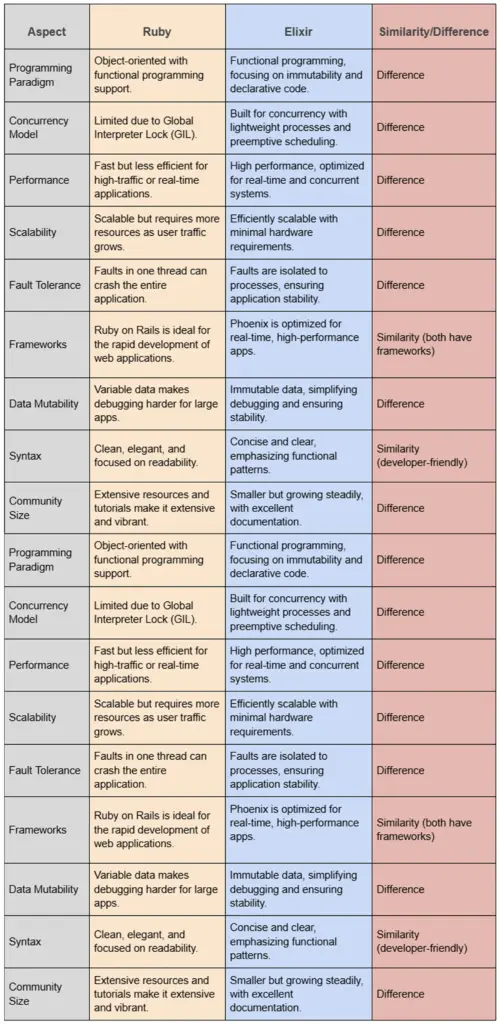
How to Choose between Ruby and Elixir: Similarities & Differences
Ruby and Elixir Talent Pool

The talent pool for Ruby is expansive and well-established as it has been around for many years in the tech world. The adoption of Ruby on Rails was widespread, which allowed any business to find reasonably paid experienced developers. In contrast, Elixir has a smaller but growing talent pool, reflecting its status as a newer, niche language. While Ruby developers often transition to Elixir due to shared syntactical influences, the functional programming paradigm can be a learning curve. Companies seeking Elixir expertise may face higher costs and longer hiring timelines but benefit from developers skilled in building scalable, concurrent systems.

Final Verdict

The Ruby vs. Elixir ruling in 2025 is a matter of business priorities. Ruby is the realistic one in case you require expedited development of MVP, huge community, and proven frameworks such as Ruby on Rails. However, when your project requires real-time responsiveness, concurrency and fault tolerance, Elixir and the Phoenix framework are your solution of the future.

Ruby vs. Elixir- BrainX Provides the Expert Insights You Need!

BrainX Technologies is a leading SaaS development company specializing in delivering tailored solutions. We take pride in innovating solutions for industries like Healthcare, Education, e-commerce, Real Estate, Beauty, etc. With a team of 100+ experts and 7+ years of experience, we can create scalable, high-performance SaaS applications. Our process begins with in-depth client consultations to understand project needs, scalability goals, and performance requirements. Based on these insights, we recommend the most suitable technologies, whether Ruby for rapid development or Elixir for real-time and concurrent systems. We leverage our extensive experience to ensure each project aligns with clients’ long-term business strategies, delivering robust and future-proof solutions.

FAQs

Q1. Ruby or Elixir: Which is the best fit of SaaS in 2026?

Ruby would work best when SaaS products require rapid prototyping, rich feature development and massive community support. Elixir is more suitable with SaaS applications that need concurrency, live updates and fault tolerance at scale.

Q2. Does that mean that Ruby is no longer relevant to Elixir?

Yes. Ruby on Rails is used by such applications as Shopify, GitHub, and Basecamp, and it is still very relevant. Elixir is however picking up in popularity regarding high performance systems, thus making it relevant depending on your project scale requirements.

Q3. What are the applications that should use Elixir?

Elixir works better with real-time applications, e.g. chat applications, live streaming, messaging services, fintech services, and IoT applications, where it is essential to have low latency and high fault tolerance.

Q4. Whatever are the key disadvantages of Elixir over Ruby?

Elixir contains less talent pool, the learning curve is steep because of functional programming and the ecosystem is relatively smaller when compared to Ruby. Companies can be exposed to increased expenses of hiring and reduced off-the-shelf solutions.

Q5. What is the comparison between Ruby and Elixir as regards to scalability?

Ruby applications are scaled well but need to be optimized in most cases and have higher resource requirements. Due to lightweight processes, concurrency models, and the Erlang VM, Elixir can scale more easily, and it is very cost-effective in heavy load.


Web application scalability means maintaining the speed and secure performance of the application with growing user demand, increasing traffic, and expanding data load. A web app that scales well can accommodate growth, so the app remains efficient as users increase.

In its simplest form, scalability is the ability of your app to support more users, process more data, and perform more transactions without performance issues. This blog will help you learn more about how to scale a web application, benefits, processes, challenges, and so much more. 

Why is Scalability Crucial for Modern Web Applications?

Scalability is not a luxury anymore, it has become a necessity. As businesses grow and users expect more, web applications will need to scale for several reasons:

  1. Business Growth: The startups and businesses that grow in numbers of users need their web apps to enable them to meet demand.
  2. User Experience: Slow and unresponsive applications turn users away, causing engagement and retention to drop.
  3. Competitive Edge: Applications that can scale beat the competition by providing more constant service.
  4. Efficiency of Cost: With proper scalability in place, resources are not wasted, and growth is more cost-effective.
  5. Dealing with Traffic Spikes: Applications that are not prepared for unexpected spikes (e.g. Black Friday sales, viral trends) can crash.
  6. Global Expansion: Applications reaching international markets need scalability to serve users across different regions seamlessly.

Key Metrics to Measure Scalability

To ensure an application scales efficiently, track these metrics:

  • Faster response time indicates better scalability.
  • Measures how many requests a system processes efficiently.
  • Delayed responses between system and user action.
  • CPU, memory, and network usage under load.
  • Number of users a system handles simultaneously.
  • Tracks system failures under high load.

Types of Web Application Scaling

Types of Web Application Scaling

1. Horizontal Scaling (Scaling Out)

  • Adds more machines (servers) to distribute the workload.

Advantages:

  • Better fault tolerance (failure of one server doesn’t crash the system).
  • Unlimited growth potential.
  • Works well with cloud services (AWS, Azure, Google Cloud).

Challenges:

  • Complex load balancing and database replication.
  • Synchronization issues across multiple servers.

Best Use Case: Large-scale applications with unpredictable traffic (e.g., social media, e-commerce).

2. Vertical Scaling (Scaling Up)

  • Increases server capacity (CPU, RAM, storage) instead of adding more servers.

Advantages:

  • Simpler implementation.
  • Faster data processing.
  • Better performance for monolithic applications.

Challenges:

  • Limited scalability.
  • Single point of failure (if the main server crashes, the system goes down).
  • Expensive high-end hardware.

Best Use Case: Applications with predictable workloads and strict database consistency needs.

3. Diagonal Scaling (Hybrid Approach)

  • Combines both horizontal and vertical scaling.

Advantages:

  • Balances cost, performance, and redundancy.
  • Minimizes downtime.
  • Offers flexible scaling.

Challenges:

  • Requires careful planning.
  • Needs advanced infrastructure (auto-scaling tools, orchestration frameworks like Kubernetes).

Best Use Case: Growing applications needing gradual scaling.

Challenges in Scaling Web Applications

Following are the most frequent issues that happen while web application scaling, and how they can be overcome using efficient solutions.

1. Handling Traffic Spikes

Challenge: 

Unexpected traffic peaks can make servers slow or crash.

Solutions:

  • Utilize cloud-based auto-scaling (AWS Auto Scaling, Google Cloud Autoscaler).
  • Apply load balancers to share traffic.
  • Cache frequently accessed data (Redis, Memcached).
  • Use CDNs to serve static assets.

2. Database Bottlenecks

Challenge: 

Slow queries, contention, and single database dependency.

Solutions:

  • Optimize queries with indexing and caching.
  • Distribute load using read-write splitting.
  • Use NoSQL databases for flexible data storage.
  • Implement sharding to distribute data efficiently.

3. Server Resource Limitations

Challenge: 

CPU, RAM, and storage limits impact performance.

Solutions:

  • Upgrade to cloud-based solutions.
  • Use microservices to split monolithic applications.
  • Implement asynchronous processing (RabbitMQ, Kafka).

4. Security Concerns

Challenge: 

More servers and APIs increase attack surfaces.

Solutions:

  • Use Web Application Firewalls (WAFs).
  • Secure API endpoints with authentication (OAuth, JWT).
  • Encrypt sensitive data.
  • Conduct regular security audits.

5. Cost and Infrastructure Limitations

Challenge:

  • Cloud infrastructure costs increase exponentially with traffic growth.
  • Improper scaling results in over-provisioning (paying for unused resources).
  • Long-term maintenance of multiple servers and databases is expensive.

Solutions:

  • Use cloud-based auto-scaling solutions (AWS Auto Scaling, Google Cloud Autoscaler) to allocate resources dynamically.
  • Track cloud consumption with tools like Prometheus, Grafana, and AWS CloudWatch to prevent waste.
  • AWS, Azure, and Google Cloud offer discounted spot instances for cost-effective scaling.
  • Reduce infrastructure costs by adopting serverless computing, containerization, and edge computing.

6. Downtime Risks and Deployment Issues

Challenge:

  • Deployments in high-traffic environments, inconsistent database migrations, and rollback failures in stabilizing the versions. 

Solutions:

  • Use CI/CD Pipelines: Automate deployments using GitHub Actions, Jenkins, or GitLab CI/CD to ensure smooth rollouts.
  • Deploy updates in parallel environments to switch traffic seamlessly.
  • Roll out features gradually to avoid full-scale failures.
  • Track error rates, latency, and request failures post-deployment using New Relic, Datadog, or AWS CloudWatch.

When Should You Scale Your Web Application?

When Should You Scale Your Web Application?

Scaling too early can bring about unnecessary cost, whereas postponed scaling can create downtime, slower performance, and missed revenue. Following are the major indicators signaling your web app is in need of scaling and best practices on proactive scalability planning.

1. Increasing Page Load Times: Slow page loads (>2s) indicate infrastructure strain.

 Solution: Optimize database queries, implement caching, and use load balancing.

2. Higher Server Response Time: Response times above 200ms signal server overload.

Solution: Scale horizontally (add servers) or vertically (increase server resources).

3. Increasing CPU and Memory Usage: CPU/RAM usage >80% causes slow performance and crashes.

Solution: Upgrade server resources (vertical scaling) or distribute load (horizontal scaling).

4. High Number of Database Queries & Slow Execution: Delayed responses due to query inefficiencies.

Solution: Optimize queries, use indexing, caching, and consider database sharding.

5. High Server Downtime & Outages: Repeated crashes or 503 errors indicate overload.

Solution: Use auto-scaling, load balancers, and shift to cloud-based infrastructure.

6. Increases in concurrent user count: Increases in concurrent user count lead to system slowdowns together with performance-reducing crashes.

Solution: Use horizontal scaling, microservices, and CDN distribution.

7. Increase in API Requests & Third-Party Integrations: High API call volumes slow down responses.

Solution: Implement API rate limiting, asynchronous processing, and background jobs.

10 Tips on How to Scale A Web Application?

10 Tips on How to Scale A Web Application?

1. Plan Scalability Before Issues Arise

Instead of waiting for performance problems, adopt a proactive scalability approach while learning how to scale a web application:

  • Simulate high traffic before launching major updates. Tools like JMeter, LoadRunner, and Locust help test system resilience.
  • AWS and Azure and Google Cloud should enable auto-scaling in their cloud infrastructure.
  • Adopt microservices before scalability challenges arise.
  • Use reserved instances, spot instances, and Kubernetes orchestration to optimize costs.
  • Configure email/SMS alerts for CPU spikes, database slowdowns, and downtime events.

2. Optimize Your Codebase for Performance

Efficient code is the cornerstone of a scalable web application. Inefficiently written code hinders performance, boosts CPU/memory usage, and introduces bottlenecks.

How to Code for Scalability?

✅ Remove redundant computations and unnecessary loops.

✅ Reduce database queries by batching requests or caching results.

✅ Choose appropriate algorithms (e.g., hash maps for quick lookups).

✅ Enable Gzip or Brotli compression to reduce the size of HTTP responses.

✅ Minify CSS/JS files and use lazy loading for images.

3. Apply Effective Caching Techniques

Caching minimizes server and database workload by holding more frequently used information in memory and enhancing response speeds.

Types of Caching

  1. Server-side Caching: Stores frequently requested data in memory (Redis, Memcached).
  2. Client-side Caching: Uses browser storage (LocalStorage, IndexedDB) for faster page loads.
  3. Database Query Caching: Speeds up repeated queries by storing results.
  4. Edge Caching: Uses CDNs to cache static assets closer to users.

Use Content Delivery Networks (CDNs)

CDNs caches and serves static files like image, CSS and JavaScript from distributed servers at various global locations to minimize latency levels.

Why Use a CDN?

Faster Page Loads: Content is delivered from the nearest server.

Reduced Server Load: Offloads traffic from the main server.

DDoS Protection: CDNs mitigate cyberattacks by distributing requests.

4. Optimize Database Performance

The performance of a poorly maintained database functions as a significant slowdown factor when your application approaches large expansion.

When your application grows into a bigger size an improperly optimized database will become a massive slowdown factor.

How to Increase Database Scalability?

Indexing: Improve query performance by indexing most searched columns.

Read-Write Splitting: Separate read and write operations across multiple servers.

Database Replication: Keep copies of the database to distribute query load.

Sharding: Split large databases into smaller partitions for better performance.

Connection Pooling: Reuse database connections instead of creating new ones.

5. Load Balancing Strategies

Load balancing prevents overload by dividing the traffic across various servers. 

Types of Load Balancing:

1️⃣ Round Robin: Requests are assigned to servers in rotation.

2️⃣ Least Connections: New requests go to the server with the fewest connections.

3️⃣ Geographic Load Balancing: Routes traffic based on the user’s location.

6. Adopt a Microservices Architecture

Instead of a monolithic application, breaking your app into smaller, independent microservices improves scalability.

Why Use Microservices?

Independent Scaling: Scale only the required components rather than the entire system.

Fault Isolation: If a single service goes down, the rest of the application is not affected.

Speedy Deployment: Upgrade or replace single services without interruption.

7. Implement Auto-Scaling Features

Auto-scaling dynamically adds or removes servers based on traffic demand.

Benefits of Auto-Scaling

Cost-Effective: Scale when necessary to save on infrastructure costs.

High Availability: Avoids application downtime during peak traffic.

Automated Resource Management: Works without manual intervention.

8. Leverage Cloud Computing

Cloud platforms provide on-demand scaling with no physical infrastructure upgrades required.

Why Use Cloud-Based Scaling?

Elastic Scaling: Scaling increases or decreases according to incoming traffic.

Global Reach: Deploy applications closer to users worldwide.

Flexible Cost Model: Pay only for what you use (pay-as-you-go).

9. Asynchronous Processing for Better Performance

Instead of processing every request synchronously, move background tasks to asynchronous queues.

How Asynchronous Processing Helps? 

Reduces Web Server Load: Resource-intensive operations are run in the background.

Better Response Time: The user does not wait for long-running operations.

Ensures Reliability: Queues prevent dropped requests during peak traffic.

10. API Rate Limiting and Optimization

A high number of simultaneous API requests can overwhelm server.

How to Optimize APIs for Scalability?

✅Rate Limiting: functions as a solution that allows 100 requests per minute for each IP address or user.

API Caching: Store API responses temporarily to reduce server load.

✅GraphQL: Provides clients with the capability to request particular data fields.

What is Scalability Testing?

Scalability testing is a type of non-functional performance testing that evaluates how a web application performs under increasing load and stress conditions.

Why is Scalability Testing Important?

Why is Scalability Testing Important?

Failing to test scalability can result in downtime, lost revenue, and poor user experience.

Common Issues Avoided by Scalability Testing:

Slow Load Times: Users leave websites if pages take longer than 2-3 seconds to load.
Server Crashes: Unchecked loads can overload servers, causing failures.
Database Overload: Too many queries can slow down transaction processing.
Poor User Experience: Performance degradation frustrates users, leading to high bounce rates.

Types of Scalability Testing

Different types of scalability testing help evaluate various aspects of an application’s performance.

  • Scalability Testing: Ensures an application performs well under increasing loads.
  • Load Testing: Measures system performance under expected user load.
  • Stress Testing: Determines system breaking points.
  • Volume Testing: Tests database performance with large datasets.
  • Spike Testing: Simulates sudden traffic surges.
  • Endurance Testing: Checks long-term performance.
  • Tools: Apache JMeter, LoadRunner, k6, Locust.

Scalability Testing Process

Scalability testing follows a structured approach to simulate real-world traffic conditions.

Step 1: Define Performance Benchmarks

Set key scalability metrics:

✅ Response Time: Should be <200ms under high load.

✅ Throughput: Number of successful requests per second.

✅ CPU & Memory Usage: Should stay below 80% during peak load.

Step 2: Create Test Scenarios

✅Stimulate different conditions: replicate 3 different load conditions gradual load increase, sudden traffic spikes, and long-duration high loads.

✅ Identify components to test: server, database, APIs, cache, network latency.

Step 3: Execute Scalability Tests

✅ Use tools like JMeter, k6, LoadRunner to generate simulated traffic.

✅ Monitor real-time performance metrics during the test.

✅ Monitor real-time performance metrics during the test.

Stage 4: Evaluate Test Data & Bottlenecks

The evaluations should include response times together with error rates and CPU/memory usage data and database query execution time metrics.

✅ Identify performance bottlenecks and system limitations.

Step 5: Optimize and Retest

✅ Apply performance fixes (e.g., add caching, optimize database, increase server capacity).

✅ Re-run tests to ensure improvements work.

Scalability Testing Tools

Best Tools for Scalability Testing

Apache JMeter

  • Use Case: Load, stress, endurance testing

  • Best For: Web apps, APIs

Gatling

  • Use Case: Simulates user behavior

  • Best For: High-performance apps

LoadRunner

  • Use Case: Enterprise-level load testing

  • Best For: Large-scale applications

k6

  • Use Case: Cloud-based load testing

  • Best For: APIs, microservices

BlazeMeter

  • Use Case: Continuous performance testing

  • Best For: CI/CD pipelines

AWS CloudWatch

  • Use Case: Auto-scaling monitoring

  • Best For: Cloud-based apps

Locust

  • Use Case: Python-based load testing

  • Best For: Spike testing

Key Security Risks When Scaling

DDoS Attacks

  • Why It’s a Problem: Attackers flood the system with fake traffic, causing downtime.

  • Solution: Use CDNs, load balancers, and DDoS protection (AWS Shield, Cloudflare).

Insecure APIs & Unauthorized Access

  • Why It’s a Problem: Weak APIs allow attackers to manipulate requests and access data.

  • Solution: Implement OAuth 2.0, JWT tokens, API gateways, and HTTPS encryption.

Data Breaches & Insecure Storage

  • Why It’s a Problem: Improperly secured databases expose sensitive user information.

  • Solution: AES-256 encrypts data while inactive; TLS 1.3 encrypts during transmission. Use RBAC (Role-Based Access Control).

Third-Party & Dependency Risks

  • Why It’s a Problem: Unpatched third-party services introduce vulnerabilities.

  • Solution: Regularly update dependencies and use automated security scanning tools (Snyk, OWASP Dependency-Check).

Weak Authentication & Authorization

  • Why It’s a Problem: Permit attackers to hack accounts and conduct force attacks.

  • Solution: Enable Multi-Factor Authentication (MFA) with rate-limited login attempts.

Best Security Practices for Scaling Web Applications

  • Role-Based Access Control (RBAC) should function by giving permissions to users based on their assigned roles to diminish potential risks.
  • API Gateways in conjunction with rate limiting functions act to stop both API abuse and unauthorized access and DDoS attacks.
  • Software developers must stay updated with dependency software versions and framework versions as a method to prevent vulnerabilities.
  • Adequate Container Security practices include maintaining small base images together with scanning containers and enabling runtime protection measures.
  • Multi-Factor Authentication (MFA) enables you to create a double-layered security system which stops unauthorized access.
  • Codes must align with OWASP Top 10 rules to stop risks associated with common flaws including XSS & SQL injection.
  • A Data Loss Prevention (DLP) system must be implemented to monitor data movements for the purpose of preventing leaks and breaches.
  • Your system should implement Intrusion Detection & Prevention Systems (IDPS) to automatically prevent and detect real-time malicious behaviors.
  • The system should have automated backup mechanisms alongside encrypted data backups and disaster recovery plans in place.
  • Require security awareness sessions that cover cybersecurity threats together with best practices.

Read Here: How to Choose Web Development Technology Stack?

Future Trends in Web Application Scaling

Here are the key future trends in web application scaling:

AI-Powered Auto-Scaling

AI-driven auto-scaling improves efficiency by predicting demand and adjusting resources dynamically.

Key Benefits:

  • Uses machine learning (ML) algorithms to predict traffic surges before they happen.
  • Allocates compute, database, and storage resources in real-time to avoid bottlenecks.
  • Prevents over-provisioning, reducing unnecessary infrastructure costs.
  • Enhances performance by dynamically adjusting resources based on traffic patterns.

Edge Computing for Low-Latency Scaling

Edge computing processes data closer to users instead of relying on centralized cloud servers, reducing latency.

Key Benefits:

  • Distributes processing across edge locations (CDNs, 5G networks, local data centers).
  • The system decreases server traffic together with network overload which results in enhanced response speed.
  • IoT applications, gaming and AI systems enhance real-time performance for financial solutions.
  • Local data processing lowers costs by reducing bandwidth usage which optimizes the end-to-end process before cloud server delivery.

The Rise of Serverless Computing

Cloud providers perform automatic resource allocation which replaces the requirement for manual scaling within serverless architectural systems.

Key Benefits:

  • No need for server management so that developers can only focus on writing code.
  • Pay-as-you-go pricing costs are based only on actual usage, reducing waste.
  • Instant scaling handles traffic fluctuations without pre-provisioning.
  • Reduces operational complexity, allowing faster application development.

Blockchain-Based Scalable Architectures

The implementation of blockchain solutions for scaling delivers greater security features and decentralized system operations and decreases database dependency.

Key Benefits:

  • The Ethereum Rollups and Polygon along with other Layer 2 solutions help boost transaction speed and cut down costs.
  • IPFS and Arweave both supply data storage platforms that combine scalability with security features.
  • Smart contracts enable automated scaling in web applications, especially in finance and supply chain management.
  • Reduces reliance on centralized infrastructure, increasing resilience against system failures.

Sustainability & Green Cloud Scaling

As data centers consume massive amounts of energy, companies are moving towards eco-friendly scaling solutions.

Key Benefits:

  • Adoption of carbon-neutral cloud services (Google Cloud, AWS, Microsoft Azure).
  • Use of energy-efficient hardware (low-power CPUs & GPUs) to optimize resource utilization.
  • AI-driven cooling systems in data centers to minimize power consumption.
  • Encourages businesses to reduce their carbon footprint while maintaining scalability.

Multi-Cloud and Hybrid Scaling Strategies

Businesses achieve better performance with cost optimization through cloud providers including AWS, Azure, Google Cloud and private data centers.

Key Benefits:

  • The ability to select superior services exists because vendor lock-in does not apply to organizations using multi-cloud approaches.
  • The duplication of cloud systems through redundancy solutions provides both high reliability and automatic system recovery features for uninterrupted functionalities.
  • The organization achieves lower costs by utilizing price arrangements that provide optimal value from various vendors.
  • Enables seamless data migration & workload balancing across different cloud environments.

Scale Your Web Application with BrainX Solutions!

Need more help figuring out how to scale a web application effortlessly?

BrainX provides expert solutions to overcome scaling hurdles with ease. With expertise in cloud-based auto-scaling, microservices architecture, and database optimization, BrainX helps your app handle traffic spikes, retain performance, and remain secure regardless of the load. 

Our integration with CDN and asynchronous processing reduce latency while optimizing the user experience. And with our AI development services, we can develop customized AI solutions specific to your requirements, anticipating demand and optimizing resources. From cost-saving serverless computing to industry-leading security, BrainX provides solutions to future-proof your web application.

Reach out to BrainX today for scalable, reliable growth!

While scratching your head to create the best digital appearance for your business, the first decision matters a lot.

With people spending over 16 billion hours on their mobile apps, you still have to compare Mobile Apps vs Web Apps – what suits your business needs?

Here’s the thing, not always obvious is the right choice. Determine whether you need a mobile or a web application depending on your business needs, target audience, and budget.

Mobile apps are available for download and installation on handsets, while web applications are accessed through browsers; therefore, they are more broadly accessible. Both have an advantage, but which satisfies your business needs? This all breaks down for you in deciding what best suits your brand and customers.

Ready to know which one works best for your business? Read on to make an informed decision that drives results!

What Are Mobile Apps?

Mobile applications are software developed only for devices like smartphones and tablets. They assist companies in communicating with users and make the process of task completion relatively easier for users. Developing a mobile app is far more complicated than developing a web application and requires a specific skill set, tailored to each platform.

Mobile apps are downloaded and installed directly from app stores from Apple or Google Play Store right onto a user’s device. They run smoothly and access the native features of any device, such as accessing GPS, camera, use of notifications, and address books. This kind of integration allows for a very harmonious user experience and individuality through intuitive functionality.

Native apps are the two major types of mobile apps that you choose from based on your desired purpose. Such apps are specifically developed with a single codebase either for iOS or Android and require access to the complete features of a device. This makes them faster and more efficient but comes with higher costs and longer development time if apps are needed for multiple platforms. Hybrid apps are cost-effective and are developed using a shared codebase that can function across multiple platforms, namely Android and iOS.

Such apps are beneficial for SaaS businesses in multiple ways. They act as a magnet for users to engage them and help businesses meet client’s expectations. However, this hustle would go to waste without properly aligning the app and business goals to provide value to the users.

The Native Apps vs. Hybrid Apps Debate

Native apps are suitable when you want your apps to work on only one specific platform with a specified programming language for each, for instance, Swift for iOS and Kotlin for Android. Thus, native apps are tailor-made to the operating system; therefore, they use the maximum features that a device can provide, from a camera and GPS up to an accelerometer or Bluetooth.

Native apps are the best performers in terms of speed and response time. They also happen to be very optimized towards the platform they are to be deployed on, making their user experience very smooth and fluid. This does indeed come at a cost since native apps for multiple platforms can have separate codebases for different platforms, increasing not only time but also money.

You might choose a native app if:

  • You want your app to be downloaded from Google Playstore and Apple Store.
  • Need a high-performing app and responsive app for enhanced user satisfaction.
  • The app requires extensive use of native device features, such as GPS, notifications, or cameras for core functionality.
  • Your revenue model relies on generating income through paid downloads or in-app purchases.

Hybrid apps combine features of native apps and web apps. They are developed using HTML, CSS, and JavaScript technologies. Such apps access features like hardware, calendars, and notifications, just like a native app would.

Benefits of Hybrid Apps:

  • One code base that runs across multiple platforms, saving time and money.
  • Access to app stores for greater visibility and discoverability.
  • Integration with native features of the device for an all-around seamless experience. Development cost is also relatively lower compared to natively developed applications.

What Are Web Apps?

Web applications are software applications using technologies, such as HTML, CSS, and JavaScript. These web-based programs have been designed to be launched or operate right within a web browser from virtually any device that has an active Internet connection. Because of such convenience, web applications have remained the favorite among various business organizations searching for easy-to-implement, efficient, and cost-effective yet highly scalable solutions. Being applications other than mobile applications, it does not need downloading and installation. One just needs a URL to access.

There is a use of the so-called frameworks, such as React or Vue.js, to create very advanced applications by rendering complex web applications, advanced function webs, and server technologies: the use of PHP, Node.js, or Ruby on Rails would enhance web applications to work dynamically with a database toward more personalized content and easy user experience. Apps in this class of application approximate features of mobile apps, like click-to-call and location-based mapping, but they run within a browser.

Responsive web apps have become the gold standard in modern web design. They not only guarantee compatibility with different screen sizes but also provide a smooth, touch-friendly interface for handheld devices. These apps can display text, images, videos, and even interactive features like location-based services or click-to-call buttons, providing a near-native experience without requiring installation.

Web apps are a great fit for SaaS businesses that have to deliver functionality and access to a large audience. Scalability, cost-effectiveness, and cross-platform compatibility make web apps an invaluable tool for businesses targeting engagements across devices.

Mobile Apps Advantages and Disadvantages

Advantages:

  • Designed to operate swiftly, providing a seamless user experience. 
  • Utilize device-specific features, resulting in faster performance compared to web applications. 
  • Many mobile apps offer functionalities that can be accessed without an internet connection, ensuring continuous usability. 
  • Push notifications enable direct communication with the users for better engagement and retention.
  • Access to Native device functionalities, i.e. camera, GPS, and contact lists, make mobile apps enhance user experience.
  • Mobile applications tailor content and experiences according to user behaviors. 
  • Increase brand visibility through unique app icons for loyalty and recognition. 
  • In-purchases, subscriptions, and ads open new revenue streams for businesses. 

Disadvantages:

  • Developing mobile apps for multiple platforms can be expensive and time-consuming. 
  • Ensuring a uniform app functionality across different devices can be difficult. 
  • Mobile apps can be vulnerable to security breaches, and hence require robust measures to protect user data and privacy. 
  • Submitting apps to platforms like the Apple App Store or Google Play Store involves approval processes that can delay deployment.
  • With numerous apps available, attracting and retaining users requires effective marketing and continuous value addition.
  • To keep users satisfied and maintain compatibility with new devices and OS versions, apps require frequent updates, adding to maintenance efforts. 
  • Users may be reluctant to download apps that consume significant storage space on their devices.

Also Read: Fintech App Development Cost Guide With Detailed Breakdown

Advantages and Disadvantages of Web Apps 

Advantages: 

  • Run smoothly across all platforms, be it iOS, Android, or Windows. 
  • Accessed directly through the browser without downloading or installing the application.
  • Less expensive compared to native applications, with one version catering to all the platforms, development and maintenance costs are reduced.
  • They have all updates done centrally, and it does not even require manual intervention to obtain the latest version for the users.
  • Maintenance and updation of web apps with a unified codebase become easier; hence, for the developers, it becomes a very straightforward process.
  • Such apps can be used on all internet-enabled devices.
  • Easily scalable to meet higher user loads, making it suitable for growing businesses.

Disadvantages: 

  • Access to web applications depends on stable internet connectivity. 
  • Might show poorer performance compared to native apps due to the limitations imposed by the browser and reliance on the internet.
  • May not utilize all the native capabilities of the device and, hence may not be as strong as native applications.
  • Vulnerable to security risks if accessed over the internet. They, therefore, need strong protection to ensure that user data is not compromised.
  • The way different browsers interpret web applications may result in different experiences among users on various platforms.
  • Not as engaging as native applications since they lack features such as push notifications.

Web Apps vs Mobile Apps – Differences & Similarities

Similarities

  • Focus on UX and UI design to make the interactions intuitive and engaging.
  • Accessible to the users with internet-enabled devices to reach a large audience.
  • Aim to provide specific functionalities or services to the users such as communication, entertainment, or productivity tools.
  • Need robust security measures to protect user data and ensure privacy.
  • Designed to run across multiple platforms and devices with enhanced user accessibility.
  • Require routine updates to add new functionality, enhance performance, and patch security holes.
  • May have to be connected to the internet to work at maximum capacity, though some features are available offline.
  • Both can use modern frameworks and tools to make development smoother.
  • Interact and engage users through interactive elements, personalized content, and responsive designs.
  • Measured in terms of performance metrics such as load time, responsiveness, and user satisfaction.

Differences between Mobile Apps and Webs Apps 

Web Apps 

  • Accessed via web browsers; no installation required.
  • Platform-independent; accessible across various devices with internet connectivity.
  • Performance depends on the browser’s capabilities and internet speed.
  • A single codebase simplifies development and updates.
  • Typically requires an internet connection to function.
  • User experience may vary across different browsers and devices.
  • Does not fully access GPS, camera, sensors, or other device features.
  • Accessible via URLs; no need for app store approval.
  • Security depends on web protocols and can be more susceptible to certain vulnerabilities.
  • Using a single codebase for multiple platforms makes them cost-effective.
  • Allow users to get the latest version without manual intervention.
  • Not listed in app stores; discoverability depends on search engines and marketing efforts.
  • Limited engagement features; lacks push notifications and may have less direct interaction with users.
  • Monetized through ads and subscriptions and is less on in-app purchases.
  • Built using web technologies like HTML, CSS, and JavaScript; lacks standardized SDKs.
  • No approval process; developers have full control over deployment.

Mobile Apps 

  • Installed on devices through app stores; requires download and installation.
  • Developed for specific platforms i.e. iOS or Android.
  • Often offers superior performance due to direct integration with device hardware.
  • Increase development and maintenance efforts with separate codebases for different platforms.
  • Provides offline for certain features.
  • Provides a consistent and tailored user experience optimized for specific devices.
  • Full access to native device functionalities, enhancing interactivity.
  • Distributed through app stores, requiring adherence to specific guidelines and approval processes.
  • Benefits from inherent security features of the operating system and app stores.
  • Can be more expensive as separate versions may be needed for different platforms.
  • Users need to download updates from app stores; this may lead to version fragmentation if users don’t update.
  • Listed in app stores, which can aid in discoverability but also requires adherence to store guidelines.
  • Can utilize push notifications and other engagement tools to maintain user interaction.
  • Ensure monetization through in-app purchases, subscriptions, and ads.
  • Developed using platform-specific SDKs and programming languages, providing robust development support.
  • Subject to app store approval processes, which can delay deployment.

When to Choose Mobile Apps and Web Apps 

Now that we have already discussed at length about mobile apps vs web apps. It’s time to understand when to decide which one you need the most. Have a look at these factors that will help you decide better:

Choose a Mobile App When:

  1. Your application requires deep integration with device features such as the camera, GPS, or push notifications.
  2. You need your users to be able to access certain features without an internet connection. 
  3. You want high performance, speed, and responsiveness for user satisfaction.
  4. You will monetize through app store downloads or in-app purchases.
  5. You want to reach users across multiple devices and operating systems without developing separate versions.
  6. You have a tight budget and demand a cost-efficient answer with a single code base.
  7. You enjoy having all updates central rather than asking users to come in and download new versions.
  8. Driving increased visibility through the organic results of search engines is part of your strategy.

Choose a Web App When:

  1. You aim to reach users across various devices and operating systems without developing separate versions. 
  2. Budget constraints necessitate a more cost-effective solution with a single codebase. 
  3. You prefer centralized updates without requiring users to download new versions. 
  4. Improving visibility through search engines is a key component of your strategy.

Leading Examples of Web Apps

Web applications are integral parts of our daily digital interactions. They have made it easier to increase productivity, improve communication, and enhance entertainment. Here are some of the top examples:

     1. Google Docs

Google Docs is a cloud-based word processor for creating, editing, and saving documents. Not just that but it also allows document sharing and collaboration online to facilitate teamwork. 

     2. Notion

Who doesn’t demand an all-in-one workplace experience? Notion brings it to its users by allowing them to take notes, manage projects, and collaborate with teams. It enhances productivity and helps streamline workflow by creating customizable pages and databases. 

     3. Asana

A web app that lets teams organize, track, and manage their work. Asana equips teams with planning, assignment, and tracking of work across projects to increase team efficiency.

     4. Spotify

Spotify is the leading music streaming application. It has millions of songs, as well as millions of tracks of podcasts. This music-streaming web application lets people listen to content from within their browsers without a separate application for a desktop.

     5. Canva

This is an application that allows the development of visual content easily. Canva web app provides thousands of templates as well as a variety of design tools, so it suits beginners and experts alike.

Leading Examples of Mobile Apps 

     1. Instagram

With billions of users worldwide Instagram has gained fame as an ideal social media platform for sharing photos and videos. It helps users to connect with friends, create communities and access content from across the globe. Instagram’s business accounts are helping multiple e-stores thrive by engaging well with their customers. 

     2. TikTok

In this day and age of influencer marketing, video content creators find TikTok helpful. With this application, one can create very short videos and share them on the entire globe while discovering many ideas from other creators.

     3. Spotify

Spotify depicted an increment of 7 million users in the second quarter of 2024. Being a leading music streaming service, Shopify offers a vast and versatile music library, podcasts, and playlists for its users. 

     4. WhatsApp Messenger

A cross-platform messaging app that enables users to send text messages, voice notes, and images, and make voice and video calls. 

     5. CapCut

A user-friendly video editing app that provides a range of tools and effects for creating high-quality videos, popular among content creators. 

The Future of Both Mobile Apps vs Web Apps 

As a result of multiple improvements in frameworks like React, Angular, and Vue.js, web apps are expected to become robust and versatile. Additionally, PWAs will bring further transformation by adjoining mobile and web experiences. They will have offline functionality, push notifications, and home screen installation without needing to download from the app store. Web apps will use AI and ML to provide customized and dynamic experiences. Cloud computing and edge technology will further scale up the application for seamless functionality across devices.

Mobile apps are entering a new era of high interactivity and integration. AR, VR, and IoT technologies will redefine app experiences by becoming even more immersive and connected with the real world. Native apps will continue to be strong in performance-critical use cases. We know that Flutter and React Native cross platform development tools are a savior for mobile app development. But, features like AI-powered voice assistants and predictive analytics are further enhancing the user experience. They will advance it more with the latest upgrades expected in the future. 

Making the Right Choice for Your Business

Choosing between mobile apps vs web apps requires careful thought. Here’s how you can decide.

Assessing Your Business Needs

Evaluate if your app’s goal is to boost engagement or ensure wide accessibility. A retail business may prioritize rich customer experiences through a mobile app, while a service provider might benefit from an accessible web app.

Budget Considerations

Smaller budgets may favor web apps due to their affordability and quicker development. But, larger businesses benefit from investing in mobile apps for branding opportunities.

Future Growth and Scalability

If your business plans to scale rapidly, analyze the ease of adding new features to the chosen platform. Web apps are generally more scalable due to their flexibility.

Build Smart, Intuitive Apps with BrainX Technologies!

The decision between Mobile Apps vs Web Apps depends on your goals, audience, and budget. BrainX Technologies has been expertly delivering mobile and web app development solutions for the past 7+ years. We take pride in building custom solutions for your unique business needs. The BrainX team goes the extra mile to ensure user-friendliness, high performance, and scalability. With us resolving the debate of mobile apps vs web apps you’ll get a result-driven solution. We use futuristic tech stacks including Flutter, React, and AI for developing seamless, future-ready apps. 

Moreover, you can rest assured of intuitive designs that engage users and drive growth. Our proven track record ensures quality, efficiency, and innovation from development to deployment.