
TL;DR / Key Takeaways
- The best ecommerce website development company has to be evaluated on set metrics such as conversion, speed, reliability, SEO readiness and post-launch growth.
- Choose the appropriate delivery model from the beginning: agency, dev shop, freelancer or in-house.
- Ask every vendor for proof artifacts, not just screenshots: discovery outputs, architecture diagrams, QA plans, and post-launch roadmaps.
- Performance, SEO, security, analytics, and integrations are essential requirements to build and should not be treated as add-ons.
- Be wary of red flags such as vague estimates, unspecified acceptance criteria, or some form of proprietary lock-in without a business case.
- Consider proposals on the basis of assumptions, scope drivers and ownership–not hourly rates.
- For U.S.-facing commerce, add accessibility, privacy, payment stack, and procurement readiness to your scorecard.
If you are building a shortlist right now, you have probably run into the same problem every buyer does: Vendor websites all sound the same: “full-service,” “conversion-focused,” “scalable,” and “secure.” But when all the vendors say they are the best ecommerce website development company, then buyers need something more to compare them than portfolio screenshots and uncertain promises.
The smarter approach is to assess partners by outcomes, like conversion, performance, reliability, search readiness, maintainability, and post-launch growth, and not by polished sales pages alone.
This guide gives you a practical evaluation framework. You will learn what “best” should mean, which proof signals matter most, what red flags to watch for, how scope really drives cost, and how to choose a partner without overpaying for buzzwords.
What Best Ecommerce Website Development Company Actually Means and What It Doesn’t
The best ecommerce website development company is not the one with the loudest branding. It is the partner most likely to help you launch a store that is fast, stable, discoverable, secure, easy to manage, and easier to improve after launch.
Google’s Core Web Vitals framework is a useful example of outcome-based evaluation because it measures loading, interactivity, and visual stability through LCP, INP, and CLS, with recommended thresholds of 2.5 seconds, 200 milliseconds, and 0.1 at the 75th percentile. Google also emphasizes that teams should pair broad field visibility with their own real-user monitoring so they can diagnose and react to regressions quickly.
In practice what “best” implies:
- Revenue impact: Improved conversion, increased AOV, increased merchandising control and reduced checkout failures.
- Performance and reliability: Fast product pages, stable checkout, and predictable scaling during traffic spikes.
- Operational efficiency: Less manual work along with better integrations and admin tooling.
- Risk management: Secure development, controlled releases, and SEO safeguards before launch.
What it does not mean:
- The biggest agency.
- The fanciest design portfolio.
- The most complex platform recommendation.
- A team that says yes to everything without explaining tradeoffs.
It does not mean “most custom,” “most expensive,” “largest headcount,” or “most advanced architecture diagram.” While a headless or composable build might be the right solution, it’s only when it addresses an actual business need more effectively than a simpler platform-led solution. The best ecommerce partners will minimize the clutter while allowing merchandising, integrations, and experimentation. That is why the best ecommerce website development company for one organization can be the wrong fit for another.
Best for Your Context (Startup vs Enterprise)
For a startup, “best” usually means faster learning, tighter scope control, and enough flexibility to iterate without rebuilding the stack in six months. A partner who can get the basics right, such as catalog structure, mobile UX, analytics, SEO hygiene and launch discipline, can create more value for their client than the one who suggests an enterprise-grade architecture prematurely.
For an enterprise team, the checklist shifts. Procurement, accessibility, infosec review, governance, multi-team approvals, and systems integration become central. That’s where the best ecommerce website development company comes into play. It’s the one that can fit into your operations without adding unnecessary overhead or slowing down the program down the road.
Before you compare vendors, write down three things:
- Your 12-month growth plan, including channels, catalogs, and regions.
- Your non-negotiables, like PCI scope, uptime, localization, accessibility, or headless architecture.
- Your integration landscape, including ERP, CRM, PIM, OMS, analytics, payments, and shipping tools.
Also Read: How to Create a Great Retail App: Main Features, Characteristics & Tips
Agency vs Dev Shop vs Freelancers vs In-House
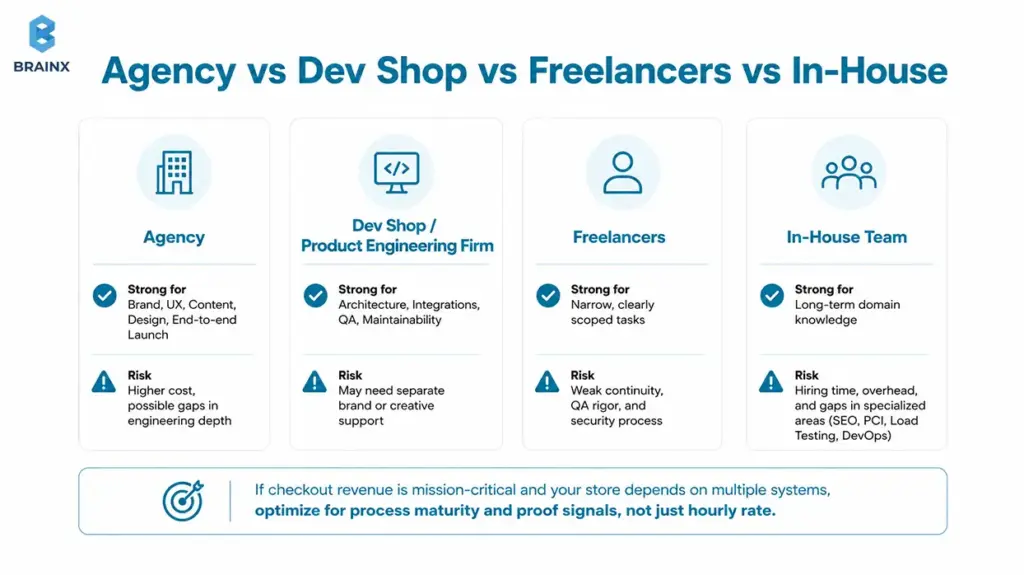
- Agency: Strong for brand, UX, content, design, and end-to-end launch. The risk is higher cost and possible gaps in engineering depth.
- Dev shop or product engineering firm: Strong for architecture, integrations, QA, and maintainability. The risk is that you may need separate brand or creative support.
- Freelancers: Useful for narrow, clearly scoped tasks. The risk is weak continuity, QA rigor, and security process.
- In-house team: Strong for long-term domain knowledge. The risk is hiring time, overhead, and gaps in specialized areas like SEO migration, PCI, load testing, or DevOps.
If checkout revenue is mission-critical and your store depends on multiple systems, optimize for process maturity and proof signals, not just hourly rate.
Ten Qualities That Define the Best Ecommerce Website Development Company With Proof Signals
If you want to evaluate the best ecommerce website development company objectively, ask for proof in three layers: what they planned, how they built, and what happened after launch.
A credible partner should be comfortable showing artifacts, technical rationale, and measurable outcomes—not just portfolio screenshots. If you want a reference point while comparing partners, BrainX’s public Ecommerce Website Development Services page is a good example of the kind of service detail serious buyers should expect to see before a proposal is even signed.
If you only do one thing after reading this article, do this: ask vendors for proof artifacts. Strong ecommerce partners usually welcome this because it makes expectations clear, reduces rework, and keeps both sides aligned before the build starts.
Strategy-First Discovery That Aligns Tech With Business Goals
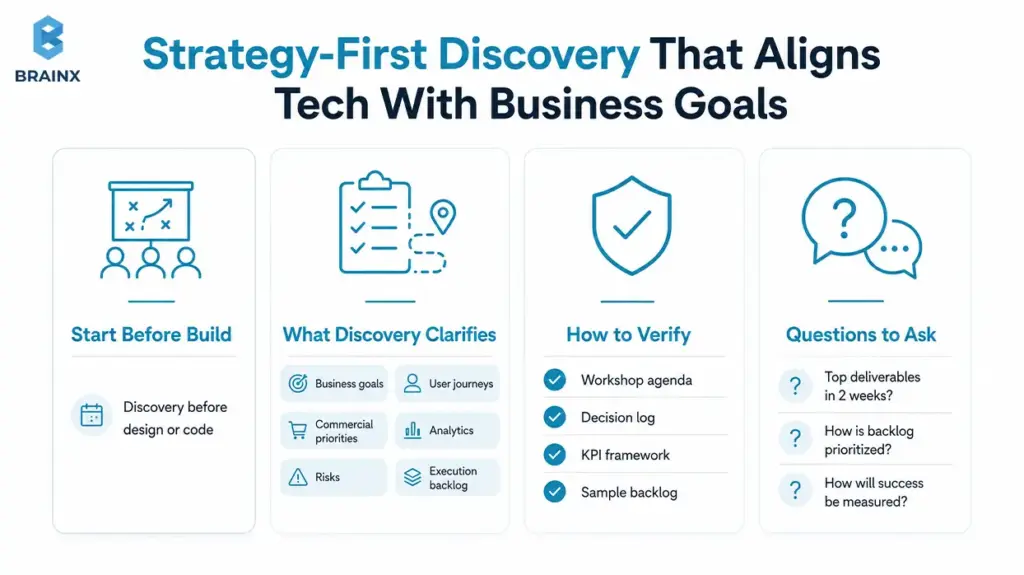
Strong ecommerce delivery starts before design or code. Discovery should clarify business goals, user journeys, commercial priorities, analytics requirements, risks, and the first execution backlog. If a vendor says it “understands the vision” but cannot show a workshop agenda, a decision log, or a measurable success framework, that is not strategic thinking. It is just a polished sales language.
How to verify: Ask for a sample discovery agenda, output deck, KPI framework, and example backlog.
Questions to ask:
- “What are your top discovery deliverables in the first two weeks?”
- “How do you prioritize backlog items: revenue impact, effort, risk, or dependencies?”
- “What metrics will we use to confirm the launch improved performance or conversion?”
Platform and Architecture Expertise for Custom, Headless, and Composable Decisions
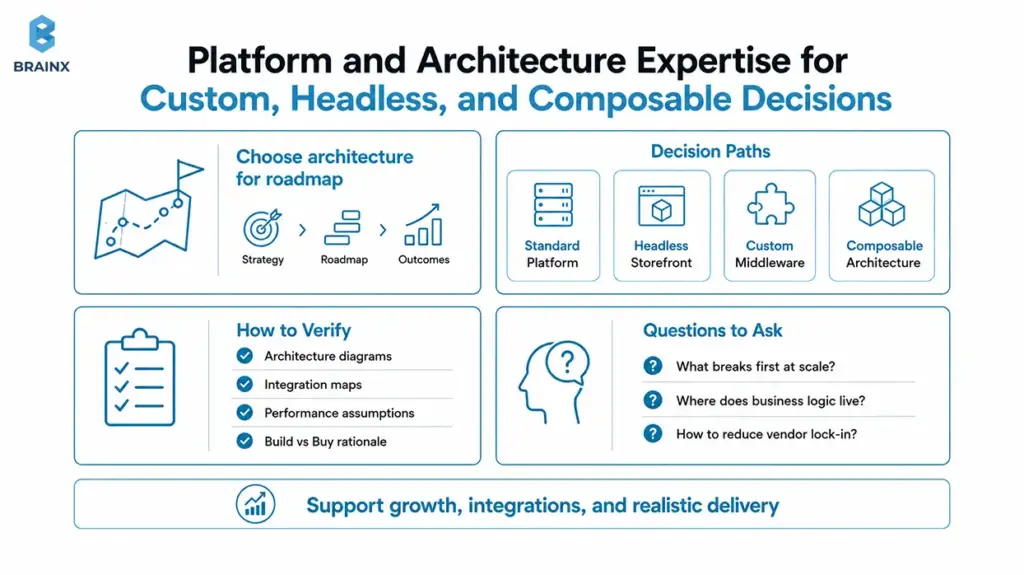
The right partner should be able to explain why a standard platform build is sufficient—or why a decoupled storefront, custom middleware, or composable architecture is justified. Architecture should be chosen because it supports your roadmap, not because it sounds sophisticated in a pitch.
How to verify: Request architecture diagrams, integration maps, performance assumptions, and a build-versus-buy rationale.
Questions to ask:
- “What breaks first when traffic doubles: frontend, backend, or integrations?”
- “Where will business logic live: storefront, backend, or a service layer?”
- “How do you avoid vendor lock-in while keeping delivery realistic?”
Conversion-Focused UX and Merchandising Understanding
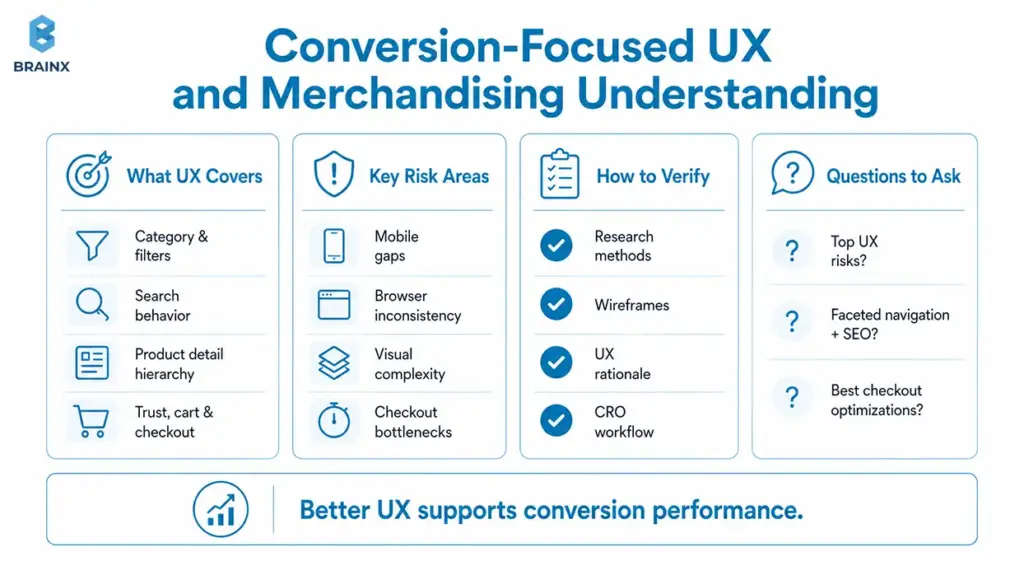
Ecommerce UX is not only visual design. It includes category structure, filters, search behavior, product detail hierarchy, trust signals, cart clarity, checkout friction, subscription logic, and merchandising rules. Recent ecommerce research points to the practical cost of getting this wrong: mobile optimization gaps, browser inconsistency, visual complexity, and checkout bottlenecks all influence exits, task completion, and conversion performance.
How to verify: Ask for research methods, wireframes, UX rationale, examples of merchandising-heavy templates, and a CRO workflow.
Questions to ask:
- “What are your top UX risks for our catalog and customer journey?”
- “How do you design faceted navigation without hurting SEO?”
- “Which checkout optimisations have you seen reliably lift conversion?”
Also Read: UX-First Engineering in Web Design and Development
Performance Engineering for Core Web Vitals, Load, and Scalability
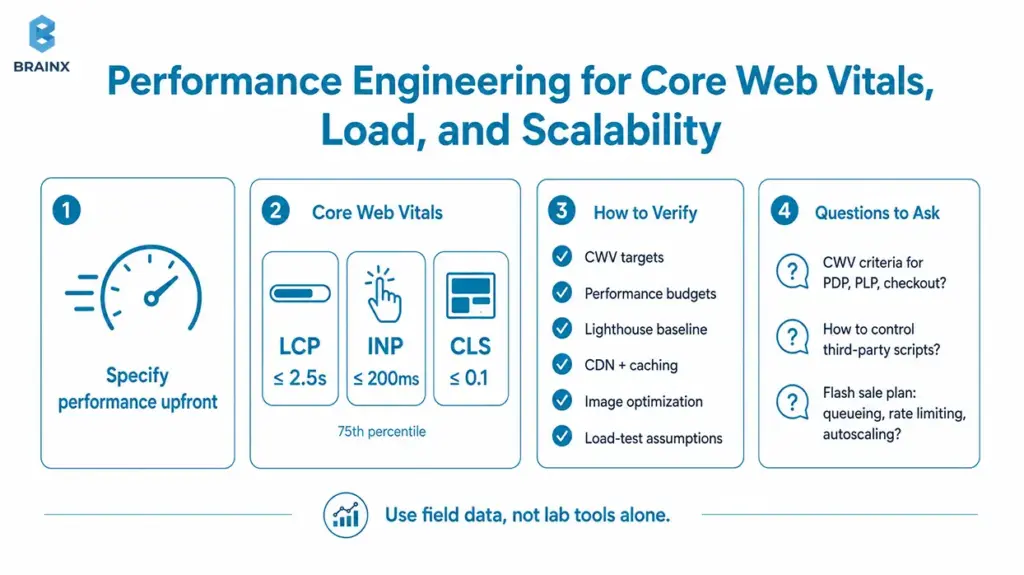
Performance should be specified early, not “optimized later.” Google’s recommended thresholds for the current Core Web Vitals are LCP at 2.5 seconds or less, INP at 200 milliseconds or less, and CLS at 0.1 or less, measured at the 75th percentile. Google also notes that lab tools matter during development, but they do not replace field measurement because real user experience varies by device, network, and interaction pattern. This is one of the clearest places where the best ecommerce website development company separates itself from a generic website vendor.
How to verify: Ask for template-level CWV targets, performance budgets, Lighthouse baselines, CDN and caching strategy, image optimization rules, and load-test assumptions.
Questions to ask:
- “What are your CWV acceptance criteria for PDP, PLP, and checkout?”
- “How do you prevent third-party scripts from degrading performance?”
- “What’s your plan for flash sales: queueing, rate limiting, or autoscaling?”
SEO and Structured Data Baked Into Development
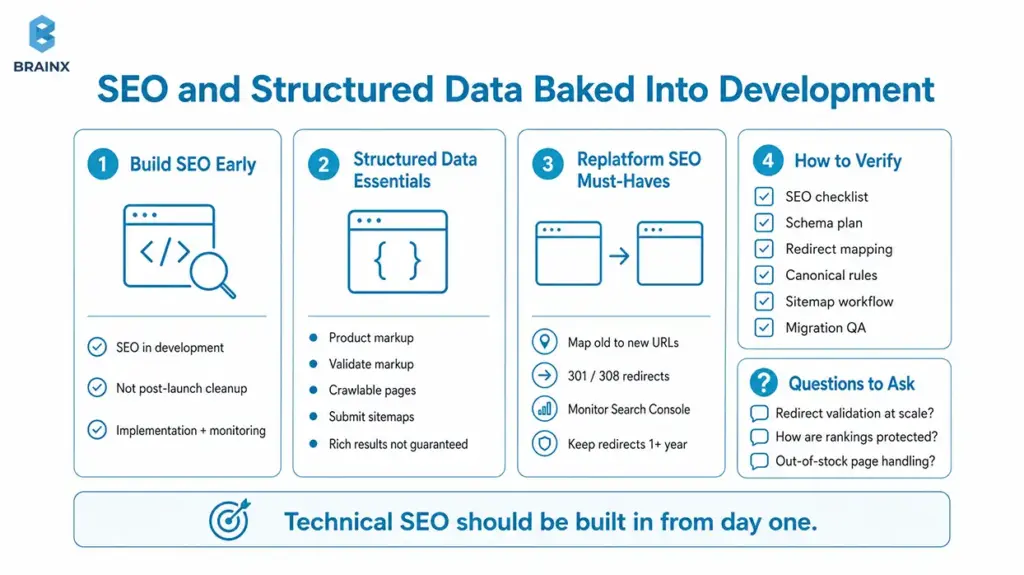
Technical SEO should be part of development, not a clean-up sprint after launch. Google documents that Product markup can make pages eligible for product snippets, recommends validating markup with testing tools, ensuring pages are crawlable, and submitting sitemaps to keep changes updated. Google also makes clear that structured data does not guarantee rich results, which is why implementation quality and monitoring matter.
This becomes even more important during replatforming. Google recommends mapping old URLs to new URLs, using permanent server-side redirects such as 301 and 308 when possible, monitoring Search Console during the move, and keeping redirects in place for as long as possible—generally at least one year.
How to verify: Ask for a technical SEO checklist, schema plan, redirect mapping approach, canonical rules, sitemap workflow, and migration QA process.
Questions to ask:
- “How do you validate redirects and prevent soft 404s at scale?”
- “What’s your process to protect rankings during a replatform?”
- “How do you handle out-of-stock pages and discontinued products?”
Secure-by-Design Development and Compliance Readiness
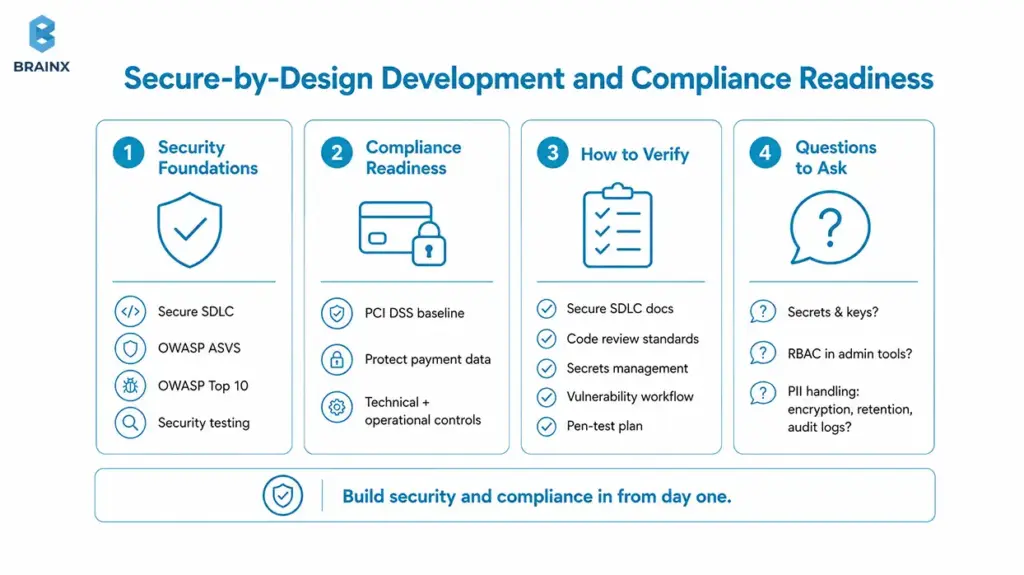
A commerce partner should be able to discuss application security in concrete terms. OWASP ASVS provides a basis for testing web application technical security controls and gives developers a requirements list for secure development. OWASP describes the Top Ten as a broad consensus on the most critical security risks to web applications, and its Web Security Testing Guide provides a framework of best practices used by penetration testers and organizations. PCI SSC states that PCI DSS provides a baseline of technical and operational requirements designed to protect payment account data and applies to entities that store, process, or transmit cardholder data, or that could affect the security of the cardholder data environment.
How to verify: Request secure SDLC documentation, code review standards, secrets-management approach, vulnerability workflow, and pen-testing or security testing plans.
Questions to ask:
- “How do you manage secrets, keys, and environment configs?”
- “What’s your approach to role-based access in admin tools?”
- “How do you handle PII: encryption, retention, and audit logs?”
Integration Depth Across Payments, ERP, CRM, PIM, OMS, and Analytics
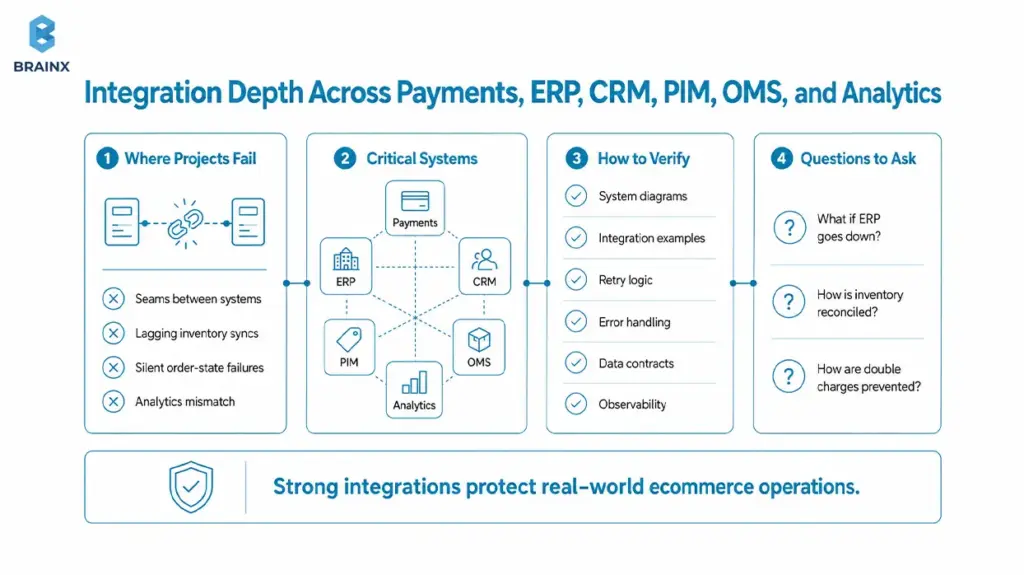
Many ecommerce projects fail in the seams between systems. A storefront can look polished and still break under real business conditions if inventory syncs lag, order states fail silently, refunds do not reconcile, or analytics events do not match reality.
How to verify: Ask for system diagrams, integration case examples, retry logic, error-handling plans, data contracts, and observability coverage.
Questions to ask:
- “What happens when ERP is down? Do we degrade gracefully?”
- “How do you reconcile inventory across channels?”
- “How do you prevent double-charging or order duplication?”
Transparent Delivery Process With Agile, QA, Staging, and Release Management
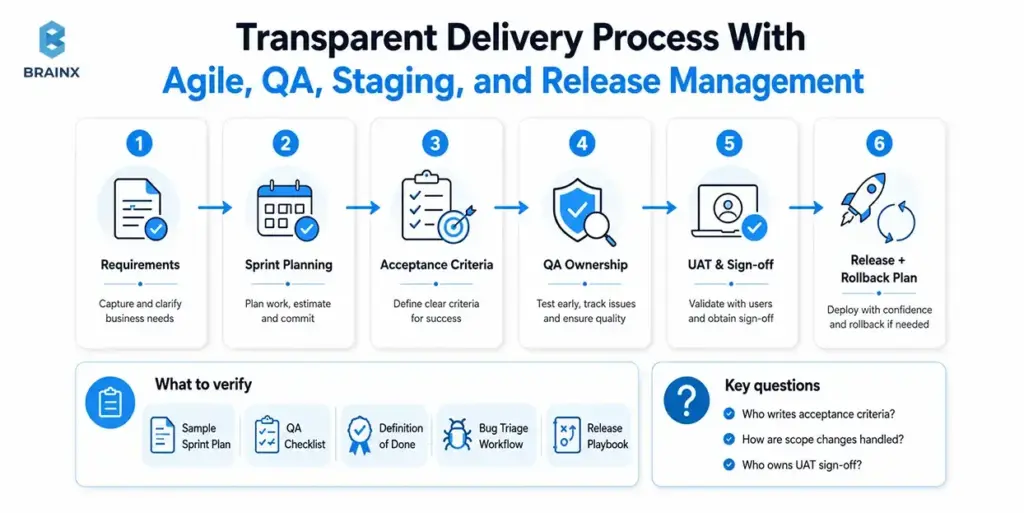
The best company for ecommerce website development should be able to show exactly how work moves from requirement to release. You want sprint planning, acceptance criteria, QA ownership, user acceptance testing, release notes, rollback plans, and clear sign-off routines—not “we are agile” as a standalone answer.
How to verify: Request a sample sprint plan, QA checklist, Definition of Done, bug triage workflow, and release playbook.
Questions to ask:
- “Who writes acceptance criteria: PM, QA, or engineers?”
- “How do you handle scope changes without surprises?”
- “What does UAT look like, and who is responsible for sign-off?”
Ownership Mindset Around Documentation, Handover, and Maintainability
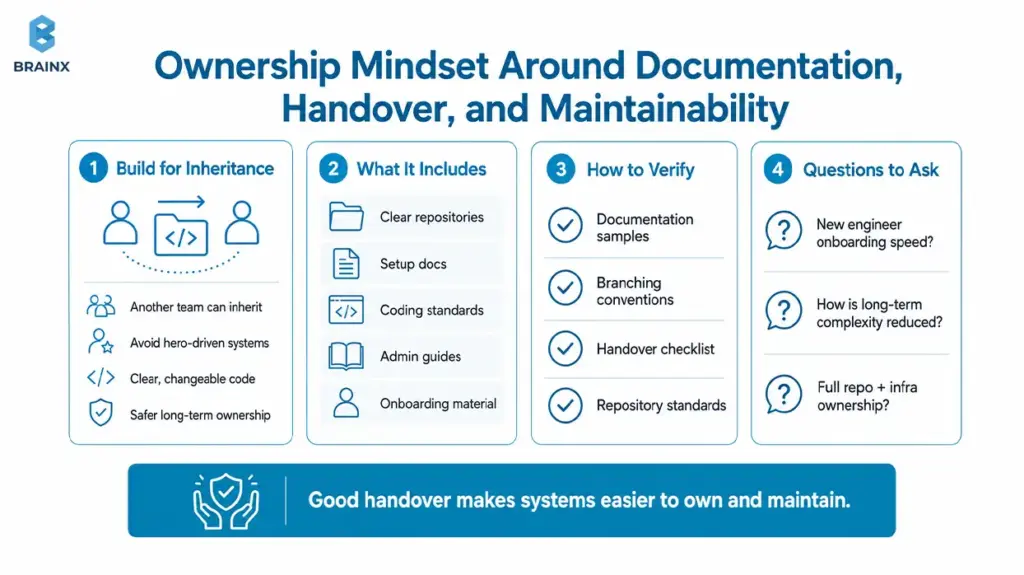
Strong vendors build as if another team may inherit the code later. That mindset leads to clearer repositories, environment setup docs, coding standards, admin guides, and onboarding material—not hero-driven systems that only the original team can change safely.
How to verify: Ask for documentation samples, branching conventions, handover checklist, and repository standards.
Questions to ask:
- “How quickly can a new engineer onboard this codebase?”
- “What’s your approach to reducing long-term complexity?”
- “Do we get full access and ownership of repos and infrastructure?”
Post-Launch Growth Support With Testing, Observability, and Iteration
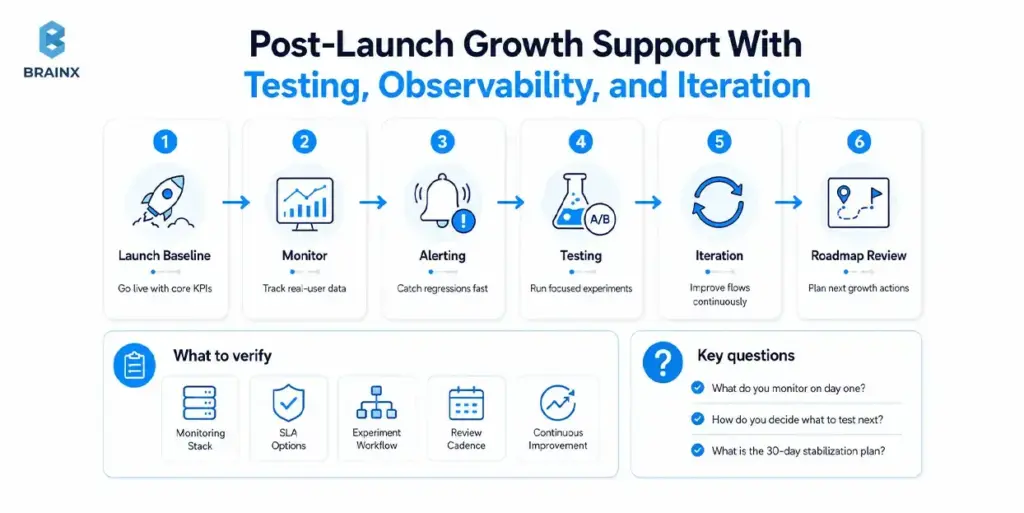
Launch is the beginning of optimization, not the finish line. Google recommends combining broader field visibility with your own real-user monitoring so teams can identify regressions and respond faster. That means a growth-minded partner should already be planning dashboards, alerting, experimentation, and roadmap review before launch day arrives. For many buyers, this is also where the best ecommerce website development company becomes obvious: strong teams do not hand over code and disappear.
How to verify: Ask about the monitoring stack, SLA options, experiment workflow, roadmap review cadence, and ownership of continuous improvement.
Questions to ask:
- “What do you monitor on day one: checkout errors, latency, payment declines?”
- “How do you decide what to test next: data, heuristics, or stakeholder requests?”
- “What’s your stabilization plan for the first 30 days post-launch?”
Red Flags When Choosing the Best Company for Ecommerce Website Development
If you’re searching for the best company for ecommerce website development, red flags matter as much as strengths. These signals predict schedule slips, SEO losses, and a site that’s hard to evolve.
Below are the most common traps—and what to ask instead.
Vague Estimates With No Assumptions
If an estimate doesn’t list assumptions, it isn’t an estimate—it’s a placeholder. A credible proposal ties cost to scope boundaries, risks, and what’s excluded.
What to look for:
- Explicit assumptions (platform chosen, number of templates, integration count)
- Line items for QA, SEO migration, analytics, and release management
- A change control process (how scope changes get priced and scheduled)
What to ask:
- “What must be true for this timeline to hold?”
- “What’s excluded that we’ll likely need later?”
No Performance/Security Acceptance Criteria
If vendors won’t commit to measurable performance and security checks, you’ll pay later in firefighting. “We optimize performance” should translate into targets, tooling, and gates.
Watch for:
- No CWV targets, no load test plan, no pen testing approach
- “We’ll handle security” without secure SDLC specifics
Ask for:
- Written acceptance criteria for CWV, API latency, and error rates
- Minimum security controls (dependency scanning, secrets management, OWASP testing)
No Analytics/Event Tracking Plan
Many ecommerce teams launch without reliable measurement, then guess what to optimize. Tracking should be designed with the user journey—not bolted on.
Red flag signals:
- No event taxonomy (view_item, add_to_cart, begin_checkout, purchase, etc.)
- No plan for deduplication, consent, or server-side tracking where needed
Ask:
- “Which events will we validate in staging before launch?”
- “How do you ensure marketing attribution isn’t broken by the rebuild?”
Proprietary Lock-In Without Clear Rationale
Sometimes proprietary frameworks are justified, but they must be transparent. If the vendor insists on black-box tooling that only they can maintain, you’re buying dependency.
Watch for:
- Limited repo access, unclear hosting ownership, custom CMS without export paths
- “You won’t need to touch it” as a reason to avoid documentation
Ask:
- “How would another team take over in 90 days if needed?”
- “What are our exit options, and what documentation will we receive?”
Cost, Timeline, and Scope: What Drives Ecommerce Website Development Estimates
When buyers compare proposals, they often compare sticker prices instead of assumptions. In practice, the best ecommerce website development company is often the one that makes scope transparent early, because transparent scoping prevents expensive surprises later.
Key cost drivers usually fall into three buckets:
- Experience scope: Number of templates, checkout flows, account pages, content pages, and responsive states.
- Systems scope: Integrations, data sync, admin workflows, and third-party dependencies.
- Risk scope: SEO migration, performance targets, security requirements, compliance needs, and launch-readiness testing.
Key Scope Drivers
Scope expands quickly with real-world commerce requirements. The biggest multipliers are usually:
- Catalog complexity: variants, bundles, subscriptions, custom attributes, multi-warehouse inventory
- Integrations: ERP/OMS/PIM/CRM, shipping carriers, tax engines, search, personalization
- Checkout customization: one-page checkout, custom payment flows, fraud tooling, split shipments
- Localization: multiple currencies, languages, tax rules, region-specific content and pricing
- Content and SEO: CMS needs, redirect mapping, canonical rules, faceted navigation handling
If two proposals differ by 2–3x, it’s often because one is assuming “standard platform capabilities” while the other is accounting for the integration and operational edge cases.
Typical Delivery Phases
A healthy ecommerce program usually moves through discovery, UX and scoping, design system work, engineering, QA, launch preparation, and post-launch stabilization. BrainX’s public ecommerce process includes requirement gathering, competitive analysis, UI/UX design, development, QA testing, launch, and maintenance. Its broader product-development process also highlights stakeholder alignment, functional scoping, sprint-based development, testing, and post-launch support. Those are exactly the kinds of phases serious buyers should expect a mature partner to make visible.
- Discovery: 1–3 weeks
- UX/UI design: 2–6+ weeks
- Build: 4–16+ weeks
- QA and hardening: 2–6 weeks
- Launch and stabilization: 1–4 weeks
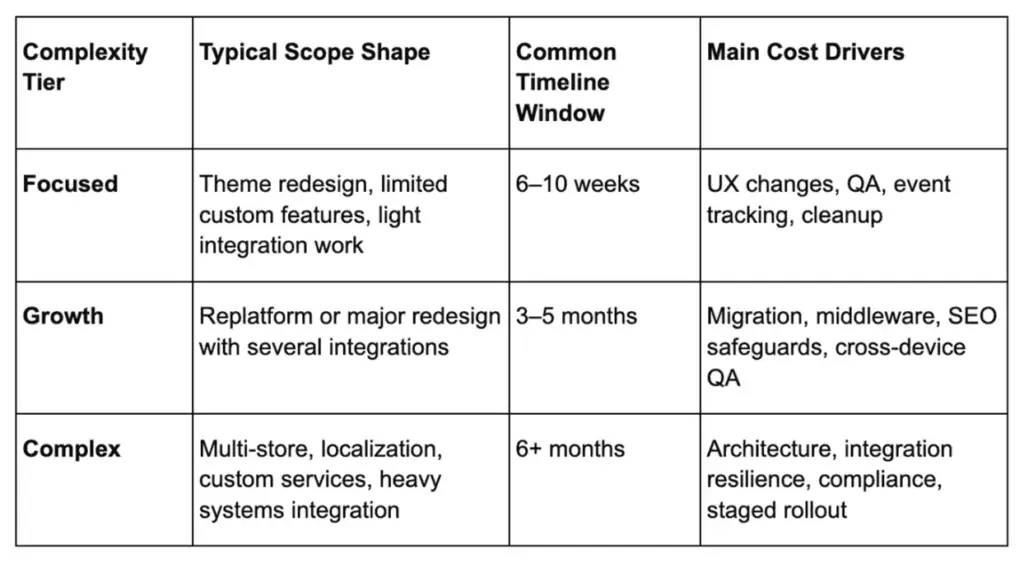
Engagement Models
Fixed-scope engagements work best when requirements are stable and the risk profile is low. Agile retainers usually work better when priorities may shift, unknowns remain, or optimization is part of the mandate.
A hybrid model is often the safest option for complex ecommerce builds: fixed discovery and architecture first, then Agile execution once scope, risks, and priorities are clearer.
How to Evaluate Best Ecommerce Website Development Company in USA Without Overpaying
If your shortlist includes the best ecommerce website development company in USA or a U.S.-facing delivery team, do not pay more simply for a postal address. Pay for communication quality, compliance readiness, delivery maturity, and decision speed.
Separate what you truly need in-country from what can be delivered globally without quality loss.
Also Read: How to Choose a Software Development Company: Fundamental Do’s and Don’ts
US-Market Expectations for Accessibility, Privacy, and Payments
In the U.S. market, accessibility and privacy cannot be treated as late-stage polish. W3C’s WCAG 2.2 is the current recommendation for web accessibility work, and W3C notes that following it makes content more accessible across devices and often more usable in general. California’s Attorney General states that the CCPA gives consumers more control over personal information and that CPRA amendments have been in effect since January 1, 2023.
That means vendors serving U.S. brands should be ready to discuss keyboard support, form behavior, privacy notices, data-handling expectations, and payment-stack implications—not just theme customization.
Hybrid Delivery Models With US-Facing PM and Global Engineering
The best ecommerce website development company in USA is not always the one with every contributor sitting in one U.S. office. Many buyers get better economics and wider technical depth from hybrid delivery models that combine U.S.-aligned leadership with globally distributed engineering.
What matters is whether decision ownership, overlap hours, escalation paths, and documentation are explicit. If those are vague, the model is risky no matter where the team is based.
Procurement-Friendly Proof
For larger organizations, procurement readiness matters almost as much as delivery capability. Ask for MSA and SOW examples, sample status reporting, security policies, referenceability, and warranty terms. BrainX publishes an Information Security Policy that states its ISMS is established in accordance with an ISO 27001 baseline, and it publicly lists a U.S. office in Newark, Delaware. Those are the kinds of proof signals many buyers want to see during early vendor review.
Buyer Toolkit: Scorecard + RFP Questions to Pick the Right Partner
When multiple vendors look similar, scoring discipline helps. This is the section that turns a subjective shortlist into a more defensible buying decision. It is also a practical way to compare each candidate for the best ecommerce website development company without relying on gut feel.
Best Ecommerce Website Development Company Ten-Point Scorecard
Rate each quality from 0 to 5, where 0 means “no evidence,” 3 means “adequate proof,” and 5 means “clear, credible, repeatable evidence.”
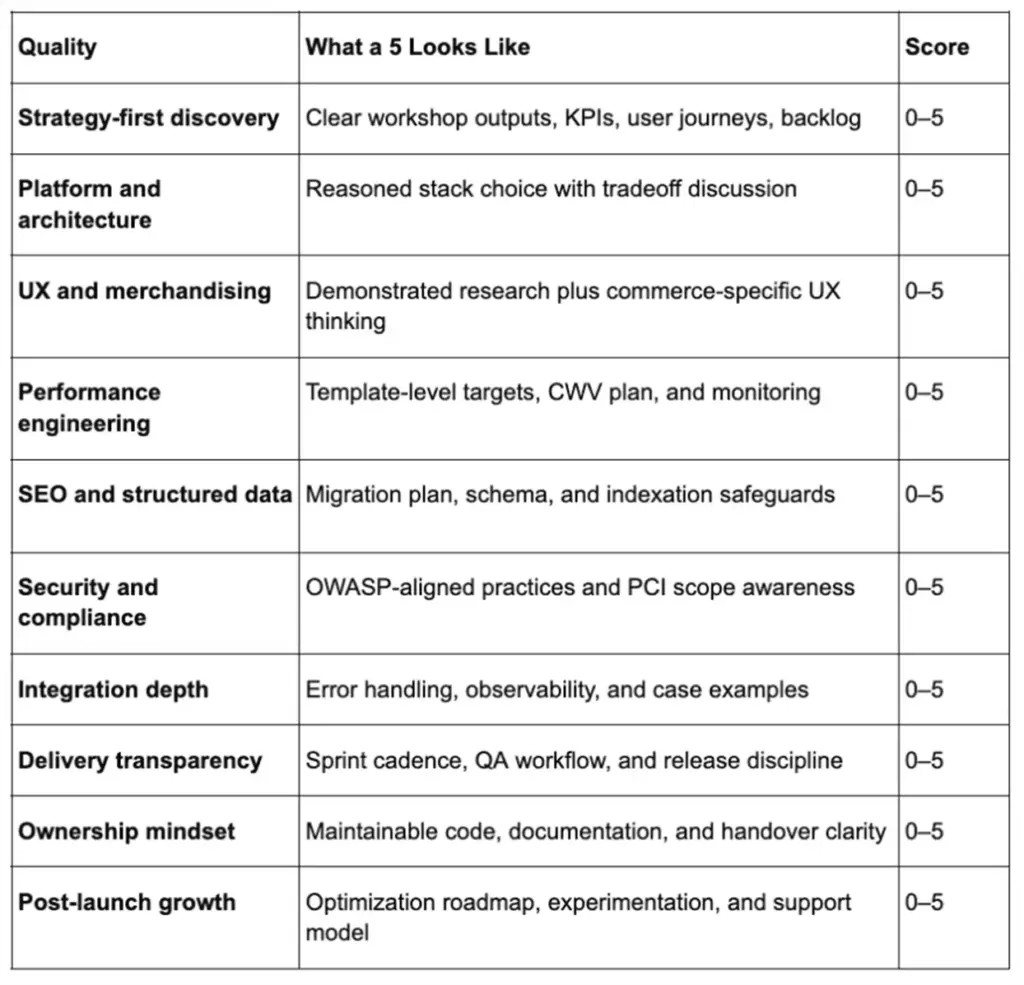
How to interpret totals:
- 40–50: Strong candidate for complex builds and long-term iteration.
- 30–39: Likely workable for moderate scope, but validate weak areas with paid discovery.
- Below 30: High risk unless the project is very simple and timeboxed.
It is also where a buyer can pressure-test whether the best ecommerce website development company on paper is actually the best fit in practice.
RFP Questions Mapped to Each Quality
Use one sharp question per quality:
- “What are your discovery deliverables in the first 10 business days?”
- “Show a redacted backlog you produced and how it mapped to goals.”
- “Explain your recommended architecture and why alternatives were rejected.”
- “Where is the source of truth for product, inventory, and customer data?”
- “What CWV targets will you commit to for mobile?”
- “How do you control third-party script impact?”
- “What’s your migration QA plan for redirects, canonicals, and indexation controls?”
- “How do you monitor integration failures and reconcile data?”
- “What is your Definition of Done?”
- “What is your 30-day stabilization plan?”
What Deliverables to Ask for in the First Two Weeks
In the first two weeks, ask for:
- Architecture decision record: Platform, hosting, deployment approach, and major tradeoffs.
- Measurement plan: Event taxonomy, funnel tracking, dashboard outline, and ownership.
- SEO migration plan: Redirects, canonical rules, sitemap handling, and indexation controls.
- Performance budget: CWV targets, image strategy, script rules, and testing approach.
- Integration map: Systems, owners, data contracts, failure modes, and monitoring needs.
- Release plan: Environments, feature flags, rollback strategy, and launch checklist.
If a vendor can’t produce these quickly, it’s a signal they’ll “figure it out later”—on your timeline and budget.
How BrainX Helps With Ecommerce Website Development
BrainX’s service and process pages map cleanly to the evaluation rubric above. The company documents ecommerce services that include store development, API integration, store migration, third-party integrations, theme development, custom templates, page-speed optimization, app development, QA, launch, and support.
Its product-development process also emphasizes requirement gathering, competitor research, UI/UX scoping, risk evaluation, sprint-based development, testing, and post-launch support. BrainX also publicly states 9+ years of experience, 120+ engineers, 250+ projects, and 130+ satisfied clients.
The more useful proof is outcome-level work. On BrainX’s public ecommerce case-study pages, Upgraded Formulas reports a 36% increase in total sales, a 10% lift in conversion rate, and a 16% increase in returning customer rate after work involving Shopify OS 2.0, theme customization, speed optimization, HubSpot integration, and cart improvements.
JustThrive reports a 56% increase in session conversions, a 16% increase in orders, and a 14% increase in total sales after UX work, custom app development, funnel optimization, speed improvements, and Shopify Plus customization. Wellnesse reports 37% growth in total sales and 17% growth in average order value after a UX/UI redesign focused on navigation, product browsing, and checkout usability.
If you are evaluating the best ecommerce website development company for a redesign, migration, or growth-stage ecommerce program, BrainX offers several relevant starting points. Our Ecommerce Website Development Services page, blog on UX-First Engineering in Web Design and Development, Web Application Development Process Guide, and a discovery call / estimate request.

Next Steps: Shortlist, Validate, and Kick Off
The next move can be simple.
- Shortlist 3–5 vendors
Choose based on scope fit, integration depth, compliance needs, and evidence quality. - Validate with the scorecard and artifacts
Ask for proof: architecture diagrams, QA approach, SEO migration plan, performance targets, and documentation samples. - Kick off with paid discovery or a defined Phase 1
The first phase should produce a backlog, risk register, timeline, acceptance criteria, and launch plan.
If you follow that path, you will not just hire a vendor that sounds confident. You will be much more likely to choose the best ecommerce website development company for your stage, risk tolerance, and growth plan.
FAQs about Defining the Best Ecommerce Website Development Company
What Makes the Best Ecommerce Website Development Company Different From a General Web Agency?
A general web agency can build attractive pages, but ecommerce requires deep expertise in checkout flows, catalog complexity, integrations, performance, SEO edge cases, and security. The best teams treat conversion, reliability, and operational workflows as first-class requirements.
They also provide proof artifacts—like CWV targets, migration plans, and integration failure handling—rather than vague promises. Finally, they build for maintainability so your team can iterate quickly after launch.
How Do I Compare Ecommerce Development Companies Beyond Portfolio Screenshots?
Ask for proof artifacts: discovery outputs, architecture diagrams, QA workflows, launch plans, documentation samples, and post-launch support details. Request a redacted Lighthouse report, an example backlog with acceptance criteria, and a sample release checklist.
Lastly, score each vendor using the same rubric across performance, SEO, security, and integrations. It will help turn subjective preferences into an objective comparison.
What Platform Should the Best Company for Ecommerce Website Development Recommend for My Business?
The right recommendation depends on your catalog complexity, integrations, and how quickly you need to change experiences. A credible partner will explain tradeoffs and provide a “why not” list for alternatives (not just push the stack they prefer).
They should also clarify where business logic will live and how data sync will work across systems. If the vendor can’t tie platform choice to measurable outcomes and constraints, treat it as a warning sign.
How Much Does It Cost to Hire an Ecommerce Website Development Company in the USA?
There is no universal benchmark, because scope changes everything. In practical buying discussions, budgets often range from focused five-figure projects to complex six-figure programs once design, engineering, QA, migration, integrations, and launch support are included. The more useful comparison is not agency rate alone. It is the assumptions behind the number: catalog structure, custom checkout needs, integrations, localization, data migration, and support coverage. A buyer looking for the best ecommerce website development company should compare pricing against execution risk, not against the lowest headline quote.
How Long Does Ecommerce Website Development Usually Take?
A focused redesign may take weeks, a replatform often takes a few months, and a complex multi-system rollout can take much longer. Timelines are driven less by code volume than by decisions, dependencies, migration quality, and QA discipline.
What Should Be Included in an Ecommerce Development Contract to Avoid Surprises?
A solid SOW should define deliverables, acceptance criteria, environments, and responsibilities across discovery, build, QA, and launch. Include performance targets (like CWV goals), security expectations (testing approach, vulnerability handling), and SEO migration requirements (redirects, indexation safeguards).
It should also specify change control (how scope changes affect cost/timeline), IP ownership, documentation/handover, and post-launch support terms. Clear assumptions and exclusions are just as important as the feature list.
TL;DR / Key Takeaways
- UX-first engineering turns web design and development into shared ownership, not “design first, dev later.” It ties UX outcomes to engineering definition-of-done.
- It’s most worth it when you face feature parity, conversion pressure, and speed-to-market constraints.
- The process change is practical: integrated discovery, UX architecture before pixels, component-driven delivery, and measurement loops.
- Expect improvements in rework, release confidence, Core Web Vitals, accessibility compliance, and funnel performance if you set targets early.
Shipping “one more feature” rarely moves the needle when competitors can match you within weeks. Instead, it’s what makes the experience feel good to use your product–how quickly it loads, how easy it is to understand, and how effortlessly users get their jobs done. That’s why web design and development can’t be treated as separate lanes anymore.
UX-first engineering is a process model where design intent, technical feasibility, and business outcomes are co-owned—day one through post-release. Instead of throwing mockups over the fence, teams align on measurable UX outcomes (conversion, time-to-value, accessibility, performance budgets) and build a system that ships predictably.
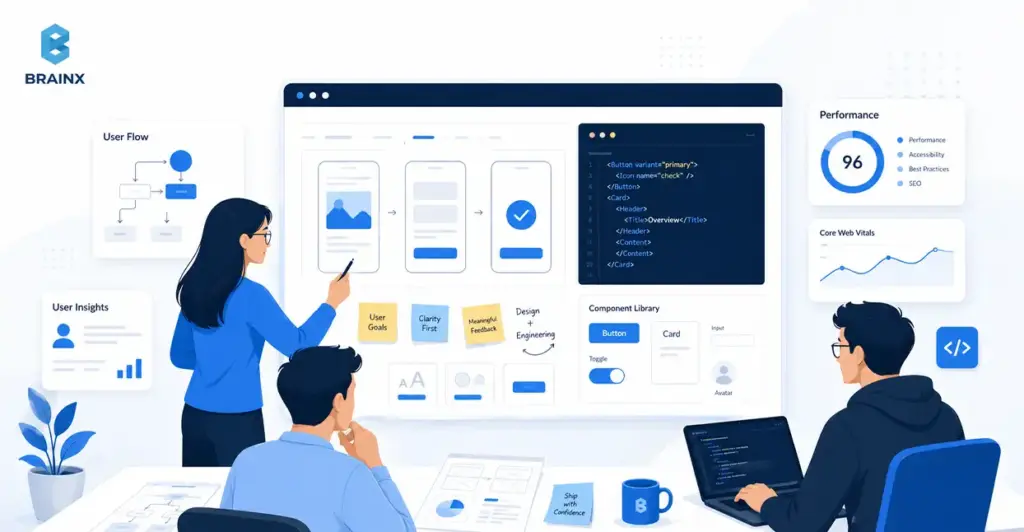
What UX-First Engineering Means in Web Design and Development
UX-first engineering is a delivery model where user experience goals are treated as engineering requirements, not creative preferences. In practice, it means research insights become constraints, designs become testable hypotheses, and the build is governed by performance, accessibility, and usability acceptance criteria—not just “it matches Figma.”
In web design and development, the biggest shift is eliminating the “design then dev” baton pass. Rather than a waterfall process, you have an integrated loop: discovery → UX architecture → system → build → validate. Designers and engineers, thus, co-own the “why,” the “what,” and the “how.”
This model is also not the same as “making the UI look modern.” UX-led product development is evaluated on the business results: reduced time-to-complete, fewer support tickets, higher activation, faster pages, and fewer regressions after releases.
For a more in-depth read on discovery and UX architecture documents that map directly to development, start here:
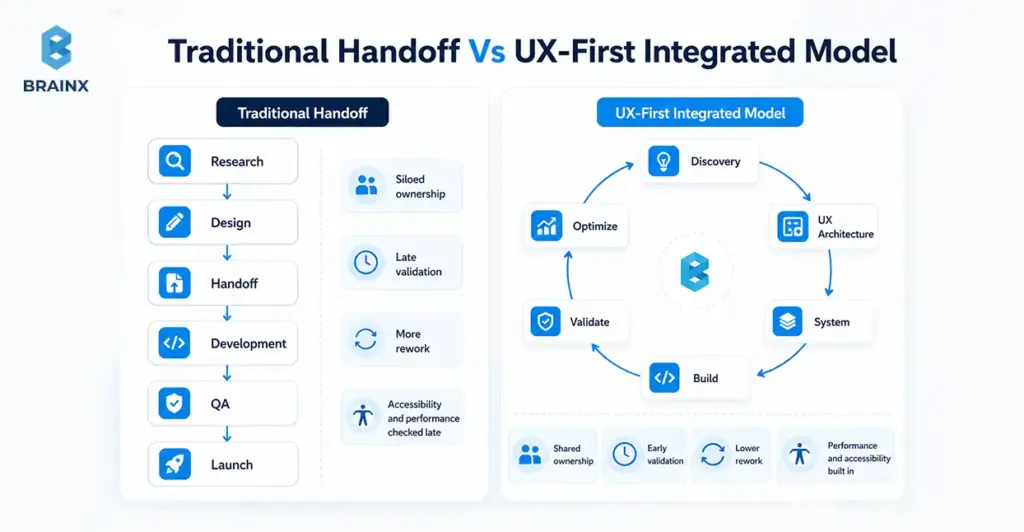
Design-Led Vs Engineering-Led Vs Stakeholder-Led (And Why Only One Scales)
Most teams tend to operate in one of the following three ways:
- Engineering-led: delivery is optimized for throughput. The risk is a product that’s “technically done” but confusing, inconsistent, or conversion-weak.
- Stakeholder-led: prioritization is driven by the loudest opinions, internal politics, or on the basis of HIPPO decisions. The risk is churned roadmaps and constant reversals.
- Design-led (UX-first): the product is led by user outcomes and validated decisions. The risk—if done poorly—is over-indexing on aesthetics without constraints.
Only the design-led model scales because it creates a decision system. It reduces “subjective debates” by using evidence (analytics, usability tests) and shared artifacts (flows, component rules, acceptance criteria). Engineering stays efficient because requirements are clearer and changes are less chaotic.
They might say that your approach doesn’t scale: people can repeatedly ask, “What are we building again?”—or worse, “Why did we build this?” UX-first engineering makes those answers visible and testable.
Also Read: Follow These 14 Simple Rules To Outsource A Development Team
UX Outcomes Are Engineering Outcomes (Performance, Accessibility, Reliability)
Users don’t separate UX from engineering. If a web page is slow to load, the button is difficult to click, or if the checkout doesn’t work under load, it’s a UX problem–no matter how beautiful the UI is.
A UX-first model treats these as first-class deliverables:
- Performance: fast LCP/INP/CLS targets tied to user journeys, not generic “optimize later.”
- Accessibility: keyboard navigation, focus states, color contrast, semantic HTML, ARIA where needed that is built into components from the start.
- Reliability: resilient states (loading, empty, error), consistent across devices/browsers, and less bugs.
This is where UX-first engineering creates leverage: when performance and accessibility are baked into the component library, you don’t “re-fix” them on every page. You inherit quality by default.
Why Design-Led Web Delivery Wins in Competitive Markets
In crowded markets, customers compare experiences more than feature lists. They see traces of doubt, discomfort, and dis-coherence immediately—especially when comparing different vendors. Done right, web design and development becomes a revenue-protection layer: it helps people understand value faster, trust you sooner, and complete actions with less doubt.
Design-led delivery also protects roadmaps. When teams validate flows early, they avoid building features that don’t change user behavior. That matters when budgets are tight and leaders expect proof, not guesses.
There’s also a strong body of evidence that usability and UX improvements correlate with better business outcomes like conversion, retention, and reduced support costs.
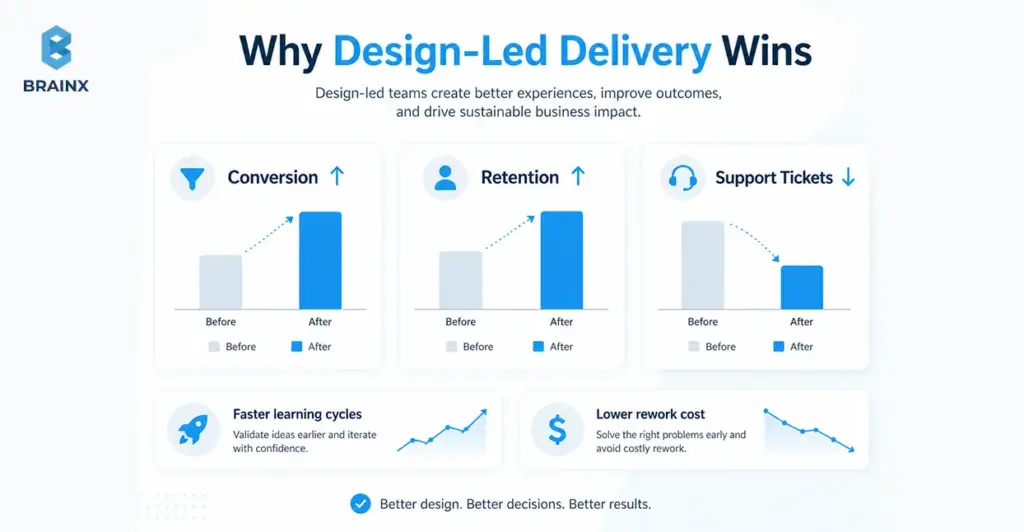
Faster Learning Cycles Beat Faster Shipping Cycles
Shipping faster only helps if you’re shipping the right things. UX-first engineering prioritizes learning velocity: how fast you can validate people’s needs, drop-offs, and what helps or hinders.
Instead of debating in meetings, teams:
- instrument key journeys (signup, onboarding, quote request)
- run usability checks on risky flows before coding
- ship smaller increments behind flags where needed
- measure behavior changes and iterate
This reduces “big reveal” launches that miss expectations. It also makes roadmaps more defensible because decisions are traceable to evidence, not internal preference.
Lower Rework Cost: Fewer Rebuilds, Fewer Stakeholder Reversals
Rework usually comes from a handful of predictable sources:
- unclear requirements (“build it like this… actually like that”)
- missing edge states (empty/error/loading)
- inconsistent components that don’t scale across pages
- late discovery of performance or accessibility issues
- stakeholder feedback arriving after code is “done”
UX-first engineering cuts rework by turning ambiguity into artifacts early: flows, IA, content models, acceptance criteria, and component rules.
If you need a defensible number for leadership discussions, cite credible engineering management research on the cost of late changes and defect multipliers.
Trust Signals: Accessibility, Performance, And Consistency
Trust isn’t just branding—it’s the cumulative effect of small signals:
- the UI behaves consistently across pages
- forms don’t surprise users
- content is readable and structured
- pages load quickly on real devices
- the experience works for keyboard and assistive tech users
In regulated or enterprise contexts, accessibility is also procurement reality. Aligning to WCAG reduces risk and increases adoption across teams and customer environments.
When your experience signals care and competence, buyers are less likely to churn during evaluation—and users are more likely to complete key tasks without needing support.
The UX-First Engineering Framework (BrainX-style Delivery Playbook)
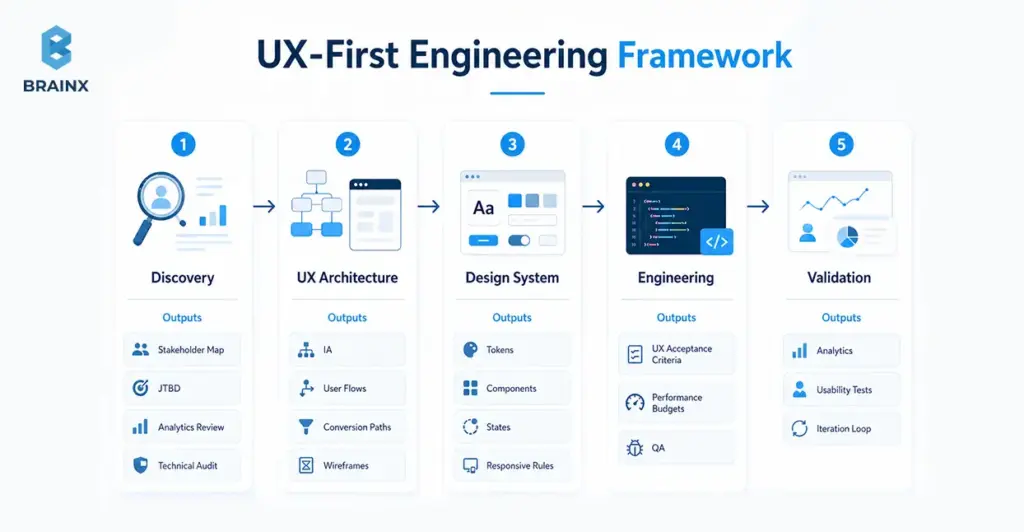
Teams often ask for “a UX process,” but what they really need is a delivery system: who decides what, which artifacts are required, what gates prevent rework, and how quality is measured. That’s the difference between a checklist and an operating model.
Below is a practical framework BrainX uses to make UX-first delivery predictable in web design and development—and easy to evaluate in a partner. The differentiator isn’t just the phases; it’s the artifacts plus gates that keep momentum without sacrificing quality.
Phase 1 — Discovery That Engineers Actually Use
Discovery fails when it produces insights that don’t translate into build decisions. UX-first discovery is engineered for delivery: it creates constraints, acceptance criteria, and architecture inputs—not just personas.
Artifacts that make discovery usable:
- Stakeholder mapping: who approves, who uses, who administers, who supports, who secures.
- JTBD (Jobs To Be Done): what users want to do, the triggers and the “success moment”.
- Analytics review: funnel drop-offs, high-exit pages, device breakdown, top search terms, and common paths.
- Technical audit: current stack constraints, rendering strategy, performance bottlenecks, accessibility issues, and third-party script impact.
- Content model: what content types exist (and should exist), required fields, governance rules, and ownership.
Key gate: discovery isn’t “done” until you can write testable requirements (flows + acceptance criteria) and identify the highest-risk unknowns.
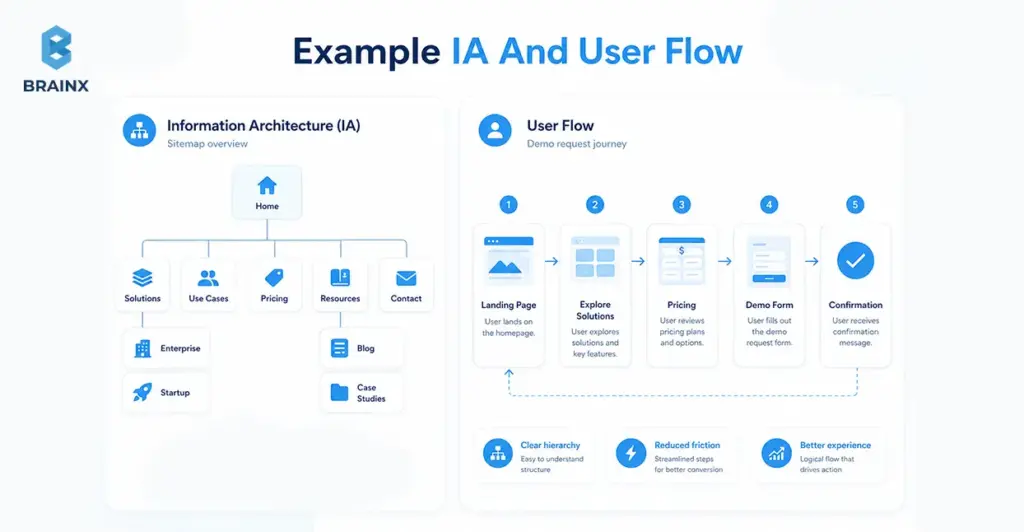
Phase 2 — UX Architecture: Flows, IA, And Conversion Paths
Before pixels, you need structure. UX architecture aligns the team on how users move through the product and how information is organized—so design iterations don’t turn into endless rearranging later.
What this phase typically produces:
- Information architecture (IA): navigation structure, page hierarchy, content grouping.
- Critical user flows: happy paths and edge cases (errors, empty states, retries).
- Conversion paths: where commitment increases (micro-yes steps), where reassurance is needed, where friction is acceptable.
- Content-first wireframes: hierarchy and content first layouts, decoration comes second.
This phase prevents a common failure mode: teams “design screens” without designing the journey. When the journey is clear, UI becomes easier—and development becomes more predictable.
Phase 3 — Design System + Component Strategy (Bridge From Figma To Code)
This is where custom web design and development stops being expensive and starts being scalable. A design system is not a “UI kit”; it’s the shared contract between design and engineering: tokens, components, states, and usage rules.
In the first paragraph of this phase, it’s worth being explicit: custom web design and development pays off when you invest in a component strategy that reduces future build cost while improving consistency.
What to define (so the system survives real-world changes):
- Design tokens: color, typography, spacing, radii, shadows, motion—mapped to code variables.
- Components with states: default/hover/active/disabled, loading, error, empty, validation rules.
- Responsive behavior rules: breakpoints, layout constraints, content priority on smaller screens.
- Composition patterns: how smaller components combine into sections (hero, pricing table, comparison, forms).
- Content guidelines: truncation, localization readiness, long/short copy behavior.
A practical bridge artifact is a mapping table that makes ownership clear:
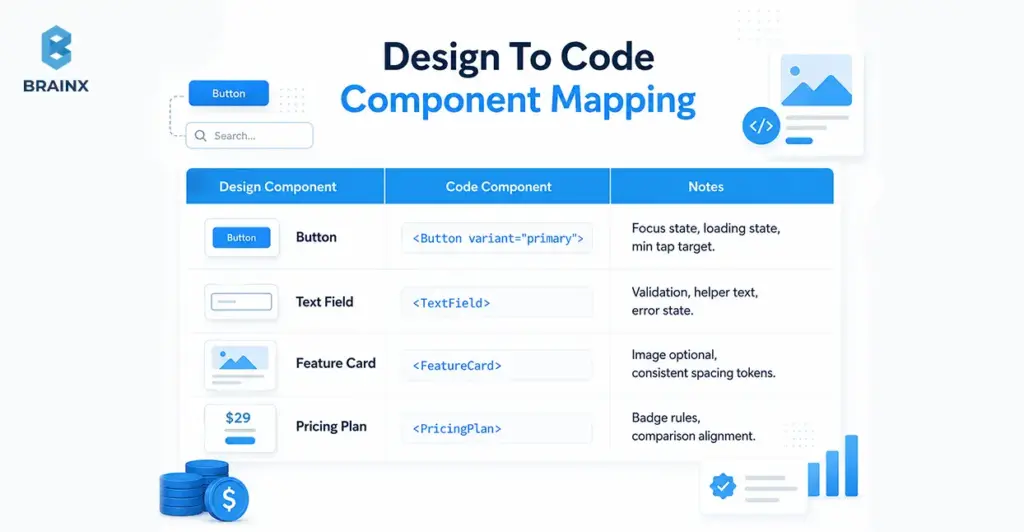
This is also where teams decide whether to implement a component library (e.g., Radix, Headless UI) and skin it via tokens—or build fully bespoke. The right choice depends on time, accessibility maturity, and long-term maintenance goals.
Phase 4 — Engineering with UX Acceptance Criteria (Not “Done When Shipped”)
UX-first engineering changes the definition of done (DoD). Instead of “it matches the design,” it becomes “it meets user and quality targets.”
A strong “UX DoD” usually includes:
- Accessibility acceptance criteria: keyboard support, focus order, semantic structure, contrast, screen reader behavior.
- Performance budgets: bundle size targets, image strategy, SSR/CSR decisions, Core Web Vitals thresholds by key route.
- Interaction quality: consistent states, microcopy behavior, error prevention and recovery, predictable navigation.
- Cross-browser/device testing scope: agreed list of browsers and device classes.
- Observability for UX: logging for critical errors, front-end performance monitoring, feature flag safety.
This phase is where many teams regain trust internally. Releases stop feeling risky because quality is defined and validated continuously, not argued after the fact.
Phase 5 — Validation & Iteration: QA + Usability + Analytics Loop
UX-first doesn’t end at launch. It ends when you’ve measured the outcome and decided what to do next—based on behavior, not assumptions.
A stable iteration loop includes:
- QA that covers UX behavior: states, responsiveness, a11y checks, and regression testing on components.
- Usability spot-checks: quick task tests on high-risk flows, especially onboarding and forms.
- Analytics instrumentation: events related to funnel steps, drop-off points, and time-to-value indicators.
- Iteration cadence: weekly or biweekly triage of learnings → backlog updates → scoped experiments.
To operationalize this, many teams benefit from aligning QA + analytics with a shared “release scorecard.” It turns subjective feedback into trackable changes.
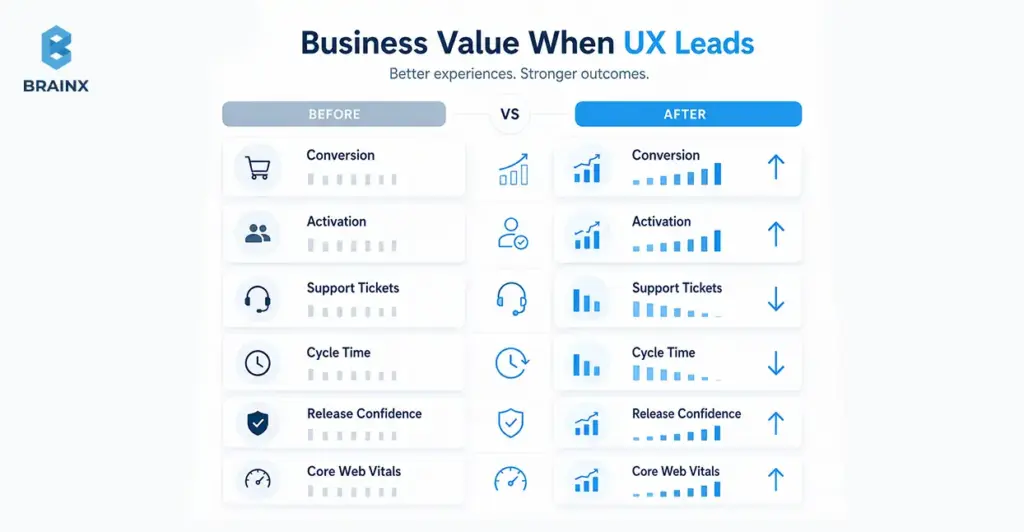
Business Value: What Improves When UX Leads Web Design and Development
Leaders don’t fund UX because it’s “nice.” They fund it because it changes measurable outcomes: pipeline, revenue, cost-to-serve, and delivery predictability. When UX leads, web design and development becomes a growth and governance function—not a one-off project.
What improves depends on your baseline, but the categories are consistent:
- Revenue lift: clearer positioning, lower friction, better activation, stronger lead quality.
- Cost reduction: fewer support interactions, fewer rework cycles, less QA churn.
- Delivery speed with stability: component reuse, fewer regressions, and less “hotfix mode.”
You can support these claims with credible benchmarks when presenting to stakeholders.
Revenue Metrics (Conversion, Activation, Lead Quality)
UX-first improvements tend to show up first in “clarity” metrics:
- higher click-through to primary CTAs
- improved form completion and lower abandonment
- higher activation rates (users reaching the first success moment)
- better lead quality (fewer unqualified inquiries because messaging is clearer)
The key is to tie UX work to one or two critical journeys. For example: “Improve demo request completion rate from X to Y” or “Reduce onboarding time-to-value by Z%.” Without a narrow target, teams end up with broad redesigns that are hard to attribute.
Even in enterprise contexts, small UX changes can materially affect the pipeline—especially where buyers evaluate credibility quickly and compare multiple vendors in parallel.
Cost Metrics (Support Tickets, Training, Dev Rework)
Cost savings are often more reliable than revenue projections because they show up internally:
- fewer “how do I…?” tickets from unclear UI
- reduced onboarding and training time for internal tools/portals
- fewer regressions due to standardized components
- less time spent debating subjective UI changes after release
A practical way to quantify impact is to tag support tickets by UX root cause (navigation, permissions, unclear copy, broken flows) and compare volume pre/post changes. For rework, track churned tickets or reopened issues tied to late requirement changes.
When leaders see cost-to-serve dropping, UX stops being seen as “design polish” and starts being seen as operational leverage.
Delivery Metrics (Cycle Time, Predictability, Release Confidence)
A design system and shared acceptance criteria can reduce cycle time while increasing quality because teams stop rebuilding the same UI patterns differently across pages.
Delivery improvements typically come from:
- higher component reuse (measurable in your codebase)
- fewer integration surprises (“this layout doesn’t work with real content”)
- fewer last-minute stakeholder reversals (because flows were validated earlier)
- clearer QA scope (because UX DoD is explicit)
The big shift is predictability. When stakeholders trust the process, teams spend less time firefighting and more time shipping improvements that compound.
B2B Web Design and Development: What Changes (and What Doesn’t)
B2B web design and development has unique constraints—buying committees, compliance, complex products—but the UX-first model still applies. What changes is the shape of the user journeys and the governance demands, not the underlying principle: reduce friction, increase clarity, and make quality measurable.
In the first paragraph of this section, it’s worth stating plainly: B2B web design and development succeeds when you design for multiple audiences at once—buyers, evaluators, admins, and end users—without creating a maze of content and approvals.
What doesn’t change:
- you still need clear flows and information hierarchy
- you still need performance and accessibility built into the system
- you still need analytics tied to outcomes (pipeline, activation, adoption)
Buying Committees, Internal Politics, And Approval Gates
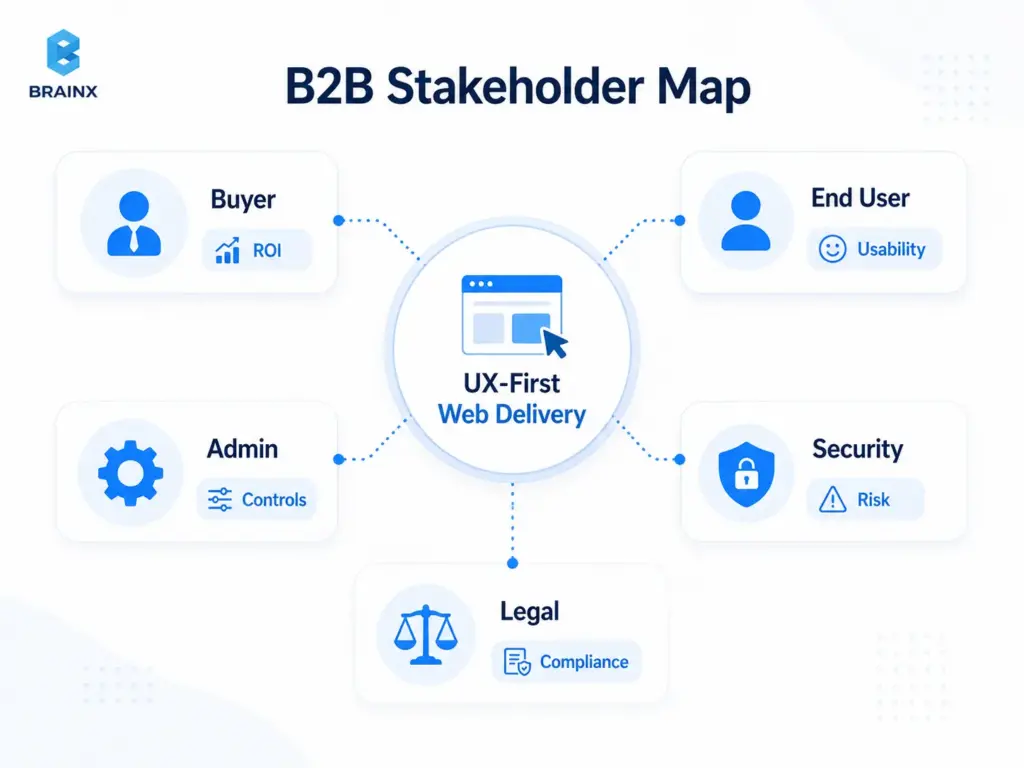
B2B journeys are rarely linear. A single deal can involve procurement, security, legal, IT, and multiple business owners—each with different concerns. UX-first engineering makes this manageable by designing for approval gates rather than being surprised by them.
Practical tactics:
- build a stakeholder map early and assign “decision owners”
- define what must be proven for each gate (security, compliance, ROI, integration feasibility)
- create reusable artifacts (security notes, accessibility statements, performance targets) to reduce repeated work
- run structured reviews at predefined moments (flow review, system review, pre-release scorecard)
This reduces the “late-stage derailment” where teams rebuild pages because a committee member finally looked at the product.
Complex IA, Roles/Permissions, And “Non-Marketing” UX
B2B experiences aren’t just marketing sites. They include:
- dashboards and reporting views
- admin portals with roles/permissions
- onboarding sequences with setup steps
- integrations and data mapping flows
- “edge-case heavy” screens where errors and empty states are common
UX-first engineering treats these as core product surfaces, not secondary pages. That means designing and building:
- permission-aware navigation (users see what they can act on)
- clear system states (syncing, partial failures, missing data)
- guidance patterns (tooltips, inline education, progressive disclosure)
- consistent data tables and filters as reusable components
When these patterns are standardized, teams ship new admin features faster and users feel less cognitive load—especially across complex products.
Governance: Accessibility, Security, Compliance, Brand Consistency
Governance is where many B2B teams struggle: they want speed, but they also need compliance and consistency. UX-first engineering supports governance by turning it into system rules rather than manual policing.
Key governance layers:
- Accessibility governance: component-level WCAG alignment and documented usage rules.
- Security/compliance alignment: approved UI patterns for authentication flows, session timeouts, data visibility, and auditability.
- Brand consistency: tokens and templates that enforce typography, spacing, and tone without redesigning each page.
The net effect: reviews become faster because the defaults are already compliant.
Custom Web Design and Development: When It’s Worth It vs Templates
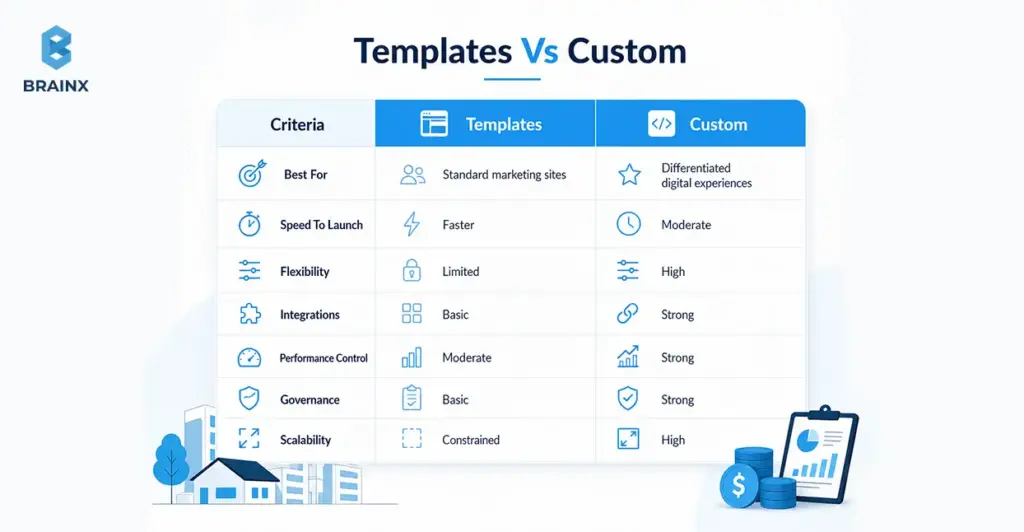
Templates are fine when your needs are common and your differentiation is minimal. But when your product, funnel, or integrations are unique, templates can become a ceiling. Custom web design and development is worth it when it reduces long-term friction—either for customers (conversion/activation) or for internal teams (governance and scalability).
In the first paragraph here, be explicit: custom web design and development should be scoped around outcomes and system reuse, not “make everything bespoke.” The goal is to customize what drives advantage and standardize everything else.
Signals You Need Custom (Differentiated UX, Integrations, Workflows)
You likely need a custom approach if you recognize several of these signals:
- Your funnel requires unique flows (multi-step qualification, role-based routing, complex pricing logic).
- You need deep integrations (CRM, billing, SSO, product data) that templates don’t handle cleanly.
- Your UX must support multiple user roles with different permissions and journeys.
- You’re scaling content and need a content model + governance, not ad-hoc pages.
- Performance and accessibility targets are strict—and third-party template bloat makes them hard to hit.
- Your brand relies on interaction quality (micro-interactions, state behavior, clarity), not just visuals.
Custom doesn’t have to mean “from scratch.” It often means using solid primitives (headless CMS, accessible component foundations) and building the system layer that templates can’t provide.
Where Custom Goes Wrong (Over-Engineering, No System, No Metrics)
Custom projects fail for predictable reasons:
- Over-engineering: building complex infrastructure before validating the journey.
- No system: every page is a one-off, so changes become slow and inconsistent.
- No metrics: teams redesign without defining what success looks like, so outcomes are unclear.
- Design/dev drift: Figma evolves, code lags, and the “source of truth” becomes political.
- Ignoring real content: layouts look great with placeholder copy but break with actual data.
The fix is not “more process.” It’s the right artifacts at the right time: flow validation early, component rules before scale, and a release scorecard that measures what matters.
Implementation Checklist: How to Start UX-First Engineering in 30 Days
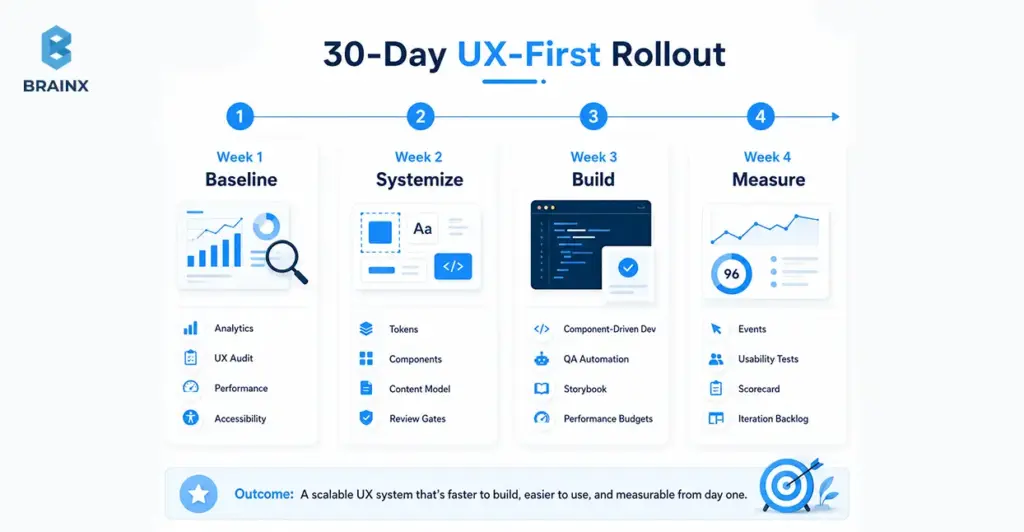
If you want to improve UX without pausing delivery, treat the next 30 days as a controlled rollout: baseline → systemize → build → measure. The goal isn’t a full redesign; it’s establishing the operating model that makes future web design and development faster and more consistent.
Use this as a practical kickoff plan, even if your team is mid-roadmap. The key is to pick one journey (e.g., signup → activation, or lead capture → qualification) and apply the loop end-to-end.
Week 1 — Baseline (Analytics, UX Audit, Performance/Accessibility Checks)
Set benchmarks before you change anything. Otherwise, you won’t be able to prove impact.
Checklist:
- Analytics baseline: top journeys, drop-off points, conversion rates, device/browser split
- UX audit: heuristic review of key pages/flows (clarity, friction, consistency)
- Performance checks: Core Web Vitals for key routes and templates
- Accessibility scan: automated checks + quick manual keyboard review
- Content issues: unclear headings, inconsistent CTAs, missing reassurance content
Deliverable by end of week: a one-page baseline scorecard + top 5 issues ranked by impact/effort.
Week 2 — Systemize (Tokens, Components, Content Model)
Week 2 is where you create reusable foundations so improvements compound.
Checklist:
- Define tokens (type scale, spacing, color roles) and document usage rules
- Identify your top components (buttons, inputs, cards, nav, table patterns)
- Agree on component states (loading, empty, error, validation)
- Draft a content model for key pages (what fields exist, who owns them)
- Establish review gates: “flow sign-off,” “system sign-off,” “pre-release scorecard”
Deliverable by end of week: a thin design system starter + a component backlog aligned to business journeys.
Week 3 — Build (Component-Driven Dev, QA Automation For UX)
Now you operationalize the system in code and make UX quality testable.
Checklist:
- Implement core components with accessibility baked in (focus, keyboard, semantics)
- Create Storybook (or equivalent) for component documentation and QA visibility
- Add automated checks where feasible (linting, visual regression, basic a11y tests)
- Define performance budgets and enforce them in CI for key routes (where practical)
- Integrate real content early to avoid “looks good in mockups, breaks in reality”
Deliverable by end of week: a working component library powering at least one real flow or page template.
Week 4 — Measure (Events, Funnels, Usability Tests, Iteration Loop)
Close the loop. Week 4 is about proving value and building the iteration habit.
Checklist:
- Instrument events for the chosen journey (step completion, errors, abandon points)
- Run 5–8 usability sessions (internal + target users if possible) on the updated flow
- Compare baseline vs current scorecard (conversion, task time, CWV, accessibility issues)
- Create an iteration backlog: what to fix now vs later, with measurable hypotheses
- Establish cadence: weekly triage + biweekly release scorecard review
Deliverable by end of week: a measurable before/after summary and a prioritized roadmap for the next 30–60 days.
Common Pitfalls (and How to Avoid Them)
UX-first engineering doesn’t work if you think it’s a design project rather than a delivery model. The following pitfalls are common—but avoidable—if the team is given clear expectations early on and some strict guidelines.
The best prevention tactic is to define ownership: who owns outcomes, who owns system quality, and who owns measurement. When that’s unclear, teams drift back to handoffs and opinion-driven decisions.
If you’re rolling this out across squads, align on a shared scorecard and a shared definition of done first.
“UX Is Subjective” → No Success Metrics
When teams don’t define success, feedback becomes unresolvable. One stakeholder prefers version A, another prefers version B, and engineers get stuck rebuilding.
Fix:
- Choose 1–2 primary metrics per journey (conversion, activation, time-to-complete)
- Add supporting quality metrics (error rate, CWV thresholds, accessibility defect count)
- Require a hypothesis for major UX changes (“We expect X to improve because Y”)
- Use usability tests and analytics as tie-breakers, not opinions
This doesn’t remove judgment; it makes judgment accountable.
Figma Handoff Without Engineering Alignment
A beautiful design can be a delivery trap if it doesn’t account for constraints like variability, responsiveness, component states, performance, and accessibility.
Fix:
- Run joint design/engineering reviews early (wireframes and flow stage)
- Use component inventories and state tables before high-fidelity mockups
- Define acceptance criteria per component and per journey
- Keep design and code synchronized via a design system and documentation
The goal isn’t to slow design down—it’s to prevent “late surprises” that cause delays.
No Design System → Inconsistent UI And Slow Scaling
Without a system, every new page is a new mini-project. You get UI drift, inconsistent interactions, and a growing maintenance burden.
Fix:
- Start small: tokens + 8–12 high-usage components
- Build states and accessibility into components once, then reuse everywhere
- Document usage rules (when to use which component, content constraints)
- Measure reuse and track “one-off UI” as a delivery smell
Systems are how you keep custom experiences scalable.
Also Read: Revamping Customer Experiences With AI Chatbots
Accessibility/Performance Treated As “Later”
“Later” almost always means “never,” or “expensive remediation.” Accessibility and performance are easiest when they’re defaults, not patchwork.
Fix:
- Make accessibility and performance part of definition-of-done
- Set performance budgets and enforce them in PR review / CI where possible
- Implement WCAG-aligned components and document constraints
- Monitor real-user metrics (RUM) so you don’t optimize only in lab conditions
This is also a trust issue: fast, accessible experiences signal competence and care.
How BrainX Helps With Web Design and Development (UX-First Engineering Approach)
BrainX Technologies delivers web design and development through a UX-first engineering model designed for measurable outcomes and predictable delivery. That means you don’t just get screens—you get an operating system: shared artifacts, component strategy, quality gates, and an analytics loop that proves impact.
We typically embed a cross-functional pod (product/UX + engineering + QA) with clear cadence, transparent artifacts, and governance aligned to your stakeholders. If you already have a team, we can augment and systemize; if you need end-to-end delivery, we run the full playbook.
What You Get (Deliverables List)
Deliverables vary by scope, but a UX-first engagement typically includes:
- UX audit summary (heuristics + prioritized friction points)
- Stakeholder map + decision gates (who approves what, when)
- JTBD + journey definitions for key user segments
- Analytics review + measurement plan (events, funnels, dashboards)
- User flows + IA (happy paths + edge states)
- Wireframes and content model (structure before visuals)
- Design system (tokens, components, states, responsive rules)
- Component library in code (documented, reusable, testable)
- Performance budget + CWV targets aligned to key routes
- Accessibility checklist and component standards aligned to WCAG
- QA plan (including regression strategy for UX-critical components)
- Iteration loop (post-release monitoring, backlog, experimentation plan)
This set is designed to prevent “design drift,” reduce rework, and make releases less risky.
Engagement Options (Startup Vs Enterprise)
We generally see two common engagement shapes:
Startup (MVP + conversion-focused launch):
- fast discovery with sharp positioning and primary journey focus
- lean design system starter (tokens + core components)
- rapid build with measurement from day one
- post-launch iteration to stabilize activation and conversion
Enterprise (modernization, design systems, governance, scale):
- UX and technical audits across multiple properties or modules
- enterprise-grade design system + governance model
- accessibility and performance standards embedded in components
- phased modernization to reduce risk and maintain continuity
Both models prioritize the same thing: measurable UX outcomes delivered through shared engineering standards.
Proof Points To Include
When evaluating a partner, ask for evidence in three categories:
- Business impact: conversion lift, activation improvements, lead quality changes
- Delivery impact: cycle time reduction, fewer reopened tickets, improved predictability
- Technical impact: Core Web Vitals improvements, accessibility defect reduction, fewer regressions
If you share your current baseline (analytics + performance + constraints), BrainX can propose a phased plan with clear gates and measurable targets.
Conclusion
Feature parity is unavoidable. Friction isn’t. When UX-first engineering leads web design and development, teams reduce rework, ship with more confidence, and improve the metrics executives actually care about—conversion, activation, cost-to-serve, and predictable delivery.
If you want to pressure-test your current process and identify the highest-leverage fixes, the simplest next step is to take a short consultation.
FAQs About UX Led Web Design and Development
1. What is web design and development in a UX-first engineering model?
In a UX-first engineering model, web design & development is a single, integrated delivery discipline where user outcomes are treated as build requirements. Designers and engineers align on flows, component rules, accessibility standards, and performance budgets before heavy implementation. The work is validated continuously through usability checks, QA, and analytics—not only by whether it “matches the design.” The result is a site or product experience that’s easier to maintain and easier for users to complete key tasks within.
2. How is UX-first engineering different from traditional design handoff?
Traditional handoff is sequential: design finishes mockups, then development tries to implement them—often discovering missing states, constraints, or content issues late. UX-first engineering replaces that baton pass with shared ownership and shared artifacts (flows, acceptance criteria, component specs). Engineers influence feasibility early, and designers account for real data, responsiveness, and system states up front. That reduces rework and prevents the “looks right but works wrong” problem.
3. Is UX-first worth it for B2B web design and development with complex stakeholders?
Yes—often more so—because B2B initiatives are more vulnerable to approval churn, governance requirements, and multi-audience complexity. B2B web design and development benefits from defined decision gates, reusable compliance-ready components, and evidence-based reviews that reduce subjective debates. UX-first engineering also helps align marketing, product, security, and legal by translating needs into explicit requirements. The key is to scope the work around critical journeys and measurable outcomes, not broad redesigns.
4. When should you choose custom web design and development over a template?
Choose custom web design and development when templates become a constraint: you need differentiated flows, complex integrations, role-based experiences, or strict performance/accessibility targets. Custom is also justified when you expect frequent iteration and want a component system that scales without UI drift. Templates can be fine for simple marketing sites with standard content structures. A practical middle path is to use proven foundations (headless CMS, accessible primitives) while customizing the system and journeys that drive advantage.
5. What metrics should we track to prove UX-first improvements?
Track a mix of outcome metrics and quality metrics. Outcome metrics include conversion rate on primary CTAs, activation rate, task completion time, and form abandonment. Quality metrics include Core Web Vitals (LCP/INP/CLS), accessibility defect counts, error rates on key flows, and support tickets tagged to UX issues. The best approach is to pick one journey, set a baseline, and measure deltas after each iteration.
6. How do design systems help engineering teams ship faster without losing quality?
Design systems reduce duplication by turning UI decisions into reusable tokens and components with documented rules and states. Engineers stop rebuilding buttons, forms, tables, and layouts in slightly different ways, which cuts QA time and regression risk. Quality improves because accessibility and performance constraints can be enforced at the component level once, then inherited across the product. Over time, this increases release confidence and makes delivery more predictable.
Key Takeaways
- Python vs JavaScript for web development depends on project needs, where JavaScript dominates frontend development while Python is widely used for backend services.
- JavaScript runs natively in browsers, and it is a must have to power interactive web interfaces and single-page applications built using frameworks like React, Angular, and Vue.
- Python is usually used for backend APIs, automation, and AI-enhanced web features, whereas Django, Flask, and FastAPI are some of its supporting frameworks.
- JavaScript can be executed on the server via Node.js, which allows full-stack JavaScript development to be used in scalable web applications.
- Modern web applications often combine Python and JavaScript, using Python for backend logic and JavaScript frameworks for dynamic user interfaces.
Python vs JavaScript for Web Development
Python and JavaScript are two of the most popular languages powering modern web development. They both have their advantages. JavaScript is dominant in client-side interactivity (98% of websites or more are using it on their front end) whereas Python is strong at backend APIs, data processing and machine learning.
We will discuss the comparisons when it comes to python vs javascript for web development on the basis of use cases, ecosystem, performance, and real world scenario. We aim at assisting you in making the right choice on the type of language to use on your project.
What Is Python?
Python is a high-level, general-purpose programming language known for its clean syntax, readability, and fast development speed. In web development, Python is commonly used for backend logic, APIs, automation, and data-driven features. Its simple structure makes it beginner-friendly, while its strong ecosystem makes it a practical choice for startups, enterprises, and teams building scalable web applications.
What Is JavaScript?
JavaScript is a high-level programming language used to create interactive and dynamic web experiences. It runs natively in web browsers and plays a central role in modern front-end development. In web projects, JavaScript is also used on the server side through Node.js, which makes it a flexible choice for teams building full-stack web applications.
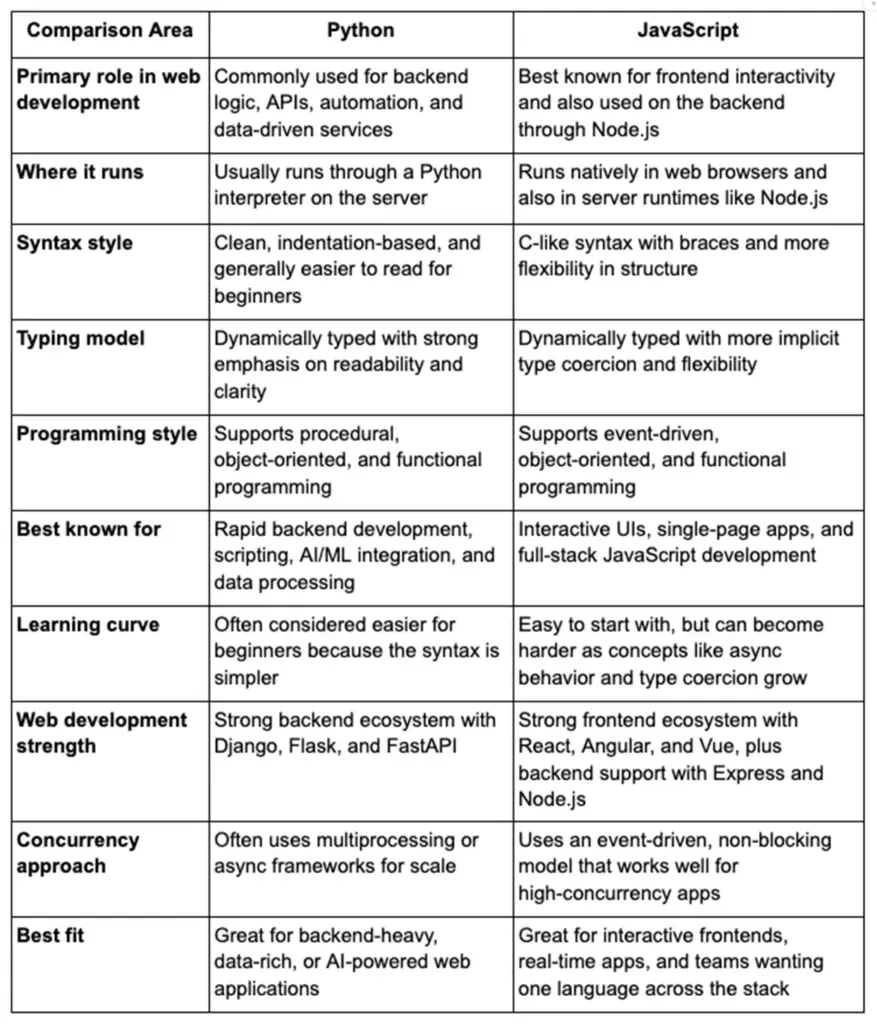
JavaScript vs Python: Key General Differences
If you want a fast high-level view, this table summarizes the key general differences between Python and JavaScript before we move into frameworks, backend use cases, and performance.
Differentiating Factors in JavaScript and Python
After understanding what Python and JavaScript are, the next step is to compare the factors that usually influence real project decisions. These include developer adoption, speed under different workloads, scalability patterns, memory handling, and the overall range of use cases each language supports. Looking at these differences early helps readers understand why both languages remain strong choices for modern web development.
Popularity
JavaScript has long been a dominant language in web development because it runs in the browser and remains essential for modern front-end development. Python, however, continues to grow because of its simple syntax, strong backend ecosystem, and major role in data science, automation, and AI-powered applications. In practice, both languages are widely used, but their popularity is driven by different strengths and different types of projects.
Performance
When teams compare Python and JavaScript, performance usually depends on the type of workload rather than the language alone. JavaScript often performs well in highly interactive interfaces and I/O-heavy web applications, especially when used with Node.js. Python, on the other hand, is often preferred when backend services rely on data processing, scripting, or AI-related workloads. For most web projects, framework choice, architecture, and infrastructure matter as much as raw language speed.
Application Scalability
Scalability is not only about how fast an application runs but also about how well it handles growth in users, requests, and features. JavaScript is often appealing for scalable web applications because teams can use one language across both the frontend and backend. Python also scales well, especially in backend-heavy systems that rely on APIs, microservices, background jobs, or data pipelines. The better option depends on whether your application is more real-time and interface-driven or more logic-heavy and service-oriented.
Memory Management
Memory management affects how efficiently an application handles data during runtime. JavaScript uses automatic garbage collection, which helps developers avoid manual memory handling in most web projects. Python also manages memory automatically, using reference counting and garbage collection behind the scenes. For most development teams, this means both languages are productive to work with, but performance tuning still becomes important when applications grow more complex or data-heavy.
Scope
Both Python and JavaScript have wide scope, but they are known for different strengths. JavaScript is central to browser-based development and extends into backend, mobile, and even desktop applications. Python has broader visibility in backend development, automation, scripting, machine learning, and data engineering. This means JavaScript often offers a more unified web stack, while Python offers wider utility across backend and technical business workflows.
JavaScript vs Python for Web Development: Use Cases and Ecosystem
When comparing javascript vs python for web development, it is worth mentioning the difference in the roles that both languages play. JavaScript and Python are used in the web projects both significantly, but usually in different spheres.
JavaScript is the language that exclusively runs in web browsers and this makes it a crucial requirement for client side features. In comparison, Python is frequently used in server-side application, scripting and AI/ML services.
Nowadays, the typical configuration of web development is both: e.g. a Python backend may be serving data APIs, and JavaScript frameworks are being used to drive the front-end. Full-stack JavaScript development has also been made possible with JavaScript’s Node.js runtime.
- JavaScript Use Cases: Building dynamic single-page applications (SPAs) with React, Angular, or Vue. Fashioning interactive front-end features and real-time server apps with Node.js or Express. It’s also used for mobile and desktop apps through React Native, Electron, etc.
- Python Use Cases: Being used to power web services and APIs (with frameworks such as Django or Flask), analytics, ETL, machine learning, and workflow automation. A large number of AI/ML-based web features (e.g. recommendation engines) depend on the Python ecosystem (TensorFlow, PyTorch, Scikit-learn).
The two ecosystems consist of enormous communities and libraries. JavaScript is supported by corporations such as Google (Angular), Facebook (React), and the open source community. It even has the npm registry (with millions of packages). Python has PyPI and strong backing from organizations for AI and web (e.g. the Django Software Foundation).
JavaScript is the language most commonly used by developers according to surveys (approximately 62% of developers used it last year), and Python is also immensely popular (approximately 51% used it).
JavaScript: Frontend and Full-Stack Ecosystem
JavaScript’s main domain is front-end development. When comparing python vs javascript for web development, take into consideration that JavaScript is a (natively) supported language in all modern browsers. React, Angular, and Vue are frameworks that assist developers in creating complex UIs effectively.
In 2024, React was used by roughly 39% of developers, with Angular at 17% and Vue around 15%. These frameworks enable single-page apps, component-based UIs, and mobile cross-platform development (React Native).
On the back end, Node.js (built on the V8 engine) allows JavaScript to run on servers. The event loop architecture means a Node.js server can serve thousands of I/O-bound requests with low overhead.
For example, a typical full-stack JS project might use React for the front end, Express for the back end, and MongoDB for the database (the MERN stack). Tools like webpack, Babel, and VS Code (a top editor) round out the ecosystem, with extensive community support.
Python: Backend Ecosystem and Libraries
When it comes to backend development, often deciding between python vs javascript for web development depends on whether you need a feature-rich framework or an event-driven runtime. Python excels on the server side with its powerful frameworks and libraries.
Popular web frameworks like Django and Flask (and newer ones like FastAPI) make it easy to build robust web services.
Django is a “batteries-included” full-stack framework: it provides an ORM, authentication, an admin dashboard, and many security features out of the box.
Flask is a lightweight microframework that gives developers flexibility to choose components.
FastAPI (modern and async) uses Python type hints to validate data and is known for its high performance. These frameworks have large communities: for instance, Django powers sites like Instagram’s backend.
Python’s interpreter is multi-paradigm (supporting object-oriented, functional, and procedural styles) and is dynamically typed. Developers often appreciate its readable syntax and large standard library. The package manager pip (and tools like virtualenv or Poetry) handle libraries for web tasks.
On the server, Python apps commonly use WSGI/ASGI servers (Gunicorn, Uvicorn) and can scale via multiple worker processes or containers. Python also has excellent libraries for APIs and web services (e.g., Django REST Framework for RESTful APIs).
The Python community is very active (it became the top language on GitHub in 2024), especially in fields like data analytics, DevOps, and backend services.
Python vs JavaScript for Backend Web Development
Specifically, python vs javascript for backend web development often means choosing between frameworks like Flask/FastAPI (Python) and Node.js/Express (JavaScript) for your APIs and server logic. There are trade-offs:
- Concurrency Model: Node.js’s asynchronous event loop handles high concurrency well; it’s ideal for I/O-bound workloads (high-traffic APIs, streaming, real-time chat) because it doesn’t block on database or network calls. Python threads, on the other hand, are limited by the Global Interpreter Lock (GIL): only one thread executes Python bytecode at a time, making CPU-bound multi-threading ineffective. To scale Python servers, developers often use async frameworks (FastAPI with async/await) or multiple worker processes.
- Performance: In many benchmarks, Node.js outperforms Python frameworks in raw throughput. For example, one 2023 benchmark showed Express (Node) handling ~1932 requests/sec, compared to ~1478 for Flask and ~989 for FastAPI under similar conditions. This suggests Express was roughly 6× faster than FastAPI in that test. However, actual web app performance depends on factors like database speed and I/O. Ultimately, development speed and ecosystem support often outweigh raw benchmarks.
- Use Cases: Python frameworks excel in CPU-intensive or data-heavy tasks (using optimized libraries), while Node.js excels in serving large numbers of simultaneous connections with minimal overhead. If your team knows JavaScript and you want a unified stack, Node/Express may be appealing. If you need rapid data processing or AI integration, Python’s rich libraries and frameworks could be better. Many large applications combine both: e.g. using Django for robust backend APIs and Node/React for the frontend.
Syntax and Readability
Python is famous for clear, indentation-driven syntax, which many developers find easy to read and maintain. JavaScript’s syntax is C-like (using braces and semicolons by default), which some find more familiar; modern JS (ES6+) adds syntactic sugar (async/await, classes, destructuring) that improves readability. Both languages are dynamically typed, but Python’s consistency often leads to concise code. JavaScript’s flexibility (first-class functions, callbacks, prototypal inheritance) offers powerful patterns but can be complex for beginners.
Typing and Paradigms
Python is strongly typed (type checking at runtime) and multi-paradigm (OOP, functional, procedural). JavaScript is weakly typed (performs automatic type coercion in many operations) and prototype-based, though modern JavaScript also supports class syntax and modules. These typing and paradigm differences influence how you write code. For example, Python’s type annotations (PEP 484) are becoming popular for clarity and editor support, while JavaScript/TypeScript’s types catch many errors at compile-time.
Execution Models
JavaScript (Node.js) typically uses a single-threaded event loop, offloading I/O to the system kernel. This allows one process to handle many concurrent connections efficiently. Python’s main implementation (CPython) uses multiple OS threads but enforces the GIL, so multithreaded Python code does not run on multiple cores simultaneously. Python concurrency is often achieved via multiprocessing or async I/O (e.g. asyncio or FastAPI). Node’s model simplifies writing concurrent servers, whereas Python can run parallel tasks via separate processes or native async frameworks.
Performance and Scalability in Web Apps
For performance and scalability considerations, the python vs javascript for web development choice can influence how you build and optimize your app. In general:
- Python Performance: Python excels at CPU-bound tasks when using optimized native libraries (NumPy, Pandas, etc.), but its GIL can limit pure Python code. For web servers, Python frameworks often use asynchronous I/O (e.g. FastAPI with Uvicorn) or multiple worker processes to handle concurrency. This can make Python services quite responsive for I/O-heavy workloads. In benchmarks, async Python services (using asyncio) can approach high throughput, but raw single-process Python is usually slower than Node (as seen in the Express vs FastAPI example).
- JavaScript Performance: Node.js uses non-blocking I/O by default, so a single Node process can serve many requests with minimal context switching. This is especially effective for real-time applications (chat servers, live data feeds). Node can also use worker threads or clusters for CPU-bound work, but most Node apps rely on the event loop for I/O-bound tasks. Benchmarks often show Node handling more requests per second than similar Python setups.
- Scalability Considerations: JavaScript’s single-language stack can simplify scaling horizontally: teams can reuse code between frontend and backend, and deploy multiple Node instances behind a load balancer. Python services typically scale by adding more worker processes or containers and maybe using message queues for parallel processing. Both languages are used in large-scale architectures. For instance, cloud platforms fully support both (AWS Lambda has runtimes for Node.js and Python), so you can choose either for microservices or serverless functions depending on the job (e.g. image processing with Python, real-time API with Node).
Frameworks & Libraries Comparison
Choosing the right framework can accelerate development. Each language has standout tools:
Python Web Frameworks (Django, Flask, FastAPI)
- Django: A mature full-stack framework (released 2005) with “batteries included” features. Ideal for large, content-driven sites (e-commerce, CMS). It includes an ORM, admin interface, and authentication by default, speeding up development of complex apps.
- Flask: A minimalist microframework (released 2010). It doesn’t impose components, so developers choose their own ORM and libraries. Great for small to medium services or when maximum flexibility is needed.
- FastAPI: A modern async framework (released 2018). It’s built for building APIs quickly, using Python type hints for automatic input validation and documentation. FastAPI is optimized for high performance (built on Starlette/Uvicorn) and is popular for microservices and ML-powered endpoints.
These Python frameworks have large, active communities. Django’s documentation is extensive and it’s used by many companies (e.g. Instagram’s backend was Django). Flask and FastAPI have growing ecosystems of plugins and extensions. Python’s ecosystem also includes strong libraries for data (NumPy, Pandas), authentication (PyJWT), and cloud integration (Boto3 for AWS).
JavaScript Web Frameworks (React, Angular, Vue, Node.js/Express)
- React (Front-end): A library by Facebook for building UIs. It uses components and a virtual DOM for efficient rendering. React’s ecosystem includes Redux (state management) and Next.js (server-side rendering). With ~39% adoption, it’s often a top choice for new SPAs.
- Angular (Front-end): A full-featured framework by Google. It uses TypeScript, built-in routing, and RxJS. Angular is favored in large enterprise projects that need an all-in-one solution (form handling, HTTP, CLI).
- Vue.js (Front-end): A progressive framework that combines templating with component-based development. Vue is known for its gentle learning curve and has gained popularity (~15% in surveys), especially for small-to-medium projects.
- Node.js/Express (Back-end): Node.js (with Express) is the go-to for server-side JS. Express is a minimal framework for handling HTTP routing and middleware. For more structure, frameworks like NestJS build on Express with additional features. This enables full-stack JS apps, reusing libraries between client and server.
The JavaScript ecosystem is vast. npm (Node’s package registry) is the largest in the world, with millions of packages. Tools like Webpack, npm/Yarn, and Babel support development. Editors like Visual Studio Code have first-class support for JavaScript/TypeScript. In surveys, frameworks like React and Node consistently rank at the top. New tools (Next.js, Svelte, Deno) continue to emerge, illustrating JavaScript’s rapid evolution.
Ecosystem and Tooling
Comparing ecosystems, JavaScript’s npm and Python’s PyPI both host huge libraries. As of 2025, npm has over 2.5 million packages, and PyPI has over 450,000 (and growing). Tools for both languages are mature: bundlers and transpilers (webpack, Babel, TypeScript) for JS, and virtualenv/Poetry or Conda for Python. IDE support is strong on both sides (PyCharm, VS Code, WebStorm, etc.). Both communities contribute to StackOverflow, GitHub, and open-source projects.
Must Read: How To Choose a Web Development Technology Stack
Popularity, Demand, and Community
- Developer Adoption: According to Stack Overflow’s 2024 survey, ~62% of developers used JavaScript last year and ~51% used Python.
- Web Usage: JavaScript is ubiquitous in browsers (around 98% of websites use JS for client-side behavior), while Python is a common backend language.
- GitHub Popularity: GitHub’s 2024 report notes Python has become the most popular language on the platform, surpassing JavaScript.
- Job Market: Both languages are in high demand. Web developer roles frequently list JavaScript skills, and Python is especially sought for backend, data, and AI-related roles.
- Community Support: JavaScript has a massive ecosystem of libraries (npm) and front-end frameworks, and Python has strong communities in web (Django, Flask) and data science. Both have active Q&A forums and conferences (JSConf, PyCon, etc.).
Use Cases and Applications
The python vs javascript for web development choice often comes down to project needs and developer expertise. Here are typical scenarios:
When to Use JavaScript
- Rich Front-Ends: If you need a dynamic, responsive web interface (forms, animations, real-time updates), JavaScript (with a modern framework) is essential.
- Unified Stack: Using Node.js on the backend means your team can work in one language for both client and server. This simplifies code sharing and can speed up development.
- Real-time Apps: Applications like chat services, live dashboards, or games benefit from Node’s non-blocking I/O. JavaScript with WebSockets or WebRTC is commonly used for real-time features.
- Mobile/Web Hybrid: With React Native or Ionic, you can reuse JavaScript code for mobile apps, giving cross-platform reach.
When to Use Python
- Backend APIs & Services: Python’s frameworks (Django, Flask, FastAPI) allow quick development of RESTful APIs. Python’s readability accelerates building complex business logic.
- Data-Driven Features: If your app needs heavy data manipulation, machine learning, or analytics, Python is preferable. It has direct support for ML libraries (TensorFlow, Scikit-learn) and data processing (Pandas).
- Rapid Prototyping: Python enables fast prototyping of ideas (e.g. using Flask or Django’s built-in server) before scaling up.
- Serverless & Automation: Python is popular for serverless functions (AWS Lambda supports Python 3.12) and for writing automation scripts, ETL processes, and DevOps tasks.
Often, a hybrid approach is best: for example, using Python (Django/Flask) for backend logic and JavaScript (React/Vue) for interactive front-end. This is common in enterprise apps: a Python-powered API serving data to a JavaScript-powered client application.
Examples of What You Can Build With Each
One of the easiest ways to understand python vs javascript for web development is to look at what teams actually build with each language. While both are used in modern web projects, they often support different parts of the product.
Python is commonly chosen for backend-heavy and data-driven systems, while JavaScript is used to build interactive user experiences and full-stack web applications.
What You Can Build With Python
Python is often used to build web products that rely on backend logic, automation, APIs, and data processing. It works especially well when a project needs clean server-side architecture, fast development, or integration with AI and analytics tools.
Common examples include:
- REST APIs and backend services (more on them later)
- Admin dashboards and business portals
- Data dashboards and reporting platforms
- Automation tools and internal systems
- AI-powered web applications
[ Also Read: How to Build AI-Powered Web and Mobile Apps with ChatGPT API? ]
For example, a company might use Python to build a customer portal with a FastAPI backend, an analytics dashboard connected to business data, or a SaaS application that includes recommendation engines, reporting, or workflow automation.
What You Can Build With JavaScript
JavaScript is best known for building interactive and user-facing web experiences. Since it runs directly in the browser, it is essential for products that need dynamic interfaces, fast UI updates, and modern front-end behavior.
Common examples include:
- Interactive websites and landing pages
- Single-page applications (SPAs)
- Real-time chat apps and collaboration tools
- Web dashboards with live updates
- Cross-platform web and mobile apps
For example, a product team might use JavaScript to build a React-based SaaS dashboard, a booking platform with real-time updates, or a customer-facing web app that needs smooth navigation and responsive design.
What You Can Build With Both
In many real-world products, the strongest solution is not Python or JavaScript alone, but a combination of both. This is common in full-stack development, where Python handles backend logic and JavaScript powers the front end.
Examples of products built with both include:
- SaaS platforms
- Marketplaces
- Customer portals
- AI-enabled web apps
- Enterprise internal tools
Combining Python and JavaScript in Web Projects
Combining python vs javascript for web development is very common. A typical architecture is a Python backend (Django/Flask/FastAPI) with a JavaScript frontend (React/Angular/Vue). They communicate over JSON APIs or GraphQL. For example, Instagram’s web stack uses Django (Python) for its backend and React for parts of its frontend.
Integration tools include:
- REST/GraphQL APIs: Python services expose endpoints that JS frontends consume (via fetch, Axios, etc.).
- WebSockets: Real-time frameworks (e.g. Django Channels or Socket.IO on Node) enable live client updates.
- Server-Side Rendering (SSR): Frameworks like Next.js or Nuxt.js (JS) can consume data from Python APIs.
- Microservices: You can deploy separate microservices (some in Python, some in Node) that talk over HTTP or messaging queues.
- Hybrid Tools: Libraries like PyExecJS allow calling JS from Python (rare), and WebAssembly projects (Pyodide) let Python run in the browser, though these are niche.
This hybrid approach leverages each language’s strengths: Python for heavy lifting (data, ML) and JavaScript for interactivity. (For details, see our internal guide on full-stack development with Python and JavaScript.)
Future Trends in Web Development: Python vs JavaScript

- Python: Expect deeper integration with AI/ML in web services (embedding models in web apps). Serverless and edge computing platforms increasingly support Python, making it easier to run Python functions globally. Technologies like PyScript/Pyodide (Python in the browser via WebAssembly) are experimental but could eventually let developers run Python client-side.
- JavaScript: Will continue to lead in web innovations. Progressive Web Apps and modern front-end frameworks (like React 19 or Svelte) will enhance user experiences. Edge computing (Cloudflare Workers, Lambda@Edge) will expand JavaScript’s role outside the browser. WebAssembly will allow more languages to interoperate with JS on the web, but JS itself will remain the main “glue” language for new web APIs (like WebXR for VR/AR).
- Both: As the web evolves, both languages will collaborate. For instance, IoT systems often use Python on the server and JavaScript on the dashboard. Developer tools will increasingly include AI-assisted coding for both languages. We may see more microservices architectures where Python handles data/AI workloads and JavaScript handles interactive front-ends, reflecting a blended ecosystem.
Python Vs JavaScript: Which Programming Language to Choose in 2026?
When deciding between python vs javascript for web development, consider your project requirements and team expertise:
- Choose JavaScript if you need rich client-side interactivity, want a single-language stack, or are building SPAs and real-time apps. It’s ideal when you need many UI components or a large ecosystem of web libraries. If your team is strong in JS/TypeScript, using Node.js on the backend lets you reuse skills and code.
- Choose Python if you need rapid backend development, heavy data processing, or integration with AI/ML. Python’s readable syntax and robust frameworks (Django, FastAPI) accelerate building APIs and data services. If your project involves complex computations or you prefer Python’s ecosystem, Python is often the better fit.
Often the best solution is to use both: for example, Python for complex backend logic and JavaScript for the frontend interface. Both languages are free, cross-platform, and have large talent pools. Weigh factors like development speed, community support, and long-term maintainability. In many cases, python vs javascript for web development becomes less a contest and more a matter of using the right tool for each part of your stack.
Not Sure Whether to Use Python or JavaScript for Your Web Project?
Choosing between Python vs JavaScript for web development can be confusing. Each language has strengths depending on your project goals. BrainX Technologies helps businesses select the right technology stack and build scalable web applications. Whether you need a Python backend, a JavaScript frontend, or a full-stack solution, our team can guide you and deliver the right development approach. Connect with BrainX to turn your web development vision into a high-performing digital product.
Python vs JavaScript Web Development FAQs
Q: Is Python or JavaScript better for web development?
A: When comparing python vs javascript for web development, neither is strictly “better”; it depends on the use case. JavaScript is essential for front-end work (every browser uses it) and can run on the server (Node.js), making it great for full-stack development. Python excels on the backend, especially for data-heavy or AI features. For example, a highly interactive SPA would lean on JavaScript (React/Angular), while a data analysis dashboard might use Python for the API. Often, teams use both: Python powers the server/API and JavaScript handles the interactive UI.
Q: Can Python and JavaScript be used together in a web project?
A: Yes—almost all modern web projects use both. A common pattern is a Python framework (Django/Flask) serving JSON APIs, with a JavaScript framework (React/Vue) building the user interface. They communicate over HTTP/WebSockets. You can also mix at the tooling level (e.g. using templating with Django and enhancing pages with JS). Many companies run a Python backend with a JavaScript frontend; this leverages Python’s backend strength and JS’s front-end interactivity.
Q: What frameworks should I use for each language?
A: For JavaScript front-ends, React, Angular, or Vue are top choices. For JavaScript back-ends, Express (Node.js) is common, with alternatives like NestJS or Koa. For Python, Django is ideal for large, full-featured sites, while Flask/FastAPI are great for lightweight or microservice APIs. Django REST Framework is excellent for APIs. The “best” framework depends on project size and requirements (full-stack vs microservice, sync vs async, etc.).
Q: Which is faster, Python or Node.js?
A: In raw benchmarks, Node.js often has higher throughput than Python web frameworks due to its non-blocking I/O. However, “faster” depends on what you measure: Python can be very fast using C libraries (NumPy, etc.) for data tasks. In web apps, database or network latency usually dominate. For most projects, both are “fast enough.” It’s usually more important to choose the language and framework you develop in more productively than to optimize a small speed difference.
Q: Should I learn Python or JavaScript for web development?
A: Both are valuable. If you’re focused on front-end or full-stack web, start with JavaScript (and its frameworks). If you’re drawn to backend, data processing, or AI/ML, start with Python. In the long run, many developers learn both: JavaScript for client-side and Python for server-side. Your choice should align with your goals and the type of projects you want to build.

Key Takeaways
- A disciplined web application development process keeps the teams focused with distinct stages, articulated outputs and quality gates that minimize rework and delivery risk.
- Lock critical decisions early, such as the security requirements, compliance requirements, scalability requirements, and architecture direction, to ensure that you do not find expensive gaps when you start building.
- A scalable application development process starts with production readiness, production level goals, observability, performance budgets, and resilience planning for real traffic.
- Build a secure application development process into every phase with threat modeling, automated security checks in CI, API security controls, and software supply chain hygiene such as SBOMs.
- An enterprise application development process introduces governance and operational rigor, such as single sign on, role based access control, audit logs, integration standards and disciplined release management.
What is a Web Application?
A web application is browser based software that allows users to do more than just view information. It lets them log in, enter data, complete tasks, and interact with the system in real time. In a strong web application development process, this distinction matters early because web applications require deeper planning around architecture, data handling, security, and performance.
Unlike static websites, web applications are built around workflows. They often include user accounts, business logic, databases, APIs, and integrations that support dynamic user actions.
To Further Reading On– How to Scale a Web Application: A Complete Guide
Web Application vs. Website: What’s the Difference?
A website is mainly designed to present information. A web application is designed to let users take actions and get results based on those actions. That difference affects everything from backend logic to testing requirements.
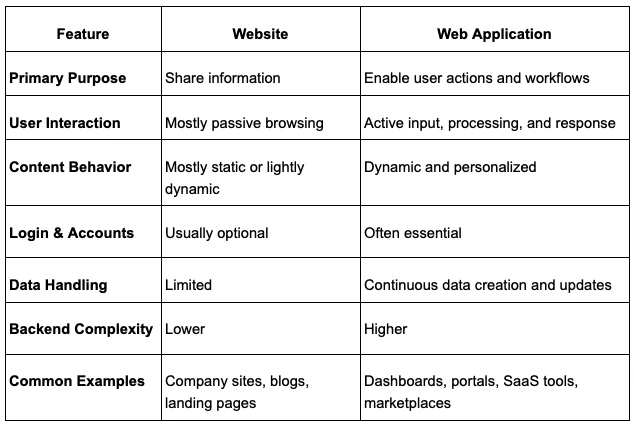
If users only need to read content, a website is usually enough. If they need to sign in, manage data, collaborate, track progress, or complete tasks, a web application is usually the better fit.
Why Do You Need a Web Application?
A web application is required when the users need to perform tasks online, such as entering data, interacting, or accessing personalized information. A standard website may be simpler and more adequate in case the end product is to simply display some text or information.
Additionally, think about limitations: in case the app should be available offline on mobile devices, a PWA may be required (which complicates the matter). Scalable infrastructure should be considered if high performance under load is a requirement.
In short, the full web app development process should only be undertaken if such requirements are warranted, otherwise, you’re better off sticking to a simplified website or content platform.
Benefits of Web Application
One major advantage of a web application is accessibility. Users can open it in a browser across devices without needing to install updates manually. That makes rollout easier and lowers friction for both users and internal teams.
Web applications also support centralized maintenance. Teams can deploy fixes, improvements, and new features in one place instead of managing separate installations. They also scale well when designed correctly, especially when the product needs shared access, role based permissions, integrations, and ongoing feature growth.
Types of Web Applications
Web applications come in many forms, while each has its architectural trade-offs:
- Single-Page Applications (SPAs) (e.g. React, Angular) load one HTML page and update content dynamically. Depending on client-side state management, they fetch data from backend APIs. It implies a robust REST/GraphQL API layer and careful oversight of client state.
- Progressive Web Apps (PWAs) build on SPAs through offline support and push notifications. A PWA uses service workers to store assets and data locally, so the app continues to work even when offline. This necessitates additional considerations in the design to have data sync and cache invalidation.
- Server-rendered dynamic apps, built using Node.js, Ruby on Rails, PHP, etc., generate pages on the server. These can be easier for SEO optimization (as the content is instantly visible to the search engines) and be performance enhanced with server-side caching.
- E-commerce platforms deal with some heavy data (product catalogs, transactions). They require robust inventory systems, databases that are ACID compliant, and in many cases, micro services to handle payments, search etc.
In the end, the nature of the app determines the technology stack and developmental pattern. For example, a highly interactive SPA can be based on rich JavaScript frontends and stateless APIs, but a website with a lot of content may have a monolithic framework with in-built templates and caching. Each choice has trade-offs in complexity, performance, and developer skill requirements.
Examples of Web Applications
Web applications show up in almost every part of modern business. Once a product needs logins, workflows, real time updates, or user specific data, it usually moves beyond a simple website and into the web application development process.
Some of the most common examples are SaaS platforms. These include project management tools, CRM systems, HR portals, invoicing systems, and analytics dashboards. Users sign in, manage records, and complete tasks inside a browser based environment.
Another common category is customer facing transactional apps. These include ecommerce portals, subscription dashboards, online banking interfaces, booking systems, and order tracking platforms. In these cases, the app must process requests, store data, and return personalized results quickly and securely.
Businesses also rely on internal web applications to run operations. These include inventory tools, approval systems, employee admin panels, reporting portals, and support dashboards. They are often built to improve speed, accuracy, and visibility across teams.
You also see web applications in marketplaces and collaboration products. Examples include vendor portals, scheduling platforms, messaging workspaces, learning systems, and document sharing platforms. These products often need strong permissions, live updates, and deeper backend logic, which is why the architecture and delivery process matter from the start.
Elements of Web Application Development
A web application is not just a user interface on a browser. It is a connected system made up of user facing screens, backend logic, data storage, APIs, and the infrastructure that keeps everything running. In the web application development process, clarity around these elements helps teams scope correctly and avoid weak architectural decisions early.
Frontend Layer and User Experience
The frontend is the part users see and interact with. It handles layout, forms, navigation, validation feedback, and the overall experience inside the browser. This layer needs to be fast, clear, and consistent because even a strong backend cannot rescue a confusing interface.
Backend Services and Business Logic
The backend processes requests, applies business rules, manages authentication, and coordinates how data moves through the system. This is where actions like account creation, payments, approvals, and reporting logic usually live. In practice, the backend is what turns user input into meaningful system behavior.
Data Storage and State Management
Most web applications depend on structured data storage. Databases hold records such as users, transactions, content, and activity logs, while caches and session layers help the app respond quickly under load. Good data design matters early because it affects reporting, performance, and long term scalability.
APIs, Integrations, and External Services
APIs connect the frontend to the backend and often connect the product to outside systems too. A web app may rely on payment providers, identity platforms, CRMs, email services, analytics tools, or internal business systems. These integrations should be treated as core architecture decisions, not last minute add ons.
Hosting, Infrastructure, and Runtime Environment
A web application also depends on the environment where it runs. That includes cloud hosting, deployment pipelines, caching layers, monitoring, background workers, and scaling controls. A strong application development process treats infrastructure as part of the product, because reliability, speed, and uptime all depend on it.
Common Web App Design Patterns and Architecture
Once the core elements are clear, the next step is deciding how they should be organized. Architecture patterns define how parts of the system are grouped, deployed, scaled, and maintained. The right pattern depends on product complexity, team maturity, and how much flexibility the system will need over time.
Monolithic Architecture
A monolithic architecture keeps the application in one main codebase and usually deploys it as one unit. This model is often easier to start with, especially for smaller teams or early products, because development and testing are more centralized. It becomes harder to manage as the codebase grows and different parts of the system need to scale independently.
Microservices Architecture
Microservices split the system into smaller services that handle separate business capabilities. This can improve scalability, deployment independence, and fault isolation, but it also adds complexity in communication, monitoring, and debugging. For most teams, microservices make sense only when the product and organization are ready for that extra operational load.
Single Page and Server Rendered Patterns
Some web apps are designed as single page applications, where one shell loads in the browser and content updates dynamically through APIs. Others use server rendered patterns, where pages are generated on the server before being delivered to the browser. The right choice depends on interaction depth, SEO needs, frontend complexity, and performance goals.
Queue Based and Event Driven Workflows
When a system handles long running or resource heavy tasks, queue based patterns can reduce pressure on the main user experience. A web front end can accept the request quickly, pass work to a queue, and let background workers process it asynchronously. This pattern is useful for uploads, notifications, reports, and other tasks that should not block the user.
Single Tenant and Multi Tenant Models
Tenancy affects how customers are isolated inside the product. Single tenant models offer stronger separation but can increase cost and operational overhead. Multi tenant models share parts of the system across customers, which is common in SaaS, but they require careful design around access control, data isolation, and performance fairness.
Web Application Development Process Guide for 2026
The web application development process refers to a methodical approach towards planning, developing, testing and maintaining a software product in such a manner that it fulfills user requirements, while remaining secure and scalable.
Unlike a simple website (mostly static content), a web app is dynamic software that users interact with in real time.
A structured process keeps teams aligned and avoids guesswork: as one expert notes, sticking to a predefined plan “reduces risk, makes collaboration smoother, and dramatically boosts the chances of creating a product that people actually love to use”.
How to Start the Web App Development Process
The majority of the delays in the web application development process are due to the fact that decisions were never made with clarity. It is costly to fix architecture once it is launched. Lock the fundamentals early.
Requirements That Include Risk and Compliance
Specify your security and compliance needs clearly before starting the coding process.
- Identify any data classifications (e.g. public vs. sensitive) and all regulations (GDPR, HIPAA, PCI-DSS) that apply.
As an example, an application that manages medical records needs to comply with HIPAA, i.e., data must be encrypted at rest and in transit and must have extensive audit logs. - Research ahead of time and decide how users will authenticate (e.g. corporate Single Sign-On) and what authorization model to use.
- Plan identity and access policies right away as implementing these early prevents massive rework.
For example, when you require a strict Role-Based Access Control and SSO, you should design the user directory and user-login flow during the planning phase and not after coding.
Scalability Targets You Can Measure
Set concrete performance goals before building.
- Estimate expected traffic, e.g. peak concurrent users, request volumes per day, and data growth rates.
- Define Service Level Objectives (SLOs) (e.g. “99.9% of requests under 200ms” or “99.95% uptime.”)
- Derive performance budgets (e.g. maximum API response size or page load time) from earlier mentioned metrics.
- Know your targets because they guide architecture choices (stateless services, autoscaling, caching).
- Plan load tests that simulate projected peak load as it will depend on your chosen architecture.
Documenting these metrics in requirements guarantees that the team develops to meet them, instead of finding out about performance issues at the last moment.
Architecture Choices That Shape Everything
Lock in your high-level architecture decisions at the start. Will you launch with a monolithic application (all code in one deployable unit) or a microservices architecture (multiple independent services)? Monoliths can be faster to develop initially but may bottleneck scale. Microservices split functionality, allowing independent scaling and deployment, but they introduce complexity (service discovery, network handling). Choose based on team expertise and project phase. Also decide on tenancy: single-tenant (each customer has an isolated database) vs multi-tenant (shared schema). Finally, pick core technologies (programming language, framework, database, cloud provider). These choices have lasting impact: a sound web application development process will document the rationale for each in an architecture decision log to avoid confusion later.
Key Technologies and Tools
The technology stack you choose has a direct impact on delivery speed, scalability, maintenance effort, and hiring flexibility. In the web application development process, these decisions should support the product’s real needs instead of following trends without clear justification.
The goal is not to pick the most popular stack. The goal is to choose technologies that fit your product requirements, team capability, integration needs, and long term roadmap.
Programming Languages for Web App Development
Programming language choice affects backend performance, development speed, ecosystem maturity, and how easily your team can maintain the codebase over time. There is no single best option for every product.
JavaScript and TypeScript are widely used for full stack development, especially when teams want to share language familiarity across frontend and backend environments. They work well for interactive products and API driven systems.
Python is often chosen for fast development, clean syntax, and strong support for automation, data workflows, and AI connected features. It is common in SaaS products, internal tools, and platforms that need rapid iteration.
Java remains a strong option for large scale systems that need stability, strong typing, and mature enterprise support. It is often used in regulated environments and long life business platforms.
PHP, C#, and Ruby also remain relevant depending on the product context, existing systems, and team expertise. A practical application development process should evaluate language choice based on maintainability, ecosystem support, and operational fit, not just personal preference.
Web App Development Frameworks
Frameworks shape how quickly teams can build features, enforce standards, and manage complexity as the product grows. They also influence testing strategy, deployment patterns, and long term maintainability.
On the frontend, common choices include React, Angular, and Vue. React works well for highly interactive interfaces and flexible component based design. Angular is often preferred in structured enterprise environments. Vue is a strong choice for teams that want simplicity and a lighter learning curve.
On the backend, teams often use frameworks such as Node.js with Express or NestJS, Django or FastAPI, Spring Boot, Ruby on Rails, or Laravel. These frameworks help standardize routing, authentication, validation, and service structure, which reduces setup time and improves consistency.
The right framework depends on the product’s complexity, expected traffic, security requirements, and the experience level of the team. A strong framework should help the team move faster without locking the product into avoidable complexity.
Best Practices for Choosing the Right Stack
Good stack decisions are usually simple, intentional, and aligned with business goals. Overcomplicating the stack too early can slow delivery and increase maintenance cost before the product has even found traction.
Start with proven technologies that your team can support confidently. Match frontend and backend choices to the product’s actual needs, not imagined future scale. If your roadmap includes high compliance, deep integrations, or complex permissions, choose frameworks and platforms that support those requirements early.
It also helps to standardize core tools early in the project. Shared conventions for structure, testing, deployment, and documentation make handoff easier and reduce friction as the team grows. When possible, record major stack decisions in a lightweight architecture log so future changes stay grounded in clear reasoning.
Web Application Development Process (Phases, Deliverables, and Quality Gates)
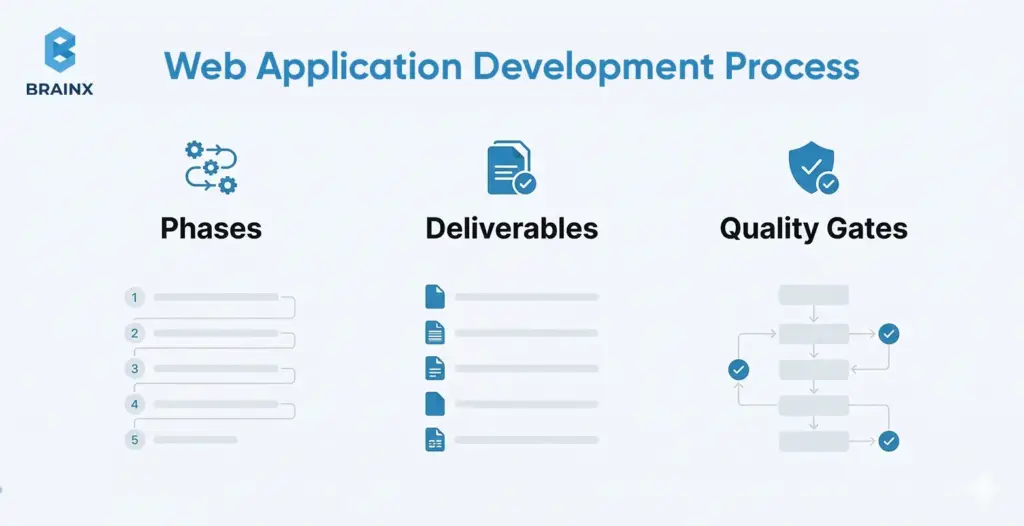
The web application development process typically breaks into defined phases, each with its own deliverables and review checkpoints. Common phases are Discovery, Design, Development, Testing, Deployment, and Maintenance. At each phase’s end, teams should verify specific artifacts (a “phase gate”). For example, in the web application development process the Discovery phase yields a problem statement, user personas, business requirements, and an MVP feature list. The Design phase produces architecture diagrams, data models, and UI mockups. These deliverables become a checklist for the phase gate to ensure nothing is missed before moving on.
Choosing a Delivery Model (Agile, Kanban, Waterfall)
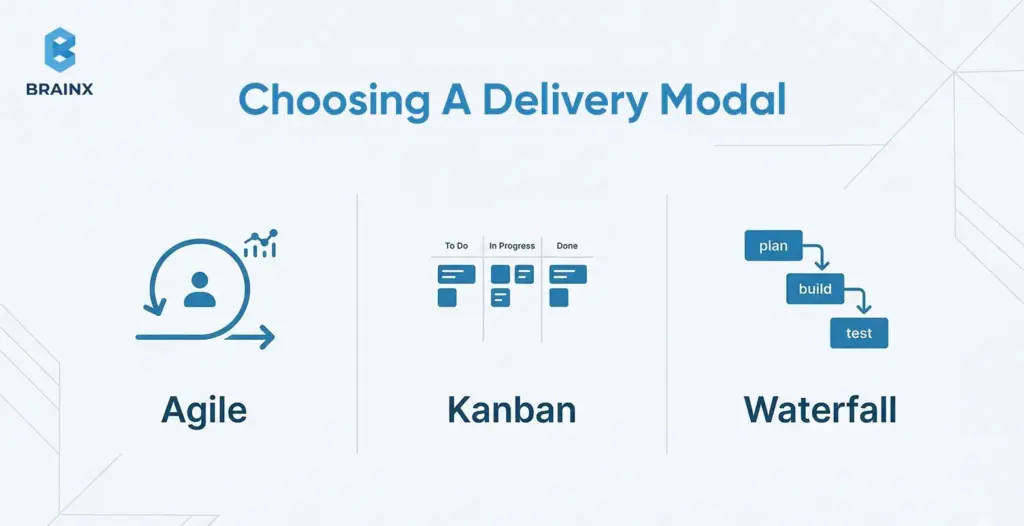
Your team should pick a development rhythm (Agile, Kanban, etc.) that fits the project. The phases (requirements, design, code, test, etc.) remain the same in any model. Agile (Scrum) divides work into short sprints with frequent releases; as one expert notes, Agile teams often deliver faster time-to-market than traditional waterfall projects. Kanban is a continuous flow model without fixed sprints, ideal for maintenance or support. A staged (waterfall) process executes each phase sequentially, which might suit projects with fixed requirements. In practice, many teams (~63%) use Agile because iterative cycles help catch issues early.
Tips for Choosing a Delivery Model
- Pick the model that matches how your team actually works, not the one that only sounds good on paper.
- Use an iterative model when priorities change often.
- Use a staged model when scope is fixed and approvals are stricter.
- The goal is to keep design, engineering, QA, and stakeholders aligned.
Discovery and Validation

In the web application development process, the Discovery phase aims to validate the project idea. Deliverables typically include a detailed requirements document, user personas, and an MVP scope or feature list.
Teams conduct stakeholder interviews, market research, and competitor analysis to define success criteria (for example, target user activation rate or performance goals). Capturing these upfront ensures every proposed feature ties to a real user need or business goal.
A vision or problem-definition document is often signed off here. This phase also produces a priority list of features, so that the team can focus on building the most valuable parts first.
Research Your Market
Before building anything, validate the market around the problem you are solving. This includes understanding user pain points, reviewing competing products, identifying feature gaps, and studying how similar solutions position themselves. The goal is not to copy what already exists, but to understand what users expect and where your product can create a clearer advantage.
Good market research also helps teams avoid building features that sound useful but do not solve a real need. In a disciplined web application development process, this step gives product and technical teams better context before requirements are finalized.
Some Tips on Discovery and Validation
- Do not treat discovery like a quick kickoff activity.
- Use it to validate the problem, narrow the MVP, and challenge assumptions early.
- Define clear user needs and measurable success criteria.
- Be equally clear about what should not be built yet.
Planning and Architecture

In the planning phase of the web application development process, engineers flesh out how the system will work under the hood. Key outputs include a system architecture diagram (showing modules, services, and data stores), a data model/schema (ER diagrams or database design), and API contract specifications (defined endpoints, request/response formats). Create a risk and dependencies register that lists any technical uncertainties (new technology, third-party integrations) and compliance checks.
For instance, you might draft a diagram showing web/mobile clients, backend services, and databases, plus note items like “need PCI-DSS certification” or “unknown throughput of legacy API.” These artifacts guide the team during implementation and serve as references for reviewers.
Create a Software Requirements Specification (SRS) Document
An SRS document turns ideas into clear implementation guidance. It outlines what the product should do, who it is for, what features are included, what constraints exist, and how success will be measured. This gives designers, developers, testers, and stakeholders a shared reference point before deeper execution begins.
A strong SRS also reduces confusion during delivery. It helps teams define scope, clarify edge cases, document dependencies, and align on technical expectations early. In practice, this is one of the most useful assets for keeping the application development process structured and predictable.
Define Technical Risks and Dependencies
Planning should also surface the unknowns before they become blockers. This includes third party integrations, compliance requirements, legacy systems, performance limits, and infrastructure constraints. A refined development process gets these risks on paper early so the team can make better decisions before build starts.
Key Tips for Planning & Architecture
- Document decisions while they are still small and easy to adjust.
- Capture architecture trade offs, risks, dependencies, and technical assumptions early.
- Pressure test integrations, compliance requirements, and scalability needs before development starts.
- Strong planning reduces confusion and expensive rework later.
UI/UX Design and Prototyping

In the design phase of the web application development process, UX/UI designers create the user experience blueprint. Deliverables include user flow diagrams and wireframes for each key screen.
A style guide or design system (detailing colors, typography, and component library) is often produced to ensure consistency. Prototypes (sometimes interactive) are built to validate workflows before code.
For example, designers might hand off clickable mockups of the login and dashboard pages. These assets help developers implement features accurately and provide a usability checkpoint. Getting design deliverables reviewed and approved is a critical gate before heavy coding begins.
Few Tips for UI/UX Design & Prototyping
- Use design to reduce delivery risk, not just improve visuals.
- Focus on user flows, edge cases, and interaction clarity.
- Make sure prototypes are easy for engineering to interpret.
- If a workflow is confusing in design, it will usually be harder to build well.
Building and Integrating

In the implementation phase of the web application development process, developers write the application code. Deliverables include the codebase itself (hosted in version control) and documents of coding standards (lint rules, style guides).
The team should also define a branching/release strategy (e.g. Gitflow or trunk-based development with feature branches). For example, you might decide that all feature work merges into a develop branch after passing code review.
This phase also produces ongoing artifacts like unit tests and libraries/components. The Definition of Done for features is agreed here: typically this includes code review sign-off and passing automated tests. Maintaining high code quality now saves rework later.
Tips for Building and Integrating
- Build in small, reviewable increments instead of large batches.
- Validate integrations early instead of leaving them for the end.
- Standardize code review, branching, and definition of what’s done.
(All of this helps maintain quality as delivery speed increases.)
Testing and Quality Assurance

In the testing phase of the web application development process, teams ensure the app is reliable and meets requirements. Deliverables include a comprehensive test plan and test cases covering unit tests, integration tests, end-to-end tests, performance tests, and security tests. Automated test suites are built and integrated into CI/CD.
For instance, developers might write automated Selenium scripts for user login and checkout workflows. Performance engineers create load tests (using tools like JMeter or k6) to simulate peak traffic. Security QA (e.g. SAST/DAST scans) is also run against the build.
The phase gate requires that major test cases have passed and any high-severity bugs are resolved before release.
Define Acceptance Criteria and Test Scenarios
Testing gets stronger when quality expectations are written before features are completed. Define acceptance criteria for each core workflow and map test scenarios for normal use, edge cases, and failure states. This makes reviews more objective and helps QA catch issues earlier.

Summarized Tips for Testing & Quality Assurance
- Start testing earlier than most teams expect.
- Use testing to validate real usage, edge cases, and failure scenarios.
- Treat automated tests, manual QA, security checks, and performance testing as one quality system.
- The goal should not only be to find bugs but to confirm release readiness.
Deployment and Release
In a modern web application development process, the deployment phase focuses on automation and infrastructure. Deliverables include CI/CD pipeline definitions (e.g. Jenkinsfiles, GitHub Actions workflows) and infrastructure-as-code scripts (Terraform, Kubernetes manifests) for each environment (dev, staging, prod).
Define how code is promoted (blue-green deployment, canary, or straight rollout) and document rollback procedures. For example, provide a script that can redeploy the previous version if a release fails.
This phase also finalizes release checklists: user acceptance sign-offs, production configuration settings, and an announcement plan.
Once everything is automated and documented, pushing new code to production should be repeatable and low-risk.
Prepare Release and Rollback Plans
A release should include more than deployment steps. Teams should know what gets released, how success will be checked, who signs off, and what happens if something breaks. Clear rollback planning reduces launch risk and makes the release process easier to repeat.
Tips for Smooth Deployment & Release
- Treat every release like an operational event, not just a code push.
- Define what success looks like immediately after launch.
- Decide what needs monitoring first and how rollback will work if needed.
- A repeatable release process lowers risk every time you ship.
Maintenance and Continuous Improvement

In the maintenance phase of the web application development process, focus shifts to keeping the app running smoothly and evolving it. Deliverables include setting up monitoring dashboards and alerts (for metrics like error rate, latency), a schedule for patching or upgrades, and an ongoing product backlog.
Teams often create a “runbook” for operations or rotate on-call engineers to respond to incidents. For example, you might deliver a Grafana dashboard with live API latency and a plan to review analytics monthly. The idea is to continually use feedback and monitoring to improve the app. The development process continues iteratively: each issue found in production feeds back into planning the next sprint or release.
Tips for Maintenance & Continuous Improvement
- Do not let maintenance become only reactive.
- Use production data, support feedback, and release learnings to guide improvements.
- Keep refining reliability, usability, and performance after launch.
- Ensure long term product quality is being sustained.
Deliverables Checklist (Phase Exit Criteria)
Many teams formalize a one-page deliverables checklist. For example, a typical web application development process might include the following phase-exit items: in Discovery, “Vision doc reviewed” and “User flows defined”; in Design, “Architecture diagram completed”; in Implementation, “All unit tests passing”; in Testing, “Performance test signed off”; in Deployment, “Rollout plan approved.”
The checklist in question is a practical asset. Before moving on, the team marks off each item. Only when every line is checked does the process proceed. This discipline (often just a simple shared table or doc) is how the team guarantees that all quality gates are satisfied.
One Page Deliverables Checklist for Every Phase
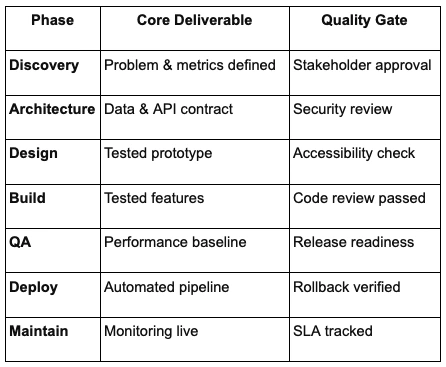
A Practical Application Development Process for Scaling in Production
If you expect growth, treat production readiness as part of the application development process and not a post launch scramble. Start by defining SLIs like latency and error rate, then set SLOs, for example 99.9% of requests under 300ms, in the web application development process. It gives you an error budget to guide smart trade offs between speed and stability.
Observability is the engine behind those decisions. Instrument the product with metrics, logs, and traces so issues are explainable, not mysterious. A tracing setup, for example, helps you connect a slow screen to an API call, then to a database query, and finally to the exact log line that explains why it happened. This data also tells you when you are burning through error budget.
Next, design for horizontal scale early. Keep services stateless where possible, store sessions in a shared cache, or use JWT based sessions. Push long running tasks into background workers and queues so traffic spikes do not overload your database. Build load testing and capacity planning into your release cycle, and set clear performance budgets so teams know what “fast enough” means before launch.
Finally, bake in resilience patterns as standard practice. Add rate limiting on critical endpoints, use circuit breakers on external dependencies, and implement retries with exponential backoff and jitter. Plan graceful degradation, such as serving cached data or fallback responses, so users still get value during partial outages.
Secure Application Development Process Checklist
Security works best when it is built in from the start, not added at the end. This secure application development process checklist keeps each phase tied to real risks, so teams can ship faster without creating avoidable exposure. Use a risk first mindset and align controls to known threats, such as the OWASP Top 10 2025.
1) Requirements and Design
Start by making risk visible.
- Draw data flow diagrams so everyone can see how sensitive data moves
- Mark trust boundaries and entry points where attackers usually test first
- Run a structured threat modeling session using STRIDE or a similar method
- Turn the output into security requirements, not just notes
2) Development and Verification
Treat security like a must have item at all steps, not a separate workstream. Use OWASP ASVS as a practical control list and match the level to your product risk.
- Enforce secure coding standards and peer review for security sensitive code
- Validate inputs and sanitize outputs to reduce injection and XSS risk
- Add automated SAST checks in your CI pipeline on every commit
- Block merges when critical findings fail, so issues do not reach staging
3) API Specific Gates
APIs often become the fastest path to data exposure, so put strong guardrails around them.
- Use strong authentication, for example OAuth tokens or API keys
- Apply fine grained authorization per endpoint and per object
- Add rate limiting and abuse detection aligned with OWASP API Security Top 10
- Maintain an API catalog or gateway so endpoints stay documented and monitored
- Run targeted penetration tests on critical routes and high impact actions
4) Software Supply Chain Controls
Third party dependencies are now a major risk category, so track what you ship.
- Generate an SBOM for every release and store it with build artifacts
- Run dependency scanning to catch known CVEs early
- Use code signing and trusted registries to reduce tampering risk
- Automate dependency updates with testing so production stays current
5) Lightweight Framework Cross Check
To keep coverage consistent, map practices to NIST SSDF across Prepare, Protect, Produce, and Respond. In this manner, reviews become routine instead of a last minute blocker, and it reinforces that security is part of delivery, not a separate event.
Enterprise Application Development Process Governance Model
Enterprise builds add governance, not just features. A strong enterprise application development process sets clear ownership, formal checkpoints, and operational guardrails so the product can scale across teams, systems, and compliance needs.
1) Decision Gates and Accountability
In an enterprise grade build, decisions need owners. Add lightweight gates before major milestones.
- Use a RACI matrix so every deliverable has a clear approver
- Require sign off on architecture, security review outcomes, and compliance checklists
- Define what must be approved before build, before beta, and before launch
- Align teams through planned release cycles like milestone reviews
2) Identity, Access, and Audit Readiness
Identity and traceability are baseline requirements, not add ons.
- Implement corporate SSO early, such as SAML, OAuth, or LDAP
- Apply role based access control across UI, APIs, and admin actions
- Add audit logging from day one, including who did what and when
- Map app roles to directory groups so access stays manageable at scale
3) Integration and Platform Fit
Enterprise apps rarely live alone, so integration is part of the initial plan.
- Define how the product connects to CRM, ERP, and data warehouses upfront
- Choose patterns that match the environment, such as REST, SOAP, or event driven messaging
- Use webhooks or middleware where legacy systems require buffering and translation
- Plan API versioning and backward compatibility for slower upgrade cycles
4) Operational Governance and Release Management
Governance also means how you run the system after launch.
- Decide release cadence early, continuous delivery or scheduled releases
- Set incident response basics, on call rotation, escalation paths, and ownership
- Tie SLOs to teams so reliability is owned, not assumed
- Use change management with logged and reviewed production changes
When you embed these controls into your web application development process, enterprise delivery becomes predictable, auditable, and easier to scale across stakeholders.
Tooling and Team Blueprint to Execute the Process Efficiently
Even the best web application development process fails without role clarity and proper tooling.
Core Roles and Responsibilities (By Phases)
A capable team should cover all key functions. Typical roles include: Product Manager/Owner (owns vision and backlog), UX Designer/Business Analyst (crafts user journeys), Frontend and Backend Developers (implement features), QA/Test Engineer (ensures quality), DevOps/Platform Engineer (manages CI/CD and infrastructure), and Security Engineer/Architect (oversees compliance and secure design). In smaller teams, individuals may wear multiple hats. What’s critical is that everyone knows who owns what: for instance, who is accountable for approving test plans or monitoring SLOs. Clear responsibilities (sometimes documented in a RACI chart) prevent tasks from slipping through the cracks.
Tool Stack by Stage
For each stage of the web application development process, use tools that enhance productivity. During planning and design, tools like Jira or Azure Boards can track requirements, while Confluence or Miro can capture architecture diagrams and user flows. For coding, use a version control system (GitHub, GitLab) with an automated build (Jenkins, GitHub Actions). Linters and formatters (ESLint, Prettier) enforce code consistency. In testing, frameworks like Jest or pytest handle unit tests, Selenium or Playwright automate UI tests, and k6 or Gatling perform load tests. Security and dependency scanners (SonarQube, Snyk) catch issues early. For deployment, container registries and Kubernetes/Docker can standardize environments. Finally, observability tools (Prometheus, Grafana, ELK/EFK stacks) monitor the live app. Choosing the right tool at each phase makes the process smoother and reduces manual work.
When Low Code Web App Development Fits
Low code web app development can speed up delivery when the product is simple, form driven, or heavily workflow based. It is often a practical option for internal tools, admin panels, dashboards, approval systems, and early prototypes where speed matters more than deep custom engineering.
That said, low code does not remove the need for discipline. In a reliable web application development process, low code solutions still need clear ownership, testing standards, security review, and deployment controls. The platform may reduce manual coding, but the product still has to meet the same expectations around reliability, access control, and maintainability.
Low code works best when the use case is well defined and the logic is not overly complex. It becomes less suitable when the application needs advanced performance tuning, custom architecture, deep integrations, or very specific user experiences that go beyond what the platform supports well.
If you choose this route, treat platform configuration like production software. Keep version history where possible, document workflows, review permissions carefully, and test generated logic the same way you would test hand written features. A mature application development process does not lower standards just because the delivery method is faster.
For teams that need quick execution without losing operational control, low code can be a useful part of the delivery strategy. The key is knowing where it fits and where custom development will give you more flexibility in the long run.
5 Web Application Development Trends in 2026
The biggest shift in 2026 is that teams are no longer treating modern delivery practices as optional. The web application development process is becoming more AI aware, more typed, more observable, and more security focused from the start. Even if it does not change the core phases of delivery, it does change what strong teams now consider a baseline.
1. AI Driven Web App Development and AI Native Web Apps
AI is now influencing both how web apps are built and what users expect inside them. GitHub reports that more than 1.1 million public repositories now use an LLM SDK, with 693,867 of those created in the last 12 months, which signals that AI assisted workflows are no longer experimental. CNCF also reports that production AI use reached 82 percent in its 2025 annual cloud native survey, which shows how quickly AI features are moving into real systems.
For product teams, this means two things. First, developers are using AI to speed up scaffolding, testing, and iteration. Second, more web apps now need to support AI powered search, recommendations, copilots, or workflow automation inside the product itself. In 2026, planning for AI is becoming part of product architecture, not just a future add on.
2. Type Safe Full Stack Development
Typed systems are becoming the default for serious web application work. GitHub says TypeScript overtook both Python and JavaScript in August 2025 to become the most used language on GitHub, which reflects a wider move toward safer, more maintainable full stack development. GitHub also ties that rise to agent assisted coding, where typed contracts help catch mistakes earlier in production workflows.
For teams building web products, that trend matters because typed APIs, schemas, and frontend contracts reduce ambiguity across the stack. It makes collaboration easier, improves refactoring confidence, and helps keep larger codebases stable as products grow. In practice, type safety is becoming less of a preference and more of a delivery advantage.
3. Platform Engineering and Self Service Delivery
As systems grow, teams need more than raw infrastructure access. They need shared delivery standards, reusable environments, and self service workflows that make shipping easier. CNCF launched the CNPA and then the CNPE certifications to formalize platform engineering skills, which is a strong signal that platform thinking is becoming more central in modern software delivery.
This trend matters because platform engineering reduces friction across teams. Instead of every squad rebuilding the same CI, security, deployment, and observability setup, organizations are standardizing those capabilities into internal platforms. That helps teams move faster without giving up consistency or governance.
4. Observability as a Product Requirement
Observability is no longer just an operations concern. CNCF says OpenTelemetry is now the second highest velocity CNCF project, and nearly 20 percent of survey respondents report using profiling as part of their observability stack. That points to a broader shift, observability is becoming part of how teams design, not just how they troubleshoot.
For web teams, this changes expectations early in the application development process. Metrics, logs, traces, and profiling now support release confidence, incident response, and performance tuning from the start. In 2026, if a system cannot explain its own behavior clearly, it is much harder to scale it with confidence.
5. Security and Software Supply Chain Hardening
Security expectations are also rising. OWASP Top 10:2025 now lists Software Supply Chain Failures as A03, and OWASP says this category ranked first in the community survey and had the highest average incidence rate in contributed data. At the same time, NIST is actively updating SSDF guidance and advancing software supply chain and DevOps security practices through NCCoE projects and draft publications.
That matters because secure delivery in 2026 is broader than scanning for a few known issues. Teams are expected to manage dependencies, improve build integrity, document components, and harden access controls as part of a secure application development process. The result is a stronger default posture, especially for products that operate at scale or serve enterprise buyers.
Common Failure Modes and How to Prevent Them
Skipping any critical steps in the web application development process can lead to pitfalls. Common failure modes include:
- Security Retrofits That Explode Scope
One classic mistake is treating security as an afterthought. If threat modeling and secure design are skipped, fixing issues later “can cost up to 100 times more”. For example, retrofitting encryption or a new authentication flow late may force massive rework of data storage and code. OWASP warns that vulnerabilities introduced in design are extremely costly to remediate. To prevent this, perform threat modeling and security reviews early so that safety is built in from the outset. - Scaling Bottlenecks Caused by Stateful Design
Another pitfall is choosing patterns that don’t scale. For instance, storing user sessions only in one server’s memory or using an unsharded database means you’ll hit limits quickly. Late-stage load tests may show these bottlenecks, but by then refactoring is hard. Architect for distribution from the start: use external session stores (Redis, JWTs), design stateless services, and plan your database schema to support scaling (indexes, sharding). Performance testing early in the process helps catch these issues in time. - Reliability Suffers Due to “No Observability” Trap
Operating blind without observability dooms reliability. Teams that skimp on logging and metrics often only discover issues when users complain. As one SRE expert puts it, “no observability → no reliability”. Make observability a requirement: instrument your app to emit meaningful logs, metrics, and request traces. For example, include request IDs in logs so you can trace user actions across microservices. Monitor health and alert on error rates/latency. This way, the team can detect and diagnose problems before they impact customers. - Supply Chain Blind Spots (Unmanaged Dependencies, Missing SBOM)
Ignoring your software dependencies is increasingly dangerous. If you don’t keep track of third-party libraries, you might include components with critical vulnerabilities or license issues unknowingly. OWASP now lists “Software Supply Chain Failures” as a top threat. For example, using an outdated front-end library with a known cross-site scripting bug could expose your users. To prevent this, maintain a Software Bill of Materials (SBOM) of every component. Automate dependency scanning (SCA) so you’re alerted to vulnerabilities. Treat updates as part of the process, not a one-off task.
Conclusion
A robust web application development process aligns product vision with technical execution and built-in safeguards.
By following a clear sequence of phases (Discovery, Design, Development, Testing, Deployment, Maintenance) and embedding performance and security best practices at every step, teams can deliver applications that scale reliably and stay secure.
Leveraging industry best practices (like OWASP’s guidelines and NIST’s SSDF) and learning from real-world failure modes ensures you cover all bases.
For startups and enterprises alike, following a disciplined web application development process can make the difference between success and costly failures. Ultimately, this structured approach is what underpins the reliability and quality of any web application.
Overcome Common Web Application Development Challenges with BrainX
At BrainX Technologies, we help businesses tackle the complexities of the web application development process, from ensuring seamless scalability to embedding security from the start.
We specialize in helping teams overcome common challenges like slow delivery times, security vulnerabilities, and integration roadblocks. Whether you need to accelerate MVP delivery or navigate the intricate demands of enterprise solutions, we ensure your app is built for growth, reliability, and security.
Let us help you streamline your development process—reach out to us today for tailored solutions.
Frequently Asked Questions About the Web Application Development Process
How long does the lifecycle typically take for an MVP vs. enterprise?
An MVP often lands in 2 to 6 months with a small, focused team and a tight scope. Enterprise builds usually run 6 to 12 months or longer because they add formal reviews, deeper testing, and compliance steps. Team size, integrations, and risk level can shift timelines a lot. Strong scoping inside the web application development process is usually the biggest lever to speed delivery.
How do I decide which process to use (Agile vs. Kanban vs. Staged)?
Pick based on how predictable your work is. Agile fits best when requirements evolve and you want iterative releases. Kanban works well for continuous flow, support, and maintenance where priorities change often. Staged approaches fit fixed requirements or regulated environments, as long as you keep feedback loops.
What’s the minimum security baseline I shouldn’t skip?
Cover the OWASP Top 10 categories and make security checks part of daily delivery. Enforce HTTPS, strong authentication, secure configuration, and dependency hygiene. Add automated scanning in CI so high risk issues are blocked early. If you need a simple bar, use OWASP ASVS Level 1 as a baseline.
What changes when building the web app for enterprise buyers?
Expect more governance, documentation, and formal approvals across teams. SSO integration, role based access control, and audit logs usually become mandatory from day one. Enterprises also care about reliability commitments, support readiness, and clear operational processes. The payoff is higher trust, smoother procurement, and fewer surprises after launch.
How much does web app development cost?
Web app development cost depends on scope, complexity, integrations, team size, security needs, and how much custom functionality the product requires. A simple MVP will cost far less than a platform with real time features, role based access, third party integrations, and enterprise level controls. The best way to estimate budget is to define the core features first, then map effort across design, development, QA, infrastructure, and post launch support. A disciplined web app development process helps control cost by reducing rework and keeping scope decisions clear.
What are the disadvantages of web applications?
Web applications can be more complex to build and maintain than simple websites because they rely on backend logic, databases, integrations, and ongoing security controls. They also depend on internet access unless offline capabilities are designed in deliberately. Performance can suffer if the architecture is weak or the app is not optimized for scale. That is why a structured web application development process matters early.
When should I choose a web app over a website?
Choose a web app when users need to do more than read content. If they need accounts, dashboards, workflows, transactions, approvals, or personalized data, a website usually is not enough. A web app is the better fit when the product must process actions and return dynamic results in real time. While this is usually the point where the application development process becomes more architecture and operations focused.
What is the most important phase of web application development?
There is no single phase that works in isolation, but discovery and planning usually have the biggest long term impact. This is where teams define requirements, user needs, technical risks, security expectations, and scalability targets before build starts. If those decisions are weak, every later phase becomes slower, more expensive, and harder to stabilize. In a strong app development process, early clarity is what makes design, development, testing, and release move smoothly.
Key Takeaways
- Web scraping for beginners starts with a clear “data contract” (i.e. fields, unique ID, freshness, output format) so your output stays consistent.
- Use a repeatable 5-step workflow. Inspect → Retrieve → Parse/Extract → Normalize → Save. Your scraper doesn’t break easily this way.
- Run the “View Source vs Inspect” test to quickly spot JavaScript-rendered pages and choose the right approach.
- Scale safely with pagination (URL patterns or next links), plus deduping and polite pacing.
- Apply proven patterns when pages get tricky (list→detail scraping, Network tab JSON endpoints, simple forms/interactions).
- Choose tools based on website type, then scrape responsibly (check robots.txt rules, review ToS, avoid sensitive data).
Introduction To Web Scraping for Beginners
Web scraping for beginners involves using code to automatically collect data from websites, turning hours of manual copying into seconds of scripted processing. In this step-by-step tutorial, you will inspect a web page to find data patterns, write a simple scraper to retrieve content, and then scale up to handle many pages. We’ll cover how to detect JavaScript-heavy sites, pick suitable tools (including no-code options), and save results in clean CSV or JSON format. At each step, we emphasize doing this responsibly – for example, by respecting robots.txt rules and site terms of service – to extract data in an ethical and reliable way. By the end, you’ll have a practical workflow for extracting web data.
What “Web Scraping” Really Means (and What it Doesn’t)
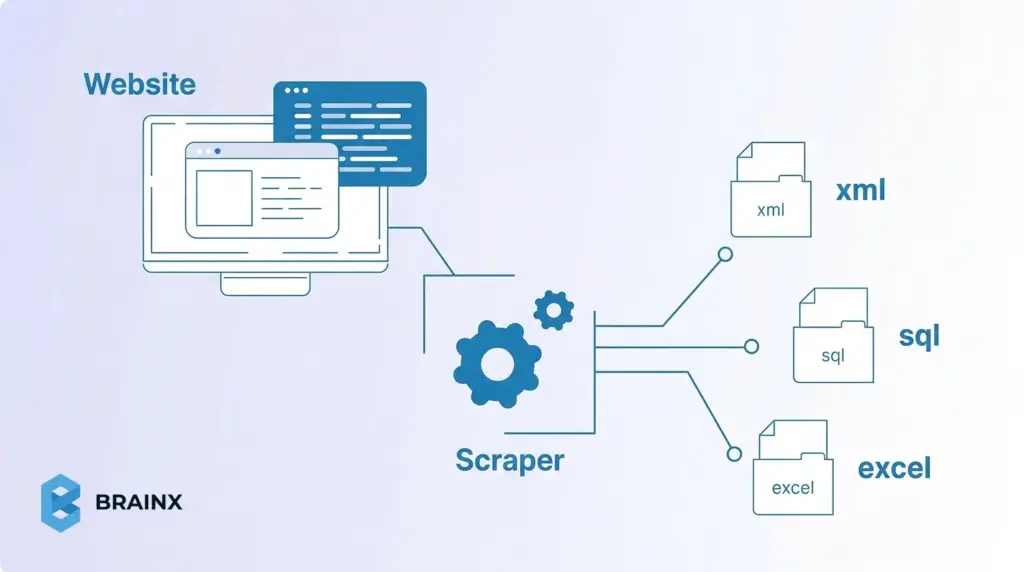
Web scraping refers to the process of extracting web page data using a program. Practically, you load the HTML (or the DOM) of a page and grab the desired content (such as product names, price, or text of an article). It is a substitute for manual copy-pasting. Unlike web crawling (which indexes pages across a site or the whole internet) or searching via an API, scraping targets specific data on each page. In other words, “web crawling is data indexing while web scraping is data extraction”. Scraping is the right approach when you need particular fields from pages, especially if no official API exists.
What Is Web Scraping Used For? (Web Data Scraping Use Cases)
Companies and researchers use scraping for all kinds of data. For example, retailers monitoring their competitors’ prices on hundreds of products, analysts scraping off real estate or job listings, and researchers accessing publicly available information on news websites or government portals.
A famous anecdote: Airbnb originally jump-started its database after scraping listings from Craigslist.
Web Scraping vs Crawling vs API
Crawlers (like Googlebot) follow links to discover pages; scrapers pull data from known pages. In case a site has an official API that provides all the information necessary, it is usually the easiest option. However, not all sites have API, and those that do can be limited or require payment.
As one guide notes, firms often turn to scraping “when no suitable API is available”. So, scraping is the act of grabbing whatever is visible in the HTML/DOM when you require it, which effectively fills gaps left by missing or restrictive APIs.
How Does a Web Scraper Function?
Web scrapers function by following a basic pipeline: Request → Parse → Extract → Store. For each page, a scraper first sends an HTTP request, or opens a browser session, to fetch the content. It then parses the HTML into a searchable structure, extracts the fields it needs using selectors or paths, and saves the result as CSV, JSON, or in a database.
The Two Core Steps of Web Scraping
For beginners, it helps to simplify that workflow into two core steps: fetching the page content and pulling the relevant data from it. Everything else, such as pagination, normalization, validation, storage, and monitoring, builds on top of these fundamentals.
Requesting the HTML Content
The first step is retrieving the page content from the target URL. On a simple site, this usually means sending an HTTP request and receiving the raw HTML in response. In Python, for example, that often starts with a request made through requests.get(). In browser based workflows, the same goal is achieved by loading the page and capturing the rendered DOM.
This step matters because your scraper can only extract what it successfully receives. If the page is static, the HTML response may already contain the data you need. If the site relies on JavaScript, the initial response may only return a partial shell, which means you may need a browser automation tool or another method to access the final content.
Parsing the Relevant Data
Once the content is retrieved, the next step is parsing it into a structure you can search. This is where HTML parsers such as BeautifulSoup, lxml, or Cheerio become useful. They let you navigate the page structure and target specific elements using selectors or paths.
The goal here is not to parse everything on the page. It is to isolate only the fields that matter, such as names, prices, dates, links, or descriptions. For example, a scraper might load the HTML into BeautifulSoup, locate each product card, and extract the title and price from those repeated elements. Once that works on one page, the same logic can usually be repeated across similar URLs.
What Kinds of Data Can You Scrape from the Web?
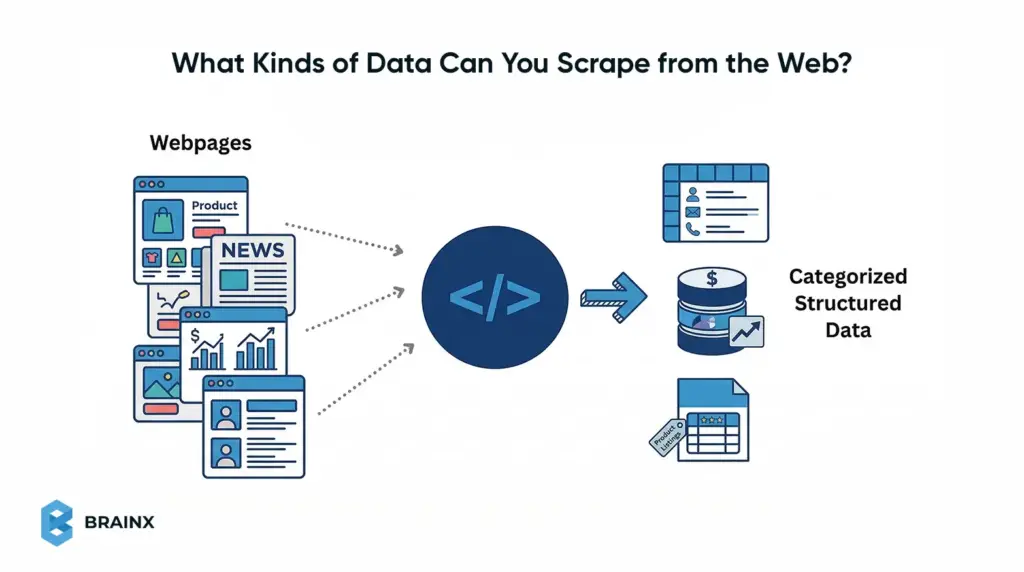
Web pages can contain many kinds of scrapeable data, but some formats are much easier for beginners than others. In general, the easiest targets are public pages with repeated elements and predictable fields, such as listings, tables, and item cards. The goal is to identify content that appears in a consistent structure so it can be extracted cleanly.
Structured Data on List Pages
Structured page data usually appears in repeating formats such as tables, search results, category grids, and public directories. These pages are ideal for beginners because each row or card often contains the same set of fields.
Examples include:
- Names and titles
- Prices and discounts
- Dates and locations
- Ratings and counts
- Page and image URLs
Detail Page Data and Metadata
You can also scrape deeper data from individual pages. The data can include longer descriptions, specifications, tags, breadcrumbs, publish dates, and other metadata attached to a single record.
It is common when you first collect links from a list page, then visit each detail page to extract richer attributes.
Static, Dynamic, and Hidden Data Sources
Not all visible data is delivered the same way. Some pages return data directly in HTML, while others load it through JavaScript or background JSON requests. That changes the scraping method, but not the overall goal.
For beginners, the best starting point is public, low-complexity data that is:
- visible without login
- repeated in a stable format
- easy to inspect in the browser
- spread across simple list or detail pages
Common Types of Web Scraping Beginners Should Know
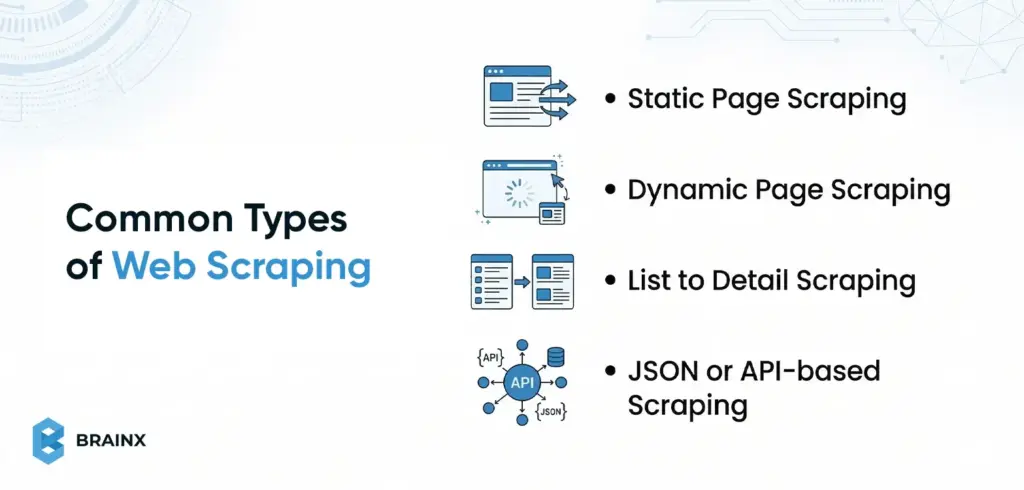
Not all web scraping jobs work the same way. Some pages return clean HTML that is easy to parse, while others load content dynamically, split data across detail pages, or expose structured data through background requests. Understanding these common types helps beginners choose the right method before they start coding.
Static Page Scraping
Static scraping is the simplest type and the best starting point for beginners. The page content is already present in the raw HTML returned by the server, so a basic HTTP request and HTML parser are often enough.
This works well for:
- Blog archives
- Category pages
- Public directories
- Simple product pages
- Listing pages
If the data appears in “View Source,” the page is usually a good candidate for static scraping.
Dynamic Page Scraping
Dynamic scraping is needed when the content is loaded by JavaScript after the initial page request. In these cases, a normal request may return only a basic HTML shell, while the real data appears later in the live DOM.
With this type of scraping you often require:
- a headless browser
- browser automation
- direct access to the background requests powering the page
A quick beginner test is to compare “View Source” with the browser inspector. If the data only appears in the inspected page, it is likely dynamic.
List to Detail Scraping
Some websites show summary data on one page and full information on another. In this type, you scrape a list page first, collect the item URLs, and then visit each detail page to extract additional fields.
Such a pattern is common in:
- E-commerce catalogs
- Job boards
- Real estate listings
- Directories
- Research repositories
It is one of the most practical scraping patterns because important attributes are often spread across multiple page levels.
JSON or API Based Scraping
Sometimes the easiest scraping target is not the visible HTML at all. Many sites load structured data through background requests that return JSON. If you can find that endpoint in the browser’s Network tab, you may be able to collect cleaner data by calling it directly.
For beginners, this can be easier than parsing messy HTML because:
- the field names are clearer
- the structure is more predictable
- nested data is easier to preserve
It is especially useful on modern apps and JavaScript-heavy websites.
Pick a Target Site and Define Your Data Contract Before You Start
Before writing any code, plan what you want to collect. Define a data contract that specifies exactly which fields to extract, what will uniquely identify each record, how often to update the data, and the output format. For instance, if you’re scraping products, your contract might list fields like product_id, title, price, and availability, with product_id as the unique key. Normalizing to this schema (each row has the same columns) prevents confusion later. This upfront schema gives your scraper a clear goal and ensures your output is consistent.
The “Data Contract” Template
- Fields: List the exact data columns you need (e.g. name, price, rating, url). Decide each field’s format (string, number, date).
- Unique ID: Choose a field or combination (like a product ID or URL) that is unique for each item. This lets you detect duplicates and merge updates.
- Freshness (frequency): How often does this data change? If prices update daily, plan a daily scrape. If stock levels change constantly, you might need hourly updates.
- Output format: Decide how to save the data. For example, use CSV if your data is flat (rows and columns) and you want easy spreadsheet compatibility. Use JSON if your data is nested or you need a flexible format for an API. (You can always convert later, but pick one to start.)
Quick Feasibility Checks
- Pagination: Does the site have multiple pages of results? If so, how are they accessed? Look for a ?page= URL or a “Next” button. These patterns determine how you’ll loop through pages.
- Login or paywall: If the data requires logging in, check whether it’s feasible (some scrapers handle login forms; others don’t). If content is behind a paywall or user account, you may need credentials or skip that site.
- JavaScript: Check if the data loads dynamically. A quick test is “View Page Source” vs “Inspect Element.” If the desired data isn’t in the raw HTML source but appears in the browser DOM, it’s inserted by JS. In that case you’ll need a headless browser or JS-enabled method (see steps below).
Lightweight Compliance Check
- Robots.txt: Look at example.com/robots.txt. This file tells well-behaved bots which URLs can’t be fetched. It’s mainly intended to prevent overloading the site. Adhering to it is good etiquette (e.g. don’t scrape disallowed paths), even though it’s not legally binding. (Robots.txt is not a “weird alien language” – it’s just a text file with allow/disallow rules.)
- Terms of Service: Briefly scan the site’s terms of use for any scraping or data-use restrictions. In many places, scraping publicly available data is legal, but breaching a site’s TOS (or collecting private user data) can lead to legal trouble. As one source notes, scraping public content is usually fine, unless you violate the site’s rules or privacy/security measures. In short, only scrape what you’re allowed to use.
Web Scraping for Beginners: the Step-by-Step Workflow
Below is a repeatable workflow for scraping a page. Treat this as a template for your own scraper:
Step 1: Inspect the Page (Identify the Repeating Pattern and Selectors)
First, use your browser’s Developer Tools (F12 or right-click → Inspect) to examine the HTML of the page. Hover over elements on the page to see which tags contain the data you need. Identify the container that repeats for each item (for example, each product might be in a <div class=”product-item”>). Note the CSS class or id of that container and of the child elements holding fields (like .price or #title). These selectors will tell your code where to extract text. In short: Find the HTML pattern.
Step 2: Retrieve Content (HTML Request vs Browser-rendered DOM)
Next, fetch the page content. For a simple site, an HTTP GET request (e.g. using requests.get() in Python) may suffice. However, if the content is loaded by JavaScript, a plain request will only return a bare HTML skeleton. As Firecrawl notes, “Most websites today use JavaScript to load content after the initial page loads… you miss everything that JavaScript creates or modifies”. If your initial fetch is empty or missing data, switch to a browser-rendering approach. Tools like Selenium, Playwright, or Puppeteer launch a headless browser, let the JS run, and then give you the final HTML/DOM. Use a static fetch for static pages, and a browser engine for dynamic pages.
Step 3: Parse and Extract (CSS Selectors, XPath, and When to Avoid Regex)
Now parse the fetched HTML into a queryable structure. For example, in Python you might use BeautifulSoup or lxml; in JavaScript, Cheerio or DOMParser. Then apply CSS selectors or XPath to find the elements you identified in Step 1. CSS selectors are very handy: for instance, soup.select(‘div.price’) finds all <div> tags with class “price”. XPath can achieve similar results with expressions. Use whichever you’re comfortable with.
A key rule: don’t parse HTML with regex. HTML isn’t a regular language, so regex parsing is brittle and error-prone. Instead, rely on the DOM-based methods above. For each element you select, extract the text content. For example:
- title = soup.select_one(‘h1’).text to get a product title.
- price = soup.select_one(‘p.price’).text to get the price text.
Step 4: Normalize Data (Clean Text, Types, and Missing Fields)
Clean the scraped text into uniform data. Strip excess whitespace, remove currency symbols or commas, and convert strings to numbers or dates as needed. For example, one site might show a price as “$1,299.00” and another as “USD 1299”; normalize both to the numeric value 1299.00. Standardize formats for dates, phone numbers, etc. Also decide how to handle missing or malformed fields (e.g. fill with NULL or skip). As one data engineering guide explains, “websites present information in inconsistent formats” and you must normalize everything into a consistent schema. For instance, ensure that numeric columns end up as numbers (not strings) and text columns are encoded uniformly.
Step 5: Save Results – CSV vs JSON vs Database (Choose Based on Use Case)
Choose where to store the data. A common beginner choice is CSV, because it’s simple and works with spreadsheets or tools like Pandas. CSV is great for flat, tabular data. If your data has nested structure (e.g. a field that is itself a list or object), consider JSON instead – it naturally preserves hierarchy and works well with NoSQL or web APIs. For large-scale or relational needs, you might write directly to a database (SQL or NoSQL). In summary: use CSV when you need a simple table, and JSON when you need flexible, structured output.
Pagination and List Pages (How Beginners Go from 1 Page to 100+)
After you succeed on one page, you’ll often need to scrape many pages. Common techniques include:
- URL patterns and “next page” links: Look at the URL when you click to the next page of results. Often there’s a parameter (like ?page=2) you can increment. If not, find the “Next” button’s link in the HTML and follow it. For example, a page might have <a href=”/products?page=3″>Next</a>. You can write a loop that fetches each page until no “Next” link is found. One guide recommends either looping by known last page, or continuously clicking the next link until it disappears. Always test manually to confirm you’ve captured the pattern.
- Deduplication: When paging through lists, you might encounter duplicate entries (for example, an item appears on the overlap between page 1 and page 2). To avoid repeated rows, filter by the unique ID or a composite key. For instance, keep a Python set of seen IDs and skip any repeats. As a data cleaning strategy notes, you should identify duplicates (exact matches easily, and fuzzy matches for slight variations) and consolidate them. In practice, using the unique field (like product ID or URL) is a straightforward way to drop repeats.
- Polite rate limits: As you iterate, throttle your requests so as not to overload the site. Insert a short delay (e.g. 1–2 seconds) between page requests. If you receive an HTTP 429 (“Too Many Requests”), it means the server’s rate limit has been reached. The solution is to back off: wait for some time (possibly exponentially increasing waits) and retry. Check the Retry-After response header too, which indicates how long to pause. Additionally, rotate IP addresses or proxies if you plan very high-volume scraping. Overall, a gentle pace and retry logic help avoid blocks and capture all pages.
[ Also Read: How to Build AI-Powered Web and Mobile Apps with ChatGPT API ]
Web Scraping Techniques for Beginners
Beyond the basic workflow, here are some practical techniques for common situations:
- List → Detail pattern: Often a site shows summaries (table rows, cards, list items) each linking to a detail page. Scrape the list page first to get summary fields and links, then loop through each link to fetch additional details. For example, first grab all product names and URLs from the category page, then visit each product URL to get full specs. This two-step approach ensures you don’t miss data hidden on detail pages. (See also the [list-to-detail scraping pattern] for examples.)
- Extracting JSON from the Network: Many modern sites load data via AJAX requests that return JSON. Open your browser’s Developer Tools Network tab and look for requests that return JSON when the page loads. If you find one (for instance, an endpoint with /api/products?page=2 returning JSON), you can call that URL directly instead of parsing HTML. This often yields structured data more cleanly and avoids parsing overhead. This technique is especially useful if your target site is a single-page app or heavily JS-driven. (See [inspect network requests] for more on this method.)
- Handling forms and interactions: If data is behind a search form or filter, you may need to simulate those actions. For simple cases, discover the form submission URL and parameters (via devtools), then issue a POST/GET with those parameters. For complex interactions (clicks, logins), use a browser automation tool (Selenium/Playwright) to fill the form and submit it programmatically. Once the form is submitted, scrape the resulting page as usual.
- Dynamic vs static pages (“View Source vs Inspect” test): A quick way to tell if a page is dynamic is to compare “View Page Source” with the live DOM in Inspect mode. If the data you want isn’t present in the raw source but appears in Inspect, it’s being loaded by JavaScript. In that case, use a JS-enabled scraper (step 2 above). If the content is already in the source HTML, a simple request is enough.
Best Web Scraping Tools For Beginners
Choosing a tool depends on your comfort level and needs. Here are some categories:
- Beginner-friendly code stacks (Python vs JavaScript): Python is a classic choice: libraries like requests + BeautifulSoup (or frameworks like Scrapy) make scraping straightforward, and Python’s data tools (Pandas, CSV, JSON) handle output easily. JavaScript can also work: Node.js with Puppeteer (or Cheerio) lets you write scrapers if you prefer JS. Use Python if you value readability and data analysis libraries; use JavaScript if you are comfortable with it or need native browser automation (Puppeteer). We’ll break down Python, JavaScript, and Ruby in more detail after this section.
- Browser automation tools: When a site relies heavily on JavaScript, use a real browser under the hood. Selenium WebDriver (available in Python, Java, etc.) and Playwright/Puppeteer (Node.js) automate a full browser (Chrome, Firefox, etc.). They can click, scroll, and wait for scripts to finish. This ensures your scraper sees the page exactly as a user would. The trade-off is these tools are heavier and slower than raw requests, but they handle any JS-generated content.
- No-code/low-code scrapers: If you prefer a graphical interface, consider no-code tools. Examples include Octoparse, ParseHub, or browser extensions like Data Miner. These let you define scrape targets by clicking elements and configure pagination or filters through a UI. They often run in the cloud or your browser and export to CSV/JSON without writing code. This is great for quick, simple projects (or non-programmers) – though you may hit limits on customization or usage for very complex sites. (For service-oriented scraping, see also [no-code web scraping] guides.)
- Scraping APIs: For large-scale or mission-critical scraping, consider specialized scraping APIs (e.g. ScraperAPI, BrightData, or cloud browser tools). With these, you send a request to their API specifying the target page, and they return the content (handling proxies, browsers, CAPTCHAs, etc.). It’s the most robust solution, but these services typically charge by usage. Use a scraping API when you need scale and reliability; for a small beginner project, your own script is usually enough. (Learn more on [web scraping API] pages.)
Web Scraping Using Python
Python’s clear syntax and powerful libraries make it a popular choice for scraping. Its ecosystem includes requests (HTTP), BeautifulSoup/lxml (HTML parsing), and frameworks like Scrapy for larger projects. These are beginner-friendly with extensive documentation.
Recommended tools:
- Requests: Simple HTTP GET/POST (concise API). Pros: Easy, synchronous. Cons: No JS rendering, must combine with parser.
- BeautifulSoup or lxml: HTML parser with CSS selectors. Pros: Intuitive DOM navigation. Cons: Slower on large pages.
- Scrapy: Full framework for large crawls. Pros: Built-in async, pipelines. Cons: Steeper learning curve.
- Selenium/Playwright: Full browser automation. Pros: Handles any JS-heavy site. Cons: Heavy, slower.
Code example (Python): Fetch a static page, extract repeating items (e.g. titles and prices), save CSV (using Requests + BeautifulSoup).
import requests
from bs4 import BeautifulSoup
import csv
url = “https://example.com/products”
res = requests.get(url)
soup = BeautifulSoup(res.text, ‘html.parser’)
rows = [[“Title”,“Price”]]
for item in soup.select(“div.product”):
title = item.select_one(“h2”).get_text(strip=True)
price = item.select_one(“span.price”).get_text(strip=True)
rows.append([title, price])
with open(“output.csv”,“w”,newline=”) as f:
writer = csv.writer(f)
writer.writerows(rows)
This script shows the core pattern: request → parse (CSS selectors) → extract → save (CSV).
Pitfalls & tips: Be careful with selector drift (sites changing HTML) and missing data. Use soup.select_one(…) to catch missing elements safely. Debug by printing res.status_code and sample soup output. Watch out for JavaScript-driven content: if res.text lacks expected elements, the page likely needs a headless browser instead.
Performance: Python is slower per request than Node.js, but comfortable for medium-scale scrapes. Use sessions or retries with requests.Session() to reuse connections. For high volume, Scrapy’s asynchronous engine or a scraping API can scale. Python’s strength is in post-processing; pair it with Pandas for cleaning structured data.
Internal anchors: Use [CSS selectors vs XPath] to explain element selection, [browser automation] for JS-heavy pages, and [CSV vs JSON] for output formats.
Suggested image: A flowchart showing requests.get() → BeautifulSoup.parse → CSV write (alt: “Python code fetching web page content and writing to CSV”).
Web Scraping Using Javascript
Node.js offers JavaScript on the server, letting you use the same language as in-browser. Its async model (callbacks/promises) can make parallel fetches easy. Tools like Axios (or node-fetch) handle HTTP, and Cheerio parses HTML with a jQuery-like API. For JS-driven sites, Puppeteer or Playwright drive real browsers.
Recommended tools:
- Axios (or node-fetch): Promise-based HTTP requests. Pros: Simple syntax (await axios.get(url)), built-in JSON handling. Cons: No built-in parsing.
- Cheerio: Fast server-side jQuery-like HTML parser. Pros: Familiar CSS selectors, lightweight. Cons: No JS execution.
- Puppeteer/Playwright: Headless Chromium/Firefox. Pros: Full browser support, great for React/Vue pages. Cons: Heavy, requires async/await.
- Selenium (JS bindings): Alternative browser automation.
Code example (JavaScript): Fetch a page and extract repeating items using Axios + Cheerio, then save CSV with a basic writeFile.
const axios = require(‘axios’);
const cheerio = require(‘cheerio’);
const fs = require(‘fs’);
async function scrape() {
const res = await axios.get(‘https://example.com/products’);
const $ = cheerio.load(res.data);
let csv = ‘Title,Price\n’;
$(‘div.product’).each((i, el) => {
const title = $(el).find(‘h2’).text().trim();
const price = $(el).find(‘span.price’).text().trim();
csv += `”${title}”,”${price}”\n`;
});
fs.writeFileSync(‘output.csv’, csv);
}
scrape();
The above given async code uses await axios.get to retrieve HTML, then Cheerio to select elements (similar to browser-based jQuery).
Pitfalls & tips: Remember Node.js is case-sensitive and async – handle promises carefully (use async/await). Cheerio isn’t a full DOM – avoid using browser-only APIs. If data is loaded dynamically, use Puppeteer: e.g. const page = await browser.newPage(); await page.goto(url); const html = await page.content();. Debug by logging the fetched HTML or element counts.
Performance: Node’s event loop can fetch many pages concurrently. However, excessive parallelism can trigger rate limits. Use libraries like p-limit to throttle. When scraping many pages, consider stream-writing CSV to avoid memory bloat. JavaScript’s Chrome engines are fast; use headless browsers sparingly.
Web Scraping Using Ruby
Ruby is concise and has a long tradition in text processing. The Nokogiri gem (built on libxml) is the go-to HTML/XML parser and uses CSS/XPath selectors. Mechanize provides an easy browser-like interface. Ruby code tends to be very readable.
Recommended tools:
- Nokogiri: Powerful HTML/XML parser. Pros: Fast, supports both CSS and XPath. Cons: Must combine with open-uri or Net::HTTP to fetch.
- Open-URI (or Net::HTTP): Easy way to get a page: Nokogiri::HTML(URI.open(url)). Pros: Simple. Cons: May need require ‘open-uri’.
- Mechanize: High-level scraping library (follows links, handles cookies). Pros: Simulates a browser, easy to fill forms. Cons: More overhead for simple tasks.
- Watir: Browser automation (wraps Selenium). Pros: For JS pages. Cons: Heavy.
Code example (Ruby): Fetch a page and extract items with Nokogiri, save to CSV.
require ‘nokogiri’
require ‘open-uri’
require ‘csv’
doc = Nokogiri::HTML(URI.open(“https://example.com/products”))
CSV.open(“output.csv”, “w”) do |csv|
csv << [“Title”, “Price”]
doc.css(“div.product”).each do |item|
title = item.at_css(“h2”).text.strip
price = item.at_css(“span.price”).text.strip
csv << [title, price]
end
end
This uses URI.open to fetch the page and Nokogiri’s CSS selectors to find elements. The results are written to a CSV.
Pitfalls & tips: A common mistake is forgetting: require ‘open-uri’. Also Nokogiri parsing can be memory-heavy for very large pages. For JS content, use Mechanize or Watir. Always check res.status or rescue exceptions on URI.open to handle 404s/timeouts. Use binding.pry or puts to debug selectors in IRB if needed.
Performance: Ruby is slower than Node and Python for many requests, but fine for small-medium scrapes. For large crawls, Mechanize’s synchronous nature can bottleneck; you might use threads (Thread.new) or call external tools. Ruby excels at string manipulation if you need to process results.
Language Comparison Table
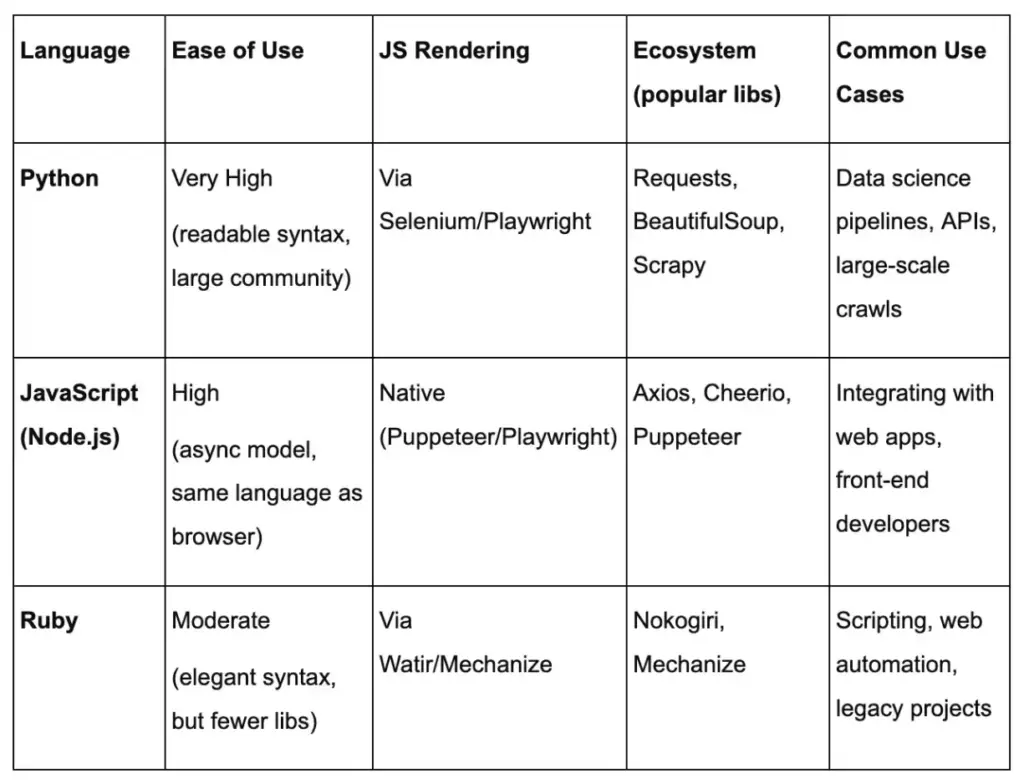
Each language can reach sites that require JavaScript via browser automation or API access, but Python and Node have broader ecosystems.
Common Challenges in Web Scraping and How to Solve Them
Even a well planned scraper can fail once it meets a real website. Pages change, selectors stop matching, content loads through JavaScript, and servers may slow down or block repeated requests. The good news is that most scraping problems follow a small set of patterns. Once you know what to look for, debugging becomes much faster and less frustrating.
For beginners, the key is to treat scraping issues as system signals, not random errors. If results are empty, duplicated, incomplete, or blocked, the problem usually comes from page structure, request timing, rendering method, or missing safeguards in your workflow.
Empty Results: Selector Drift, Wrong HTML, or JavaScript Rendered Content
One of the most common scraping problems is getting no data back even though the page looks correct in the browser. In most cases, this happens because the scraper is reading different HTML from what you see on screen. A selector may also stop working after the site changes its layout or class names.
Start with these checks:
- Confirm the request actually returned the expected page
- Inspect the saved HTML, not just the live browser view
- Verify that your selector still matches the current structure
- Compare View Source with Inspect Element to spot JavaScript loaded content
If the data appears only after the page finishes rendering in the browser, a simple HTTP request may not be enough. In that case, you may need browser automation or a JSON endpoint from the Network tab.
Blocks and Errors: 403, 429, CAPTCHAs, and Rate Limits
Another common challenge is being blocked before you can collect useful data. Websites may respond with status codes like 403 or 429, show a CAPTCHA, or return incomplete pages when they detect too many repeated requests.
At a high level, these signals usually mean:
- 403 means access is denied
- 429 means you are sending requests too quickly
- CAPTCHA means the site wants to verify human activity
- Repeated redirects or strange page content may indicate soft blocking
The safest response is to slow down and reduce pressure on the site. Add delays between requests, use backoff after failed attempts, and avoid sending unnecessary traffic. This is where internal guidance like rate limiting and retries can be helpful. A scraper that behaves politely is more stable and easier to maintain.
Logging Basics: What to Print or Save So You Can Reproduce Issues
When a scraper breaks, debugging is much easier if you have enough context to reproduce the problem. Many beginners only print the final extracted values, but that is rarely enough when something goes wrong.
Useful things to log include:
- Target URL
- HTTP status code
- Timestamp
- Number of records extracted
- Selector used for key fields
- Output of failed or suspicious requests
- A saved copy of the response HTML for broken pages
This gives you a trail you can inspect later instead of guessing what happened. It also helps separate parser issues from request issues. If the request succeeded but extraction failed, the problem is probably your selectors or assumptions about page structure. If the request itself failed, focus on access, timing, or rendering.
Maintenance Habits: Monitoring Changes and Updating Selectors Safely
Web scraping is rarely a one time setup. Websites evolve, class names change, pagination shifts, and data fields move into new containers. A scraper that works today may quietly degrade next week unless you monitor it.
Good maintenance habits include:
- Validating a small sample of output regularly
- Checking for sudden drops in row count
- Watching for missing key fields
- Keeping selectors simple and readable
- Avoiding selectors that depend on fragile visual classes only
It also helps to separate your extraction rules from the rest of your code so updates are faster and safer. If a site changes one product card layout, you should not have to rewrite the whole scraper. This is also a good place to use a data validation checklist so you can catch silent failures before bad data spreads downstream.
A practical mindset for beginners is this: scraping does not break because the internet is random. It breaks because pages, delivery methods, and access rules change. If you expect that from the start, you will build workflows that are easier to debug, maintain, and trust.
Responsible Scraping: Etiquette, Compliance, and Privacy Basics
Scraping responsibly is key. Follow these guidelines to stay on the right side of ethics and law:
How robots.txt Works (and Its Limits)
The robots.txt file at a website’s root tells web crawlers which pages they’re allowed or disallowed to fetch. It’s there primarily to prevent overloading a site. For example, a robots.txt might disallow /checkout or /admin. Remember, robots.txt is voluntary – it doesn’t legally grant permissions or set copyright. It’s good practice for scrapers to avoid disallowed paths (as a courtesy). In plain terms: think of robots.txt as the site owner saying “please don’t crawl these pages.” Respect it, but also know it’s mainly about polite behavior, not a permission slip for using data.
Respecting Site Performance: Concurrency, Caching, and Request Pacing
Don’t hammer the site. Keep parallel requests low (especially on smaller servers). Insert delays between requests (even a random 0.5–2 seconds can drastically reduce load). Use caching for static pages if you re-run scrapes frequently. If you update daily, there’s no need to re-download data that never changes (you can use HTTP headers or local caching to skip unchanged pages). The goal is to leave the site in basically the same state as before you scraped. Concurrency and request pacing are your best tools – more workers or speed are usually unnecessary for a beginner’s scrape.
Terms of Service and Data Rights: What to Review Before Scraping
Always check the site’s Terms of Service. Some sites explicitly forbid scraping or data reuse. For example, news or social sites often restrict automated copying of content. Even if data is public, copying copyrighted material without permission is problematic. Also, avoid scraping personal data (user emails, private profiles, etc.), as privacy laws may apply. In short: use only data that the site intends for public viewing. If you see a clause like “You may not use bots,” take it seriously. As noted, scraping public data is generally fine, but violating terms of use can have legal consequences.
Sensitive Data: Red Flags (personal data, gated content, copyrighted datasets)
A few red flags to watch out for:
- Personal information: Don’t scrape anything that isn’t explicitly public. Names, emails, or account data behind a login are off-limits (and may violate privacy laws).
- Login/paywall content: If content requires a login, credentials, or payment, you should have permission to scrape it. Otherwise skip it.
- Copyrighted content: Be cautious with large copyrighted texts, images, or proprietary databases. Unless you’re scraping for legitimate fair use (like research) or the site’s terms allow it, avoid bulk copying of copyright material.
When in doubt, err on the side of caution or seek legal advice. The aim is to respect privacy and copyright: gather only public, intended-to-be-shared data.
Conclusion
Web scraping for beginners is easiest when you treat it like a repeatable workflow, not a one-time script. Start by defining your data contract, inspect the page for a stable pattern, then retrieve, parse, normalize, and store your results in a format your team can actually use.
Once your first scraper works on a single page, the real value comes from scaling it safely. Add pagination, dedupe your rows, and implement pacing with backoff so you stay reliable over time (see: rate limiting and retries). If pages are dynamic, use the “view source vs inspect” test to decide when browser automation is worth it.
Before you ship anything into production, build in the basics: logging, selector maintenance habits, and a simple data validation checklist. And always keep compliance and privacy in scope by reviewing robots.txt rules and the site’s terms, especially when data could be sensitive.
BrainX Helps Build Reliable Web Scraping Pipelines
If you’re past the first script and want production-ready scraping, we can help. BrainX builds scalable scrapers for listings, pricing, and research datasets with clean CSV/JSON outputs, rate limiting, retries, and monitoring. Share your target site and data contract, and we’ll recommend the right approach, tools, and architecture.
FAQs for Web Scraping Beginners
Is web scraping legal?
Scraping publicly accessible websites is usually legal in many countries, especially when the data is non-sensitive (like product prices or publicly posted statistics). It can become illegal if it violates copyright law or a site’s terms of service. For example, copying large copyrighted text verbatim can be infringement, and bypassing a login wall can be unauthorized. Most disputes depend on how you scrape and what you do with the data.
Safest rule: scrape only clearly public, allowed data and avoid personal or confidential information.
What’s the difference between web scraping and web crawling?
Web crawling and scraping are related but distinct. Web crawling involves systematically browsing the web or a site to discover and index pages (like search engines do). Web scraping specifically means extracting data from individual pages. In short, crawling is about finding pages; scraping is about pulling data from pages. Think of crawling as building a map of URLs, and scraping as extracting answers from those URLs.
As summarized earlier: “web crawling is data indexing, while web scraping is data extraction”.
How do I know if a site is JavaScript-heavy?
A quick test: use your browser to “View Page Source” (which shows the original HTML). Then “Inspect Element” (which shows the live DOM after scripts run). If the information you want is missing in the raw source but appears in the live page, the site is JavaScript-heavy. For example, if View Source shows a mostly empty <div> but Inspect shows that same <div> filled with text, it’s being populated by JS. Also check the Network tab for API calls.
In short, if a basic HTTP fetch returns little content, plan to use a headless browser in your scraper.
Can I do web scraping for beginners without coding?
Yes – there are many no-code or low-code tools for scraping. For example, browser extensions or SaaS platforms (like Octoparse, ParseHub, or web data connectors) let you extract tables and lists by clicking on them. Google Sheets even has functions (IMPORTXML, IMPORTHTML) to pull data into a spreadsheet. These tools handle the crawling and parsing under the hood, so beginners can start scraping without writing code. They often include tutorials geared toward novices.
Once you’re comfortable, you can learn to script your own scrapers for more flexibility.
How do you scrape a web page in Python?
At a basic level, scraping a web page in Python usually involves four steps: sending a request to the page, parsing the HTML, selecting the elements you want, and saving the extracted data. A common beginner stack is requests for fetching the page and BeautifulSoup for parsing it.
In simple cases, the workflow looks like this:
- Use requests.get() to retrieve the page HTML
- Load that HTML into BeautifulSoup
- Find the target elements with CSS selectors or tag paths
- Extract the text, links, or attributes you need
- Save the result as CSV, JSON, or in a database
Python is often the easiest language for beginners because its scraping libraries are mature, readable, and well supported. If the site loads content with JavaScript, you may need tools like Playwright or Selenium instead of a basic HTTP request.
What should I store first: CSV or JSON?
It depends on your use case. CSV is best for spreadsheets, Pandas, or SQL because it’s simple and tabular.
JSON is better for nested fields (like lists of features or images) and works well for web apps or APIs.
You can usually convert between them later, so start with how you’ll use the data.
By following this guide, web scraping for beginners becomes systematic: plan, extract, clean, scale, and stay ethical.

Ruby on Rails (RoR) is an open-source, full-stack, web framework created using open-source Ruby. It adheres to Convention over Convention and Don’t Repeat Yourself ideologies, which make the development process more efficient, easy, and clean. It is relevant due to its powerful community support, scalability, and easy learning. RoR is reliable since it is used by such popular apps as Shopify, Airbnb, GitHub, and Hulu. Although the new technologies are appearing, RoR continues to offer an impressive and uncomplicated way of creating strong web applications.
For over 20 years, ROR projects have been leading in the tech industry, with many big companies using them to stay ahead of the competition. Ruby on Rails (RoR) is an open-source full-stack framework that was created to develop different web applications.
ROR is a collection of software modules, called RubyGem, that can be added via the operating system’s command-line interface. This tool allows Ruby programmers to save time by offering ready-made solutions for common tasks such as designing website forms or menus instead of manually coding them.
Being an open-source tool, Ruby on Rails is perfect for developing web apps, allowing developers to concentrate on the creative aspects of their projects. This guide to Ruby on Rails is designed for beginners looking to take on innovative web development projects.
The Evolution of Ruby on Rails
Ruby is a famous programming language created by Yukihiro “Matz” Matsumoto in the mid-1990s. It is one of the general-purpose languages, just like Java and C. However, it appears to be gaining more fame in web development. Rails, on the other hand, is a program library that expands the Ruby language with additional functionalities and conventions. In this way, David Heinemeier made this library and called it “Ruby on Rails.”
One of the fundamental reasons why software engineers are eager to learn Ruby is that it has taken the programming world by storm and has taken an unchallenged position in the IT industry.
Also Read : Python vs JavaScript for Web Development: A Practical Comparison
What is Ruby on Rails?
Rails is a web app development framework, written using the Ruby programming language. It aims to simplify web application programming by assuming the basic needs of all developers. It enables you to achieve more with less code compared to various other languages and frameworks. Experienced Rails engineers have also expressed that it improves the satisfaction of web application development.
Also Read : Web Application Development Process Guide for Secure, Scalable Systems
Rails has strong opinions about how software should be structured. The assumption is that there is an optimal approach to doing things, and the system is intended to promote that approach, sometimes at the expense of other options. Learning “The Rails Way” will likely lead to a significant boost in productivity. Continuing to apply old habits and familiar patterns from different languages to your Rails development can result in a less enjoyable experience.
The following are the two key components to remember:
- Ruby is a versatile programming language that can be used for a variety of projects, including E-commerce, SaaS solutions, social networking platforms, etc.
- Rails is an easy-to-use and user-friendly framework for developing websites and apps.
The Rails logic incorporates two major directing principles:
- Don’t Repeat Yourself
The DRY principle, essential in Ruby on Rails, reduces redundancy, ensuring efficient, maintainable, and cleaner code. It represents each piece of knowledge uniquely, leading to fewer bugs and easier maintenance.
- Convention Over Configuration
Rails has opinions about the best way to do many things in a web application and defaults to this set of conventions, rather than requiring that you specify minutiae through endless configuration files.
Recommended: 12 Benefits of Using Ruby on Rails for Your Startup
Ruby on Rails Architecture: Model-View-Controller (MVC)
Model
The model component oversees database interactions and trade rationale (information traded between the database and site interface). This element is connected to a database, typically housing an application that displays the current orders of a customer.
View
The view component displays all the graphical user interface elements with presentation logic. This section is solely dedicated to showcasing website pages; it does not involve accessing or saving data from a database. The task of the view component is done when the data is visible to the user; it’s as straightforward as that.
Controller
The controller module manages the user interface and application. In this section, the controller acts as a binding agent, connecting the model, view, and web browser in the application. The controller must collect data from the web browser request and then update the information in the model component.
Why Use Ruby on Rails?
439,443 websites are using Ruby on Rails to scale in the vast IT industry in 2024. Don’t these statistics show why it remains relevant after 20 years? If not, here are the 8 reasons why you must use RoR for your projects.
Recommended: Step-by-Step Guide to Scaling Ruby on Rails Applications
1. Convenient
Ruby on Rails utilizes a free open-source framework that is open to all clients and is helpful for developers. Furthermore, there are numerous gems to choose from for additional features, making it convenient for customizing your website or application and saving time.
2. Easy to Learn
Feeling overpowered and threatened is common when beginning to learn to code, particularly while grasping new concepts. Ruby on Rails is amazingly simple to study and closely follows the English language.
3. Agile Software Development
Ruby on Rails is suitable for Agile software development. It allows developers to make quick iterations and add new features instantly.
4. Secure
The Ruby on Rails framework has default settings for all the fundamental security features. While you utilize Ruby on Rails, you’ll be taking after a secure advancement process without even knowing it.
5. Readable
Ruby on Rails has a similar syntax to the English language, which makes it unique. It simplifies web development for beginners by enabling them to add as many features to their website or app as they want.
6. Flexible
Normally, a website may require Rails for the backend, but it can conveniently utilize a different programming language for the front end. Developers have the flexibility to utilize Ruby on Rails as needed, incorporating various coding languages smoothly.
7. Scalable
Ruby on Rails is amazingly versatile, as it allows engineers to execute indistinguishable code on different platforms. Its scalability allows applications or websites to effectively manage increased web traffic, making it well-suited for social media platforms or streaming services.
8. Helpful Community
Since Ruby on Rails is open-source, many developers are available to share their code, which can save you time and the frustration of starting from scratch. Beginners in coding can feel reassured knowing that a group of skilled developers is available to assist.
Popular Web Applications Created Using Ruby on Rails
In the last two decades, Rails has led numerous companies to huge user bases and massive market valuations.
Airbnb
Airbnb is the best pick globally for linking travelers with accommodations, created using Ruby on Rails. This online platform was established in 2008 and offers services in 65,000 cities globally across 191 countries.
GitHub

GitHub is the favored choice for overseeing source code, having over 66 million dynamic projects. This site permits developers to host and assess code, trade past projects, and exchange code for web applications with worldwide colleagues. GitHub is a web application planned with Ruby on Rails that permits engineers to share and collaborate on their work.
Shopify

Shopify is one of the most preferred platforms for online retail businesses worldwide. Ruby on Rails functions at the very core of this SaaS business model as its base programming language. This platform helps in designing one’s e-commerce website and makes digital marketing and SEO efficient.
Zendesk
Zendesk services companies like Shopify, Airbnb, Uber, etc. by running a client benefit program on RoR to give clients a quick means of reaching a back agent for any individual company.
Hulu

Hulu is one of the largest video streaming platforms, and it has been one of the go-to places ever since its establishment in 2008. It had more than 12 million active subscribers in the U.S., diverse in its range of shows, movies, and other content—basically, all loved by people. However, most of them hardly know the fact that it is powered by Ruby on Rails.
Kickstarter
Kickstarter would be the first website any business or individual would approach when seeking funds to kickstart any new project or product. Given that the company has had more than 150,000 successful campaigns in the past, it is surprising that a website as popular as this uses Ruby on Rails for its base, despite having such a friendly user interface.
Twitch

Twitch, the online video streaming platform, depends on Ruby on Rails for versatility and execution, serving 38 million viewers every month. Presently, in any case, Twitch is gradually peering toward Go for backend administrations, with a few engineers starting movements. Both Ruby on Rails and Go remain solid for large-scale stages like Twitch.
Bloomberg

Bloomberg is one of the leading news agencies about finances, providing the most recent data on the stock market with prices and analytics. It is equally important for investors and companies at large. Bloomberg’s tech stack includes Ruby on Rails, ASP.NET, Express, and PHP, along with over 12 libraries like jQuery, RESPOND.js, and Backbone.js. These technologies work together to handle and power Bloomberg’s vast amount of information.
SlideShare
SlideShare is a social media platform that allows registered users to put up any of their PowerPoint presentations, PDFs, or even Keynotes and spread the word about them. It has had more than 18 million transfers since the company began, in 40 categories. In this manner, it is the viewers’ favorite. It is one of the 100 most visited websites on the web and is among the best examples of successful ROR projects.
Basecamp
Basecamp was developed by David Heinemeier, the same man behind the development of Ruby on Rails. Well-known marketing firms, IT companies, academic institutions, and governments around the world use it. Basecamp has a user base of 75,000 people from 166 countries. Using ROR as its framework helped it get 2 million users in 2016 who preferred using this platform for project management services.
What Is the Future of Ruby on Rails?
Considering the constantly changing technologies, the success and relevancy of Ruby on Rails seem uncertain. Without a doubt, it once created ripples in the web development era, and big players like Basecamp, GitHub, Shopify, etc., are still using it, but somewhere it shows that Ruby on Rails has somehow been tapered off and may get outdated shortly.
Gems are the libraries or plugins that enhance RoR’s functionality and a decline in their creation means developers are shifting their interest and focusing on other technologies.
With continuous development in technology, developers are reaching out to different technologies that emphasize varied capabilities, such as;
- Machine learning
- Blockchain
- Automation
While all of these features can be supported by Ruby on Rails to some extent, it does not mean it is the best choice if the developer wants to use cutting-edge developments in these regards.
Moreover, no framework can easily keep up with all the latest trends in the development of technologies because of the fast pace it holds. Where Ruby on Rails did progress with new releases and enhancements, it would not at all times be at the forefront of emerging technologies.
Although the core technology may have changed over time, it’s the robust community of Ruby on Rails that continues to be a huge factor in its continued relevance. The community behind Ruby on Rails is energetic and accommodating; it offers a parcel of assets, forums, and meetups through which engineers can share data.
Recent & Upcoming Updates in Ruby on Rails
These are the latest features, improvements, and changes in RoR (Rails) that are known to beginners or to developers in the present time.
- Rails 8 Release & Beta Features
-
-
- Rails 8.0 was officially released in November 2024.
- New features include enhancements in deployment, updated asset pipelines, security improvements, etc.
-
- Solid Trifecta: Solid Cable, Solid Cache, Solid Queue
-
-
- To reduce dependency on external tools like Redis and simplify infrastructure.
- These are database-backed solutions for WebSockets (Solid Cable), caching (Solid Cache), and job queues (Solid Queue).
-
- Native/Built-in Authentication System
-
-
- Rails 8 also provides an in-built authentication generator, which minimizes the usage or even removes the usage of popular external gems such as Devise to most common authentication workflows.
-
- No More Support for Old Versions of Ruby
-
-
- Rails 8 has just switched to Ruby 3.2 or later and dropped support of Ruby 3.1. This encourages using newer Ruby features and improvements.
-
- Default Regexp Timeout for Security
-
-
- To mitigate ReDoS (Regular Expression Denial of Service) attacks, there’s a default Regexp.timeout of 1 second in Rails 8.
-
- Improved ActiveRecord & Database Features
-
-
- Better performance, smarter querying, improvements in migrations.
- Support for devcontainers (development environments using containers) in Rails 7.2.
-
- Modernized Asset Pipeline and Deployment Tooling
-
-
- Rails 8 uses Kamal (or Kamal 2) for easier deployments.
- Updates to asset pipelines to be more modern and efficient.
-
- Better Production Support for SQLite (and others)
-
-
- Rails now improves production-capabilities for SQLite (often used in development) and overall cross-database consistency features.
-
- Security and Defaults
-
-
- Removal of deprecated configuration settings for better consistency.
- Stronger defaults (e.g. timeout, authentication) to make Rails apps secure “out of the box”
-
- Smaller Developer UX Improvements
-
- New guides, updated documentation.
- Improvements like minimal apps option, better console behavior, etc.
Conclusion
Ruby on Rails has maintained an excellent presence in current web development. It is easy to use, flexible, and has a robust ecosystem that makes it a very good option among both beginners and businesses. As newer technologies appear, RoR has proven its worth to global companies and therefore remains a reliable framework. To businesses, it offers scalability, cost effectiveness, to developers it offers a simple point of entry to professional web development.
FAQs
Q1. Will Ruby on Rails be relevant beyond 2025?
Yes. RoR has been very popular despite new frameworks owing to its scalability, speed of development, and good community. It is still used by big platforms such as Shopify, GitHub, and Airbnb.
Q2. Is it necessary to know some coding language when learning Ruby on Rails?
The knowledge of basic programming is useful but not necessary. RoR is user-friendly to novices as its syntax is English-like, and therefore, a novice can build projects for the first time within a short time.
Q3. What classes of applications can I develop in RoR?
RoR is versatile. With it, you can build eCommerce platforms, SaaS products, social networking, CRM, project management solutions and streaming.
Q4. Is RADAR web application safe with Ruby on Rails?
Yes. RoR is provided with default security measures against such common threats as SQL injection and XSS. Gems can also be used to extend security by developers.
Q5. What is the rationale of businesses using Ruby on Rails and not other frameworks?
RoR provides prototyping which is quicker and provides thousands of pre-existing gems, is scalable over the long run and also provides access to a great community of developers. This will reduce the cost and accelerate time-to-market.
Kickstart Your ROR Project with BrainX!
Scaling an application or managing a new codebase doesn’t have to be overwhelming. We can help you assess your code quality, identify optimization opportunities, strengthen your foundation, improve processes, and upgrade your system effectively. Our skilled web developers specialize in Ruby on Rails, allowing us to build robust, feature-rich web apps quickly while ensuring quality and managing maintenance costs.
Do you have a Ruby on Rails project in mind? Trust BrainX to guide you from start to finish!
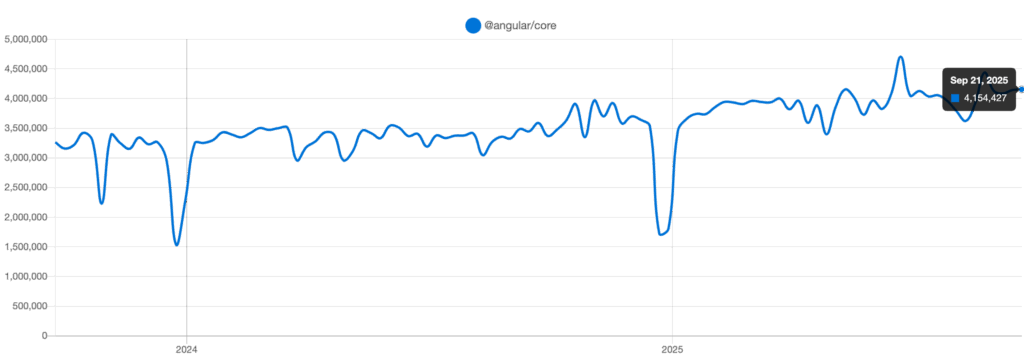
Source: NPM Trends
AngularJS can be a powerful application to create scalable, secure and easy web applications. It allows the business to deliver contemporary digital experiences, be it in the speed of its development and real-time data management, cross-platform interoperability, and the strength of community support. AngularJS is also a fast, secure and flexible app; this is why it is trusted by global brands, including Gmail, PayPal and Upwork.
53% of users leave a website that loads more than three seconds slow (Google, 2023). Current business operations need to move past making use of outdated bulky web applications.
As a project of Google AngularJS represents a strong JavaScript framework which developers use to build web applications. The current business design practice transforms digital solutions through AngularJS into user-centered adaptive interfaces that maintain simplicity. The platform provides superior value for startups developing initial applications and large enterprises that aim to enhance their operations. It boosts efficiency, enhances customer satisfaction, and supports business growth.
But what makes this framework stand out in a crowded tech landscape?
Read this blog to learn about the revolutionary advantages of AngularJS development for your business. Discover how it cuts development time, increases performance, and provides experiences that bring users back for more.
Let’s discover how AngularJS can expand your business in 2025 and beyond!

What Is AngularJS and Why Does It Matter?
AngularJS functions as an open-source framework designed to simplify web app building through SPAs (Single-Page Applications) development tools. The front-end framework arrived in 2010 under an MVC structure and combines two-way data binding with dependency injection and reusable components.
How Can AngularJS Development Benefit Your Business?
The following capabilities mentioned above make Angularjs favorite among developers and businesses alike.
But why should your business care?
The solution lies in its potential to accelerate development, save money, and provide high-quality applications that align with today’s user expectations. Let’s analyze the 12 concrete ways AngularJS development can work for your company.
1. Faster Development with Reduced Costs

Firms focus on time-to-market as a main priority while introducing new products or services. AngularJS expedites web development with two-way data binding and reusable components.
The automatic data synchronisation enables UI changes to appear in underlying data structures and data modifications. It automatically updates the UI while eliminating the need for repeated manual coding. With this time-saving, your teams can allocate additional hours toward innovative work instead of handling basic operations.
Next AngularJS established its modular platform, which permits developers to share written code throughout different projects. Juvenile projects profit from this method since it cuts costs by eliminating repeated work. The feature represents a major advantage, particularly when applied to small companies along with startups that manage limited budgets. The framework stands out from others since it eliminates the need for extensive manual DOM manipulation to accomplish tasks.
2. Enhanced User Experience with Single-Page Applications
Today’s users have come to expect quick, seamless web experiences. AngularJS masters the development of single-page applications (SPAs) which dynamically load content while maintaining an uninterrupted user experience. The application functions smoothly for users while responding quickly to commands which delivers an app-like interface for better engagement.
Several businesses can improve customer satisfaction levels while maintaining their client base. Picture an ecommerce site that has product filters refresh instantly or a dashboard with real-time data refresh effortlessly AngularJS allows this to happen. Through its use of routing features and dynamic content loading, you are able to provide a smooth, professional experience that will impress.
3. Scalability for Long-Term Growth

As your company grows, so do your app requirements. AngularJS is built with scalability in mind, so it can serve as comfortably in small projects as in large and intricate systems. Its MVC structure divides concerns data (Model), presentation (View), and logic (Controller) so that developers can scale various portions of the app independently.
Moreover, AngularJS’s dependency injection simplifies adding new features or integrating with other technologies as your business evolves. Whether you’re adding a payment gateway or expanding into new markets, AngularJS adapts without requiring a complete overhaul.
4. Simplified Maintenance and Testing
Maintaining a web application can be a headache, especially as it grows. AngularJS reduces this burden by promoting clean, organized code through its modular design. Developers can easily update or debug specific modules without affecting the entire system, saving time and resources.
Testing is also a sector in which AngularJS excels. It has intrinsic support for end-to-end and unit testing using tools such as Jasmine and Protractor. This helps ensure that your app stays bug-free and functions smoothly, which is key to upholding customer trust. Companies can push updates without any fear because the framework provides intensive quality assurance.
5. Cross-Platform Compatibility
Organizations today need to interact with users through desktops and smartphones and tablets simultaneously. AngularJS enables platforms to interact through cross-platform development processes that help you build responsive apps which function uniformly among multiple devices. The framework connects ideally with HTML and CSS attributes to ensure performance consistency due to its two-way data binding process, while the Ionic Angular-based framework enables hybrid application development for mobile systems.
Your company can extend its target demographic through one solution that obviates the need for specific investments in web or mobile platforms. A retail company can implement AngularJS to write one code base for developing their web shop alongside their mobile app thus reaching better ROI.
6. Robust Community and Ecosystem Support
AngularJS has a huge, vibrant community supported by Google. This means frequent updates, a lot of documentation, and plenty of third-party libraries and plugins. For companies, this means solid support and access to advanced solutions.
Require a custom feature?
Likely, the community has already created a directive or module for it. This environment saves you development time and keeps your app up to date with industry trends, making you more competitive.
7. Improved Team Collaboration

AngularJS’s organized methodology promotes collaboration between development teams. This project framework provides clear separation of concerns together with reusability capacity that enables multiple developers to work simultaneously on the same project. The segregation of concerns through AngularJS enables multiple developers to work concurrently on the same project, particularly benefiting organizations with remote teams and organizations that rely on external development resources.
AngularJS uses TypeScript as a codebase in later versions to enhance readability and error detection which results in simplified transitions of work between team members. A streamlined workflow becomes possible due to the reduction in delays that managers experience.
8. Cost-Effective Hiring and Training
It is difficult to hire talented developers, but the popularity of AngularJS simplifies the process. Its extensive usage ensures there is a huge talent pool of developers who know the framework, lowering recruitment expenses. Its easy-to-use syntax and vast learning materials also reduce the time taken to onboard new employees.
For companies, it translates to faster team ramp-up and fewer training costs than with specialized frameworks. You can invest those savings in other areas of growth, such as marketing or product development..
9. Security Features for Business Protection

Security is always a necessity for organizations that deal with sensitive data. AAngularJS has built-in protection mechanisms. AngularJS includes two security features which protect against cross-site scripting (XSS) attacks and secure data binding to validate data integrity. Your application becomes compliant through the built-in API and authentication system integration which AngularJS provides in a user-friendly manner.
For industries such as finance or health care, where data breaches can be expensive, particularly if the data is considered protected health information (PHI), AngularJS as a framework provides a measure of confidence. In combination with security best practices, such as crippled HTTPS environments and well-documented security audit practices, AngularJS can lead to a secure and trusted platform.
10. Real-Time Data Handling for Dynamic Businesses
Companies live off live insights such as live chat, share prices, or order tracking. AngularJS’s two-way data binding and WebSocket capabilities make it well-suited for applications needing update-instant realities. It raises decision-making and customer interaction to the next level, especially for industries such as e-commerce or shipping.
For example, a delivery app developed using AngularJS can show real-time shipment statuses, enhancing transparency and trust of users. This interactive feature differentiates your company from others in a saturated market.
Also Read: On-Demand Food Delivery App Development: All You Need to Know
11. AngularJS for Rapid Prototyping and MVP Development
Startups and companies frequently need to experiment on ideas quickly prior to investing in full-scale implementation. AngularJS is a top pick for speedy prototyping as well as implementing Minimum Viable Products (MVPs). Its reusable code pieces and off-the-shelf directives enable the developer to get working prototypes finished in a portion of the time required using regular techniques.
For instance, a fintech company can employ AngularJS to develop a payment application as a prototype, experimenting with essential features such as transaction monitoring or user authentication. This agility allows companies to receive user feedback early, iterate fast, and obtain funding or market validation.
12. Supporting Business Analytics with AngularJS Dashboards
In the contemporary business environment, any business should set out to leverage data-driven decision-making, and AngularJS does an excellent job at building interactive dashboards that display data in real-time. AngularJS’s ability to dynamically render elements and to handle two-way data binding makes it a great candidate to develop dashboards that update continuously in real time when new data is received, whether that is sales data, customer usage data, or business KPIs.
To illustrate, a logistics company could use an AngularJS-built dashboard to track fleet performance, scheduled delivery times, and fuel prices to make adjustments on the fly all to improve efficiency.
With contenders such as React and Vue.js, why use AngularJS?
Its rich feature set, with data binding, MVC, and testing capabilities, provides a one-stop solution that minimizes dependency on other libraries. Although React leads in flexibility and Vue.js in simplicity, AngularJS finds the middle ground between power and structure, making it perfect for enterprises requiring strong, maintainable apps.
Additionally, AngularJS’s Google support guarantees long-term stability, as opposed to newer frameworks with unknown futures. For businesses prioritizing stability and scalability, it’s a strategic choice.
Also Read: Top 6 Cross-Platform App Development Frameworks
Real-World Businesses Choosing AngularJS
To illustrate AngularJS’s impact, here are five popular, real-world examples:
1. Gmail by Google
Google rewrote Gmail’s front-end using AngularJS, creating a dynamic SPA. Its real-time email updates and seamless navigation showcase AngularJS’s data-binding and performance capabilities. This efficiency contributes to Gmail’s status as a top email service, handling billions of users.
2. Upwork
Upwork transformed its freelance platform with AngularJS, improving scalability and user experience. The framework’s modular architecture resulted in a 25% increase in page load speed, boosting engagement and connecting freelancers with clients more effectively.
3. The Guardian
The Guardian’s website leverages AngularJS for endless scrolling search results and its “Grid” image management system, storing over 3 million images. This dynamic content handling enhances user interaction, making it a top-read online newspaper globally.
4. PayPal Checkout
PayPal uses AngularJS in its checkout system (e.g., adding credit cards, payment reviews). The framework’s ability to manage complex data structures ensures a secure, smooth transaction process, supporting millions of daily users.
5. Weather.com
Weather.com relies on AngularJS for real-time weather widgets across devices. Its modular functionality delivers accurate, dynamic forecasts, ranking it among the top weather sites with millions of monthly visitors.
Also Read: How to Scale a Web Application: Tips and Techniques
How to Leverage AngularJS for Your Business
To maximize AngularJS’s benefits, consider these steps:
1. Hire Expert Developers: Engage a seasoned AngularJS development company to guarantee quality implementation.
2. Set Specific Targets: Map your app’s features with business objectives, e.g., improving UX or streamlining operations.
3. Iterate and Refine: Use the testing capabilities of AngularJS to tweak your application based on user feedback.
4. Integrate Smartly: Combine AngularJS with backend technologies (e.g., Node.js) for a full-stack solution.
Conclusion
In the modern competitive digital environment the businesses cannot afford to have slow or old-fashioned web applications. AngularJS is a proven framework that is scalable, fast and secure yet modularly designed to an extent of simplicity. Its capabilities in creating single page applications, real time dashboards and enterprise ready solutions make it a strategic choice both to startups and large companies.
Using AngularJS, companies can develop dynamic applications, user-driven applications that are easy to scale when the demands increase. AngularJS, with the support of the Google ecosystem and the active developer community, will continue to be a solid option to developing web applications that will be future-proof.
Partner with BrainX for Expert AngularJS Development!

Business expansion through contemporary web solutions needs evaluation with AngularJS development professionals at BrainX Technologies.
AngularJS development at BrainX Technologies produces goal-oriented applications with high speed and scalability and an exceptional user experience along with real-time functionality. Your business growth relies on AngularJS features for real-time data management alongside single-page interface designs which our team implements from the trusted framework of Google. Our aim is to develop adaptable security-enhanced efficient solutions that follow your organizational requirements through their developments.
Explore how we collaborate to develop your digital vision in 2025!
FAQs
1. What will make AngularJS become relevant in 2026?
AngularJS is a secure type of the framework that should be adopted by a startup or business because the system has a solid community, two directions of data-binding, scale, and ecosystem.
2. What are the best apps that can be used with AngularJS?
AngularJS would be useful to single page applications (SPA), dashboards, real time (e.g. chat or live tracking), and large scale enterprise level apps that have to be scaled.
3. What is the AngularJS speed of development enhancement?
Two-way data binding, reusable components, and modular code are some of the features that alleviate repetitive effort in development processes and make development processes more economical.
4. Can AngularJS be used to store sensitive data?
Yes. It has inbuilt protection against XSS attacks, secure data binding and easy integration with authentication APIs thus fitting well in financial and healthcare industries.
5. What is the comparison between AngularJS and React/ Vue.js?
React is more flexible; Vue.js is simpler, and AngularJS is more moderate with structure, scalability, and built-in tools hence is particularly effective on corporate applications.
Erlang vs Elixir vs Ruby is a debate that comes up often when developers are looking for the best programming language for web development. These three languages share historical ties but take very different approaches to building scalable, reliable, and modern applications.
If you’ve ever searched for Erlang vs Elixir or Ruby vs Elixir, you already know the conversation can get heated. Some developers swear by Ruby’s productivity and Rails ecosystem. Others prefer Erlang’s legendary fault tolerance for real-time systems. And then there’s Elixir, which brings functional programming and concurrency into the spotlight while still running on the Erlang VM.
So, which one should you choose? In this guide, we’ll break down Erlang, Elixir, and Ruby, compare their strengths and weaknesses, and show you real-world use cases to help you decide which language makes the most sense for your next web project.
In 2025, Erlang, Elixir and Ruby will shine in various fields. Erlang has no competition in terms of concurrency, fault tolerance and mission-critical telecom system. Elixir, which runs on the Erlang VM, is based on reliability and features modern syntax and real-time and scalable applications such as chat platforms, fintech, and IoT. Ruby (with Ruby on Rails) is the language of choice in fast web development, MVPs, and SaaS applications because of a tremendous ecosystem and syntax friendly to developers. The correct option lies in the fact that you need fault tolerance (Erlang), no, scalability and concurrency (Elixir), or speed to market (Ruby).
“Erlang is great for high-availability systems,” says one.
“Elixir is the right solution for real-time scalable apps,” says another
“Ruby will get us to market more quickly,” says the third.
This chorus of tech jargon is all too familiar for business owners when trying to build an app. You have a brilliant idea, a clear vision, and the best resources for its execution. However, it feels like you are stepping into a debate between competing web development languages.
Each of them claims to take away your business challenges; which one will you trust to build your app and your future? In 2025, technology is advanced to a certain level where you might rely on the language you choose for your app to have a seamless scalability rate, rapid speed, or robust stability.
In this blog post, we will break down the strengths of Erlang vs Elixir vs Ruby and guide you toward choosing the right option to build an application that delivers hard-core business value.
Also Read : Python vs JavaScript for Web Development: A Practical Comparison
5 Latest Trends in Erlang, Elixir and Ruby
Erlang
- This is expanding into new domains with Operational Technology (OT), manufacturing, and smart grids because of its robust fault tolerance and concurrency capabilities.
- Elixir has increased the popularity of Erlang, creating a more balanced ecosystem where both languages benefit each other.
- The addition of the JIT compiler has significantly improved performance in executing concurrent processes.
- The Erlang community is focusing on sustainable software development practices, which is in line with the industry trend toward green programming.
- Erlang developers are still in demand, and their median salary in 2025 is around $100,636 yearly.
Elixir

- Ranked as the second-most desired programming language in 2024, showcasing its growing popularity for building scalable applications.
- Concurrency model makes Elixir perfect for real-time apps like chats, live updates, and dashboards.
- Becoming a viable choice for AI and machine learning, with native GPU support for processing heavy data.
- The Remote company uses Elixir to scale and enhance its performance. It also helps them increase growth while maintaining the code quality.
- There are few skilled Elixir developers and hence the demand for them has increased and they earn a median salary of about $116,759 a year.
Ruby

Ruby 3.4 that was released on December 25, 2024, incorporated several key enhancements, including a new `it` block parameter reference to enhance code readability.
-
- Prism as the default parser, hence improving parsing efficiency and performance.
- Happy Eyeballs Version 2, which is available in the socket library, enhances network performance of applications.
- YJIT got the updates for the better execution speed.
- Modular Garbage Collection was introduced to improve memory management.
- Ruby on Rails is the top choice in web development with its convention-over-configuration approach, helpful in rapid application development.
- The microservices architecture is influencing Rails usage, leading to debates over whether it’s suitable or not compared to others like Go or Node.js.
- Exploratory areas in which it has become very popular with data analysis expressive syntax for which complex processing can be made quite simple.
- API development is an emerging area too, as strengths of Rails support the creation of robust RESTful services.
- Salaries are always competitive as ruby developers have expert skills to make high-quality web applications in very efficient ways.
Also Read: How to Scale a Web Application: Tips and Techniques
Ruby on Rails applications are known to reduce development time by nearly 30 to 40 percent compared to many other programming languages, making it a popular choice for businesses that need fast, efficient, and scalable web solutions.
Key Milestones in the Development of Erlang, Elixir, and Ruby
This timeline presents the development of Erlang, Elixir, and Ruby, which greatly influence modern programming and web development.
The Emergence of Erlang in 1986
- Joe Armstrong, Robert Virding, and Mike Williams among the engineers at Ericsson create Erlang to meet the needs of telecommunication systems.
- Designed to handle concurrency, fault tolerance, and distributed computing.
The Emergence of Ruby in 1993
- Yukihiro “Matz” Matsumoto initiates the development of Ruby.
- It was designed to be a combination of the best features of other languages, yet with simplicity and productivity in mind.
Ruby First Release in 1995
- Ruby is officially released to the public.
- It is introduced as an intuitive language that focuses on developer happiness.
Erlang Goes Open Source in 1998
- Ericsson releases Erlang as an open-source language.
- The programming community at large can now use and contribute to its development.
Elixir’s First Commit in 2011
- José Valim makes the first commit to the Elixir programming language.
- The program runs on Erlang VM for increased productivity and extensibility.
Elixir 1.0 Release in 2012
- Elixir achieves its 1.0 version.
- Offers a stable and strong platform for developers who want a functional, concurrent language with an easy syntax.
Phoenix Framework in 2014
- Uses Elixir to build a high-performance web development framework with real-time capabilities.
Main Features of Erlang, Elixir and Ruby

Some unmatchable and strengthening features make every programming language unique. Here are some which will help you decide the Erlang vs Elixir vs Ruby dilemma.
Erlang
- Concurrency: Erlang is designed for handling many simultaneous connections, so it is excellent for real-time applications.
- Fault Tolerance: Emphasizes a “let it crash” philosophy, letting systems recover from errors gracefully.
- Hot Code Swapping: Updating code without halting the system ensures high availability.
- Functional Programming: Erlang is a functional language with very strong pattern matching capabilities.
- Lightweight Processes: It uses lightweight processes that require minimal memory and CPU usage, supporting massive concurrency.
Elixir:
- Modern Syntax: It has a more expressive and readable syntax than Erlang, which increases developer productivity.
- Scalability: Built on the Erlang VM, Elixir supports massive concurrency with lightweight processes, making it suitable for applications that are expected to grow significantly.
- Fault Tolerance: Inherit Erlang’s fault tolerance, and thus allow programmers to build reliable programs.
- Functional Model: Elixir is a functional language; im-mutability and first-class function capabilities support the model.
- Metaprogramming: Allow metaprogramming using macros so that the programmer can write programs that can produce other programs.
- Phoenix Framework: Using Phoenix for web development, high-performance and real-time web development technology.
Ruby:
- Elegant Syntax: Designed for developer happiness, Ruby’s syntax is clean and closely resembles plain English, making it accessible for beginners.
- Rich Ecosystem: The RoR framework contains vast libraries that accelerate the development process, allow code reusability, and perform other various functions.
- Object-Oriented Design: Object-oriented principles enhance flexibility and make maintenance feasible.
- Productivity: Ruby projects tend to complete early thanks to its powerful framework and cleaner code.
- Community Support: Possesses a big and mature community, which brings about rich resources, tutorials, and forums to seek help from.
Detailed Comparison between Erlang vs Elixir vs Ruby
1. Overview
Erlang: Created by Joe Armstrong, Robert Virding, and Mike Williams in Ericsson during 1986. Basically used for communications and for applications that run in real time.
Elixir: Jose Valim invented this 2011 for simplifying the Erlang syntax to make the overall language with retaining performance and concurrency capabilities of the Erlang
Ruby: The main objective by Yukihiro “Matz” Matsumoto for creating Ruby in 1993 was developer happiness and simplicity.
2. Programming Paradigm
Erlang: Functional Programming.
Elixir : Functional programming over Erlang Virtual Machine.
Ruby : Object-Oriented programming.
3. Syntax & Readability
Erlang: Complex, less intuitive, and has a steeper learning curve.
Elixir: Modern, user-friendly, inspired by Ruby, making it more readable and maintainable.
Ruby: Clean, simple, and planned for easy use, resemblance to plain English.
4. Concurrency & Scalability
Erlang:
- Concurrency, distribution, and fault tolerance are baked in.
- Has support for hot-swapping via zero-downtime deploy.
- Designed for HA environments.
Elixir:
- Benefits from Erlang’s concurrency model.
- Lightweight processes are perfect for real-time applications.
- Built on the Erlang VM, meaning that it’s scalable.
Ruby:
- The Global Interpreter Lock (GIL) limits its concurrency.
- It is not designed for high concurrency applications.
- Suitable for small projects or web development.
5. Performance
Erlang: Very fast, especially with massive simultaneous connections.
Elixir: As good as Erlang in performance but with modern syntax and tooling.
Ruby: Generally slower; not good for performance-critical applications.
6. Fault Tolerance
Erlang: “Let it crash” philosophy; failure can be recovered graciously.
Elixir: Inherits Erlang’s fault tolerance mechanism.
Ruby: No built-in fault tolerance; errors need to be dealt with manually.
7. Ecosystem & Libraries
Erlang: Mature, with particular strong features, is broadly used in telecommunication and in real-time systems.
Elixir: Ecosystem is growing and has modern tools like Mix (for project management) and
Hex (for package management).
Ruby: Quite huge in its ecosystem, the web development is quite strong with Ruby on Rails.
8. Community Support
Erlang: Active community, developers engaged in high-reliability applications.
Elixir: Fast-growing community with adoption across industries.
Ruby: Huge mature community with all available resources, tutorials, and discussion forums.
9. Best Use Cases
Erlang: Telecommunication companies, message transfer systems, etc., need higher availability and can tolerate errors easily.
Elixir: All sorts of real-time services that may require significant concurrency and scalable programs.
Ruby: Web applications where Ruby on Rails is often found to be at its best on small-sized, medium projects and startups.
8 Necessary Steps for Switching between Erlang vs Elixir vs Ruby
Step#1 Identify Your Needs
Identify why you need the transition (e.g., scalability, performance, or modern features). Consider the strengths of the new language, whether it’s Elixir’s concurrency or Ruby’s rapid development capabilities.
Step #2 Leverage Shared Foundations
Moving from Erlang to Elixir? Take advantage of their shared BEAM architecture to reuse existing libraries and knowledge.
Step #3 Adapt to New Paradigms
Transitioning from Ruby to Elixir or Erlang? Prepare to embrace functional programming principles, which may differ from Ruby’s object-oriented approach.
Step #4 Start with Incremental Changes
Implement small modules or services in the new language before fully transitioning your application.
Step #5 Invest in Learning
Equip your team with training and resources to get familiar with the new language’s syntax, tools, and ecosystem.
Step #6 Utilize Community Support
Engage with the language’s community for insights, libraries, and best practices to ease the learning curve.
Step #7 Refactor Thoughtfully
Avoid rushing into rewrites; instead, refactor your existing codebase strategically while migrating.
Step #8 Test and Optimize
Test well to determine if it gives performance gains and the new language does actually deliver the promises you envisioned. A good migration plan will see your team easily leveraging the entire power of the new language with minimal disruption.
Use Cases and Industry Applications
Erlang, Elixir, and Ruby each have features that fit some specific needs within the industry. Below is a more detailed view of their use cases and industry applications.
Erlang
Use Cases
- High concurrency applications
- Fault tolerance applications
- Real-time messaging servers
- Distributed databases
Industry Applications
- WhatsApp: Initially developed using Erlang, WhatsApp used the ejabberd XMPP server to support messaging services. They have retained Erlang in their stack to manage massive concurrent connections efficiently.
- RabbitMQ: Being an open-source message broker developed in Erlang, RabbitMQ contains its concurrency and fault-tolerance features.
- Ejabberd: Ejabberd is a server, XMPP, that is designed using Erlang and still continues to be one. It helps in developing scalable and highly robust real-time communication applications.
- Grindr: In the architectural setup of this company, they utilized Erlang as their infrastructure since the concurrent use by a number of people is high.
- Motorola: Motorola has adopted Erlang for use in projects related to its telecommunication system. Information concerning its current application is not specified.
- Ericsson: Being the inventor of Erlang, Ericsson has been highly utilizing the language in their telecommunication systems. Nowadays, Ericsson is still using Erlang in many of its products and enjoys the high aspect of its design as concurrent and distributed.
Elixir
Use Cases
- Real-time web apps
- Scalable APIs
- Data processing pipelines
- IoT apps
Industry Applications
- Discord : Adopted Elixir for handling millions of concurrent users to augment real-time communication.
- Spotify : Implemented Elixir to effectively process thousands of requests per second to optimize high-traffic operations.
- PepsiCo: Engaged Elixir to automate workflow for the optimization of data processing and marketing intelligence through search marketing.
- Toyota Connected: Used Elixir for their Mobility Services Platform to manage millions of vehicles connected in real-time.
- Pinterest: Scaled down from 200 Python servers into 4 server usage with a reduction of over $2 million annually after switching to Elixir.
- Square Enix: Isolated high concurrency gaming services with the use of Elixir for all authentication across the platforms.
- Sketch: In their design platform, integrated Elixir with the Phoenix framework for real-time collaboration features.
- Bleacher Report: For their backend services in real-time updates and notifications, Elixir is used.
- Solarisbank: Elixir was used to design scalable banking platforms with fault tolerance.
Ruby
Use Cases
- Web application development
- E-commerce platforms
- Content management systems
- Prototyping and MVPs
Also Read: Web Application Development Process Guide for Secure, Scalable Systems
Industry Applications
- Airbnb: Ruby on Rails is used here to manage complicated booking systems which have a very high traffic count so that seamless user experience may be achieved.
- Basecamp: It is built using Ruby on Rails and offers the most efficient tools for project management and fosters team collaboration.
- GitHub: It is built using Ruby on Rails and provides a robust platform for version control and collaborative software development.
- Shopify: Uses Ruby on Rails to run their e-commerce system, which enables the businesses to manage and create stores online.
The Bottom Line
The Erlang vs Elixir vs Ruby debate does not concern itself with the relative quality of the language which is the most universal and the best but whether the language fits your business purpose. Erlang forms the basis of systems where reliability is the most required. Elixir is based on that and is scaled and performance-guaranteed to real-time, which is suitable to present-day high-concurrency apps. Ruby, in its turn, focuses on developer productivity and speed and drives some of the most successful startups and SaaS platforms in the world.
Scale Beyond Limits with The Future of Web Development
We use the best tools and technology to develop scalable, high-performance web applications matching your specific requirements at BrainX Technologies. If you are now at the decision stage between Erlang or Elixir or even Ruby, our highly seasoned team will ensure that your application is built on the most suitable foundation for growth and resilience. From real-time systems to dynamic web solutions, we focus on smooth scalability, top performance, and user-centric design.
Need the right tech stack for your app?
Reach out to BrainX and let’s build something scalable, together.
FAQs
What are the strengths of Erlang for app development?
Erlang has a high concurrency, fault tolerance, and real-time systems. It’s “let it crash,” ensuring high reliability.
Why is Elixir so popular for real-time apps?
Elixir, in its model for concurrency, combined with a modern syntax, allows for an excellent fit into developing scalable, real-time applications like chat systems and live dashboards.
Does Ruby still make sense in 2026?
Ruby, or specifically Ruby on Rails, still represents one of the top preferences in web development for startups or small businesses.
What companies work with Elixir?
Companies, like Discord or Pinterest, work with Elixir, as the application is pretty easy to write scalable, real-time applications in.
How do I choose between Erlang vs Elixir vs Ruby?
Your choice will be based on what your project will need. Use Erlang to support fault tolerance, Elixir for scalability, or Ruby for rapid development and easy-to-read syntax.
Both Ruby and Elixir are powerful programming languages but, in 2025, they have different applications. Ruby (with Ruby on Rails) is the ideal choice in the context of rapid development, an enormous ecosystem of gems, SaaS or marketplace applications. Elixir (and Phoenix Framework) is good at real-time and concurrent systems, as well as at fault-tolerant ones like chat applications, financial technology, and data-intensive ones. It is up to you whether you appreciate developer productivity and ecosystem (Ruby) or performance and scalability (Elixir).
Choosing the right programming language for a business involves tough trade-offs. Many business owners find themselves switching to understand what works best. If you’re experiencing the same between Elixir vs Ruby, you are not alone! Both work equally well for specific niches in the IT industry but serve different purposes.
Elixir is widely celebrated for its ability to scale seamlessly and handle faults gracefully, making it a go-to choice for building real-time applications and managing high levels of concurrency. On the other hand, Ruby has charmed developers for decades with its clean and intuitive syntax, paired with the game-changing Ruby on Rails framework. Together, they’ve become synonymous with rapid development and code that’s both easy to maintain and a joy to work with. These are different strengths between them, but their distinct differences need to be comprehended if you plan on harmonizing your tech stack to the long-term success of your SaaS objectives.
But how do you choose the best programming language for SaaS in 2025? Fret not, read this guide to make an informed decision. Let’s navigate the Elixir vs Ruby debate with a detailed breakdown of the pros and cons.
Background of Ruby vs Elixir
Ruby and Ruby on Rails have long been synonymous with efficient and enjoyable web application development. Since its creation in 1995 by Yukihiro Matsumoto, Ruby has prioritized a human-friendly programming experience. When paired with the Ruby on Rails (RoR) framework, developers gain access to a vast ecosystem of gems—libraries that supercharge development speed and functionality. As a result, Ruby on Rails has redefined web development by emphasizing rapid iteration and developer happiness. Even today, companies rely on Ruby on Rails to build scalable, feature-rich applications quickly.
Interestingly, Ruby programming language inspired the creation of Elixir. José Valim, a former core team member of Rails, admired Ruby’s elegance but identified limitations in its concurrency and throughput capabilities. Determined to improve upon these aspects, he designed Elixir atop the Erlang VM, leveraging its exceptional concurrency and fault tolerance. Elixir has since become a favorite for handling high-traffic, real-time applications. Similarly, Phoenix, an Elixir programming language, mirrors Ruby on Rails in usability but excels in performance and scalability.
Both languages cater to distinct business needs. Understanding their origins and strengths sets the stage for a deeper comparison, helping companies choose the right from Elixir vs Ruby to future-proof their tech stack.
Pros of Ruby
Ruby offers impressive benefits, making it a top choice for developers and businesses. From its expansive ecosystem to its developer-first philosophy, here’s what makes Ruby stand out:
1. Expansive Library Ecosystem
Ruby’s ecosystem comprises thousands of gems—pre-built libraries that simplify and accelerate development. There’s probably a gem for implementing authentication, handling payments, or adding real-time features. Such an eco-system saves developers from reinventing the wheel, enabling them to innovate more solutions.
2. Developer-Friendly and Productive
Ruby programming language was built to make coding enjoyable. Its clean and straightforward syntax ensures developers can express their ideas clearly and efficiently, leading to fewer errors and faster development cycles. This ease of use is why Ruby remains a favorite for beginners and seasoned professionals.
3. Vibrant and Supportive Community
Ruby’s community is renowned for its inclusivity and helpfulness. With countless tutorials, active forums, and regularly updated solutions, developers at all levels can easily find guidance and inspiration. This collaborative environment ensures that even complex problems can be tackled efficiently.
4. Commitment to Best Practices
Ruby emphasizes strong software development principles like “coding by convention” and “don’t repeat yourself” (DRY). These practices make the codebase cleaner and enhance maintainability, reducing technical debt over time.
5. High Scalability Potential
While Ruby is already known for its ease of use, it also boasts scalability, making it suitable for applications that handle growing user bases and data demands. Properly designed Ruby applications can grow alongside your business without significant rework.
6. Strong Focus on Web Standards
Ruby ensures compliance with web standards at every level, from front-end development to back-end data handling. This alignment guarantees smoother integrations with third-party systems and a consistent platform user experience.
Cons of Ruby

While Ruby excels in several areas, it also lacks in many, especially if compared to languages like Elixir. Here are the main drawbacks when choosing Ruby for your SaaS application:
1. Limited Concurrency Support
It is one of the most important features of most modern web applications, especially for those involving high-traffic or real-time applications. Ruby has a Global Interpreter Lock, which does not allow more than one thread at a time; thus, using a concurrent process is not too effective. Though tools like Concurrent Ruby could mitigate this limitation, they add a bit of complexity that is not as smooth as Elixir’s concurrency built into the language.
Also Read: How to Scale a Web Application: Tips and Techniques
2. Slower Performance Compared to Elixir
Ruby isn’t inherently slow, but its performance lags behind Elixir, particularly in high-traffic or computation-heavy applications. While measured in microseconds, Ruby apps’ response rates are generally slower than those built with Elixir. While experienced developers can optimize Ruby applications, performance remains a potential bottleneck for scaling.
3. Challenges with Long-Term Maintenance
Ruby’s extensive gem ecosystem, while a strength, can become a double-edged sword in the long term. Gems abstract much of the functionality, which is convenient but can obscure the inner workings of the code. For less experienced developers, maintaining or debugging an application built with many gems can be challenging, leading to productivity issues and potential technical debt.
4. Higher Resource Consumption
Ruby applications often require more server resources compared to leaner, more efficient languages like Elixir. This can increase hosting costs and infrastructure requirements, especially for large-scale SaaS platforms with high user activity.
5. Learning Curve for Scaling Applications
While Ruby is beginner-friendly for small-scale projects, scaling an application requires a deep understanding of its nuances and limitations. For instance, optimizing for concurrency and performance can be complex without significant experience, making it less ideal for traffic-intensive applications without a skilled team.
6. Dependency on Gems for Core Features
Ruby’s reliance on gems for functionality can lead to dependency management issues over time. As the application grows, keeping track of gem compatibility, updates, and security vulnerabilities becomes increasingly difficult, adding an extra layer of complexity to development and maintenance.
Also Read: Erlang vs Elixir vs Ruby- Which Scales Best?
Pros and Cons of Elixir
It’s no wonder Elixir quickly became developers’ favorite technology to build high-performance, scalable web applications. Its paradigm of functional programming and heavy reliance on the robust Erlang VM give it a cutting-edge feature in modern SaaS applications.
Here’s why the Elixir programming language stands out:
1. Immutable Data for Debugging and Stability
Elixir’s use of immutable data ensures that variables remain unchanged once assigned, enabling local reasoning and easier debugging. Unlike mutable data in languages like Java, Elixir’s approach reduces the likelihood of unexpected behavior, making applications more stable and predictable.
2. Superior Performance
Elixir’s performance is outstanding, especially when it is used with its Phoenix framework. The response times are always in microseconds, so it is a perfect solution for high-traffic or latency-sensitive applications. Although Ruby-developed apps is also fast, the concurrency model of Elixir gives it the upper hand for performance-critical projects.
3. Concise Code and Easy Testability
As a functional language, Elixir promotes concise, purpose-driven functions. This clarity not only simplifies development but also enhances testability. Developers can easily predict outputs based on inputs, facilitating faster iteration and more reliable testing processes.
4. Quick and Safe Refactoring
Refactoring code in Elixir is significantly easier compared to other languages. Its functional and immutable nature minimizes unintended side effects, allowing developers to make changes confidently without disrupting external behaviors.
5. Built for Concurrency and Parallelism
Elixir’s intelligent process scheduler leverages concurrency to the fullest. By preemptively managing processes, Elixir ensures low latency even under extreme load. This capability makes it perfect for applications requiring real-time responsiveness or handling multiple simultaneous tasks.
6. High Fault Tolerance
Unlike many languages where a single bug can crash the entire application, Elixir isolates faults to individual processes. This design keeps the application running smoothly by limiting failures to specific areas, ensuring high availability and reliability.
7. Scalability Without Compromise
Elixir’s ability to maximize resource utilization on a single machine means businesses can scale effectively without immediately adding servers. This makes it a cost-efficient option for scaling SaaS applications as traffic grows.
8. Thoughtful Language Design
Elixir’s syntax and design are clean, intuitive, and optimized for developer productivity. Even complex functional programming concepts are made accessible, easing the learning curve and improving overall development efficiency.
9. Fault-Tolerant Systems
Elixir’s concurrency is driven by lightweight processes that use less memory and CPU resources. It comes with Erlang’s Open-Telecom Platform, a set of tools for building strong concurrent applications. This enables it to run hundreds of thousands of processes in parallel. OTP allows the development of distributed and fault-tolerant systems without much effort.
10. Documentation and Community Support
Elixir’s extensive documentation and active community make it easy for developers to get started and find support. From official guides to terminal-based documentation, resources are readily accessible to help teams build high-quality applications.
11. Full Access to Erlang Libraries
Elixir offers seamless interoperability with Erlang libraries, expanding its capabilities and allowing developers to leverage decades of proven solutions.
Cons of Elixir
While Elixir has its merits, it is certainly fraught with many challenges businesses must consider before implementing the stack.
1. Narrow Talent Pool
Despite its popularity since its origin in 2011, Elixir is still more of a niche language. This makes finding experienced Elixir developers challenging. Although Ruby developers might find it easier to transition into Elixir development because of the shared ancestry, this scarcity of specialists slows down hiring processes and inflates costs.
2. Functional Programming Paradigm
Elixir’s functional programming paradigm can be difficult for developers habitual of using object-oriented languages i.e. Ruby, Python, or Java. Functional programming requires a mindset shift: immutability and declarative patterns of coding.
3. Smaller Ecosystem Compared to Competitors
Elixir’s ecosystem is smaller compared to the established ones like Ruby or JavaScript. Although it benefits from interoperability with Erlang libraries, developers may still find themselves building features from scratch more frequently. This lack of ready-made solutions can increase development time for some projects.
4. Limited Resources and Community Size
Elixir’s relatively small community means fewer learning resources, tutorials, and third-party libraries, compared to mainstream languages. While its documentation is excellent and accessible, developers may face challenges when troubleshooting issues without the same level of community-generated solutions available in larger ecosystems.
5. Challenges with Adoption
Since Elixir is still a new language, most organizations are not eager to embrace it, considering questions regarding the long-term sustainability and language support. Businesses should weigh this risk if they are thinking of using Elixir for mission-critical projects.
Best Use Cases of Elixir
Here are the updated descriptions that specifically highlight why Elixir was chosen for these use cases:
1. Discord
Discord depends on Elixir to maintain its real-time messaging system because Elixir can easily handle millions of concurrent connections. Its light processes and fault-tolerant nature ensure seamless communication and fast message delivery are not affected even by heavy traffic.
2. Pinterest
Pinterest adopted Elixir for its notification system to enhance scalability and real-time delivery. Elixir’s concurrency model allows Pinterest to send millions of updates simultaneously while optimizing server performance and ensuring notifications reach users quickly and reliably.
3. PepsiCo
PepsiCo uses Elixir to process massive datasets for marketing and sales intelligence. Elixir’s ability in concurrency enables it to handle real-time data analysis for PepsiCo to extract actionable insights faster, which makes decision-making efficient and fast, even in such a business environment.
4. FarmBot
Elixir is incorporated into FarmBot automated systems of farming due to its fault tolerance features and ability to process and run code in real-time; Elixir maintains strict control of all agricultural equipment, a critical activity such as seeding and watering.
5. Moz
Moz employs Elixir for processing vast amounts of SEO data because Elixir can handle concurrent tasks with exceptional performance. This makes it possible for Moz to deliver accurate and timely analytics to its clients, ensuring data processing is both scalable and reliable.
6. Axle Payments
Axle Payments chose Elixir to automate invoicing, collections, and financial transactions due to its ability to manage high transaction volumes efficiently. Elixir’s reliability ensures smooth operations while supporting the platform’s rapid growth in the financial services sector.
7. Ulysse
Ulysse uses Elixir to manage complex flight search queries and bookings. Elixir’s fault tolerance and concurrency allow Ulysse to provide users with a seamless and responsive booking experience, even during peak traffic ensuring high performance and reliability.
8. GoodsID
GoodsID utilizes Elixir for its blockchain-based tracking platform because of the language’s concurrency and fault tolerance. Elixir ensures secure authentication and transaction management, providing real-time reliability and protecting data integrity for luxury goods tracking.
Best Use Cases of Ruby
Here are updated descriptions, focusing on why Ruby was specifically chosen for each use case:
1. NASA Langley Research Center
NASA employs Ruby for simulations due to its flexibility and ease of handling complex computational tasks. Ruby’s dynamic nature allows scientists to prototype, iterate, and run simulations quickly without compromising accuracy, making it a reliable choice for scientific research workflows.
2. Google SketchUp
Google SketchUp uses Ruby for its scripting API to empower users with customization capabilities. Ruby’s intuitive syntax and dynamic features enable the creation of plugins and automation scripts, enhancing SketchUp’s usability and adaptability for designers, architects, and engineers.
3. BioRuby
BioRuby relies on Ruby to manage and analyze biological data because of its simple syntax and robust libraries. The language allows researchers to easily handle complex bioinformatics workflows, including genetic sequence analysis, making it an efficient tool for molecular biology.
4. Capistrano
Capistrano is built with Ruby to automate deployments because of Ruby’s ability to handle scripting tasks effectively. Its concise syntax and ease of writing automation scripts make Ruby the perfect choice for managing server configurations and streamlining application rollouts.
5. EventMachine
EventMachine uses Ruby to build event-driven applications due to the language’s support for concurrent processes. Ruby’s versatility and the simplicity of implementing asynchronous I/O operations allow developers to create high-performance systems, such as chat servers and proxies, with minimal complexity.
6. Sidekiq
Sidekiq processes background jobs using Ruby because the language simplifies task management. Its ability to handle multithreading efficiently within a dynamic environment enables smooth handling of asynchronous processes like sending emails or processing large datasets.
7. Capybara
Capybara utilizes Ruby for automated web application testing because of Ruby’s readable syntax and flexibility in simulating user actions. Its integration capabilities with behavior-driven development tools like RSpec make Ruby a natural fit for ensuring application functionality.
8. Sinatra
Sinatra is built on Ruby because of its lightweight and expressive syntax. Ruby’s simplicity enables developers to quickly create and deploy small-scale web applications and services, making it ideal for prototyping or projects that don’t require the overhead of larger frameworks.
How to Choose between Ruby and Elixir: Similarities & Differences
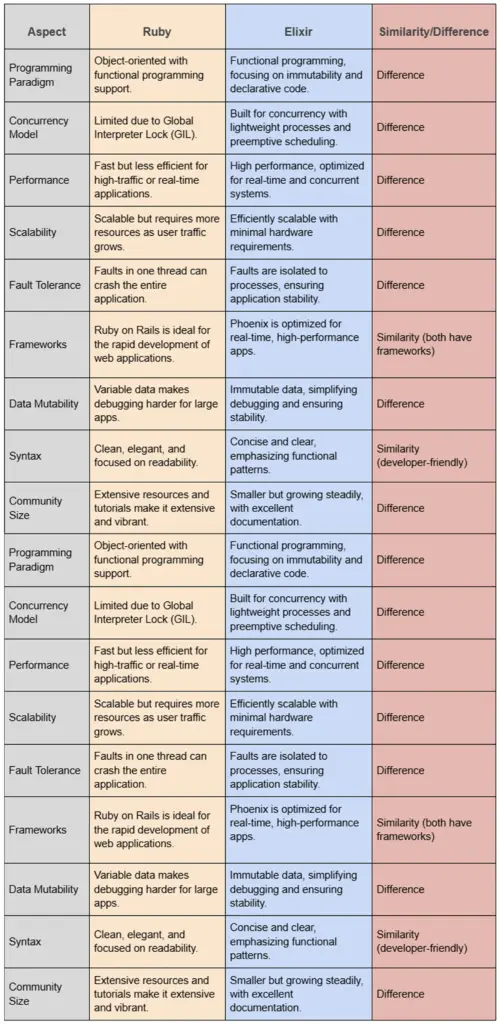
Ruby and Elixir Talent Pool
The talent pool for Ruby is expansive and well-established as it has been around for many years in the tech world. The adoption of Ruby on Rails was widespread, which allowed any business to find reasonably paid experienced developers. In contrast, Elixir has a smaller but growing talent pool, reflecting its status as a newer, niche language. While Ruby developers often transition to Elixir due to shared syntactical influences, the functional programming paradigm can be a learning curve. Companies seeking Elixir expertise may face higher costs and longer hiring timelines but benefit from developers skilled in building scalable, concurrent systems.
Final Verdict
The Ruby vs. Elixir ruling in 2025 is a matter of business priorities. Ruby is the realistic one in case you require expedited development of MVP, huge community, and proven frameworks such as Ruby on Rails. However, when your project requires real-time responsiveness, concurrency and fault tolerance, Elixir and the Phoenix framework are your solution of the future.
Ruby vs. Elixir- BrainX Provides the Expert Insights You Need!
BrainX Technologies is a leading SaaS development company specializing in delivering tailored solutions. We take pride in innovating solutions for industries like Healthcare, Education, e-commerce, Real Estate, Beauty, etc. With a team of 100+ experts and 7+ years of experience, we can create scalable, high-performance SaaS applications. Our process begins with in-depth client consultations to understand project needs, scalability goals, and performance requirements. Based on these insights, we recommend the most suitable technologies, whether Ruby for rapid development or Elixir for real-time and concurrent systems. We leverage our extensive experience to ensure each project aligns with clients’ long-term business strategies, delivering robust and future-proof solutions.
FAQs
Q1. Ruby or Elixir: Which is the best fit of SaaS in 2026?
Ruby would work best when SaaS products require rapid prototyping, rich feature development and massive community support. Elixir is more suitable with SaaS applications that need concurrency, live updates and fault tolerance at scale.
Q2. Does that mean that Ruby is no longer relevant to Elixir?
Yes. Ruby on Rails is used by such applications as Shopify, GitHub, and Basecamp, and it is still very relevant. Elixir is however picking up in popularity regarding high performance systems, thus making it relevant depending on your project scale requirements.
Q3. What are the applications that should use Elixir?
Elixir works better with real-time applications, e.g. chat applications, live streaming, messaging services, fintech services, and IoT applications, where it is essential to have low latency and high fault tolerance.
Q4. Whatever are the key disadvantages of Elixir over Ruby?
Elixir contains less talent pool, the learning curve is steep because of functional programming and the ecosystem is relatively smaller when compared to Ruby. Companies can be exposed to increased expenses of hiring and reduced off-the-shelf solutions.
Q5. What is the comparison between Ruby and Elixir as regards to scalability?
Ruby applications are scaled well but need to be optimized in most cases and have higher resource requirements. Due to lightweight processes, concurrency models, and the Erlang VM, Elixir can scale more easily, and it is very cost-effective in heavy load.

Ruby on Rails (RoR) will be among the most potent frameworks of startups in 2025. RoR has 6.3% of all servers that use it (compared to 0.6 percent in 2014), which is simple, scalable, and economical. RoR itself powers giants such as Shopify (2.7M + stores worldwide), as well as supports startups in the fintech, healthcare, SaaS and eLearning sectors, with unlimited scalability, in-built security and community that is thriving across the world. When comparing frameworks, these are the main advantages of working with Ruby on Rails and the reason why it remains the solution of choice when it comes to ambitious startups.
Are you on the cusp of launching your innovative startup?
The idea is good, and market research seems optimistic, but the critical decision to select the right technology stack is holding you back! Choosing wisely sets the stage for long-term growth, but making the wrong move so early could lead to significant setbacks and expenses.
Opt for Ruby on Rails, a robust open-source framework that most startups favor!
Its blend of simplicity and power accelerates development, minimizes costs, and ensures scalability. RoR includes ORM, routing, and application management tools, but it’s important to understand its distinctive features before choosing it.
Read this blog to find the unique benefits of using Ruby on Rails, and why it’s an optimal choice for startups dreaming of becoming a full-fledged IT development company.
Benefits of Ruby on Rails
“As of June 2025, Ruby on Rails is used on about 6.3% of all servers on the web, up from around 0.6% back in 2014.”
–Historical yearly trends from W3Techs
Ruby on Rails offers a wealth of features that streamline the development process. From rapid prototyping to built-in security measures, Rails provides the tools necessary to create robust applications quickly and effectively. Let’s look at the remarkable benefits of using Ruby on Rails for your startup in 2025
Ruby on Rails offers a wealth of features that streamline the development process. From rapid prototyping to built-in security measures, Rails provides the tools necessary to create robust applications quickly and effectively. Let’s look at the remarkable benefits of using Ruby on Rails for your startup.
1. Sets Best Industry Standards
Ruby on Rails leads the developers to the best practices for developing a web application. It ends up with a clear separation of concerns and makes the code easy to maintain in strict adherence to the Don’t Repeat Yourself (DRY) principle. Its ‘convention over configuration’ approach means Rails provides pre-set conventions, simplifying many tasks and reducing the need for manual configuration.
Rails is constructed on the model-view-control structure (MVC) structure. It promotes modularity and scalability, thus supporting the easy introduction of new features regardless of the app’s complexities. For instance, the world’s largest source code repository GitHub is also built on Ruby on Rails.
2. Guaranteed Security

Ruby on Rails ensures strong security with built-in safety features, allowing developers to focus on building without concern for vulnerabilities. It supports behavior-driven and test-driven development, ensuring quality and security throughout the process.
RoR includes comprehensive tools that keep projects organized and websites updated and protected from threats. With security as a core principle, the framework makes it easy for developers to stay informed about the backend operations. This way they can focus on creating exceptional sites without worrying about potential hacks or malicious attacks.
3. Cost-Effective
One of the best benefits of using Ruby on Rails for your startups is its cost-effectiveness. Moreover, it has an open-source community, established conventions, and compatibility with free operating systems, databases, and web servers. The framework is 100% free and runs on Linux, saving development time and reducing costs.
With a wide array of available gems (plugins), developers can work efficiently, cutting down on effort. Rails simplifies website creation and maintenance, delivering high-quality performance and scalability without extra expenses. Its developer-friendly nature makes it an ideal choice for fast, affordable, and scalable web development.
4. Active Community
The open-source framework, Ruby on Rails highly benefits from a spirited community of developers. It is one of the largest repositories on GitHub. Rails is always under active maintenance because people who have committed to it are helping make it up-to-date and as efficient as possible. The framework benefits from Ruby’s powerful package manager, RubyGems, which offers an extensive library of packages.
This strong community-driven ecosystem allows developers to build on existing solutions, speeding up development and solving issues collaboratively. With a pragmatic framework, a robust language, and a passionate community, Rails delivers a development experience that’s greater than the sum of its parts.
5. Scalability
Developing a scalable application is crucial for businesses to handle increasing user loads seamlessly. Ruby on Rails excels in this, as its server-side code processes user requests efficiently without relying on additional web services, unlike client-server apps. Shopify, a leading example built on Rails, supports over 300,000 users effortlessly.
Scalability ensures that your app can manage spikes in traffic, especially during high-demand events like new feature launches. Key factors influencing scalability include architecture, database size, deployment strategies, and framework choice. Rails’ ability to deliver high performance makes it a reliable option for building scalable applications.
6. Helpful Tools & Libraries
RoR offers a vast collection of community-created gems and libraries that enhance the software development experience beyond just coding. These tools help with debugging, optimizing, and testing while allowing developers to tailor applications for any business need.
Whether you want to build a social network or add advanced ecommerce features with strong data protection, Ruby on Rails offers the flexibility to customize your solution. This wide array of resources enables developers to deliver more features efficiently, making RoR a versatile and powerful framework for various industries.
7. Quick Development
Ruby on Rails offers rapid application development with its vast library of ready-to-use gems and open-source code. Its concise syntax reduces boilerplate coding, allowing developers to achieve more in less time. Rails also includes a default ORM system, ActiveRecord, simplifying data handling.
With built-in modules, author scripts, and effective package administration, even complex operations can be scaffolded quickly. While it may take time to master, RoR’s large community ensures constant innovation and support. The framework’s ease of use and speed make it ideal for building scalable web applications efficiently, saving both time and resources.
8. Easy Maintenance
For startups, selecting a framework with strong support and maintenance is crucial to address potential development challenges. Ruby on Rails offers extensive support services that ensure project reliability and developer ease. Its robust components streamline coding, enhance testing, and enable quick bug fixes, making it a preferred choice for many app development companies.
Additionally, Ruby on Rails focuses on effective coding and maintaining code quality, which simplifies project management. Finding skilled RoR talent has become easier than ever with a wide pool of experts available in the market.
9. Versatility
Ruby on Rails is flexible and powers applications in various fields like ecommerce, fintech, healthcare, and entertainment. The framework supports big data and is ideal for long-term projects like content management systems, and social networks.
RoR is an inexpensive and efficient alternative for J2EE and .NET when it comes to web application development. This gives RoR an extremely high position among popular choices for startups, SMBs, and large enterprises in developing countries. The flexibility and powerful capabilities of RoR make it suitable for virtually any industry vertical that requires reliable and scalable software solutions.
10. Flexibility
Web operations in Ruby on Rails generally involve both frontend and backend factors. It makes them simpler to develop but frequently reliant on server communication, which can degrade responsiveness. Single-page applications (SPAs), constructed with Angular, Reply, or VueJS, give more complex and interactive user interfaces.
They load only the necessary parts of a site, allowing instant responses to user actions. Despite the differences, Rails remains a powerful backend choice, allowing developers to leverage its flexibility and seamlessly integrate with various technologies, thus enabling a layered architecture for their applications.
11. Ruby Gems
Ruby on Rails has a vibrant global community of developers who can actively create over 3,000 gems—software packages that enhance the framework’s capabilities. They simplify authentication and payment processing, making it easy to add new features to applications.
Gems are similar to Jars in Java! They contain Ruby libraries, codes, (.rb files), tests, and metadata about the gem, including its name, dependencies, and version. Available publicly at RubyGems, these resources empower developers to streamline their workflows and meet user needs effectively.
12. Built-In Testing
This framework simplifies testing by generating skeleton test code during model and controller creation. This enables developers to ensure functionality remains intact even after significant code changes. Such software development methodologies allow browser request simulation, application responses can be tested without manual browser checks.
Ruby on Rails integrates built-in testing frameworks, eliminating the need for third-party tools. Its MVC architecture separates business logic, views, and controllers, enhancing code maintainability and testing efficiency. This approach also supports asynchronous programming, making it ideal for developing dynamic websites swiftly.
Why is Ruby on Rails/RoR Still Relevant?

Here are the following points to ponder regarding the benefits of using Ruby on Rails for your startup in 2025:
- Ruby on Rails continues to have a huge influence on the conception of web development; it has been used by massive companies including Basecamp, GitHub, and Shopify.
- Ruby, the language behind Ruby on Rails has an expressive syntax that makes the code readable. Thus, developers may be able to focus more on the problem at hand rather than dealing with its code.
- Ruby programming language ranked among the top 20 languages, as of December 2023, according to the TIOBE Index. This placement is a good sign that the language is extensively used by developers and is expected to remain in use in the future.
- Ruby on Rails is now at version 7.1.4, with over 10 updates annually, showcasing its ongoing security and effectiveness. These upgrades are a testament to the thriving status of Ruby on Rails.
- It allows rapid prototyping, convenient creation of create, read, update, and delete (CRUD) features, and MVP development.
- With numerous gems available, you can add new functionalities efficiently, leading to lightweight code and better performance.
Major Features of Rails
Ruby on Rails provides developers with powerful capabilities that foster innovation and efficiency. Let’s explore these key features that make it a standout choice for web development.
1. Active Storage
Active Storage enables indefectible file uploads to cloud services such as Amazon S3, Google Cloud Storage, or Microsoft Azure Storage, attaching them to Active Record objects. It includes a local disk service for development and supports file mirroring for backups. Additionally, it can transform image uploads and extract metadata from various files.
2. Action Cable
Action Cable enables developers to build interactive applications, like chat platforms and live notifications, by facilitating seamless data exchange between clients and servers. It integrates WebSockets for concurrent communication, making it an important feature of Rails.
This increases user engagement and responsiveness without needing constant page reloads. It offers a comprehensive solution, combining a client-side JavaScript framework with a server-side Ruby framework. Developers can utilize their complete domain model using Active Record or their preferred ORM.
3. Multiple Database Support
As your application gains popularity and user engagement, scaling becomes essential to accommodate new users and their data. Ruby on Rails supports multiple databases, enabling you to distribute data storage rather than relying on a single location. It provides features like multiple writer databases with their corresponding replicas and automatic connection switching based on the model you’re using.
Additionally, it allows for smooth swapping between writers and replicas depending on the HTTP verb and recent write actions. Rails provides tasks for creating, dropping, migrating, and managing these multiple databases, ensuring efficient handling of growing data needs.
Active Record Encryption
Active Record supports application-level encryption by permitting developers to define which attributes to encrypt, ensuring they’re seamlessly encoded and deciphered as needed. This encryption layer protects sensitive information, such as personally identifiable data.
It adds an excess security measure, making it tough for attackers to interpret encoded data. Active Record Encryption also minimizes the risk of accidental exposure in application logs.
Noteworthy Applications of Ruby on Rails
No matter the industry, RoR ticks all the boxes for scaling your business. Multiple standout examples showcase the versatility and effectiveness of Ruby on Rails in real-world scenarios.
Still doubtful of the benefits of using Ruby on Rails for your startup?
Reading these popular applications might help!
1. Online Marketplaces
Ruby on Rails offers integrated tools for HTML, JavaScript, and data storage, simplifying online marketplace creation. It significantly enhances efficiency by reducing time-to-market and lowering overall development costs.
This robust framework facilitates secure payment integrations, ensuring user transactions are protected. Additionally, Rails is designed to handle high traffic volumes, maintaining optimal performance and responsiveness for successful marketplace operations.
2. Software as a Service (SaaS) Products
This framework provides simplicity and seamless integration with third-party platforms like PayPal and AWS. Its support for web applications, such as ActionCable and Rails-React, ensures SaaS products remain efficient and scalable. By offering pre-built, tested features, Rails accelerates the development process and saves valuable time for your team.
3. Minimal Viable Products (MVPs) & Prototypes
Ruby on Rails’ simplicity, open-source nature, and rich plug-in ecosystem make it ideal for rapid MVP development and quick feature implementation. Its strong security, scalability, flexibility, and active community support foster efficient development. Meanwhile, the MVC architecture promotes maintainability and rapid iteration, ensuring successful project launches.
4. Backend Development
Choosing a framework that excels in efficiency and flexibility is crucial for building backend REST services to support mobile apps. Ruby on Rails stands out with its maturity and ability to minimize code while maximizing functionality. Its vibrant community and extensive library of free plugins (gems) facilitate rapid prototyping and agile development, all at no cost.
5. eLearning Platforms
Ruby on Rails provides a user-friendly interface that enhances navigation in eLearning platforms, allowing pupils to concentrate on the content. Its framework supports interactive features like quizzes and forums, fostering engagement. Additionally, it enables personalized learning through machine learning, tracking progress, and offering tailored resources for improved academic outcomes.
6. Social Networking Platforms
Its scalability and modular architecture support growth making ruby on rails an excellent choice for social networking websites. Meanwhile, the strong community offers valuable resources. These features ensure a solid foundation for managing a growing and active user base, providing optimal performance as the platform expands.
7. AI/ML-powered & IoT solutions
Renowned for its convention over configuration (CoC) and don’t repeat yourself (DRY) principles, ruby on rails is an excellent choice for developing complex AI/ML applications. Its straightforward syntax and extensive library of gems simplify integration and enhance functionality across various projects.
Scale-Up Your Startup with BrainX and Ruby on Rails!
Now that you have learned about the benefits of using Ruby on Rails for your startup, it’s time to pick a partner! At BrainX, we leverage Ruby on Rails to scale your business efficiently and effectively. Our expert developers utilize its robust framework to create scalable applications that handle increasing traffic and user demands. With Rails’ rapid development capabilities, we ensure quicker time-to-market for your products, allowing you to stay ahead of the competition. Additionally, our focus on best practices and security means your application will be reliable and safe. By choosing BrainX and Ruby on Rails, you gain a powerful partnership that drives innovation and growth for your business. Let’s build your startup together!
FAQs
Q1: What are the benefits of using Ruby on Rails for startups?
Ruby on Rails allows start-ups to be launched cheaper and quickly. It also has inbuilt security features, scaling, fast prototyping and an extensive open-source ecosystem of gems. The above characteristics render it a perfect match to create MVPs and transform them into full-fledged products.
Q2: Is Ruby on Rails relevant in 2025?
Yes. Rails remains a power behind such global sites as Shopify, GitHub, Basecamp, and proves to be reliable and scaled. Rails is also future-proof and can support modern web applications with version 7.1.4 in 2025 and a flourishing global community.
Q3: How big is the Ruby on Rails community?
Rails community is open-source development that is one of the most active ones. There are more than 2,700 contributors in 106 countries working on its growth in 2024, which guarantees constant updates, security patches, and innovation.
Q4: Does Ruby on Rails support large applications?
Absolutely. Shopify is a rail-based platform, which supports 2.7 million+ stores globally, with huge volumes of transactions every day. This confirms that Rails can support enterprise-level scalability.
Q5: How expensive is it to develop using Ruby on Rails?
Rails is open-source and compatible with free databases and operating systems, which means that it will be less expensive to develop than many of its competitors. Its collection of gems is also huge and helps in saving time and money used in building custom code.
Q6: Which kinds of businesses should utilize Ruby on Rails?
Ruby on Rails is versatile. It is popular in eCommerce, fintech, SaaS, healthcare, publishing and social networking. Rails has powerful foundations whether you are developing a simple MVP or another complex enterprise platform.
Q7: Why should I trust BrainX for my Ruby on Rails project?
BrainX is a company that deals with scalable, secure and cost-effective development of Rails. Our own specialists will take the best of Rails and combine it with CRO-oriented approaches, to ensure the smarter, faster growth of your enterprise.