Customer support is changing with the use of AI chatbots:
- Allowing real-time, 24/7 customer service without additional staff.
- Improving CSAT through faster responses and consistent service.
- Reducing support costs by automating repetitive queries.
- Freeing human agents to focus on complex, high-value issues.
- Delivering personalized, context-aware interactions at scale.
- Creating a scalable hybrid support model that balances efficiency and empathy.
Customer support AI chatbots are changing customer support forever, offering real-time, 24/7 customer support services, and some businesses report customer satisfaction scores (CSAT) increased by up to 25 percent after implementing AI-powered customer support.
The modern day AI chatbots apply complex technologies such as Natural Language Processing (NLP) and machine learning in comprehending queries, personalizing answers, and solving simple tasks without human intervention. With the automation of repetitive processes, they reduced response times and operating costs drastically and relieved human agents of complex issues.
Practically, the firms adopting AI chatbots experience a positive response rate, increased CSAT, and reduced support costs, which can be faster than a conventional support model.
AI chatbots use neural network-based NLP and machine learning to “read” customer messages and instantly provide relevant answers. This means chatbots can handle thousands of simultaneous chats with consistent, accurate replies. Because they never “clock out,” they answer questions in seconds (e.g. “where’s my order?”) at any hour, eliminating long queues. As a result, businesses see dramatically reduced wait times and happier customers. For example, IBM notes that AI adopters enjoy 17% higher satisfaction scores and 38% shorter call handling times. Similarly, one UK bank’s use of an AI support agent increased satisfaction for certain queries by 150%. These gains underscore how instant, 24/7 chatbot support turns frustrated callers into satisfied users.
Round-the-Clock Support and Faster Response
Availability of chatbots 24/7 is one of the most obvious advantages of AI chatbots. In contrast to human teams which have shifts and holidays, chatbots operate 24 hours. A survey discovered that 90% of customers want their questions answered within 10 minutes, but the response rate of support is more than 84 hours average. AI chatbots eliminate such gaps and offer fast help 24/7.
As an example, non-profit CALM has a chatbot that responds to mental health questions within 1.3 seconds to prioritize human responders to urgent situations. Chatbots increase the speed of first response by ensuring that a customer does not have to wait, which increases the level of CSAT directly. To support this finding, Zendesk reports that 51 percent of consumers choose bots when quick service is required.
- One-second responses: Chatbots will respond to frequently asked questions and common problems in seconds, eliminating the misery of customers on hold. In a different instance, after installing a trained chatbot, an e-commerce firm reduced its first-response time to approximately 4 minutes that was previously 12 hours.
- Various channels: Chatbots can be deployed on the web chat, mobile apps, SMS or social media, where they will meet the customers at their favorite channel. This “omnicanal” presence means no matter where a customer asks a question, AI can answer immediately, keeping satisfaction high.
- Load spikes: Chatbots can easily handle the load spikes when demand is high e.g. in times of sales, outages, holidays etc. Firms do not need to employ expensive temp workers, AI bots respond to generic inquiries and allow human employees to work on the queue of complicated cases. This scalability is essential because volumes of support become more and more unstable with each passing day. To illustrate, customer complaints in telecoms have increased by 38% in one year alone, yet AI chatbots have the potential to handle the increased demand without any decline in customer satisfaction.
In short, continuous availability and rapid answers convert impatient customers into satisfied ones. By making “support now” a reality, AI chatbots turn long waits into delightful instant resolutions, lifting CSAT scores across industries.
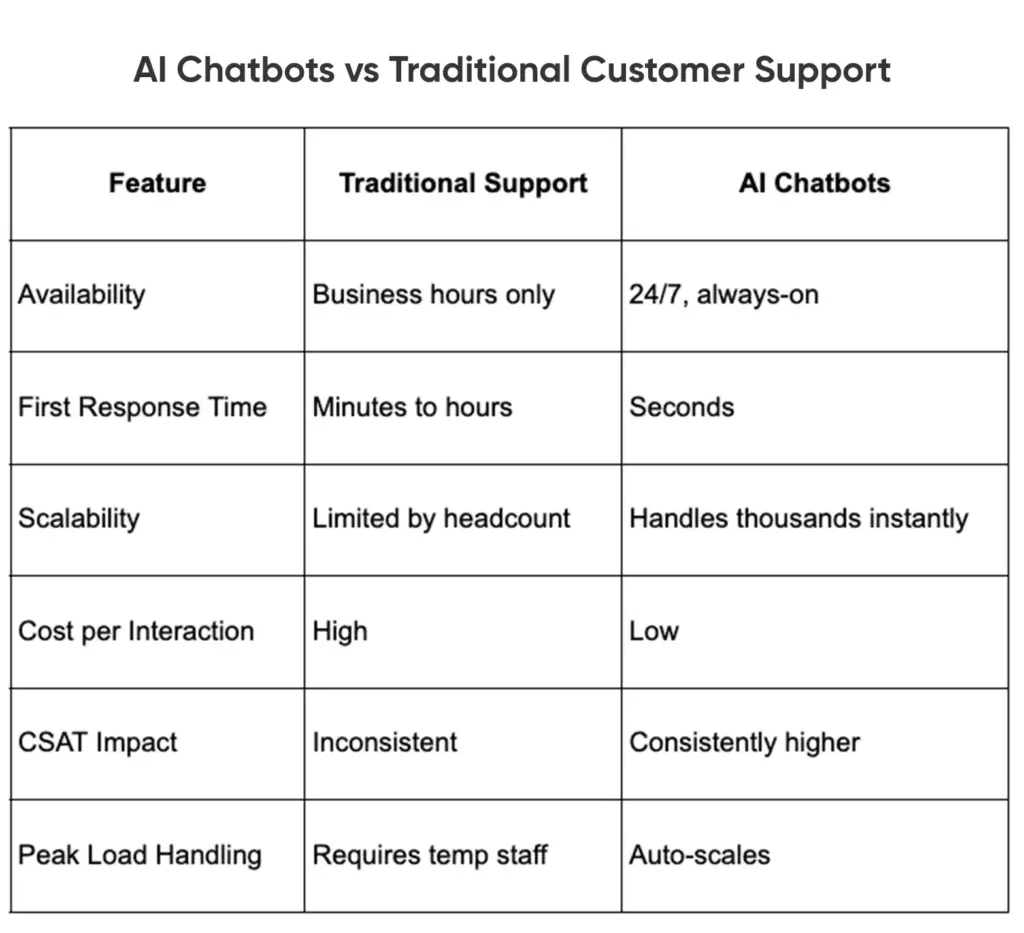
AI Chatbots vs Traditional Customer Support
Reducing Expenses and Increasing Productivity
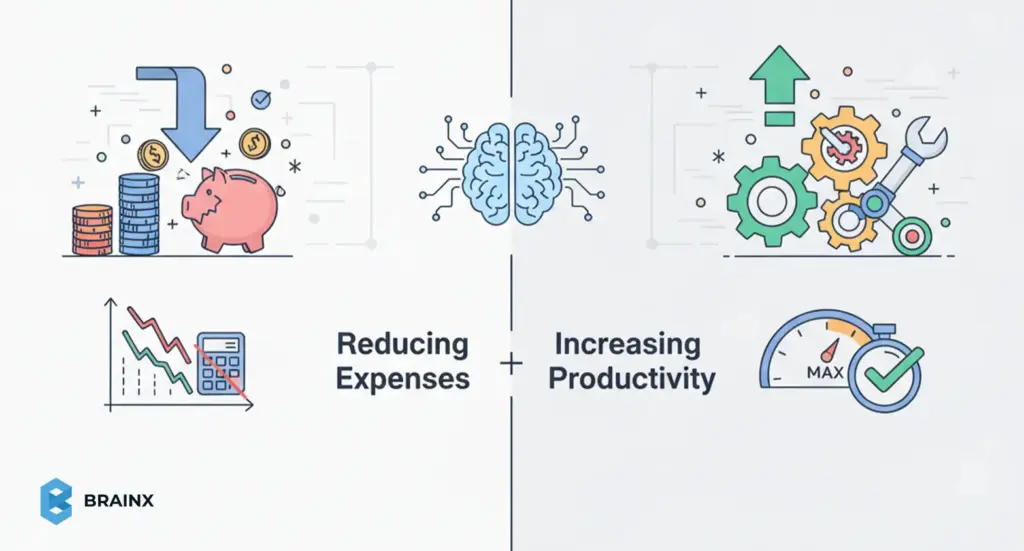
In addition to happier clients, AI chatbots lead to major cost reductions and efficiency improvements. Since chatbots automate repetitive processes, companies are able to serve more clients without corresponding to the increase in staffing requirements..
According to a Smartsupp report, chatbots reduced support expenses in companies by up to 30 percent. Similarly, Nutshell notes AI customer service typically lowers expenses by roughly 30%. These savings come from having one chatbot manage thousands of chats simultaneously, which is something no human team can match.
Internally, chatbots free human agents for high-value work. By handling password resets, order status questions, and other repetitive requests, bots reduce agent workload. Agents spend less time on “tier-1” tickets and more time solving complex problems or building customer relationships.
IBM observes that giving agents AI assistance raises their productivity by 14%. Likewise, Kommunicate highlights that telecoms saw 30–45% higher support productivity after adding generative AI chatbots.
Key efficiency boosts include:
- Lower headcount needs: Automation means support centers can handle growth without hiring extra staff. Companies no longer scramble to bring on-temp agents during busy seasons; AI chatbots pick up the slack.
- Faster handle times: AI agents do not need breaks. Convin reports its AI agent solution cuts average handling time by 40%, quickly resolving queries that would stall human staff. In practice, this leads to dozens fewer abandoned calls or delayed tickets.
- Better knowledge use: AI chatbots are connected to product databases and FAQs. They instantly fetch accurate information (order status, billing info, troubleshooting guides), eliminating time wasted on searching or manual data pulls.
Even beyond chat, AI tools boost contact center efficiency. For example, a 30–45% jump in support productivity has been documented in industries adopting AI chatbots. Instead of spinning up new teams for a surge, companies use AI to serve more inquiries per agent. This efficiency correlates strongly with CSAT: faster resolution and lower wait times mean more satisfied customers.
Personalization, Context Awareness and Sentiment Analysis
Contemporary chatbots based on AI go much beyond pre-written question-answers. With the help of NLP and embedded data, they provide highly personalized, context-sensitive help. As an example, a chatbot can welcome a repeat customer with his or her name, recall previous purchases or recommend products based on profile information. The personal touch in the interactions makes it seem more human. According to Gartner, 75% of CX leaders expect chatbots to mirror their brand’s tone and values.
Importantly, sentiment analysis, or the capability to identify the mood of a user, is present in many AI chatbots. When the words or tones of a customer reveal frustration or anger, an advanced chatbot can notice it and redirect to a human agent. This means angry or complex issues are handled by empathetic staff, while calm, routine questions stay with the bot. By steering conversations appropriately, chatbots help prevent negative experiences from festering.
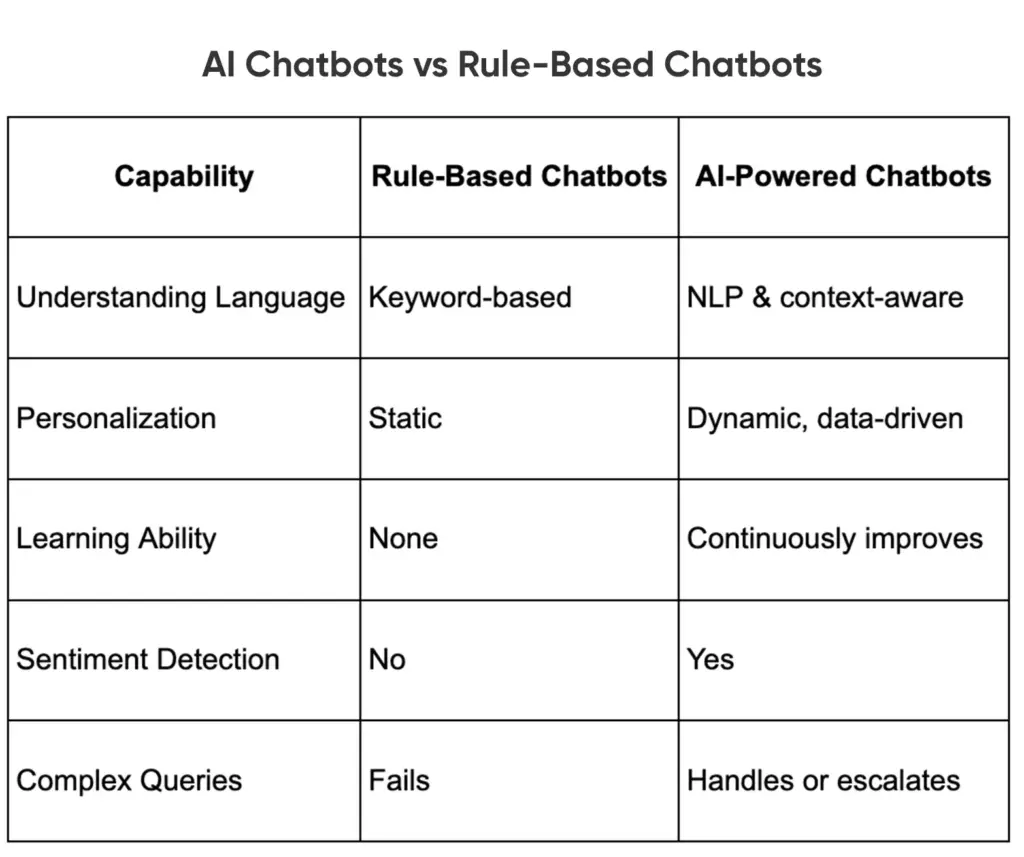
One way of examining further why AI-powered chatbots provide a more human and adaptive support experience is to compare them with the traditional rule-based chatbots.
AI Chatbots vs Rule-Based Chatbots
Examples of AI-driven personalization and sentiment use:
- Tailored responses: IBM notes generative AI assistants can analyze customer data to provide custom product suggestions, resulting in about a 15% lift in CSAT.
- Emotion-aware handoff: Advanced bots “know” when to call in a human. SuaveSol explains that sentiment-aware chatbots will empathize with an angry user or immediately route them to live support if needed. Automatically, minimizing customer frustration and maximizing satisfaction.
- Omnichannel context: An integrated AI engine makes sure that a customer context is transferred between channels. In case a customer joins the chat and makes a call, an agent can view the chat history. Unity between chat, email or voice ensures the customer does not need to repeat themselves, further supporting a seamless support experience.
Altogether, these AI capabilities personalize interactions at scale. Customers get relevant, human-like help instantly, which fosters trust. One survey found 70% of CX leaders believe generative AI enables highly personalized customer journeys. As bots refine their responses, they not only reduce errors but also make each conversation feel more custom – an engagement style that naturally boosts CSAT.
Uniting AI and Human Strengths for Hybrid Support
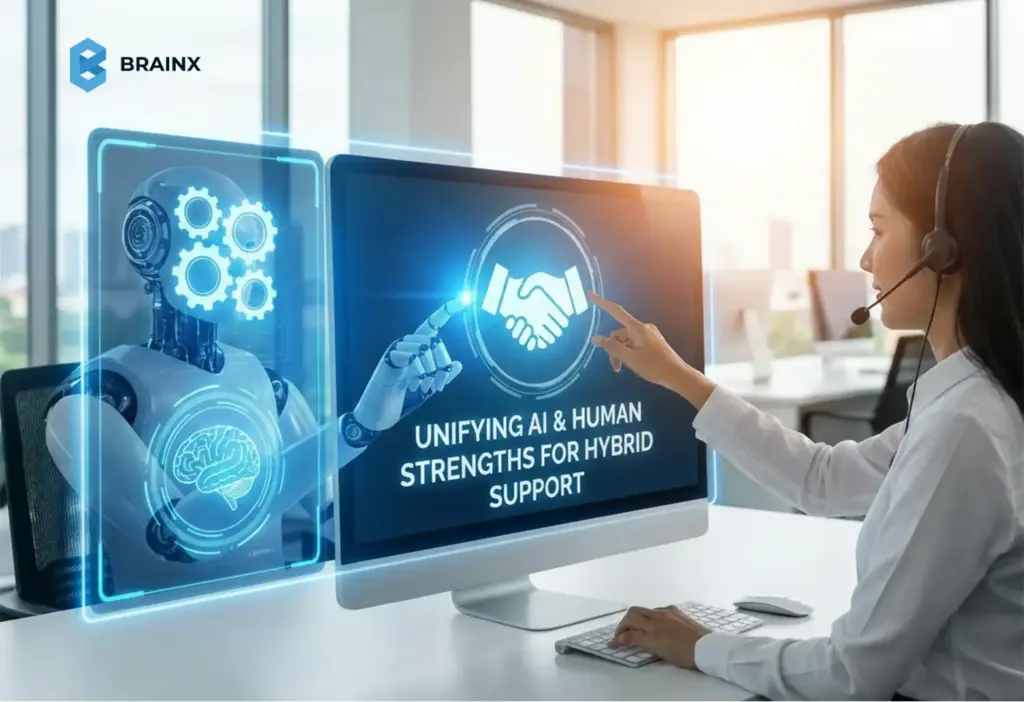
AI chatbots are very effective at monotonous, high volume work, but human agents cannot be replaced in matters that are complicated and sensitive. A hybrid model is the most appropriate way to support since it takes advantage of the strengths of either side.
As InvoZone notes, bots are “team-mates, not magic” so they should be working alongside humans rather than supplanting them. In this model, chatbots handle 70–80% of common queries, while smooth handoffs ensure tough problems get expert care.
Key elements of a hybrid approach:
- Seamless escalations: AI chatbots should be engineered to recognize their limits. If a customer’s issue is too complex or emotional, the chatbot signals for human assistance without losing context. Customers thus experience a fluid transfer rather than repeating themselves.
- Agent enablement: When live agents take over, AI can still help in the background. Tools can suggest next-best actions, pull up relevant data, or summarize the conversation so far. This “agent assist” capability further improves resolution speed and consistency. In fact, Zendesk reports 75% of CX leaders see AI as amplifying human intelligence, not replacing it.
- Balanced work: Chatbots lighten agent workloads, reducing burnout. SuaveSol points out that by automating FAQs, AI “minimizes burnout” and helps maintain a healthy workplace. When agents feel happier, they would serve customers much better and hence the CSAT would be indirectly raised.
The overall result: A more efficient, predictable and compassionate hybrid support team. Customers enjoy quick automated help most of the time, but still have empathy when they need it. The balance drives both efficiency and loyalty. Indeed, studies show customers actually prefer this combination: about 43% of people favor an integrated bot-human support experience.
Key Metrics and ROI of AI Chatbots
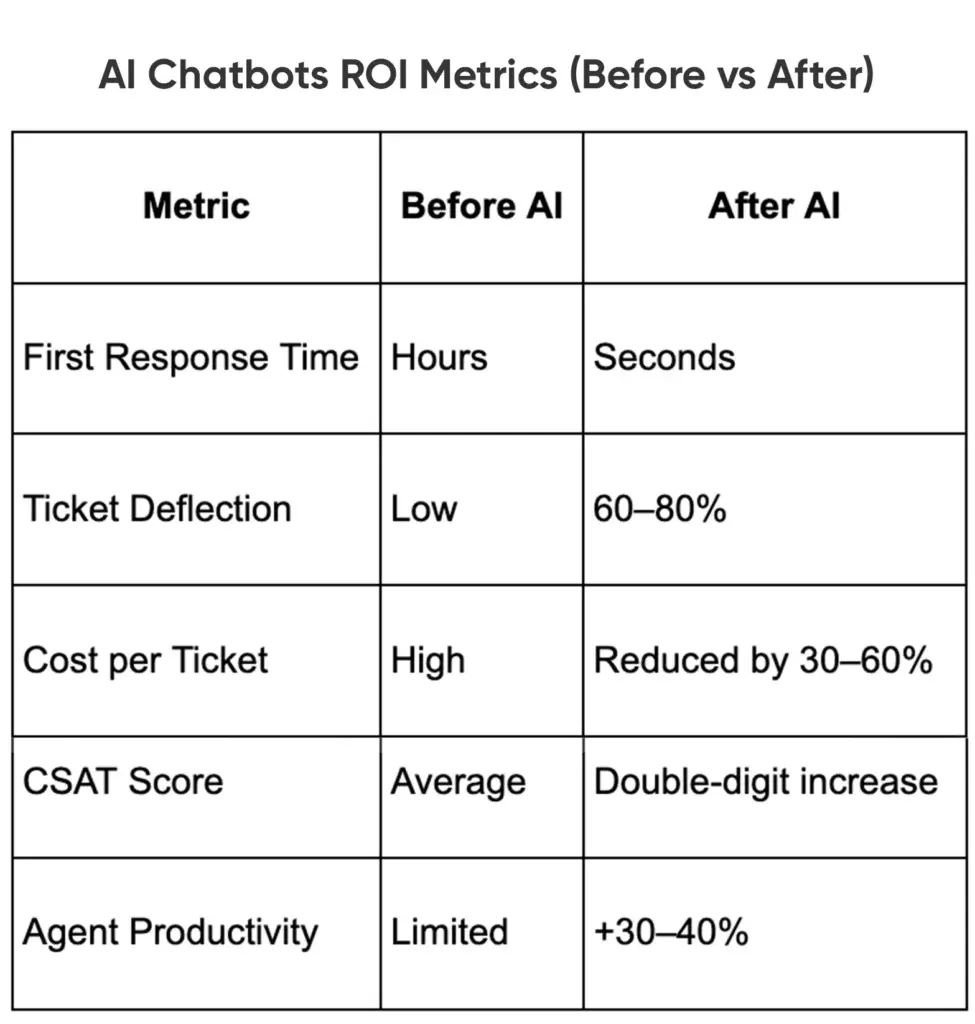
To justify investment, leaders track hard numbers. AI chatbots move the needle on several key support metrics:
- First Response Time: With bots answering instantly, first-response times often fall by 50–70%. In one case study, an ecommerce client’s response time shrank from 12 hours to under 4 minutes. Such speed directly correlates to higher CSAT and lower churn.
- Resolution Rate and CSAT: Improved speed and accuracy mean more issues are resolved in one go. For example, Convin reports its AI agent improved CSAT by 27% thanks to faster, more precise replies. Telecoms saw 97% of companies reporting CSAT gains after adding AI support. In short, chatbot usage typically boosts CSAT by eliminating delays and errors.
- Cost per Ticket: Automating lower-tier tickets drives down cost per contact. InvoZone’s client cut ticket costs by over half – from $6.00 to $2.50 – after deploying AI. These savings accumulate rapidly as chatbots handle more traffic.
- Deflection Rate: A key metric is how many chats the bot can handle entirely on its own. High deflection (e.g. 60–80% of routine inquiries solved by AI) means less strain on help desks. Chatbot ROI comes in when support teams can do more with fewer people.
- Agent Efficiency: AI tools free agents to resolve higher-tier cases. IBM noted a 33% increase in agent efficiency in a company using AI ticketing. Such gains mean support teams can scale without proportional headcount.
AI Chatbots ROI Metrics (Before vs After)
Metrics matter. For example, 46% of telecom customers left their provider after a bad support experience – a glaring business impact. By contrast, successful chatbot use can prevent such churn. Every stat improvement – faster replies, higher CSAT, lower costs – boosts the bottom line. As an AI industry leader puts it, companies using AI-first support see “real revenue and productivity gains”. Over 80% of leaders plan increased AI investment because it tangibly amplifies customer happiness and efficiency.
Real-World Case Studies
Trilogy (IT services) experienced impressive outcomes with chatbots: two-thirds of their queries were satisfied via AI, and the level of customer satisfaction was 96 percent, while half of the support costs were reduced.
Tiger of Sweden (fashion retailer) incorporated an AI chatbot: It helped them resolve 30% of their tickets. After implementation, CSAT increased by 73% to 96% as customers received timely and correct responses.
Banking: A major UK bank used an AI agent to answer natural-language chat queries and saw satisfaction for those answers soar 150%.
Telecom: AI is proving critical. In Canada, telecom complaints spiked by 38% in one year, but telco companies using chatbots reported CSAT gains. IBM found 97% of telecom execs saw CSAT improvements with AI-powered support. Generative chatbots provide customers with happier service and also streamline it, which may result in up to $100 billion of supplementary revenue to telecoms around the world by the year 2030.
Retail & Others: Companies, such as Klarna and DHL, rely on AI assistants to notify customers about their orders and deliveries. Klarna’s chatbot virtually eliminated chat wait times, which allowed agents to focus on sales and resulted in an indirect CSAT win. German Media firm: implementing a generative AI assistant for personalized recommendations increased CSAT by ~15%.
These are just a few examples of a definite trend: AI chatbots lead to a quantifiable CSAT boost. Satisfied customers are more loyal and less expensive to serve, so even a single-digit CSAT increase will have a payoff in recurring business and referrals.
Future Trends Involving Chatbots & AI Assistants
The AI customer support environment is changing by the day. Generative AI and natural language models are making chatbots even smarter. The chatbots we have today are based on NLP to help them understand requests, however the AI agents of tomorrow will be able to anticipate our needs better and will be nearly human-like in their conversations. Gartner anticipates that approximately 25 percent of businesses are going to have chatbots as their main support system in 2027.
Key trends to watch:
- AI agents: The new generation of bots, capable of autonomously resolving complex problems, and trained on large data sets, is coming up. They continuously learn from all interactions, improving “with every chat”.
- Voice and multilingual bots: Support via spoken conversation is growing; voice-activated AI assistants will further broaden 24/7 help (communicating in the customer’s language too). More than 62% of CX leaders predict the use of AI in voice support in the coming years.
- Proactive service: AI will not react to questions, but it will preempt them, notifying the customer about problems or upsells. Predictive analytics will be able to determine when a customer is likely experiencing a problem and automatically reach out to them turning support into a retention engine.
- Deeper analytics: Chatbots create a massive amount of data. Advanced AI will mine that data to continually refine scripts and detect pain points. Real-time sentiment tracking can flag dips in satisfaction as they happen.
These innovations promise even higher CSAT and efficiency. Early adopters of advanced AI (whether chatbots or broader support AI) are gaining a competitive edge in loyalty and cost – a lead that grows as technology matures.
Conclusion (It’s A Competitive Advantage)
Speed and quality of support are the distinguishing features of business in the modern competitive environment, which AI chatbots provide. They deliver instant, correct answers along with fluid hybrid experience, resulting in increased CSAT, reduced waiting times, and reduced support cost.
The use of AI chatbots is no longer an option but a strategic requirement to founders, product managers, and IT leaders. Chatbots can improve efficiency and empower human agents to work on complex problems when prioritized as frontline team members and optimized regularly. The outcome is a more scaled-back support operation and a more dedicated customer base that appreciates fast 24/7 service-time, which provides visionary enterprises with a sustainable advantage.
BrainX Develops Smarter Customer Support using AI Chatbots
Make customer support a competitive edge using AI chatbots that are fast, scale to large, and bring customer satisfaction. At BrainX Technologies, we build and implement custom AI chatbot systems that will work well with your current support stack, are able to auto-serve high-volume queries, and can improve CSAT by providing smart and human-like experiences.
Whether you’re a startup scaling support or an enterprise modernizing CX operations, our AI experts tailor chatbots to your workflows, data, and customers—so your teams resolve faster, your costs stay lean, and your customers stay loyal.
AI Chatbots & Customer Support (CSAT) FAQs
1. What types of customer queries should AI chatbots handle first?
High frequency, low complexity queries, like order status, account access, refunds, and onboarding steps, and product FAQs, tend to be best handled with AI chatbots. These use cases provide a quicker ROI and avoid frustrating customers when adopting it initially.
2. How do AI chatbots affect customer trust and brand perception?
AI chatbots can improve trust when designed properly with the appropriate tone, accuracy, and logic of escalation. Untrained bots will damage brand reputation and that’s why continuous training and human fallback is essential.
3. What data do AI chatbots need to deliver accurate support responses?
The quality of AI chatbots depends on knowledge bases, frequently asked questions, customer relationship management, order systems, and previous conversation. The accuracy of chatbots and the experience of the customer depend on the quality of these data sources.
4. How can companies ensure AI chatbots do not provide wrong or misleading responses?
Reducing errors in companies is achieved through controlled training data, retrieval based response, confidence thresholds and human in the loop escalation. A lot of businesses implement guardrails and ongoing control to ensure reliability of answers.
5. What industries are AI chatbots most effective for when it comes to customer support?
The fastest growth is achieved in industries having large support volumes, including SaaS, eCommerce, fintech, telecom, healthcare, and logistics. These industries enjoy a shorter response time, scale better and customer satisfaction in peak times.
AI chatbot development is taking off in the business sector and more than three-quarters of businesses are now using AI chatbots in one business operation or another. Indeed, it is projected that AI will do up to 95 percent of customer interactions by the end of 2025. Corporations are adopting a conversational AI to automate customer service, improve business processes and connect with their clients 24/7.
However, the difference between one chatbot to serve a small application and enterprise chatbots to serve a multinational corporation?
That is a different ball game altogether, and has its own challenges and enormous opportunities.
Firms are allocating resources to AI-based conversational bots to automate customer care and internal processes, but the scaling of such systems cannot be achieved without a well-thought out and strong architecture.
If you’re still exploring the fundamentals, read our AI chatbots for business growth guide to understand types, benefits, and real-world use cases before diving into enterprise-scale development.
Why Scaling Enterprise Chatbots Is a Different Game

When you have tried simple chatbots, you can guess that they are able to respond to simple questions on a website. However, to take that to the level of virtual assistants is like trying to take a small restaurant and turn it into a fast-food chain country-wide. Users multiply, queries become more complex and integration and compliance requirements become out of this world. A bot which had been well behaved with a few hundred chats may crumble under tens of thousands.
Majority of the teams begin with off-the-shelf natural language processing (NLP) products or a basic rule-based bot. It is equivalent to constructing with LEGO blocks that are fast to boot but you bang on a wall when there is a traffic spike or when decoupling with the legacy systems.
Some of the frequent problems businesses face include slow response time, bots not understanding subtle questions or failure to transition to human agents where necessary.
Sound familiar?
In case a bot cannot scale gracefully, you may have wasted opportunities, customers who become frustrated, and support that is overwhelmed with tickets.
Basic Building Blocks of Scalable AI Chatbots
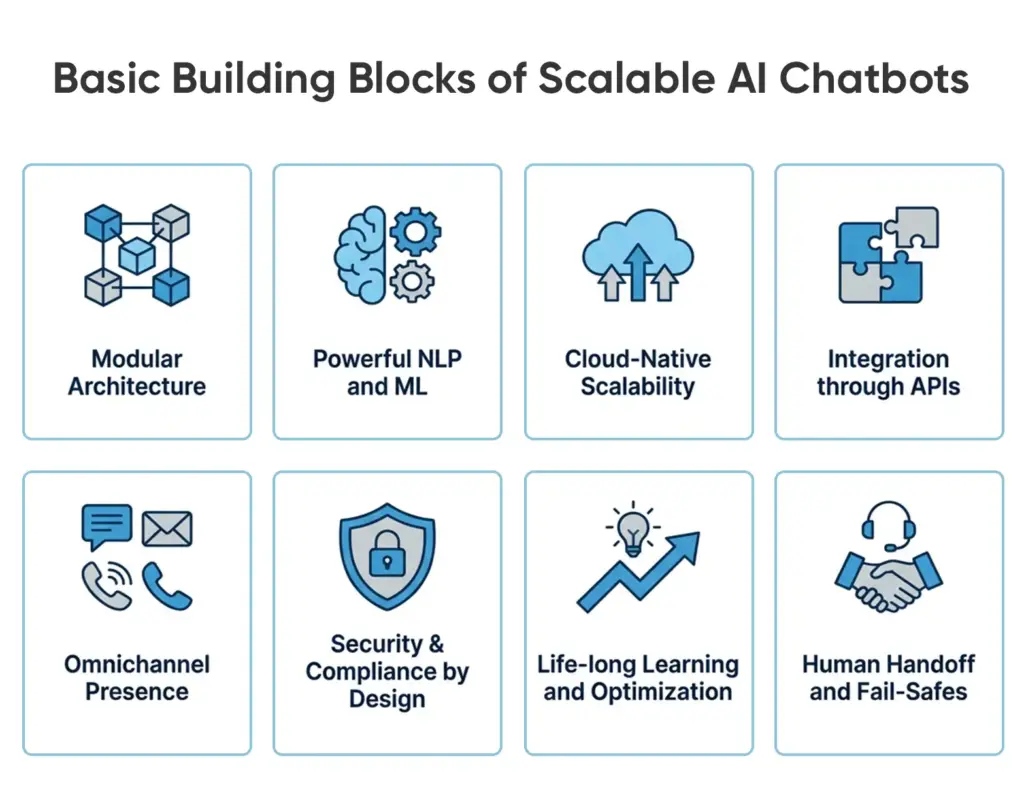
As we have learned enterprise AI chatbot development, it depends on a combination of good architecture and intelligent technology. The following are the major pillars that distinguish a scalable bot:
- Modular Architecture: Develop the chatbot in separate modules, intent recognition, dialog management, integrations, analytics such that each part can develop independently without interfering with the rest.
- Powerful NLP and ML: Process the domain-specific language using strong Natural Language Processing, and also teach your own machine learning and continually increase the accuracy.
- Cloud-Native Scalability: Run on elastic cloud architecture (AWS, Azure, GCP) on Docker and Kubernetes to support millions of interactions without problem.
- Integration through APIs: Integrate the chatbot with CRMs, ERPs, and databases using secure REST or GraphQL API to carry out real time business activities.
- Omnichannel Presence: Have uniform user experiences through web, mobile, messaging apps, and voice interfaces, using the same backend AI engine.
- Security & Compliance by Design: Use encryption, role-based access, and GDPR/CCPA/HIPAA Compliance to protect enterprise data, starting at day one.
- Life-long Learning and Optimization: Feed the live chat data into the analytics loops to make responses more refined, increase knowledge, and get long-term ROI.
- Human Handoff and Fail-Safes: facilitate the process of the transfer to live agents and have fallback messages in the event of unresolved queries (or complex queries).
Pro Tip: Don’t forget performance tricks like caching frequent answers and using asynchronous processing for external API calls. These ensure your bot stays snappy even as workload grows.
Real Benefits Beyond the Chatbot Hype
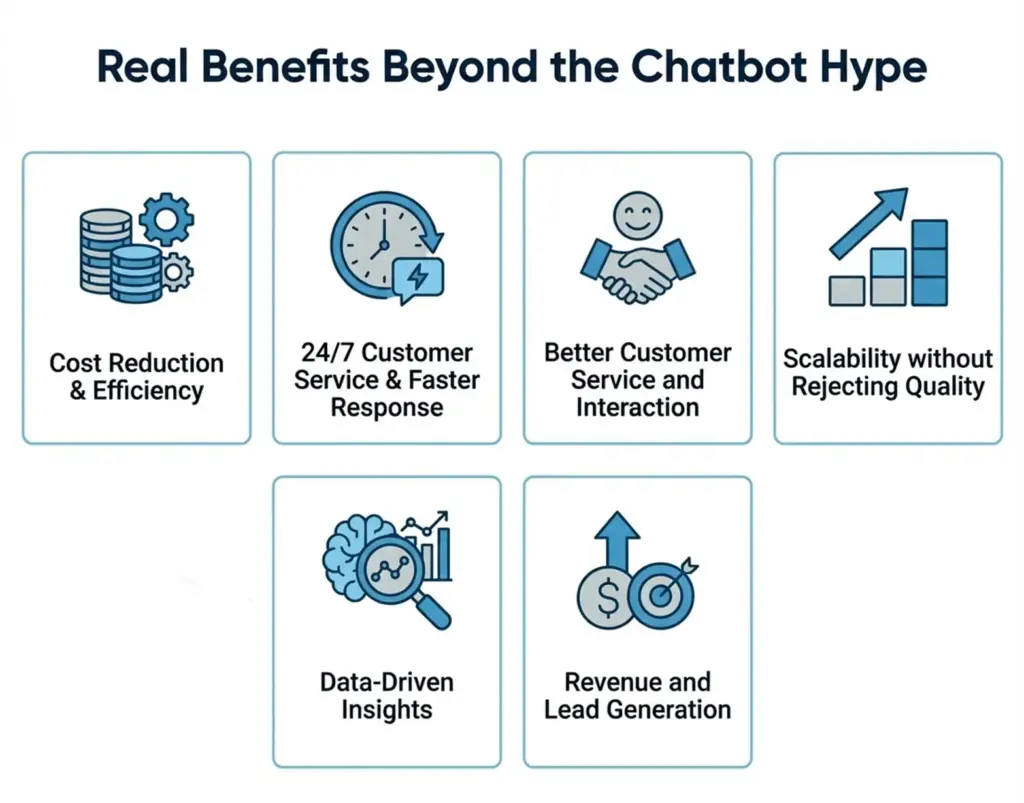
You’ve probably heard the generic promises like “chatbots cut costs and boost CX!”. Let’s dig into what that really means, especially at enterprise scale, and back it with some numbers:
- Cost Reduction & Efficiency: AI-powered chatbots can resolve up to 80% common questions, cutting support costs by 30%. Vodafone saw a 70% reduction in cost-per-chat for support. The efficiency gains free time for your human agents to focus on high-value complex issues instead of answering “Where is my order?” for the 100th time.
- 24/7 Customer Service & Faster Response: Bots are on-demand virtual agents that don’t need coffee breaks to be productive. Over 51 percent of the customers desire a response to be less than 5 seconds and the majority of them would rather receive an immediate response with a bot than a response after 15 minutes with a human agent. Customers have been able to get what they expected in the business, and this makes them satisfied.
- Better Customer Service and Interaction: A chatbot AI will be consistent, and a friendly and helpful personality can be trained. Customers receive on-demand and interactive customer support on everything, including basic queries and one-on-one suggestions. Indeed, when the chatbot is designed properly, 80 per cent of consumers mention having positive experiences with it.
- Scalability without Rejecting Quality: It becomes much easier to scale AI bots to serve more customers or other markets. Spike in demand can be easily managed by adding more server capacity instead of having to panic and add headcount. The scale-out or elastic scalability will ensure that your support quality does not suffer during high traffic periods or unforeseen periods of rapid growth.
- Data-Driven Insights: Enterprise chatbots are accompanied by analytics dashboards, which monitor the customer questions, most frequent pain points, and customer satisfaction. Summation of these chat logs would give you access to real-time customer insights, which would be difficult to obtain otherwise.
- Revenue and Lead Generation: By engaging website visitors proactively (“Can I help you find something or get a demo?”) and guiding them through product information, bots can increase conversion rates. Business leaders have observed that deploying chatbots for sales inquiries led to a 67% surge in sales in some cases. Chatbots can qualify leads by asking a few questions and then route hot leads to your sales reps instantly. They can also upsell and cross-sell by recommending products based on what the customer is asking (“You’re looking at smartphones; do you need a case as well?”).
Example Use Cases of Scalable Bots
It’s easy to talk about the theory behind AI chatbot development. We can see what is happening in the real world of enterprise chatbots usage, and impressive outcomes that are achieved:
- Telecom Customer Support (Vodafone):
Telecom companies such as Vodafone have millions of customers who always have billing questions, technology problems, and service questions. Vodafone has introduced an AI chatbot known as TOBi on its sites and applications in order to do customer support.
TOBi turned out to be a game-changer and it now successfully resolves about 70% of all customer inquiries on its own (everything from “What’s my data usage?” to troubleshooting device settings). This deflected a huge volume of calls away from human call centers.
The payoff? Customer wait times dropped, and Vodafone saw a 70% reduction in support cost per chat after rolling out the chatbot. TOBi’s success led Vodafone to develop an even more advanced version called “Super TOBi” using deeper NLP; in one market, first-contact resolution went from 15% to 60%, and online customer satisfaction (NPS) jumped by 14 points. These are massive improvements in an industry where quick, efficient service is key to reducing churn.
- E-commerce & Retail (Alibaba):
E-commerce giants deal with enormous query volumes, especially during peak shopping seasons. Alibaba, for instance, handles millions of customer questions during Singles’ Day sales. They built a highly scalable AI chatbot system that integrates with their product database and order systems.
The result: Alibaba’s bots can field over 2 million customer messages per day and handle 75% of all online customer questions without human help. These bots assist with order tracking, product info, returns, and more across both chat interfaces and even voice hotlines. By offloading repetitive queries to AI, Alibaba saves an estimated ¥1 billion RMB annually (≈$150 million) in customer service costs.
Even more impressive, their analysis found that automating chats didn’t hurt customer experience. On the contrary, customer satisfaction rose by about 25% after the chatbot rollout, likely because customers got faster service. To retailers, a scalable chatbot would be comparable to employing an army of super-efficient store clerks who can serve all shoppers at the same time.
- Financial Services (Bank of America):
Banks in this sector require customers to receive immediate answers regarding their accounts and internal departments have to be able to access information fast. Bank of America’s Erica chatbot is a famous example in this space. Erica serves over 50 million users and has handled 3+ billion interactions to date, offering help with everything from balance checks to budgeting advice.
98% of users get the info they need from Erica, which significantly reduces calls to the bank’s support lines. In other words, almost all routine banking questions are answered by AI, freeing up human bankers to focus on more complex client needs.
Bank of America also deployed “Erica for Employees” internally, over 90% of BoA’s staff now use an AI assistant at work, which cut IT helpdesk calls by half. It is a massive productivity improvement at an enterprise level. These findings demonstrate how chatbots with scalable features can be subjected to an industry that is highly regulated and sensitive to security yet offer fast service and consistent verification and precision.
- Healthcare & Insurance:
AI chatbot development is leveraged by most of the health providers and insurance companies to process patient requests, booking appointments, and claims. To illustrate, a healthcare chatbot will be able to check the symptoms, locate clinics, and handle simple questions (What is my co-payment in regards to X?) without violating privacy.
During the COVID-19 pandemic, AI chatbots were deployed by organizations like the CDC and hospital networks to answer millions of queries about symptoms and guidelines, taking enormous pressure off call centers. On the insurance side, bots are helping customers file claims or get policy info instantly.
A scalable bot in this sector needs to integrate with patient databases or policy management systems, but when it does, it dramatically cuts down response times for anxious patients and customers. While specific stats vary, companies have reported double-digit percentage drops in call volume after introducing chat assistants, and higher customer satisfaction because people get answers faster during stressful situations.
- HR and Internal Helpdesks:
It’s not just customer-facing use cases, enterprises are also turning to chatbots for internal support. IT helpdesk bots for example can troubleshoot common tech issues for employees (“How do I reset my VPN password?”) or route tickets to the right team, all through a chat interface on Slack or MS Teams.Opting for this option can save thousands of man-hours.
One national retailer implemented an HR chatbot for its employees to get instant answers on PTO balance, payroll dates, and company policies; the bot handled ~40% of inquiries without HR staff involvement in the first year, speeding up responses for employees and letting the HR team focus on strategic work. Scalable bots for internal use need to be highly secure and integrated with company databases, but payoff is a more productive workforce and reduced internal support costs.
How to Avoid The Difficulties and Traps of Scaling Chatbots
Alongside success stories, it should be made clear that there is no painless way of developing a scalable enterprise chatbot. Quite a number of projects fail or come to a halt due to pitfalls. Here are the top challenges we’ve seen, and how to avoid them:
1. The “Messy” Integration: One of the hardest parts of scaling isn’t the AI itself, but connecting the chatbot to all your enterprise systems. Legacy IT infrastructure can be a nightmare to integrate with outdated databases, closed-off CRM systems, etc. If your chatbot can’t pull up order details or update a ticket because systems don’t talk, it will frustrate users with half-baked answers.
Solution: Use middleware or integration platforms to bridge legacy systems with modern APIs. In one ecommerce project, a company’s chatbot worked fine during small trials but froze and started giving generic errors when Black Friday traffic hit, because it was trying to query an old order management system that couldn’t scale. After the crisis, they re-architected with an API layer decoupling the bot from the legacy system and containerized the backend services.
2. Performance and Latency Problems: Users expect instant answers – a few seconds delay can feel like an eternity in a chat. A major challenge as you scale is ensuring the bot stays fast when handling many requests or pulling data from multiple sources. We’ve seen bots that worked fine in testing become painfully slow in production because of unoptimized code or server overload.
Solution: Test your chatbot with high load capacities before rolling it out with high volumes. Introduce query caching, asynchronous calls to third party APIs and ensure that your cloud infrastructure is auto-scaling according to the CPU/memory load. Also, monitoring is prudent to put in place, once response times are beginning to creep under load, you receive warnings, and before response times get too long, you can add resources or optimizations. The speed is not only the luxury of scale but also a precondition of good UX.
3. NLP Accuracy and Maintenance: A chatbot used by an enterprise is sensitive to complicated and evolving questions. A trap is to set the bot and forget about the NLP models. The bot may eventually begin to misinterpret user intentions, particularly when you add more services to it, or the language changes (consider all the new slang or emerging trendy words and phrases that appear every year).
Solution: Continuously update its training data with real conversations. Leverage active learning: have a system to review when the bot says “I don’t know” or when user satisfaction dips, and use those cases to retrain. Also, don’t oversell the bot’s abilities initially – start with a focused scope of what it can handle and expand as the AI gets smarter. A large bank had its chatbot gradually grow its knowledge base of 100 FAQs to more than 700 in a few years, and the models were retrained 75,000+ times in the process. This was done through an iterative process that helped in keeping the bot accurate and useful with an increase in its scope.
4. Data Privacy and Compliance Risks: Minimal focus when it comes to using AI is to work with customer data (or any other sensitive information). Any non-conforming scalable chatbot can lead to the violation or huge fines. Potential pitfalls are: the bot spills top secret data onto the wrong person, or logs of the dialog are stored in an unsecure location, or one has not gotten appropriate user consent.
Solution: Mask or omit any personal identifiers in bot logs, encrypt data in transit and at rest, and implement user verification for account-specific queries (“Please log in to view your order status”). Also, configure the AI to refuse certain queries if they would violate policies (e.g. a medical bot should not give unapproved medical advice, a finance bot shouldn’t divulge account details without authentication). In highly regulated industries, involve your compliance officers early to sign off on the chatbot’s functionality. It’s much easier to build compliance into the chatbot from the start than to retrofit it after a violation has occurred.
5. Shortage of AI Talent: Many enterprises find that building a sophisticated AI chatbot requires skills their team might not fully have – like conversational UX design, NLP model tuning, and cloud DevOps for AI. Hiring unskilled developers may result in low quality results or the creation of a bot that fails to scale.
Solution: Invest in your team (training, hiring) or collaborate with one of the successful AI chatbot development companies. Enterprise AI solutions firms that can bring in expertise are also available. This will save time and expensive mistakes particularly with first-time projects. The good news is that AI frameworks are improving, and even “no-code” or “low-code” chatbot platforms are emerging for simpler use cases – but for a truly custom, scalable bot, you still need professionals who know what they’re doing. Consider a hybrid AI development approach: your internal IT or product team works alongside an AI specialist agency to get the best of both domain knowledge and technical know-how. This addresses the skill gap while also transferring knowledge to your team for future maintenance.
6. Setting Unrealistic Expectations: Finally, an insidious yet prevalent trap, which is to hope the chatbot is going to perform flawlessly within two or three days. The ideas of an all-knowing human-like AI (particularly with the hype of such tools as ChatGPT) can turn into a dream of stakeholders and disappointment when the first version turns out to have its limit. This detachment can kill the project support.
Solution: Teach internally that the development of chatbots is iterative. Establish clear and attainable targets of Phase 1 (e.g., top 20 customer questions will be automated with accuracy of 90-percent). Add capabilities in phases, get feedback and then launch. Manage expectations that the bot will handle routine stuff well but isn’t a magic brain that can answer any question under the sun (not yet, anyway!). By demonstrating quick wins – say your Phase 1 bot deflects 30% of live chat volume – you build confidence and buy-in for expanding it further. In our experience, the most successful enterprise chatbot rollouts start small, nail the basics, and then earn the right to take on bigger workloads over time.
The Future of Enterprise Chatbots Trends
The AI chatbot environment is changing at a high rate. Meaningful things are happening in the field of chatbot within the enterprise, and CTOs and product leaders should look forward to the following trends over the next few years:
- Advanced LLMs such as GPT-4 will be used in future chatbots to produce natural and human-like replies and enrich and support complex multi-turn dialogues in context-sensitive manners.
- Bots that understand emotions will respond to user emotion and will adjust tone or behavior to offer emotional support and better experiences as scale.
- Predictive chatbots will give suggestions or help to the users even before they request aid through behavioral analytics that will actively interact with users by being proactive.
- Bots in the enterprise will go beyond Q&A to make business transactions to a comprehensive extent as they are deeply integrated with RPA and workflows.
- Multimodal chatbots will integrate voice, text and visual interface to provide cross-channel interactions on any device.
- The AI governance systems will make sure that the bots are clear, abiding, impartial, and in accordance with the company ethics and laws.
Conclusion
Introducing an AI chatbot to your business is not a trend, but a way to solve the real business problems with smart yet scalable solutions. The development of AI Chatbot cannot be achieved without strategic planning, clear goals, and ROI. CTOs and product executives ought to see it as a long-term investment, which must be supported by scalability of architecture to the cloud, strong NLP, and scalability.
Integrate safely with the end of the enterprise systems and optimize on the user experience continuously. Having both a strong technical foundation and profound understanding of customer needs, companies are able to develop chatbots which are efficient and cost-effective, but also involving and have the potential to make customer care and inner processes so smart and future-oriented that they are digitalized intelligent systems.
Want Long-Term Stability? Create AI Chatbots at Scale using BrainX!
We are BrainX Technologies and we are experts in creating business-scale AI chatbots. Our team of developers, NLP professionals, and LLM experts can build bots to overcome workflow, customer, and ROI automation challenges, and provide bots with reliable returns. Looking to optimize the customer service process, enable staff, or customize customer experience, BrainX creates solutions that fit your objectives, are secure and scalable, and future-proof. Collaborate with us and turn your business into a smart, 24/7 and AI-driven organization.
Let’s build your next-generation chatbot. Contact BrainX Today!
FAQs
1. Why should AI chatbots be relevant to businesses?
With the help of the AI chatbots, the enterprises can automatize repetitive tasks and provide 24/7 support and enhance customer satisfaction. It reduces the expenses of the operations and of course, efficiently scaling the communication.
2. What is the difference between an enterprise chatbot and a basic chatbot?
Scalability, complex workflows, system integrations (such as CRM or ERP) are designed to be performed by enterprise chatbots as opposed to the simple queries that are limited and predefined to simple bots.
3. Do AI chatbots support multiple languages?
Yes. Multilingual chatbots can understand and respond in several languages and this allows business organizations to serve the maximum number of customers worldwide without difficulties.
4. What is the integration of chatbots with current business systems?
They are linked by APIs and microservices to provide real-time access to the data in CRMs and ERPs and other enterprise platforms in order to automate the tasks and workflows.
5. Why would I prefer BrainX to develop an AI chatbot?
BrainX Technologies is an enterprise-grade architecture, strong security, and LLM-driven intelligence AI solutions, focused on assisting businesses to achieve long-term stability, innovation, and quantifiable ROI.
There was a shift towards intelligent conversations based on NLP, machine learning, and large language models because AI chatbots no longer rely on simple rule-based scripts. They allow 24/7 support, reduce expenditure, enhance sales and provide personalization at scale thus fulfilling the business expansion in 2025 and beyond. AI chatbots can be used as 24/7 digital assistants to provide customer services and leads, as well as to optimize the work inside and outside the organization and speed up the ROI process. Any business can start a high-impact chatbot and grow without fear using the right platform, integrations, and strategy.
AI chatbots for business are transforming relationships between companies and clients, while streamlining growth. Since only simple scripted answers were possible, today AI chatbots provide personalised, natural conversations that stimulate interaction and productivity.
“Up to 80% of common customer inquiries can be handled by chatbots and allow companies to reduce support expenses by approximately 30% without slowing down or reducing the quality of service delivery.”
This guide will cover the mechanisms of AI chatbots, their major benefits, its application into practice, and why it will become an essential element of business success in 2025 and beyond.
What is an AI Chatbot?

An AI chatbot is a computer program, a software agent that applies artificial intelligence (AI) such as Natural Language Processing (NLP) and machine learning to communicate with human users in a human-like style. They are context sensitive, can read between the lines, comprehend the intent of users and produce responses on the fly unlike old-school rule-based bots which only execute predefined scripts. Nowadays, chatbots frequently make use of advanced Large Language Models (LLMs) (such as GPT-4 or others) so that they can sustain a fluid, natural conversation.
How Do AI Chatbots Work?
When a consumer enters or says a message, the bot processes the entry through NLP to identify the intent and important facts of the user. It then applies a trained model or body of knowledge to come up with a response. It is also common to see many AI chatbots connected to databases and business systems to obtain information or perform tasks.
They learn with every interaction through machine learning and increase the number of answers that satisfied users and those that were not. The feedback loop will enable the bot to be more precise and personalized as the conversation goes on. They are self-trained with each customer inference, which means that the smarter and more effective your business becomes.
Types of AI Chatbots
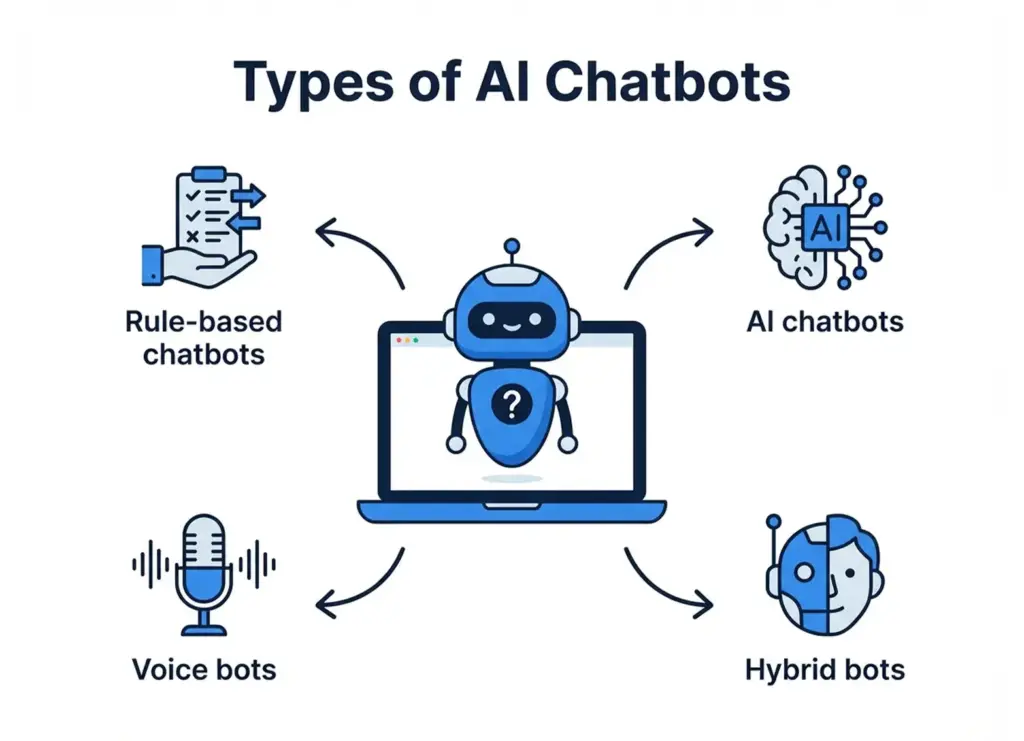
There are various flavors of chatbots:
- Rule-based chatbots: Follow predefined rules/flows (less flexible).
- AI chatbots: NLP/ML in order to understand an open-ended question and context (less strict).
- Voice bots: Modern voice bots can use voice communication (e.g. Alexa skills).
- Hybrid bots: Introduce a hybrid combination of artificial intelligence and rule-based processes or introduce otherwise a human operator fallback.
10 Advantages of AI Chatbots for Business Growth
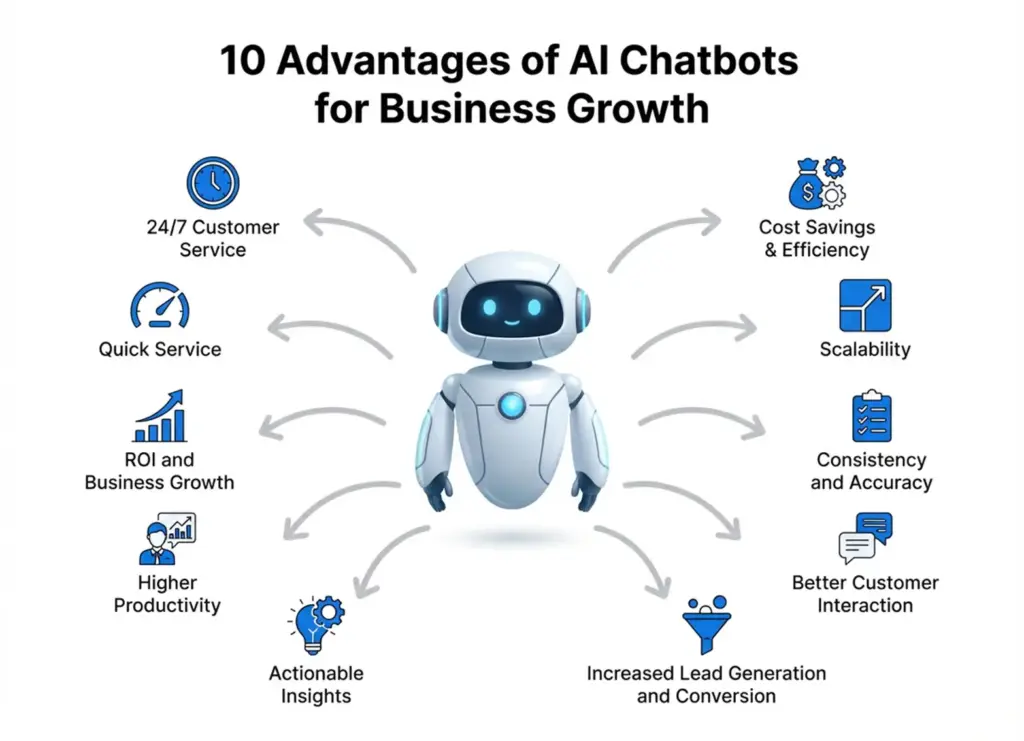
According to recent studies, the use of chatbots will save companies up to $11 billion and 2.5 billion hours of work and reduce costs by up to half. The following are some of the best benefits that chatbots have to businesses:
1. 24/7 Customer Service
Immediate response to queries any time of the day is essential and it is important because 90 percent of contemporary consumers require instant reply whenever they approach a business.
2. Quick Service
Get rid of the queue times by responding to several users at a time. As a matter of fact, 89 percent of the consumers like chat bots due to their immediate responses to questions on customer care.
This urgency makes the customer happy and also improves interaction because clients are more willing to spend more time on your site or in your app when they receive customer support immediately instead of walking away in disgust.
3. Cost Savings & Efficiency
Companies indicate that costs of customer services are reduced by as much as 30% once AI chatbots are installed. The bot will be able to assist many agents, and your human resources can attend to more difficult and high-value interactions. According to Gartner, chatbots will reduce labor expenses of businesses by 80 billion dollars by 2026.
4. Scalability
The bots can assist in handling a lot more questions with minimal staff needs as your business grows. The bot can support several conversations at the same time irrespective of whether it has 100 customers or 100, 000 customers.
This is the reason why the service has consistently remained steady during peak periods or when it is rapidly expanding. The issue of staffing will not be a complex matter; AI chatbots for business can increase as much as possible.
5. Consistency and Accuracy
Offer consistent replies that are extracted out of one body of knowledge, and this implies that customers will receive the correct information at all times. No longer any variation by different agents or human error. Regular service creates confidence and trust in your brand. And where the bot has no answer to provide, it can be programmed to either politely say it does not know or escalate, instead of making educated guesses, and it will always be accurate in its response.
6. Better Customer Interaction
On the contrary, modern chatbots can be personalized on a large scale. They are able to call users by name, suggest their products according to their browsing history and customize their response based on the customer data. Such a level of personalization would produce a sense of appreciation and empathy among the customers, who would take interest in going further.
An ecommerce website chatbot, as an example, can do upselling i.e. suggest a product that is similar to one that a customer is seeking, or a discount, when it notices a hesitant customer: it is like an experienced salesman.
7. Increased Lead Generation and Conversion
They are able to actively spearhead sales. Chatbots can be used to find more leads and drive them to purchase, by starting conversations with webpage visitors (Can I help you find something?), qualifying (friendly) questions, and funnels. They react immediately to product questions, offer advice, and even do checkouts which minimizes drop off.
8. Actionable Insights
Chatbots are able to monitor frequently used questions, likes and dislikes of the customers, pain points and so on. Through these chat logs, businesses are able to collect important data on customer behaviour and requirements.
An example of this is that you may find that a particular product feature is enquired about by a number of customers, so you need to emphasize it more in your marketing. Or analytics of the bot can reveal where customers become frustrated, and you can work on your site or services.
9. Higher Productivity
On the internal level, employees can also use chatbots, such as an HR helpdesk or an IT support agent that can respond to questions of staff. This decreases the monotonous effort of internal teams. In general, companies that operate with the help of AI assistants are likely to state that their productivity has increased dramatically.
10. ROI and Business Growth
Instead, contribute directly to the business growth through enhancing the quality of services, converting more leads into sales and reducing expenses. They assist companies to do more with less, to scale at a faster pace and to offer improved customer experiences and these in turn lead to revenue. It is not surprising that 84% of companies think that chatbots are getting more and more significant in terms of communication with customers and their engagement.
How AI Chatbots for Business Increase Customer Engagement
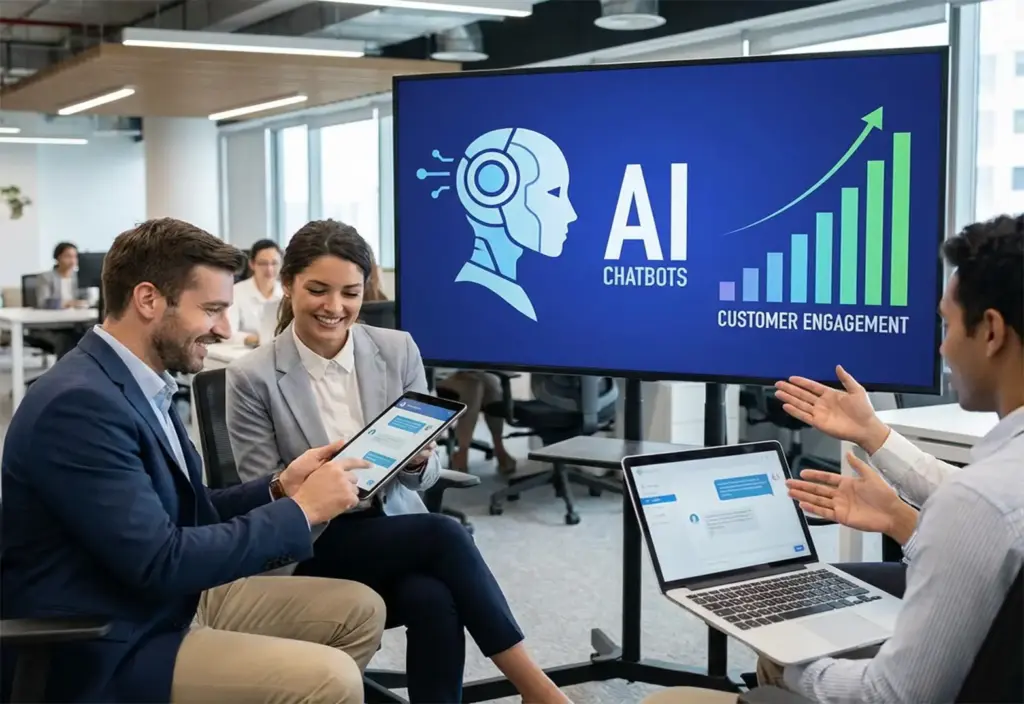
- Two-way interaction, initiated by instant, interactive conversations, is human-like, and it assists users to locate what they need within a very short duration and increases retention.
- Individualized communication with customer information makes it more relevant; the chatbot Sephora uses, in turn, can suggest products based on personal preferences.
- A fast response mechanism lowers the level of frustration, 75 percent of customers like chatbots to give swift answers, which increases the duration of their interaction, and thus a positive experience.
- Distribution of channels ensures a high level of engagement since omnichannel chatbots retain the context between web, apps, and social media.
- Younger consumers lean more towards messaging; the chatbot in Kik of H&M brought a 70 percent re-engagement rate and 13 percent increase in time spent in-app.
- The re-engagement messages remind the users in a gentle manner giving them timely offers or updates, which attracts more open rates compared to the traditional emails.
Sales and Lead Generation Chatbot Automation
- Lead qualification now happens on autopilot as chatbots greet visitors, ask tailored questions, and route serious prospects to sales teams, 41 percent of business chatbots focus on this task.
- Personalized product recommendations increase order value; North Face’s AI bot guided customers through interactive Q&As and achieved higher conversion rates than static listings.
- Shopping and ordering have become frictionless; Domino’s “Dom” chatbot generates 50 percent of digital orders and lifted online sales by 29 percent after launch.
- The follow-up automation maintains the prospects’ warmth by reminding, arranging demos, and providing them with the relevant information that can prompt them to make a purchase.
- The sales FAQs and objections are also answered within a few seconds, and the customers do not lose momentum as they are answered instantly on the policies or the pricing.
- The 24/7 availability allows the brands to gain worldwide advantages, half of the businesses invest in chatbots to take after-hours advantages.
- A pioneer in the retail sector, H&M style chatbot transformed the idea of conversational shopping into a source of sales, improving the level of interaction and online sales with the help of suggested outfits.
Artificial Intelligence (AI) Chatbots in Customer Service and Support

AI chatbots offer 24/7 instant response, which has increased customer satisfaction by approximately 25 percent due to quicker and more reliable response.
- They answer the most frequent questions such as the status of orders or resetting passwords, with Bank of America Erica responding to 100 million queries and reducing the number of calls by a third.
- Chatbots provide precise and current information because they draw answers out of centralized knowledge bases, thus eliminating human error.
- They recognize and alternate languages on their own, providing customers the world over with experiences that are localized, which builds brand loyalty.
- Addressing thousands of conversations simultaneously, can deal with 85 percent of routine queries and diminish agent pressure.
- When the matter is complicated, chat robots will easily hand over the dialogue and context to human operators to effectively resolve it.
- Firms such as Mastercard are resolving 90 percent of complaints within the shortest time possible, which helps save money as well as increase customer satisfaction.
- The ChatBot by Marriott grew the direct bookings by 44 percent, received 87 percent positive feedback, demonstrating that AI chatbots result in better service and growth.
The Major Characteristics to Consider in an AI Chatbot Platform
Measuring the exact features that influence the use of AI chatbots for business evolution is crucial to choosing the right chatbot solution. The usability, scalability, and intelligence that are combined to the right mix would make or break your chatbot in terms of customer interaction. Here’s what to look for:
- Ease of Use / No-Code Development: Select systems to grow business using drag-and-drop or no-code systems, ideal when companies require fast development with no developers; no-code chatbot technologies are now popular with startups and SMEs because of this reason.
- Integration Capabilities: Seek models that integrate with the system, such as CRM, helpdesk, or e-commerce software, such as Shopify or Salesforce, to automate processes, integrated chatbots have been proven to make services 35 times more efficient.
- Scalability and Performance: Be sure that your solution can be scaled to support thousands of simultaneous users and run in harmony on websites, applications, and other messaging systems; scalability is critical, since chatbot applications are estimated to be more than $46 billion in market value by 2029.
- Multi-Language Support: Use AI chatbots with many languages: Multilingual chatbots serve companies with a global customer presence, and with localization, companies that use such websites show customer satisfaction rates as high as 30-percent.
- AI Sophistication (NLP & ML): AI chatbots need to be advanced in NLP and machine learning so they can comprehend intent, context, and tone, which can be explained by the fact that first-contact resolution rates of AI chatbots are nearly an order of magnitude higher than of rule-based chatbots.
- Customization and Training: Select customizable AI chatbots that can be trained on your FAQs, documentation or internal information; proprietary content training makes the chatbot more accurate in responses, up to 60 percent, and makes them sound brand-like and knowledgeable.
- Analytics and Dashboard: Use systems with analytics that give information on queries, engagement, satisfaction, and conversions- Businesses that use chatbot analytics recorded 25% improved decision-making in optimizing customer support.
- Human Handoff and Live Chat Integration: Chatbots can be integrated with live agents to ensure the continuity of escalation in case of complex cases; chatbots and human agent integration can be employed to shorten the resolution time by half and gain customer confidence.
- Security and Compliance: Select secure AI chatbots with encryption, GDPR, HIPAA or SOC 2 compliance, in particular, it is crucial to mention that 75 percent of the companies stated data safety as a primary reason to adopt AI.
- Budget: Review the prices, simple models are free, yet can escalate fast; adjusting the overall price to ROI will avoid excessive expenses, and access necessary automation tools.
- Track Record and Support: Collaborate with trusted vendors who have success stories, industry-specific solutions, and responsive support companies that select established vendors have 20 -30 better adoption success.
Also Read: How to Choose a Software Company: Fundamental Do’s and Don’ts
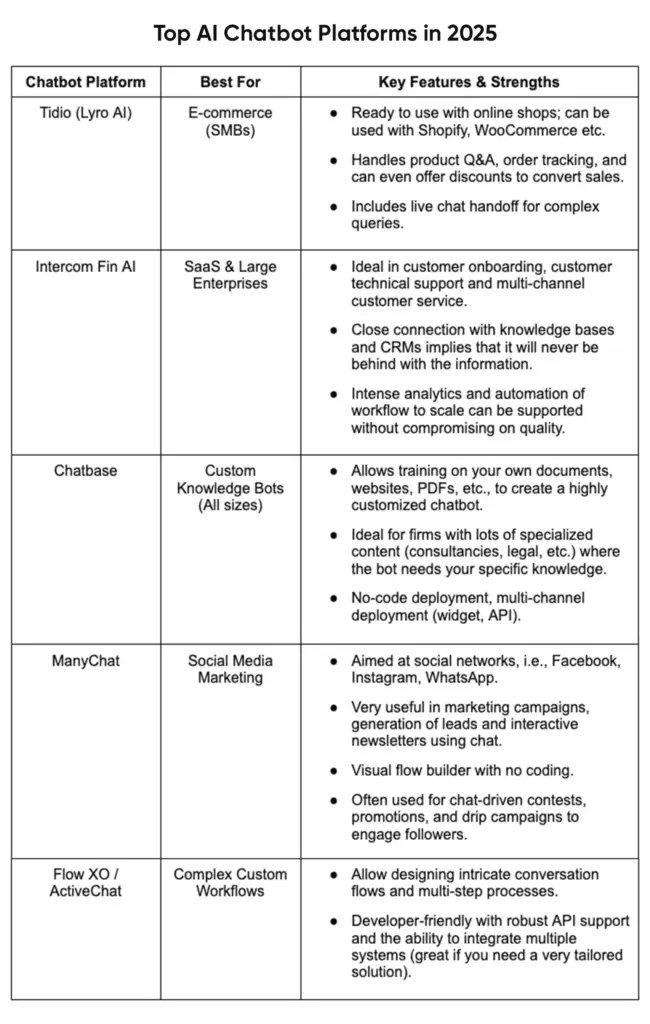
Top AI Chatbot Platforms in 2026
Chatbot builders are numerous, yet several of them can be names that are popular in 2025. There are several best AI chatbot tools available in use by businesses, all of which have their merits and the best way to use them. A comparison of some of them is given below.
Significant Implementation Procedures and Good Practices
A roadmap of practical implementation and some of the best practices that can help you get the most out of your chatbot and ROI are outlined below.
- Pre-established goals and KPIs, make decisions on whether to decrease the volume of support, increase the number of leads, or enhance satisfaction, and create quantifiable goals that can be measured to monitor success.
- Collect all the training data such as FAQs, help articles and policies to create a strong accurate knowledge base in your chatbot.
- Write clear chat flows to use in your most common situations and ensure that your tone and personality match your brand voice.
- Choose the appropriate deployment channels and combine the chatbot with platforms, such as CRM, ecommerce tools, and calendars, to gain the most functionality.
- It should be tested in reality on a basis of other devices to demonstrate and correct any gaps in logic or design, before going online.
- Start small by introducing the chatbot on a small scale and keep a close watch over the interactions and make changes depending on the user behaviors and feedback.
- Popularize your chatbot after it is stable and then inform the users about it, advertise its capabilities, and make people use it to adopt it faster.
- Constantly examine the chatbot analytics and feedback to improve responses, increase its knowledge and maintain high performance.
- Always keep human supervision through checking of escalations, taking feedback and providing regular training to the bot to maintain quality and accuracy.
Scaling Your Chatbot Strategy Business Growth
The AI chatbots are easy to scale and can change according to the requirements of startups, SMEs, and large enterprises without losing efficiency and individuality at each of the development levels.
For enterprise-grade scaling, architecture, integrations, and compliance, read on AI chatbot development for scalable enterprise bots.
- No-code chatbots such as Tidio or ManyChat are cost effective and help small businesses automate their frequently asked question (FAQ) and lead capture messages, and can cut support costs by about 30 percent and retention by 20 percent.
- In the case of medium-sized businesses, scalable solutions with multi-channel capabilities and CRM integration are needed; systems such as Intercom or enterprise-level bots will assist them in automating customer support, sales scheduler, and analytics-guided insights.
- In large organizations, AI chatbots are being used at scale, serving millions of multilingual interactions with the ability to secure, comply, and integrate the omnichannel via platforms such as IBM Watson or Microsoft AI.
The Use of AI Chatbots for Business Expansion
There is nothing like practical cases which could demonstrate the influence of AI chatbots better. The following are some of the examples of business chatbots of well-known companies in various fields with their achievements:
- Sephora chatbot on Messenger provides product suggestions, tutorials, and virtual try-ons, which are personalized and increase the level of interaction, as well as leading to an 11% growth in in-store bookings.
- H&M’s stylist chatbot engages users with outfit suggestions, keeping 70% of shoppers active and increasing app time by 13%.
- Mastercard’s chatbot enables secure account inquiries via Messenger, improving satisfaction and reducing routine customer service calls.
- Whole Foods chatbot, Messenger, is an app that suggests recipes to purchase using text or emoji, which boosted online purchases of groceries by 12 percent and brand engagement.
Future Trends of AI Chatbots

The history of chatbot development does not stop here as the pace of improvements is only increasing. In the future, a number of trends are already on the verge of turning AI chatbots as the business develops to become even more effective and central to the way companies interact with customers, enhance efficiency, and expand internationally.
- Multimodal AI Chatbots: All AI chatbots in the future will support text, voice, images, and video to provide businesses with rich, more interactive customer experiences.
- Voice and Conversational IVR: Chatbots which are voice-enabled AI will be used to replace the old menu with natural and conversational voice to support customers faster.
- Emotion and Sentiment Analysis: This will be performed by customer service bots that examine the tone and language in order to identify emotions and provide human-like, empathetic responses.
- AI Assistants with Autonomy: If applied in business automation, AI assistants will also have the ability to perform real actions, e.g., booking, payments or troubleshooting without human intervention.
- Industry Specific Chatbots: AI chatbots in certain industries, e.g. healthcare, finance, law etc., will give industry specific knowledge so that they will be more precise.
- CRM-Based Chatbots: Chatbots developed on AI and linked to CRM systems will provide context-dependent and personalized conversation with anticipation of user needs.
- Analytics-Focused Chatbots: Chatbots using AI will have analytics capabilities where conversation data will be fed into business dashboards to generate insights and enhance decision-making.
- Ethical and Regulated AI Chatbots: In the future, business expansion will be guided by the principles of data privacy, transparency, and ethical communication.
Conclusion
AI chatbots are no longer futuristic technologies, but already important assets that help grow the business, make customers happy, and organize work efficiently. Since the first startup created with zero-code solutions and the largest enterprises that are implementing sophisticated AI applications, businesses across the globe are adopting chatbots to grow faster and serve smarter.
Create Your AI Chatbot with BrainX
At BrainX Technologies, we creatively develop AI chatbots to enhance business expansion, which offers a combination of the power of intelligence, integrations, and user-friendliness. You may require a lead-generation bot, e-commerce assistant, or an enterprise-level AI support system. Our developers will develop a solution according to your objectives.

FAQs
1. In what way AI chatbots can support my business?
Business growth AI chatbots enhance customer interaction, provide support automation, create leads, and enhance sales efficiency. They are 24/7, cost reduction, and user satisfaction which has a direct effect on revenue growth.
2. Do AI chatbots cost a lot to install?
Not necessarily. There are numerous no-code solutions that are reasonably priced to startups and SMEs. Prices are based on complexity, integrations, as well as scale. The most basic chatbot can have a high ROI since it will automatize the redundant functions and can save time.
3. What is the difference between the AI-based chatbot and rule-based chatbot?
Unlike AI-powered chatbots, rule-based bots adhere to a predefined script, so the intent, context, and tone have to be filled out by the user, whereas AI-based chatbots have the ability to adapt flexibly, accurately, and learn at every interaction, as long as it is not programmed to operate differently.
4. Is the interaction between AI chatbots and my systems possible?
Yes. The majority of contemporary chatbot systems are linked to CRM, eCommerce, payment gateway, and analytics software. It will provide a smooth flow of work such as order tracking, meeting booking, or customer data synchronization.
5. What is my evaluation of the success of a chatbot using AI?
Customer satisfaction (CSAT), conversion rate, response time, rate of issue resolution, and lead generation are the KPIs that can be applied in tracking the success. In the long run performance and ROI may be optimized through regular reviews of analytics.
This blog will demonstrate how to make a sentiment-analysis application with the OpenAI API and Node.js. Prompt-based classification (zero- or few-shot) instead involves text Prompts to classify text Positive, Negative or Neutral, but does not involve traditional model training.
You’ll:
- Install a Node.js application with Express, dotenv, and OpenAI SDK.
- Write an assistant that will be used to write text to the API with prompts that will force the 3 sentiment categories.
- Add a path (/analyze-sentiment) to which POSTs will be sent, the input will be checked, the sentiment function will be invoked and the results will be presented.
- Test it using curl or Postman
- Deploy on systems such as Vercel, Heroku or AWS.
- Compare this method to conventional ML and additional cloud text-classification services, trade-offs (cost, latency, control, data privacy).
How to use OpenAI API to Build a Sentiment Analyzer in a Node.js App is not just a technical tutorial, but also an invitation to the world of learning to understand the way customers feel on a large scale. In the current era of digital marketing, where more than 90 percent of all consumers read online reviews prior to making purchases, the skill to categorize feedback as positive, negative, or neutral is growth-critical.
Sentiment analysis conventionally referred to the construction of bespoke machine learning models using a lot of data and considerable effort. Today, the OpenAI API allows developers to make use of advanced AI representations of language to understand the tone and context with amazing precision. Together with Node.js which is fast and efficient, you are able to process feedback in real time and directly add sentiment analysis to your applications.
It can be product reviews, support tickets, or social media chatter, but however you use it, this tutorial will step you through the process How to use OpenAI API to Build a Sentiment Analyzer in a Node.js App, starting with the setup to the deployment stage.
What is Sentiment Analysis?
Sentiment analysis is an exercise of identifying the tone of the writing, both in the sense of emotion and context. It categorizes feedback as positive or negative or neutral and even effective to understand the slightest changes like sarcasm, ambivalent opinions, or strong emotions. It is used to track customer satisfaction, analyze social media discussion as well as enhance the products or services experience by the companies.
Sentiment analysis works roughly like this: given unstructured text, such as a review or tweet, sentiment analysis will convert it into structured data, upon which decisions can be made.
Traditional Machine Learning vs. Large Language Models
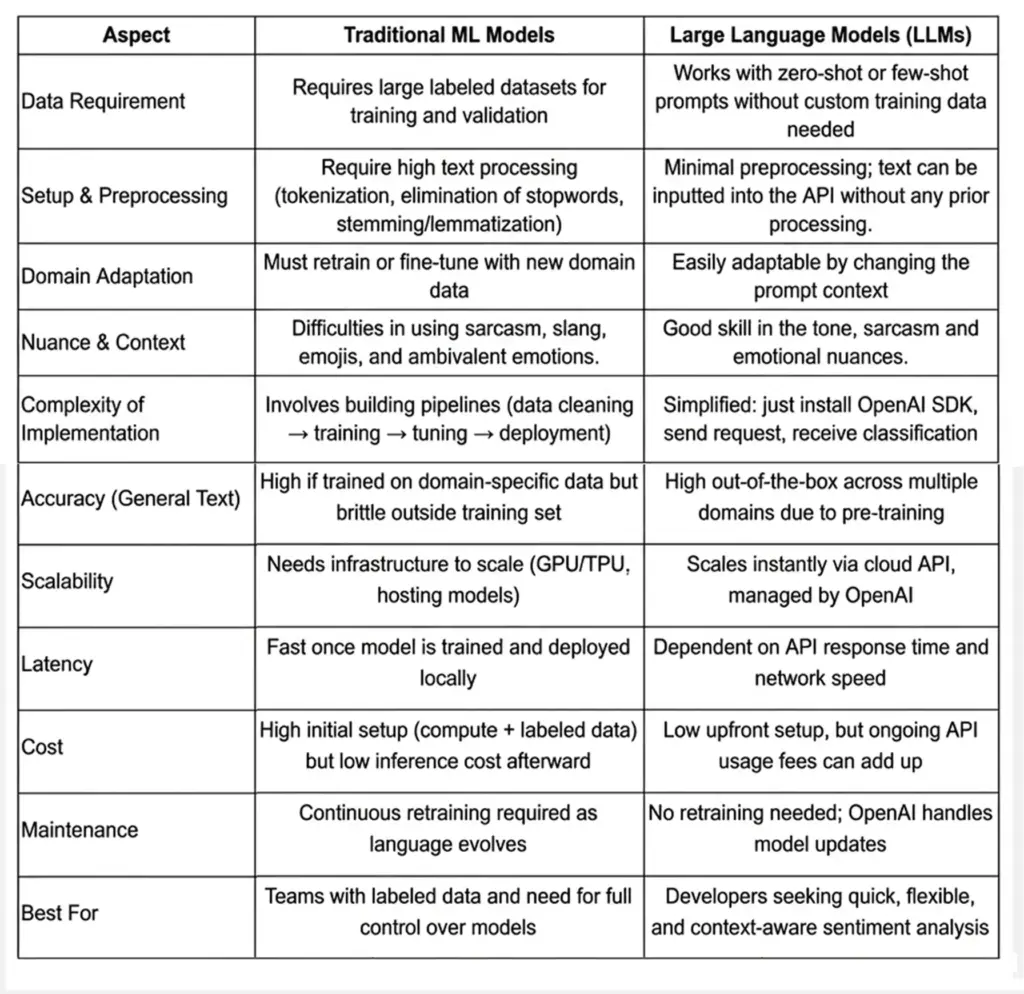
Benefits and Limitations of Using OpenAI API
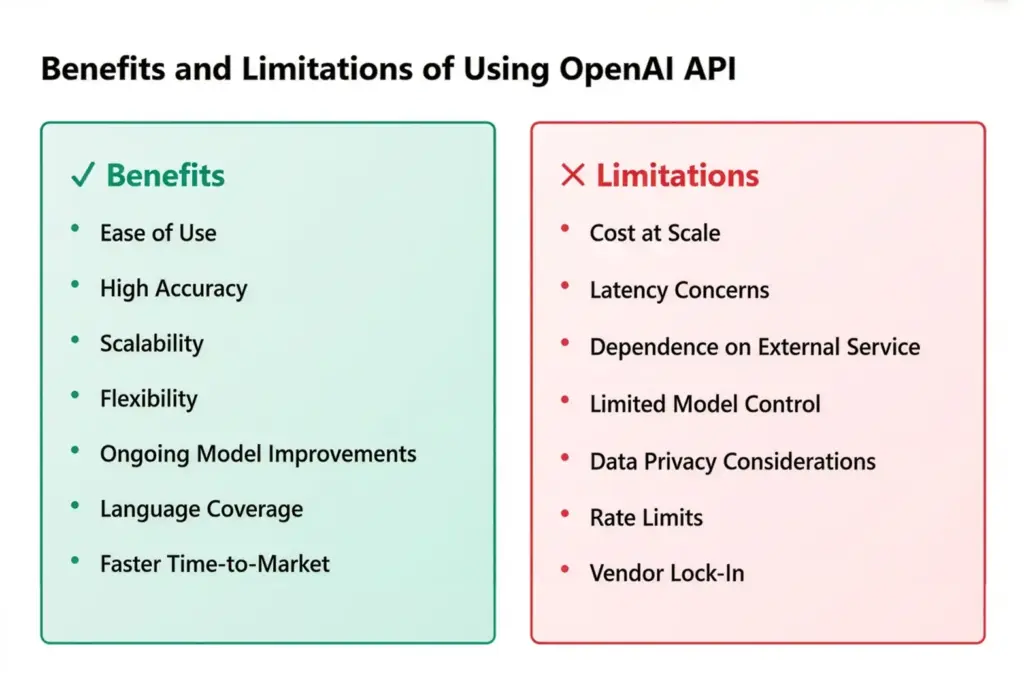
✅ Benefits
- Ease of Use:
No need to collect massive datasets, build pipelines, or host ML models. With the OpenAI API, you send a request and get instant results.
- High Accuracy in Context:
LLMs interpret sarcasm, slang, and complex sentence structures better than rule-based models like VADER. This makes them more reliable across industries.
- Scalability:
Supports NODE backends, serverless functions or microservice environments. You are able to scale hundreds of requests to thousands an hour.
- Flexibility:
You can reuse the same model on other tasks, and classify reviews, analyse tweets, process support tickets without retraining with prompt engineering.
- On-going Model Improvements:
OpenAI performs regular releases of new models, providing developers with the best of state-of-the-art performance, and their models do not need to be manually updated.
- Language Coverage:
Multi-lingual and therefore fits all over the world as opposed to English language only.
- Faster Time-to-Market:
Good when you have a team that needs to roll out sentiment analysis as a speedy orchestration not connected to the creation of special AI infrastructure.
❌ Limitations
- Cost at Scale:
While affordable for small projects, costs can rise quickly for large-scale applications with millions of requests.
- Latency Concerns:
Since requests depend on the API’s response time and internet connectivity, there may be delays in real-time systems.
- Dependence on External Service:
Needs internet connectivity, API quota, and depends on the availability of OpenAI.
- Limited Control Over Model:
You can’t fully retrain or fine-tune the base models (unless using fine-tuning endpoints), which may restrict customization.
- Data Privacy Considerations:
Confidential information should be forwarded to the OpenAI servers, which can be a compliance issue in certain sectors, such as healthcare or finance.
- Rate Limits:
APIs have usage caps per minute or per account, requiring batching or multiple keys for high-volume apps.
- Vendor Lock-In:
Applications become tied to OpenAI’s ecosystem; switching providers may require re-engineering.
Prerequisites & Setup of How to use OpenAI API to Build a Sentiment Analyzer in a Node.js App
You should have the right development environment in place before you start developing your sentiment analyzer. You can get an idea into a working prototype within an hour or so and it only requires a few tools.
1. Install Node.js and npm
You will also require Node.js ( Node.js version 16 or above is suggested ) and npm, which is packaged with Node. You can download both from Node.js official site. Confirm your installation by running:

This makes sure that your environment is set up to take care of dependencies and scripts.
2. Create a New Project Folder
To start your project with:

This will create a package.json file in which all the relevant data on your settings and dependencies will be printed.
3. Install Required Dependencies
In this project, you are going to require three basic packages:
- express – To set up a lightweight API server.
- dotenv – To securely load your API key from environment variables.
- openai – The official OpenAI Node.js client for making requests.
Install them with:

4. Get Your OpenAI Account and API Key
- Go to the platform of OpenAI and obtain a free account.
- After logging in, visit the API keys page to create a new key.
- Integrate this key to a .env file in your project’s root.

Never hardcode your key directly into your codebase; keeping it in .env ensures security.
Why Node.js for AI Apps?
Node.js is very popular and is supported by a wide variety of features as well as being lightweight and event-driven, which makes it a good option in the creation of AI-driven apps with OpenAI. You can use Node.js to scale request processing whether you are analyzing a customer review, creating a chatbot or adding sentiment detection to mobile applications.
After getting done, you will be able to set up an environment, connect your app to OpenAI and analyze text.
Step-by-Step Guide on How to use OpenAI API to Build a Sentiment Analyzer in a Node.js App
You have now prepared your environment and therefore it is time to go into the implementation. In this section, you will be taken through the process of How to use OpenAI API to Build a Sentiment Analyzer in a Node.js App. In the end, you will be able to have a working sentiment analyzer API that will categorize text as Positive, Negative or Neutral.
1. Integrating an Application on Node.js to the OpenAI API
Begin with setting up the OpenAI client to send and receive requests using your app. Inside your project, create a new file called app.js (or server.js if you prefer).
Add the following code:
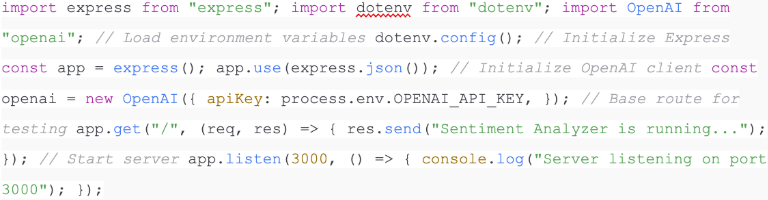
Explanation
- dotenv loads your API key securely from .env.
- express creates a lightweight API server.
- OpenAI client handles communication with the API.
At this stage, you can run:
node app.js
Visit http://localhost:3000/ in your browser, and you should see “Sentiment Analyzer is running…”
2. Write the analyzeSentiment Function
Next, create a helper tool to send user text to OpenAI and classify the responses (Positive, Negative, Neutral).
This code should be added to your app.js:
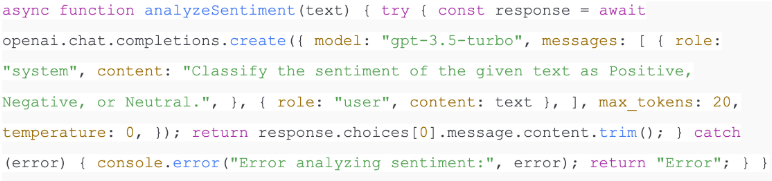
Explanation
- This system message informs the model that it must give responses from only 3 categories i.e. positive, negative, or neutral.
- The user message is the text input.
- temperature: ensures deterministic results, reducing randomness.
- The function returns the model’s classification.
3. Create the /analyze-sentiment Endpoint in Express
Now let’s expose this function via an API endpoint so external apps can send requests.

Explanation
- The endpoint accepts POST requests with a text field in JSON format.
- It validates the input and calls analyzeSentiment.
- The response is structured as JSON, returning both the input text and the sentiment classification.
4. Test the Sentiment Analyzer with Curl or Postman
With your server running, you can now test the endpoint.
Using curl

Expected output:

Using Postman
- Open Postman.
- Make a new POST to localhost:3000/analyze-sentiment.
- Header Content-Type: application/json.
- Add body:

- Send request and check response.
Expected output:

Example Inputs and Outputs
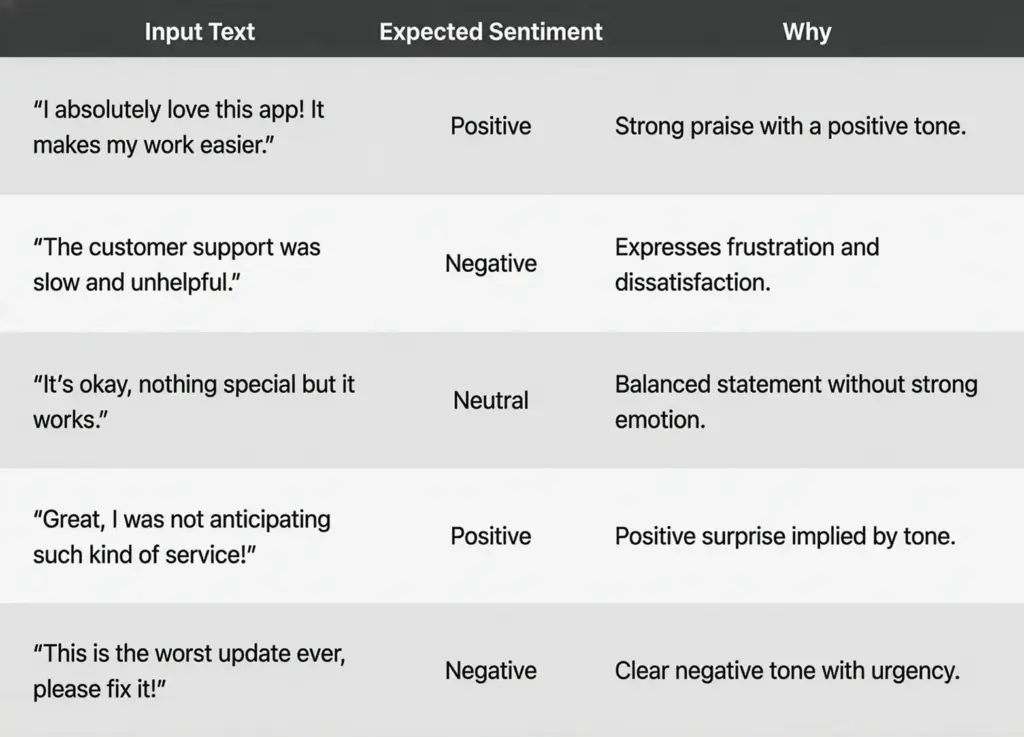
Here are a few sample results you can try:
Improving the Function for Real Use Cases
You may want to expand your analyzer beyond a simple three-class classification. Some possible improvements:
- Confidence Scores: Ask the model to return a percentage confidence for each classification.
- Multi-language Support: Add prompts to tell the model to classify sentiment using other languages.
- Detailed Labels: You can either use a simple Positive or use different classes such as Strongly Positive, Mildly Negative or Mixed Sentiment.
- Text Processing Batch: Let arrays of text be able to analyze a whole batch of data within a single request.
For example, you could modify your prompt:

Enhancements & Best Practices
Your sentiment analyzer works, however, in the real world, you need more than a single classification endpoint. Some typical difficulties and mitigations are presented in the form of questions that companies tend to have when expanding AI-based systems below.
How can I analyze multiple texts at once (batch processing)?
When you have to make many hundreds or thousands of requests, you cannot send only one request per text. Rather, they can be batch requested, and an array of texts can be passed and looped.
For example:

Batching reduces overhead and lets you scale sentiment analysis for datasets like product reviews or survey responses. For very large datasets, consider chunking them into smaller groups to stay within API rate limits.
How do I cache results to reduce costs?
If your app repeatedly analyzes the same text (e.g., a product review viewed by multiple users), caching prevents unnecessary API calls. You can store results in:
- In-memory caches (e.g., Node’s Map, Redis, or Memcached).
- Database fields (store sentiment alongside original text).
Checking the cache should be the first thing when a request is received. In case of finding, save the obtained result, otherwise, ask OpenAI and save the answer. This approach improves speed and significantly lowers costs.
What should I do if requests fail (retries)?
APIs occasionally fail due to network hiccups or rate limits. To handle this gracefully:
- Implement retry logic with exponential backoff (wait 1s → 2s → 4s before retrying).
- Use libraries like axios-retry to simplify error handling.
- Log failures for monitoring.
Retries ensure reliability without overwhelming the API.
How do I improve accuracy in sentiment analysis?
Accuracy depends on your prompt design. Instead of a vague instruction, give the model explicit rules.
Basic Prompt:

Improved Prompt (Few-Shot):
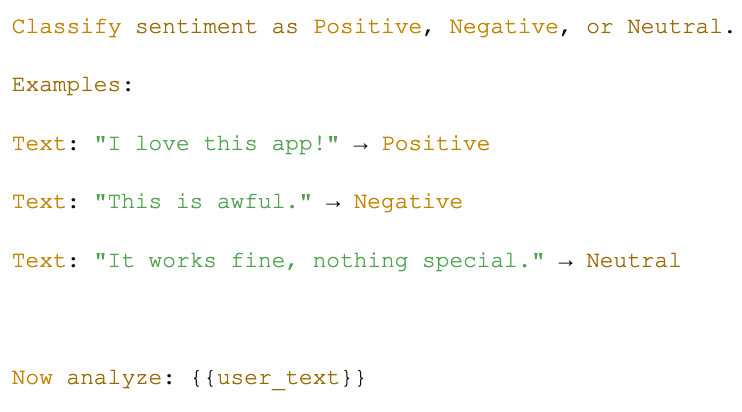
By providing examples, you guide the model’s behavior and reduce misclassifications. For domain-specific cases (like medical reviews or financial comments), tailor examples to that field.
Can I add confidence scores to results?
Yes. Instead of returning only a label, ask the model to output a classification with confidence.

Sample output:
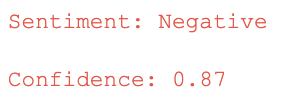
This is valuable when displaying results in dashboards or when filtering borderline cases that need human review.
How do I handle errors and timeouts?
Production systems must plan for failures. Common strategies include:
- Timeouts: There is a time limit on the maximum wait time on API responses (e.g. 10 seconds).
- Graceful degradation: In case OpenAI is not accessible, respond to a fallback message such as “Sentiment unavailable”.
- Detailed logging: Log successful and unsuccessful requests.
These protection measures enhance the user experience as it eliminates crashes or infinity loading screens.
How do I scale sentiment analysis for thousands of users?
Scaling requires balancing performance with API restrictions. Consider these practices:
- Rate limiting: Observe the OpenAI restrictions on requests per minute.
- Request queueing: Bottleneck is a throttling library to use in Node.js.
- Parallel requests: Divide traffic into several workers or instances.
- Background processing: In the case of non-real-time analysis (e.g. bulk reviews), process jobs are asynchronously handled using a queue system such as RabbitMQ, Kafka or Bull in Node.js.
Combined, these strategies will enable you to scale sentiment analysis without going beyond the limit or complexity.
What about multi-language sentiment analysis?
The OpenAI API supports multiple languages out of the box. You can expand your analyzer by adding a language hint:

This is particularly useful for global applications dealing with multilingual reviews or social media.
5. Deployment & Integration
When you have a sentiment analyzer working on your computer, all you need to do is to deploy it. Running your Node.js app on a cloud allows access by users, mobile applications or other services.
Deployment (Vercel, Heroku, AWS Lambda)
- Vercel: Ideal when deployments need to be done fast. The push-to-GitHub, push-to-Vercel setup would have your Express app online in minutes. Perfect in small-scale projects.
- Heroku: Easy to use, and easy to command. Deploy with git push heroku main. Good at prototyping and small-scale applications.
- AWS (Elastic Beanstalk / Lambda): Better control and scalability. Useful when you assume that traffic will be heavy or require the serverless function of AWS Lambda.
Integration with Frontend & Mobile Apps
Your API may very easily be linked to:
- React or Vue frontends: Visualize the real-time results of a sentiment analysis within dashboards.
- React Native or Flutter mobile applications: Incorporate an AI-powered sentiment analysis application to review or customer feedback using which users can see insights immediately.
- Support tools/chatbots: Add into current customer service processes so as to identify mood and priority cases.
6. Alternatives & Comparisons
While the OpenAI API offers simplicity and accuracy, other approaches exist for sentiment analysis.
Traditional/Local Approaches
- TensorFlow.js: Enables you to train and run models directly in JavaScript. Good for browser-based apps but requires datasets and training effort.
- Hugging Face Models: Provides off-the-shelf transformers such as BERT or DistilBERT, which are sentiment-fined tuned. Scalable and powerful with the need of infrastructure hosting.
Cloud Provider APIs
- AWS Comprehend: Provides sentiment analysis and entity extraction.
- Google Cloud Natural Language API: Strong for text classification with integration into Google Cloud ecosystem.
- Azure Cognitive Services: Offers sentiment and key phrase detection.
Comparison Table
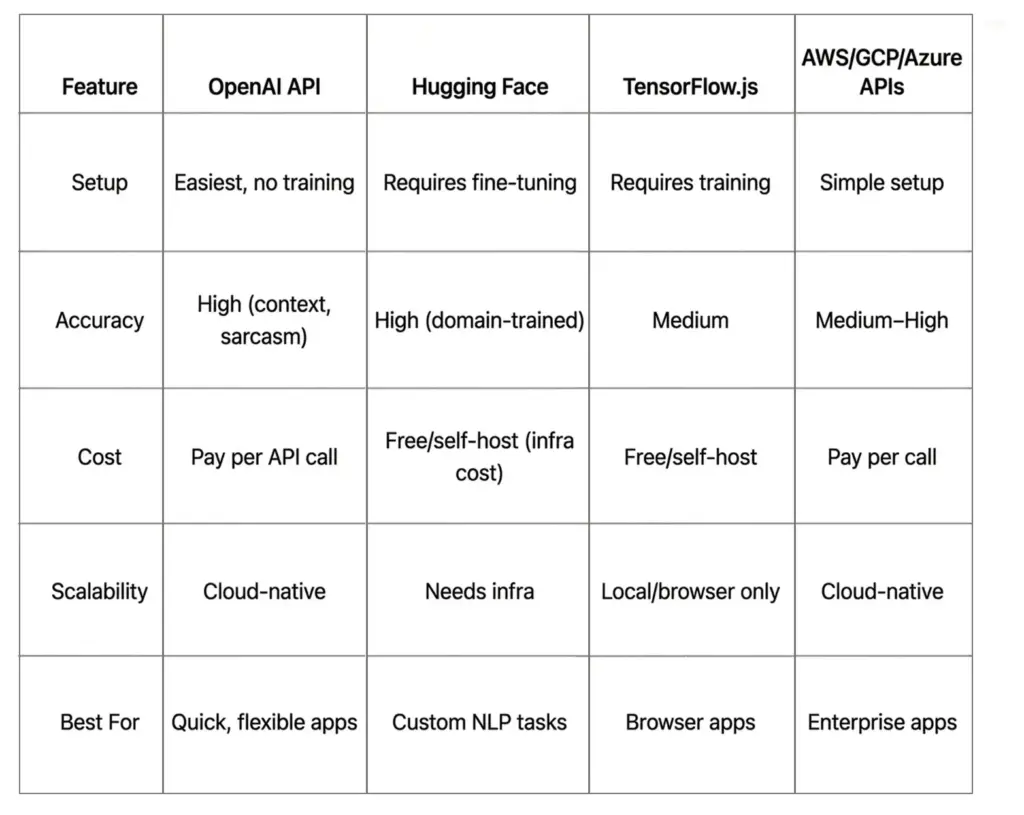
Use Cases in Real Apps
Sentiment analysis is not theory alone, and it is the driver of real-life applications that enhance customer experience and decision-making.
- Social Media Monitoring Applications.
Determines the mood of the audience in real-time on a platform like Twitter or Instagram.
Track brand reputation and respond to negative comments quickly.
- Customer Support Analysis
Integrate into support tickets or chatbots to gauge frustration levels. An AI customer service app can prioritize angry customers for faster human response.
- E-Commerce Product Reviews
Classify thousands of reviews to highlight trending issues or positive features. This can be particularly helpful in an AI-based sentiment analysis review program to increase the visibility and trust of a product.
Conclusion
In this tutorial, you learned how to use OpenAI API to build a Sentiment Analyzer in a Node.js Apps app from setting up your environment to writing the analyzeSentiment function, creating an Express endpoint, and testing real examples.
We also reviewed such best practices as batching, caching, and immediate tuning, and explained deployment on Vercel, Heroku, or AWS. You also got an idea of how the system would compare to other programs such as TensorFlow.js or Hugging Face and how it can be used in the real world, such as social media monitoring, e-commerce, and customer service.
Next steps? Upgrade the analyzer to a full dashboard, connect with a mobile application, or proceed to aspect-based sentiment analysis with more detailed information.
Check out more guides and tutorials by subscribing to this guide or taking the template up to a tutorial and completing your own AI project.
FAQs
Q1. What’s the best OpenAI model for sentiment analysis?
In the majority of instances, gpt-3.5-turbo should do, it is fast and low-cost. To be more accurate or deal with more complex cases, GPT-4 should be used.
Q2. How much does it cost per request?
Costs vary by model. For gpt-3.5-turbo, it’s a fraction of a cent per request, while GPT-4 is more expensive. Pricing depends on tokens processed (input + output).
Q3. Can I use embeddings for sentiment analysis?
Yes. OpenAI embeddings can cluster texts by similarity, which can indirectly reveal sentiment patterns. However, for direct classification, chat completions are simpler.
Q4. Is Node.js suitable for AI apps?
Absolutely. Node.js can process multiple API calls concurrently, which is why it is a good option to use in lightweight AI back ends. Combine it with such frameworks as Express or Next.js to create a full-stack application.
Q5. What are the weaknesses of OpenAI sentiment analysis?
- Costs can rise at scale.
- Latency depends on internet/API speed.
- Limited control compared to custom ML models.
- Sensitive data must be sent to external servers.
Q6. Can it handle multiple languages?
Yes. OpenAI models support sentiment classification in many languages, making it useful for global businesses.
Ready to turn feedback into actionable intelligence?
At BrainX, we help businesses build robust, scalable sentiment-analysis platforms from prototype to production. Through the use of modern LLMs and prompt engineering, our team creates systems where text gets automatically categorized as positive, negative, or neutral, and allows keeping your data safe and cost-effective.
Through customer reviews, social media chatter or customer support tickets, or any other type, we custom build sentiment analyzers to meet your precise domain, volume, language and integration requirements. We are going to make your trip quicker: insights at a faster pace, decisions made faster, and comprehension of your customers.
Contact BrainX today to get your custom sentiment solution rolling.
Are you unable to take action because your enterprise data is held in spreadsheets and old systems, where it is identified as a problem?
To business owners, the tech enthusiasts, and investors, this wasted potential is a bedeviling issue costing time, money, and opportunities. AI tools for enterprise data step in to transform raw data into your greatest resource.
One research study by the IDC in 2023 shows that 60 percent of businesses around the world will use AI to make decisions by 2026 because it will unlock billions of value.
Are you looking to increase efficiency, bring joy to customers, or identify the next ticket to ride?
AI tools give you the whole picture and the power to operate successfully in the data-driven world as generative AI is reshaping industries and driving large-scale transformations across business functions.
The following guide will provide you with practical knowledge to utilize AI tools for enterprise data and make your business a leader in the era of data-based tools.
Why AI Tools for Enterprise Data Matter?
Enterprise data that includes customer data, financial data, operation records, and others, will be a treasure trove to any organization. Nevertheless, it is so massive and intriguing that it can choke traditional analytics. This is covered by AI tools on enterprise data that allow companies to compute big data and unstructured data at scale, provide real-world knowledge, and automation. A 2023 study by Grand View Research estimates the worldwide market of AI is anticipated to develop at a compounded yearly growth rate (CAGR) of 35.9% between 2025 and 2030.
Compared to the approach of traditional analytics, the AI technologies have a better possibility to apply pattern recognition, predicting, and decision automation. To business owners, this means a saving in costs and more customer experiences. These tools attract tech enthusiasts with its ground-breaking algorithms and investors are keen to invest in scalable AI solutions.
Key Applications of AI Tools for Enterprise Data
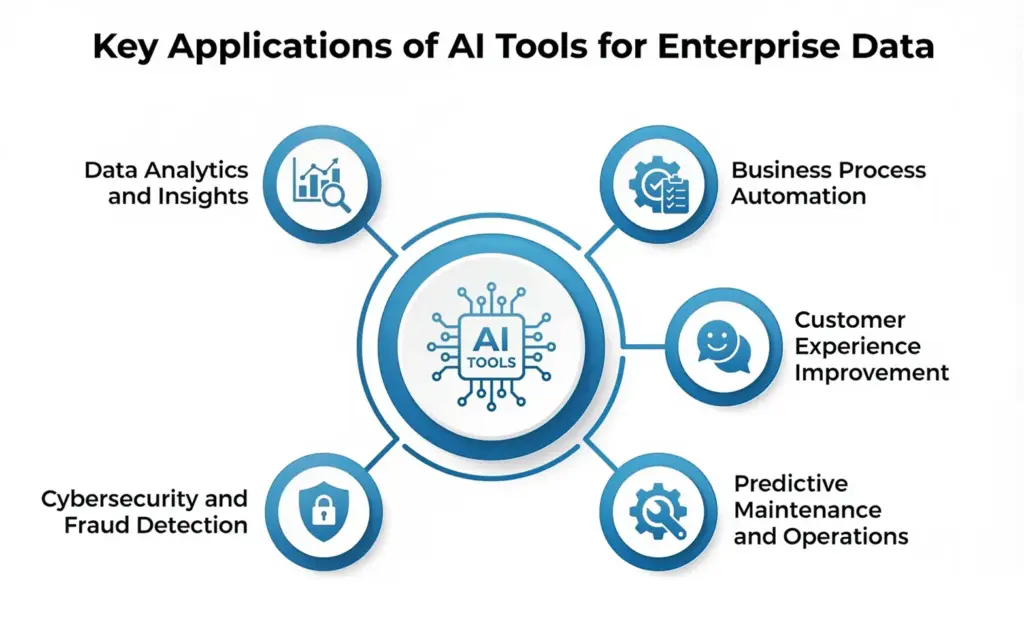
AI tools for enterprise data are versatile, addressing diverse business needs. Below are the primary applications.
1. Data Analytics and Insights
Databricks’ AI-driven analytics tools and Google Cloud help process vast amounts of data to identify patterns and forecast future trends. As an example, Google Cloud offers the AutoML that helps companies to create customized machine learning models without extensive technical knowledge, thus democratizing analytics to non-technical people. What makes us different compared to many other blogs is that we focus on the technical implementation but at the same time, we also highlight the possibility of using these tools to make sales forecasting, inventory optimisation, or personalised marketing campaigns. Considering a business case of a retail store, the use of AI would help it to understand the purchase histories of clients and make forecasts to determine how they would make further purchases to increase sales.
2. Business Process automation
AI also automates repetitive duties enabling human resources to work strategically. The products offering AI services of Microsoft Azure, such as Azure Machine Learning, enable automation of the data processing services, for example invoice categorization or answering the customer queries. Telstra also employed the use of the Azure OpenAI Service to cut customer-related follow-up calls by 20% using automated support infrastructures. What is less mentioned is using automation to simplify compliance procedures, track changes in regulations in the financial arena or healthcare to make sure that businesses are up to date with their compliance without human supervision.
3. Customer Experience Improvement
AI tools foster positive experiences with clients by making the experience one-on-one.
For teams building personalised AI-driven features, here’s how to build AI-powered web and mobile apps with the ChatGPT API.
Such tools as Einstein AI of Salesforce can process data about the customers to attach marketing messages to them or suggest the products. Nevertheless, leading blogs tend to overlook the possibility of generative AI, including the DBRX model developed by Databricks, to develop dynamic customer support chatbots that can adjust to enterprise-specific situations, which enhances accuracy in responses. The benefits of being able to customize these models using their own data will be a game changer to the tech enthusiasts, and the investors may consider the fact that such solutions can scale across various industries.
4. Predictive Maintenance and Operations
In manufacturing or other logistics companies, AI tools are used to see and prevent breakages on equipment, reducing downtime. Partnership of Databricks with Chevron Phillips Chemical Company applies time-series analytics to track data on IoT, and predict maintenance requirements with high precision. One of the aspects that have not been explored is ways in which the small and medium enterprises (SMEs) can use these tools effectively at a relatively low cost through the use of clouds, which help them compete with the big names.
5. Cybersecurity and Fraud Detection
AI strengthens cybersecurity by detecting irregular patterns in enterprise data. Rivian’s cybersecurity lakehouse on Databricks proactively addresses threats to reduce operational risks. In addition to threat detection, AI can actively train itself by simulating cyberattacks and strengthening its defenses. This capability is rarely highlighted in current literature but is crucial for businesses and organizations handling sensitive data.
Selecting the Appropriate AI Solutions of Enterprise Data
The success of the alignment of the right AI tools depends on the alignment with the business objectives, data infrastructure and expertise of the users. This is a step-by-step method:
1. Business Needs Assessment
Find points of pain like employees making decisions slowly or working inefficiently. For example, a logistics company may opt for predictive maintenance, while a retail business might focus on customer analytics. As compared to most blogs, however, we emphasize the need to engage non-technical stakeholders in such a process in order to harmonize it with strategic objectives.
2. Scalability
Select scalable tools as well as the tools that integrate with the existing systems. The example of Unity Catalog in Databricks is the platform that integrated data governance across the cloud platforms, so there is no issue with the smooth correlation with Azure, AWS, or Google Cloud. An important point to keep in mind by any investor is that platforms containing open-source components as in the case of Databricks with Delta Lake are cost-efficiently scalable.
3. Make it Easy to Use
To the non-technical user, there are easy to use tools, such as Tableau or the Smart Analytics platform offered by Google Cloud. Other benefits include low-code/no-code applications such as the Lakeflow Designer in Databricks that allows business owners to create data pipelines without coding-related skills.
4. Data Governance
Data governance is great especially when there is a need to ensure compliance and security. Unity Catalog offers roles-based access controls and lineage tracking to make sensitive data safe. One of the omissions is the ability of AI to automate governance related functions like marking data quality problems which is critical to regulated industries like the finance industry or the healthcare sector.
5. Cost & ROI
Although some platforms such as Azure databricks support consumption-based pricing, companies have to balance costs and ROIs. As an example, Lexmark International increased its insights speed by 25% with Databricks, and this is a good reason to invest.
Step-by-Step Guide Plan on Implementing AI Tools
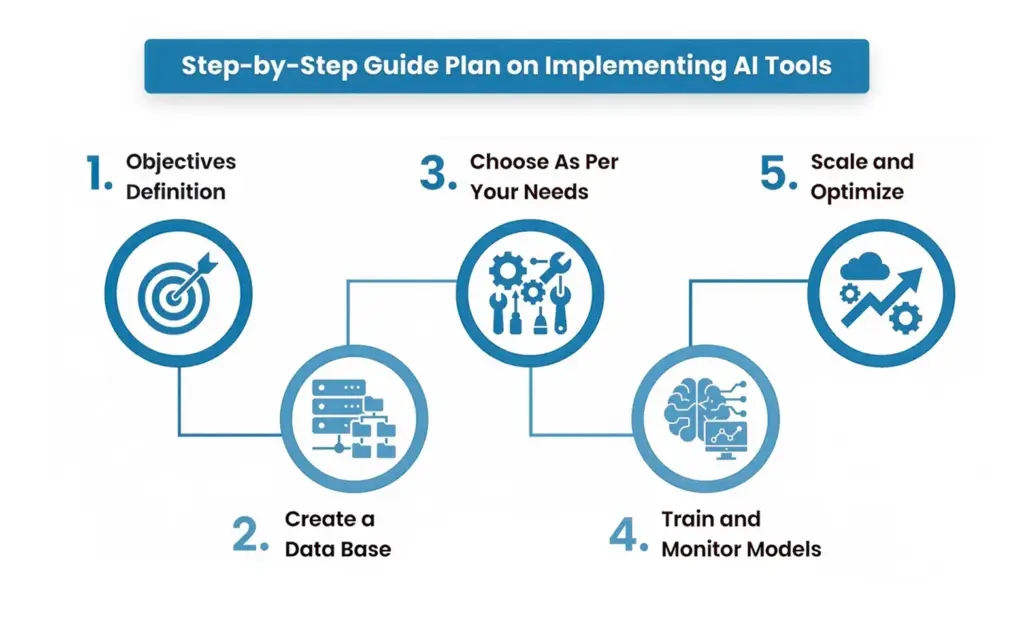
Business owners, technology enthusiasts, and investors can implement AI tools to manage enterprise data successfully, referring to the following steps:
Step 1: Objectives Definition
Formulate specific objectives, e.g. cut down costs of operations or enhance customer retention. Another example would be a healthcare provider who wants to simplify the process of analyzing patient data in order to issue faster diagnoses.
Step 2: Create a Data Base
Ensure data quality through thorough cleaning and organization of datasets. The Intelligent Data Management Cloud connects with Databricks to share data consisting of different sources such as Salesforce or Oracle. In contrast to other blogs, we emphasize the necessity to relate structured data (databases) and unstructured (PDFs, emails) data to have full AI analysis.
Step 3: Choose As Per Your Needs
Choose tools based on your needs. For instance, MindsDB’s open-source platform allows querying enterprise data with natural language, ideal for non-technical users. Deploy tools in phases, starting with a minimum viable product (MVP) to test functionality, as Artkai did for Quantum Energy’s HR solution.
Step 4: Train and Monitor Models
Machine learning models require training on enterprise data. Google Cloud’s AutoML simplifies this for non-experts, while Databricks’ Mosaic AI supports advanced model tuning., Monitor performance to prevent issues like model drift, where predictions degrade over time due to changing data patterns.
Steps 5: Scale and Optimize
After the success, scale AI deployment to departments. Databricks Apps can support the accelerated development, deployment and scaling of AI-based applications, including unique dashboards that give marketing groups fast insights into customer behavior. Automate with human-in-the-loop feedback to control AI outputs and be accurate and trustworthy.
You can also explore how generative AI improves software team collaboration and productivity during scaling.
Rising Trends to Look Before You Choose!
Here are key areas to enhance your enterprise AI strategy:
1. Agentic AI and Autonomy
Agentic AI enables autonomous decision-making, such as automating supply chain adjustments. This is critical for real-time operations but requires robust governance to mitigate risks, a topic underexplored in existing blogs.
Explore how modern AI agents transform enterprise support and enable autonomy across workflows.
2. Data Mesh for Decentralized Data Management
Data mesh, as discussed by CIO, organizes data by domain, enabling AI tools to access high-quality, context-specific data. This approach is ideal for large enterprises but less discussed for SMEs, which can adopt simplified versions via cloud platforms.
3. Ethical Artificial Intelligence and Bias Reduction
Ethical AI promotes ethical and transparent results. Such tools as the Unity Catalog with Databricks, can provide guardrails against AI models being biased but the number of blogs discussing how businesses may audit AI results in terms of fairness is limited and that is a major issue as regulated businesses will need to demonstrate fairness of their results.
4. A1 Democratization
Tools such as Databricks One are used to democratize AI and enable non-specialists to interact with AI with no need to write code. This development enables the owners of businesses to directly query the data and thus there is an increased pace of decision-making involving less dependency on data scientists.With new ChatGPT features emerging , AI democratization is becoming easier across enterprises.
5. Data-Intelligence in Real-Time
Streaming data can be used in real-time through the analytics that can provide instant insights, e.g., using Databricks with a Lakeflow designer. It is critical to such industries as e-commerce, where sales success depends on the analysis of customer behavior in real-time.
Common Challenges and Their Solutions
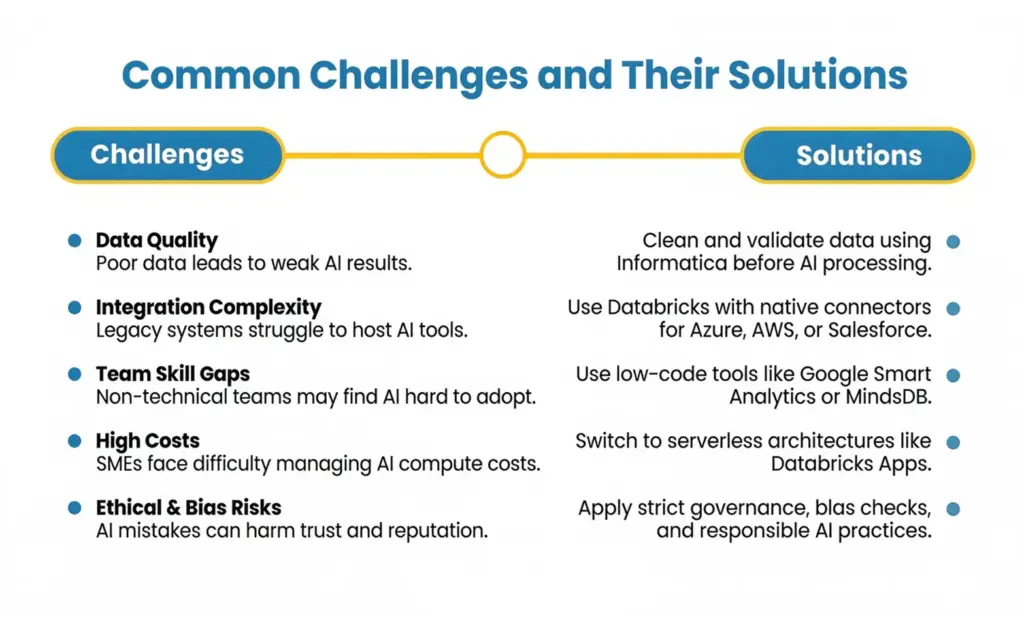
There are difficulties in implementing AI tools to enterprise data:
Data Quality: Inaccurate or low-quality data leads to unreliable AI outcomes.
- Solution: Clean and validate data by applying tools of data quality offered by Informatica prior to the processing by AI.
Complexity of Integration: The older systems might not be able to host AI tools.
- Fix: Use databases such as Databricks that have native connectors to Azure or AWS or Salesforce.
Skill Gaps: all the non-technical teams might have a hard time learning how to implement AI.
- Solution: Opt for low-code platforms like Google Cloud’s Smart Analytics or MindsDB.
Cost Management: High computational costs can deter SMEs.
- Solution: Leverage serverless based architectures such as Databricks Apps to optimize the cost around.
Ethical Risks: There is the risk of causing damage to the reputation due to prejudice or breached privacy.
- Remedy: Put in place governance structures such as Unity Catalog and run AI audits.
Best 10 Enterprise Data AI Tools in 2025
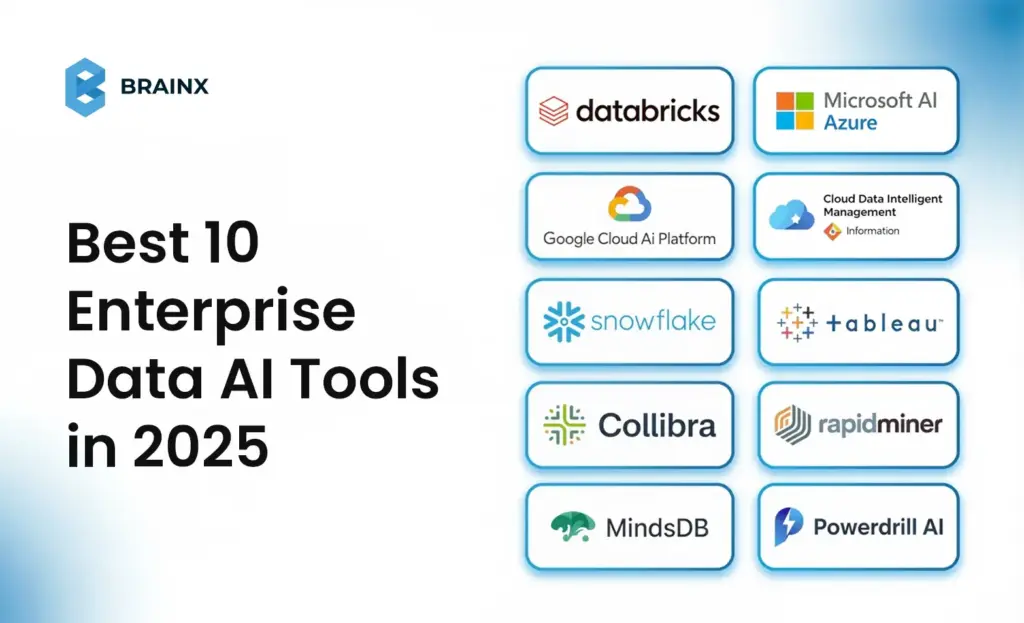
Next, we discuss the most promising 10 AI-tools that might work with enterprise data in 2025, their most important features, application, and unusual advantages.
1. Databricks
Databricks is an integrated analytics platform on Apache Spark which has the capabilities to support end-to-end data pipelines.
Notable Features:
- Lakehouse Architecture: Joins together data lakes and warehouses to be governed and analyzed in unison.
- Mosaic AI: Helps in developing generative AI and Machine learning models.
- Delta Lake: Guarantees data reliability, and it supports ACID compliance.
What Makes It Unique?
Unlike other blogs, its low-code interfaces such as Lakeflow Designer with an open-source foundation allow it to be used by those who are not very technical.
- Pricing: By consumption, and a free trial can be found on databricks.com.
- Best Fit: Companies that require scalability, cloud agnostic solutions that have good governance.
2. Microsoft AI Azure
Azure AI is a collection of AI-model construction, deployment, and management tools that are easily integrated into the enterprise’s system.
Key Features:
- Azure Machine Learning: Results in automation of model training as well as deployment.
- Azure Cognitive Search: Increases the efficiency of data discovery by providing AI powered search to get results that are smarter and more relevant.
- Copilot Integration: reads the data in excel and creates meeting insights.
- Use Cases: T-Mobile uses Azure to share information securely as well as cut IT time to find a solution.
What Makes it Distinct?
It is very well integrated with Microsoft 365, meaning businesses that are already in the Microsoft circle will find Microsoft Viva of great use and value, as they will enjoy easy access to the giant company and technical components such as Copilot.
- Pricing: Resource based pricing that is on-demand through Azure.
- Suited to: Companies that use Microsoft to do data analytics and automation.
3. The Google Cloud AI Platform
Google Cloud AI includes a complete data analytics/natural language processing (NLP) and machine-learning offering.
- Key Features:
- AutoML: Helps ordinary users to develop their highly customized machine learning models with limited technical knowledge.
- Big Query: Allows one to process large information and perform real-time analytics.
- Tableau Pulse: Provides AI-focused, customized insights inside the workflows.
- Use Cases: It can be used to predict customer behavior, analyze the market and study images/videos.
What Makes It Special?
It uses no-code AutoML and Tableau, making it an essential tool to business owners and users who do not have a technical background, which many tech blogs fail to do.
- Pricing: Pay-as-you-go.
- Suitable for: The best business to use this product is that which focuses on usability and integrated use with Google workspace.
4. Cloud Data Intelligent Management Informatica
Informatica simplifies integration, governance, and analysis of information with its CLAIRE AI-based data integration and governance and analytics that can be deployed on a hybrid condition.
Key Features:
- Data Integration: Integration of data of different sources such as Salesforce and Oracle.
- Data Governance: GDPR, HIPAA and CCPA compliance.
- Automated Data Quality: Data cleans and makes standard to be ready for AI.
- Walgreen and Informatics: Walgreens has employed Informatica to conduct real-time analytics, generating a two-fold productivity.
Why Does It Stand Out?
Its area of interest is compliance and automated governance, which eliminates the ethical AI issue, which lacks in most blogs, making it entirely reliable in industries that are regulated.
- Pricing: There are consumption-based prices and a free trial at informatica.com.
- Appropriate to: Companies with severe compliance needs.
5. Snowflake
Snowflake is a cloud-based data platform that can be reputed to perform well regarding ETL/ELT operations and analytics with the help of AI.
Key Features:
- Automated Scaling: Efficiently handles both structured and semi-structured data for optimal performance.
- Snowpark: Lets you process machine learning workloads using Python, R, and Scala.
- Data Sharing: It enables safe cooperation of data with teams.
Use Cases: Include real-time analytics, predictive maintenance, and customer segmentation.
What Makes It Comprehensive?
It has the pay-as-you-go model which makes it affordable to regular users and supports SME, alleviating smaller companies that would not be served by blogs which cater only to major enterprises.
- Pricing: Usage, Find it at snowflake.com.
- Ideal for: Scale-able, Cloud based Data Management for Business.
6. Tableau
Tableau is one of the most popular analytics and data visualization tools that can be used in Salesforce and include AI analytics built on Einstein.
Key Features:
- Tableau Pulse: Creates bespoke-generated knowledge-based on generative AI.
- No-Code Interface: Allows the drag-and-drop analytics capability to non-technical audience.
- Einstein Analytics: Foresees trend and customer behaviors.
Use Cases: Marketing analytics, sales forecasting and Embedded BI.
What Makes It Special?
It is certified to work with Salesforce CRM and is geared towards business intelligence, which is a good fit to enterprise-focused organizations, unlike most sources that emphasize its voice capabilities.
- Price: Visit their website for the latest subscription price.
- Investors: Tableau has high growth prospects as evidenced by adoption in business.
- Best For: Small-to-Medium sized businesses in Marketing and Sales departments that want easy to use analytics.
7. Collibra
Collibra is an industry strength data governance solution which provides assurance over data quality and AI data usage.
Key Features:
- Data Catalog: improves data visibility and accessibility within business departments.
- Policy Management:Incorporates and enforces rules in order to govern the access and secure data.
- Lineage Tracking: Ensures clear visibility into how data is sourced, transformed, and used.
Use Cases: Auditing of compliance, cross-department cooperation and data stewardship.
What Makes it Stand Out?
It is a governance framework oriented on AI-driven analytics that targets an existing fragile area of ethical AI, which is crucial to areas, such as financial sectors and healthcare.
- Pricing: Get to know about their custom pricing on the official website.
- Best Suited: Market with regulatory businesses where data governance is the priority.
8. RapidMiner
RapidMiner provides end-to-end utilizing data science with analytic and machine learning abilities.
Key Features:
- Visual Workflow Designer: drag and drop model building.
- AutoML: Automates the model creation in order to get insights faster.
- Model Operations: Supports the entire machine learning process.
Applications: Anti-fraud, sentiment analysis and predictive maintenance.
Why Does It Stand Out?
It is available to both a layman and a professional, which can fill a professional gap in other products, often overlooked because of its practical focus.
- Pricing: Free plan and paid plans.
- Best For: Teams with mixed technical expertise.
9. MindsDB
An open-source environment, MindsDB allows querying enterprise data using natural language in order to gain AI-based insights.
Key Features:
- Natural Language Queries: Gives you the option of asking data questions using natural language with non technical users.
- Integration: It is linked with approximately 200 platforms of data.
- Explainable AI: It is easy to know how and why a model has made its decision as they are transparent and explainable.
Applications: Customer service automation, sales predictors and text analytics.
Why Is It Unique?
An open-source format and non-technical user emphasis makes it suitable to SMEs which is not always fulfilled in the leading blogs.
- Price: Free with paid business grade plans here at mindsdb.com.
- Best For: SMEs and non-technical teams.
10. Powerdrill AI
Powerdrill AI is a SaaS platform designed for natural language interaction with enterprise datasets.
Key Features:
- Conversational AI: Allows to query data sets using plain English.
- Scalable Pricing: Cost effective cost using billing by usage.
- BI Analysis: Facilitates Business intelligence processes.
Applications: Market analysis, ad-hoc reporting and operational insight.
What Makes It Great?
It specializes in conversational AI, and the opportunity is the varied pricing, which has made it accessible to smaller companies as well.
- Pricing: Free trial with price tiered plans.
- Its Strengths: Affordable and easy to use AI analytics that can be deployed across the business.
Why Are These Tools Special?
These enterprise data AI tools focus on the most essential needs such as data integration, analytics, governance and automation and serve a wide audience. As compared to many of the blogs in the top ranking that lay more emphasis on technical attributes, this list focuses more on usability by laymen, cost effectiveness to the SMEs and ethical governance and thus addresses some of the most important gaps in the literature.
For instance:
- Non-Technical Accessibility: Tableau, MindsDB, and Powerdrill platforms have no-code/low-code platforms, and they empower business owners without knowledge of data science.
- SME Focus: such platforms as Snowflake, MindsDB, Powerdrill offer cost-effective solutions that will help smaller businesses compete and expand.
- Ethical AI: Informatica and Collibra focus on governance that matters in a regulated industry and highlights any bias and compliance issues.
- The Future: Tools such as Databricks allow agentic AI, which allows autonomous decision-making, an upcoming feature that is yet to be emphasized as a speculative characteristic.
Data Gridlock Stalling Your Vision? Ignite Progress with BrainX!
Is your enterprise data stuck in a web of complexity, preventing you from reaching your most ambitious goals?
BrainX is an innovative startup in developing AI software as a service and redefines the state of the art by applying innovative AI technology to enterprise data. We are a platform that enables business owners to access effortless enterprise AI that combines advanced machine learning and business intelligence to unleash potential, simplify and accelerate growth. BrainX is easy-to-use and intuitive but with maximum results; it helps you to turn data into your edge on the battlefield with no tech skills needed.
Daring to lead in the data-driven era? Visit BrainX for a free trial and unleash your business’s true potential today.

Business success is being reshaped by AI-driven web and mobile applications by the year 2025. The market for AI all over the globe is expected to reach $1,871.2 billion by 2032 and will grow at a CAGR of 47.6%. Consequently, using ChatGPT API in apps is now viewed as an essential strategy.
AI-powered web and mobile apps can help businesses involve customers, automate tasks and increase their earnings. You’ll find a detailed series of steps on building AI applications using the ChatGPT API and discover new ways to boost your business’s growth.
Why Do Businesses Need AI-Powered Web and Mobile Apps?

AI-based apps provide customized experience and efficiency of operations. The chatbot industry, according to a report from Statista, which was worth $190.8 million in 2016, will grow to $1.25 billion by 2025 as a result of conversational AI demand.
To explore how AI is transforming mobile experiences specifically, read our guide on the latest trends in AI in Mobile Apps for 2025
Key benefits include:
- Enhanced Engagement: AI chatbots boost user satisfaction by 60% through tailored responses.
- Cost Efficiency: According to the recent IBM reports, chatbots can lessen over 30% of customer support costs.
- Scalability: The City of Buenos Aires’ Boti chatbot responds to 2 million inquiries per month without any human interference.
Integrating these APIs, companies can develop scalable, user-focused applications that fuel growth.
Understanding the ChatGPT API
Powered by OpenAI’s GPT-4o model, these APIs are a versatile tool for natural language processing (NLP). Additionally, it supports up to 8,000 tokens for handling complex interactions.
It excels in:
- Conversational Intelligence: Maintains context across multi-turn conversations.
- Multimodal Capabilities: Processes text, images, and potentially voice inputs.
- Customizability: Aligns responses with brand voice.
- Real-Time Performance: Enables rapid development with minimal code.
Unlike regular APIs, it is made for applications that use dynamic features like virtual assistants, recommendation systems and content generators.
How to build AI App using OpenAI API?
Here’s how to integrate the API into your AI-powered web and mobile apps.
1. Define Your Business Use Case
Identify the problem your app will solve. Common applications include:
- Customer Support: Automate routine queries, reducing workload.
- Personalized Recommendations: Increase conversions by 15%, as seen in Netflix’s AI-driven system.
- Content Generation: Produce dynamic product descriptions or blogs, boosting engagement.
2. Set Up the Development Environment
Prepare your setup with these steps:
- Obtain an API Key: Register at OpenAI’s platform to get your key.
- Choose a Tech Stack: Use Python with Django/Flask for backend and React Native for cross-platform mobile apps.
- Install Libraries: Install OpenAI for Python (pip install openai) or Node.js (npm install openai).
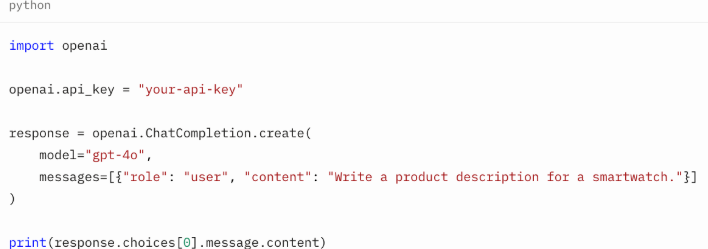
3. Design the App Architecture
- Frontend: Use React Native for responsive, cross-platform interfaces, leveraging its vibrant ecosystem.
- Backend: Implement Node.js or Django to manage API requests and data flow.
- Database: Use MongoDB or PostgreSQL to store user interactions for analytics.
4. Integrate and Customize
Send structured messages (roles: system, user, assistant) to ensure context-aware responses. Fine-tune prompts for brand alignment.
Example for a luxury brand:
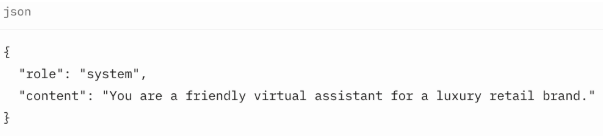
5. Test and Deploy
- Test for accuracy and relevance, iterating based on user feedback.
- Deploy on AWS or Azure for scalability.
If your business needs expert execution of these AI-powered iOS, Android, or cross-platform builds, explore our Mobile App Development Services for end-to-end development by senior engineers.
💡Scalable Path’s Heuristica app used A/B testing to refine its mind-map interface, improving engagement by 25%.
Cost-Benefit Analysis of ChatGPT-Based API
Pros:
- Affordable: Starts at $20/month with a free trial.
- Rapid Development: Requires minimal coding, making it easy to integrate and launch with just a few API calls.
- Scalability: Supports high-volume interactions without infrastructure costs.
Cons:
- Limited Customization: Less flexible than custom AI models for niche use cases.
- Ongoing Costs: API fees scale with usage.
- Dependency: Relies on OpenAI’s infrastructure.
Unique Insight: BrainX offers hybrid solutions, blending this API with custom models to balance cost, scalability, and specificity for enterprise needs.
Real-World Case Studies
1. Instacart: AI-Powered Grocery Shopping Assistant
Instacart rolled out the “Ask Instacart” feature powered by OpenAI’s ChatGPT to make online shopping easier. Natural language interaction is possible with this tool which allows a person to ask, “What dinner options are available?” or “How can I make sure my kids eat a healthy lunch?”
The assistant creates a personalized list of meals and places the needed ingredients in the user’s cart which helps simplify grocery shopping. ChatGPT and Instacart have come together, letting users use ChatGPT to pick meals from Instacart’s large catalog.
2. Klarna: Conversational Shopping Experience
Klarna used AI powered by OpenAI to help improve the way customers shop online. Users can use the assistant via chat and find products, review prices and decide what to buy by chatting. With ChatGPT on its platform, Klarna hopes its users will have a more personalized and efficient shopping experience.
3. Khan Academy: Personalized Learning with Khanmigo
Khan Academy’s Khanmigo is a tutoring and teaching assistant based on OpenAI’s GPT-4. It is used to help students learn about difficult topics by walking them through problems but not actually giving answers, helping them learn more in-depth. Khanmigo is helpful to teachers as well, providing assistance in lesson planning and monitoring of student progress, making the learning experience better.
4. Canva: AI-Enhanced Design Assistance
Users of Canva can now generate design components by following prompts prompted by AI. Users can easily make presentations, social media posts and other visual material using Magic Design and Magic Write. Thanks to AI, Canva allows anyone to design their own materials, regardless of whether they are designers.
10 Latest Trends in AI App Development for 2025
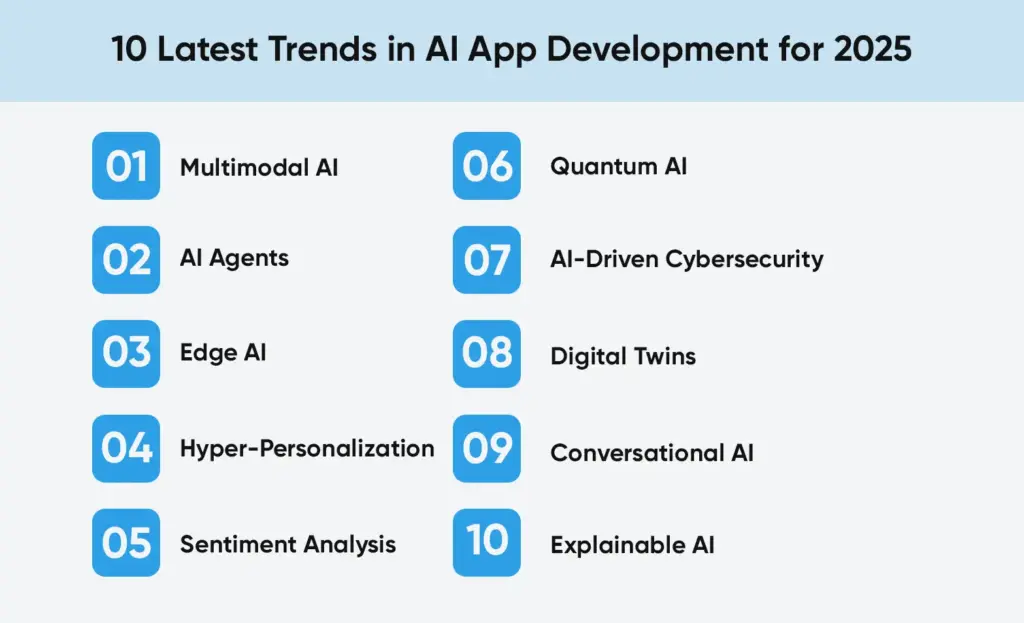
1. Multimodal AI
Thanks to models like OpenAI’s GPT-4o, AI can now deal with several types of data such as text, images and audio, at the same time. Using several approaches, applications can better understand the user’s situation and offer more natural features. For example, in order to assist customers, multimodal AI can interpret what is said, analyze the customer’s documents, produce an answer and provide assistance.
2. AI Agents
Autonomous Agentic AI makes it possible for AI to seek out actions, choose and learn independently. Because of these agents, scheduling, analyzing data and making personal suggestions require less human help. This leads to smarter and more efficient systems in different fields.
3. Edge AI
With Edge AI, information is processed right on local gadgets such as smartphones or devices that are part of the Internet of Things (IoT). It achieves faster performance, better security and requires less use of cloud services at the same time.
4. Hyper-Personalization
AI is now a main tool for businesses to improve how users interact with their websites. Keeping track of how users interact and what they enjoy, applications can show content and options suited to each user. Making the platform this customizable makes users happier and more loyal.
5. Sentiment Analysis
The use of advanced sentiment analysis leads applications to interpret what people feel and react accordingly by studying text, spoken words and behaviors. Being able to detect user sentiment adds great value for customer care teams and mental health platforms, helping them interact more empathetically.
6. Quantum AI
Integrating quantum and artificial intelligence offers the chance to resolve difficult problems faster than current natural computing methods. Thanks to this synergy, finance, logistics and drug discovery are predicted to benefit from rapid data handling and accurate predictions.
7. AI-Driven Cybersecurity
AI is now important in cybersecurity as it responds to threats quickly as soon as it finds them. Using AI, cyberattacks can often be detected, response actions can be set to happen automatically and protection can adapt to emerging risks, thus improving system security.
8. Digital Twins
Digital twins are computerized versions of equipment that are used to run models, predict behaviour and increase effectiveness. When AI is used, these models work faster and make decisions in real time which matters greatly for manufacturing, healthcare and urban planning.
9. Conversational AI
This technology is being applied to services in fields such as education, healthcare and legal work. As the market forecasts that AI systems will surpass $49.9 billion by 2030, they are now more complex, can deal with difficult conversations and offer personalized support across different areas.
10. Explainable AI
When AI systems affect decision-making more, it becomes vital to make sure those decisions are fair and easy to trace. In healthcare and finance, Explainable AI helps ensure people understand and trust the decisions taken by AI.
Common Questions About ChatGPT API Integration in Web and Mobile Apps
Do I Need a ChatGPT Plus Subscription for Using APIs?
No. This API is separate from the ChatGPT Plus subscription. While Plus gives you access to GPT-4o in the ChatGPT interface, API usage is billed separately based on token consumption. This makes it ideal for scaling your mobile or web app without a fixed monthly fee, perfect for startups and growing businesses looking to build AI-powered apps on a budget.
Why Do API Calls Fail on Mobile But Work on Web?
Many developers face this issue when testing GPT’s API in mobile environments. Typically, the problem is due to incorrect handling of authentication headers or insecure storage of API keys. In web apps, secure environments like Node.js backends protect the API key. On mobile, you must ensure the key is encrypted and permissions are configured correctly, especially on Android and iOS platforms.
How Can I Avoid Rate Limiting Errors Like HTTP 429?
If your app is experiencing HTTP 429 errors, the best solution is to implement an exponential backoff strategy and optimize the number of requests sent per minute. Monitoring your usage through the OpenAI dashboard and setting alert thresholds also helps manage scale as your user base grows.
How Do I Keep API Integration’s Costs Manageable?
Using these APIs efficiently can significantly lower costs. Reduce token usage by crafting concise prompts and limiting redundant message history. Apps can also cache frequent queries like repeated FAQs or instructions, to avoid unnecessary API calls. These tactics are crucial for businesses scaling AI functionality without inflating their cloud costs.
Is It Safe to Use the ChatGPT-powered API Directly in Frontend Code?
No. Direct integration of the API in frontend code exposes your API key and can lead to unauthorized usage. The recommended approach is to route all API requests through a secure backend whether it’s Node.js, Django, or Flask before passing responses back to the frontend or mobile app.
Should I Use Asynchronous API Calls in AI-Powered Web and Mobile Apps?
Yes, especially for mobile and modern web applications. Asynchronous calls prevent the app from freezing while waiting for responses, which is critical when using generative AI models like GPT-4o. This improves both performance and user satisfaction.
How Can I Maintain Conversation Context Across API Calls?
To build an intelligent, context-aware AI chatbot, use the messages array in your API request. This includes prior messages from the user and assistant, allowing the model to retain context throughout a multi-turn conversation. It’s one of the reasons the ChatGPT API is highly effective for customer support and virtual assistant use cases.
Why Aren’t Custom GPTs Working on Some Mobile Devices?
Custom GPT features may not be supported on all devices or platforms. If a feature works on the web but not on Android or iOS, it’s often due to platform limitations. Always validate device compatibility early during testing, especially when targeting multiple mobile OS versions.
Can I Keep ChatGPT’s Replies in Memory for Faster and Lower Cost Performance?
Absolutely. Caching is a good option to minimize API requests and expedite responses, when pages aren’t changing much. You should also make sure to change messages often, especially when what you are sharing needs to be recent or relevant to the user.
How BrainX Helps Businesses Address Problems with AI?
Wanting to transform your business with the help of AI-powered web and mobile apps? BrainX develops AI applications for diverse businesses. We integrate ChatGPT’s API with unique models to help reach better results for the business. Our applications for customer chatbots and recommendation systems are always scalable, protected and keep our client brand in mind. With proven results like a [X%] increase in patient satisfaction for a [X industry] client, BrainX empowers your business to lead in 2025.
Contact us at BrainX Technologies for a free consultation and start your AI journey today.
A Slack app connected to ChatGPT can proofread messages instantly, refine tone, and prevent errors. Setup involves creating a Slack bot, connecting it with the ChatGPT API, and configuring slash commands like /proofread. This guide shows how to build it step by step.
Build a Slack app to proofread messages with ChatGPT API and ensure your team’s Slack communication is clear and error-free. In fact, Slack is now used by over 1.1 million companies worldwide and ChatGPT processes more than 190 million queries every day, so integrating an AI proofreading tool directly into Slack addresses a huge market.
As AI adoption surges in the workplace (daily AI use among workers jumped 233% in six months), a Slack-based proofreader can save time and boost professionalism. This guide covers why and how to build such an app, step by step, with up-to-date tips, code examples, and best practices.

Use Cases for a Slack Proofreading App
According to McKinsey, “employees spend up to 20% of their workweek clarifying miscommunication”. AI-powered proofreading can drastically reduce this wasted time.
1. Enterprises
Maintain consistent, professional communication across large teams where hundreds of Slack messages are exchanged daily.
2. Startups
Save time and improve investor-facing communication with automated proofreading that keeps pitches sharp and professional.
3. Remote Teams
Improve visibility among working teams that are distributed and may lead to misunderstanding due to time zones and cultural differences.
4. Global Companies
Translate and refine multilingual messages to ensure seamless collaboration between international offices and clients.
5. Customer-Facing Teams
Guarantee client interactions remain professional, polished, and brand-aligned in every message.
6. HR & Recruitment
Craft clear, professional onboarding instructions, policy updates, and candidate messages that avoid confusion and maintain company reputation.
7. Sales Teams
Refine outreach messages shared internally before client delivery, helping sales reps send persuasive and error-free communications.
8. Marketing Departments
Ensure campaign ideas, brainstorming notes, and content drafts exchanged in Slack are clean and easy to reuse externally.
9. Product & Engineering Teams
Clarify technical discussions, feature updates, and bug reports, reducing the chance of misunderstandings in high-stakes product development.
10. Legal & Compliance Teams
Proofread compliance-related messages to minimize risk, ensuring all communication is precise and aligned with regulatory standards.
Why Use ChatGPT API for Slack Message Proofreading?
Research shows daily AI users experience up to 64% higher productivity and 81% higher job satisfaction.
–Slack’s Workforce Index
Here are the following benefits to build a Slack app to proofread messages with ChatGPT API:
1. Professionalism in Each Message
Make sure that all Slack messages are clear, refined, and free of errors and make teams remain credible and confident in their day-to-day communication.
2. Clean In-Slack Support
Compose and tidy messages within Slack seamlessly, without having to switch applications or disruption of working sessions.
3. Checking More Than Grammar
Go even further and spell checks with smart aiding tones, lessening jargon, formatting, and phrasing suggestions to make the text easier to understand.
4. Focus on Ideas, Not Errors
Give the employees a chance to focus on creativity, teamwork and problem solving when AI takes care of proofreading, editing and improvement of messages on its own.
5. Consistent Brand Voice
Keep the similarity of the tone in all Slack communications within and outside of the company, enhancing brand recognition and working atmosphere.
6. Instant Multilingual Support
Break language barriers with instant translation, ensuring smooth, accurate communication between global teams and across multiple regions or markets.
7. Reduced Miscommunication
Prevent misunderstandings by clarifying intent, simplifying complex language, and ensuring messages are always delivered in a precise, readable format.
8. On-Demand Writing Coach
Get immediate feedback on tone, style, and structure of writing, and convert any Slack message into an effective, concise, and professional communication.
9. Inclusive Communication
Individualization of the message so as to reach different audiences and ensure that communication with other employees in different positions and at different cultural backgrounds are respectful, accessible, and inclusive.
10. Faster Decision-Making
Enhance quicker team alignment by eliminating the use of wordy language as well as by provisioning concise, action-oriented Slack messages which prompt quicker decision making.
How Slack and ChatGPT Work Together?
In Slack, a Slack App is the umbrella for any integration you install. In case there is a bot user of the app, messages can be published and answered as a human. That is, all Slack bots are Slack apps, although not all apps include bots. In our case, the proofreader is a Slack App that we have configured with a bot that listens to commands or mentions. Triggering the Bot. A common pattern is to use a slash command (e.g. /proofread). When a user types /proofread some text, Slack sends that text to your server via a URL you provide. Your server (the Slack app backend) then calls the ChatGPT API to get corrections, and responds back to Slack with the proofread text.
Alternatively, you could listen to message events (using Event Subscriptions) and trigger when someone mentions the bot. For simplicity and user control, a slash command is straightforward. Slack API Scopes and Setup. Your Slack App will be configured in the Slack Developer Dashboard. Name it and attach it to your workspace. Then in OAuth & Permissions, add bot token scopes like commands (to use slash commands) and chat:write (to post messages).
After installing the app to the workspace, Slack gives you a Bot User OAuth Token. Save that token and the Signing Secret; you’ll use them in code to authenticate your app. ChatGPT API. We’ll use OpenAI’s Chat Completions API (the same API behind ChatGPT). You need an API key from OpenAI’s developer platform. The bot sends the user’s text to the ChatGPT endpoint with a prompt such as “Proofread the following text: [user text]” or uses the chat-completion endpoint with a system message like “You are a grammar assistant.” Your bot sends the text with corrections back to Slack by OpenAI.
How to Build a Slack Proofreading App ChatGPT API?
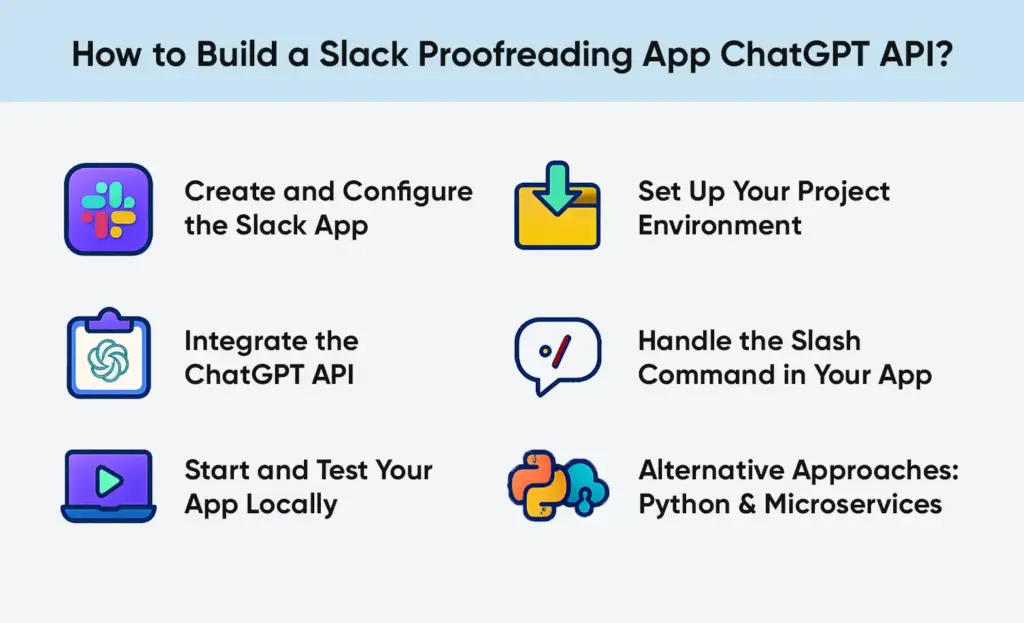
Below is a high-level outline of the development steps to build a Slack proofreading app with ChatGPT API.
Step# 1. Create and Configure the Slack App
1. Create a New App: In the Slack API dashboard, click Create New App. Choose “From scratch” and give it a name (e.g. “ProofreaderBot”) and select your development workspace.
2. Slash Command (Proofread): Under Features, go to Slash Commands. Click “Create New Command.” For the command, use /proofread. Input the Request URL to the endpoint on your server that will accept the command (you may change this later e.g. https://your-server.com/slack/events).
Give it a short description like “Proofreads your message.” Save these settings.
3. Bot Token Scopes: In OAuth & Permissions, scroll to Bot Token Scopes and add at least commands and chat:write. (If you want the bot to also respond to direct messages or listen to channel messages, you might add scopes like im:read, channels:read, etc., but for a simple slash command these two are enough.)
4. Install to Workspace: Click “Install App to Workspace”. Slack will ask you to authorize your bot; approve it. After installation, Slack provides the Bot User OAuth Token and displays the Signing Secret in Basic Information. Copy both for your code environment.
At this point, your Slack app is set up. The bot has permission to respond to /proofread commands.
Step# 2. Set Up Your Project Environment
1. Create a Project: On your local machine or server, make a new folder (e.g. slack-proofreader) and initialize it. For Node.js:

2. Install Dependencies: For a Node.js solution (using Slack Bolt and axios), install:
npm install @slack/bolt axios dotenv express
- @slack/bolt – Slack’s app framework for Node.js makes listening to commands/events easy.
- axios – to call the OpenAI API.
- dotenv – to load environment variables (tokens/keys) from a .env file.
- express – if you need an HTTP server (Bolt actually includes an Express under the hood).
3. For Python, you might use Flask or FastAPI, plus the slack_sdk and requests libraries (and python-dotenv). The concepts are similar.
4. Environment Variables: To make your tokens safe, make a file called .env:

Then in code, use dotenv (Node) or python-dotenv to load these. This keeps secrets out of your codebase.
Step# 3. Integrate the ChatGPT API
Write code to take user text and get a proofread result. Gpt 4.1 can also be used through the Chat Completions endpoint, by typecasting the prompt as a chat message, which can provide more natural responses. Reminder: API usage cost is to be considered. Each call to ChatGPT consumes tokens (the input and output text) and OpenAI charges per token. Keep prompts concise to save cost. In a business setting, you might track usage or set usage limits.
Step# 4. Handle the Slash Command in Your App
Next, tell your Slack app how to respond to /proofread. In Bolt, you register a command handler:
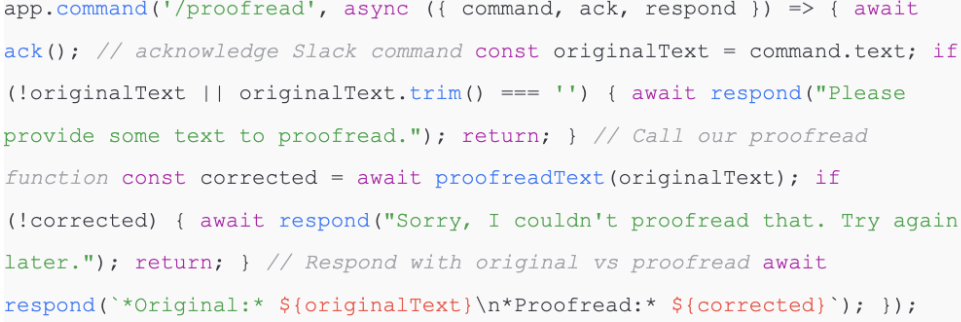
This code does the following:
- It lacks the slash command so Slack knows the app received it.
- It reads command.text (the user’s input).
- It calls proofreadText (originalText) to get corrections from ChatGPT.
- It uses respond () to send a message back in the Slack channel (or DM) showing the original and the proofread text.
For example, if a user types:
/proofread This is a smaple text with some erros.
the bot might reply:
*Original:* This is a smaple text with some erros.
*Proofread:* This is a sample text with some errors.
Step# 5. Start and Test Your App Locally
In order to test locally, your Slack must be able to access your server. The most common trick is to tunnel your localhost using ngrok.
- Run ngrok http 3000 (or whatever port your app uses). ngrok gives you a URL like https://abcd1234.ngrok.io.
- In your Slack app settings, update the Slash Command’s Request URL to https://abcd1234.ngrok.io/slack/events (Bolt’s default endpoint is /slack/events).
- Restart (or “Re-install”) the Slack app in your workspace after changing URLs.
- Run your server: node index.js.
- In Slack, try /proofread with some text. Check that your app logs the incoming request (Bolt logs) and responds correctly.
If something goes wrong, use Slack’s developer tools and the logs. ngrok provides a web interface (http://localhost:4040) to inspect requests. And check your server console for errors. This workflow (tunneling, changing URLs, reinstalling) is standard for Slack development.
Step# 6. Alternative Approaches: Python & Microservices
While the above uses Node.js and Bolt, you could do the same in Python. For example, a Flask app could receive slash command POSTs and use the slack_sdk to respond. The key steps (verify Slack signature, parse JSON, call OpenAI, post answer) are similar. For larger scale or advanced setups, consider a microservices architecture. CloudAMQP’s tutorial uses LavinMQ (a RabbitMQ service) to decouple Slack events from processing. In that design, one service quickly receives Slack messages and enqueues them, and a separate worker dequeues to call ChatGPT and post back. This prevents losses of time when ChatGPT is sluggish. It is also more reliable: in case the ChatGPT call is unsuccessful, the message remains in the queue until reattempted.
A high-level architecture for a Slack-ChatGPT bot: Slack messages → Slack Bot Service (producer) → LavinMQ queue → Processing Service (consumer) → ChatGPT API → Slack response.
This is a decoupled method where the Slack Bot Service never blocks ChatGPT so a spike in traffic or short-lived failures does not crash the bot. When you are going to deal with a large volume, or high fault tolerance, then the additional effort of a queue based design (with RabbitMQ, Kafka, or any other broker) is worth it.
Best Practices/Considerations
- Slack Rate Limits: Please note Slack is a rate limit in which slash commands (e.g., ~set my status) are permitted to make requests, as well as how quickly HTTP endpoints have to respond (3 seconds). Bolt handles retries, but if ChatGPT takes too long, you should at least ack() first and then send a delayed response.
- Security: Always verify requests are from Slack. If you use Bolt, it checks the signing secret for you. If DIY, validate the Slack signing signature. Only respond to authenticated calls. Avoid logging user data carelessly.
- Response Time: Slack expects a response within 3 seconds. If OpenAI is slow, Slack will retry your endpoint. The first of these is to add the following header to your responses: X-Slack-No-Retry: 1 to instruct Slack to not retry. This header can be sent by your web framework once you ack() the command.
- Message Context: By default, we’re just proofreading isolated text. But you could extend the bot to use conversation history. For example, if a message is in a thread, you could fetch prior messages with conversations.replies and send the whole thread to ChatGPT to make suggestions in context. That’s more complex but more powerful (e.g. “rewrite this whole thread politely”).
- Costs: OpenAI bills per token. Keep prompts tight. For instance, GPT-3.5 costs about $0.002 per 1,000 tokens input and $0.002 per 1,000 output (gpt-4 is more expensive). Even a short proofreading prompt (a few sentences) might consume a few dozen tokens. Costs may accumulate in a busy Slack workspace, track usage or limit quotas.
- Alternative Triggers: You may also allow users to engage with the bot by either an slash command or by mentioning it in a thread or replying to it. Then, allow Event Subscriptions and subscribe to app mentions or message events.
- Coding Changes: Listen to message events instead of commands.
Will The Bot Post The Proofread Text Publicly?
The code above uses respond(), which by default replies in the same channel or thread. If you want private replies, you can adjust to use ack() with an ephemeral message, or have the bot DM the user. It’s up to your design.
Are There Existing Slack Apps For ChatGPT? Why Build A Custom One?
Yes, Slack’s App Directory already has apps like “Q, ChatGPT for Slack” (by Suchica) which offer AI chat features. However, custom building lets you tailor the experience (e.g. restricting it to proofreading, integrating with your data). Also, custom apps can use your own OpenAI key instead of a third-party’s.
Can The App Handle Multiple Messages in a Thread?
By default, the slash command proofreads only the text given. To handle threads, you can change your logic: if the incoming Slack event has a thread_ts (thread timestamp), you could fetch the full thread history with conversations.replies and send it all to ChatGPT. This way, ChatGPT can see the context. This is more advanced and was demonstrated in other integrations.
Why Build with Us?
At BrainX Technologies, we go beyond tutorials. Our Slack integrations match your workflow and business objectives and are enterprise-grade.
- Tailored AI Solutions: We will create solutions, such as proofreading bots, or complete AI assistants, that fit your requirements.
- Scalable Integrations: scaled to support growing teams and enterprise-level security.
- End-to-End Support: We take care of setup, API integration, deployment and maintenance so that you can work on results.
- Cross-Platform Expertise: We are integrating AI in Microsoft Teams, CRMs and custom platforms in addition to Slack.
FAQs
Q1: How much does it cost to run a Slack proofreading bot?
Costs depend on usage volume and the ChatGPT model chosen. Lighter usage may only add minimal monthly costs.
Q2: Can the bot maintain a company-specific tone?
Yes, ChatGPT can be trained or even asked to learn your brand style guide to keep the same voice throughout the messages.
Q3: What industries are Slack proofreading bots most useful in?
In the healthcare industry, finance, consulting and eCommerce, clear and accurate communication is most important.
Q4: Does ChatGPT on Slack ensure data security?
Yes, with proper setup. BrainX observes enterprise grade security measures such as API key management, encrypted storage, and Slack-approved scopes.
Q5: Is the Slack proofreading robot compatible with the private channels or direct message?
Yes, under the right Slack API scopes, the bot can check the text of messages in a private channel and DMs.
Q6: Does the bot support any type of Slack (desktop, mobile, web)?
Yes, as the integration occurs on the level of Slack workspace, the proofreading works effectively in desktop, mobile, and browser versions.
Q7: What is the speed of Slack proofreading bot?
In most cases within a few seconds, depending on the ChatGPT API response time and the latency of the Slack network.
Q8: Does the bot make work with long or technical messages?
Yes, but token limits apply. Prolonged technical discussions can be proofread in sections so that it is accurate and complete.
Q9: Does it enable the users to go up or down in correctness level (i.e. formal vs. casual)?
Yes, the bot can adapt to the professional, formal or casual connected to the choice of the user.
Q10: Does proofreading bot support multiple languages?
Yes, ChatGPT can proofread and translate messages in various languages and it can come in handy with global teams.
Q11: The bot is sensitive or confidential, how does it address sensitive or confidential information?
Messages are safely processed through API and BrainX can set up private hosting services to businesses that have high compliance requirements.
Q12: Does the bot know how to propose other phrases or simply correct mistakes?
It serves two purposes: in fixing grammar, spelling and structure, but also in providing clearer and more effective ways to express something.
Gen AI has transcended from being a hype to a necessity for today’s businesses. It is driving trillions in economic value through AI automation, creativity and decision support. From protein decoding in health to supply chain optimization in retail, it is driving productivity and personalization at scale. While quality of data, hallucinations and regulation remain issues in transition, companies that have taken a thoughtful approach to AI are driving strong ROI and differentiation.
How generative AI is reshaping industries is no longer a theoretical discussion, it’s a visible reality transforming how businesses innovate, operate, and grow. Once treated as a hype cycle novelty, today it is delivering real business value.
For example, leading analysts estimate it could add between $2.6 and $4.4 trillion to the global economy each year. Indeed, one report predicts a potential $20 trillion impact on global GDP by 2030 and an annual 300 billion work hours saved. These eye-popping statistics illustrate why organizations worldwide are racing to a cadence of action that takes gen AI from the realm of hype and into practice. If you want to learn how to bring these innovations into your own organization, read our Guide on How to Use Generative AI for Your Business, a detailed roadmap from strategy to deployment.
They are deep learning models (typically base models or LLMs) that generate new content (text, code, images, audio and more) in response to prompts. ChatGPT, Bard, DALL·E and Stable Diffusion have captured the imagination of people because they can be employed by anyone to write, design or brainstorm.
These applications are based on giant neural networks that are trained on large amounts of data. Contrary to conventional predictive artificial intelligence, generative models are particularly good at generation and exploration they can;
- Draft a marketing email
- Generate website layouts
- Propose chemical compounds
Let’s explore how generative AI is reshaping industries is evident in its broad range of capabilities in more detail.
Generative AI Adoption Trends of the Economy

The practical outcomes of real use cases are already going on in businesses all over the world. What was once experimental is now driving measurable returns across industries.
According to a recent survey, 71 percent of organizations currently apply GenAI to at least one business operation, an increase of approximately 33 percent in one year. The transformation clearly reflects how generative AI is reshaping industries.
The returns on the investments are high in companies. Firms claim an average ROI of 3.7x on each dollar on initiatives. The level of private investment is also increasing rapidly, with $33.9 billion of startups being invested around the world in 2024, a 18.7% year-over-year growth.
McKinsey’s research highlights where the real value lies:
“Almost 75% of Gen AI’s potential value falls within four domains i.e. customer service and operations, marketing and sales, software development, and R&D. Within these, banks, tech companies, and life-sciences firms stand to benefit the most.”
Their analysis further estimates that it could create $200–$340 billion of additional annual value in banking and $400–$660 billion in retail and consumer goods.
The technology’s impact extends beyond profits, it’s redefining how people work. Current tools can automate 60–70% of routine knowledge-work activities, compared to about 50% for traditional AI automation technologies.
Employees recognize the advantages too:
More than 96 percent of employees are convinced that generative AI can assist them in doing their jobs better.
However, 50% of them fear that they will be replaced by robotization.
As of 2025, it is estimated by the analysts that the world will lose around 85 million jobs, but new AI-based jobs are going to be introduced.
Concisely, this technology has transformed pilot projects to a strategic engine of innovation, productivity and competitive advantage.
How Generative AI Works?
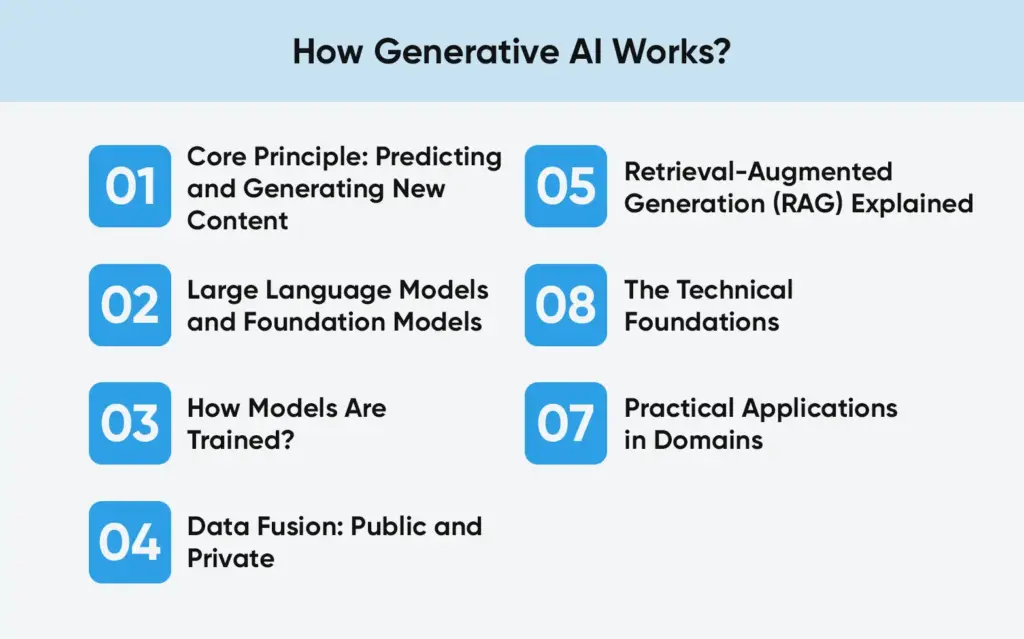
Gen AI works through learning habits on big data and replicating these habits to produce fresh and original work. Understanding how generative AI is reshaping industries begins with recognizing the architecture, training processes, and integration methods that make this technology so adaptable across domains.
1. Core Principle: Predicting and Generating New Content
Generative AI models are based on the principle of predicting the next element of a sequence – it could be a word, a pixel, a note, or a line of code.
Proprobabilistic modeling is used to produce new, coherent, contextual content.
By doing so, AI can write articles, create products, create visuals or can even compose music that would seem human.
2. Large Language Models and Foundation Models
The best developed type is the Large Language Model (LLM).
GPT-4, Claude, Gemini, and LLaMA are trained on trillions of words obtained by accessing books, websites, code repositories and research papers.
Its objective is to learn grammar, context, logic and semantics at scale to be able to answer queries in an intelligent way in almost any query.
Other generative models utilize other modalities besides language:
- Image Generation: Stable Diffusion, Midjourney and DALL-E.
- CodeGeneration: Amazon CodeWhisperer and GitHub Copilot.
- Audio & Video Generation: Suno, Runway ML, Synthesia.
3. How Models Are Trained?
Training is a method that involves being exposed to extensive data sets, and it is even being trained to identify statistical associations among inputs and outputs.
The model is trained with the help of transformer architecture, which teaches contextual dependencies (e.g., the relationship between words or pixels).
The model is self-refined over several training processes:
- Pre-training: Trains on the general knowledge of big datasets.
- Fine-tuning: Industry or task conformity.
- Reinforcement Learning with Human Feedback (RLHF): Improves the quality of the output depending on the human judgment.
4. Data Fusion: Public and Private
The merging of foundation models with the internal data of many enterprises is now done to ensure that it is accurate and relevant.
It will enable firms to develop custom AI copilots, which know about the world as well as the firms.
Example Use Cases:
- A chatbot that will respond to an employee query by referring to company policies.
- An engineering assistant that provides solutions using proprietary technical documentation.
5. Retrieval-Augmented Generation (RAG) Explained
Retrieval-Augmented Generation (RAG) is a method that combines a public LLM (like GPT-4) with a company’s private database.
The process:
- The system retrieves relevant information from internal sources (like documents or knowledge bases).
- The LLM uses that information to generate grounded, accurate answers.
- RAG helps overcome “hallucination” by anchoring responses to verified data.
- This makes it ideal for enterprise chatbots, knowledge assistants, and AI documentation tools.
6. The Technical Foundations
- Neural Network Architecture: Advanced transformers make it possible to use large sequences of data in models.
- Compute Power: GPUs and TPUs of modern time can train on trillions of parameters in sensible time.
- Data Availability: AI has an abundance and variety of material to study due to the explosion of digital content.
- Optimization Algorithms: Algorithms such as gradient descent, attention mechanisms and fine-tuning have significantly enhanced the performance of a model.
7. Practical Applications in Domains
Following are the real examples of how generative AI is reshaping industries:
- Writing: Writing summaries of reports, writing emails, blogs and documentation.
- Design: Creation of product prototypes, UX and creative work.
- Code: Debugging bugs, compiling functions and optimization of old systems.
- Language Translation: Overcoming the language barrier in international businesses.
- Analysis: A summary of research, financial analysis, or market analysis of raw data.
Why Does It Matters?
The flexibility allows automating complex, creative, and repetitive operations. It does not eliminate human knowledge, it enhances it, making knowledge workers AI-enhanced professionals who can do more within a shorter period of time.
[ Also Read: Guide on How to Use Generative AI for Your Business ]
Industry Transformations

Generative AI is not a universal technology. It has an impact on all key industries, including healthcare and financial, manufacturing, educational, and governmental sectors. Let’s find out how generative AI is reshaping industries to create value.
1. Healthcare & Life Sciences
AI in healthcare has accelerated drug discovery, predictive diagnosis, and medical adherence.It can further enable clinicians to spend more time with patients and less time in paperwork, whether it involves consultation transcription, modeling molecular interactions, and so on.
Examples: Medical summaries: AI-based scribers produce doctor-patient conversations in real time.
Important Figures: AI spend in 2025 is projected to 1.4B (3 times growth); 22 percent of health organizations are using domain-specific AI; saves three hours/day per doctor.
2. Finance & Banking
Optimizes risk modeling, fraud detection, and customer personalization. It also speeds up the compliance reporting and automates the tasks that have a lot of data to enhance accuracy and decision-making.
Example: Virtual AI advisors identify irregularities, prepare reports, and suggest changes in the portfolio.
Critical Statistics: 78 percent of financial institutions mention greater efficiency; value added of $200-340 B/yr in banking.
3. Retail & Ecommerce
Personalizes the shopping experience, predicts inventory demand, and it simplifies marketing campaigns. Retailers use AI to make their ads dynamic, have virtual try-on, and smarter supply-chain predictions.
Case Study: The AI agents of a multinational electronic company saved 25% of live calls and increased query accuracy up to 95%.
Major Statistics: GenAI will add more annual retail value of 310 B; conversion rates will increase significantly.
4. Manufacturing & Supply Chain
Generative design, predictive maintenance, and digital twins are the changes that are undergoing in factories. AI is used to produce optimal part geometries, predict equipment failures and it lowers the logistical waste.
Example: EV manufacturers use AI to make their components lighter and to plan assembly.
Key Stats: 30% increased material efficiency; up to 40% cost of maintenance decreased.
5. Marketing, Media and Creative Industries
Redefines creativity by enabling companies to create ad scripts, visuals, and videos in a few minutes. It allows campaigns to be hyper-personalized, and the production pipelines can be automated so that the go-to-market outcomes can be even faster.
Sample: DALL·E and Midjourney are utilized by creative teams in visualizing ideas to be utilized in advertisements in real time.
Critical Metrics: 70 percent. faster rate of content generation; decreased the cost of creativity by 40%.
6. Education & Training
Online tutors give instructions to students according to their personal progress and teachers generate content that is used in lessons, quizzes and grading in an automated manner.
Example: GPT-4 tutor at Khan Academy designs specific exercises and immediate feedback.
Important statistics: 35 percent improved retention of learning; AI uses 2 times faster than the majority of industries.
7. Energy & Utilities
AI is utilized in grid optimization, predictive equipment maintenance, and forecasting of renewable-energy. Generative models imitate power demand and design smarter storage systems and minimize the downtime in utilities.
Example: AI is utilized by energy providers to model the output of the sun and predicting consumption.
Key Stats: Predictive AI is capable of reducing grid outages by 30 percent; increasing renewable power efficiency by 20.
8. Transportation & Logistics
Improves mobility, starting with autonomous routing, and all the way to vehicle design. It models logistics networks, forecasts delay during delivery and produces optimal transport plans to save on fuel and time.
Example: AI is applied by logistics companies to map the current traffic and change routes independently.
Significant Statistics: Saves up to 15-25 in delivery expenses; up to 20 emission reductions.
9. Agriculture & Food Tech
Assists farmers in prediction of yields, crop diseases, as well as developing sustainable farming plans. It is a combination of satellite and sensor imagery data to produce actionable intelligence to implement precision agriculture.
Example: The AI creates treatment plans of crops using data on soil and weather forecasting.
Significant Facts: Increment of the farm productivity by 30 percent; cutting the resource consumption by up to 40 percent.
10. Real Estate & Construction
Gen AI can speed up the process of building architectures, provide automated descriptions of property, and render building layouts. The AI is used by developers to predict market trends and facilitate the planning of the project.
Example: AI has been used to create 3-D models and energy-efficient building plans within minutes by the architects.
Major Stats: (Design) – 50% faster design time; (Construction) – overrun cost in construction.
11. Public Sector & Government
Governments use GenAI to improve the services offered to people, understand the consequences of their policies, and make communication with citizens easier. AI chatbots are useful in tax-related inquiries, licensing, and benefiting claims.
Example: AI assistants are used by public agencies to automate the process of document review and servicing citizens.
Important Statistics: Decreases the time of service response by 40 percent; decreases administrative expenses by 35 percent.
Major Generative AI Benefits
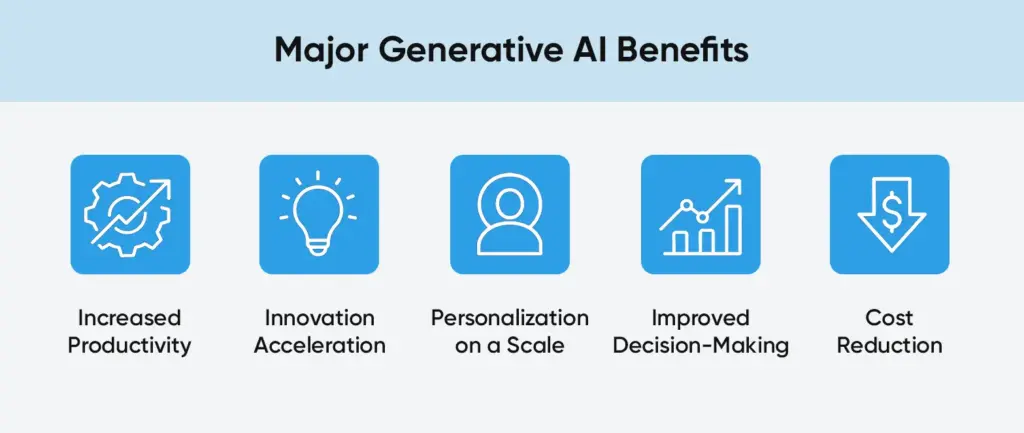
Now that we have discussed how generative AI is reshaping industries, it’s time to learn about all the generative AI benefits.
- Increased Productivity
Routine activities (writing reports, summarizing data, etc.) are automated, and experts can perform high-value jobs. GenAI has the potential to automate 60-70 percent of activities of many jobs in McKinsey. There are also high time savings by the early adopters such as businesses that deployed AI to code have reduced the developer labor by more than 25%.
- Innovation Acceleration
It is able to come up with new drug candidates, develop prototype products or even pursue other avenues of marketing that the human mind may not readily consider. The teams are able to go through design or texts and come up with designs or texts very quickly; this sets them on the way to execution.
- Personalization on a Scale
AI has the ability to study the behavior of a customer and create something or suggestions that are unique to that customer. Such hyper-personalization (in emails, offers, interfaces) is more likely to make people interact more and even sell more. Indeed, the companies that rely on AI-based recommendation systems record high increases in conversion rates.
- Improved Decision-Making
Generative AI models have the ability to consume and generate large volumes of data to provide answers to complex queries. Scenario models, financial forecasts, risk assessments of AI-generated analyses are used by executives to make better decisions. According to Gartner, the AI-based analytics tools are becoming a center of global decision support by the executive.
- Cost Reduction
Frequently reduce operational costs by eliminating manual work, as well as by minimizing the number of mistakes (e.g. by helping to identify bugs in either coding or fraudulent transactions through AI analysis). As an example, AI assistance in customer service can lower the overhead of the call-centers.
Also Read: AI Chatbot Development: Build Bots That Scale Your Business
Implementation Challenges
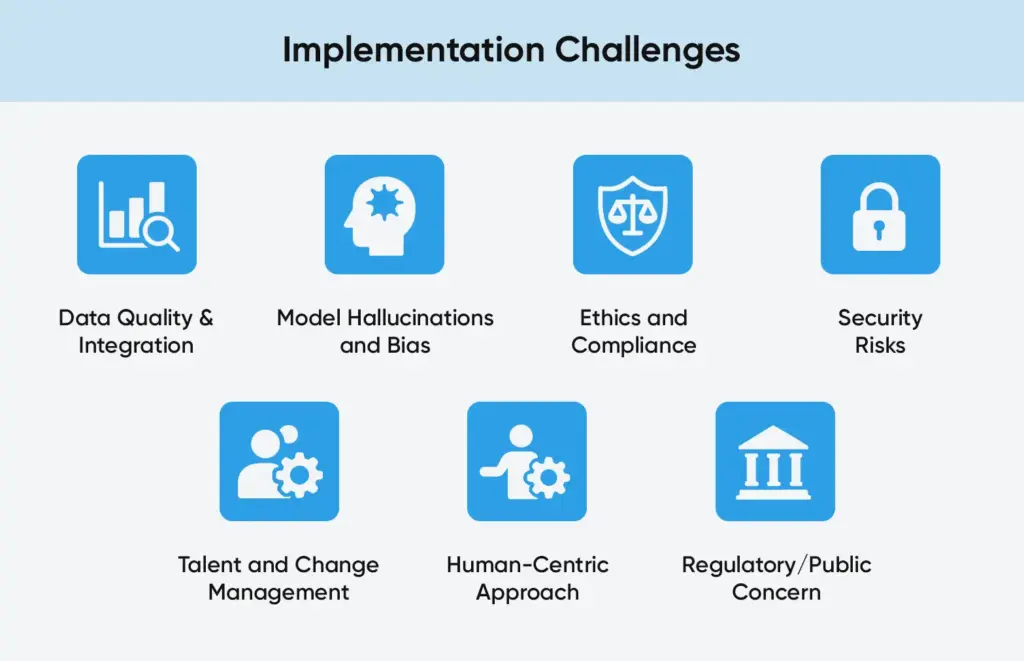
It is not that easy to transform AI potential into reality. Organizations are challenged with a number of obstacles:
- Data Quality & Integration
Generative models require training data of high quality. Poor or rushed data is a challenge facing many enterprises. Gartner is estimating up to 30 percent of projects will fail or be stopped by 2025 because of lack of data management or poor risk management. Before deployment, companies have to spend on data clean-up, integration pipelines, and governance.
- Model Hallucinations and Bias
Models can sometimes produce incorrect or biased outputs (“hallucinations”), which is unacceptable in fields like healthcare or law. Ensuring accuracy requires human oversight and domain constraints. As one review notes, AI’s “potential for hallucination and black-box logic” means organizations must proceed with caution.
- Ethics and Compliance
There is intellectual property and privacy issues when an AI is trained on proprietary data or data that is copyrighted. Organizations have to maneuver the legislation (GDPR, copyright regulations, etc.) and stay trusted by the users.
- Security Risks
GenAI systems may be victims of new attacks (e.g., poisoned training data or adversarial queries). This vulnerability is noted in organizations where three-quarters stated that they would increase cybersecurity solely in AI programs.
- Talent and Change Management
The skilled professionals in AI are lacking. The firms require human resources despite the tools, as they require individuals with an awareness of AI working processes. Besides, AI can be opposed or abused by workers when not trained adequately.
- Human-Centric Approach
Retraining staff and placing them in tasks that are more valuable than the technology itself is not any less important than the latter.
- Regulatory/Public Concern
As generative AI permeates the mainstream, the governments are considering new laws (such as the EU AI Act) on its usage. Firms have to keep on the run of changing regulations and popular opinion.
Also Read: Ways Generative AI in Software Development Optimize Teamwork
The Road Ahead!
GenAI is still developing, shifting towards commercial implementation. The following chapter offers further integration, and more human-like relationships between industries.
Rise of Agentic AI Systems
The second embrace of AI will be agentic AI systems that can perform complex workflows on their own.
Examples: Data collection, report writing, email, and follow-ups are tasks on which an AI analyst requires minimum input.
➤ Gartner estimates that agentic AI will evolve out of pilot projects to enterprise-deployments by the end of 2025.
Greater Human-Artificial Intelligence Cooperation
GenAI will be a creative co-pilot in all industries. The AI will be used in real time to brainstorm, visualize and refine the ideas with authors, architects, and designers.
➤ AI-assisted storytelling will bring forth more opulent, repetitive creation to instant architecture design models.
Development of Multimodal Capabilities
With the growth of models, AI will combine text, image, and video generation in one system.
➤ This development will make AI avatars to serve customers with emotion and superior creative features to media, marketing, and entertainment.
Domain-Specific AI Models
Businesses are moving towards proprietary foundation models that are being trained on their data.
Example: Banks, retailers, or healthcare companies that build their own LLMs in which the models are trained using their own data to be more accurate and competitive.
Finding the Gold Mean between Hype and Real Value
AI does not have the same benefit in all processes. Human intelligence is needed to be creative in strategy, provide leadership, and make decisions in a subtle way.
➤ High-impact generative AI use cases should be the priority of the business, ROI should be carefully measured, and the process of scaling should be repeated to concentrate on the value that is actually important.
Conclusion
The ideas around how generative AI is reshaping industries are now solidly entering the reality stage after a frenzied bout of hype. In healthcare, finance, retail, and in most other fields, we observe tangible examples when AI enhances human work, not entirely replacing it.
- Augmentation: with AI-powered tools in the hands of employees, they have a lot more than they could have previously, and the routine work is robotized.
- Supporting Data: the potential productivity in trillions of dollars, high rates of generative AI adoption, and quantifiable ROI.
Finally, the transformations are taking various shapes, yet all the examples revolve around accelerated innovations and AI automation. It is all because as businesses start to incorporate AI into products, services and processes, they will discover new levels of efficiency and experiences. The transition between hype and reality is in progress and it is transforming operations throughout the global economy.
How BrainX Helps Businesses Innovate with AI Solutions?
At BrainX Technologies, we help companies move from concept to measurable impact through practical implementation.
Here’s how we support your digital evolution:
- AI Strategy and Consulting – Learn how AI can be used to optimize operations and improve the business performance.
- AI Model Development Custom: Develop intelligent systems capable of learning, adapting and solving actual business challenges.
- AI-Powered Automation – Implement smart assistants and automation of the processes to achieve efficiency and customer experience.
- Integration & Deployment – Stream integration of AI with your apps, CRMs and enterprise platforms.
- Performance Optimization– Improve, refine and scale AI solutions to provide long-term value.
Bring your AI change now! Ready to apply these steps to your own project? Book a Free Consultation ”
FAQs
1. What is the difference between traditional AI and GenAI?
The classic AI is based on data analysis and forecasting, whereas gen AI generates something original like a text, code, picture, or design, by taking into account the previously learned patterns. It allows creativity and automation in aspects that the older AI systems did not.
2. What industries does it benefit most?
The main pioneers are healthcare, finance, retail, manufacturing and marketing. GenAI is used to find new drugs, automate reports, personalized shopping experiences, design parts, and create creative content all of which are redefining the way these industries work.
3. What are the chief advantages of genAI to businesses?
The main generative AI benefits involve increased productivity, accelerated innovation process, tailored customer experiences, better decision-making and lower cost. A significant number of companies claim to make more than 3 times ROI on their investments in AI.
4. What are the pitfalls involved?
Some of these pitfalls are poor data quality, bias or hallucination in the model, ethical and privacy concerns, cybersecurity risks, and unavailable skilled AI talent. Success is pegged on effective data management, human control and well defined change management.
5. What is the future of generative AI?
The second advancement is the agentic AI one. Such systems are used to perform tasks autonomously, like to collect data, write reports, and share findings. AI is expected to be a reliable, daily business partner as refined domain models and more powerful regulations appear instead of just being a new thing.
Choosing generative AI for your business is a way of operation by allowing machines to generate new content such as text, images, code, and designs, according to the acquired data patterns. Firms that are using generative AI are experiencing increased incomes and reduced expenditures through automation, personalization and innovation in marketing, client support, R&D and more. With the help of a qualified roadmap, goal and use case definition, data preparation, model building, and responsible scaling, businesses will be able to transform both creative and operational workflows without compromising the ethical and data governance standards.
Using generative AI for your business is not just a hype, but it is quickly turning into a competitive necessity. Indeed, 71 percent of the American CEOs currently rank generative AI among the leading investments. The world wide industry analysts forecast that the gen AI market will have surpassed more than 71.36 billion dollars by the end of the year 2025 as it is growing exponentially.
The creative work can be automated, the experience of customers can be enhanced, and the productivity can be increased in many ways by using generative AI tools (such as advanced large language models and image generators). This blog will provide you with a step-by-step roadmap of taking advantage of those opportunities.
Read further to this guide on how to use generative AI for your business to find out viable steps to implementation.
What is Generative AI?
Generative AI is a sub-field of artificial intelligence that is able to generate novel content such as text, images, code, even music by observing whatever data is presented to it. Gen AI is a type of AI used to produce original artifacts in contrast to the traditional predictive AI (which makes predictions).
As an example, an autogenerative language model such as GPT can write emails or marketing text, and an image-generating model can write product mockups. These functions allow businesses to automate creative processes: firms based on gen AI experience 15.8% increased revenue and 15.2% reduced costs on the average. Generative AI applications are changing industries not only in marketing but also in R&D, since they allow creating content fast and personalizing it in large volumes.
Generative AI systems are generally made up of foundation models (large neural networks), which were previously trained on large datasets. Different model types excel at different tasks: for language-based tasks (chatbots, copywriting), transformer models are ideal, whereas for creating images or audio, models like GANs (Generative Adversarial Networks) or diffusion models are preferred. For instance, one guide notes that “GANs” work well for realistic image and video generation, while “Transformers” power sophisticated text generation. This flexibility means businesses can choose the right type of generative model to match their use case. Consequently, you may witness AI-driven automation for content creation, automated generators, and even personalized recommendation engines, and even AI-powered data simulations.
The Generative AI Importance to Businesses

Surveys indicate that 83 per cent of companies are already experimenting with generative AI tools and 60 per cent of companies have already handled some kind of AI within their operations.
These technologies are literally paying off: a study in the industry indicated that operational efficiency will increase by 25 percent, and the cost will decrease by 20 percent on average among companies that embrace generative AI. Generative AI is transforming industries worldwide — see how different sectors are adopting it in 2025 and beyond
In practice, it may mean the rapidity of product development, intelligent customer interaction, and less manual work, all of which are beneficial to the bottom line.
Also Read: Ways Generative AI in Software Development Optimize Teamwork
Applications of Generative AI in Businesses
The applications of generative AI in business are vast.
- Marketing teams are able to create personalized ad copy and images with the help of AI, which can boost rates of conversion.
- Recommendation engines based on AI have been demonstrated to increase average order value by an average of 30 and customer satisfaction by an average of 40 in retail.
- AI chatbots employed by the customer service teams can address common questions 24/7 and save thousands of human-hours.
- Generative models are applied in R&D departments to simulate the design of products or even speed up the process of drug discovery.
- Software engineering can benefit: coding assistants (powered by generative models) help developers write boilerplate code faster. In software development, teams are already leveraging AI for collaboration and automation — discover 10 ways generative AI is optimizing teamwork.
- Basically, any routine or artistic task of content, whether it is writing reports or creating logos, has the potential to be automated or enhanced with generative AI use cases.
- The applications of AI in finance include companies to create market insights and individualized investment statements.
- In the production field, firms use AI to streamline design prototyping.
- In hospitals, AI-generated patient reports and diagnostics enable better health care.
How to Use Generative AI for Your Business?
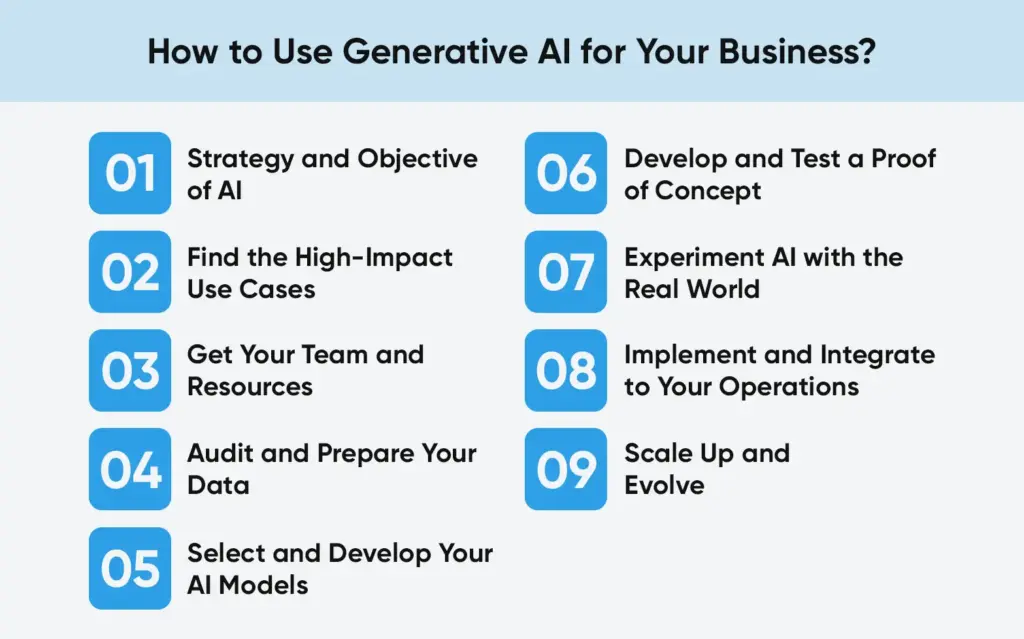
Having known what generative AI adoption can do for your business can be beneficial in multiple ways. Now, let’s explore the ways to adopt generative AI for your business.
Step 1: Strategy and Objective of AI
- The initial process is to establish clear goals of generative AI that would be in line with your business strategy.
- The questions to ask:
- Do you have to improve customer experience?
- Automate routine content tasks?
- Speed up design processes?
- In case of any possible AI initiative, associate it with quantifiable objectives.
- Putting goals in business terms will say, decrease customer support expenses by 10 percent, or decrease time-to-market on new products by 20 percent.
- It is important to involve business leaders at this point in time, making the AI objectives directly aligned with the general objectives of the company.
- Clarify the issue and deliverables. Clearly describe the business challenge (e.g. “We want to automate product description writing”) and the desired result (e.g. “Increase online sales by improving content generation speed and quality”).
- Set success metrics. Decide on how you are going to measure impact (e.g. revenue lift, cost savings, time saved, engagement scores). These metrics will steer your project and will assist you in justification of investment.
- Get executive buy-in. Introduce your AI objectives to company stakeholders. They will contribute to the optimization of the goals and make them company strategy-oriented.
Also Read : How AI Chatbots Are Revolutionizing Customer Support and CSAT
Step 2: Find the High-Impact Use Cases
Having an idea of the result, identify particular applications of generative AI where it can bring the most value. The most advanced AI is not needed in all issues, and therefore focus on the areas where generative models are best. Common examples include:
- Customer care and chatbots: Virtual assistance based on AI can address the frequently asked questions and simple queries in real-time and enhance the level of customer care and free human-based agents.
- Creation and marketing of the content: Scale drafting of email campaigns, social media posts, or graphics using models and upholding brand voice.
- Design and prototyping: The product designs, mockups, or simulations (generating layout variations, 3D models etc.) are to be produced to accelerate R&D.
- Data analysis and predicting: AI will analyze data and come up with reports or predictions, discovering the patterns quicker than the manual approach.
- Generation of codes and documents: Reflexive coding or generation of legal/financial document draft.
Step 3: Get Your Team and Resources
The key to successful generative AI implementation is the ability to have a cross-functional team with a combination of technical and business expertise.
Key roles often include:
- Business Manager/Product Owner: He is in charge of the business part of the project as he will make sure that the AI solution meets the user needs and will reach the ROI objectives.
- Data Scientist / AI Expert: Trains and tunes the generative models, designs them.
- AI/ML Engineer or Software Developer: Applies the AI model in applications or processes. Develops user interfaces, API and pipeline of data ingestion.
- Data Engineer: Pipelines and prepares the data. Assures the accuracy, dependability and integrity of the data supplied to the model.
- Quick Engineer / Quality Assurance Specialist: (New positions) Develops useful prompts and verifies quality and aligned model output.
- Gen AI Strategist: Leads the activities of the team to ensure that the AI efforts remain aligned to the strategy and governance.
- (Optional) Cloud / DevOps Specialist: In case of large scale deployment, a person ought to take care of the cloud infrastructure and model deployment.
The expertise of each of these team members is different. Engaging software engineers earlier will result in more mature AI uses, whereas more recent roles such as prompt engineers can be used to optimize the user interface with models. In case your existing employees do not have any of these skills, you can use training facilities or recruit external professionals. Developing AI within the company is an investment that can be paid with the ease of implementation of projects.
Step 4: Audit and Prepare Your Data
“Data is the foundation of generative AI,” so inventory and prepare your data carefully.
- The first step is to list the available data sources to the use case you are working with. This can be databases, documents, images, customer review, transaction records etc.
- Evaluate all the data sets in terms of completeness and relevance. To give an example, in the case of a customer support AI, you would collect chat logs and email communications of the past; in the case of a design assistant, you would collect libraries of images and product specifications.
- Identify and clean and combine the data after identifying sources. Business data has a tendency of being messy (duplicates, errors, disparate forms).
- Your data engineers are supposed to use standard preprocessing: fill-in missing data, format normalization, and extract sensitive data.
- Make sure that strong pipelines are installed to ensure that the AI model is constantly fed with high-quality data. It can also be beneficial to store data centrally in a controlled platform or data lake and this can be easily accessed.
- At this stage, management and privacy must be taken into consideration. Make sure the personal or proprietary information is processed in reference to the laws (e.g. GDPR, HIPAA). Your team will have to clean fields that are sensitive, and can implement such methods as anonymization. The future of compliance-related problems will be prevented by having a defined data governance policy (who can see what data, and what is it used for).
Step 5: Select and Develop Your AI Models
Choosing or training your real AI model implies the selection of a basic model that can fit your purpose. A large language model (LLM) such as GPT-4 or an open-source alternative can be suitable in the case of a language-based (text generation, chat) use case. In case it is associated with images or media, a GAN (Generative Adversarial Network) or diffusion model that has been trained on them should be used.
- Most companies begin with canned models or APIs since they save on development time. To illustrate, you can use such a service as the API of OpenAI or Hugoing Face models and take advantage of available features in a short time. Existing models (such as GPT or Stable Diffusion) are easy to use, but might miss domain knowledge on a niche; a specialized model can be tailored to your specific data, but needs additional effort to be trained.
- Match model to task. Text (e.g. GPT to write) Use text LLMs, and images or design (uses vision models, e.g. GANs) Multimodal models are even capable of having text and images simultaneously (when marketing mixed media content).
- Think of the open-source and proprietary. Open-source models are more flexible and have no licensing costs, whereas proprietary APIs (such as GPT-4) tend to have state of the art performance and support.
- Plan to compute. Big models have high GPU/TPU requirements. Make sure that the training and serving of your desired model is a possibility within your infrastructure.
Step 6: Develop and Test a Proof of Concept
It is high time to train and test your selected model on the data that has been set up.
- It can begin with a proof-of-concept (PoC), a smaller solution to the entire one to test assumptions without taking too many risks.
- Train the model on your data.
- Monitor the training process closely.
- Adjust parameters (like learning rate, data volume) as needed to improve performance.
- Good tools and platforms (for example, managed ML services) can help track metrics during training.
- The goal is to get a working prototype that performs reasonably well on core tasks (e.g. generates coherent text or images based on your examples).
- Next, validate the model’s performance thoroughly. Go beyond technical accuracy to ensure the model behaves safely and ethically.
Step 7: Experiment AI with the Real World
Put the following scenarios to test your A.I. model:
- Do the generated outputs meet quality standards?
- Are they free of harmful bias or factual errors?
Key actions in this step include:
- Rigorous testing: Apply test cases and metrics you defined earlier to measure performance. Check edge cases and ensure the model doesn’t hallucinate incorrect content.
- Compliance checks: Take the model through any regulatory validation frameworks of your industry (e.g. FDA regulations on healthcare implementations or financial compliance audits).
- Iterate rapidly: Consider this a learning cycle. Test to improve the preprocessing of data, the architecture of the model or its parameters.
Step 8: Implement and Integrate to Your Operations
Having a proven model, now it is time to put it into a real-life setting and make it a part of your business. Deployment involves moving the trained model that is in a prototype environment and linking it to live systems to allow users to actually utilize it.
- To begin with, implement the model with your IT and development teams. It’s usually done by making the AI accessible through an API or embedding it into an existing application interface.
- Then, be scalable and reliable. Performance of the model (latency, error rates) should be monitored and be ready to add more computing resources in case of usage spikes.
- It is also prudent to have backup strategies (e.g. delegate key tasks to a conventional system in the meantime).
- Lastly, define explicit feedback loops.
- Solicit input from end-users:
- Are they useful in the outputs of the AI?
- Request them to point out errors or recommend on how to do things better.
- Measures real-world impact by also gathering measurements (such as user satisfaction scores or business KPIs). Feedback is essential: it is frequent that generative AI models can be improved when retrained with new data or fine-tuned with user interaction.
- A practice that is best to adopt is to periodically review whereby your team goes through the feedback and makes a decision on whether to change the model or data pipeline.
Step 9: Scale Up and Evolve
Once the initial deployment is proving value, scale the solution to broader use. It means expanding to new areas of your business and enhancing the AI over time.
- Broaden the scope: Identify other departments or functions that the same generative AI solutions can be used. To illustrate the point, in case you had an AI-based marketing copywriter, the salespeople could also have a similar tool to generate outreach emails. The model or data will need minor modifications with each new use case, however, the fundamental technology may be reused.
- Advance the technology: As you scale, explore more sophisticated features. You might upgrade to a more powerful model, incorporate multimodal inputs (e.g. add image inputs to a text model), or integrate additional data sources. Keep an eye on emerging AI trends for instance, newer large models or specialized AI services – that could boost performance.
- Maintain governance and ethics: As AI usage grows, continue enforcing policies on data privacy and bias. Periodically audit the models and their outputs. Use automated tools if possible to monitor for issues like model drift or ethical violations.
Governance, Ethics, and Culture
Responsible use is a very important aspect of an AI strategy. Generative AI, specifically, has its own considerations to take into account, and if it is not adequately monitored, it can create biased or even offensive content. Since the beginning, construct protection:
- Ethics as an engineering capability: Develop ethical standards of the AI output (e.g. no hate speech, no leaked personal data). Use techniques like content filtering, bias reduction algorithms and humans in the loop analysis of sensitive outputs.
- Transparency and trust: Be transparent with the customer and the working population on the implementation of AI. As a demonstration in the case of an AI-generated chatbot, make it apparent. When customers are convinced that AI is being utilized in the appropriate manner, they will become trustful.
- Regulatory compliance: Compliance with regulations in the industry (e.g. the GDPR in data or industry-specific own AI regulations). Keep a documentation of your AI processes and this will be required by the auditors or regulators at some time.
- Continuous monitoring: Once the model has been deployed, continue to check the model against unintended behavior. As an illustration of this, it can be structured as a periodical review of AI output, where the output is sampled or tested by human specialists.
- Culture and skills: Lastly, develop an AI friendly culture. Educate your team to learn the basics of AI and to become familiar with it.
- Foster curiosity: The employees are to be encouraged to report the AI mistakes. The use of AI is not technologically deterministic but rather people deterministic. Ensure that the knowledge of all the executives and end-users is informed of what generative AI can or cannot do.
Next Steps to Get Started….
Creating a journey in the field of generative AI is more of a marathon, rather than a sprint. The above steps form a roadmap that is used to guide strategy to scaling.
To recap the key takeaways:
- Start with clear goals: Connect the AI perspective projects to particular business performance.
- Select the appropriate pilot: First focus on one and big impact use-case (an indicator of the approach).
- Take advantage of your data: Generative AI is only as good as the data on which you feed it.
- Train your AI models: Regularly retrain them with fresh, high-quality data to improve precision and explainability.
- Assemble a powerful team: Unite business management, data expertise and engineering.
- Iterate rapidly: The first deployment is a learning process, treat it as such; get feedback to get better.
- Govern responsibly: Have ethics and compliance in mind at all levels.
- Scale strategically: After the pilot is proven valuable, then extend the pilot to other regions without losing control.
Conclusion
Generative AI in your business can open up new efficiencies and innovations. With this guidance, you will be in a good position to implement AI in a highly manageable and quantifiable manner and expand its influence over time. The winning companies will be the companies that do not just embrace the technology, but also establish the appropriate strategy, culture, and governance on it.
By following the following steps, your organization can now realize the opportunities of generative AI by automating creative work, reinventing products and services, and finally gaining a competitive advantage over your competitors in the future of AI.
FAQs
1. What should be the optimal business applications of Generative AI?
Generative Artificial Intelligence is able to compose blogs, create descriptions of products, create images, and even create human-like dialogues in chatbots. Artificial intelligence can be used to personalize communication and help to optimize response time. When applied in the internal processes, it assists teams to summarize the report, write proposals faster and shorten the brainstorming process.
2. What should be my first step in Generative AI in my company?
To start, one does not need to make a giant technological change, it is about determining where AI has the most significant impact.
- Choose one area that is repetitive or time-consuming such as marketing content development or lead qualifying.
- Select a proven AI system to execute your first pilot.
- Coach your staff, gather feedback and gauge any changes of time and quality.
- After you begin to see positive returns, you can slowly start applying AI to other departments.
3. What are some of the risks or difficulties of using Generative AI?
There are the risks of data security, the possibility of bias in the generated content by AI, and the error or misleading results (so-called hallucinations). There is an increasing ethical concern on originality and transparency. These risks can be dealt with through vetted datasets, human review layers and adhering to international standards such as GDPR on privacy.
4. What is the cost of the implementation of Generative AI?
There are tools that can be used by small enterprises and cost only a few hundred dollars per month. In the case of larger businesses, creating individual AI models, or connecting with internal systems, could cost thousands to tens of thousands a month.
5. What is the ROI of Generative AI Projects?
Quantitative results are lower operation costs, improved speed of delivery, more content and better lead conversion and increased innovation and productivity of employees.
In the case of creative teams, measure such engagement metrics as click-through and customer satisfaction.
Introduce the Generative AI Power to Your Business with BrainX
Think of ideas that are self-creating, workflows that are self-optimizing and customer experiences that are dynamically changing. It is the case when Generative AI is mixed with BrainX innovation. Our professionals do not merely add AI, they make it part of your business to discover smarter automation, insights and unlimited inventiveness. Concept-to-deployment We transform your vision and create a living, learning system that grows.
Book your free consultation and discover how BrainX can help to transform AI potential to business power.

The future developments of ChatGPT in 2025 are changing the nature of interaction between users and companies with AI. ChatGPT is becoming a reality as an actual virtual assistant, with greater reasoning abilities, real-time web integration, and multimodal artificial intelligence that is able to combine voice, image and text. Such upgrades offer improved precision, customization, and integration with the current tools – reinventing productivity, automation, and customer communication across all sectors.
AI is quickly getting more advanced and ChatGPT is paving the way for our current technology use. By the end of 2025, we are expecting new features from AI chatbots. They will bring better interfaces, boost productivity and affect our online communication. If you manage a company, market offerings or enjoy technology, staying informed about the most important features of ChatGPT matters. It allows you to keep up with the world’s fast-growing technology.
The following discussion focuses on the most important ChatGPT features coming in the next few years. You will find out why it’s important to learn about the use of these features and how they help your success in life and at work. Smart reasoning and smooth integrations will shape the future of AI chatbots.
Why ChatGPT Features Matter in 2026?
OpenAI’s ChatGPT has evolved. It started as a chat AI and now helps with many tasks. It supports content creation and enhances customer service. The influence of the platform cannot be overlooked with more than 180 million users, 1.5 billion visits each month.
In 2025, there will be new tools added to ChatGPT to match user needs. It will provide a more personal service, more automation and easier integration. These improvements align with Generative Engine Optimization (GEO). It’s important to adjust your content to match what search engines like SearchGPT can handle.
That is why it is really critical to remain updated on the news of ChatGPT:
- Business Effectiveness: Automate the boring process like creating content, customer care and data analysis.
- SEO and Marketing Support: AI can be leveraged to perform keyword research, optimize content, and develop effective backlink strategies.
- User Experience: Offer subjective and context-based experience to stimulate interaction.
- Innovation: Become competitive with the use of state-of-the-art AI solutions to your field.
ChatGPT Features to Look for in 2026
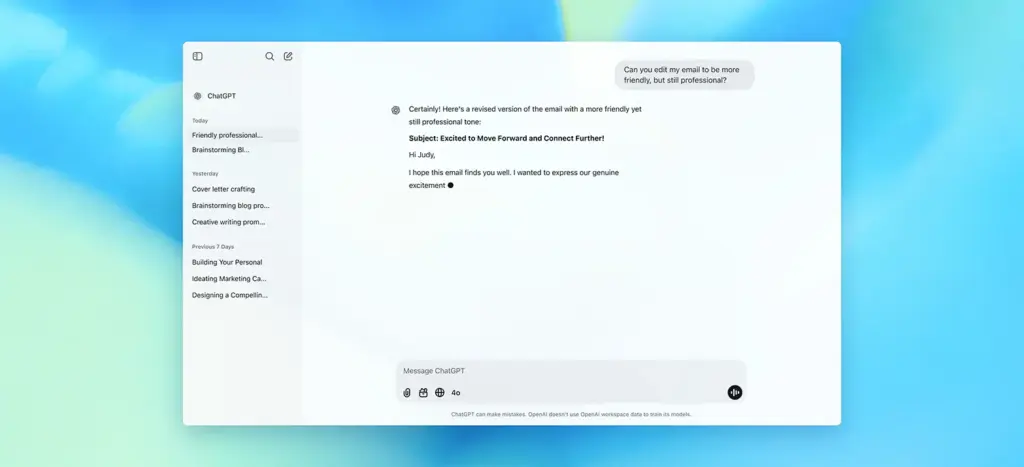
ChatGPT is a practical AI assistant in the year 2025. It brings new ways to improve how much you can do, how things look and the use of automation. Enhancements like these add value for companies, marketers, developers and all users. They show everyone how to make best use of AI.
Now, take a look at the most significant ChatGPT bot capabilities to research in 2025 and the ways to alter your processes with its help.
1. Advanced Reasoning and Problem-Solving (o1 Model Enhancements)
Advance reasoning capabilities, built on the o1 model preview, will reach new heights. The o1 model, launched in 2024, shines in complex problem-solving. It handles coding, math reasoning, and strategic planning well. By the year end, more improvements can be anticipated such that ChatGPT will now be able to:
- Solve step by step problems with logic that is human-like.
- Give technical questions step by step descriptions.
- In addition, it provides businesses and SEO professionals with actionable marketing ideas and suggestions.
Why is it important?
Enhanced reasoning makes this LLM a virtual consultant for professionals. Marketers can use it to study competitor strategies. Developers can use it to fix complex code. This feature helps ChatGPT provide accurate and useful insights. It cuts down the chance of “hallucinations,” which are incorrect outputs.
How to use it?
- “Look at the top 10 search results for ‘best AI tools 2025.’ Then, suggest a content strategy to rank higher than them.”
- Use ChatGPT to come up with ideas concerning solving problems that are specific to a niche such as optimising product feeds in eCommerce.
- Cross-check the results using the Ahrefs or Semrush tools to have confirmation.
2. Real-Time Web Integration and Data Retrieval
In 2024, ChatGPT introduced SearchGPT. In 2025, it will evolve to include real-time web integration. SearchGPT is different from traditional search engines. It looks at trusted sources. It responds with clear, concise, and relevant information. In 2025, expect:
- Access to the recent statistics, news and trends right away.
- Enhanced citation of authoritative sources like Bloomberg or Wikipedia.
- Integration with tools like Web Pilot for live data retrieval.
Why is it Significant?
ChatGPT’s access to real-time data ensures accurate, up-to-date information which is critical for SEO experts, researchers, and organizations. This feature connects static AI knowledge with live web content. It’s perfect for tasks that need quick updates.
How to use it?
- Use ChatGPT to fetch real-time competitor data or trending keywords.
- “Look for the newest trends in AI chatbot development for 2025 and highlight the main points.”
- Make content better for GEO by writing clear, list-style articles. ChatGPT likes this format.
Also Read: DeepSeek vs ChatGPT: Features, Strengths, and Limitations Explained
3. Multimodal AI Capabilities: Voice, Image & Text
By 2025, ChatGPT will use multimoda AI features. It will blend voice, image processing, and text generation. Voice mode, now in Grok’s iOS and Android apps, will soon expand to more platforms. It will offer:
- Natural, conversational voice interactions.
- Image analysis for tasks like visual content optimization.
- Integration with tools like DALL-E for custom visuals.
Why is it Significant?
The AI multimodal characteristics optimize user experience by supporting the multiplicity of their desires. Customer support can be in voice mode by the businesses. Subsequent images can be produced by marketers who can make images friendly to searches on blogs. These features are in line with Google’s preoccupation with user experience and accessibility.
How to Leverage It?
- Design blog headers that are visually appealing by integrating DALL-E.
- Use voice mode for hands-free content ideation or customer queries.
- Create a unique header image for the blog post “ChatGPT Bot Features 2025.” This image will help improve SEO by attracting more clicks. A striking visual can draw in readers and keep them engaged. Plus, relevant images can boost search rankings. List keywords in the name of the image file and alt text to boost the discoverability using keywords.”
4. Personalized and Contextual Responses
ChatGPT will become more personalized in 2025. It will use user data, with permission, to give custom responses. Expect:
- It enables context-aware conversations with the ability to remember previous interactions.
- Sector-specific suggestions (e.g. SEO image).
- Connection to such solutions as Shopify or Google Merchant Center to receive custom outputs.
What is the Significance?
Personalized responses boost user satisfaction and engagement. This is key for businesses that want to keep customers. For SEO, tailored content recommendations can raise click-through rates and dwell time. This signals quality to search engines.
How to use it?
- Leverage ChatGPT to generate customized content briefs tailored to your target audience.
- Prompt Example: “Write a 500-word blog on the topic AI chatbot trends for Shopify store owners, discussing ‘best AI chatbot features 2025.’
- Test personalized outputs for different user segments to optimize conversion rates.
5. SEO and Content Optimization Tools
ChatGPT will be a game-changer for SEO experts in 2025. It will provide built-in tools for:
- Keyword research and clustering based on search intent.
- Generating SEO-optimized titles, meta descriptions, and content briefs.
- Analyzing competitor content for gaps and opportunities.
Why Does It Matters?
68% of SEO experts use AI for automation. ChatGPT’s SEO tools will help streamline workflows. This saves time and boosts rankings. These features ensure content aligns with Google’s E-E-A-T criteria and GEO requirements.
What are its uses?
- Use ChatGPT to generate title tags within 50-70 characters.
- Prompt Example: “Create 10 SEO-optimized title tags for ‘ChatGPT Bot Features 2025,’ incorporating the primary keyword.”
- Analyze competitor content to identify low-hanging keywords with vulnerabilities like thin content.
6. Integration with Business Tools and APIs
Now, ChatGPT is capable of working together with business tools. Salesforce, Google Analytics and shopping websites are all part of that. Now, you can expect:
- API access for custom workflows via xAI’s API service.
- Automation of tasks like product feed optimization for Google Shopping.
- Real-time analytics for performance tracking.
Why It Matters?
Integrations allow companies to integrate ChatGPT in current workflows, improving efficiency. Ecommerce brands can improve product descriptions. Marketers can also track SEO performance directly in ChatGPT.
How to apply it?
- Connect ChatGPT to Shopify for automated product descriptions.
- Prompt Example: “Generate a product description for a smartwatch, optimized for Google Shopping, using the keyword ‘best smartwatch 2025.’”
7. Ethical and Transparent AI Practices
OpenAI’s focus on ethical AI will strengthen in 2025, with features like:
- Watermarking AI-generated content to prevent plagiarism.
- Transparent sourcing of data to build trust with users.
- Compliance with Google’s Search Guidelines for E-E-A-T.
Why is it important?
Ethical AI practices help content meet Google’s quality standards. This reduces the chance of penalties for spammy or unoriginal content. This builds trust with both users and search engines.
How to use it?
- Use ChatGPT to create original, value-driven content that demonstrates expertise.
- Prompt Example: “Write a 300-word section on ethical AI use in content creation, aligning with Google’s E-E-A-T criteria.”
- Verify AI-generated content with plagiarism checkers to ensure uniqueness.
How to Choose the Right ChatGPT Features for Your Needs?

With so many features, selecting the right ones depends on your goals:
- For Marketers: Rank SEO tools, content optimization, and real-time data retrieval.
- For Businesses: Focus on integrations, personalization, and automation.
- For Developers: Leverage advanced reasoning and API access for custom solutions.
- For Content Creators: Use various media and ethical AI to create engaging, trustworthy content.
Integrating ChatGPT Features with Other Tools & Platforms

Once developed for the purpose of responding to human questions, this chatbot has now become a complete AI assistant for the users. Integrating it with various tools and platforms can boost productivity. It can also improve customer engagement and streamline business operations. Here’s how ChatGPT integrates across different domains:
-
Productivity Tools
ChatGPT works with Microsoft 365 apps like Word, Excel, and Teams. This lets users automate tasks, create content, and simplify workflows. With this integration, users can draft emails, summarize documents, and make reports right in Microsoft tools.
-
Social Media Platforms
ChatGPT integrates with social media like WhatsApp and Instagram for real-time customer interactions. Businesses can use ChatGPT-powered chatbots to answer inquiries, offer support, and engage customers. This enhances the overall user experience.
-
Payment Systems
ChatGPT integrates with payment processors like Stripe and PayPal. This setup ensures secure and efficient transactions. It’s especially useful for ecommerce platforms. It allows automated payment processing and enhances customer service.
-
APIs and No-Code Platforms
ChatGPT works well with APIs and no-code platforms like Zapier. This helps businesses build custom workflows without needing deep coding skills. Users can automate tasks. They can combine services and customize ChatGPT’s features to fit their needs.
5 Ways Businesses Can Get Started with ChatGPT in 2026
Looking to bring AI into your business? Here are five simple ways to get started with ChatGPT in 2025.
1. Select the Right ChatGPT Plan
OpenAI offers various ChatGPT plans tailored to different business needs:
- ChatGPT Free: Access to GPT-3.5, suitable for basic tasks and exploration.
- ChatGPT Plus: For $20/month, gain access to GPT-4, offering enhanced capabilities.
- ChatGPT Team & Enterprise: These plans are made for teamwork. They offer shared workspaces, admin tools, and better security features.
2. Define Clear Objectives
Determine the specific goals you want to achieve with ChatGPT:
- Customer Support: Automate responses to common inquiries, providing 24/7 help.
- Lead Generation: Engage potential customers through interactive conversations.
- E-commerce Help: Guide users through product selections and purchasing processes.
- Internal Operations: Assist employees with information retrieval and task automation.
3. Leverage Free Trials and Resources
Before committing to a paid plan, explore ChatGPT’s capabilities through available free resources:
- ChatGPT Free Plan: Test basic functionalities and assess suitability for your business.
- GPT Store: Explore a marketplace of custom GPTs. These are made for different needs, helping you find solutions that fit your goals.
4. Customize ChatGPT to Align with Your Brand
Personalize ChatGPT to reflect your brand’s voice and identity:
- Set clear behaviors and response styles to keep your brand consistent.
- Train custom GPTs that cater to your unique business requirements.
- Input your proprietary info into ChatGPT. This helps it give accurate and relevant answers.
5. Monitor Performance and Iterate
Regularly assess ChatGPT’s performance to ensure it meets your business objectives:
- Analytics Dashboards: Track user interactions, response accuracy, and engagement metrics.
- Feedback Mechanisms: Collect user feedback to identify areas for improvement.
- Continuous Refinement: Update ChatGPT’s settings as needed. Use insights gathered to keep performance at its best.
Conclusion
The future of ChatGPT in 2025 is the dawn of intelligent co-operation between machines and human beings. As AIs develop to be more contextually aware with improved memory, multimodal learning, and ethical application, ChatGPT is becoming more than a chatbot, and it is an active problem solver learning, evolving, and providing value in all fields. Marketing and research, customer service and automation are changing the way we think about creativity, decision-making and digital transformation itself.
Frequently Asked Questions About ChatGPT
1. Why does ChatGPT sometimes give wrong answers?
Researchers trained ChatGPT on a lot of text. Yet, it doesn’t grasp facts like humans do. It creates answers by finding patterns in data. It does not use real-time knowledge or human reasoning. While it tries to be accurate, it can:
- Misinterpret prompts
- “Hallucinate” or invent facts
- Provide outdated answers if you disable real-time browsing
To avoid issues, always verify critical information from trusted sources.
2. Can ChatGPT think or feel like a human?
No, ChatGPT cannot think or feel. It doesn’t have emotions, self-awareness, or consciousness. It uses language models to predict the next best word in a sentence based on your input. It might seem kind or caring, but it’s copying how people talk.
3. What are ChatGPT’s limitations or weaknesses?
Despite its advanced capabilities, ChatGPT has some limitations:
- Lacks real understanding: It doesn’t know facts, it guesses based on training data. It may reflect biases that the training data contains.
- Context length limits: It can lose track in long or complex conversations.
- Doesn’t access live data (unless enabled): It can’t get real-time info without browsing tools.
4. Can ChatGPT replace human jobs?
ChatGPT can handle event handling, writing, scripting and acting as a customer support agent. Yet, it is meant to help you, but it can’t completely replace mental processes. Conditional Automation allows industries to aid human team members, rather than displace them. Jobs may evolve, but creativity, empathy, decision-making, and oversight still need humans.
5. Is ChatGPT safe to use?
Yes, developers built ChatGPT with safety features. It also doesn’t store personal chats by default. Yet:
- Don’t share private, sensitive, or confidential data.
- Use official platforms (like OpenAI or Microsoft) to avoid scams or fake versions.
- Follow ethical and legal guidelines for usage, especially in business.
6. What is ChatGPT Plus? Is it worth it?
ChatGPT Plus is a paid plan from OpenAI. It gives you access to advanced models, like GPT-4 and GPT-4o. For $20/month (as of now), users get:
- Priority access even during high traffic
- Faster response times
- Access to the most powerful versions of ChatGPT
Is it worth it? If you often use ChatGPT for work, learning, coding, or creating content, Plus is a great upgrade.
7. What is Deep Research in ChatGPT?
Deep Research is an AI tool within ChatGPT. It browses the web on its own. Then, it creates reports with citations on topics chosen by users. It analyzes text, images, and PDFs. It provides detailed reports in 5 to 30 minutes.
Make BrainX Your Partner for Precise AI Development!
Your AI journey doesn’t start with answers, it starts with the right questions. At BrainX, we don’t guess what your business needs, rather we work with you to uncover it. As specialists in AI development, voice agent design, automation workflows, and enterprise integrations, we craft solutions that align with your operations and not the other way around.
From building custom ChatGPT integrations to developing intelligent agents and AI-augmented platforms, our team turns complexity into clarity. If you’re ready to move from potential to performance, BrainX is here to help you lead the way, intentionally and intelligently.