TL;DR / Key Takeaways
- AI integration services help businesses add AI to existing CRMs, ERPs, data systems, and workflows without rebuilding their tech stack.
- Start with one measurable workflow, validate data readiness, and prove ROI before scaling AI across the business.
- The right AI architecture depends on your constraints, including speed, latency, sensitive data, legacy systems, compliance, and budget.
- Production AI needs strong data quality, permission-aware retrieval, governance, evaluation, monitoring, and human review paths.
- A 30–90 day phased rollout helps teams move from pilot to production safely through discovery, pilot integration, hardening, and controlled release.
Your CRM already has the customer context. Your ERP already has the operational truth. Your data warehouse already has the metrics your leadership trusts. The hard part isn’t “getting AI”—it’s connecting AI to what you already run without destabilizing core systems, breaking permissions, or creating yet another silo.
That’s exactly what AI integration services are built for: adding practical AI capabilities to an existing tech stack through secure architecture, data plumbing, evaluation, and rollout controls—without forcing a rewrite of your app or a risky replatforming project.
The timing matters. McKinsey’s 2025 global AI survey found that 88% of organizations now use AI in at least one business function, but only a smaller share report clear enterprise-level EBIT impact. That gap shows the real challenge. AI adoption is no longer the bottleneck; operational fit is. The teams getting better results are redesigning workflows, defining where human validation is needed, and connecting AI to the systems people already use.
The opportunity is real, but so are the constraints: data access, latency, compliance, ownership, and the human review paths that keep automation safe. McKinsey’s 2025 AI research repeatedly points to workflow redesign and human validation as common traits of successful deployments.
That is why the real question is no longer “Can we use AI?” It is “Can AI fit our workflow, data, security model, and success metrics without creating new operational debt?”
If you’re trying to move from “we tested a model” to “this works in production,” this guide breaks down the patterns, pitfalls, and a 30–90 day plan to ship value without starting over.
Who Should Consider AI Integration Services?
If you already have systems people rely on daily—and you want AI to help those systems produce outcomes faster—this is for you. The best candidates aren’t “AI-native” companies. They’re organizations with real workflows, real users, and real constraints that can’t be ignored.
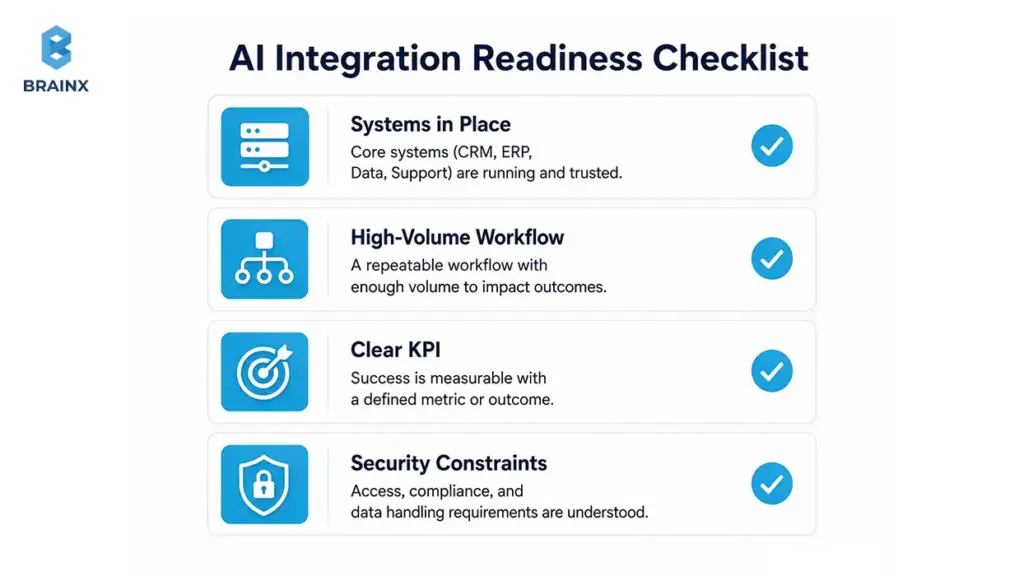
Most teams considering this approach have one or more of the following in place:
- A CRM (Salesforce, HubSpot) with sales and customer history
- An ERP (NetSuite, SAP, Dynamics) with financial/ops data
- Support platforms (Zendesk, Intercom, ServiceNow) with ticket volume and knowledge bases
- Product databases, event logs, analytics stacks, and dashboards people already trust
- Document-heavy repositories (contracts, claims, clinical notes, policies)
- Internal tools and approval workflows that are slow, manual, or inconsistent
You’re also a fit if leadership is pushing for AI outcomes—but engineering is (rightly) pushing back on “let’s rebuild everything.” A pragmatic path is to integrate AI capabilities into the workflows you already run, with measurable KPIs and safety rails.
If you want help scoping what’s realistic without overcommitting, start with a short discovery call.
Best-Fit Scenarios
Teams tend to get strong ROI when AI is applied to a repeatable workflow with clear inputs, clear outputs, and a measurable definition of “better.”
Common best-fit scenarios include:
- SaaS platforms: in-product copilots, intelligent onboarding, knowledge search, and admin automation
- Ecommerce systems: product enrichment, customer support deflection, returns triage, and fraud review
- Customer support teams: summarization, intent routing, suggested replies, and ticket quality checks
- Healthcare workflows: documentation assistance, coding support, prior auth support (with strong compliance)
- Internal operations: procurement, finance ops, HR case handling, and policy Q&A
- Document-heavy businesses: contract review, claims processing, compliance checks, and extraction pipelines
- Data-heavy products: forecasting, anomaly detection, and personalization (with governance and monitoring)
The more your workflow already has structure and history, the easier it is to connect AI and measure improvement.
When AI Integration Services May Not Be The Right First Step
Sometimes the best “AI” decision is to pause and fix prerequisites first. Integration work can fail when the organization can’t support production ownership.
Hold off if you have:
- No clear use case beyond “we should use AI”
- Poor data ownership (nobody can approve access, definitions, or quality standards)
- No technical owner who can maintain integrations post-launch
- No success metrics (no baseline, no KPI, no acceptance criteria)
- No budget for monitoring and security (critical for LLMs and automation)
In those cases, start with use-case discovery and data readiness—then integrate.
What Are AI Integration Services?
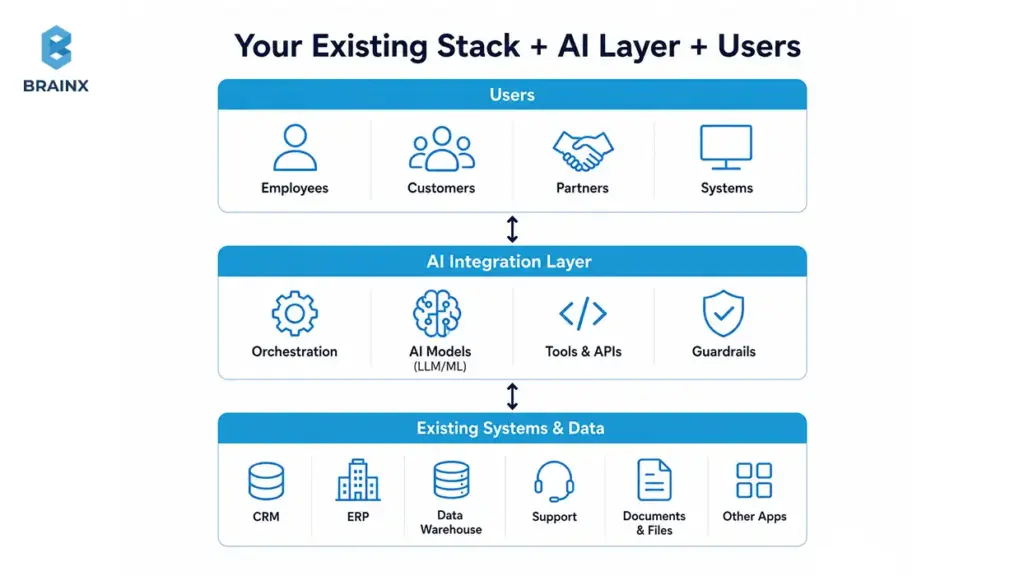
AI integration services are the delivery work required to connect AI capabilities—LLMs, ML models, search/retrieval, and automation—into your existing applications and workflows. The goal is not a demo. The goal is production behavior that’s secure, observable, and measurable.
In practical terms, this includes:
- Designing how AI fits into your architecture (not just “calling an API”)
- Connecting models to your data sources (with permissions intact)
- Building integrations with CRMs/ERPs/support tools/internal apps
- Evaluating quality before rollout and monitoring after launch
- Implementing security controls, governance, and operational ownership
Unlike generic “AI strategy,” integration is where constraints show up: latency budgets, rate limits, approval paths, compliance requirements, and cost per task. Done well, it becomes a repeatable pattern your team can reuse across workflows.
For related approaches to model building and productization, see:
AI Integration Services vs AI Development vs AI Consulting
These categories overlap, but they’re not interchangeable. Here’s a practical way to compare them based on outcomes and deliverables.
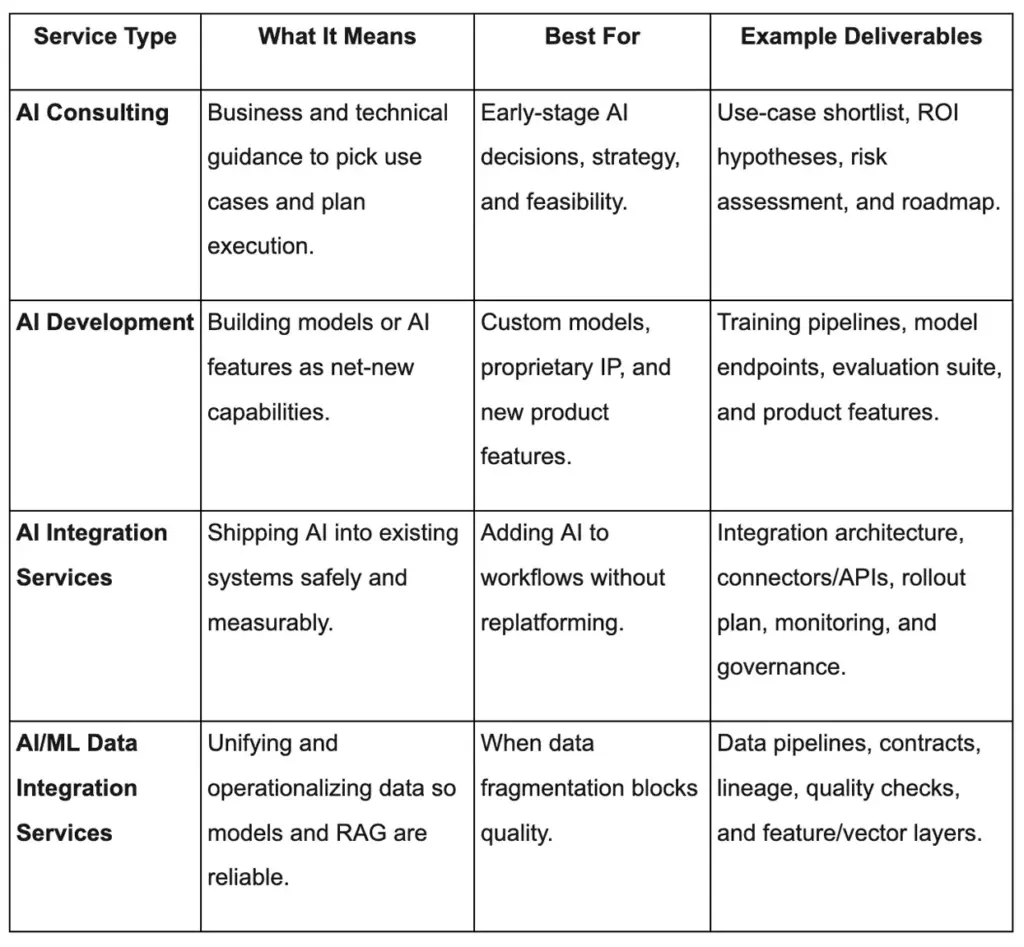
If your product already exists and the business needs outcomes fast, integration-focused delivery is usually the shortest path to production value.
Typical Deliverables You Should Expect
A serious integration engagement should produce artifacts your team can operate long after launch. Look for a partner who commits to specific deliverables, not vague “implementation support.”
Typical deliverables include:
- Architecture plan: patterns, components, security boundaries, and data flows
- Integration roadmap: phased rollout with decision gates and KPIs
- Data readiness audit: sources, owners, access paths, quality, and freshness
- APIs/connectors: to your CRM, ERP, data warehouse, ticketing, or internal tools
- PoC and pilot: thin-slice workflow integrated into staging with evaluation harness
- Production rollout: feature flags, release strategy, and user enablement
- Monitoring and observability: logs, metrics, tracing, cost dashboards, error tracking
- Security controls: SSO/RBAC, secrets management, redaction, policy enforcement
- Governance: audit logs, approval flows, model/prompt versioning, incident playbooks
- Enablement: handover, runbooks, training, and documentation
Common Misconceptions That Derail Integrations
A few misunderstandings reliably turn “AI project” into “AI mess.” Avoid these early:
- “Just add ChatGPT.” If you can’t control data access, evaluation, and UX, the result is unpredictable.
- “The model is the product.” Most value comes from workflow fit, permissions, and delivery mechanics.
- “We can fix the data later.” Data issues show up as inconsistent outputs, broken trust, and support load.
- “We need to migrate everything.” Often you can integrate incrementally using APIs and event streams.
- “AI works without workflow redesign.” If the process is broken, AI makes failures faster and harder to debug.
Why Adding AI Usually Breaks Existing Systems And How to Avoid It
AI features touch more surfaces than teams expect: customer data, internal permissions, third-party APIs, latency-sensitive workflows, and compliance obligations. When those surfaces aren’t mapped, the first production rollout becomes the test environment—and users pay the price.
The most common breakages fall into three categories:
- Data and permissions issues (wrong access, wrong context, wrong freshness)
- Operational issues (latency spikes, outages, unexpected costs)
- Governance issues (no auditability, unsafe automation, unclear accountability)
IBM consistently highlights that poor data quality leads to factual errors, bias, and uneven performance—exactly the failure modes that destroy stakeholder trust. McKinsey emphasizes that high-performing AI deployments redesign workflows and define human validation points.
If you treat integration as “just wiring,” you’ll miss these systemic constraints.
The 6 Integration Friction Points
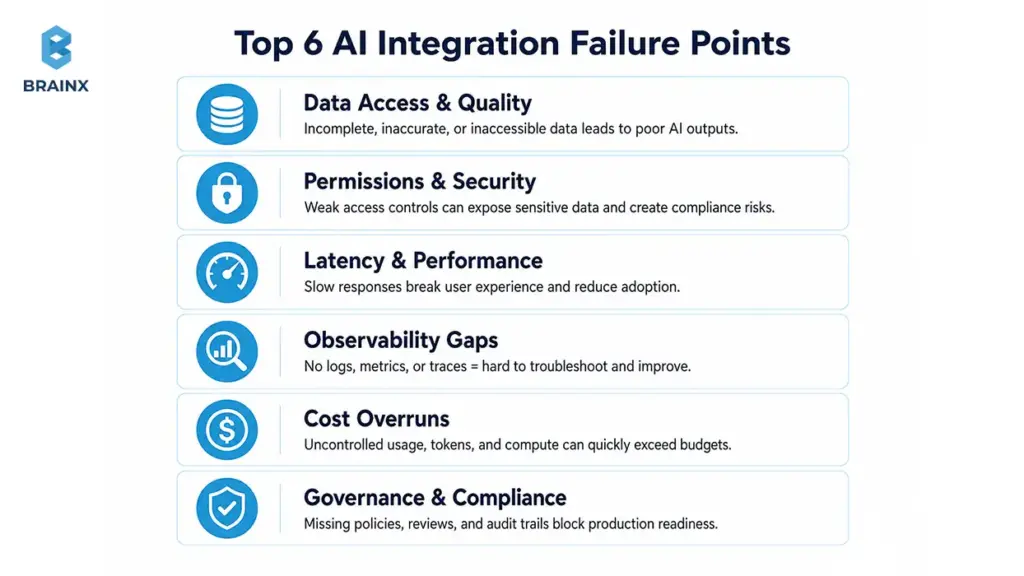
These six areas account for most production failures:
- Data access
You can’t answer user questions or automate decisions if your AI layer can’t reliably reach the right data sources (or if it reaches too much). - Identity and permissions
If users have role-based access in your app, your AI must enforce the same rules—especially for RAG and internal copilots. - Reliability and latency
A support agent can tolerate a few seconds. A checkout flow cannot. Latency budgets must match the workflow. - Observability
Without logging, tracing, and quality metrics, issues become “AI is random,” and the team can’t debug confidently. - Cost controls
Token usage, retrieval calls, retries, and tool invocations can balloon. You need budgets, caps, and dashboards. - Governance
Production AI needs defined owners, review workflows, and audit trails. Otherwise, risk becomes everyone’s problem—and nobody’s job.
Why AI Needs Workflow Design, Not Just API Access
Calling a model endpoint is easy. Building a system that produces consistent outcomes is not.
Workflow design includes:
- Where AI is allowed to act vs where it can only recommend
- What context is injected (and what must be excluded)
- How users review outputs and correct them
- How exceptions route to humans or safe defaults
- What success looks like (fewer escalations, faster handling, higher accuracy)
If your current process is unclear, adding AI usually creates faster confusion. The best deployments start by mapping the workflow and adding AI only where it reduces real friction.
When Not to Integrate AI Yet
Integration becomes risky when foundational controls don’t exist. Delay rollout if you can’t answer these:
- Who owns each data source and approves access?
- What’s the baseline process performance today?
- Do we have logs and a way to reproduce failures?
- Has compliance reviewed the data flow and retention?
- Is there a human review path for edge cases and high-risk actions?
If the answer is “not yet,” you’ll move faster by fixing prerequisites first.
How to Choose the Right AI Use Case Before Integration
Many teams start with the most exciting AI idea instead of the most operationally viable one. That’s why pilots often stall: the workflow is ambiguous, the data isn’t accessible, and success can’t be measured.
A better approach is to treat use-case selection like product discovery:
- Define the workflow boundary
- Define “good” vs “bad” outcomes
- Confirm the data exists and is accessible
- Estimate risk and compliance requirements
- Choose a thin slice with a measurable KPI
Also Read: Generative AI in Finance: Automating Risk, Compliance, and Customer Service
McKinsey’s 2025 research supports this: high-performing teams pair technical capability with workflow redesign and clear definitions of when human validation is required.
Before architecture work begins, decide whether the use case is worth integrating at all. The best AI integration roadmap starts with one question: where can AI improve a workflow enough to justify orchestration, evaluation, governance, and change management? The goal is not to deploy AI everywhere. The goal is to improve one measurable workflow first.
If you need help facilitating this step, a short strategy sprint pays off quickly.
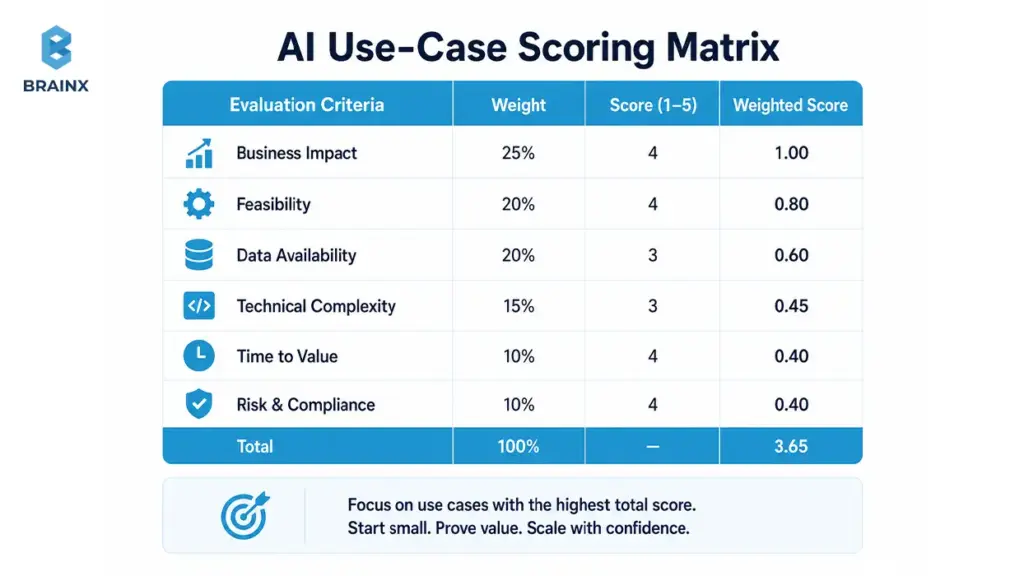
Score Each Use Case Before You Build
Use a simple scoring model to avoid “cool demo” traps. Score each candidate 1–5 (low to high):
- Business value: time saved, revenue impact, risk reduction
- Data readiness: availability, quality, ownership, freshness
- Technical complexity: number of systems touched, integration effort, latency constraints
- Risk and compliance: PII, regulated data, decision criticality
- Measurable ROI: KPIs you can track within weeks, not quarters
Pick the top 1–2 candidates that are high value and high readiness—even if they aren’t the flashiest.
Start With One Workflow, Not the Whole Company
Company-wide AI rollout is where integration debt grows. Thin-slice integration reduces risk by limiting scope while providing end-to-end operability.
A thin slice typically includes:
- One user group (e.g., Tier-1 support)
- One data boundary (e.g., knowledge base + tickets)
- One measurable KPI (e.g., resolution time or deflection rate)
- One fallback path (e.g., escalate to human)
Once you can measure improvement reliably, scaling becomes a decision—not a hope.
High-Value AI Integration Use Cases
These workflows often deliver ROI quickly because they’re repetitive, measurable, and data-rich:
- Customer support copilots: suggested replies, summaries, intent routing
- Internal knowledge search: RAG over policies, docs, wikis, tickets
- Document processing: extraction, classification, compliance checks
- Sales automation: call summaries, follow-ups, CRM updates with approval
- Fraud review: triage and analyst assistance (not fully automated decisions)
- Personalization: recommendations, content ranking, offer selection
- Forecasting: demand, churn risk, capacity planning
- Workflow automation: approvals, ticket routing, exception handling
AI Integration Patterns That Let You Keep Your Current Stack
The strongest AI integration services engagements are not defined by a generic checklist. They are defined by choosing the right architecture pattern for your constraints. If you choose the wrong pattern, you either overbuild, under-secure, or create latency and cost problems that were avoidable.
There isn’t one “correct” architecture. The right pattern depends on latency, data sensitivity, compliance, scale, and how deeply AI needs to interact with your systems.
Most production deployments fall into a small set of integration patterns. The advantage of naming them is that you can make decisions faster—and avoid re-architecting mid-project.
It is also where AI integration services create leverage: you pick the smallest pattern that meets your constraints, then evolve the architecture safely as usage grows.
For deeper understanding of related components, also read: AI Development Partner vs In-House Team: What’s Best for Your Business?
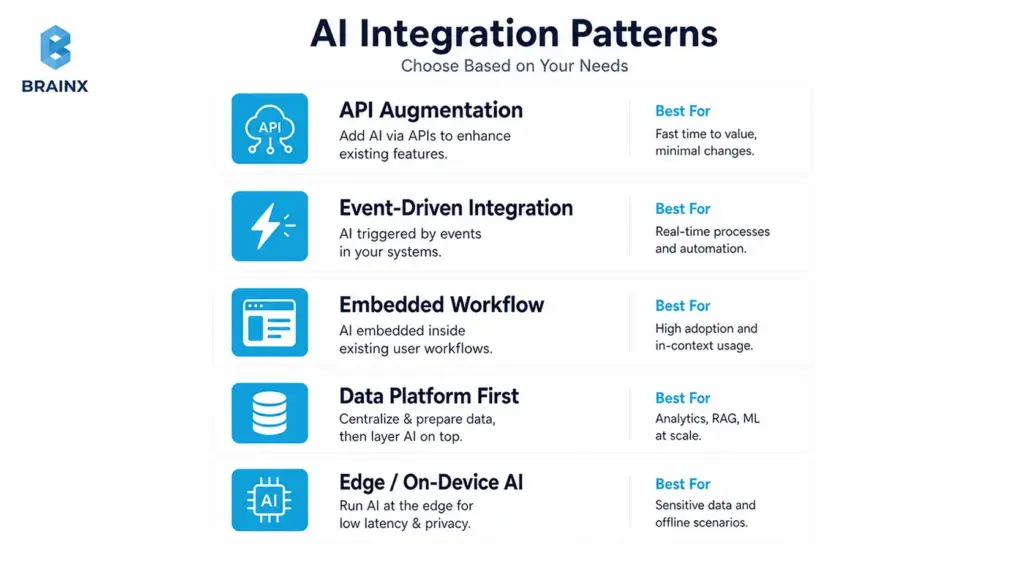
Pattern 1 — API-Based Augmentation
This is the fastest path for many SaaS teams: keep your app as the system of record, and call AI capabilities behind your existing endpoints.
Best for:
- Copilots and assistants inside the UI
- Classification, summarization, extraction
- Knowledge search and Q&A (often with RAG)
- Support automation with human review
Key implementation notes:
- Put AI behind a service boundary (an “AI gateway” or orchestration service) rather than calling providers directly from the front end.
- Enforce permission-aware retrieval if you’re using internal content.
- Add timeouts, retries, and fallbacks so your core workflow stays stable.
Pattern 2 — Event-Driven AI
If you need real-time automation at scale, event-driven patterns help you avoid synchronous bottlenecks. Systems like Kafka, Pub/Sub, or SQS let you trigger AI workflows when something happens.
Best for:
- Fraud detection signals and alerts
- Personalization updates based on behavior streams
- Monitoring, anomaly detection, and incident triage
- High-volume classification pipelines
Key implementation notes:
- Design for idempotency (events can arrive twice).
- Keep AI work in a separate consumer group so it doesn’t block operational events.
- Track costs and throughput, especially when events spike.
Pattern 3 — Embedded AI in Workflows
Sometimes the right answer is embedding AI where work already happens: BPM tools, CRM automations, ERP approvals, support platforms, and internal admin portals.
Best for:
- Guided agent workflows (support, ops, finance)
- Approval-centric processes
- Data entry assistance and enrichment
Key implementation notes:
- Maintain a clear division between suggest vs act.
- Ensure every action is logged with user identity and context.
- Avoid “shadow automations” that bypass business controls.
Pattern 4 — Data-Platform-First Integration
If your AI use case depends on many data sources, a data-platform-first approach reduces repeated integration work. Your warehouse/lakehouse, feature store, or vector database becomes the foundation for multiple AI features.
Best for:
- Organization-wide knowledge retrieval
- Analytics-driven copilots
- Forecasting and personalization
- Reusable data products for multiple teams
Key implementation notes:
- Data contracts and freshness matter more than model tuning in early stages.
- Centralize sensitive-field tagging and permission mapping to reduce risk.
- Plan for evaluation and monitoring at the platform layer, not per feature.
Pattern 5 — Edge or On-Device Integration
For certain products, sending data to the cloud is not acceptable (privacy), or the latency is too high (real-time). Edge/on-device inference can be a strong fit.
Best for:
- Mobile apps with offline needs
- IoT environments
- Regulated workflows requiring data minimization
- Ultra-low-latency interactions
Key implementation notes:
- Choose smaller models and optimize for device constraints.
- Plan for updates, drift handling, and rollback mechanisms.
- Keep sensitive data local where possible, but still log non-sensitive telemetry for monitoring.
Where AI Agents Fit in Existing Workflows
Agentic systems can plan steps and use tools (APIs) to complete tasks. That’s powerful—and risky—if you don’t control identity, permissions, and auditability.
In production, safe agent patterns usually include:
- Unique agent identity (not “shared system user”)
- Role-based access control (RBAC) and least privilege for tool access
- Human approval for high-risk actions (refunds, account changes, compliance actions)
- Audit trails: every tool call, input, and output captured
- Limited action permissions: start with read-only, then graduate to write actions
Microsoft guidance for agentic systems emphasizes unique identity, RBAC, least privilege, and human review for high-risk actions.
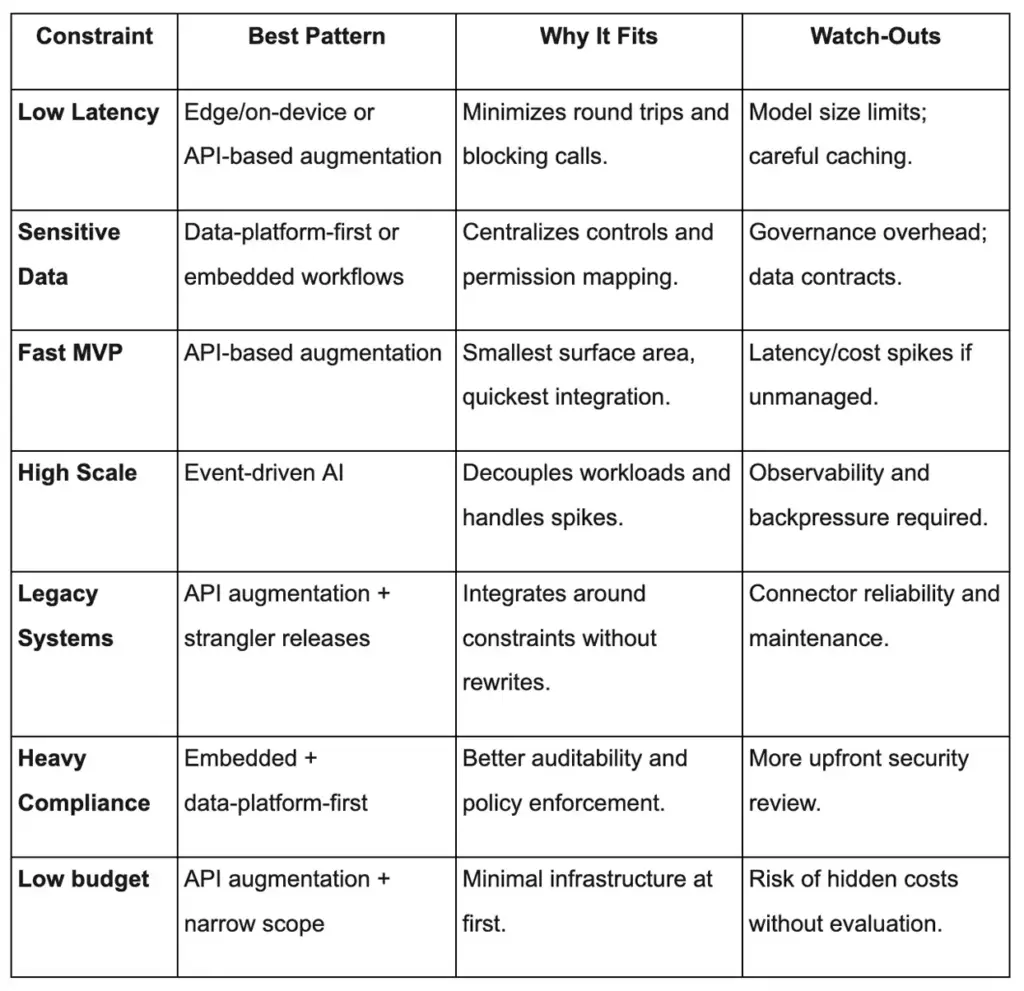
Quick Chooser: Which Pattern Fits Your Constraints?
Use this as a quick mapping tool during architecture discovery:
The Data Integration Layer: What Leading AI/ML Data Integration Services Actually Do
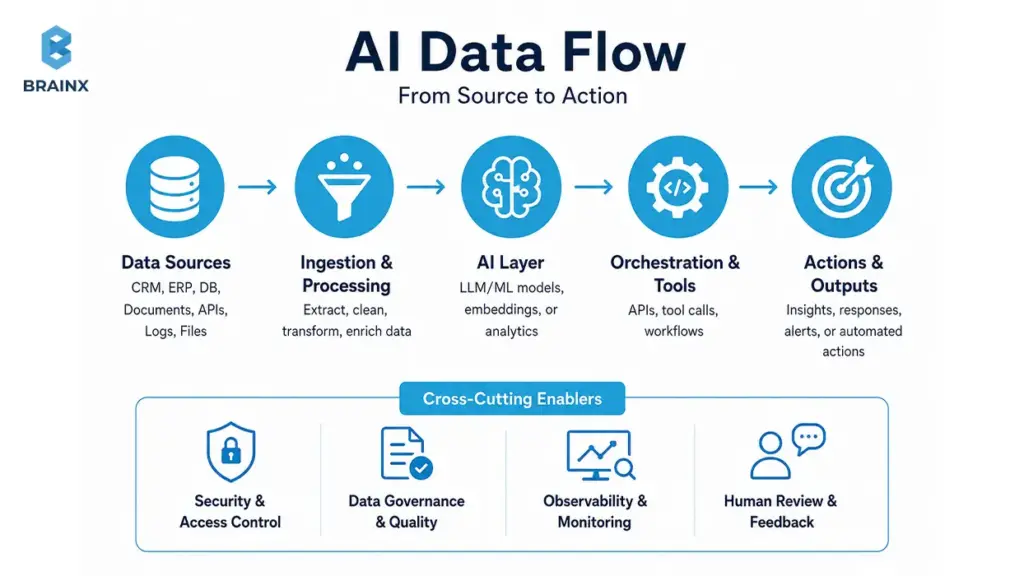
The difference between “AI that demos well” and “AI that works in production” is often the data layer. In real organizations, the necessary context is scattered across CRMs, ticketing systems, databases, document stores, and analytics logs.
Leading AI/ML data integration services do not just move data from one place to another. They identify which sources matter, clean and map them, tag sensitive fields, define ownership, monitor quality, and make the right context retrievable for the model. That is what turns scattered business data into usable AI context.
IBM links weak data quality to incorrect and biased outputs that vary unpredictably across segments and time. For LLM use cases, Google Cloud explains Retrieval-Augmented Generation (RAG) as combining LLMs with external knowledge sources to improve output grounding.
If your AI depends on internal knowledge, your data integration work is not optional—it is the product’s foundation.
Data Sources You May Need to Unify
Most integration projects end up needing more sources than expected. Common inputs include:
- Product databases (transactions, catalog, orders, subscriptions)
- CRM (accounts, deals, notes, lifecycle stages)
- Support tickets and chat transcripts
- Application logs and event streams
- Documents (policies, contracts, claims, manuals)
- Analytics (funnels, cohorts, attribution)
- ERP (invoicing, inventory, procurement)
- Warehouses/lakehouses (central metrics and reporting)
- Knowledge bases (Confluence, Notion, SharePoint, wikis)
- User behavior data (clickstream, feature usage)
Unification doesn’t always mean centralization. Often it means consistent access paths, contracts, and permission-aware retrieval.
Data Readiness Scorecard Before AI Integration
Before you invest in RAG, copilots, or automation, validate readiness with a simple checklist:
- [ ] Data sources identified
- [ ] Data owner assigned
- [ ] APIs available (or extraction path confirmed)
- [ ] Data quality checked (missingness, duplicates, drift risk)
- [ ] Permissions mapped (roles, entitlements, tenant boundaries)
- [ ] Sensitive fields tagged (PII/PHI/PCI where applicable)
- [ ] Logs available for troubleshooting and audits
- [ ] Freshness defined (how current must data be?)
- [ ] Feedback loop planned (how corrections improve the system)
If you can’t check most of these, prioritize data foundations before expanding features.
Data Contracts, Lineage, and Quality Checks
AI systems amplify weak assumptions. Data contracts help you make those assumptions explicit and enforceable.
What this looks like in practice:
- Validation rules: schema checks, null constraints, allowed values, uniqueness
- Schema evolution: safe changes without breaking downstream embeddings/features
- Ownership and SLAs: who fixes issues, how fast, and what “fresh” means
- Metadata and lineage: where data came from, how it was transformed, what depends on it
- Data quality monitoring: automated alerts for drift, missingness spikes, and anomalies
These controls reduce “silent failures,” where output quality degrades without obvious errors.
RAG Readiness Checklist for LLM Integration
RAG succeeds when retrieval is relevant, permission-aware, and measurable.
Checklist for production-grade RAG:
- Document ingestion pipeline (batch + incremental updates)
- Chunking strategy aligned to your content types
- Embeddings selected and versioned
- Vector search configured and benchmarked
- Permission-aware retrieval (per user/tenant/role)
- Evaluation: retrieval relevance + answer groundedness
- Freshness: update SLAs for high-change docs
- Source citations in the UI (links back to original docs)
Without these, users quickly lose trust—even if the model is strong.
Security, Compliance, and Governance for AI in Production
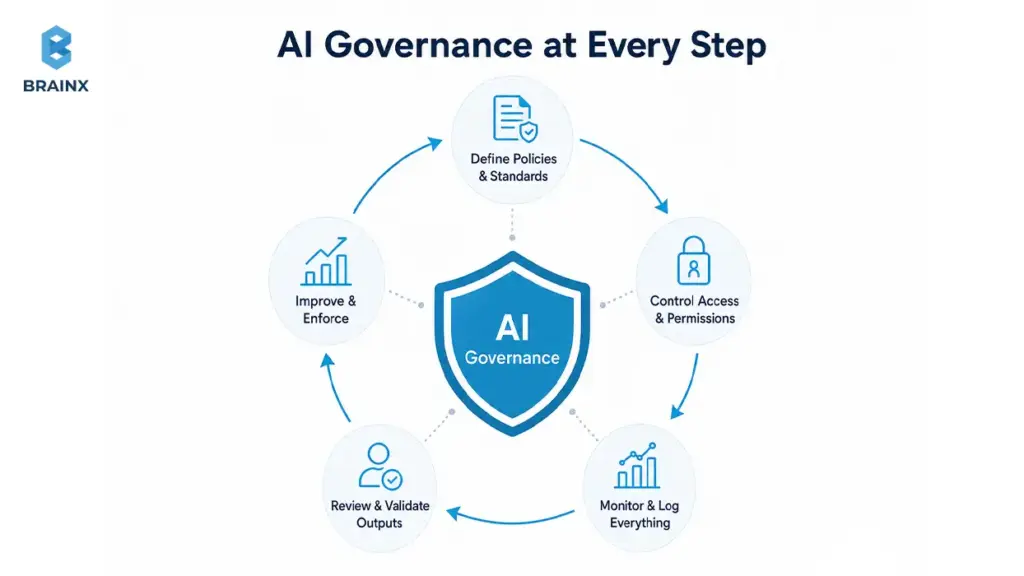
Security is where AI projects stop being exciting experiments and start becoming real production systems. Once a model can read internal data, recommend actions, retrieve documents, or trigger tools, you need identity controls, logging, review paths, privacy boundaries, and policy enforcement before rollout.
This section isn’t “enterprise paranoia.” It’s how you avoid the two most common outcomes of rushed AI launches:
- Security teams block expansion after the first pilot
- Users circumvent the system with shadow tools because they don’t trust it
A practical governance approach references known frameworks. NIST’s AI Risk Management Framework helps structure AI risks across the lifecycle. OWASP’s LLM Top 10 documents common GenAI app vulnerabilities like prompt injection and data leakage. Microsoft Responsible AI guidance adds operational practices for accountability and safety.
Identity and Access
Access control is the backbone of secure AI.
Key controls to implement:
- SSO integration so users inherit corporate identity
- RBAC for roles like agent, supervisor, admin, auditor
- ABAC when access depends on attributes (region, customer tier, data classification)
- Tenant isolation for multi-tenant SaaS
- Least privilege for every tool the AI can call
- Secrets management for API keys and connector credentials
A good test: “Can the AI ever see something the user cannot?” If yes, redesign before launch.
Data Privacy and Retention
Privacy failures often come from “harmless” logs, prompt histories, or copied documents used for embeddings.
Production controls include:
- PII handling rules and redaction where needed
- Encryption in transit and at rest
- Consent and purpose limitation (especially for regulated industries)
- Data residency controls if your org has regional requirements
- Retention policies for prompts, outputs, and retrieved documents
Define retention early; retrofitting it later is painful.
AI-Specific Risks
LLM apps and agents create distinct risks beyond traditional software:
- Prompt injection (users or docs manipulate the model into unsafe actions)
- Data exfiltration via retrieval or tool calls
- Hallucinations presented as facts
- Unsafe outputs (toxicity, regulated content, harmful guidance)
- IP leakage (sensitive internal content exposed)
- Model abuse (automation used to spam, scrape, or brute force)
- Tool misuse (agents taking unintended actions)
OWASP LLM Top 10 is a useful checklist for threat modeling these systems.
Auditability and Human-In-The-Loop
Auditability is how you turn “AI did something” into “we can explain and correct it.”
Implement:
- Approvals for high-risk actions (refunds, account changes, compliance decisions)
- Traceability from output back to retrieved sources, prompts, and tool calls
- Decision logs that capture who approved what and why
- Escalation rules for uncertain outputs or policy violations
- Review workflows for supervisors and auditors
Human-in-the-loop is not a weakness. It’s how you ship safely while learning.
Governance Frameworks to Reference
Use recognized frameworks to reduce ambiguity and align stakeholders:
- NIST AI RMF for risk governance and lifecycle controls
- OWASP LLM Top 10 for GenAI app threats
- Microsoft Responsible AI for accountability and operational practices
- SOC 2 controls for security, availability, confidentiality
- GDPR for privacy and lawful processing
- HIPAA if healthcare data is involved
- Internal security policies and vendor risk requirements
How to Evaluate AI Integration Before Full Rollout
If you don’t measure quality, users will—by escalating tickets, bypassing the tool, or losing trust in outputs. Evaluation needs to be designed into the integration, not stapled on after launch.
For LLM workflows, evaluation should check more than basic accuracy. It should measure correctness, relevance, safety, coherence, groundedness, and whether the system completes the intended task. For agentic workflows, evaluation also needs to test tool selection, multi-step reasoning, and whether the system stops for human approval when needed.
A practical approach uses two loops:
- Offline evaluation to catch failures before users see them
- Online evaluation to monitor real-world performance, cost, and drift
MLflow describes LLM evaluation as measuring correctness, relevance, safety, and coherence—and notes that agent evaluation adds checks for multi-step task completion.
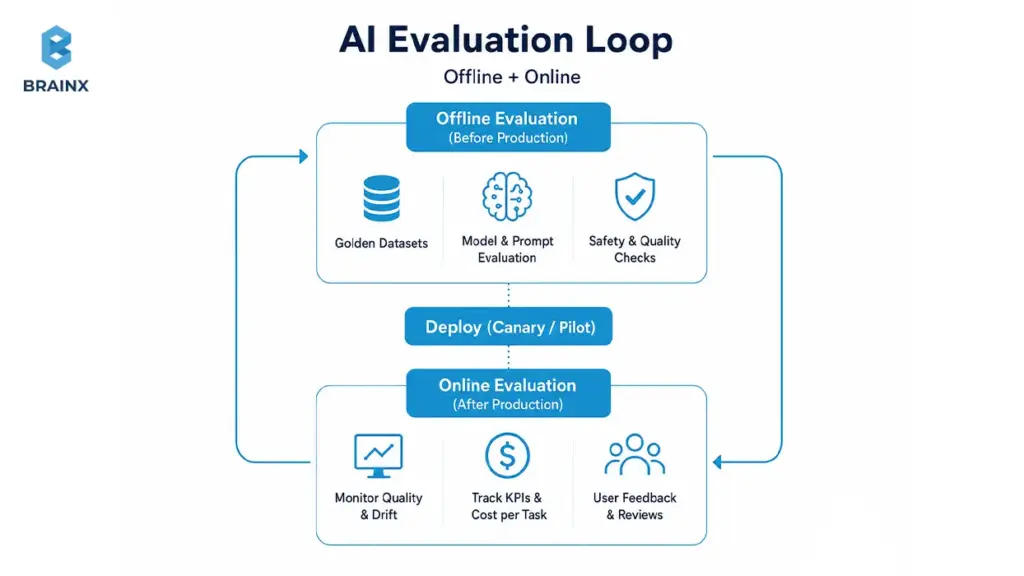
Offline Evaluation Before User Rollout
Offline testing reduces embarrassing failures and unsafe behavior.
Core components:
- Golden datasets: curated examples of real cases with expected outcomes
- Test prompts: standardized prompt sets for your core tasks
- Expected answers: rubric-based scoring, not just exact matches
- Edge cases: ambiguous requests, adversarial inputs, missing data
- Regression tests: ensure improvements don’t break previously working behavior
For RAG, test retrieval separately from generation: if retrieval is wrong, generation quality will follow.
Online Evaluation After Rollout
Once users are involved, evaluation becomes product analytics plus safety monitoring.
Track:
- User feedback (thumbs up/down, corrections, reason tags)
- Response quality (rubric sampling and human review queues)
- Conversion impact (e.g., deflection rate, lead-to-meeting conversion)
- Escalation rate (how often AI hands off to humans)
- Latency and failure rate (timeouts, retries, tool failures)
Online evaluation is also how you identify where the workflow needs redesign—not just where the model needs tuning.
Metrics That Matter
Choose metrics that map to business outcomes and operational safety:
- Accuracy (task-specific correctness)
- Groundedness (answers supported by sources)
- Hallucination rate (unsupported claims)
- Response time (p50/p95 latency)
- Cost per task (tokens + retrieval + tool calls)
- Fallback rate (how often you route away from AI)
- User satisfaction (CSAT, internal ratings)
- Business KPI impact (AHT, resolution time, revenue lift, risk reduction)
Tie these to a dashboard owned by both product and engineering.
Fallback Rules When AI Confidence Is Low
Fallbacks are how you keep reliability high while still shipping AI.
Common fallback strategies:
- Human review for uncertain or high-risk outputs
- Safe defaults (provide sources, ask clarifying questions)
- Routing to support when data is missing or user intent is unclear
- Manual approval for any write actions (especially in finance/healthcare)
- Disable automation for risky actions until confidence is proven
A good system treats AI as a probabilistic component—so it must degrade safely.
Implementation Roadmap: 30–90 Days Without Replatforming
A workable rollout plan is what turns ambition into production adoption. Most teams can ship meaningful AI features in 30–90 days if they constrain scope, choose the right pattern, and treat evaluation and security as first-class deliverables.
This is where AI integration services are most valuable: you get an execution plan designed for your stack, your constraints, and your governance needs—without triggering a replatforming effort.
If you want examples of what this looks like in practice, review outcomes and architectures in our case studies.
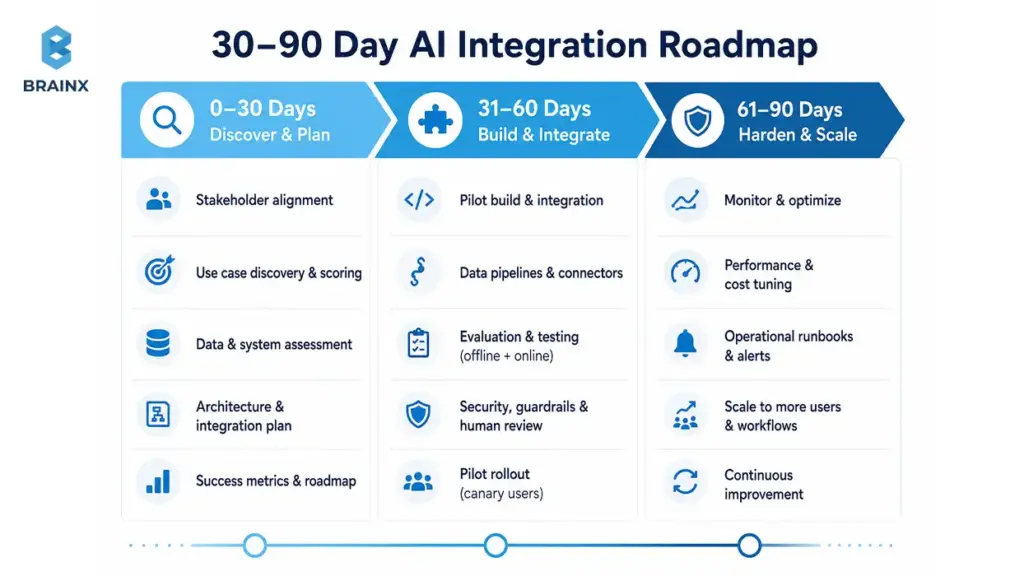
Phase 1 — Discovery and Architecture
Goal: pick the right workflow and design an integration that can be operated safely.
Deliverables typically include:
- Use-case selection and workflow mapping
- Constraints capture (latency, compliance, data access, scale)
- Success metrics and acceptance criteria
- Data audit and readiness scorecard
- Architecture plan and integration pattern selection
- Security review: identities, permissions, retention, threat model
- Roadmap with phases and decision gates
This phase prevents “surprise complexity” in week six.
Phase 2 — Pilot Integration
Goal: ship a thin slice into staging (and then a controlled production cohort) with evaluation.
Pilot deliverables include:
- Thin-slice integration with real systems (not mock data)
- Sandbox/staging environment configuration
- Evaluation harness (offline tests + online telemetry hooks)
- Initial RAG or model orchestration (if needed)
- Test user rollout and feedback loop
- First workflow live with feature flags and fallback paths
The pilot should prove one thing: the workflow improves and can be supported operationally.
Phase 3 — Production Hardening
Goal: make the feature reliable, secure, and maintainable at scale.
Hardening deliverables:
- Observability (logs, traces, dashboards, alerting)
- Cost controls (caps, budgets, caching, batching)
- Security review and fixes (redaction, RBAC, secrets, retention)
- Incident playbooks and on-call expectations
- Monitoring for drift and quality degradation
- Documentation and team enablement (runbooks, training, handover)
This is the difference between “pilot success” and “production reliability.”
Release Tactics That Prevent Starting Over
Safe rollout tactics reduce risk while you learn:
- Shadow mode: run AI in parallel without affecting users to measure quality
- Canary releases: roll out to a small cohort, then expand
- Feature flags: turn behaviors on/off without redeploying
- Strangler pattern: wrap legacy functionality and incrementally replace pieces
- Rollback plans: explicit kill-switch and fallback UX
- Phased rollout: expand by workflow, team, or tenant—not all at once
These tactics protect core systems while you iterate.
Cost, Timeline, and Team: What to Budget for AI Integration Consulting Services
Budgeting is easier when you understand what actually drives cost. Most organizations underestimate the “non-model” work: data cleanup, connectors, evaluation, and security controls.
If you’re evaluating AI integration consulting services, expect cost and timeline to vary based on how many systems are involved, how sensitive the data is, and how strict the latency requirements are.
For a typical SaaS workflow (one primary workflow, 2–4 data sources, moderate compliance), a pilot can often be delivered in weeks, with production hardening taking additional time depending on governance and monitoring needs. Exact numbers depend on your constraints and acceptance criteria.
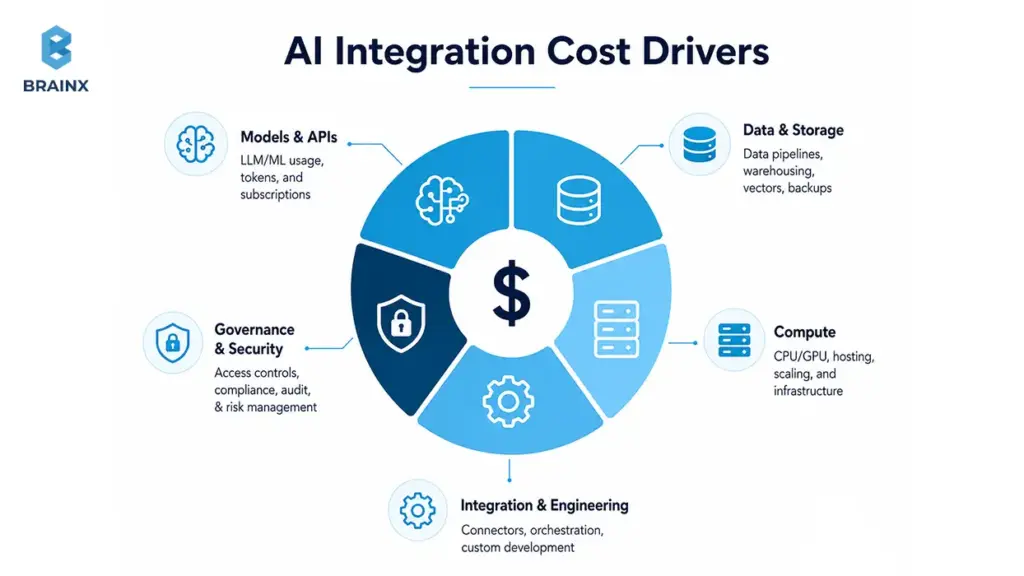
Main Cost Drivers
Most cost comes from these areas:
- Data cleanup (duplicates, missing fields, inconsistent definitions)
- Integration complexity (number of systems, connector maturity, API limits)
- Legacy systems (limited APIs, fragile workflows, manual steps)
- Compliance needs (PII/PHI handling, auditability, vendor review)
- Latency requirements (need caching, batching, async patterns)
- Evaluation (golden datasets, rubrics, regression testing)
- Monitoring (dashboards, alerts, quality drift detection)
- Vendor/tooling (LLM APIs, vector DBs, MLOps tools)
- Ongoing support (incident response, improvements, retraining)
A useful budgeting question: “What will it take to operate this feature like any other production service?”
Build vs Buy vs Partner
A practical stack often combines all three:
- Buy (iPaaS/automation tools): faster connectors for common systems
- Buy (MLOps/LLMOps platforms): evaluation and deployment scaffolding
- Buy (vector databases/search): strong retrieval and scaling capabilities
- Build (custom orchestration): your specific workflow logic, permissions, and UI
- Partner: accelerate architecture, security, and rollout patterns
The wrong choice is rebuilding commodity tooling from scratch. The right choice is building only what differentiates your workflow.
Model Selection: Proprietary, Open-Source, or Domain-Specific AI
Model choice should follow constraints, not trends.
Common options:
- Proprietary APIs (OpenAI/Gemini/Claude-style): fast start, strong general performance
- Watch-outs: data handling policies, residency, cost at scale, vendor dependency
- Open-source models: more control and potential cost advantages at scale
- Watch-outs: hosting/ops burden, evaluation and safety work
- Private deployment: for sensitive data and strict governance
- Watch-outs: infra cost, model updates, security ownership
- Smaller models: lower latency and lower cost for narrow tasks
- Domain-specific models: better performance in constrained domains (legal, medical, finance)
- Multi-model routing: route tasks to the best model by risk/cost/complexity
The best practice is to keep model choice modular, so you can swap or route without rewriting the workflow.
Who You Need Involved
Successful delivery requires shared ownership across product, engineering, and risk.
Typical roles:
- Product owner (workflow definition, acceptance criteria, KPI ownership)
- Data engineer (pipelines, contracts, quality monitoring)
- Backend engineer (APIs, orchestration, integrations)
- Security lead (threat model, permissions, retention, audits)
- DevOps/MLOps engineer (deployment, monitoring, cost controls)
- Domain expert (what “correct” means in the real workflow)
- QA (test plans, regression suites, edge case validation)
- Business stakeholder (priorities, adoption, change management)
Without a clear owner, production AI becomes “everyone’s side project.”
Common Mistakes to Avoid When Adding AI to an Existing Tech Stack
Most failures aren’t caused by the model being “not smart enough.” They’re caused by teams treating AI like a plug-in instead of a production system with probabilistic behavior.
Below are the mistakes that repeatedly create rework—and the fixes that keep rollout safe and steady.
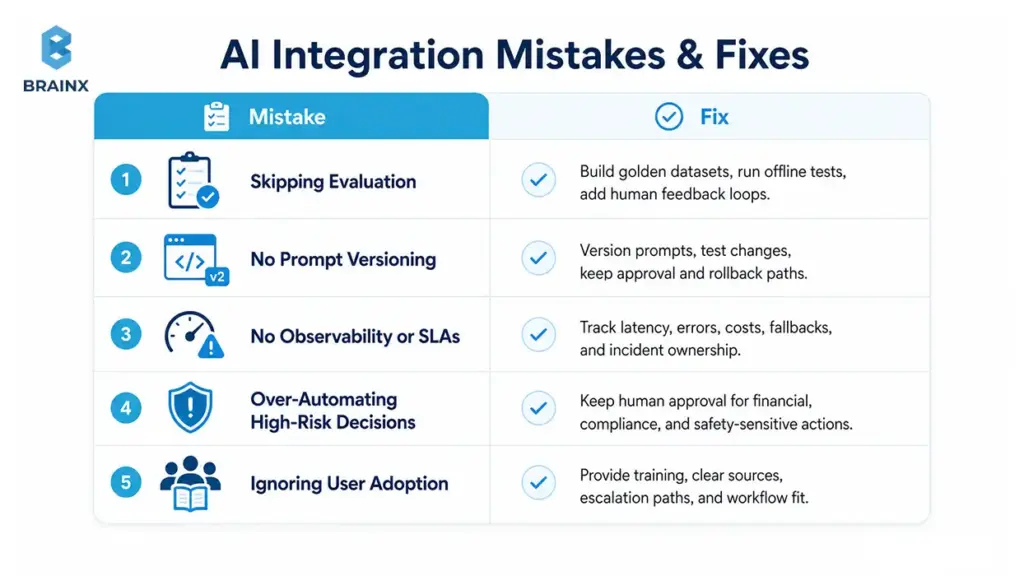
Skipping Evaluation
If you don’t evaluate, you’ll ship surprises.
What to do instead:
- Build golden datasets early
- Run offline evaluation before any user sees outputs
- Add online testing and sampling-based human review
- Track drift checks and quality regressions over time
- Implement human feedback loops so improvements are systematic
Evaluation is not bureaucracy—it’s how you build trust.
Treating Prompts as Code but Not Versioning Them
Prompts change behavior. Untracked prompt changes create “it worked yesterday” incidents.
Fixes:
- Prompt versioning (like code releases)
- Review workflow with approvals for high-impact changes
- Prompt testing against golden datasets
- Approval logs and rollback capability
- Separation of system prompts vs user prompts vs retrieved context
Even if you don’t call it “prompt engineering,” you still need prompt operations.
No Observability or SLAs
Without observability, production AI becomes impossible to support.
Minimum bar:
- Latency SLOs (p50/p95) and alert thresholds
- Clear fallback behavior when providers fail
- Queueing and backpressure strategies for spikes
- Error tracking tied to correlation IDs
- Cost monitoring (token usage, retries, retrieval calls)
- Incident response playbooks and ownership
Treat AI like any other critical service in your stack.
Over-Automating High-Risk Decisions
Not every workflow should be automated end-to-end. High-risk domains need staged control.
Keep humans in the loop for:
- Financial actions (refunds, credits, chargebacks)
- Access control changes and identity workflows
- Compliance decisions and regulated disclosures
- Clinical or safety-related guidance
- Anything with irreversible impact
Start with “recommend and draft,” then graduate to “act” only when confidence and auditability are proven.
Ignoring User Adoption
Even strong AI fails if it doesn’t fit how people work.
Adoption drivers:
- Training and enablement for teams
- Internal documentation and “how to use it safely” guidelines
- UI/UX that shows sources and confidence (especially for RAG)
- Clear escalation and correction paths
- Incentives aligned to the workflow (e.g., faster handling, fewer clicks)
If users can’t trust outputs, they won’t use the tool—no matter how good the demo is.
How to Choose an AI Integration Services Partner
Choosing a partner is less about brand names and more about execution maturity. You’re not buying a model. You’re buying the ability to ship reliable behavior into your systems and keep it running.
A good partner will be opinionated about evaluation, security boundaries, and rollout controls—and will ask for your workflow, your constraints, and your success metrics before recommending tools.
If you want a quick assessment of fit, start with a structured discovery call.
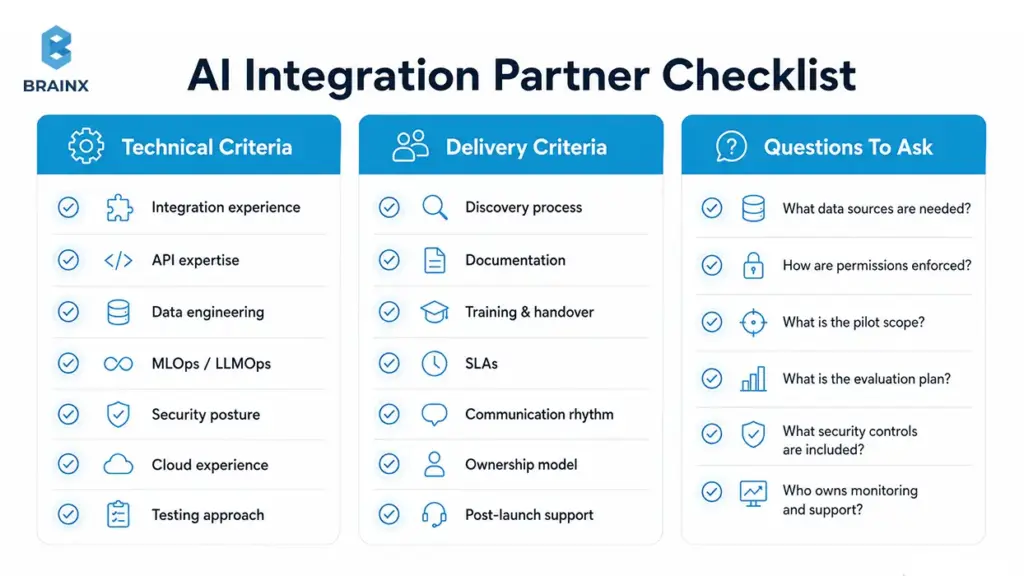
Technical Criteria
Look for demonstrated capability across the full stack of integration work:
- Integration experience across common SaaS and enterprise systems
- Reference architectures for RAG, copilots, and automation
- Strong API expertise (auth, rate limits, retries, idempotency)
- Data engineering depth (contracts, lineage, quality checks)
- MLOps/LLMOps capability (evaluation, monitoring, drift handling)
- Security posture (RBAC, tenant isolation, retention, threat modeling)
- Cloud experience relevant to your environment
- Testing approach that includes offline + online evaluation
You want builders who can operate production systems—not just prototype.
Delivery Criteria
Execution quality is as important as technical skill.
Assess:
- Discovery process that clarifies scope and acceptance criteria
- Documentation quality (architecture, runbooks, playbooks)
- Training and handover approach
- SLAs and support expectations post-launch
- Communication rhythm and stakeholder alignment
- Ownership model (who maintains what after delivery)
- Post-launch improvement plan (feedback, iterations, governance)
A partner should leave your team stronger, not dependent.
Questions to Ask in the First Call
Use these questions to force clarity early:
- What data sources will the AI need, and who approves access?
- How will you enforce role-based permissions in retrieval and tools?
- What are the success metrics and baseline?
- What’s the smallest pilot scope that proves value end-to-end?
- What evaluation plan will you implement before rollout?
- What security controls and retention policies do you recommend?
- How will you choose models, and how do you avoid lock-in?
- What’s the timeline to reach production hardening, not just a demo?
- Who owns monitoring, incident response, and ongoing improvements?
Good partners answer with specifics and trade-offs.
Red Flags to Watch For
Avoid teams that:
- Have no evaluation plan beyond “we’ll test it”
- Don’t discuss security until late in the project
- Offer vague pricing without scoping constraints
- Have no handover or documentation process
- Overpromise automation in high-risk workflows
- Push a model choice before understanding your workflow and data
If they treat AI like a widget, you’ll inherit the operational debt.
How BrainX Helps With AI Integration Services
BrainX Technologies helps teams implement AI in real systems—without forcing a rewrite. The focus is practical delivery: architecture decisions that fit your constraints, data flows that keep outputs reliable, and rollout controls that keep production stable.
When teams engage BrainX for AI integration services, the goal is clear: move from experimentation to production outcomes with measurable KPIs, proper security boundaries, and an integration plan your team can maintain.
What You Get In an AI Integration Assessment
A good assessment should produce clarity, not a slide deck that evaporates after the meeting.
Typical assessment outputs:
- Stack review (apps, data sources, auth, workflows, constraints)
- Use case prioritization with scoring and ROI hypotheses
- Data readiness check and gap list
- Integration architecture recommendation (pattern selection)
- Security considerations (permissions, retention, governance)
- A phased roadmap with decision gates
- Rough effort estimate and team plan
This gives stakeholders a realistic path forward—without committing to a rebuild.
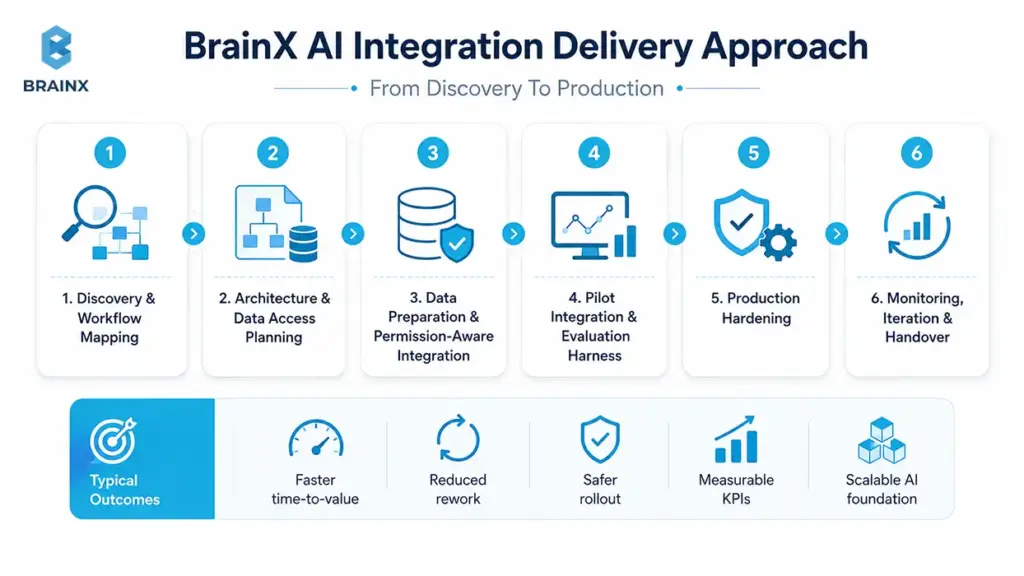
How BrainX Approaches AI Integration
BrainX uses a phased delivery approach designed to reduce risk:
- Discovery and workflow mapping
- Architecture and data access planning
- Data preparation and permission-aware integration
- Pilot integration with evaluation harness
- Production hardening (observability, cost controls, governance)
- Monitoring, iteration, and handover
This approach is designed to keep the business moving while protecting core systems.
Typical Outcomes
Teams that execute integration correctly typically see:
- Faster time-to-value (thin-slice delivery in weeks, not quarters)
- Reduced rework through upfront evaluation and architecture clarity
- Safer rollout with clear human review paths
- Better workflow automation and user adoption
- Measurable KPIs tied to business outcomes
- A scalable foundation to extend AI across more workflows
FAQs Section
What are AI integration services, and how are they different from AI development?
AI integration services focus on connecting AI capabilities to your existing applications, data sources, and workflows so they work reliably in production. AI development is broader and often includes building new models or net-new AI features from scratch.
Integration work typically emphasizes connectors, permissions, evaluation, monitoring, and rollout controls. In many real projects you’ll use both, but integration is what makes the system usable day-to-day.
How long does it take to integrate AI into an existing tech stack?
A focused pilot can often be delivered in a few weeks when the use case is narrow, data access is straightforward, and security requirements are clear. Production hardening—monitoring, governance, performance, and incident readiness—usually adds additional time.
The biggest schedule variables are data readiness, number of systems involved, and compliance reviews. A phased plan helps you ship value early while reducing rollout risk.
Do I need to migrate my data warehouse or rebuild my app to add AI?
Usually, no. Many teams start by integrating AI via APIs, event streams, or embedded workflow steps while keeping the warehouse and app architecture intact. You may need targeted data improvements (contracts, quality checks, or a vector layer for retrieval), but that’s different from a full migration. The safest approach is incremental rollout with feature flags and clear fallbacks.
Can AI integration services work with legacy systems?
Yes, as long as there’s a reliable integration path—APIs, database access with controls, file exports, RPA (carefully), or middleware that can bridge the gap. Legacy constraints mainly affect latency, observability, and connector reliability, so architecture needs to account for that.
Many teams use a strangler-style approach to wrap legacy flows and add AI capabilities in isolated steps. The key is to avoid letting legacy limitations force unsafe shortcuts in security or auditability.
What data do I need before integrating AI?
You need the data that drives your target workflow: the inputs users rely on, the context needed for decisions, and the historical examples that define “good outcomes.” You also need owners, permissions mapping, and a definition of freshness—how current the data must be for the workflow to work.
For LLM/RAG use cases, you’ll typically need curated documents plus metadata and access rules. It’s less about having “big data” and more about having usable, governed, and measurable data.
What are the biggest security risks when integrating LLMs into internal tools?
The biggest risks include prompt injection, leaking sensitive data through retrieval, unauthorized tool actions by agents, and retaining prompts/outputs longer than policy allows. Another common risk is broken permission boundaries—where the AI can access data the user shouldn’t see.
Mitigations usually include RBAC/least privilege, permission-aware retrieval, redaction, audit logs, and human approval steps for high-risk actions. Threat modeling against OWASP LLM risks is a good baseline.
What should I look for in AI integration consulting services?
Look for a provider that can demonstrate production experience across integrations, data engineering, evaluation, and security. They should propose a phased rollout with decision gates, include offline and online evaluation, and be clear about monitoring and incident response.
You should ask how they enforce permissions, how they manage retention and auditability, and what the handover looks like. Strong AI integration consulting services will also help you pick the smallest viable pilot that proves value end-to-end.
How do leading AI/ML data integration services improve model accuracy and reliability?
They improve reliability by making sure the model receives consistent, permission-correct, high-quality context, every time. That includes unifying sources, implementing data contracts, monitoring quality, and maintaining lineage so failures can be traced and fixed.
For LLMs, they also build RAG-ready pipelines: ingestion, chunking, embeddings, and retrieval evaluation so answers are grounded in trusted sources. In practice, leading AI/ML data integration services reduce hallucinations, stabilize performance across segments, and make outputs auditable.
How do AI integration services reduce the risk of failed AI pilots?
They reduce pilot failure by forcing clarity on workflow boundaries, success metrics, data access, and operational constraints before rollout. Integration work also includes evaluation harnesses, release controls (feature flags, canaries), and security reviews that prevent late-stage blockers.
Instead of shipping a demo, the pilot is designed as a production candidate with observability and fallbacks. That makes it easier to scale the feature without rewriting it later.
TL;DR / Key Takeaways
- Tasks are carried out by AI agents; Chatbot primarily talks. Agents combine LLM reasoning with tool use (APIs, workflows, databases) to complete tasks end-to-end.
- The shift is powered by agentic workflows: plan → act → observe → refine, plus safer function execution and better monitoring.
- Adopt agents when you need multi-step execution, cross-system actions, and measurable cycle-time reduction—not just Q&A.
- A hybrid is common: a chat interface with an agent back-end that can take actions only when allowed.
- Start with one workflow, design permissions and approvals, and ship a pilot with evaluation from day one.

Your current chatbot might answer questions well—but the moment a user asks it to reset an account, refund an invoice, open a ticket, or change a subscription, the experience often breaks. That gap is exactly where the AI agents chatbot model shows up: not as “a smarter bot,” but as software that can reason through a goal and take actions in real systems (with the right controls).
This guide explains what agents are (in plain language), what changed recently, and how to decide whether you need a chatbot, an agent, or a hybrid. You’ll also get a reference architecture, a maturity model, and an implementation playbook you can use to scope a pilot confidently.
What “AI Agents” Mean (and How They Differ From a Chatbot)
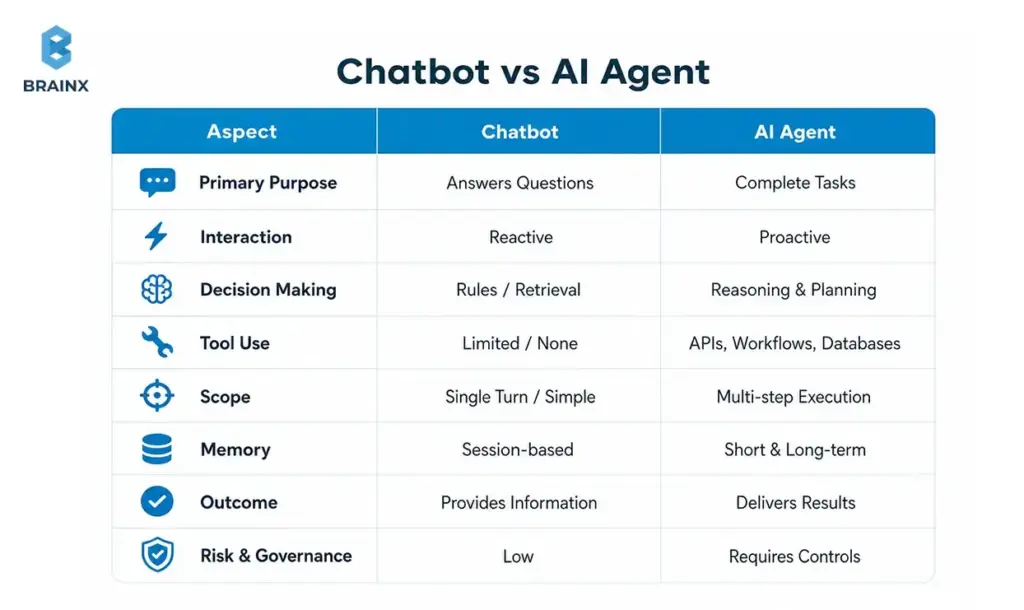
An AI “agent” is best understood as a system that can pursue a goal, choose steps, and use tools to produce an outcome—not just generate text. In practice, many teams implement this as an LLM + orchestration layer + tool integrations + guardrails. When you hear people describe AI agents chatbot, they usually mean a chat experience backed by an agentic system that can take actions (create tickets, update records, trigger workflows) with governance.
A classic chatbot is often deterministic (rules/flows) or retrieval-driven (RAG) and focuses on responding. Agents focus on deciding + executing. That difference matters for scope, risk, and architecture: agents need permissions, audit trails, approvals, and evaluation in ways basic bots often don’t.
Industry definitions vary, but most reputable references converge on the idea that agents combine reasoning with tool use and feedback loops rather than one-shot answers.
If you’re exploring AI chatbot agents, treat the term as a practical category: “conversational UI” + “agent back-end.” The UI can look identical to a normal assistant; the difference is what happens after the user message—whether the system can safely do something.
Chatbots: Rules, Flows, and Retrieval (Where They Shine)
Rule-based chatbots are still excellent when the path is known upfront. Think: shipping policies, password reset instructions, store hours, onboarding steps, or structured triage forms. With a well-designed flow, you get predictable outcomes, easier QA, and lower operational risk.
Modern “FAQ bots” often improve accuracy with retrieval: a RAG chatbot searches a knowledge base (help center, docs, SOPs) and answers with citations. When the task is “find and explain,” retrieval-based designs can deliver high utility without connecting to sensitive systems.
Where chatbots struggle is when requests become procedural: “change plan,” “approve access,” “apply discount,” “open ticket with these logs,” or “schedule a renewal call and update CRM.” You can bolt on integrations—but once the bot must select tools, manage state, and confirm actions, you’re no longer in simple chatbot territory.
The key takeaway: chatbots shine when success is primarily information delivery with constrained branching, not multi-step execution.
AI Agents: Goals, Tools, and Multi-Step Execution
Agents introduce an execution loop: interpret the goal, plan steps, call tools, observe results, and refine. Many implementations are variations of “plan → act → observe,” sometimes with explicit reasoning traces, sometimes with hidden planning but visible actions and confirmations.
Tool use is the inflection point. Instead of generating “Here’s how to do it,” the system can call functions like:
- create_ticket(summary, priority, user_id)
- lookup_invoice(invoice_id)
- apply_credit(account_id, amount)
- reset_mfa(user_id)
- update_crm_opportunity(stage, next_step)
That said, the agent isn’t “the model.” Production systems add an orchestrator (state + policy), tool gateways (auth + rate limits), and monitoring. References on tool use and agent patterns emphasize that reliability comes from system design, not prompting alone.
When teams build AI chatbot agents, they typically combine:
- A conversational front-end for intent capture and user trust
- An orchestration layer to decide when tools are allowed
- Verified tool execution with approvals, logging, and rollback patterns
The Real Shift: From Responding to Doing
The practical shift is simple: instead of optimizing for “answer quality,” you optimize for task completion.
A responding system is judged by correctness and tone. A doing system is judged by:
- Did it complete the workflow?
- Did it use the right system of record?
- Did it ask for approval at the right time?
- Can we audit what happened and why?
This is why agent projects feel different from chatbot projects. You’re designing a digital operator with constraints, not just a conversational layer. That’s also why governance, evaluation, and permissions become first-class requirements—not add-ons.
Why AI Agents Are the Next Step After Chatbots (What Changed Recently)
Agents didn’t become interesting because businesses suddenly wanted more automation—they always did. They became feasible because the ecosystem matured: models got better at following structured outputs, tool calling became standardized, inference got cheaper, and evaluation/monitoring practices improved.
For many teams, the AI agents chatbot approach is the first time a conversational experience can reliably connect to operational systems without turning into a brittle flowchart. The difference is not “more AI,” but more engineering patterns that make LLMs usable as components in software.
A few macro changes drove this:
- Model capability: better instruction-following and structured generation
- Tool calling: safer and more deterministic integrations
- Operational maturity: monitoring, regression testing, and red-teaming for agent behavior
- Cost curves: lower latency/cost for running assistants at scale
[IMAGE: Timeline/maturity model visual — alt text suggestion: “Evolution from chatbots to tool-using agents and multi-agent workflows”]
LLM Tool Calling + Function Execution
Function calling made LLM outputs more predictable for software. Instead of parsing free-form text (“I think you should create a ticket…”), the model can emit a structured call with validated parameters—then your system executes it.
This is where many automation wins come from:
- Reliable routing to the correct internal workflow
- Fewer brittle regex parsers
- Better separation of responsibilities (LLM decides what, code controls how)
Even with function calling, production teams still enforce schemas, rate limits, and allowlists. The LLM proposes an action; the system decides whether it’s permitted.
RAG + Enterprise Knowledge Access (Without Training on Your Data)
RAG gives agents a grounded way to answer with current, company-specific context—without training the base model on private data. Done properly, it reduces hallucinations and improves compliance posture because you can control exactly what content is retrieved.
This is especially important for AI chatbot agents operating in support, IT, or sales ops:
- They need accurate policy and account context
- They must cite sources (internal SOPs, KB articles, CRM fields)
- They must avoid leaking sensitive information across tenants
A strong RAG layer includes document chunking strategy, relevance ranking, access control filters, and citation rendering.
Better Guardrails, Monitoring, and Evaluations
Early “agent demos” often failed in production because nobody measured reliability. What changed is the rise of practical evaluation methods:
- Offline test sets (golden conversations + tool traces)
- Automated checks for policy violations and PII leakage
- Online monitoring of tool calls, fallbacks, and human escalations
Guardrails also got more actionable: from simple content filters to policy engines that enforce allowed tools, required confirmations, and safe completion criteria.
Also Read: How a Custom AI Agent Development Company Brings Your Ideas to Life
AI Agents Chatbot Maturity Model (Rules → Reasoning → Autonomy)
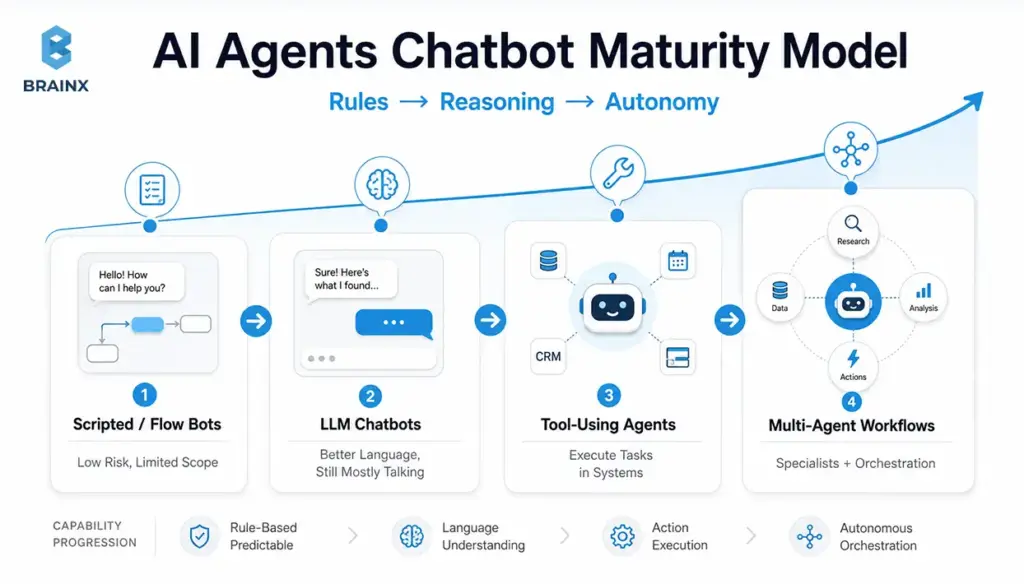
Most organizations aren’t choosing between “no agent” and “full autonomy.” They’re moving along a maturity path. This AI agent’s chatbot maturity model helps you map where you are today and what the next stage should look like, based on risk tolerance and integration needs.
Use it as a planning tool:
- Align stakeholders on scope (“we’re targeting Stage 3, not Stage 4”)
- Set architecture requirements (audit logs start at Stage 3)
- Budget realistically (integrations and evaluation expand with maturity)
Stage 1 — Scripted/Flow Bots (Low Risk, Limited Scope)
Stage 1 is deterministic: decision trees, menus, forms, and handoffs. It’s still the best fit when:
- Compliance requirements are strict
- Inputs are predictable
- You need highly consistent language and outcomes
The upside is operational simplicity: QA is straightforward, and failure modes are known. The downside is coverage: edge cases explode, maintenance costs rise, and the experience feels rigid.
Stage 1 often remains a component even in advanced systems—for example, for identity verification steps or regulated disclosures.
Stage 2 — LLM Chatbots (Better Language, Still Mostly “Talking”)
Stage 2 replaces rigid conversation with natural language understanding and generation. It can summarize, explain, and route more smoothly—often with retrieval augmentation for accuracy.
Constraints still matter:
- Without tool execution, you’re limited to advice and instructions
- Errors manifest as confident-but-wrong answers if retrieval and policies aren’t strong
- The UX can degrade when users assume it can “do” things it can’t
Stage 2 is a strong upgrade when your highest ROI is deflection and documentation navigation, not automation.
Stage 3 — Tool-Using Agents (Execute Tasks in Systems)
Stage 3 is where automation becomes real: the agent can perform actions in business systems through approved tools. This is the “threshold” where you’ll invest in:
- Permissioning and scoped credentials
- Approval flows for high-impact actions
- Tool-call logging and traceability
- Test harnesses for regression
This is also where the product becomes meaningfully differentiated: users stop copying answers into other systems and instead complete work in one place.
Stage 3 tends to deliver measurable gains in cycle time and handle time—if you pick the right workflow and instrument it properly.
Stage 4 — Multi-Agent Workflows (Specialists + Orchestration)
Stage 4 introduces multiple specialized agents coordinated by an orchestrator (or a supervisor pattern). You might have:
- A “triage” agent that classifies requests and gathers missing info
- A “policy” agent that checks compliance and required approvals
- A “tool runner” agent restricted to execution
- A “QA” agent that validates outputs and citations before user delivery
Stage 4 is useful when workflows span departments, require higher reliability, or need separation of duties. It also increases complexity, so you typically justify it only after Stage 3 is stable in production.
When a Chatbot Is Enough vs When You Need AI Chatbot Agents (Decision Checklist)
The simplest way to choose is to look at workflow complexity and system access. If your assistant only needs to answer and guide, keep it simple. If it needs to execute and coordinate, you’re in AI chatbot agents territory—and you should plan for permissions, evaluation, and operational ownership from day one.
Use the checklist below in planning meetings. It helps founders, PMs, and IT leaders avoid the two common extremes: “agents everywhere” vs “never connect it to anything.”
Choose a Chatbot If…
A chatbot is enough when most of these are true:
- The task is Q&A or document navigation (“What’s your refund policy?”)
- You can solve it with retrieval and clear citations
- No write access is needed (read-only context is sufficient)
- Escalation to a human is the normal endpoint for complex cases
- The cost of a wrong answer is low to moderate (and you can constrain responses)
This is a great fit for:
- Help centers and internal knowledge portals
- Product FAQs and onboarding guidance
- Basic triage that ends in ticket creation by a human
Choose an AI Agent If…
You likely need an agent when several of these are true:
- The workflow requires multiple steps (collect info → validate → execute → confirm)
- You must take actions across systems (CRM + billing + ticketing)
- The user expects an outcome, not an explanation (“cancel subscription,” not “here’s how”)
- Personalization depends on account state, entitlements, or history
- You need measurable reductions in handle time, backlog, or cycle time
Common examples:
- Refund/credit workflows
- Access provisioning requests with approvals
- Sales ops updates after calls (notes → CRM → follow-up tasks)
Hybrid Approach (Chat UI + Agent Back-End)
In many products, the best design is hybrid:
- The UI stays conversational for discovery and clarification
- The back-end agent runs tool calls and confirms actions
- High-risk steps require approval; low-risk steps can be automatic
This approach improves adoption because users don’t need to learn a new interface. It also improves safety because you can progressively enable tool access as confidence grows, rather than granting broad autonomy on day one.
How AI Agents Work
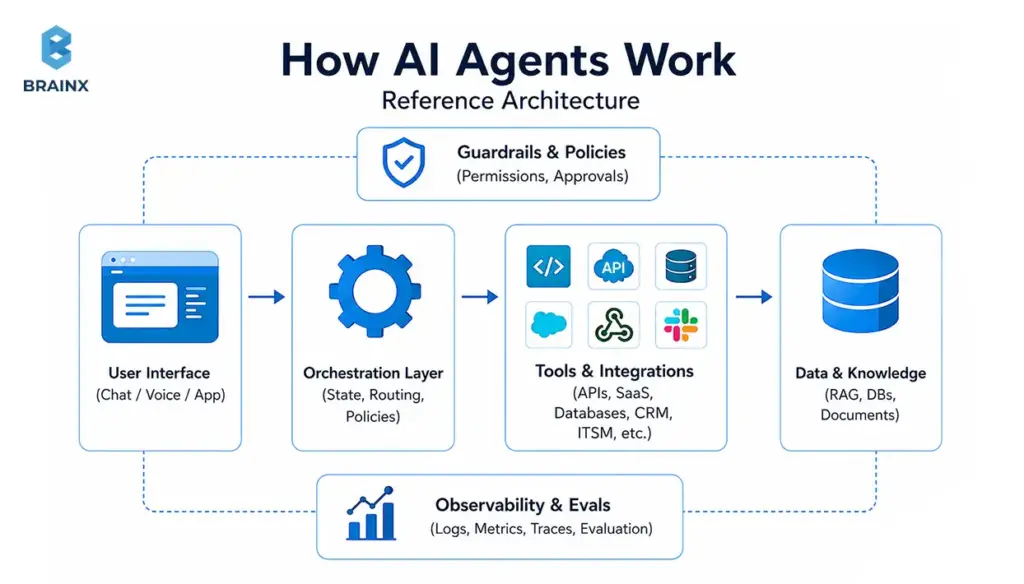
A production-ready agent is a system, not a single model call. The AI agents chatbot architecture most teams end up with includes: a UI layer, an orchestrator, retrieval, tool gateways, policy enforcement, and observability/evaluation.
This section is written so you can sketch your own architecture and identify what you’re missing before you pilot. It also highlights enterprise-grade components that many “demo architectures” skip—especially around auditability and permissions.
Orchestration Layer (State, Routing, Policies)
The orchestrator is the control plane. It manages:
- Conversation state (what’s already known, what’s pending)
- Routing (which tool, which workflow, which specialist agent)
- Policies (what is allowed, what requires confirmation, when to escalate)
Without orchestration, teams often ship a “single prompt” system that becomes unmaintainable: fragile logic, unclear failure modes, and inconsistent tool usage. With orchestration, you can evolve safely—adding tools, tightening policies, and improving evaluation without rewriting everything.
A practical orchestration layer typically includes:
- A state store (for session context and task status)
- A policy engine (allowlists, approvals, content constraints)
- A fallback strategy (human handoff, safe refusal, ask-clarifying-questions)
Tools & Integrations (APIs, SaaS, Databases, Ticketing, CRM)
Tools are how agents create business outcomes. But every integration expands the blast radius, so treat tool design like product API design.
Best practices:
- Prefer purpose-built tools over “raw database access”
- Use scoped credentials (least privilege), short-lived tokens, and strict allowlists
- Validate inputs (schemas, rate limits, business rules)
- Separate read tools from write tools
- Add idempotency keys for write actions to prevent duplicates
Common tool categories:
- Ticketing/ITSM (ServiceNow, Jira, Zendesk)
- CRM and sales ops (Salesforce, HubSpot)
- Billing/subscriptions (Stripe, Chargebee)
- Data platforms (Snowflake, Postgres read replicas)
- Identity and access (Okta, Azure AD) with approvals
Memory & Context (Short-Term vs Long-Term; What to Store)
“Memory” is overloaded. In practice, separate it into:
- Short-term context: what the agent needs right now to complete the task (current conversation, retrieved docs, tool results). Keep it minimal and time-bounded.
- Long-term memory: stable preferences or recurring facts (user’s timezone, preferred escalation channel). Store only what you can justify and govern.
Guidelines that prevent privacy and compliance issues:
- Don’t store sensitive data “because it might help later”
- Store pointers/IDs instead of raw content where possible
- Apply retention policies and deletion workflows
- Clearly label what comes from the user vs tools vs retrieval
If you operate in regulated environments, treat memory like any other data product: define owners, access controls, and audits.
Safety: Permissions, Approval Flows, and Audit Logs
Safety for tool-using agents is mostly about control and traceability:
- Who requested the action?
- What data did the agent use?
- What tool calls were executed?
- Was there approval, and by whom?
- Can we revert or compensate if it was wrong?
Enterprise patterns include:
- Approval gates for refunds, access changes, and billing actions
- Audit logs that capture tool inputs/outputs and policy decisions
- Role-based access control (RBAC) and separation of duties
- Redaction of secrets/PII in logs
These controls are aligned with broader security frameworks (access control, auditability, change management).
Business Value: What AI Agents Unlock That Chatbots Typically Can’t
The value story changes when assistants can execute. Instead of measuring “engagement,” you can measure operational outcomes: deflection with completion, cycle-time reduction, fewer touches per case, faster quoting, and fewer manual updates.
This is where AI chatbot agents can outperform a standard assistant: they reduce work, not just questions. The best business cases are workflows with high frequency, clear success criteria, and expensive human time in the loop.
Below are value patterns that show up repeatedly—along with KPIs you can instrument.
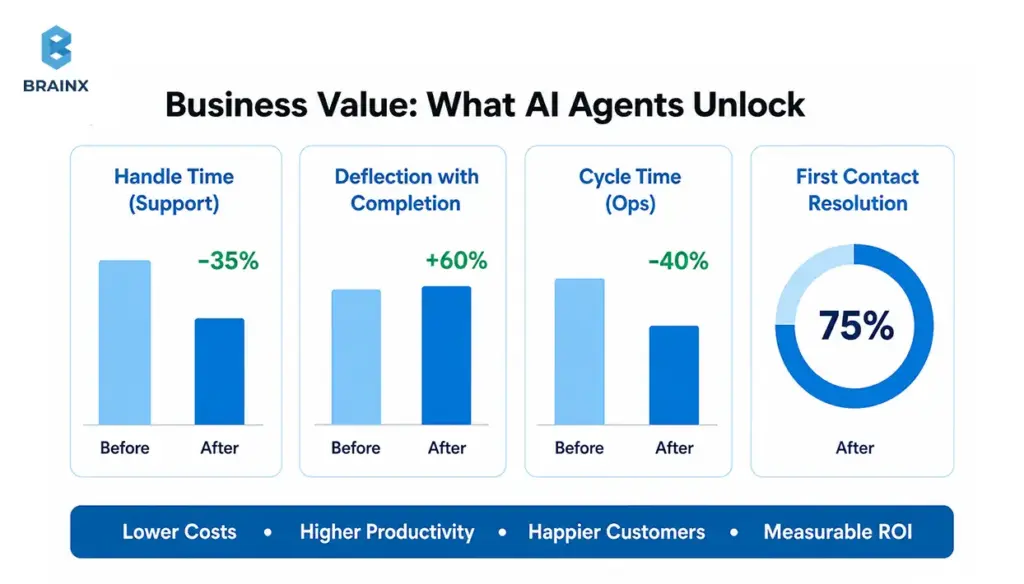
Faster Resolution and Higher Deflection (Support)
A chatbot can deflect “how-to” questions. An agent can resolve cases by:
- Collecting required details automatically
- Running diagnostics (logs, account status, feature flags)
- Applying approved fixes (reset, re-provision, resend invoice)
- Creating a ticket only when necessary—with context already attached
KPIs to track:
- First-contact resolution rate
- Average handle time (AHT)
- Time to resolution
- Deflection with completion (not just deflection)
The nuance: “deflection” is only a win if users actually get the outcome they wanted. Agent designs should explicitly measure completion.
Shorter Lead-to-Quote / Sales Ops Automation
Sales workflows are often slow because they’re fragmented: notes in one place, pricing in another, approvals in email, CRM updates later (or never). Agents can compress this by:
- Summarizing discovery calls into structured fields
- Creating/updating opportunities and tasks automatically
- Generating draft quotes based on rules and product catalog tools
- Scheduling follow-ups and attaching relevant collateral
KPIs:
- Lead-to-quote time
- Data completeness in CRM
- Rep time spent on admin tasks
- Conversion rate changes (when measured carefully)
Internal IT and Employee Service Desk Acceleration
Internal service desks are full of repeatable tasks that require system actions:
- Password/MFA resets (with identity verification)
- Access requests with approvals
- Software provisioning
- Knowledge + execution (“here’s the policy and I’ve initiated the request”)
Agents can reduce backlog and improve employee experience, but only if you enforce strict permissions, approvals, and logging.
KPIs:
- Mean time to resolve (MTTR)
- Ticket reopen rate
- Escalation rate to tier-2
- SLA compliance improvements
Product Experiences: In-App “Doer” Assistants (Not Just Help Text)
In-app assistants often fail when they only explain features. A “doer” can:
- Configure settings on the user’s behalf (with confirmation)
- Create objects (projects, tickets, dashboards)
- Generate reports or summaries from usage data
- Trigger workflows (“invite teammate,” “set up SSO,” “create alert”)
This is where agent experiences can become a product feature, not a support add-on—especially in SaaS platforms with complex configuration.
KPIs:
- Time-to-value for new users
- Setup completion rate
- Feature adoption lift
- Reduction in “how do I…” tickets
Top Use Cases for AI Agents Chatbot Experiences (By Team)
Different teams benefit from agentic systems in different ways. The fastest path is to pick use cases with:
- Clear inputs and outputs
- Bounded tool access
- Observable success metrics
- A real human cost today
In the section below, you’ll see practical examples of an AI agents chatbot experience by persona, including what systems it typically touches and where to start safely.
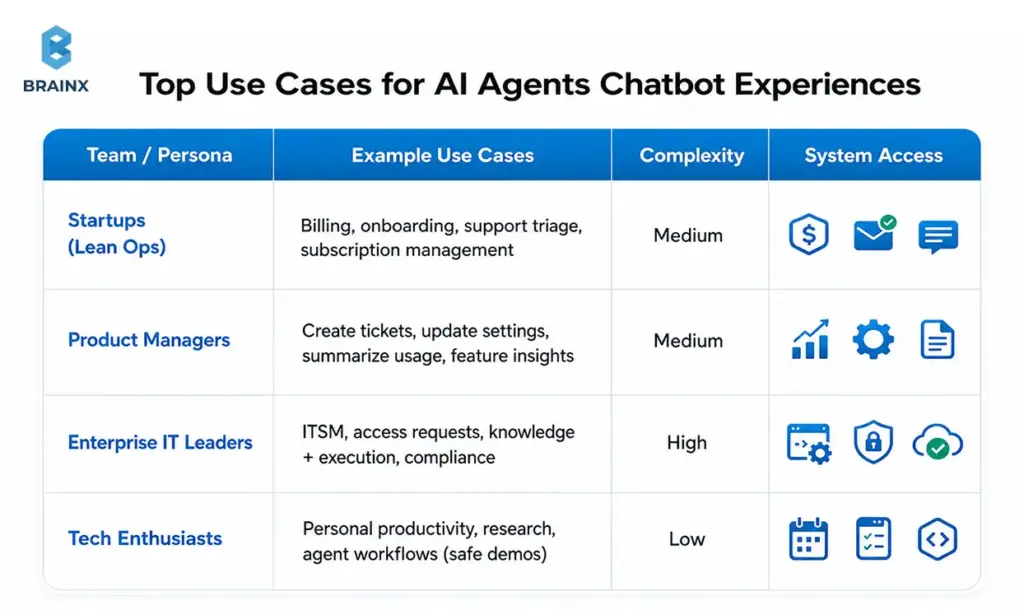
Startups: Lean Ops (Billing, Onboarding, Customer Support Triage)
Startups usually want leverage without hiring ahead of revenue. Great starter workflows:
- Billing questions with account lookup + safe actions (send invoice, update billing email)
- Onboarding “setup concierge” that checks configuration and nudges next steps
- Support triage that gathers context, suggests fixes, and drafts a ticket with logs
Start with low-risk tools:
- Read-only account context
- Ticket creation
- Email sending from templates (with approvals)
The win is fewer interruptions and faster customer response without adding headcount.
Product Managers: In-App Actions (Create Ticket, Update Settings, Summarize Usage)
PM-led use cases often focus on in-product activation and reducing friction:
- “Create a bug report with this screenshot and steps”
- “Turn on this integration and set defaults”
- “Summarize my last 30 days usage and recommend next steps”
The key is strong UX boundaries: users should always know what the assistant can do in-app, and what requires confirmation.
Common systems:
- Product database (read/write with strict scopes)
- Analytics/telemetry (read)
- Feature flag tools (write with approvals)
Enterprise IT Leaders: ITSM, Access Requests, Knowledge + Execution
Enterprise IT gets value when agents reduce ticket volume and time-to-resolution:
- Access request intake, routing, and approval workflows
- Password reset and account unlock flows with identity verification
- Knowledge retrieval + automated execution (“apply standard fix”)
Enterprise constraints are non-negotiable:
- RBAC and separation of duties
- Full audit trails
- Integration with identity providers and ITSM
Start with “read + recommend + draft” and progressively enable execution once evaluation and controls are in place.
Tech Enthusiasts: Personal Productivity + Agent Workflows (Safe Demos)
For individual experimentation (and internal demos), safe workflows include:
- Calendar planning and meeting summaries (with explicit consent)
- Email drafting (no auto-send)
- Research assistants grounded in public sources
- Task automation in sandbox environments
Even demos benefit from good habits: clear tool scopes, visible actions, and logs. Those habits transfer directly to production builds.
Costs, Timelines, and What Actually Drives Complexity
Decision-makers ask two questions early: “How long will this take?” and “What drives cost?” The honest answer is that the LLM is rarely the expensive part. Complexity comes from integrations, data readiness, evaluation, and security—plus the product work to make the UX trustworthy.
If you’re planning AI chatbot agents, think in phases: a pilot that proves a workflow, then a controlled rollout, then production hardening. That approach reduces risk while creating real value quickly.
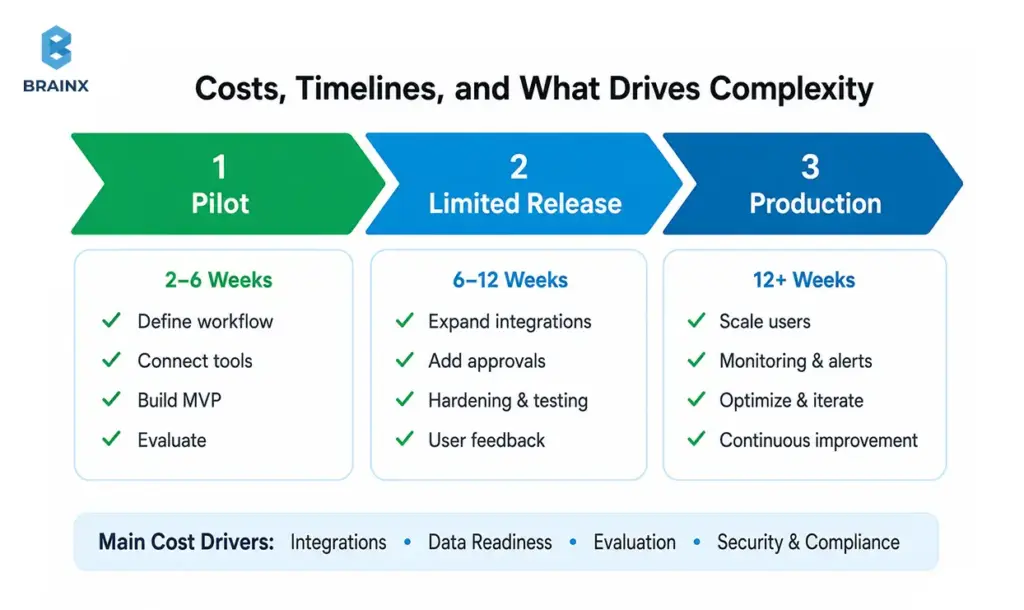
Main Cost Drivers (Integrations, Data, Eval, Security)
The largest cost levers usually are:
- Integrations: number of systems, tool design, auth patterns, rate limits, error handling
- Data readiness: knowledge base quality, permissions, document structure, tenancy boundaries
- Evaluation: building test sets, regression runs, tool-call validation, red-team scenarios
- Security & compliance: audit logs, approvals, secrets management, PII handling, vendor reviews
- UX/product work: confirmations, undo paths, user education, escalation flows
A good scoping exercise identifies which of these can be minimized for the pilot (without cutting corners that cause rework later).
Typical Rollout Phases (Pilot → Limited Release → Production)
Most successful implementations follow a predictable rollout:
- Pilot (2–6 weeks, depending on integrations)
One workflow, limited user group, tight tool scope, heavy logging. - Limited release
Expand to more users/cases, add more tools, formalize evals, introduce approvals for riskier actions. - Production
SLOs, incident playbooks, ongoing evaluation, governance, and operational ownership.
Timelines vary by integration complexity and security requirements. Avoid committing to timelines before confirming tool access, identity patterns, and data constraints.
Build vs Buy vs Partner (What to Consider)
You have three common paths:
- Buy: fastest start, but may limit customization, governance controls, or deep integrations.
- Build: maximum control and differentiation, but requires architecture, eval, and ongoing operations.
- Partner: combine speed with custom engineering—often best when you need production-grade integrations and security without staffing a full internal team.
A practical decision lens:
- If the workflow is generic and low-risk, buying can be enough.
- If it touches core systems (billing, access, healthcare data), you’ll likely need custom work—either in-house or with a partner experienced in enterprise controls.
Risks and Common Mistakes (and How to Avoid Them)
Most failures aren’t “the model wasn’t smart enough.” They’re design failures: too much autonomy, unclear permissions, no measurement, and UX that hides what’s happening. If you’re implementing an AI agent chatbot, treat it like deploying a new operational layer—because that’s what it is.
The goal is not to eliminate risk; it’s to engineer risk down with guardrails, approvals, and visibility.
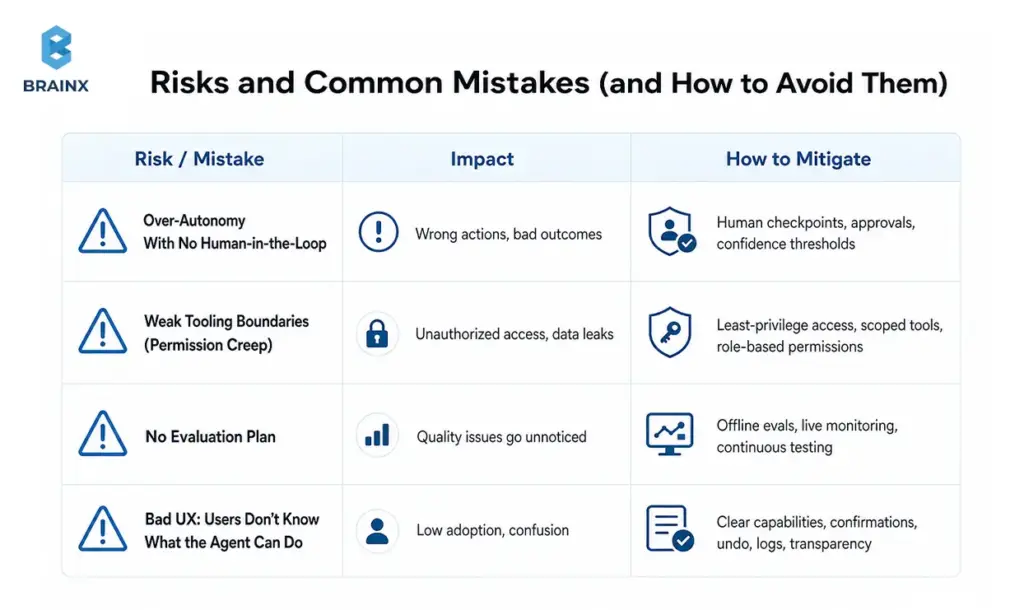
Over-Autonomy Too Soon (No Human-in-the-Loop)
The fastest way to lose trust is letting an agent take irreversible actions without confirmation. Early stages should include:
- Confirmations for any write action
- Approval flows for high-impact actions (refunds, access grants)
- “Draft mode” for messages and updates (human reviews before execution)
Progressive autonomy works better: earn permission through measured reliability.
Weak Tooling Boundaries (Permission Creep)
If every tool has broad access, your agent effectively becomes a super-user. That’s a security and compliance problem.
Prevent permission creep by:
- Scoping tools to specific actions (“issue refund up to $X,” not “write to billing DB”)
- Enforcing allowlists at the gateway
- Using per-user auth where possible (agent acts “on behalf of” the user)
- Rotating secrets and monitoring for abnormal tool usage
No Evaluation Plan (You Can’t Improve What You Don’t Measure)
Teams often rely on anecdotal feedback (“seems good”). That’s not enough when tool calls affect real systems.
Minimum viable evaluation:
- A curated set of representative conversations
- Expected tool calls and success criteria per scenario
- Regression tests for every prompt/tool change
- Monitoring dashboards for tool failure rate, escalation rate, and policy blocks
This turns agent behavior into something you can improve like any other software component.
Bad UX: Users Don’t Know What the Agent Can Do
Users form mental models quickly. If they think the agent can cancel subscriptions but it can’t, they’ll churn. If they don’t realize it did cancel a subscription, you’ll get support fallout.
Fix this with:
- Visible “capabilities” hints in the UI
- Clear confirmation steps and summaries of actions taken
- Receipts: what changed, where, and how to undo it
- A consistent escalation path to humans
How to Get Started With AI Chatbot Agents
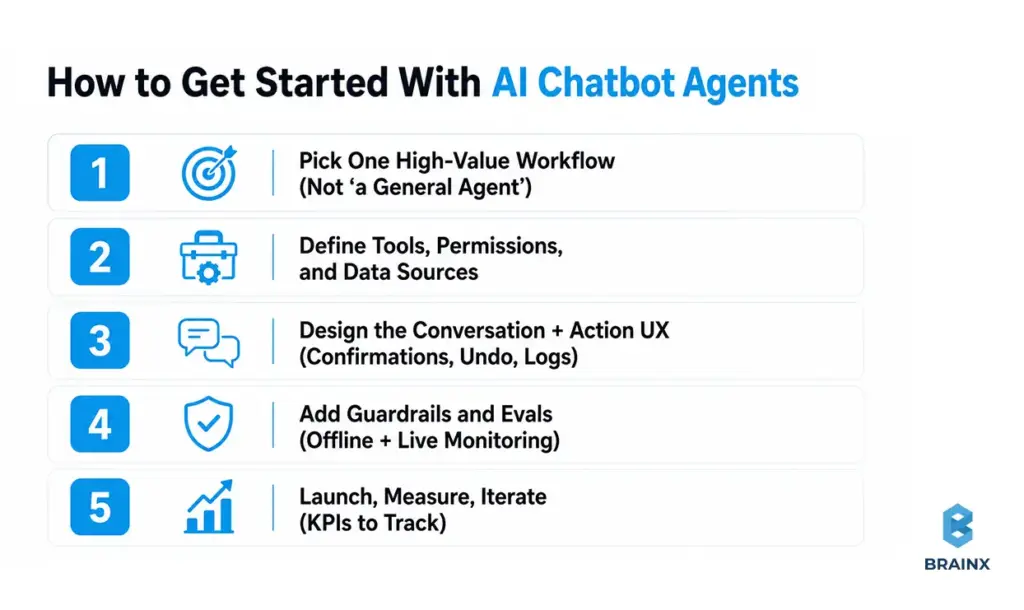
A safe, fast start is absolutely possible—but it requires discipline. The goal is not to build “a general agent.” The goal is to deliver one workflow end-to-end, with logs and evaluation, then expand.
This playbook is what we use to scope and deliver AI chatbot agents so stakeholders can see progress early without compromising on governance.
Step 1 — Pick One High-Value Workflow (Not “a General Agent”)
Choose a workflow with:
- High frequency or high cost
- Clear success criteria (definition of “done”)
- Limited systems at first (1–2 integrations)
- Low-to-moderate risk actions
Examples:
- Support: “collect info + run diagnostics + create ticket with full context”
- Sales ops: “update CRM + schedule follow-up + generate recap”
- IT: “access request intake + approval routing”
Document the workflow like a product spec: inputs, outputs, edge cases, and escalation rules.
Step 2 — Define Tools, Permissions, and Data Sources
Design tools that are:
- Narrow in scope
- Validated by schema
- Permissioned by role and environment
Make a table before you code:
- Tool name
- Read/write
- Data source/system
- Required auth (service account vs user-delegated)
- Approval requirement
- Audit fields to log
This is where security teams can engage early—before the implementation bakes in risky assumptions.
Step 3 — Design the Conversation + Action UX (Confirmations, Undo, Logs)
Your UI needs to make actions legible. Patterns that work:
- “Proposed action” cards (user approves before execution)
- “Receipt” messages with what changed and a link to the system of record
- Undo where possible (or compensating actions)
- Status tracking for long-running workflows
Also decide how the agent asks clarifying questions. Good agents don’t guess missing fields; they request them.
Step 4 — Add Guardrails and Evals (Offline + Live Monitoring)
Guardrails should enforce:
- Tool allowlists
- Required confirmation steps
- Policy constraints (e.g., don’t disclose sensitive fields)
- Safe fallback behavior
Evaluation should include:
- Offline regression tests (tool-call traces, expected outputs)
- Online monitoring (tool error rate, escalation, blocked actions)
- Sampling for human review (especially early)
If you can’t measure it, you can’t safely expand it.
Step 5 — Launch, Measure, Iterate (KPIs to Track)
Ship to a limited group first. Track:
- Task completion rate
- Time-to-complete workflow
- Escalation rate and reasons
- Tool failure rate
- User satisfaction on completed tasks
Then iterate: tighten prompts, improve retrieval, refine tools, and adjust approvals based on real usage. The best systems improve monthly—not annually.
How BrainX Helps With AI Agents Chatbot Projects
If you’re ready to move from experiments to something your team can trust, BrainX Technologies helps you plan, build, and operate agentic systems with production-grade engineering. We focus on measurable workflows, tight integrations, and security-first delivery—so you can prove value early and scale safely.
When clients engage BrainX on an AI agent chatbot initiative, we typically start with a scoped workshop and pilot, then harden for production with evaluation and governance built in.
Discovery & Use-Case Prioritization (ROI + Feasibility)
We help teams avoid “general agent” traps by:
- Mapping your workflows and identifying the best first automation target
- Estimating ROI using current cycle time, volume, and error cost
- Defining success metrics and acceptance criteria for the pilot
- Aligning stakeholders across product, IT, security, and operations
The output is a practical plan you can execute: scope, timeline, architecture outline, and evaluation approach.
Architecture, Tooling, and Integrations (CRM/ITSM/Data)
BrainX builds the agent system around your real environment:
- API integrations (CRM, ITSM, billing, analytics)
- Tool gateways with strict permissioning and schema validation
- Retrieval layers with access control and citations
- Orchestration for routing, state, and policies
We prioritize maintainability: tools that are easy to evolve, and architectures that don’t collapse under “one more integration.”
Guardrails, Evaluation, and LLMOps (Production Readiness)
Production readiness is where many teams stall. We operationalize:
- Offline evaluation sets and regression pipelines
- Observability for tool calls, failures, and escalations
- Guardrails that enforce approvals, policy rules, and safe fallbacks
- Deployment workflows that support iteration without breaking reliability
This reduces risk and makes performance improvements measurable over time.
Pilot-to-Production Delivery (Roadmap, Governance, Adoption)
A good pilot proves value; a good rollout proves repeatability. We support:
- Staged enablement of tool access (progressive autonomy)
- Governance models (owners, change management, audit readiness)
- UX iteration based on real usage
- Team enablement so internal stakeholders can operate and extend the system
The goal is an assistant your users trust—and your security team can sign off on.
Final Checklist (Before You Replace or Upgrade Your Chatbot)
Use this readiness checklist before expanding from conversational help to execution:
- Workflow clarity: Do we have one prioritized workflow with clear “done” criteria?
- Tool design: Are tools narrow, schema-validated, and separated into read vs write?
- Permissions: Are credentials least-privilege with allowlists and environment boundaries?
- Approvals: Which actions require confirmation or human approval—and is it implemented?
- Knowledge grounding: Is retrieval secured with access controls and citations where needed?
- Evaluation: Do we have offline regression tests and a plan to expand coverage?
- Observability: Can we trace tool calls, failures, escalations, and policy blocks?
- UX transparency: Do users understand capabilities, confirmations, and receipts?
- Fallbacks: Is there a safe handoff to humans when confidence is low?
- Ownership: Who owns ongoing tuning, tool changes, and incident response?
- Next step: Do we have a pilot plan and timeline?
If you want a second set of eyes on your plan, BrainX can help you scope a pilot that’s ambitious enough to prove ROI—but constrained enough to ship safely.
FAQs on Why AI Agents Are the Next Step After Chatbots
What is an AI agent chatbot, exactly?
An AI agent chatbot is a chat-based experience where the assistant can go beyond answering questions and complete tasks by calling tools (APIs, workflows, databases) under defined policies. It typically includes an orchestration layer that manages state, routing, and permissions, rather than relying on a single model prompt. The “agent” part refers to goal-driven, multi-step execution with feedback (observe results and adjust). In production, it also includes approvals, audit logs, and monitoring so actions are controlled and traceable.
Are AI chatbot agents the same as agentic AI?
They’re closely related, but not identical. “Agentic AI” is a broader concept describing systems that can plan and act toward goals, sometimes without a chat interface. AI chatbot agents are a common implementation: an agentic back-end presented through a conversational UI. In other words, agentic AI is the capability model; chatbot agents are one of the most practical product forms.
When should I upgrade a chatbot into an AI agent?
Upgrade when users repeatedly ask for outcomes that require multi-step execution or system changes—not just explanations. If your support team spends time copying details from chat into ticketing, CRM, or billing tools, that’s a strong signal. You should also upgrade when you can define success metrics clearly (completion rate, cycle time, deflection with resolution). If you can’t yet control permissions and approvals, stay with a chatbot while you put those foundations in place.
Do AI agents hallucinate more than chatbots—and how do you control that?
They can create higher-impact failures because they take actions, not just produce text. Control comes from system design: grounding with retrieval, restricting tool access, requiring confirmations, and validating tool-call parameters. You also reduce risk with evaluation—regression test suites and monitoring for policy violations and abnormal tool behavior. In practice, the combination of RAG + strict tool gateways + human-in-the-loop for risky actions is what keeps hallucinations from becoming incidents.
What systems can AI agents safely connect to (CRM, ITSM, billing)?
Most systems are connectable if you implement least-privilege access, scoped tools, approvals, and strong logging. Common safe integrations include CRM (Salesforce/HubSpot), ITSM/ticketing (ServiceNow/Jira/Zendesk), and billing (Stripe/Chargebee), but you should start with low-risk read actions and controlled writes. The safest pattern is “agent proposes, system enforces”: the agent suggests actions, while your policy layer decides what’s allowed. Audit logs and idempotent writes are essential for billing and access-related actions.
How do you measure ROI for AI agents in support or internal ops?
Start with baseline metrics: handle time, time-to-resolution, escalation rates, and volume by category. Then measure agent impact on task completion (not just deflection), plus tool execution success rates and reduced touches per case. For internal ops, cycle time and SLA compliance are often the clearest indicators. You’ll get the most credible ROI when you run a controlled pilot with a defined workflow and compare outcomes against a pre-pilot baseline.
TL;DR / Key Takeaways
- Choose an in-house AI team when AI is part of your long-term product moat, your roadmap is stable enough to justify specialized hiring, and you are prepared to support data engineering, platform operations, evaluation, and security over time.
- Choose a partner-led model when speed matters, your internal team is lean, or you need specialist skills in LLMs, RAG, evaluation, and MLOps that would take too long or cost too much to assemble from scratch. Tech hiring is still slow, and specialist compensation remains expensive.
- For many SaaS companies, the strongest answer is hybrid: keep product ownership, domain expertise, and governance in-house while using external specialists to accelerate delivery.
- Treat outsourcing AI development differently from standard software outsourcing. If there is no evaluation plan, monitoring approach, or data-governance model, the work is still in demo territory.
Choosing between an AI development partner and an internal build is not the same as choosing between outsourcing and hiring for a standard SaaS feature. AI systems are probabilistic, data-dependent, and operationally “alive” after launch, which means your real trade-off is not only budget. It is speed to learning, control over the stack, and the level of delivery risk your team can absorb.
If you already know AI matters but are unsure how to execute, one practical starting point is to review BrainX’s AI Development Services page to see what end-to-end support should actually include before you commit to either model.
What An AI Development Partner Actually Does (and What They Don’t)
An AI development partner should do much more than connect an API and ship a polished interface. In a mature engagement, the scope includes problem framing, data-readiness review, architecture selection, evaluation design, deployment planning, monitoring, and governance. What a serious partner should not do is sell “AI magic,” promise accuracy without an evaluation method, or hand over a proof of concept with no path to production.
The useful signal is whether the offer spans strategy, build, deployment, and operational support rather than model access alone.
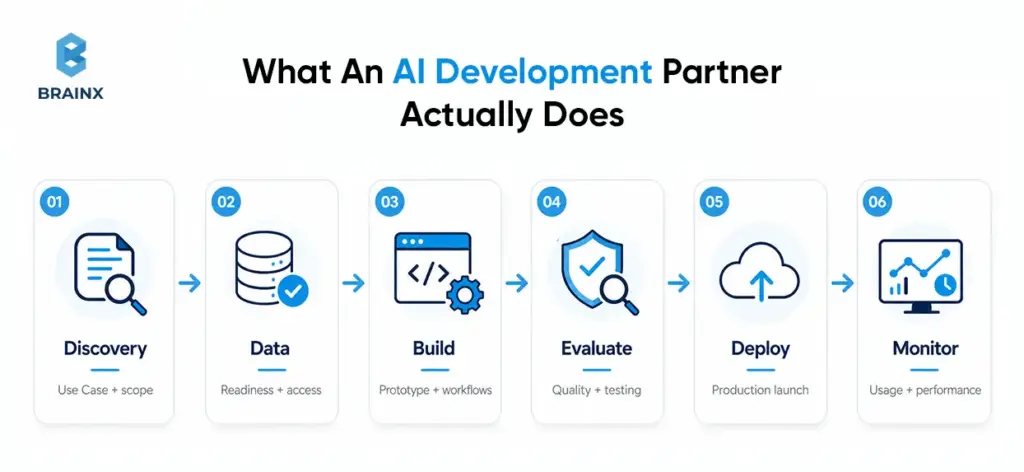
Typical Deliverables (PoC, MVP, Production-Grade AI)
The healthiest way to set expectations is by stage. A PoC should prove feasibility and define a baseline. An MVP should add a working workflow, clear success criteria, instrumentation, and a cost model. Production-grade AI should include deployment pipelines, runbooks, rollback paths, access controls, monitoring, and handover documentation. That is how you avoid the classic PoC trap: impressive output, no operational system.
The broader scope matters because the right operating model is easier to judge when you know what “delivery” actually includes at each stage. A simple way to make that concrete is to separate the work into three practical stages:
- PoC / Prototype: proves feasibility on sample data
- MVP: usable workflow integrated into a pilot environment
- Production AI System: scalable infrastructure, monitoring, maintenance, and handover
Engagement Models (Project Team, Dedicated Squad, AI Assisted Development Partner)
There are usually three practical models. A project team works best for narrow scope and fixed outcomes. A dedicated squad fits a multi-quarter roadmap with integrations and continuous improvement. An AI assisted development partner model sits in the middle: your internal leaders keep direction and decision-making authority while external specialists add the scarce delivery muscle around evaluation, architecture, and LLMOps.
An AI assisted development partner can also augment an internal team with architecture guidance, curated AI workflows, and co-development support rather than taking over the full build. We are making that distinction because many teams do not need full outsourcing. They need targeted acceleration around the parts of AI delivery that are hardest to hire for internally.
In-House AI Team: When It’s the Right Choice
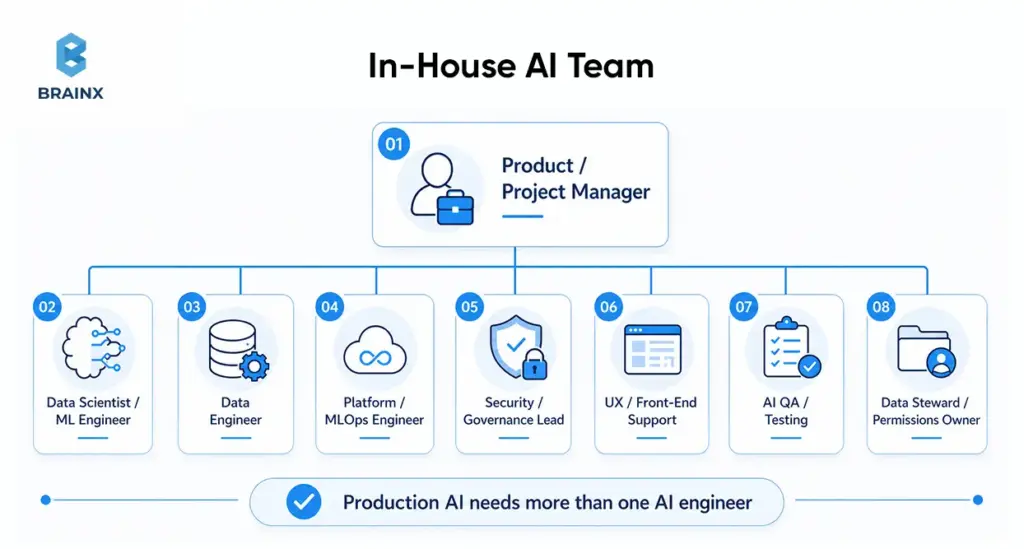
An in-house AI team is the right choice when AI is central to your product differentiation, tightly linked to proprietary workflows, or embedded in a regulated decision path you expect to own for years. The hiring challenge is real, though. The World Economic Forum says skill gaps are the biggest barrier to transformation for 63% of employers, while AI and big data remain the fastest-growing skills category.
Minimum Viable Roles (PM, DS/ML, Data Eng, Platform/MLOps, Security)
A realistic in-house setup usually needs more than one “AI engineer.” At minimum, most teams need a product owner or PM, applied AI or ML capability, data engineering support, platform or MLOps ownership, and security or compliance involvement.
The U.S. Bureau of Labor Statistics continues to project strong growth for data scientists, information-security analysts, software developers, database roles, and computer and information research scientists—all signs that the supporting roles around AI are not optional overhead, but part of the real staffing picture.
For user-facing AI products, teams often also need UX or front-end support, AI QA, and a data steward or permissions owner. This is where many teams underestimate the build. The challenge is not only finding AI talent. It is covering the surrounding operational roles that make the system usable in production.
A practical in-house team often includes:
- Product or Project Manager
- Data Scientist or ML Engineer
- Data Engineer
- Platform or MLOps Engineer
- Security or Governance Lead
- UX or Front-End Support for User-Facing Systems
- QA or Testing Support for AI Behaviors
- Data Steward or Custodian for Permissions and Access
And that staffing picture only tells part of the story. Even a well-hired team still has to support the systems around the model.
The Hidden Work: Data Pipelines, Evaluation Harnesses, Monitoring
The expensive part of AI often sits outside the model. The operational burden includes data ingestion, permissions, data quality, retrieval quality, prompt and model regression tests, observability, alerting, and incident response.
Google Cloud’s MLOps guidance explicitly treats automation and monitoring as required across integration, testing, release, deployment, and infrastructure management, while Microsoft’s guidance for generative AI emphasizes production telemetry and evaluation beyond the original build.
Without reliable dashboards, alerting, and rollback paths, even a promising system can decay after launch as data, usage patterns, or model behavior shift over time.
Common In-House Failure Modes
The pattern is familiar. The model looks strong in a notebook, then weakens under real permissions, data quality, latency budgets, and user behavior. Those gaps usually do not show up all at once. They appear as a series of predictable failure patterns once the work moves beyond the prototype phase.
Common failure modes include:
- Works In Notebook, Fails In Production
- Data Access Delays
- Lack Of Evaluation
- No Governance Or Unclear Ownership
- Burnout And Turnover
For a related internal read, BrainX’s IT Staff Augmentation in Software Development and Detailed IT Staff Augmentation Handbook are useful references for team-shape decisions once you know which roles truly need to stay internal.
AI Development Partner: When It’s the Better Move
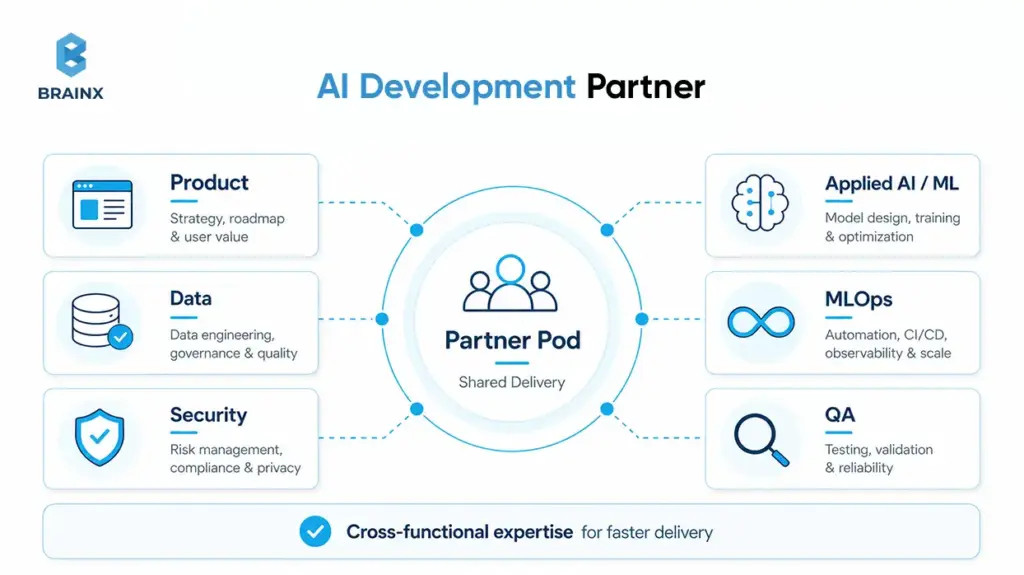
An AI development partner is usually the better move when the business needs speed, the use case is clearly valuable, and internal capacity is constrained. It is especially effective for SaaS teams that need to validate one or two high-value workflows before deciding whether permanent hiring is justified. Median tech hiring times remain long, and ML compensation is still materially above the average software hiring profile.
The strongest signal is usually not company size. It is the combination of urgency, internal bandwidth, and how much specialized capability the use case requires right now.
A partner-led model is especially useful when:
- deadlines are tight
- the work spans multiple AI disciplines
- you need temporary burst capacity
- predictable phased engagement is easier than immediate hiring
Speed To MVP And Faster Iteration Cycles
The biggest partner advantage is not lower hourly cost. It is the compression of time-to-value. A capable external team begins with reusable discovery formats, architecture patterns, evaluation templates, and sprint rituals. That matters when tech hiring alone can consume weeks before a team even starts learning.
Our public process emphasizes requirement gathering, risk evaluation, sprint-based delivery, testing, and post-launch support—exactly the pieces that shorten the path from idea to measurable baseline.
The speed advantage usually comes from reusable patterns, pre-built delivery workflows, and a team that can start learning immediately instead of spending months assembling capability. While that advantage becomes clearer once you look at what partners compress in the first place.
Access To Specialized Skills (LLMs, RAG, MLOps/LLMOps, Evaluation)
Most product teams do not already have deep expertise in retrieval tuning, agent evaluation, groundedness testing, tool-use validation, prompt regression, or model routing. A good partner brings those specialties together instead of forcing you to hire them one by one.
De-Risking Delivery With Established Playbooks
Partner-led delivery also reduces risk by bringing playbooks for discovery, architecture review, security controls, testing, and handover. That does not remove your internal obligations around access, approvals, or data cleanup, but it does lower the chance of avoidable mistakes. A strong partner should be able to explain when retrieval is enough, when fine-tuning is unnecessary, where human review belongs, and what “done” means in evaluation terms before anything reaches production.
AI Development Partner Vs In-House Team
If you are comparing an AI development partner with an internal team, the right answer depends less on ideology and more on operating context: do you need speed, long-term ownership, scarce specialist skills, or stricter control around regulated data? The matrix below is a practical synthesis of current hiring, MLOps, monitoring, and security guidance.
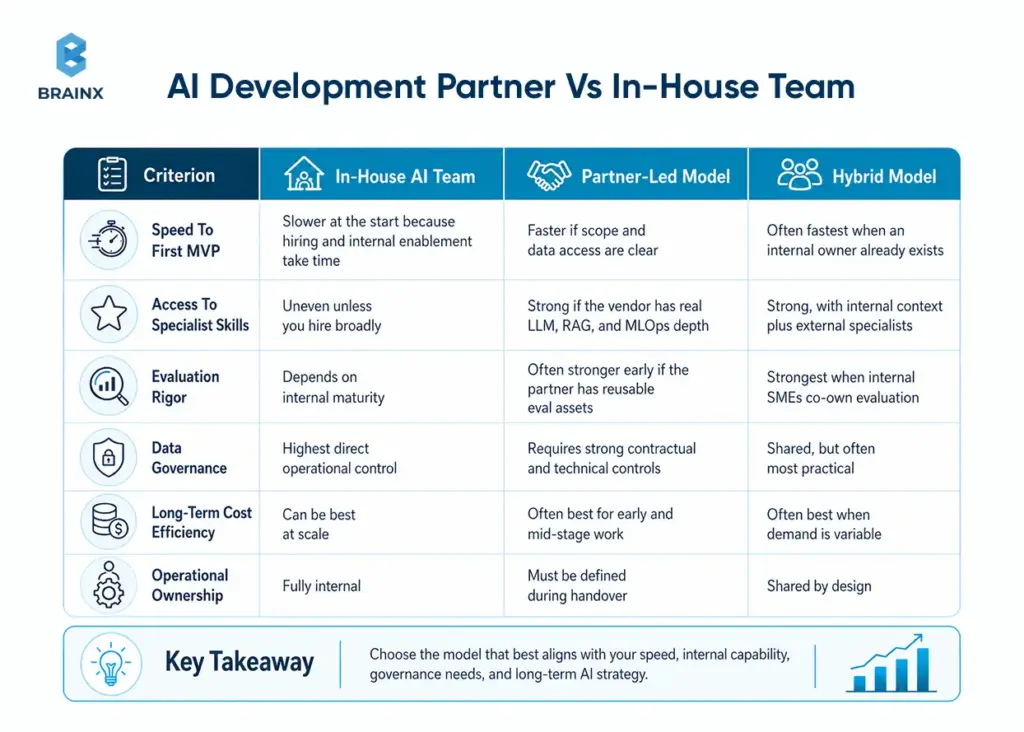
This comparison aligns with public guidance on tech hiring timelines, current specialist salary levels, the operational requirements in MLOps and GenAI monitoring, and the way AI infrastructure pricing compounds as usage grows.
It is also where many teams misread the economics. AI delivery costs rarely sit in one line item. It usually means budgeting not just for salaries or vendor fees, but also for recruiting time, cloud usage, data labeling, vector search, monitoring, software licenses, and ongoing maintenance.
What Are the Best Alternatives to LLMOps Consultancy vs In-House Team?
Hybrid co-sourcing, managed LLMOps platforms, fractional AI leadership, freelance AI architects, open-source LLMOps stacks, and automated AI tools or agents are the best alternatives to LLMOps consultancy vs in-house teams. These models are useful for businesses to consider when making decisions about their speed, cost, control and internal capacity in the long term.
A full in-house LLMOps team provides high control, but can be costly and time-consuming to establish. A traditional consultancy can provide fast expertise, but it may reduce internal ownership if knowledge transfer is weak. A middle-ground model is often a better idea for many companies, as it involves keeping strategy in-house while leveraging external expertise and platforms or automation as necessary.
Hybrid Co-Sourcing Or Embedded LLMOps Teams
Hybrid co-sourcing allows you to integrate external LLMOps experts into your current team. They collaborate with your developers, fit into your systems and processes, and support the development of systems within your own environment.
This is the preferred solution for companies that have engineers already in place but may not be very experienced with LLMOps. It enables quicker deliveries and allows internal teams to learn about RAG pipelines, model monitoring, evaluation workflows, deployment systems, and observability.
Best for: Companies that wish to have custom LLMOps infrastructure but do not wish to fully outsource ownership.
Managed LLMOps Platforms
Managed LLMOps platforms support teams to deploy, monitor, test, and scale LLM applications without having to manually build each infrastructure layer. These platforms may support prompt testing, model evaluation, observability, hosting, workflow orchestration, and data pipeline management.
They are useful for startups and mid-sized teams that need speed. The primary challenge is platform dependency, so it is important that companies should plan their architecture carefully.
Best for: Teams that want faster deployment and lower infrastructure complexity.
Fractional AI Leadership
You can have a fractional AI leader, AI architect, CTO or CAIO who can steer the strategy without being a full-time employee. This person helps with model selection, LLM governance, security planning, data architecture, evaluation standards, and implementation direction.
Suitable for: A company that has developers, but lacks experience in making senior AI decisions.
Freelance AI Architects
Freelance AI architects are useful for early planning, audits, vendor selection, and technical validation. They can be critical in determining if the company should implement RAG, fine-tuned models, open source models, managed platforms or custom infrastructure.
This is a good choice but can be insufficient for long-term execution.
Works for: Early-stage planning, architecture review, or technical audits.
Open-Source LLMOps Stack
An open-source LLMOps stack usually encompasses tools to trace, evaluate, manage prompts, orchestrate, monitor and manage model lifecycles. This provides more control and minimizes the vendor lock-in problem, but it does require that you have solid DevOps/engineering skills within your organization.
Best for: Technical teams that want ownership and flexibility.
Automated AI Tools And AI Agents
AI tools and agents can support testing, monitoring, alerting, evaluation, and repetitive operational tasks. They can decrease human workload but they are not meant to entirely replace humans.
Best for: Teams looking to automate the routine work of LLMOps while keeping humans in the loop.
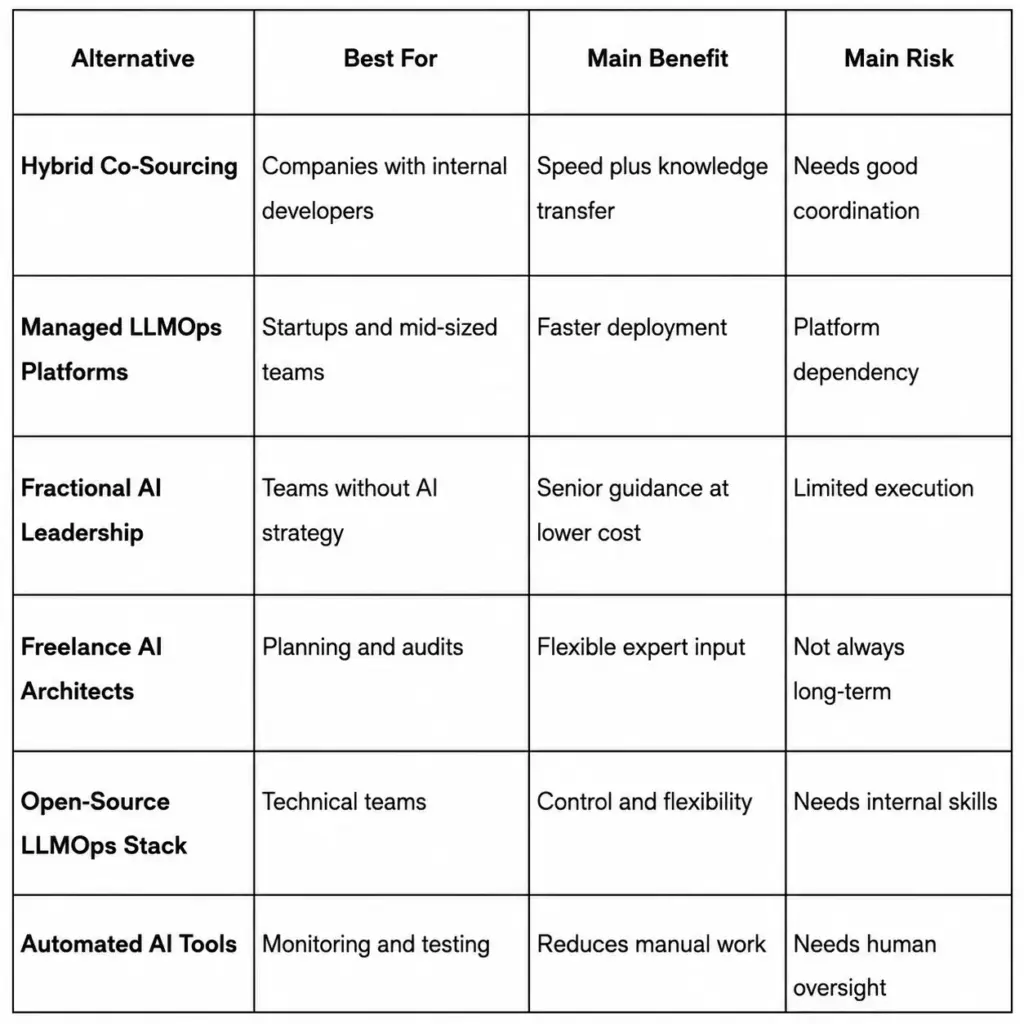
Once you understand these alternative options, the next step is to compare their real cost beyond headline rates, such as hiring time, tooling, infrastructure, monitoring and ownership over the long term.
Cost (TCO), Not Just Rates
Total cost of ownership should include recruiting time, compensation, management overhead, cloud spend, retrieval infrastructure, observability, experimentation, compliance, and maintenance. Current salary benchmarks still put mid-level ML engineers roughly in the low-to-high six figures and senior talent higher, while model, vector search, and observability vendors all layer usage-based costs on top.
Time-To-Value And Delivery Risk
Time-to-value in AI depends on more than coding speed. Environment readiness, clean data access, stakeholder alignment, and experiment velocity are usually the bigger variables. A partner can reduce risk because the team is already assembled, but no partner can erase delays caused by missing permissions, unclear KPIs, or slow internal sign-off.
Control, IP, And Security
In-house teams offer more direct day-to-day control, but partner-led work can still be secure and contractually clean if IP ownership, approved tooling, access rules, logging, retention, and secure SDLC expectations are documented up front. The AICPA frames SOC 2 against security, availability, processing integrity, confidentiality, and privacy, while ISO/IEC 27001 defines requirements for an information security management system. On the AI-specific side, Amazon Web Services guidance emphasizes least-privilege access across models, data stores, endpoints, and agent workflows.
Quality Evaluation, Testing, And Monitoring
AI quality is not “did the demo work.” It is whether the system meets offline metrics, human evaluation thresholds, regression tests, safety requirements, and production monitoring standards over time. NIST’s AI RMF centers this around govern, map, measure, and manage, while Microsoft’s current evaluator stack goes beyond output quality to tool selection, tool-call accuracy, groundedness, and task completion.
By this point, the pattern is usually clear: the real decision is rarely binary.
The Hybrid Model (Often The Best Answer)
For many SaaS businesses, the most practical answer is hybrid. Keep strategy, product vision, domain context, data stewardship, and governance inside the company. Add a partner pod to accelerate architecture, implementation, integration, and evaluation.
BrainX’s own team-model guidance makes the same distinction: direction can stay in-house while execution is extended externally with clear ownership for architecture, QA, and reporting.
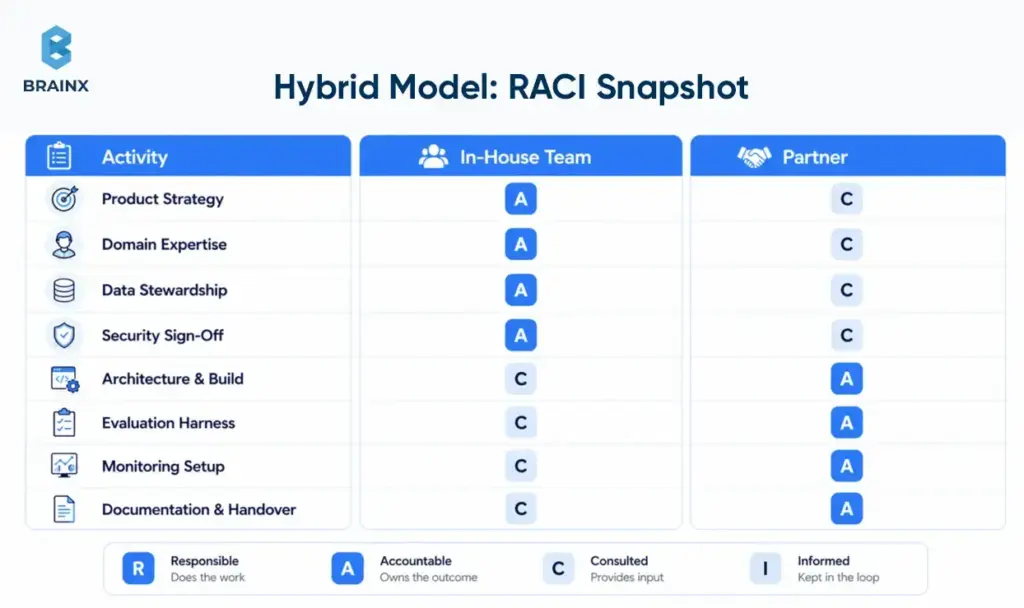
What To Keep In-House Vs Delegate To A Partner
Keep product strategy, customer understanding, domain nuance, data stewardship, legal review, and final security sign-off in-house. Delegate delivery acceleration, architecture spikes, evaluation harness setup, integration-heavy implementation, experimentation, and documentation support to the partner. That split preserves accountability without forcing the business to hire every niche role on day one.
How To Structure A “Partner Pod” Around Your Core Team
Make the operating model explicit. Assign one internal product owner, one technical owner, one data owner, and one executive sponsor. Establish weekly demos, a shared decision log, clear acceptance criteria, and a written handover plan. BrainX’s public process and team-model guidance both put documentation, evaluation instructions, and change management on the table—which is exactly what keeps hybrids from degrading into ambiguity.
How To Choose An AI Development Partner (Scorecard + Red Flags)
If your next step is figuring out how to choose an AI development partner, do not start with polished demos or portfolio screenshots. Start with delivery maturity. The real test is whether the vendor can explain how they frame the problem, validate quality, control model risk, and transfer operational ownership without creating permanent dependency.
A practical scorecard is simple: rate each vendor from 1–5 on domain fluency, data-security posture, evaluation maturity, architecture judgment, LLM/MLOps depth, delivery process, and handover quality. A team can be imperfect on one or two items, but anything weak on evaluation, security, or handoff should be treated as procurement risk.
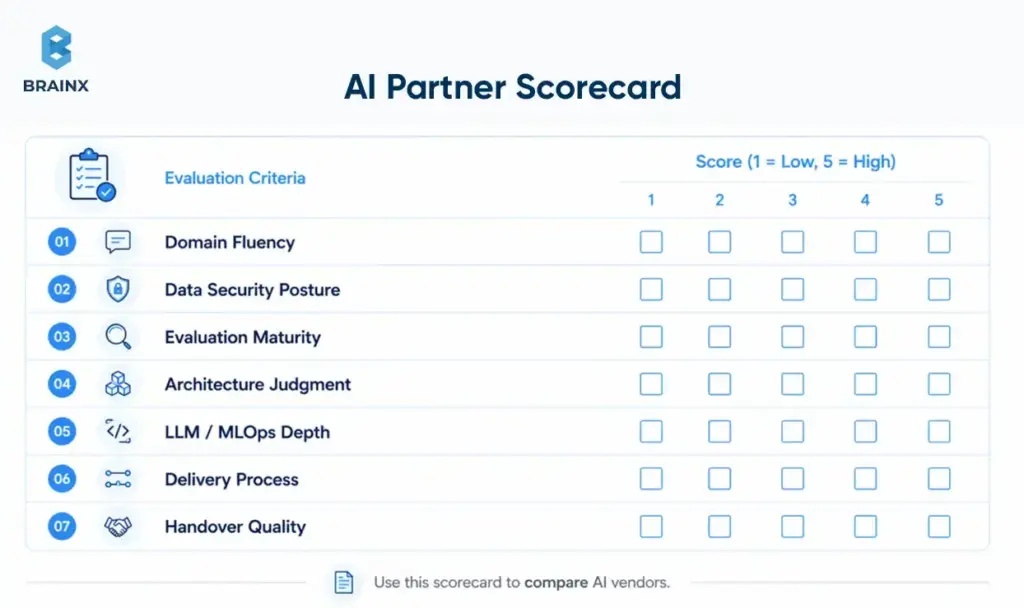
Technical Signals To Verify (Not Just Portfolio Screenshots)
Ask for architecture decisions, evaluation artifacts, monitoring examples, and incident-handling logic. A capable team should be able to show how they measured relevance or groundedness, how they test tool use, what telemetry they collect, and what rollback path they follow if quality or cost worsens after a release. Portfolio visuals do not answer any of those questions; evaluation and operations artifacts do.
Data & Security Questions (Must-Answer)
Ask where data is stored and processed, how PII is handled, which third-party tools are involved, who can access prompts and logs, how retention works, and whether vendor policies allow data exclusion from training or logging. This is not theoretical. OpenAI documents up to 30-day default abuse-monitoring retention for API usage, with modified or zero-data-retention controls for eligible customers, while Microsoft states that Azure OpenAI does not use customer data to retrain models and supports private networking. Those are the kinds of specifics your partner should already know and map to your environment.
You should also ask how the partner maps its controls to SOC 2 criteria, ISO/IEC 27001, least-privilege access, vendor approval processes, and your sector’s own compliance obligations. If the security conversation never gets more concrete than “we take privacy seriously,” move on.
Delivery Process Questions (Discovery → Build → Validate → Deploy)
Ask what happens before the build starts. What artifacts come out of discovery? What baseline is used for comparison? What evaluation set exists before prompting is tuned? What marks the MVP as ready? What documentation and runbooks are included at handover? Good teams can define a real “definition of done” for AI, not just a list of shipped tickets.
Red Flags
Red flags are usually obvious once you know what to look for: guaranteed accuracy with no evaluation plan, vague answers about data handling, no monitoring story, no rollback path, no named owner for post-launch support, and no explanation of how prompt or model changes are regression-tested. Another warning sign is a team that only talks about the model and never about the surrounding system, the threat model, or the operational lifecycle.
Implementation Plan: Your First 30–90 Days With A Partner (or Building In-House)
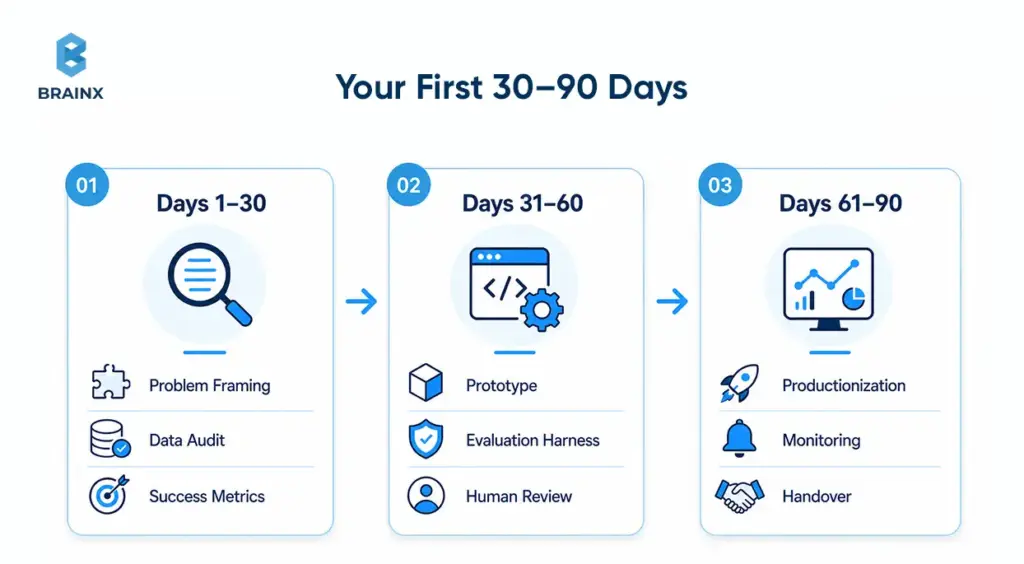
Once you choose a path, the first 90 days should reduce uncertainty in the right order. Whether you work with an AI development partner or build internally, the sequence should be: frame the problem, audit the data, define success, build the smallest useful baseline, then productionize only what has been validated. That order mirrors both BrainX’s public process and broader MLOps guidance.
Days 1–30 — Problem Framing, Data Audit, Success Metrics
Use the first month to define the workflow, business KPI, user path, data sources, risks, and decision-makers. Create the evaluation plan before writing much code. Identify which integrations, approvals, and security reviews could block progress. If nobody can state the success metric clearly, the build is not ready.
Days 31–60 — Prototype + Evaluation Harness
In the second phase, build the smallest workflow that can be measured against a baseline. Add tracing, guardrails, feedback capture, and human review where the cost of error matters. Microsoft’s current evaluator guidance is useful here because it pushes teams to assess not only answer quality, but also tool selection, tool accuracy, task completion, and groundedness.
Days 61–90 — Productionization (MLOps/LLMOps), Monitoring, Handover
Only after the baseline proves value should you harden the system. Add deployment discipline, alerting, access controls, SLAs where needed, support runbooks, regression testing, and a handover model. This is also where retraining or prompt-change ownership should be assigned explicitly if the use case requires frequent updates.
Cost & Budgeting: What This Decision Really Costs
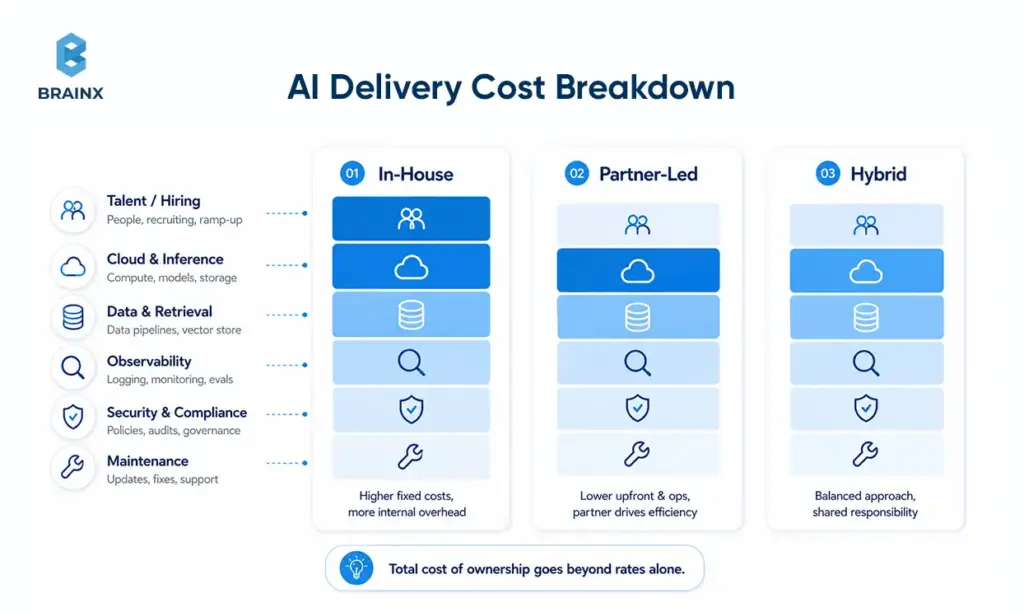
AI budgeting gets distorted when leaders focus on daily rates or token prices in isolation. In practice, the costs land across people, time, retrieval infrastructure, observability, security, and integration-heavy delivery. That is why even as the Stanford HAI AI Index documents sharp drops in inference cost over the last two years, real project budgets can still expand once usage, support, and operational discipline grow.
Key Cost Drivers In AI Projects
The big cost drivers are usually data labeling or cleanup, vector search, inference usage, observability, security controls, and integrations with the rest of your stack. Pricing pages from OpenAI, Azure AI Search, and Google Cloud Observability all show why: model usage is token-based or throughput-based, search scales with storage and throughput, and monitoring scales with data volume. Vendors such as Pinecone also add a dedicated retrieval cost layer for production applications.
Budget Ranges By Stage (PoC Vs MVP Vs Production)
As a directional planning heuristic—an inference from 2026 hiring benchmarks, tech recruiting timelines, cloud and model pricing, and BrainX’s own stage-based cost guidance—many SaaS teams budget roughly $25k–$75k for a narrow PoC, $75k–$200k for an MVP that reaches real users, and $200k+ for production AI with integrations, governance, monitoring, and handover. If the work involves regulated data, voice, complex retrieval, or heavy back-office integration, the range can move materially higher.
Common Mistakes To Avoid (In-House And Partner-Led)
The fastest way to waste AI budget is to treat the project like a normal feature build. The second fastest way is to hire or outsource before anyone has defined what “good” actually means in quality, risk, and operating terms.
Skipping Evaluation And Shipping “Demo AI”
A persuasive demo can hide weak reliability. If you do not define test sets, human-review criteria, failure thresholds, and business KPIs, you are not validating the product. You are reacting to anecdotes. Modern evaluator stacks exist because output quality alone is not enough.
Underestimating Data Readiness
Teams often assume they can “figure out the data later.” In reality, missing permissions, inconsistent source quality, fragmented knowledge bases, and weak taxonomy are among the most common reasons AI projects stall or underperform. AWS’s GenAI data guidance is blunt here: sensitive-data controls, governance, and data-quality discipline have to be built into the lifecycle early.
No Monitoring Plan (Quality, Drift, Cost)
If nobody is watching quality, latency, safety events, and cost after launch, users will discover production problems before your team does. That is expensive and avoidable. Google’s MLOps guidance and Microsoft’s monitoring playbook both treat telemetry as part of the system, not a nice-to-have add-on.
Unclear Ownership (Who Maintains What After Launch)
Many projects fail not because the MVP was bad, but because no one owns the system after release. Decide who owns prompts, vendors, regressions, incident response, and roadmap changes before handover. BrainX’s team-model and process documentation are helpful reminders that architecture docs, runbooks, evaluation instructions, and change management are part of the deliverable.
How BrainX Helps With AI Development Partner-Led Delivery
BrainX positions its AI offering around discovery, readiness, architecture, build, deployment, and ongoing support rather than around isolated model work. That is the right shape for buyers who want measurable progress without having to build every specialist capability internally from day one.
What You Get (Discovery, Build, Eval, Deploy, Handover)
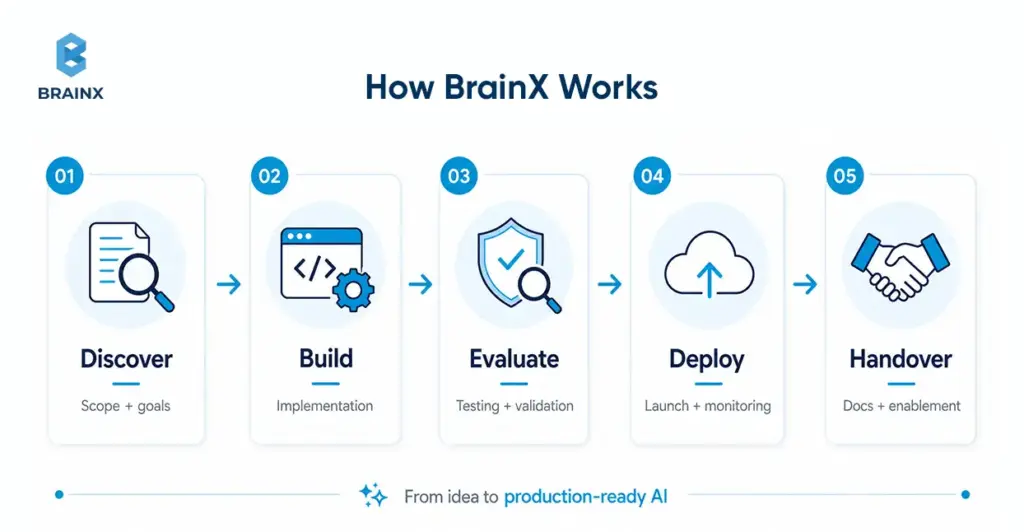
A credible partner-led engagement should include structured discovery, scoped architecture, implementation, evaluation, deployment planning, documentation, and handover support. On the BrainX side, the public AI pages explicitly include strategy and advisory, generative AI delivery, RAG, integration, and AI DevOps/MLOps—plus process pages that show requirement gathering, risk evaluation, testing, and launch support.
Typical Engagement Options (Pilot → MVP → Scale)
The most practical engagement path is staged: align on the problem, run a focused pilot, expand to MVP once evaluation is credible, then scale with tighter governance and operations. BrainX’s newer AI content and process pages describe that progression clearly, from discovery to PoC to MVP to production support.
Proof Points (Case Studies, Metrics, Testimonials)
The strongest proof is specific outcomes. BrainX’s Copyright Clinic case study states the platform enabled 24/7 AI triage and cut intake time by 80%. Another example is 15% beta-retention lift and a 4.6 App Store rating for the Ponder App, alongside our client’s feedback that emphasizes speed, testing, design, and QA support. Those are the kinds of signals buyers should look for in any vendor. Go for measurable outcomes and not just polished screenshots.
FAQs About Choosing an AI Development Partner
What is an AI development partner?
An AI development partner is an external team that helps a company move from use-case definition to data readiness, architecture, evaluation, deployment, and post-launch operations. The best partners do not just build a prototype. They help you ship something that can be measured, governed, and maintained.
Is an AI development partner cheaper than hiring an in-house AI team?
Often, yes in the first phase, but not always over the long term. If your roadmap is stable and AI becomes a core competency, internal hiring can become more efficient. If demand is variable or you need specialist skills quickly, partner-led delivery often lowers both cost and execution risk because you avoid long hiring cycles and immediate fixed headcount.
How do I choose an AI development partner for my industry (Healthcare/Fintech/Retail)?
If you are working through how to choose an AI development partner for healthcare, fintech, or retail, start with domain reality, not generic AI claims. In healthcare, ask about privacy, human review, and sensitive-data handling. In fintech, ask about auditability, access control, and failure modes. In retail, ask about integrations, search quality, experimentation cadence, and cost-per-query economics. Then verify that the partner can show relevant architecture and evaluation examples, not just sector logos.
What should I ask before signing with an AI assisted development partner?
Ask about data handling, evaluation methodology, monitoring, incident response, documentation, handover, model and vendor dependencies, and IP ownership. With an AI assisted development partner, the key question is not “Can you build it?” It is “Can you build it in a way my team can trust and operate later?”
How long does it take to build an AI MVP with a partner vs in-house?
A partner can often start discovery immediately because the team is already assembled, while internal teams may spend weeks on hiring and enablement first. Actual build time still depends heavily on data access, environment readiness, and stakeholder alignment, but partner-led MVPs usually reach a measurable baseline faster when the use case is already defined.
How do IP, Data Privacy, and Security work when partnering on AI development?
The right answer is contractually and technically, before work begins. IP ownership, data retention, logging, approved vendors, encryption, access control, model-training restrictions, and handover obligations should all be documented. Use SOC 2 and ISO/IEC 27001 as baseline control language, then add AI-specific requirements around least privilege, prompt and log access, residency, and vendor-specific data controls.
TL;DR / Key Takeaways
- An AI chatbot development company in 2026 should deliver more than a chat UI: LLM architecture, data grounding (RAG), integrations, security, evaluation, and LLMOps.
- “Enterprise chatbot” success depends on LLM governance: access control, audit logs, monitoring, red-teaming, and safe failure modes.
- The biggest ROI comes from ticket deflection, faster resolution, improved agent productivity, and internal knowledge access, but only when you track the right KPIs.
- Most failures come from underestimating data readiness, identity/permissions, integration complexity, and hallucination risk.
- A strong partner helps you choose the right approach (RAG vs fine-tuning vs agents), avoid compliance gaps, and ship incrementally without locking you into a single model/provider.
- If you want a low-risk start, run a short assessment/workshop → pilot scope → measurable rollout plan.

Enterprise AI initiatives are no longer judged by how impressive a demo looks. They are judged by whether they work reliably in production, respect governance requirements, and create measurable business value.
The said shift is happening fast. McKinsey’s 2025 global survey found that 88% of organizations now use AI in at least one business function, up from 78% a year earlier. It also found that 71% report regular generative AI use, up from 65% in early 2024.
In customer service, the pressure is even clearer. Intercom reports that 82% of senior leaders invested in AI for customer service in 2025, and 87% plan to invest again in 2026. Yet only 10% say their deployment is mature and operating at scale
Deloitte’s 2026 AI report adds another signal. Worker access to AI rose by 50% in 2025, and the share of companies with 40% or more of AI projects in production is expected to double within six months.
That’s why more teams are moving from “let’s try a chatbot” to “we need an AI chatbot development company that can ship an enterprise-grade assistant with governance, integrations, and evaluation built in”.
In 2026, the stakes are higher. Regulatory scrutiny is tighter, security teams are less tolerant of shadow AI, and business leaders expect real ROI, not pilot theater. If you’re a startup founder scaling support, a product manager building AI into the roadmap, or an enterprise IT leader modernizing service delivery, the key shift is this: a chatbot is now an operational system. Treat it like one, or it can fail like one.
What an AI Chatbot Development Company Actually Does (in 2026)
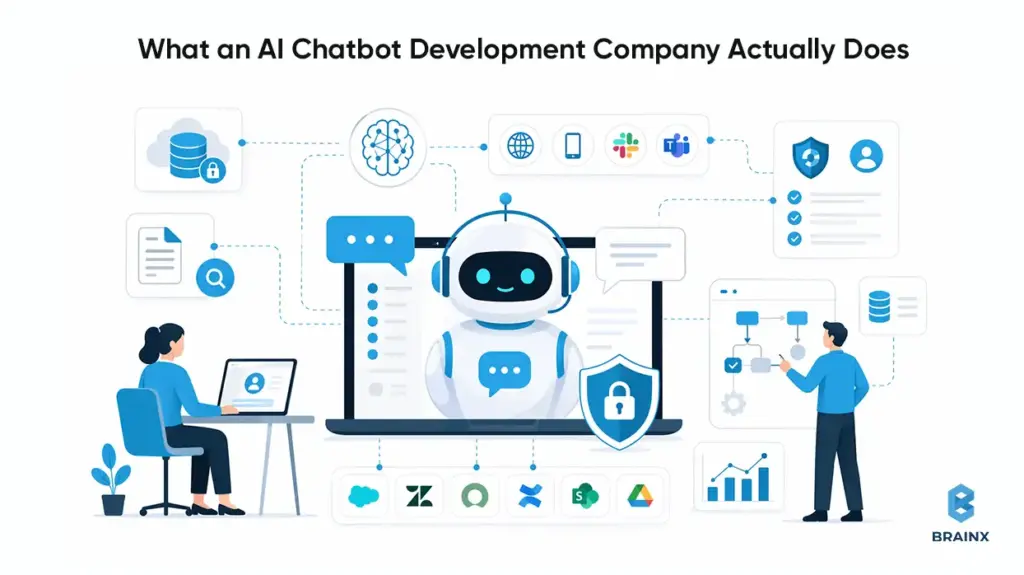
In 2026, an AI chatbot development company is closer to a product engineering partner than a “chat widget” vendor. The work spans strategy, architecture, security, evaluation, and operationalization—because the assistant becomes part of your customer experience and internal operating model.
A capable AI based chatbot development company starts by aligning the chatbot with business outcomes (deflection, conversion, cycle time reduction), then designs how the assistant will access knowledge and take actions. That includes decisions like RAG vs fine-tuning, whether to add tool-using agents, and what guardrails to enforce.
The enterprise-grade part is the unglamorous part: identity, permissions, logging, monitoring, and compliance. Most pilots fail at the handoff from demo to production because teams don’t plan for multi-system integration (CRM, ticketing, IAM, data warehouses) and continuous evaluation.
Finally, a production partner owns rollout mechanics: staged launches, fallbacks to humans, analytics, and iteration loops. The goal is not to “launch a chatbot,” but to run an assistant that improves over time without breaking trust.
Typical Deliverables
Enterprises should expect a clear set of artifacts and system components—not a vague promise of “LLM magic.” Common deliverables include:
Solution architecture
- LLM selection rationale (quality, latency, data handling)
- RAG pipeline design (indexing, chunking, retrieval, reranking)
- Agent/tooling design where relevant (function calling, workflow steps)
Integration deliverables
- CRM/ticketing integrations (e.g., Salesforce, Zendesk, ServiceNow)
- Knowledge source connectors (Confluence, SharePoint, Google Drive, wikis)
- Channel integrations (web, mobile, Slack/Teams, IVR handoff where needed)
Governance and security
- SSO integration, RBAC/ABAC mapping to enterprise identity
- Audit logs and data retention policies
- Prompt injection controls, DLP scanning, and safe content filters
Evaluation and analytics
- Offline test sets and regression evaluation harness
- Production monitoring dashboards (latency, cost, quality signals)
- Analytics for intents, containment, handoff reasons, and feedback loops
Operational runbooks
- Incident response, model/provider failover strategy
- Content update workflows and index refresh policies
- Versioning for prompts, policies, and retrieval configuration
These deliverables reduce operational risk. They also make your assistant maintainable when business rules, systems, or compliance requirements change.
Roles Involved
A production build needs cross-functional ownership. If your vendor says “two engineers can do it,” you’re likely looking at a PoC factory, not an enterprise delivery team.
Typical roles include:
- Product manager / product owner to define scope, constraints, success metrics, and rollout gates.
- Solution architect to design integration patterns, identity flows, and environment topology.
- ML/LLM engineers to implement RAG, agent patterns, and evaluation harnesses.
- Backend engineers to build API layers, orchestration services, caching, and tool endpoints.
- Frontend engineers for chat UX, channel-specific constraints, and accessibility.
- Security engineer to drive threat modeling, DLP, secrets management, and auditability.
- QA engineers for functional testing plus adversarial testing (jailbreak attempts, prompt injection).
- DevOps/LLMOps to manage CI/CD, monitoring, model gateway policies, and cost controls.
The point is not to add process overhead. It’s to ensure the assistant behaves like an enterprise system with predictable failure modes.
Also Read : Revamping Customer Experiences With AI Chatbots in 2026
What Enterprises Should Expect vs What Vendors Often Oversell
Enterprises should expect:
- A documented approach to grounding (RAG), evaluation, and monitoring.
- Clear security boundaries: where data flows, what is stored, and how it’s protected.
- Integration depth: “read + write” workflows, not just Q&A over PDFs.
- A plan for ongoing operations: model updates, regression tests, cost tuning.
What vendors often oversell:
- “Hallucination-free” chatbots. That’s not a real guarantee; the goal is measurable reduction + safe behavior under uncertainty.
- “We fine-tune and it will learn your business.” Fine-tuning doesn’t automatically solve factual accuracy, permissions, or compliance.
- “One-week implementation.” You can deploy a UI quickly, but you can’t responsibly productionize identity, governance, and evaluation in a week for an enterprise.
- “Works with all your tools out of the box.” Real integrations involve permissions mapping, edge cases, audit trails, and operational ownership.
In 2026, enterprises win by choosing partners who are explicit about constraints, tradeoffs, and operating requirements.
Why Enterprises Need an AI Chatbot Development Company in 2026 (Not Just a Tool)
Buying a chatbot tool can be a reasonable starting point. But in 2026, most enterprises discover that “tooling” doesn’t cover the hard parts: data access control, integration reliability, governance, and measurable ROI. That’s where an AI chatbot development company becomes a necessity rather than a nice-to-have.
The biggest driver is risk. An assistant that gives incorrect policy guidance, leaks sensitive data, or takes the wrong action can create real financial and reputational impact. Security teams want provable controls, not just vendor assurances.
The second driver is competitiveness. Customers increasingly expect high-quality self-serve resolution. Employees expect instant access to internal knowledge. If your organization can’t provide that, you’ll feel it in support costs, churn risk, and internal throughput.
The third driver is execution speed. Enterprises that treat assistants as “a side experiment” get stuck in pilots. A delivery partner helps you ship incrementally while keeping the system production-ready from day one.
The Shift From “Chatbots” to “AI Assistants” and “Agentic Workflows”
The term “chatbot” undersells what modern systems do. In 2026, the dominant pattern is assistant + tools:
- The assistant answers questions grounded in enterprise data.
- It executes workflows by calling APIs (create ticket, update order, request approval).
- It routes to humans with context when confidence is low.
- It adapts to role and permissions (employee vs manager vs contractor).
This shift matters because it changes architecture. You’re no longer building a conversational FAQ. You’re building a system that can trigger real business actions—and therefore needs the same rigor as any other production automation.
Agentic workflows also introduce new failure modes: partial completion, tool errors, permission mismatches, or ambiguous user intent. A strong partner designs guardrails (confirmation steps, scoped actions, idempotency, and audit trails) so automation remains safe.
The Hidden Enterprise Requirements
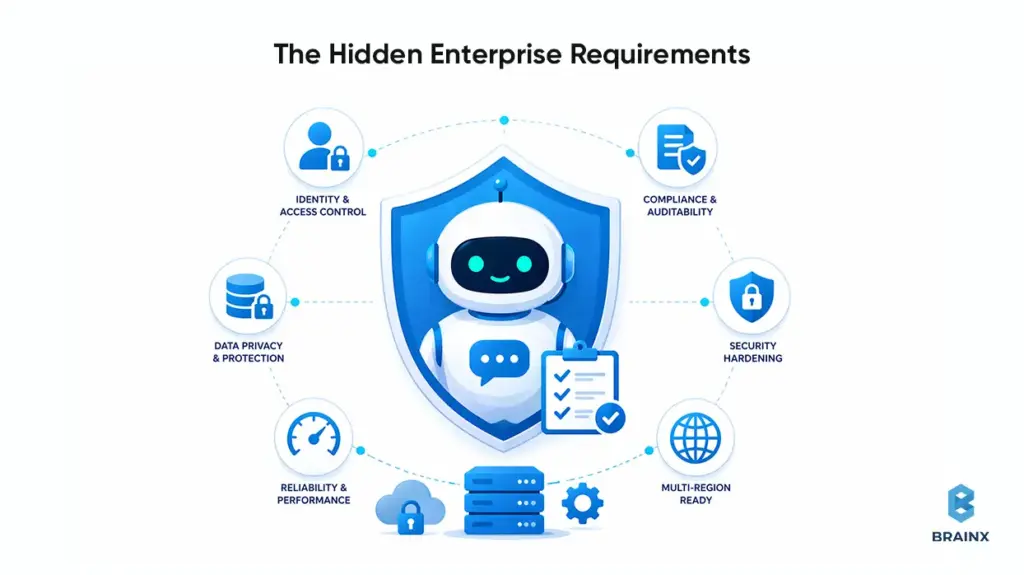
The “hidden” work is what separates an enterprise assistant from a prototype. Typical requirements include:
Identity and access control
- SSO (SAML/OIDC), SCIM provisioning, RBAC/ABAC enforcement
- Permission-aware retrieval (the assistant can’t retrieve what the user can’t access)
Compliance and auditability
- Audit logs for queries, tool calls, data sources, and admin changes
- Retention policies aligned with legal requirements
Security hardening
- Prompt injection defenses (content scanning + sandboxed tool execution)
- DLP controls and secrets management
Reliability and performance
- Latency budgets for interactive UX
- Rate limiting, caching, and fallback behaviors
- Multi-region considerations for global enterprises
Many SaaS tools cover some of these. Few cover them in a way that matches your internal security posture, legacy systems, and governance model.
The Opportunity Cost of Slow Adoption
Slow adoption isn’t neutral—it’s a compounding cost.
Externally, slow adoption shows up as:
- More tickets per customer as your product surface area grows
- Higher cost-to-serve, especially for repetitive “how do I” issues
- Slower response times that reduce CSAT and increase churn risk
Internally, slow adoption shows up as:
- Engineers and IT teams spending time answering repeat questions
- HR and Ops teams acting as “human routers” for policy interpretation
- Longer onboarding cycles and slower resolution of routine requests
In 2026, the winners aren’t the companies with the flashiest demos. They’re the ones that operationalize assistants with governance and iterate based on measurable outcomes.
Business Value: Where Enterprise AI Chatbots Deliver Measurable ROI
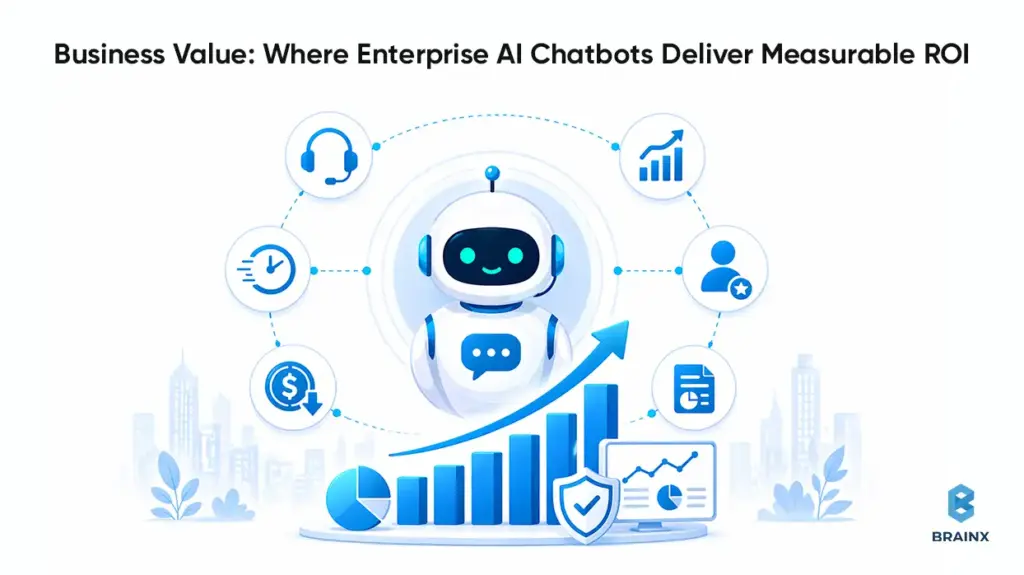
If you want executive sponsorship, you need ROI you can defend. The good news is that enterprise chatbots map cleanly to measurable metrics—if you instrument them properly and avoid vanity numbers like “messages sent.”
The most common ROI path is straightforward: reduce human workload on repetitive interactions, shorten time-to-resolution, and improve self-serve completion. But to claim those outcomes, you need baseline data (ticket volumes, AHT, cost per contact) and a measurement plan that separates “handled by bot” from “deflected but unresolved.”
Enterprises also underestimate second-order value: faster onboarding, fewer escalations, and better knowledge reuse. Those benefits don’t always appear in a single dashboard, but they show up in throughput and cycle times when tracked consistently.
External-Facing
External assistants typically drive ROI in three buckets:
Customer Support Deflection and Containment
- Deflection: user resolves without creating a ticket
- Containment: ticket is created, but bot resolves without human agent involvement
- Primary levers: better retrieval, better intents, better handoff rules
Sales Enablement
- Pre-qualify leads, answer product questions, route to the right rep
- Capture structured attributes (company size, use case, timeline) for CRM
- Reduce time-to-first-response and improve conversion rates on inbound
Onboarding
- Guided setup steps, troubleshooting, “what’s next” recommendations
- Fewer onboarding calls for common configuration issues
- Better activation rates when the assistant is embedded in-product
For startups, these use cases often prevent support headcount from scaling linearly with users. For enterprises, they reduce cost-to-serve and improve customer experience consistency.
Internal-Facing
Internal assistants are frequently the fastest path to adoption because the organization controls the channels and data sources. Common wins include:
IT Helpdesk
- Password reset guidance, VPN troubleshooting, device policies
- Ticket creation with context: device type, OS, screenshots/logs
- Integration into ServiceNow/Jira for routing and status updates
HR and Policy Q&A
- PTO policy interpretation, benefits enrollment steps, travel policies
- Permission-aware responses (manager vs employee vs contractor)
- Strong need for grounding + citations to policy sources
Knowledge Search
- Faster access to SOPs, runbooks, incident postmortems, architecture docs
- Reduced interruptions to SMEs
- Measurable through reduced time-to-answer and fewer internal tickets
Internal assistants also act as a forcing function to improve documentation quality and access control hygiene—which helps beyond AI initiatives.
Also Read: 9 Step Guide on How to Use Generative AI for Your Business
KPIs That Matter
A CFO-friendly KPI set should include both efficiency and quality:
Efficiency Metrics
- Deflection rate (self-serve resolution rate)
- Containment rate (resolved without human after contact)
- Average handle time (AHT) reduction for assisted agents
- Cost per ticket/contact reduction
- Ticket backlog reduction or throughput increase
Quality and Trust Metrics
- CSAT (or internal satisfaction proxy)
- First-contact resolution rate
- Escalation rate due to wrong answers
- Hallucination/error rate on a curated evaluation set
- Citation coverage (how often answers include verifiable sources)
Adoption Metrics
- Weekly active users (WAU) by persona
- Repeat usage rate (retention)
- Top intents by volume and success rate
- Handoff reasons (no data, low confidence, policy restricted)
At this point an enterprise AI chatbot development company adds value as they help you define these metrics upfront and build instrumentation so you can improve what actually matters.
Enterprise Use Cases to Prioritize in 2026 (With Quick Wins vs Strategic Bets)
Picking the right starting point is often more important than picking the “best model.” In practice, enterprises succeed when they start with a use case that has:
- High volume and repeatability
- Clear success criteria
- Known data sources and owners
- A safe failure mode (human handoff, read-only answers)
An enterprise AI chatbot development company can help you structure the roadmap as a portfolio: quick wins that pay for themselves, and strategic bets that unlock deeper automation over time.
A useful way to prioritize is to map use cases on an Impact vs Complexity matrix. Complexity is usually driven by integration depth, permissions, and compliance, not by the UI.
Tier 1 (Quick Wins): Support Deflection + Knowledge Base Assistant (RAG)
Tier 1 is where most enterprises should start in 2026. It’s the cleanest ROI with manageable risk.
Typical Tier 1 scope:
- RAG over curated knowledge sources (help center, internal KB, SOPs)
- Strong citations (“answer + sources”) to improve trust
- Clear boundaries (what the assistant will not answer)
- Human handoff rules and intent routing
Key implementation details that matter:
- Index only approved content; don’t “vacuum up” everything
- Use permission-aware retrieval for internal content
- Build an evaluation set from real historical tickets/questions
- Add feedback capture at the answer level (thumbs up/down + reason)
Tier 1 tends to deliver value quickly because it targets repetitive questions and reduces time spent searching.
Tier 2: Workflow Automation (Ticket Creation, Refunds, Order Status, Approvals)
Tier 2 adds write actions. This is where you start seeing bigger operational leverage—but also higher risk.
Examples:
- Create or update support tickets with structured fields
- Retrieve order status and initiate returns/refunds (with confirmations)
- Approvals workflows (access requests, purchase requests, policy exceptions)
- Account changes that require identity verification steps
Key design requirements:
- Confirmations before irreversible actions
- Idempotency keys and retries for tool calls
- Audit logs that record the user intent and tool execution result
- Permission checks at the tool layer, not only in prompts
This tier benefits from partner experience because the failure modes are often integration- and workflow-related, not “LLM intelligence.”
Tier 3: Agentic Copilots (Multi-Step Tasks, Tool Use, Cross-System Actions)
Tier 3 introduces more autonomy: multi-step planning, tool selection, and cross-system orchestration. This is powerful, but it needs tight guardrails.
Examples:
- “Resolve my VPN issue” → gather context → run diagnostics → update ticket → propose fix
- “Prepare a renewal risk summary” → pull CRM notes → query usage metrics → draft summary
- “Onboard this employee” → create accounts → request approvals → assign training modules
Enterprise considerations:
- Scoped tool access per persona (least privilege)
- Sandboxed execution and explicit action policies
- Strong observability: traces for planning + tool calls
- Regression testing across workflows, not just responses
Tier 3 is usually a “strategic bet.” It can create meaningful differentiation, but only when Tier 1 and Tier 2 foundations are stable.
Industry Snapshots
Different industries prioritize differently based on compliance and workflow patterns:
SaaS
- Tier 1: in-product support + onboarding guidance
- Tier 2: ticket enrichment, account changes, usage-based troubleshooting
- Tier 3: customer success copilot pulling CRM + product telemetry
Fintech
- Tier 1: policy + FAQ with strict compliance/citations
- Tier 2: dispute workflows, account status checks (with identity verification)
- Tier 3: internal compliance copilot with auditable outputs
Healthcare
- Tier 1: internal policy/SOP assistant with strict access control.
- Tier 2: scheduling workflows (within compliance boundaries)
- Tier 3: clinician admin copilots (documentation support) with governance
Retail
- Tier 1: order status, returns policy, product Q&A
- Tier 2: returns/refunds automation and customer identity checks
- Tier 3: supply chain and merchandising copilots using tool access
Manufacturing
- Tier 1: maintenance SOP assistant + safety documentation retrieval
- Tier 2: work order creation and parts availability checks
- Tier 3: incident response copilots integrating CMMS + inventory systems
An experienced partner helps you pick the first use case that fits your data reality and governance maturity—not just what looks impressive.
How Modern Enterprise AI Chatbots Work (Architecture Options)
Architecture is where most enterprise chatbot programs succeed or fail. The key is choosing patterns that map to your data constraints, compliance needs, and maintenance capacity.
In 2026, you’ll typically choose among three core patterns—often combined:
- RAG for knowledge grounding (most common)
- Fine-Tuning for style or narrow behaviors (less common than many assume)
- Tool-Using Agents for workflows and actions (high leverage, higher risk)
Enterprises also need a backbone: identity, audit logs, monitoring, DLP, rate limiting, and environment separation. Without that, the assistant is a liability.
Pattern A: RAG (Recommended Default for Enterprise Knowledge)
Retrieval-Augmented Generation (RAG) is the default recommendation for enterprise assistants because it grounds answers in your approved sources without needing to retrain a model.
A typical RAG flow:
- The user asks a question.
- The system retrieves relevant chunks from indexed sources (based on embeddings + filters).
- Optional reranking improves relevance.
- LLM answers using retrieved context and returns citations.
What makes RAG enterprise-ready:
- Permission-aware retrieval (filter results by user identity and document ACLs)
- Source-of-truth citations (links to Confluence pages, policy docs, tickets)
- Indexing governance (approved collections, update cadence, content ownership)
- Evaluation (test set aligned to real user intents)
RAG reduces hallucinations relative to unguided generation, but it’s not automatic. Retrieval quality, chunking strategy, and prompt constraints matter.
Pattern B: Fine-Tuning (When It Helps and When It Doesn’t)
Fine-tuning can be useful, but it’s often misapplied.
It helps when you need:
- Consistent structured outputs (e.g., specific JSON schemas)
- Domain-specific phrasing or classification behavior
- Narrow task performance improvements with stable requirements
It does not automatically solve:
- Factual accuracy on changing enterprise knowledge
- Permissioning and data access control
- Compliance auditability and retention
- Tool execution safety
In many enterprise scenarios, fine-tuning is unnecessary if you have good RAG, strong system prompts, and a reliable evaluation loop. If you do fine-tune, treat it as a software release: version it, test it, and plan rollback.
Pattern C: Tool-Using Agents (Actions, Workflows, Guardrails)
Tool-using agents connect the assistant to APIs so it can take actions. This is where assistants become operationally meaningful.
A robust agent design includes:
- Tool registry with strict schemas and permission gating
- Policy layer controlling which tools can be used in which contexts
- Confirmation flows for destructive or sensitive actions
- Execution logs that capture tool inputs/outputs for auditing
- Fallback behaviors when tools fail or return partial data
Guardrails matter more than intelligence. An agent that can do fewer things safely is more valuable than one that can do many things unreliably.
The Enterprise Backbone
Regardless of pattern, enterprise deployments need baseline platform capabilities:
SSO + RBAC/ABAC
- Authenticate users and enforce role-based access to tools and documents
Audit logs
- Track prompts, retrieved sources, tool calls, and admin changes
Monitoring & alerting
- Latency, error rates, cost per conversation, drift in answer quality
DLP
- Detect and block sensitive data exfiltration
- Redact PII in logs where required
Rate limiting + cost controls
- Prevent abuse, manage spend, and ensure predictable performance
Environment separation
- Dev/stage/prod with distinct keys, policies, and data boundaries
An enterprise AI chatbot development company should implement this backbone as a first-class requirement, not an afterthought.
Build vs Buy vs Partner – The 2026 Decision Framework
Enterprises usually debate this too late—after a pilot. In 2026, you’re better off deciding upfront what you’re optimizing for: speed, differentiation, control, or compliance.
“Buy” is attractive because it’s fast. “Build” sounds attractive because it’s controllable. “Partner” is often the most pragmatic path when you need enterprise-grade delivery without rebuilding everything from scratch.
If your goal is to pick the best AI chatbot development company, define “best” in terms of your constraints: integration depth, security posture, delivery maturity, and measurable outcomes—not marketing claims.
When SaaS Chatbot Platforms Are Enough
SaaS platforms can be enough when:
- The use case is mostly Tier 1 Q&A over public or low-risk content
- You don’t need deep custom integrations or complex permissions
- Your compliance requirements are modest or already met by the vendor
- You can accept vendor constraints on logging, evaluation, and architecture
Even then, you’ll want to validate:
- How the platform handles data retention and model training defaults
- Whether you can export logs and analytics
- How identity and permissioning is implemented (if at all)
- How you evaluate and regression-test changes
SaaS can be a good starting point, but enterprises often outgrow it when they add workflows or strict governance.
When In-House Makes Sense (and What It Truly Costs)
Building in-house makes sense when:
- The assistant is a strategic differentiator embedded into core product workflows
- You have strong platform engineering, security, and ML/LLM expertise
- You can staff ongoing operations (LLMOps, eval maintenance, monitoring)
- You need maximum control over architecture and vendor exposure
But “in-house” costs more than engineering time. It includes:
- Building and maintaining evaluation harnesses and test datasets
- Security review cycles, threat modeling, compliance documentation
- On-call ownership and incident response
- Ongoing iteration as models, providers, and best practices change
If you don’t budget for operations, an internal build becomes fragile quickly.
When Partnering Wins (Speed, Risk Reduction, Integration Depth)
Partnering often wins when:
- You need production results in a predictable timeframe
- You have complex integrations (ServiceNow, SAP, Salesforce, custom IAM)
- You need governance and compliance alignment from day one
- Your internal team wants to own the product but not reinvent the delivery playbook
A partner can accelerate:
- Architecture decisions (RAG vs agent patterns)
- Security design (prompt injection mitigations, DLP, auditability)
- Evaluation maturity (test sets, red-teaming, regression gates)
- Integration implementation (tooling, orchestration, reliability engineering)
In other words, partnering reduces execution risk while still allowing you to retain ownership of outcomes and IP—if your contract is structured correctly.
What It Takes to Implement Enterprise Chatbots Successfully (Step-by-Step)
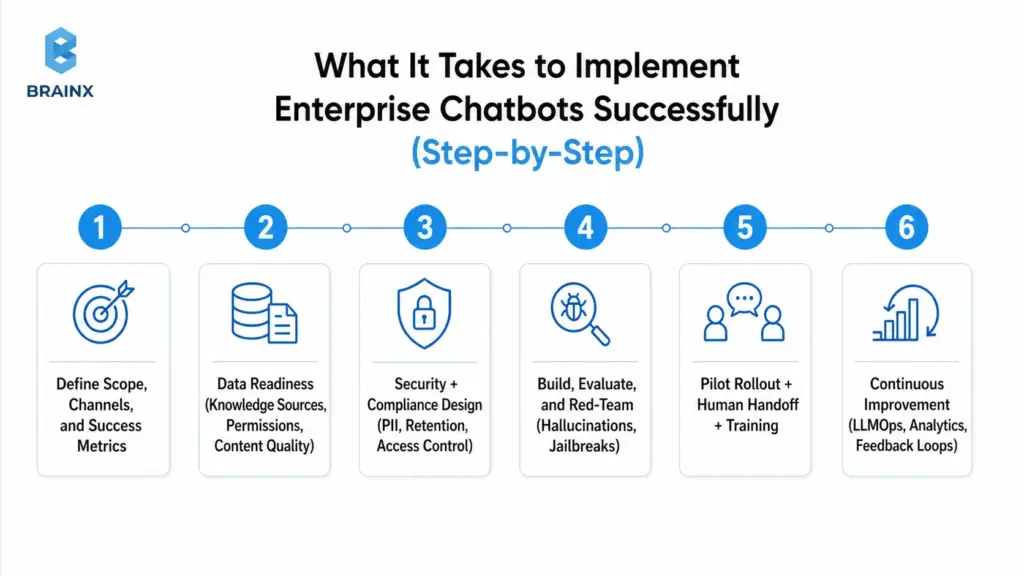
Enterprise assistants fail when teams jump from “we have a model” to “let’s launch.” Implementation needs a roadmap that includes governance, change management, and measurable success criteria.
In practice, the highest-leverage move is to treat the assistant like a product: define personas, design workflows, build an evaluation harness, and roll out in controlled stages.
The steps below reflect what we typically see work for enterprises that need reliability and auditability—without getting stuck in analysis paralysis.
Step 1: Define Scope, Channels, and Success Metrics
Start with clarity, not capabilities.
Define:
- Primary personas (customers, agents, employees, managers)
- Channels (web, in-app, Slack/Teams, email, voice handoff)
- Top intents (based on ticket data, search logs, call drivers)
- Success metrics and thresholds (deflection, CSAT, resolution time)
- Non-goals (topics you will not answer; actions you will not take)
Also define what “good” looks like for failure modes:
- When to handoff to human
- How to signal uncertainty (“I don’t know” behavior)
- How to cite sources or request clarification
Step 2: Data Readiness (Knowledge Sources, Permissions, Content Quality)
Most enterprise assistants are limited by content quality and access control, not model intelligence.
Data readiness includes:
- Identifying authoritative sources (KB, SOPs, product docs, policies)
- Removing or flagging outdated/conflicting documents
- Establishing content ownership and update workflows
- Designing chunking and metadata strategies (department, product, region, effective date)
- Implementing permission mapping (document ACLs aligned with SSO identities)
If you skip this, RAG retrieval will return the wrong context, and the assistant will confidently answer incorrectly.
Step 3: Security + Compliance Design (PII, Retention, Access Control)
Security design should be explicit and testable.
Key decisions:
- What data can be sent to the model provider, and under what terms
- Whether prompts/responses are stored, and for how long
- How PII is detected/redacted (in logs and analytics)
- How user identity is propagated to retrieval and tool layers
- How admin actions are logged and reviewed
This is also where you align with internal policies and external frameworks.
Step 4: Build, Evaluate, and Red-Team (Hallucinations, Jailbreaks)
Evaluation is not optional in 2026. If you can’t measure correctness and safety, you can’t responsibly ship.
A practical approach:
- Build an offline evaluation set from real tickets/questions
- Create expected answers and acceptable sources/citations
- Run regression tests on:
- retrieval quality (did we pull the right documents?)
- answer quality (is it correct, complete, and within policy?)
- safety (does it refuse restricted requests?)
- Red-team for:
- prompt injection attempts (malicious content inside retrieved docs)
- jailbreak prompts (trying to override system policies)
- data exfiltration attempts (asking for secrets, internal-only content)
Red-teaming results should feed back into guardrails, filters, and policy prompts.
Step 5: Pilot Rollout + Human Handoff + Training
Roll out in stages:
- Internal alpha (limited users, full logging, rapid iteration)
- Pilot (single department or customer segment)
- Gradual expansion (more intents, more channels, more actions)
Implement human handoff with context:
- Conversation summary
- Retrieved sources
- Tool calls attempted and results
- User metadata (role, account tier, region) where appropriate
Train support agents and internal teams on:
- What the assistant can/can’t do
- How to correct issues (feedback workflows)
- How escalation should work
This prevents the assistant from becoming a siloed experiment no one trusts.
Step 6: Continuous Improvement (LLMOps, Analytics, Feedback Loops)
Production assistants need LLMOps practices that look like standard DevOps plus model-specific controls:
- Version prompts, retrieval config, and policies
- Monitor quality signals and cost
- Track intent drift as products and policies change
- Add new evaluation items from real failures
- Schedule index refreshes and content governance reviews
The highest-performing teams treat every failure as data: “Why did retrieval fail?” “Was the doc outdated?” “Was the question ambiguous?” Then they fix the system, not just the prompt.
Cost, Timeline, and Resourcing: What Enterprises Should Budget For
Enterprises often ask for a single number. In reality, cost depends on scope, integration depth, security/compliance needs, and ongoing usage.
A useful way to budget is to separate build cost (one-time) from run cost (ongoing). Build cost is driven by engineering and governance work. Run cost is driven by LLM usage, monitoring, evaluation maintenance, and support.
Also plan for hidden costs: stakeholder time, security reviews, content cleanup, and change management. Those aren’t line items from your vendor, but they are real constraints.
Key Cost Drivers
The key cost drivers typically include:
Integrations
- CRM/ticketing, identity providers, knowledge repositories
- Custom APIs, legacy systems, and workflow orchestration
Governance and Security
- SSO/RBAC, audit logs, DLP, threat modeling, compliance documentation
Evaluation and QA
- Building test sets, regression harnesses, red-teaming, ongoing evaluation ops
LLM and Infrastructure Usage
- Token usage, embeddings, vector DB, reranking, caching layers
- Model gateway costs (if used) and observability tooling
Support and Maintenance
- Bug fixes, workflow changes, new intents, policy updates
- On-call expectations and SLA requirements
A common budgeting mistake is to fund the build but not the run. In production, the assistant needs continuous attention—especially in the first 90 days.
Typical Timelines by Scope (PoC vs MVP vs Production Rollout)
Timelines depend on enterprise readiness, but typical ranges look like:
PoC (2–6 weeks)
- Demonstrates feasibility with limited data and minimal governance
- Useful for stakeholder buy-in, not for broad rollout
MVP (6–12 weeks)
- Real channels + curated knowledge + basic evaluation + basic handoff
- Limited integrations, defined scope, measurable KPIs
Production Rollout (12–20+ weeks)
- Full governance, robust integrations, monitoring, security hardening
- Expanded intents and workflows, staged rollout plan, operational runbooks
If you’re integrating multiple systems with strict compliance requirements, expect production work to skew toward the longer end. The tradeoff is fewer incidents and faster scaling after launch.
Team Model Options (Project Squad, Dedicated Team, Staff Augmentation)
Enterprises generally choose one of three resourcing models:
Project Squad (fixed scope)
- Best for a defined MVP with clear deliverables
- Works well when you have internal owners for operations afterward
Dedicated Team (ongoing program)
- Best for multi-quarter roadmap: Tier 1 → Tier 2 → Tier 3
- Supports continuous improvement, eval maintenance, and integrations expansion
Staff Augmentation
- Best when you have architecture ownership in-house but need extra capacity
- Useful for RAG implementation, integration work, or QA/red-teaming support
A mature AI chatbot development company should support any of these and help you pick based on your operating model—not force a single engagement type.
Also Read: Detailed IT Staff Augmentation Handbook: On Benefits, Process, And More
Risks Enterprises Face Without the Right AI Chatbot Partner (and How to Mitigate)
Enterprise assistants combine probabilistic model behavior with deterministic enterprise systems. That mix creates unique risks—especially when teams underestimate governance and evaluation.
A strong partner reduces risk by designing for safe failure modes, implementing measurable controls, and operationalizing continuous validation. Without that, risks surface in production when it’s most expensive to fix them.
Below are the most common risk categories enterprises face in 2026, along with practical mitigations that should be part of your delivery plan.
Hallucinations and Incorrect Answers (Evaluation + Grounding)
Hallucinations are not just a model problem—they’re a system problem.
Common causes:
- Retrieval pulls irrelevant or outdated content
- The question needs data that isn’t available
- Prompt policy is unclear about uncertainty and refusal behavior
- Evaluation coverage is weak, so regressions slip through
Mitigations:
- Use RAG with citations and enforce “answer only from sources” for sensitive domains
- Implement confidence/coverage heuristics (e.g., “no relevant sources found” → ask clarifying question or handoff)
- Maintain an evaluation set from real interactions; run regression tests on every change
- Add “I don’t know” and escalation as first-class behaviors, not failure cases
The goal is not perfection. The goal is measurable correctness improvements and predictable behavior under uncertainty.
Data Leakage and Prompt Injection (DLP, Isolation, Policies)
Prompt injection is a real enterprise threat because malicious instructions can exist inside retrieved documents or user messages. Data leakage can occur through logs, tool calls, or overly permissive retrieval.
Mitigations:
- DLP scanning and redaction for prompts, outputs, and logs where required
- Strict separation of system prompts and retrieved content (treat retrieved text as untrusted)
- Tool isolation: validate tool inputs, enforce permissions at the API layer
- Limit retrieval scope via metadata filters and allowlists
- Rate limit and detect anomalous usage patterns (exfiltration attempts)
Treat the assistant as an entry point that must be hardened like any other application surface.
Compliance Gaps (Auditability, Retention, Access, Model Governance)
Compliance failures often come from ambiguity: “Where is data processed?” “Who can access logs?” “What is retained?” “What changed between versions?”
Mitigations:
- Maintain audit logs for user queries, retrieved sources, tool calls, and admin changes
- Define retention and deletion policies aligned with legal requirements
- Document model/provider usage terms and data handling guarantees
- Establish governance workflows: approvals for new data sources, prompt/policy changes, and tool additions
- Implement environment controls and release gates tied to evaluation outcomes
Your compliance posture should be demonstrable, not implied.
Vendor Lock-In and Maintainability (Architecture + Ownership)
Lock-in happens when your assistant is tightly coupled to one vendor’s proprietary orchestration, evaluation, or retrieval stack—making it expensive to switch models or providers.
Mitigations:
- Use abstraction layers (model gateway, provider-agnostic tool interfaces)
- Keep prompts, policies, and evaluation sets versioned and portable
- Ensure you own:
- vector indexes (or at least the ability to export)
- conversation logs (with privacy constraints)
- integration code and workflow logic
- Contract for IP ownership and clear handover documentation
A strong enterprise architecture makes switching providers a manageable migration, not a rewrite.
How to Choose the Best AI Chatbot Development Company (Enterprise Checklist)
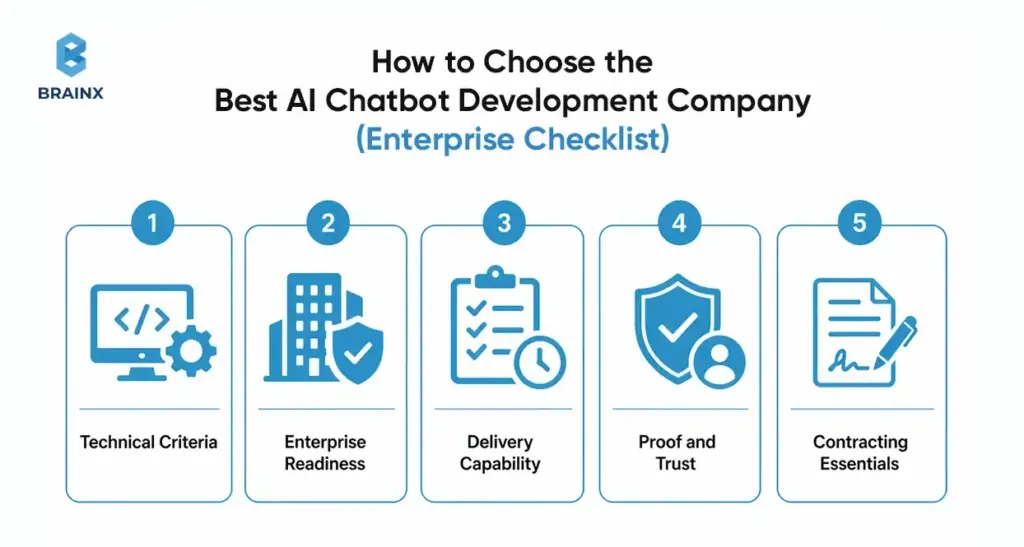
Choosing the best AI chatbot development company is less about branding and more about whether the team can ship safely into your environment. The right vendor will ask hard questions about identity, data permissions, evaluation, and operational ownership—early.
Use the checklist below to evaluate partners. It’s structured to reflect how enterprise assistants fail in real life: missing governance, weak integrations, lack of evaluation, and unclear ownership.
Technical Criteria
Ask for specifics, not generalities:
- Can they implement RAG with reranking, metadata filters, and citation control?
- Do they have a repeatable evaluation framework (offline test sets + regression gates)?
- How do they do red-teaming (prompt injection, jailbreaks, tool abuse)?
- What does monitoring include (quality signals, cost, latency, tool failure rates)?
- Can the system scale with:
- caching strategies
- rate limiting
- async workflows for long-running tool calls
- multi-region deployment needs
If they can’t explain their evaluation approach, you’re taking on avoidable production risk.
Enterprise Readiness
Readiness of the enterprise should be demonstrable:
- SSO integration (OIDC/SAML) and role mapping
- Permission-aware retrieval and tool access enforcement
- Audit logs and admin traceability
- Data handling documentation (retention, redaction, encryption)
- SLA readiness: incident response, uptime targets, support process
Also ask how they handle regulated environments and security reviews. A mature partner has templates and a clear process.
Delivery Capability
The best outcomes come from disciplined delivery:
- Discovery workshops that produce a scoped plan and success metrics
- UX design for:
- clarification questions
- citations and “show sources”
- handoff experience
- Integration capability across your stack (not just a single platform)
- QA approach that includes conversational edge cases and adversarial testing
- Documentation and handover:
- architecture docs
- runbooks
- evaluation harness instructions
- change management guidance
If the vendor can’t show examples of these deliverables, expect gaps later.
Proof and Trust
Credibility reduces risk:
- Case studies with measurable outcomes (deflection, AHT, cycle time)
- References from similar enterprise contexts
- Security posture:
- secure SDLC
- vulnerability management
- access controls for their own team
- clear subcontractor policies (if any)
Also look for honesty. Teams that acknowledge limitations and tradeoffs tend to ship safer systems than teams that promise perfection.
Contracting Essentials
Contract terms can make or break long-term success. Ensure clarity on:
- IP ownership for code, prompts, evaluation assets, and orchestration logic
- Data handling and retention (including logs and training defaults)
- Model/provider usage (who selects, who pays, how changes are handled)
- Support scope post-launch:
- bug fixes
- monitoring
- prompt/policy updates
- evaluation maintenance
- Exit plan:
- documentation handover
- ability to migrate providers
- data export formats
This is where enterprises prevent lock-in and protect governance requirements.
How BrainX Helps With AI Chatbot Development in 2026
BrainX is a custom AI software development company that helps enterprises move from pilots to production with measurable outcomes and governance. We build assistants that work inside real environments: identity systems, ticketing platforms, CRMs, knowledge bases, and compliance constraints.
Our focus is pragmatic delivery. That means we start with a scoped roadmap tied to KPIs, implement a production-ready architecture (often RAG-first), and set up evaluation and monitoring so your team can operate the assistant with confidence.
We also prioritize ownership and maintainability. You should be able to evolve models, add tools, and expand scope without rewriting the system or losing control of your data and IP.
What BrainX Delivers
A typical BrainX engagement includes:
Strategy and Scope
- use case selection (quick wins vs strategic bets)
- KPI model and measurement plan
- rollout plan and risk register
Build and Architecture
- RAG implementation with citations and permission-aware retrieval
- agent/tool layer for workflows where appropriate
- channel UX for web/in-app/Slack/Teams
Integrations
- knowledge sources (Confluence/SharePoint/Drive/custom)
- ticketing/CRM/ERP integrations with reliable tool execution
- identity and access (SSO/RBAC) alignment
Governance and Security
- audit logs, retention, DLP controls
- threat modeling and red-teaming playbooks
LLMOps
- evaluation harness, regression testing, release gates
- monitoring dashboards for quality/cost/latency
- ongoing iteration workflows
This is what turns an assistant into an operational capability—not a demo.
Typical Engagement Paths
Enterprises usually engage with us in one of three ways:
Audit / Workshop (low friction)
- review current chatbot/pilot, data sources, and security constraints
- produce architecture recommendations, KPI plan, and pilot scope
MVP Delivery
- 6–12 week build for a defined use case with measurable KPIs
- production-ready foundations (identity, logging, evaluation)
Scale Program
- expand intents, channels, and tool automation over multiple phases
- operationalize LLMOps and internal enablement
- support governance and cross-team adoption
You can start small and still build the right foundations for scale.
What success looks like (KPIs + enablement + handover)
We define success in operational terms:
- KPIs improve (deflection/containment, resolution time, CSAT, cost per ticket)
- Incidents decrease over time due to monitoring and regression testing
- Security posture is clear (audit logs, DLP, retention, access control)
- Teams adopt the assistant because it’s trustworthy and easy to use
- Your org can run it: documented runbooks, dashboards, and ownership transfer
The end state is not creating any dependency on a vendor. It’s an enterprise assistant your team can confidently operate and evolve.
Next Steps: A Simple 2-Week Plan to Start (Without a Massive Commitment)
If you want progress without committing to a large program upfront, a two-week plan can create clarity quickly. The goal is to exit with a scoped pilot, an architecture recommendation, and a measurable KPI model—plus a risk plan your security team can review.
This approach also prevents wasted effort. You won’t overbuild. You won’t pick a model before you know your data constraints. And you’ll surface integration and governance blockers early.
Stakeholders to Involve
Involve the people who will own outcomes and approvals:
- Product (scope, UX, metrics, prioritization)
- CX/Support or Ops (intents, workflows, handoff rules, quality standards)
- IT (systems, identity, environments, deployment constraints)
- Security/Compliance (data handling, retention, auditability, risk acceptance)
- Data/Knowledge owners (source-of-truth content and update workflows)
If these stakeholders aren’t aligned early, pilots stall during security review or rollout planning.
What to Prepare
You don’t need perfect data, but you do need a starting package:
- Top 20–50 intents from:
- ticket tags
- search logs
- call drivers
- A list of knowledge sources and owners (what’s authoritative vs outdated)
- A shortlist of integration targets (ServiceNow, Zendesk, Salesforce, internal APIs)
- Identity requirements (SSO provider, RBAC model, any sensitive roles)
- Any compliance constraints (PII, regulated data, regional data residency)
This prep lets you build a pilot plan that reflects reality.
Outputs to Demand
At the end of two weeks, you should have:
Architecture Recommendation
- RAG vs fine-tuning vs agents, with rationale
- Data flow diagram and trust boundaries
KPI Model
- Baseline metrics and target improvements
- Measurement plan and instrumentation requirements
Pilot Scope
- Channels, intents, sources, handoff rules
- Rollout gates and acceptance criteria
Risk Plan
- Threat model summary
- Red-teaming plan and evaluation approach
- Compliance checklist (retention, logging, access control)
These outputs make executive approval and implementation straightforward.
How BrainX Helps With AI Chatbot Development Company Needs in 2026
If you’re evaluating an AI chatbot development company for enterprise rollout in 2026, BrainX can help you in navigating the roadmap without missing the challenging steps, which include security, integrations, evaluation, and measurable ROI.
A practical starting point is a short workshop/audit where we map your top intents, data sources, identity constraints, and integration targets into a pilot plan with KPIs and a risk register. From there, we can deliver an MVP and scale in phases—so your assistant earns trust in production and improves over time.
If you want to explore scope and feasibility, start with a short workshop or audit. We will help you in defining the appropriate use case, visualizing your data and integrations, identifying key risks, and creating a pilot with quantifiable KPIs.
FAQs About Enterprise AI Chatbot Development Firm
1. What does an AI chatbot development company do for an enterprise in 2026?
An enterprise-focused AI chatbot development company designs, builds, and operates a production-grade assistant—not just a chat interface. In 2026, that typically includes RAG pipelines for grounded answers, secure integrations with systems like ServiceNow/Salesforce, and identity-aware access control (SSO/RBAC). A strong partner also implements evaluation and red-teaming to manage hallucinations and prompt injection risks. Finally, they set up monitoring and LLMOps so the assistant can be improved safely over time.
2. How much does it cost to hire an AI chatbot development company?
Cost depends on scope, integration complexity, governance requirements, and how much operational support is needed after launch. A limited PoC may be relatively small, while a production-grade rollout typically requires additional investment in security, evaluation, monitoring, and support. The best way to budget is in phases: assessment, MVP, and scale. Contact our AI development experts to find out your project cost estimates.
3. How long does enterprise AI chatbot development take from pilot to production?
Smaller pilots can launch in weeks, but enterprise production rollout usually takes longer because identity, permissions, auditability, and compliance must be finalized before scale. MVP timelines often fall in the 6–12 week range for a single well-scoped use case, while production rollout for multiple channels and integrations can extend to 12–20+ weeks. The timeline also depends on content readiness and how quickly security/compliance reviews can be completed. A phased rollout with clear gates reduces risk while still delivering early value.
4. How do enterprises prevent hallucinations in AI chatbots?
Enterprises reduce hallucinations by grounding responses in approved sources (usually via RAG) and enforcing citation-based answering for sensitive topics. They also build evaluation datasets from real questions and run regression tests whenever prompts, retrieval settings, or models change. In production, monitoring should detect spikes in negative feedback, low source relevance, or increased handoffs. Finally, assistants should be designed to ask clarifying questions or hand off to humans when confidence is low rather than guessing.
5. What should we look for in the best AI chatbot development company?
Look for a partner that can demonstrate enterprise-ready delivery: permission-aware RAG, tool integrations with auditability, and an evaluation/red-teaming practice. They should be fluent in SSO/RBAC, logging/retention requirements, and security controls like DLP and prompt injection mitigation. Also evaluate delivery maturity—discovery, documentation, QA, and operational runbooks matter as much as model selection. Case studies with measurable KPIs (deflection, AHT, resolution time) are a strong signal. Contract terms should clearly define IP ownership, data handling, and support scope.
6. Should we build in-house or hire an enterprise AI chatbot development company?
Build in-house if the assistant is a core differentiator and you have the team to own architecture, security, evaluation, and ongoing LLMOps. Hire an enterprise AI chatbot development company when you need to move faster, reduce delivery risk, or integrate deeply across enterprise systems while meeting governance requirements. Many enterprises choose a hybrid approach: internal ownership of product direction with a partner delivering the initial architecture, implementation, and operational foundations. The right choice depends on your integration complexity, compliance constraints, and operational capacity after launch.
TL;DR / Key Takeaways
- A custom AI development company does far more than choose a model. It handles discovery, data readiness, architecture, testing, deployment, and ongoing improvement.
- A good partner delivers more than a prototype. You should expect documentation, guardrails, evaluation logic, deployment planning, and handover support.
- AI agents are a strong fit when workflows require tool use, live data, multi-step reasoning, or action-taking inside business systems.
- Most successful projects move through discovery, PoC, MVP, production hardening, and post-launch optimization.
- The biggest project risks usually come from weak data, vague success metrics, poor evaluation, and loose security controls.
- The best vendors can explain how they test outputs, manage risk, support production, and measure ROI.
Many teams already have an AI idea on the table.
The harder question is what comes next. How do you turn that idea into something secure, useful, and reliable enough for real users and real workflows?
That is where a custom AI development company becomes important. It helps you move from an early concept to a working AI agent that fits your systems, data, users, and business goals.
This guide walks through that full journey. You will see what a delivery partner should actually build, where AI agents make sense, what the development process looks like, what affects cost and timeline, and how to choose the right team to build it properly.
What A Custom AI Development Company Actually Delivers (Beyond “A Model”)
A custom AI development company should not leave you with a demo, a few prompts, and a loose set of notes.
It should deliver a real working solution that fits your business workflow, your internal systems, and your operational needs. That means the output is not only intelligence. It is also structure, control, documentation, integration, and a clear path to launch.
Typical Deliverables (PRD, Architecture, Data Plan, Eval Suite, Deployment)
A strong AI engagement usually produces a complete delivery package. That often includes:
- Product Requirements Document (PRD): scope, users, use cases, business goals, and success metrics
- Architecture Plan: how the agent, tools, APIs, retrieval layer, and interface work together
- Data Readiness Plan: where the data comes from, how it is cleaned, what permissions are needed, and how privacy is handled
- Evaluation Suite: benchmark prompts, test cases, edge cases, and quality thresholds
- Deployment Plan: environments, monitoring setup, rollback logic, handover materials, and support model
This matters because production AI is never just about whether the model can respond. It is about whether the full system can respond well, safely, and consistently.
Team Roles (PM, ML/LLM Engineer, Backend, DevOps, Security)
AI delivery usually needs a cross-functional team.
Depending on the project, that team may include:
- Product Manager to connect business goals with delivery priorities
- ML or LLM Engineer to design prompts, model logic, RAG pipelines, and evaluation
- Backend Engineer to build orchestration, APIs, and tool integrations
- DevOps or LLMOps Engineer to handle deployment, monitoring, and reliability
- Security Specialist to review privacy, access controls, and risk exposure
- QA Engineer to test workflows, outputs, regressions, and failure cases
More complex projects may also need UX support, data engineering, or domain specialists.
Engagement Models (Workshop → Sprint Delivery → Managed Improvement)
Most AI projects work best when they are delivered in phases.
A common engagement model looks like this:
- Discovery Workshop: align on business goals, users, data reality, and technical constraints
- Sprint Delivery: move from prototype to PoC to MVP in focused build cycles
- Managed Improvement: keep refining prompts, tools, retrieval quality, monitoring, and model behavior after launch
The said structure keeps your project grounded. It also reduces the chance of spending heavily before the team proves real value.
Where AI Agents Fit: Turning An Idea Into An Agentic Workflow
Not every AI use case needs an agent.
Some problems need semantic search. Some need workflow automation. Some only need a smarter interface. But when the workflow involves reasoning, tool use, live data, and action-taking, AI agents become much more relevant.
That is where a custom AI agent development company creates real value. It helps define what the agent should do, what it should not do, and how it should operate within safe boundaries.
AI Agent Vs Chatbot Vs Automation (Quick Comparison)
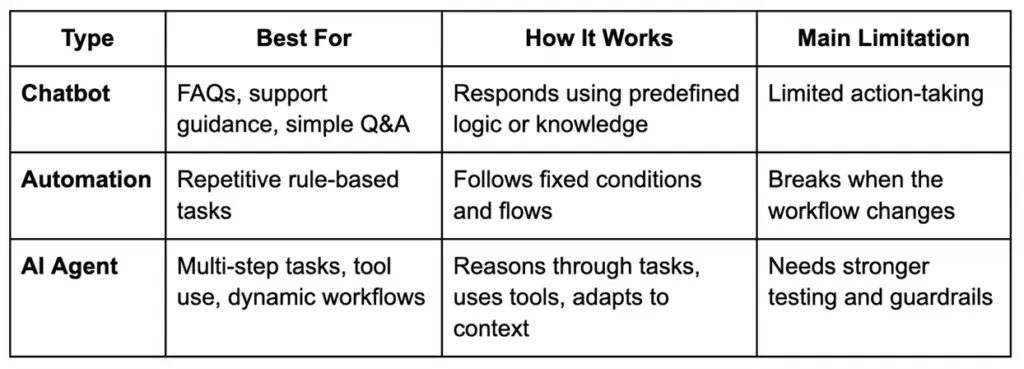
A chatbot usually answers.
Automation usually executes.
An AI agent can reason, retrieve, route, and act within defined limits.
Common Agent Patterns (RAG, Tool Calling, Planners, Multi-Agent, HITL)
There is no single agent architecture for every use case.
Common patterns include:
- RAG: retrieves relevant information from your knowledge base before generating a response
- Tool Calling: lets the agent interact with APIs, databases, CRMs, or internal functions
- Planner-Based Flows: breaks large requests into smaller steps before execution
- Multi-Agent Systems: assigns specialized tasks to different agents
- Human-In-The-Loop (HITL): pauses for review before sensitive actions such as refunds, approvals, or outbound communication
The right design depends on workflow complexity, acceptable risk, speed expectations, and business rules.
Signals You Need An Agent (And When You Don’t)
You likely need an agent if:
- the task spans multiple systems
- the agent must use tools or APIs
- answers depend on live or internal data
- the workflow changes based on context
- the system needs memory, routing, or approvals
You likely do not need an agent if:
- the use case is simple FAQ response
- a rule-based automation already works
- the workflow is static and highly predictable
- autonomy adds more risk than value
A good partner should tell you honestly when an agent is the wrong fit. That is a sign of maturity, not limitation.
The Concept-To-Code Process (BrainX-Style Delivery Playbook)
A strong custom AI development company follows a structured process that turns ideas into production-ready systems.
That process matters because AI projects can look impressive early while still failing under real business pressure. Clear stages, checkpoints, and outputs help prevent that.
Step 1 — Discovery & Success Metrics (KPIs, Constraints, Users)
The first step is defining what success actually looks like.
That includes:
- business goal
- target users
- workflow scope
- technical and legal constraints
- measurable outcomes
Typical success metrics may include response accuracy, support deflection, time saved, reduced manual effort, faster triage, or improved conversion.
Without this step, teams often build clever AI features that never solve the right business problem.
Step 2 — Data Readiness & Access (Sources, Permissions, Privacy)
This step is often where real project complexity shows up.
The team needs to understand:
- what data the agent needs
- where it lives
- who owns it
- what permissions are required
- whether the data is reliable enough
- what privacy or compliance limits apply
This may include internal documents, CRM records, ERP data, support tickets, emails, chats, and structured databases.
For sensitive use cases, strong data handling matters early. That may include redaction, access control, encrypted storage, tenant separation, and logging rules.
Step 3 — Architecture Decisions (RAG Vs Fine-Tune Vs Hybrid)
At this stage, the solution path becomes clearer.
The team may choose:
- RAG when the agent needs access to internal or frequently changing knowledge
- Fine-Tuning when output behavior, tone, or formatting needs to be highly specialized
- Hybrid Architecture when both knowledge grounding and specialized response behavior matter
This decision should not be based on hype. It should be based on cost, latency, explainability, risk, and update frequency.
Step 4 — Agent Design (Tools, Memory, Guardrails, Routing)
Once the core architecture is chosen, the agent itself needs to be designed carefully.
That includes:
- tool registry
- API calling behavior
- session and memory rules
- fallback logic
- escalation paths
- approval workflows
- routing between tools or sub-agents
- response boundaries and restrictions
Many AI failures are not really model failures. They are workflow design failures.
Step 5 — Prototype → PoC (Prove Feasibility Fast)
The PoC should validate the riskiest assumption first.
That might be:
- whether tool use works reliably
- whether retrieval quality is good enough
- whether latency is acceptable
- whether the workflow is genuinely useful to the user
A good PoC is focused. It is not trying to be the final product.
It is trying to answer one important question fast: is this concept worth building further?
Step 6 — MVP Build (Productization: UX, APIs, Reliability)
Once the PoC proves promise, the MVP phase turns the idea into a usable product.
That usually includes:
- frontend or embedded interface
- backend services
- prompt and tool versioning
- instrumentation and logs
- retry logic and error handling
- permissions model
- baseline reliability controls
This is where the project starts behaving like software delivery, not just AI experimentation.
Step 7 — Evaluation & Red Teaming (Before Production)
This is one of the most important trust-building stages in the entire process.
Before launch, strong teams test the system in structured ways. That includes:
- golden datasets
- expected-answer validation
- tool-call accuracy checks
- hallucination testing
- regression testing
- prompt injection testing
- unsafe action scenarios
- edge-case simulations
A polished demo is not enough.
Production trust comes from repeatable evaluation. If a vendor cannot explain how they test risky behavior, failures, and quality drift, that is a serious gap.
Step 8 — Deployment & LLMOps (Monitoring, Incident Playbooks)
Launching the agent is not the end of the work.
A mature deployment includes:
- latency and uptime monitoring
- usage analytics
- failure tracking
- token and cost monitoring
- rollback planning
- incident response playbooks
- change management for prompts, tools, and model versions
This is how you keep the system stable after release.
Step 9 — Iterate & Scale (Roadmap, Model Upgrades, New Tools)
The most valuable AI systems improve after launch.
Once the agent is live, the team can:
- refine prompts and workflows
- improve retrieval quality
- expand tool access
- add new use cases
- refresh evaluation sets
- test better model versions
- roll out to more teams or regions
AI delivery works best when the system is treated like a living product, not a one-time build.
Business Value: What You Get (And How To Measure ROI)
AI agent development should be tied to business outcomes, not just technical capability.
A well-built system can reduce manual effort, speed up repetitive work, improve consistency, shorten handling time, and unlock better customer or employee experiences.
Also Read: Revamping Customer Experiences With AI Chatbots in 2026
Startup Lens: Speed, Differentiation, MVP Learning
For startups, the biggest return is often speed.
A strong AI agent can help a small team:
- reduce operational load
- move faster with customer support
- automate research and internal workflows
- test new product experiences quickly
- create a real point of differentiation
For many startups, ROI shows up first in learning speed, productivity, and product momentum.
Also Read: How AI Chatbots Are Revolutionizing Customer Support and CSAT
Enterprise Lens: Reliability, Governance, Integration, Change Management
For enterprises, ROI is broader.
It may include:
- reduced handling time
- standardized workflows
- lower support or processing cost
- better use of internal knowledge
- stronger audit readiness
- safer access to business systems
- better consistency across teams
This is also where governance becomes part of value. If the system saves time but creates security, privacy, or compliance problems, the real return drops quickly.
KPI Examples By Use Case (Support, Sales Ops, Finance, Engineering)
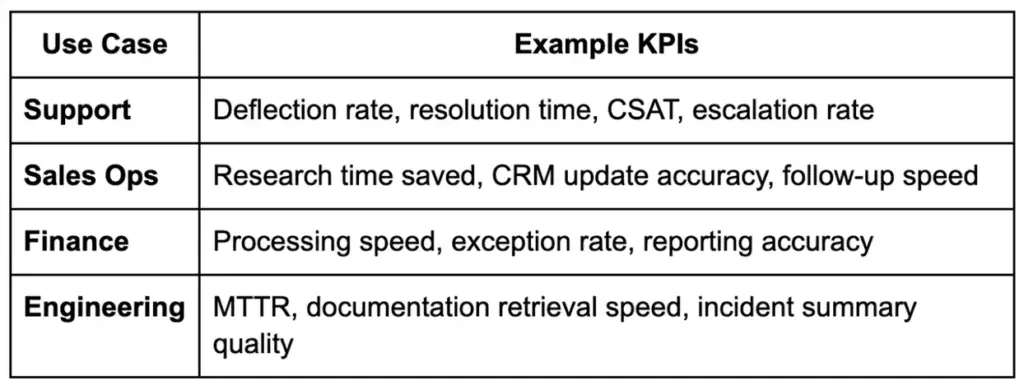
Whenever possible, connect these metrics to hours saved, cost reduction, risk reduction, or revenue support. That makes the business case easier to defend.
Use Cases That Fit A Custom AI Development Service Company (With Examples)
The best use cases for a custom AI development service company are usually the ones that involve internal systems, business rules, approvals, or domain-specific complexity.
These are not generic chatbot tasks. They are real workflow problems.
Customer Support Agent (Knowledge + Actions: Refunds, Status, Triage)
A customer support agent can retrieve answers from a knowledge base, check order status, guide returns, triage requests, and support approved actions such as refunds or escalations.
This works well when support teams handle repetitive volume but still need control and consistency.
Internal Ops Agent (HR/IT Helpdesk, Policy Q&A, Ticket Routing)
Internal teams often lose time jumping between policies, documents, systems, and tickets.
An internal ops agent can answer policy questions, suggest next steps, retrieve the right documents, and route issues into the right workflow.
Revenue Ops Agent (Lead Research, CRM Updates, Email Drafting With Approvals)
Sales and revenue teams often work across scattered platforms.
An AI agent can enrich account context, summarize new leads, update CRM fields, prepare email drafts, and pass actions for approval before anything is sent.
This is a strong example of where a custom AI development service company can add value through smart integration and workflow design.
Engineering Agent (Docs Q&A, Code Search, Incident Summaries)
Engineering teams can use AI agents to search internal docs, summarize incidents, surface likely causes, and support on-call workflows.
These use cases need stronger controls, but they can save meaningful time when speed matters most.
Cost, Timeline, And Resourcing: What Determines The Budget
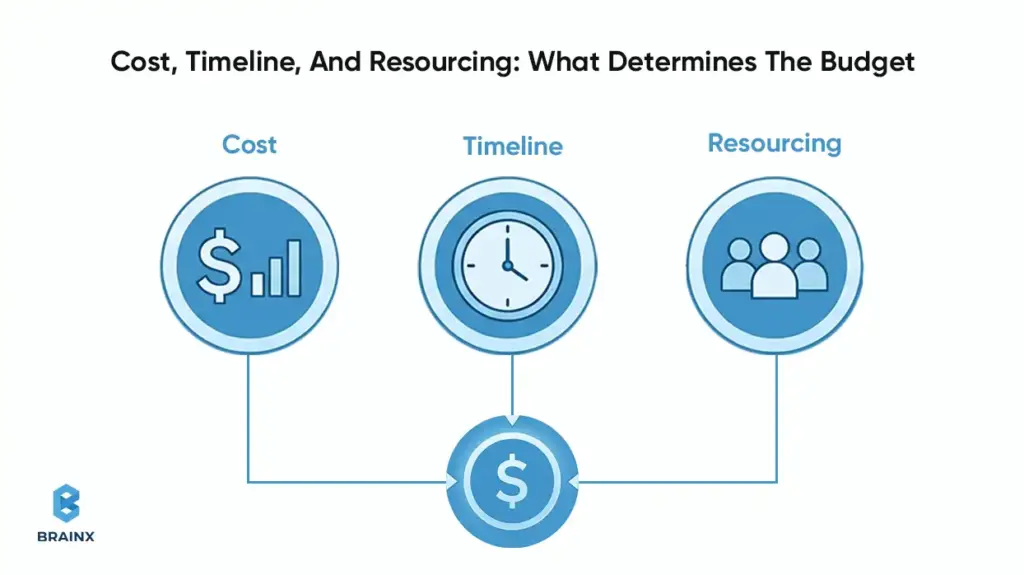
The cost of working with a custom AI development company depends on what you are building, how complex the workflow is, how much testing is needed, and how much operational risk the system must handle.
It helps to look at the budget in phases instead of expecting one simple number.
Typical Timelines (Discovery, PoC, MVP, Production Hardening)
A common timeline looks like this:
- Discovery and Scoping: 1 to 2 weeks
- Proof of Concept: 2 to 4 weeks
- MVP Build: 6 to 12 weeks
- Production Hardening: 2 to 6 weeks
The final timeline depends on data readiness, system integrations, approvals, and evaluation depth.
Cost Drivers (Data Complexity, Integrations, Eval Rigor, Compliance)
The biggest cost drivers usually include:
- messy or fragmented data
- number of systems being connected
- complexity of retrieval and orchestration
- amount of UI or workflow customization
- evaluation depth
- security and compliance requirements
- rollout and support expectations
High-stakes use cases usually cost more because they need stronger testing, tighter controls, and better operational monitoring.
In-House Vs Partner: When Each Makes Sense
Build in-house when:
- AI is central to your product strategy
- you already have strong technical leadership
- you can support evaluation, deployment, and LLMOps over time
Work with a partner when:
- you need faster time to market
- the use case spans multiple systems
- your team wants help with architecture and delivery discipline
- you want to avoid costly trial-and-error during the first rollout
A good partner can shorten the path to value by helping your team avoid common AI delivery mistakes.
Risks, Failure Modes, And How Good Teams Prevent Them
AI systems can create strong business value, but they also introduce new failure modes.
Good teams do not hide those risks. They design around them from the start.
Hallucinations & Bad Actions (Guardrails, Verification, Tool Constraints)
Hallucinations are not only wrong answers.
In agent workflows, they can also become wrong actions.
To reduce this risk, strong teams use:
- grounded retrieval
- guardrails
- action constraints
- fallback logic
- approval steps for sensitive actions
- verification against live systems when needed
If an agent can do things, it should never rely on prompt wording alone to stay safe.
Data Leakage & Privacy (PII Redaction, Access Control, Tenancy)
If the system uses internal or sensitive data, privacy handling must be built in early.
That often includes:
- role-based access
- data masking or redaction
- encryption
- controlled logs
- tenant separation
- limited data exposure to the model layer
This is especially important in enterprise and regulated environments.
Vendor Lock-In (Portable Architecture, Model Abstraction)
Teams should avoid designing everything around one provider if flexibility matters long term.
A healthier architecture may include:
- model abstraction layer
- modular tool setup
- portable data handling
- documented migration paths
This keeps your options open as business needs, provider pricing, and model quality change.
Model Drift & Performance Decay (Monitoring + Eval Regression)
AI performance can slowly decline even when the product still appears to be working.
That is why good teams keep:
- baseline metrics
- regression testing
- live monitoring
- refreshed evaluation sets
- alerting when outputs start shifting
This is how trust stays intact after launch.
How To Choose The Right Custom AI Agent Development Company (Scorecard)
Choosing the right custom AI agent development company is not about who gives the most exciting demo.
It is about who can design, test, secure, deploy, and support the system properly.
Also Read: How to Choose a Software Development Company Fundamental Do’s and Don’ts
Technical Proof To Request (Demo + Eval Results + Architecture)
Ask vendors to show:
- how the workflow is designed
- how tools are used safely
- how quality is measured
- how edge cases are tested
- why they chose the architecture they are proposing
You want evidence they understand how the system behaves outside the happy path.
Delivery Proof (Roadmap, Sprint Cadence, QA, Documentation)
Ask how the team actually delivers work.
Look for:
- clear sprint structure
- defined outputs by phase
- QA discipline
- documentation quality
- handover readiness
- realistic communication process
Trust Proof (Security Posture, Compliance Readiness, References)
Trust matters even more when the workflow touches internal systems or sensitive data.
Ask about:
- security posture
- privacy and compliance handling
- ownership of code and assets
- support after launch
- client references
- examples of long-term project outcomes
Red Flags (Demo-Only, No Evals, Unclear Data Handling)
Watch for these warning signs:
- no evaluation methodology
- vague answers about security or privacy
- no monitoring or rollback plan
- unclear ownership terms
- polished demo, but no explanation of failure handling
If the team cannot explain how it tests risky behavior, that is a gap you should take seriously.
Implementation Checklist (What You Need From Your Side)
Even the best partner needs client-side readiness to move quickly.
The more prepared your side is, the smoother the project becomes.
Stakeholders & Approvals
Make sure you have:
- business owner
- technical owner
- security or compliance input where needed
- decision-maker for scope and rollout
- internal sponsor who can remove blockers
Data Sources & Permissions
Prepare:
- list of knowledge sources
- system access requirements
- data owners
- permission boundaries
- privacy and legal considerations
Tooling/Integrations List
Document the tools the agent will need to interact with, such as:
- CRM
- ERP
- ticketing system
- knowledge base
- communication tools
- analytics platform
- internal databases
Definition Of Done + Rollout Plan
Agree on:
- success metrics
- test criteria
- pilot user group
- rollout phases
- support ownership
- post-launch feedback loop
It gives the project a clearer path and helps both sides move faster.
How BrainX Helps With Custom AI Agent Development
Turning an AI idea into a working system takes more than experimentation. It takes delivery discipline, technical clarity, and a practical understanding of how AI fits into real business workflows.
That is how BrainX works. As a custom AI development company, we help businesses move from concept to production with a delivery approach built around usability, security, and long-term value.
What We Build (Agentic Apps, RAG Systems, Workflow Automation)
We build AI solutions that are designed to work inside real products and real operations.
That includes:
- agentic applications
- RAG-powered business assistants
- workflow automation solutions
- AI systems connected to internal tools and business data
Our focus is not adding AI for trend value. It is building something that solves a real problem and fits the way your team works.
How We Deliver (Discovery, Rapid PoC, Eval-First, Production Hardening)
Our approach starts with understanding the workflow, users, goals, and constraints.
From there, we move into rapid validation, MVP delivery, structured evaluation, and production hardening. We keep a strong focus on measurable outcomes, safe workflows, and practical rollout planning.
That means you are not just getting a model experiment.
You are getting a path to production.
What You Get (Artifacts, Code Ownership, Handover, Support Options)
When you work with BrainX, you get more than a prototype.
You get:
- structured discovery
- delivery documentation
- clear architecture thinking
- production-focused build quality
- practical handover support
- flexible support options after launch
If you are looking for a custom AI development company that can help you move from discovery to PoC to MVP to production, BrainX is ready to help.
FAQ Section
What Does A Custom AI Development Company Do Compared To An Off-The-Shelf AI Tool?
An off-the-shelf tool gives you a shared product with fixed limits. A custom AI development company builds around your workflow, your data, your systems, and your business rules. That gives you more control, deeper integration, and a better fit for complex use cases.
How Do I Know If I Need A Custom AI Agent Development Company Or A Chatbot Platform?
If you only need simple FAQ responses, a chatbot platform may be enough. If the workflow needs tool use, approvals, live data, or multi-step task handling, a custom AI agent development company is usually the better choice.
How Long Does It Take To Build An AI Agent With A Custom AI Development Company?
A focused PoC may take a few weeks. A stronger MVP often takes a few months. A production-ready system takes longer when integrations, compliance requirements, and evaluation depth increase.
How Much Does It Cost To Hire A Custom AI Development Service Company?
The budget depends on the use case, data condition, integration scope, compliance needs, and testing depth. A custom AI development service company will often scope the work in stages so you can validate value before scaling the investment.
How Do Companies Test And Evaluate AI Agents Before Production?
They use structured evaluation methods such as golden datasets, scenario testing, tool-call validation, regression testing, hallucination checks, and red-team style reviews. Strong teams also test how the agent behaves when prompts, data, or workflows go wrong.
Can A Custom AI Agent Integrate With Our CRM, ERP, And Internal Knowledge Bases Securely?
Yes. That is one of the biggest advantages of custom development. With the right design, a custom AI agent can securely connect to internal systems using access controls, encryption, logging, and permission-aware workflows.
DeepSeek vs ChatGPT is no longer a “which chatbot is better?” question.
For executives, it’s a strategic choice between:
- An open, engineerable model stack you can deploy and tune.
- A highly productized AI workspace with tools, governance, and a flagship model that adapts its reasoning depth to the task.
ChatGPT now centers on GPT‑5.2 and offers Auto routing between Instant and Thinking, with a slim “chain of thought” view and an “Answer now” control for speed.
DeepSeek’s open-source DeepSeek‑R1 is a first-generation reasoning model trained with large-scale reinforcement learning, built on a Mixture-of-Experts base (671B total parameters, 37B activated) and released under an MIT license.
For teams:
- Choose DeepSeek when you need deployment control and customization.
- Choose ChatGPT when you need a polished UX and integrated tools (search, data analysis, files, images, Canvas, memory) that accelerate day-to-day work without building your own platform.
Performance Benchmark Testing
Benchmarks are useful for spotting patterns, not declaring a permanent winner. Most public head-to-head numbers you’ll see online were run on earlier ChatGPT generations, while ChatGPT now defaults to GPT-5.2 in the product, so absolute scores can shift over time. Still, recent third-party summaries consistently show DeepSeek performing especially well on structured math/logic, while ChatGPT tends to be stronger when tasks blend reasoning with broad context and tool-assisted workflows.
DeepSeek vs ChatGPT Benchmarks
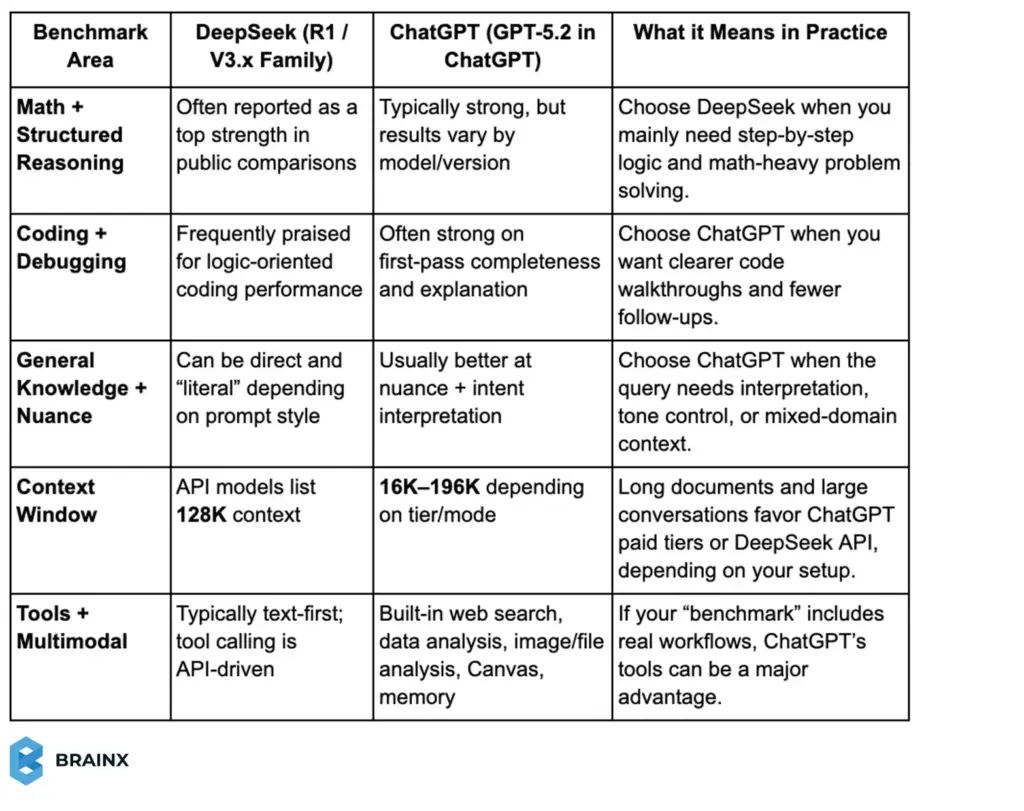
Note: If you want the fairest internal test, run the same prompts on your real tasks (coding tickets, support macros, docs, and SOPs) and score outcomes like accuracy, time saved, and revision cycles.
DeepSeek vs ChatGPT Comparison: Key Differences at a Glance
DeepSeek and ChatGPT represent two different “ends” of the modern AI adoption spectrum. DeepSeek is best understood as an open model ecosystem—anchored by models like DeepSeek‑R1 and DeepSeek‑V3—optimized for reasoning and cost efficiency, and designed to be integrated, self-hosted, and adapted.
ChatGPT, by contrast, is a full AI product environment that now defaults to GPT‑5.2 and includes built-in tools (web search, data analysis, image and file analysis, Canvas, image generation, memory, and custom instructions), plus a model picker for paid tiers.
This DeepSeek vs ChatGPT comparison matters today because “model quality” alone no longer determines business value. Delivery mode (API vs product UI), reasoning controls, tool access, context length, message caps, privacy requirements, and integration effort now drive total cost and total impact.
In this report-style blog post, we’ll break down:
- What each platform does best
- Where each has real limitations
- How to choose based on practical SaaS and enterprise workflows
The fastest way to evaluate these tools is to separate model architecture and availability from end-user workflow experience. DeepSeek is strongest when you want an open stack you can control; ChatGPT is strongest when you want an “AI operating system” with advanced tools and predictable UX.
Summary comparison table
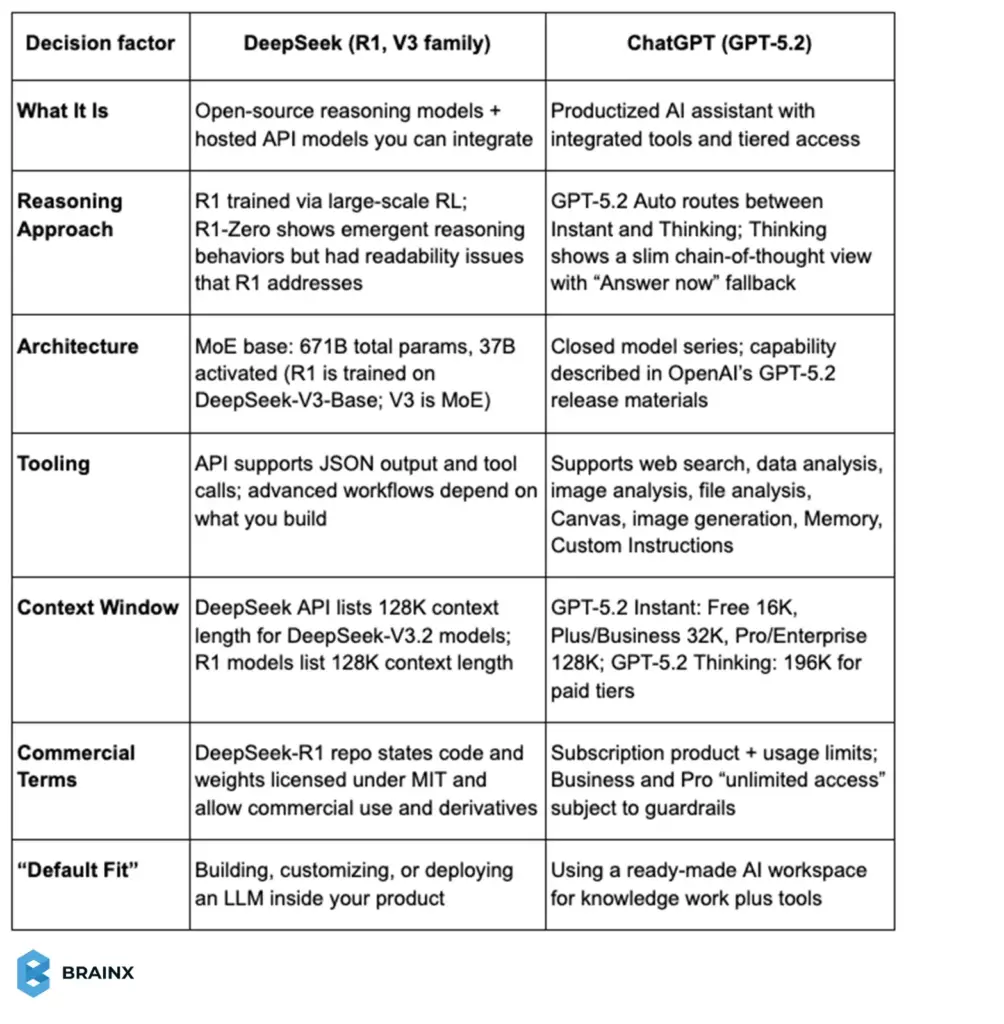
Mermaid Timeline of Model Evolution
The timeline below highlights milestone releases that shape today’s capabilities and buying decisions.
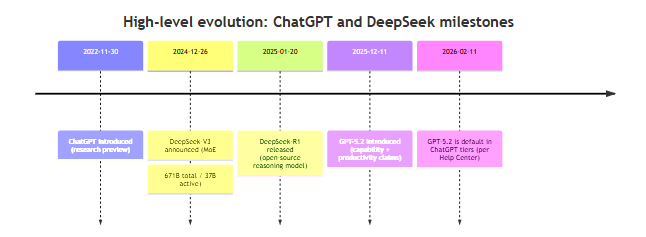
What Is DeepSeek AI?
DeepSeek AI is an open model ecosystem built around high-efficiency Mixture-of-Experts language models and reasoning-focused post-training. DeepSeek‑V3 is explicitly described as a Mixture-of-Experts (MoE) model with 671B total parameters and 37B activated per token, trained on 14.8T tokens, and released with open-source artifacts and a technical report.
Core purpose and positioning: DeepSeek’s positioning is “performance-per-dollar plus openness.” Its DeepSeek‑R1 line focuses on reasoning capability: DeepSeek‑R1‑Zero is trained via large-scale reinforcement learning without supervised fine-tuning as a preliminary step, and DeepSeek‑R1 adds “cold-start data” before RL to improve readability and usability.
DeepSeek‑R1 and R1‑Zero are open-sourced, and the repository states that both code and model weights are MIT licensed and support commercial use and derivative works (including distillation).
A practical note for business readers: DeepSeek is a Chinese company based in Hangzhou, China, and it captured attention worldwide with low-cost models and open-source releases that caused pricing responses throughout the market.
What Is ChatGPT?
ChatGPT is a product platform from OpenAI that packages frontier models into a consumer- and enterprise-friendly workspace. ChatGPT was introduced in November 2022 as a conversational interface for a model fine-tuned from the GPT‑3.5 series using reinforcement learning from human feedback.
Core purpose and positioning: ChatGPT’s core purpose is to turn frontier model quality into repeatable productivity. As of February 2026, ChatGPT’s Help Center states that GPT‑5.2 is available to all ChatGPT tiers and is the default model family, with paid users able to manually select Instant or Thinking via the model picker.
ChatGPT’s product differentiator is its integrated tooling layer—web search, data analysis, image and file analysis, Canvas, image generation, Memory, and Custom Instructions—so users can execute workflows inside one interface rather than stitching together separate tools.
Feature Comparison: DeepSeek vs ChatGPT
This section focuses on “capability on the page”—what each system is built to do well—rather than pricing or UI, which we’ll cover later.
Reasoning and Accuracy
This DeepSeek AI vs ChatGPT comparison starts with a key question: How does each system behave when the task requires multi-step reasoning and the answer must be correct—not just plausible?
DeepSeek’s Reasoning Design (R1)
DeepSeek positions R1 as a first-generation reasoning model trained with a pipeline centered on reinforcement learning and chain-of-thought exploration. The R1 repository describes two related models:
- DeepSeek‑R1‑Zero: trained via large-scale RL without SFT first, showing emergent reasoning behaviors (e.g., long chains of thought, self-verification) but also issues like repetition and language mixing.
- DeepSeek‑R1: adds “cold-start data” before RL to improve usability while retaining reasoning performance.
From an accuracy perspective, this matters because RL-perf reasoning models tend to be better at “structured correctness” (math steps, logic chains, consistent constraints). DeepSeek’s own materials claim DeepSeek‑R1 achieves performance comparable to OpenAI’s o1 on math, code, and reasoning tasks.
ChatGPT’s Reasoning Design (GPT‑5.2)
GPT‑5.2 introduces an explicit reasoning control surface inside ChatGPT. With GPT‑5.2 Auto, ChatGPT can decide when to use Instant or Thinking based on prompt signals and learned patterns from user choices and correctness.
When GPT‑5.2 is in reasoning mode, ChatGPT shows a slimmed chain-of-thought view, and you can click Answer now to switch back to Instant for speed.
What this means in practice:
- If your organization values transparent “reasoning effort” control, ChatGPT’s Instant/Thinking split is a genuine product advantage because it lets teams standardize when deeper reasoning should be used (e.g., use Thinking for “ship a patch” coding tasks; use Instant for drafting internal updates).
- In case your organization puts value in model-level openness (you should run your own inference, distill for performance or integrate with proprietary tools behind a firewall), the open-source release and the MIT-licensed weights of DeepSeek are hard to beat.
The following approach can be taken where accuracy matters the most:
- Prefer DeepSeek when the task is “bounded” (clear constraints, code, math) and you plan to wrap it with deterministic checks anyway.
- Prefer ChatGPT when the task needs tool-backed verification (search, file analysis, or data analysis) to reduce hallucination risk through grounded context.
Coding and Technical Tasks
For SaaS and product teams, coding performance is less about writing a single snippet and more about supporting a workflow: reading requirements, manipulating files, reasoning across codebases, and producing patches or refactors.
DeepSeek for Coding
DeepSeek‑V3’s training and architecture were built for efficient inference and strong performance, and DeepSeek’s own V3 materials emphasize MoE efficiency (only 37B parameters are active per token) and large-scale training (14.8T tokens) followed by SFT and RL.
DeepSeek‑R1 adds a reasoning layer on top, and the R1 repo highlights performance claims across math, code, and reasoning, plus distilled models intended to bring reasoning patterns into smaller dense checkpoints.
Why does that matter for engineering teams? An open reasoning model is especially attractive for:
- Internal developer tools (code review helpers, test generators, incident summarizers), when the data is sensitive and should not be leaving your environment.
- Use cases that are cost sensitive, with large volume usage, and consume pricing and inference efficiency are major factors.
ChatGPT for Coding
OpenAI’s GPT‑5.2 release materials describe GPT‑5.2 Thinking as improving real-world software engineering performance (including on SWE-Bench Pro and SWE-bench Verified) and translating those gains into more reliable debugging, refactors, and end-to-end implementation.
In ChatGPT specifically, GPT‑5.2 supports tool use—especially data analysis and file analysis—which changes the coding experience from “chat for code” to “work with artifacts.”
An original, SaaS-friendly way to compare them:
- When your developers require an assistant during coding (read logs, recreate bugs, run analysis, reason step-by-step, and maintain context across long threads), ChatGPT often wins on speed-to-outcome as it already includes relevant tools and long context windows.
- If your product requires an LLM as infrastructure (built-in inference, adjustable prompts and routing, cost management, deployment options), DeepSeek is very attractive since its openness allows you to use the model like a component, and not like a product subscription.
Content and Creativity
Most leadership teams care about content generation for one of three reasons: marketing velocity, internal communication, or customer-facing content (support, onboarding, docs). “Creativity” in business context usually means: tone control, audience adaptation, and consistency.
DeepSeek for Content
DeepSeek’s public narrative emphasizes reasoning and technical strength. Still, recent reporting describes improvements in R1 updates for writing and summarizing tasks, including reduced hallucinations and stronger output quality in rewriting and summarization scenarios.
For teams that implement DeepSeek via API, content quality can be “productized” through structured prompts, templates, style guides embedded into system prompts, and post-processing checks.
ChatGPT for Content
OpenAI describes GPT‑5.2 Instant as a fast workhorse with improvements in information-seeking queries, “how‑tos,” technical writing, and translation, and GPT‑5.2 Thinking as designed for deeper work like summarizing long documents and answering questions about uploaded files with clearer structure.
In other words: ChatGPT’s advantage is not only raw writing quality, but the ability to bring files, images, and research tools into the same content workflow.
The practical difference, when it comes to SaaS marketing teams, is operational:
- DeepSeek is superior when you want to incorporate generation to your CMS or pipeline Example: generating 10,000 help center drafts at a low cost, and then reviewing.
- ChatGPT is better when you want to collaborate in a UI with tools and memory. Example: daily campaign iteration, briefs, and rapid rewrites.
Customization and Integration
For SaaS teams, customization is not just tone. It’s the ability to plug the model into real workflows like product support, internal tools, RAG, and agent pipelines. Integration quality shows up in how easily you can route requests, enforce schemas, and connect tools safely.
DeepSeek for Customization and Integration
DeepSeek is attractive when you want the model to behave like infrastructure. DeepSeek-R1 is open-weight, which supports self-hosting and deeper customization for internal use cases.
On the integration side, the DeepSeek API is designed to be OpenAI-compatible, and its current deepseek-chat and deepseek-reasoner models support JSON output and tool calls. It’s a combination that makes it easier to embed DeepSeek inside products where structured outputs and tool routing matter.
ChatGPT for Customization and Integration
ChatGPT’s customization is product-led. GPT-5.2 supports Custom Instructions and the full toolset in ChatGPT, which means you can integrate “work” features like file analysis and data analysis directly into the workflow without building a wrapper layer first.
ChatGPT also supports custom GPTs that combine instructions, extra knowledge, and optional capabilities like browsing or data analysis. This is a practical way to standardize behavior across teams.
Simply put: If you need an LLM as a component inside your product with control over deployment and structured outputs, DeepSeek is a strong fit.
If you need fast adoption across roles with built-in tools and configurable assistants, ChatGPT often wins because the integration is already packaged into the product experience.
Performance and User Experience
Performance is where many evaluations get misleading because “model speed” and “user experience speed” are not the same thing. You should evaluate the full interaction loop:
prompt → tool use → revisions → final artifact.
Speed and Response Quality
- ChatGPT offers GPT‑5.2 Auto, which can switch to GPT‑5.2 Thinking on complex tasks and show a slim chain-of-thought view, with an “Answer now” option to prioritize speed.
- DeepSeek’s speed depends on deployment, but DeepSeek’s own V3 announcement claims high throughput (e.g., “60 tokens/second,” described as faster than previous versions) and focuses on inference efficiency from MoE design.
Interface and Accessibility
ChatGPT’s differentiator is that it’s a cohesive product: model picker (paid), tool selection, file workflows, and integrated features like Memory and Canvas (except Pro limitations noted below).
DeepSeek’s interface experience is more variable: you may use the official web/app experience or build via API. DeepSeek’s R1 release announcement highlights that the website and API were live (“Try DeepThink”), indicating a direct-to-user entry point, but the enterprise-grade UX typically depends on the wrapper you build.
Stability and Consistency
Two stability factors matter: (1) service consistency and (2) plan-based restrictions.
- ChatGPT is explicit about what happens beyond caps: Free and Plus/Go users are switched to a “mini” model after GPT‑5.2 message limits reset.
- DeepSeek stability and availability are often framed through pricing and access (e.g., off-peak pricing strategies and rapid model updates), and Reuters reports DeepSeek’s rapid growth and global attention around R1’s release.
Pricing, Subscriptions and Accessibility
Pricing is not just what you pay—it’s what you can actually use before you hit caps, downgrades, or engineering overhead. This section treats limits as part of the cost model.
ChatGPT pricing and GPT‑5.2 message caps
OpenAI’s Help Center provides very specific GPT‑5.2 limits and behavior by tier:
- Free: up to 10 messages with GPT‑5.2 every 5 hours, after which chats automatically use the mini version until the limit resets.
- Plus/Go: up to 160 messages with GPT‑5.2 every 3 hours, then the same switch to mini.
- Thinking usage (manual selection): if you’re on Plus or Business, you can manually select GPT‑5.2 Thinking with a limit of up to 3,000 messages per week; automatic switching to Thinking does not count toward this weekly limit.
- Go plan Thinking: Go users can enable Thinking via the tools menu and send up to 10 messages every 5 hours after enabling Thinking.
- Business and Pro: described as “unlimited access” to GPT‑5.2 models, subject to abuse guardrails and terms.
Two critical nuance points for decision-makers:
- Paid tiers can manually choose Instant vs Thinking, which matters if you’re standardizing workflow quality.
- GPT‑5.2 Pro has feature exclusions. OpenAI notes that Apps, Memory, Canvas, and image generation are not available with Pro.
DeepSeek API Pricing and Access Limits
DeepSeek publishes token pricing directly in its API docs for its primary hosted models (as of the documentation displayed in February 2026):
- Model versions: deepseek-chat and deepseek-reasoner are listed as DeepSeek‑V3.2 (with non-thinking and thinking modes).
- Context length: 128K.
- Max output: deepseek-chat default 4K (max 8K); deepseek-reasoner default 32K (max 64K).
- Features: both list JSON output and tool calls support.
- Pricing (per 1M tokens): cache-hit input $0.028, cache-miss input $0.28, output $0.42 (as shown on its Models & Pricing page). DeepSeek also explicitly notes prices can change and recommends checking the page for the most recent pricing.
Separately, DeepSeek’s R1 release announcement (January 2025) describes R1 as fully open-source under MIT and provides a snapshot of API access (including “model=deepseek-reasoner”) and then-current pricing.
Which AI is More Cost-Effective? The Practical Pricing Takeaway
- ChatGPT costs are predictable per seat, but your usable capacity depends on caps and tool availability at your tier.
- DeepSeek costs are predictable per token, but your total cost includes engineering time if you need ChatGPT-like UX and orchestration.
As a founder-friendly heuristic:
- If the work is “interactive knowledge work” (writing, planning, analysis with tools), ChatGPT often has a lower time-to-value.
- If the work is “embedded inference in a product,” DeepSeek often has a lower cost-to-serve at scale.
Strengths and Limitations
The goal here is decision support: identify what you gain and what you risk with each option, with an emphasis on SaaS and enterprise reality.
DeepSeek Strengths and Limitations
Strengths
DeepSeek’s biggest strength is openness plus efficiency. DeepSeek‑R1 is open-sourced, cites a reasoning-centric RL pipeline, and is released under an MIT license that permits commercial use and derivatives (including distillation).
It is also grounded in a proven MoE base: DeepSeek‑V3 is described as 671B total parameters with 37B activated per token, trained on 14.8T tokens, and followed by SFT and RL to “fully harness its capabilities.”
For engineering-first teams, these properties translate into: lower marginal inference cost, the ability to self-host, and the ability to build domain-optimized variants.
Limitations
DeepSeek’s limitations tend to be “product” limitations rather than “model math” limitations. If you want the full ChatGPT-style experience—tool selection, file UX, memory, model routing, governance—you typically have to engineer the wrapper.
There are also adoption considerations: Reuters reporting notes DeepSeek stores user information on servers in China (in the context of U.S. adoption concerns), which is relevant if your team is using hosted DeepSeek services rather than self-hosting open weights.
ChatGPT Strengths and Limitations
Strengths
ChatGPT’s strength is that it packages model capability into a complete workflow environment. GPT‑5.2 Auto can switch between Instant and Thinking based on complexity, shows a slim chain-of-thought view in reasoning mode, and provides an “Answer now” button for speed.
GPT‑5.2 supports ChatGPT tools (search, data analysis, image/file analysis, Canvas, image generation, memory, custom instructions), which is often the difference between “useful chat” and “repeatable business workflow.”
OpenAI’s GPT‑5.2 release materials also position the model as improved for professional work, with stated benchmark gains in software engineering and knowledge work tasks.
Limitations
The most important limitation is operational: caps and tier differences. Free and Plus/Go users hit message limits and then automatically switch to mini models.
Another nuance: GPT‑5.2 Pro is described as research-grade intelligence, but OpenAI notes Pro excludes Apps, Memory, Canvas, and image generation—features many product teams assume come “with ChatGPT.”
Finally, since ChatGPT is a hosted product, it might not be suited for use cases where full on-prem control and self-managed compliance boundaries are required. It’s an area where open-source DeepSeek deployments have a structural advantage.
Strengths/Limitations Side-by-Side Table
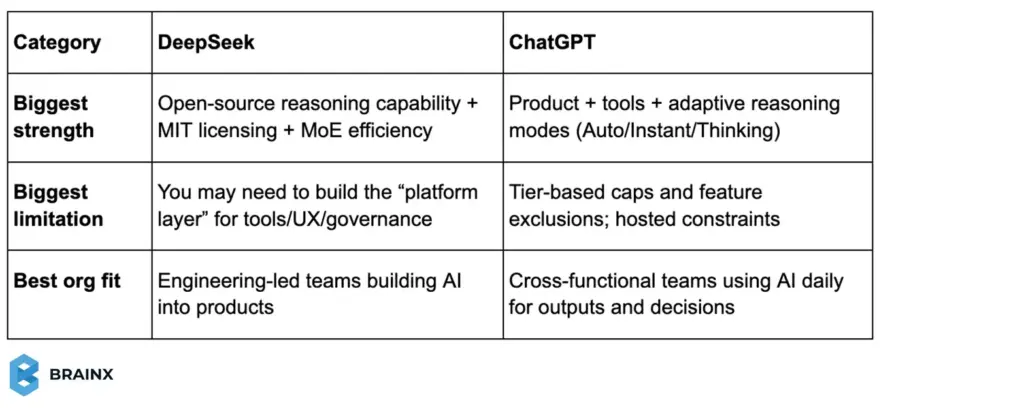
Best AI Model for Different Users
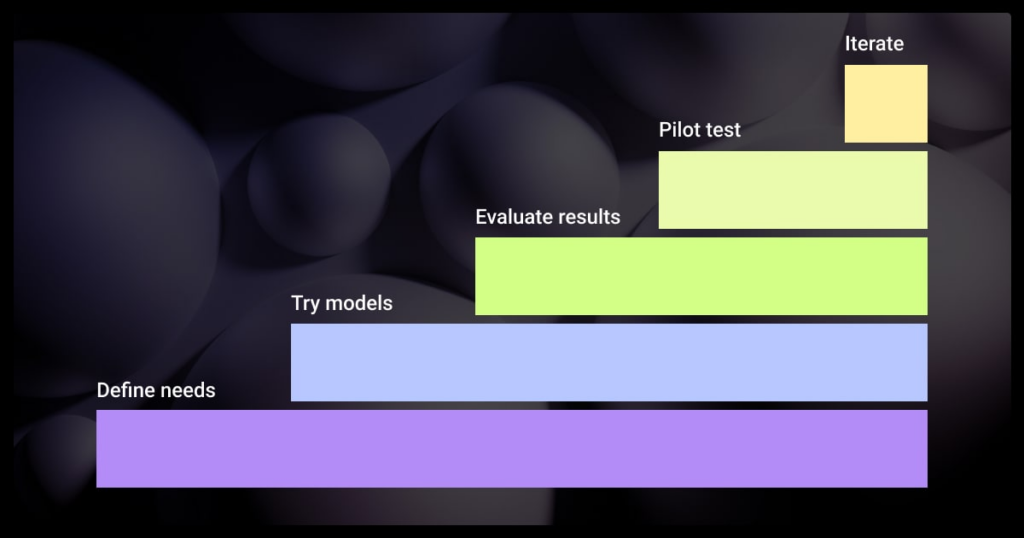
Choosing between DeepSeek and ChatGPT is easiest when you stop asking “which is better” and start asking “better for whom.” Different users care about different outcomes. Some need natural conversations. Others need workflow automation, governance, and reliability. Technical teams often need controllable infrastructure and strong coding support.
Everyday Users: Conversations
For everyday users, the best model is the one that feels effortless. That usually means understanding intent, keeping the tone natural, and staying helpful across a wide range of topics without constant re-prompting.
DeepSeek for Everyday Conversations
DeepSeek can handle Q&A and general chatting well, especially when prompts are clear and direct. It often feels structured and “to the point,” which some users prefer for quick answers and learning.
ChatGPT for Everyday Conversations
ChatGPT tends to shine in conversational flow. It adapts tone better, supports longer back-and-forth, and feels more “assistive” for planning, explaining, rewriting, and brainstorming. If you also care about voice, images, files, and a smoother interface, ChatGPT’s product experience usually makes it the easier daily driver.
Businesses: Productivity and Automation
For businesses, the question is less about “chat quality” and more about operational value. Can the model reduce ticket time, generate consistent outputs, follow brand and compliance rules, and plug into processes without creating chaos?
DeepSeek for Business Productivity
DeepSeek becomes compelling when you treat it as a component inside your stack. If you need deployment control, cost management at scale, or custom behavior for internal tools, DeepSeek can be a strong base. It’s especially relevant when sensitive data should stay within your environment and you want flexibility in how the system is designed.
ChatGPT for Business Productivity
ChatGPT is often chosen for speed-to-adoption. It’s easier to roll out across teams, and its built-in tools can turn “AI chat” into “AI work.” That matters for teams that want quick wins like drafting support macros, summarizing meetings, reviewing docs, and automating repetitive knowledge tasks without building a full AI layer first.
Developers and AI/ML Teams: Coding and Technical Work
For engineering teams, the best model is the one that supports the entire workflow. That includes reading requirements, reasoning through edge cases, producing code patches, handling logs, and keeping context across long technical threads.
DeepSeek for Developers and AI/ML teams
DeepSeek is attractive when you need model-level control. It fits well for internal developer tools, custom agents, and productized features where the model must behave predictably under your orchestration. It’s also a practical option when you want infrastructure flexibility, including deployment choices and tighter control over cost and routing.
ChatGPT for Developers and AI/ML teams
ChatGPT is often the fastest path to strong developer productivity because the tooling is already integrated. For debugging, refactors, documentation, and analysis-heavy work, it tends to deliver better speed-to-outcome when you’re iterating with files and artifacts rather than just prompting in a blank chat.
Which suits you? If you’re implementing AI inside a product and want full control over behavior and deployment, DeepSeek usually aligns better. If you’re equipping a team with a powerful assistant today for coding, docs, and cross-functional collaboration, ChatGPT often wins on usability and time saved.
DeepSeek AI vs ChatGPT: Text-to-Video Generation
Text-to-video is quickly becoming a practical advantage for SaaS teams, not a gimmick. It helps with product teasers, onboarding clips, ad variations, and “explainer” content without a full production cycle. In this DeepSeek AI vs ChatGPT comparison, video is one of the clearest places where product experience and tooling matter more than raw text quality.
Text-to-Video in ChatGPT
ChatGPT’s edge here comes from Sora, OpenAI’s video generation product. Sora supports text prompts and can also start from uploaded images or video, then iterate using editor actions like remixing, blending, looping, and storyboard-style sequencing.
From a workflow perspective, it’s built for creators and teams who want outputs fast:
- Up to 20 seconds per generation and adjustable settings like aspect ratio, resolution, duration, and variations.
- Plan-based capabilities: Plus/Business includes up to 480p + 10s, while Pro goes up to 1080p + 20s with faster generations and more concurrency.
- Important for builders: Sora has no API access right now, so you can’t directly embed it into your product pipeline via API.
Text-to-Video in DeepSeek
DeepSeek’s official public model releases are strongest in text reasoning and, on the multimodal side, vision + image generation (for example, Janus supports multimodal understanding and text-to-image generation).
But DeepSeek does not currently present a first-party text-to-video product in its core public model repositories, so “DeepSeek for video” usually means a different approach: use DeepSeek for the planning layer (scripts, shot lists, prompts, captions, storyboards), then pair it with a dedicated video generation system that fits your stack.
DeepSeek and ChatGPT: Which is Better in Text to Video?
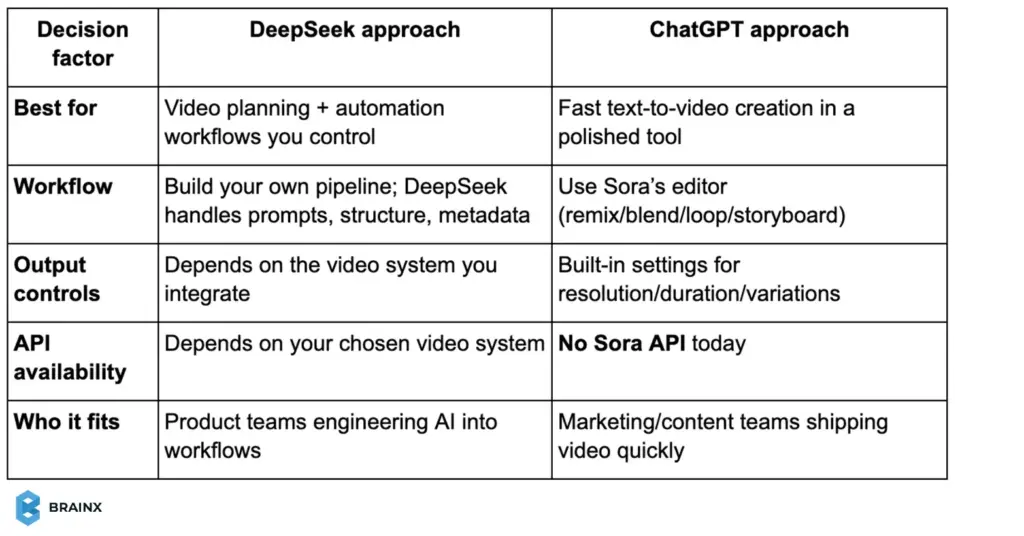
If you need video generation as a ready-to-use feature, ChatGPT + Sora is the practical winner today. If you need video as part of an integrated product workflow, DeepSeek can still play a strong role, but typically as the orchestration brain around whatever video generation stack you deploy.
DeepSeek vs. ChatGPT for LLM Fine-Tuning
Fine-tuning is where the “AI chatbot” conversation turns into an AI product conversation. For SaaS teams, the goal is rarely “better writing.” It’s tighter domain behavior, fewer hallucinations in your niche, consistent formats, and responses that match your policies, data model, and tone.
Fine-Tuning and Customization Capabilities
DeepSeek for Fine-tuning
DeepSeek becomes especially interesting because parts of the ecosystem are open-weight, which gives teams the option to fine-tune and deploy on their own infrastructure. DeepSeek-R1 is publicly released via the official repository, making it a realistic path for organizations that want full control over model behavior.
In practice, most teams fine-tune using efficient methods like LoRA (a lightweight technique that adapts a model without retraining everything). Several hosted platforms also support LoRA fine-tuning for DeepSeek V3.x checkpoints, which reduces the ops burden if you don’t want to self-host.
ChatGPT for Fine-tuning
ChatGPT (running GPT-5.2 in the product) is not positioned as “fine-tune the ChatGPT model.” Instead, customization is primarily product-layer configuration: model selection (Instant/Thinking/Auto), tool use (file analysis, data analysis, etc.), and behavior shaping through instructions and workflows.
If you specifically need model fine-tuning in an application, OpenAI offers fine-tuning for select API models (for example, GPT-4o fine-tuning), which is typically used to lock in tone, structure, and domain-following behavior in production.
When comparing them, think of it as control vs convenience:
- If you need an LLM you can treat like infrastructure (train it, host it, govern it), DeepSeek is appealing.
- If you need fast rollout and strong day-to-day usability, ChatGPT wins by packaging intelligence + tools into a product teams actually adopt.
If you’re building a product feature around the model, DeepSeek fine-tuning can be a strategic advantage. If you’re optimizing team output quickly, ChatGPT’s customization is usually “enough,” and faster to operationalize.
Best Use Cases: When to Use DeepSeek vs ChatGPT
Rather than declaring a winner, align the tool to the workflow.
Developers and Technical Teams
Use DeepSeek when you are building:
- Internal tooling that must run behind a firewall (CI assistants, incident bots, regulated data workflows). The MIT license and open weights make this possible.
- LLM features inside your product that need predictable per-token pricing and engineering control (routing, caching, guardrails, evaluation).
Use ChatGPT when your dev team needs:
- A fast “workbench” that can use tools like data analysis and file analysis to accelerate debugging, documentation, and analysis—without building an internal UI.
- A standardized reasoning toggle (Instant vs Thinking) for higher-stakes tasks.
Startups and Enterprises
Use DeepSeek when you are optimizing:
- Unit economics for an AI feature at scale (token pricing + inference efficiency).
- Deployment control and non-dependence on the UX and tier structure of one vendor in the long term.
Use ChatGPT when the goal is:
- Quick productivity in all domains (product, marketing, operations, sales, support) supported by tools and a long content retention for documents.
- A managed environment with clear usage policies and guardrails (especially at Business/Pro tiers).
An enterprise IT nuance: if your employees use DeepSeek via hosted services, Reuters reports DeepSeek stores user information on servers in China—something many security teams will want to assess.
If you self-host open models, that risk profile changes substantially.
Content and General Users
Use ChatGPT when you need:
- High-quality writing and tool-based workflows (summarize upload, generate a plan, analyze a spreadsheet, create an image).
- Fast iteration with consistent UX and memory-driven personalization (except for Pro exclusions).
Use DeepSeek when you need:
- A cost-effective engine for content generation at volume, embedded in your own pipeline (where you build checks, templates, and human review).
DeepSeek and ChatGPT in AI Development
For product teams, AI development is rarely “just pick a model.” It’s building a system that can retrieve the right context, follow policies, call tools safely, and produce outputs your app can trust. In a practical DeepSeek vs ChatGPT decision, the real question is whether you’re choosing a model to ship inside your product or a platform to accelerate team workflows.
DeepSeek in AI Development
DeepSeek fits well when you want LLMs as infrastructure. The DeepSeek API models (deepseek-chat and deepseek-reasoner) support 128K context, JSON output, and tool calls, which are key building blocks for agents, RAG pipelines, and structured automation.
This makes DeepSeek a solid option for:
- RAG + assistants that must return consistent JSON for your frontend or workflow engine
- Agent tool routing where the model chooses functions and returns machine-readable results
- Cost-aware systems where token-based pricing and caching can matter at scale
ChatGPT in AI Development
ChatGPT is powerful for development because it compresses the iteration loop. GPT-5.2 is the default model and supports Auto switching (Instant/Thinking) plus built-in tools like web search, data analysis, file analysis, image analysis, Canvas, image generation, Memory, and Custom Instructions.
That changes many AI builds from “model + glue code” to “prototype inside a workspace,” especially for:
- Designing prompts, evaluation sets, and edge-case tests quickly
- Debugging agent behavior with files/logs in-context
- Helping teams standardize workflows via custom GPTs (instructions + knowledge + capabilities)
Use this simple model-selection lens:
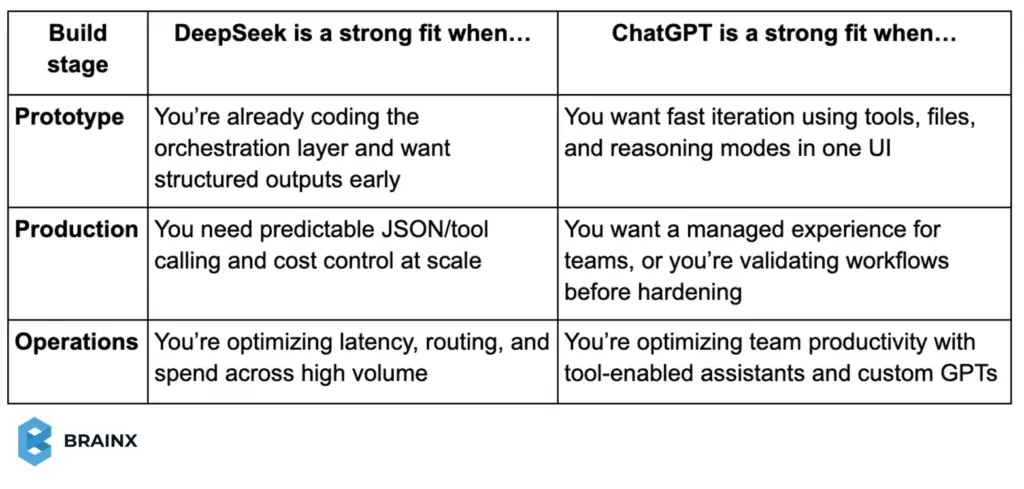
If you’re building AI features into a SaaS product, DeepSeek often feels like a flexible component you can architect around. If you’re accelerating product discovery, documentation, QA, and internal workflows, ChatGPT tends to win on speed-to-outcome because the “developer environment” is already packaged.
Final Verdict: DeepSeek vs ChatGPT
A neutral, business-realistic conclusion: DeepSeek vs ChatGPT is best decided by your operating model.
Choose DeepSeek if your priority is control: open weights, MIT licensing, the ability to self-host, and the ability to treat the model as infrastructure you can tune and integrate. DeepSeek‑R1’s open-source release and the MoE efficiency story behind DeepSeek‑V3 are central advantages for engineering-led organizations and cost-sensitive product deployments.
Choose ChatGPT if your priority is time-to-outcome: GPT‑5.2 Auto, explicit Instant/Thinking modes, a model picker for paid tiers, and a complete tool suite (search, data analysis, files, images, Canvas, image generation, memory, custom instructions) that turns “AI quality” into daily workflow acceleration. The hard limits (message caps and tier policies) are real, but they’re also transparent and operationally predictable.
In practice, many SaaS and enterprise teams will use both: DeepSeek as a deployable model layer for product features, and ChatGPT as the day-to-day AI workspace for strategy, analysis, content, and collaboration.
Turn DeepSeek or ChatGPT Into Real Business Automation
Ready to move beyond comparisons and start using AI for real business impact? BrainX Technologies helps you build and integrate AI agents, chatbots, and custom LLM solutions using the right model for your use case, whether that’s DeepSeek, ChatGPT, or a hybrid stack. From MVP to enterprise rollout, we design secure, scalable AI workflows that fit your product and teams.
DeepSeek vs ChatGPT Comparison FAQs
1) How good is ChatGPT vs DeepSeek for studying?
ChatGPT is usually better for studying because it explains concepts in a more conversational way, adapts tone, and helps you practice with examples and quizzes. DeepSeek is great when your studying is math, logic, or coding-heavy and you want structured, step-by-step problem solving.
2) Is there a DeepSeek AI vs ChatGPT comparison chart?
Yes. A simple chart usually compares model focus, reasoning strength, tools, pricing, and best use cases. In this blog, you can use the “Key Differences at a Glance” table as your DeepSeek AI vs ChatGPT comparison chart and expand it with benchmarks if needed.
3) Is DeepSeek better than ChatGPT in math?
DeepSeek often performs very strongly in math and structured reasoning tasks, especially when the prompt is clear and problem-solving is step-based. ChatGPT is also strong, but DeepSeek may feel more consistent on pure math, while ChatGPT can win when explanation quality and context matter.
4) Which AI is better than ChatGPT now?
There isn’t one AI that is universally “better” than ChatGPT for every use case. Some models can outperform ChatGPT on specific tasks like math, coding benchmarks, or cost efficiency. The best choice depends on your goals, tools needed, and how you plan to deploy it.
5) Which AI is better for training industry-specific models?
DeepSeek is usually better if you want to fine-tune and deploy a model for an industry use case with more control over infrastructure and behavior. ChatGPT is better if you want faster rollout using instructions, custom GPTs, and tool-enabled workflows without managing model training.
6) Which AI subscription is worth it: DeepSeek vs ChatGPT?
ChatGPT is usually worth paying for if you want a polished workspace with tools like file analysis, data analysis, and multimodal features. DeepSeek can be more cost-effective if you mainly need API usage at scale or plan to build and optimize your own workflows.
7) Which is more accurate: DeepSeek or ChatGPT?
Accuracy depends on the task. DeepSeek can be very strong for structured logic, math, and technical prompts. ChatGPT is often more accurate for mixed-context questions because it handles nuance, intent, and longer conversational flow more reliably, especially when paired with tools for validation.
8) Is DeepSeek better than ChatGPT for coding?
DeepSeek can be strong for structured coding tasks, logic-heavy problems, and self-hosted workflows. ChatGPT is often better for end-to-end coding help because it explains code clearly and supports tools like file analysis and data analysis in the ChatGPT app.
9) What is the main difference in a DeepSeek vs ChatGPT comparison?
The biggest difference is how they’re used. DeepSeek is often chosen for open-source flexibility and custom deployments. ChatGPT is a full product experience with GPT-5.2, built-in tools, and a polished interface for everyday work.
10) Is DeepSeek free to use compared to ChatGPT?
DeepSeek models can be used through open-source releases or via paid API usage (pricing depends on tokens and model). ChatGPT offers a free tier with limits and paid plans that provide higher usage, advanced tools, and better performance.
11) What should businesses choose in a DeepSeek AI vs ChatGPT comparison?
Choose DeepSeek if you need deployment control, customization, or on-prem hosting. Choose ChatGPT if you want quick adoption, strong productivity features, and integrated tools for teams. Many businesses use both, depending on the workflow.
- Based on external pricing benchmarks and BrainX’s planning estimates, AI app development may range from around $30,000 for a focused MVP to more than $500,000 for an advanced enterprise solution.
- Project scope, data readiness, and AI model complexity are the biggest factors driving the total cost.
- A phase-by-phase AI app development cost estimate helps businesses budget clearly across discovery, design, core development, AI implementation, quality assurance, and deployment.
- Ongoing expenses such as cloud infrastructure, API usage, model tuning, and maintenance can significantly increase the total investment.
AI app development cost is a major consideration for businesses looking to use artificial intelligence. The short answer is that it varies considerably. A focused AI MVP may require an investment of tens of thousands of dollars, while complex enterprise applications can exceed $500,000.
Published 2026 pricing benchmarks demonstrate how widely budgets can vary. GoodFirms’ 2026 app development cost survey estimates that applications incorporating AI and other advanced technologies can cost approximately $50,000 to $400,000+, while highly complex AI-powered applications may exceed $500,000. The report is based on responses from 267 app development companies.
Clutch’s 2026 AI pricing guide reports an average AI development project cost of approximately $120,595 based on verified client reviews, although the most common reviewed project range is $10,000 to $49,999.
Why such a broad range? The final price depends on factors such as model complexity, data requirements, integrations, development approach, security obligations, expected usage, and post-launch support.
In this guide, we’ll break down how much AI app development costs by examining the key cost factors and providing phase-by-phase estimates. You will also observe actual cost examples of various forms of AI applications, understand about the unseen recurrent expenses, and get insight on how to save money on your AI app. Armed with all this insight, you can plan and maximize the value of your AI investment with confidence.
Why Should You Invest in AI App Development
Investing in AI app development pays off when it turns slow, manual workflows into fast, repeatable systems. For example, customer support apps can use AI to auto-tag tickets, route them to the right queue, and generate a first-draft response based on your help docs. That alone reduces handling time and improves SLA performance. In internal operations, AI can read invoices, contracts, and PDFs, extract key fields, and push them into your CRM or ERP, which cuts data entry errors and speeds up approvals.
AI is also valuable when decisions depend on patterns humans miss. A product analytics app can detect churn signals from user behavior, then trigger retention plays automatically. A logistics or retail app can forecast demand and recommend reorder quantities using seasonality and historical data. In regulated industries, AI can support reviews by highlighting anomalies or missing documentation, while keeping a human in the loop for final decisions.
The goal is not “adding AI.” It’s building features that create measurable outcomes like fewer hours spent per task, faster turnaround time, higher conversion, or reduced risk. When you tie use cases to KPIs early, your AI app development cost estimate becomes easier to defend, and you avoid spending on AI features that don’t move the business forward.
Factors Influencing AI App Development Cost
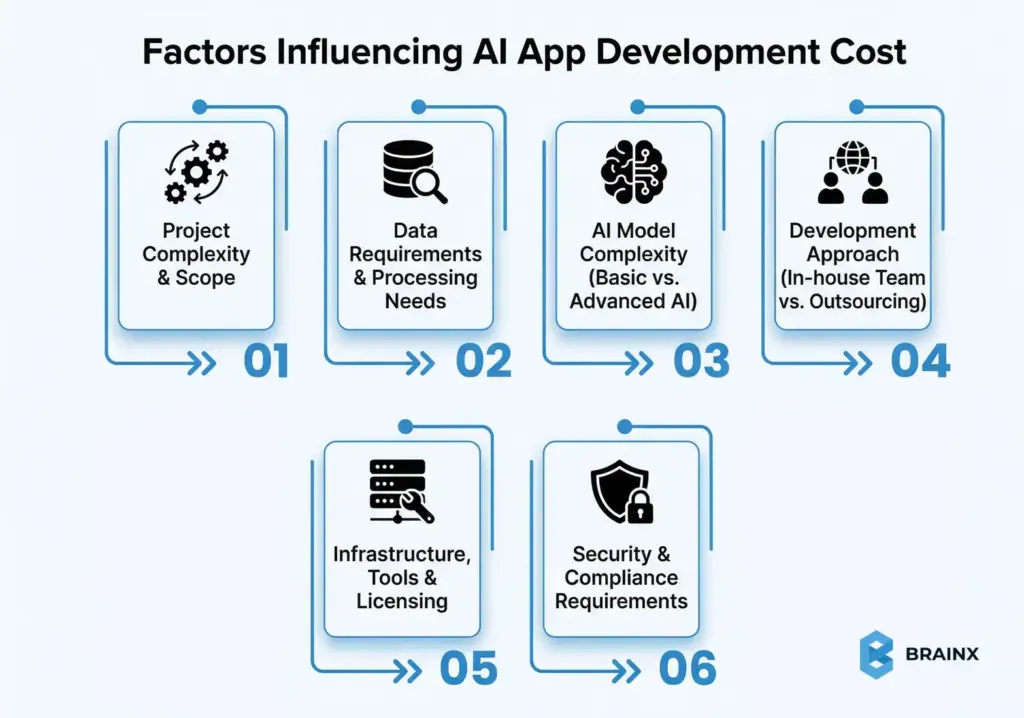
Several primary factors drive the cost of developing an AI app. Learning about these will make you understand why AI app development costs may differ so much. Some of the most influential elements are listed below:
Project Complexity & Scope
One of the largest cost drivers is its overall scope and complexity of the project. A simple application with a limited feature set (such as a basic AI chatbot with FAQs) is much cheaper than a platform with a wide range of AI features and integrations. The greater the features, user role, and use cases your application needs to accommodate, the more development hours and skills you will need to hire.
As an example, a basic AI customer support chatbot can be developed at fairly low cost and speed, but a more sophisticated AI solution (such as a predictive analytics application or a medical diagnostic application) that requires the use of several AI models and big streams of data will inherently come at a much higher price. Put simply, the wider and more sophisticated the functionality of your app, the more expensive it is to develop.
Data Requirements & Processing Needs
AI runs on data, and data requirements of your application can be a substantial cost factor. Take into account questions such as: How much data do you need to train and run your AI models? Is there a requirement to gather or otherwise acquire vast data sets? Will it work with real-time data or work with sensitive information that needs to be stored securely?
In case your AI application will need a lot of data collected, cleaned, and labeled, this preliminary work can become quite costly. Similarly, applications that constantly use high amounts of data (e.g. real-time analytics or image recognition feeds) might result in increased cloud computing and storage expenses. As an example, one guide estimates data collection alone may go as high as 1000 to 30,000 dollars a year and big data processing infrastructure might further cost tens of thousands per year.
In simple words, AI applications that are data-intensive require additional resources to control data pipelines, storage, and processing power.
AI Model Complexity (Basic vs. Advanced AI)
Not every AI is made equal, the complexity of the AI models that you use is another significant cost factor. There is a big difference between integrating an existing basic AI feature and creating an advanced AI system from th
e ground up. The more complex and personalized your AI models are, the more time and expertise the creation, training process, and optimization of the models require.
As a crude estimate, the simplest AI applications (such as simple chatbots or recommendation engines) could add tens of thousands of dollars to the cost, and more complex AI applications (such as multi-model predictive analytics or generative AI systems) can go into the six figures. As a matter of fact, one of the industry breakdowns indicates that basic AI applications can be affordable with about 15,000-35,000 dollars, whereas complex or multiple models of AI applications can cost 250,000-500,000+.
Advanced AI is more expensive due to the increased size of the datasets required, the greater amount of computation, and specialized AI research and development.
Remember that the decision between off-the-shelf AI models and custom models is a huge one because custom models will provide greater control and distinctiveness but will be more expensive, whereas using the existing AI models can save time and money (you’ll find more about this in the cost-saving tips section).
Development Approach (In-house Team vs. Outsourcing)
The way you organize your development team will directly influence your budget. You can develop an AI application with an inhouse team, outsource to an agency or offshore developers or use a mixed approach. All the options have different impacts on cost, control and scalability.
- In-house teams involve the recruitment of developers, data scientists and AI engineers, who are usually charged higher per hour. Payrolls, allowances, and infrastructure become part of recurrent costs. Although such an approach has the benefit of direct control it typically requires greater initial investment, especially for specialized AI talent.
- Outsourcing to an AI development agency or offshore team is usually cheaper. It reduces costs by utilizing available expertise and regional rates benefits without having to hire long-term or permanent staff. You only pay for the skills on demand and do not have to pay continuous overhead on employment.
Budget, timeline and control requirements determine the most appropriate approach. Many teams outsource at the beginning (to create an MVP), and scale their in-house team afterwards, or use a mix between the two. Team structure and location should always be included when you’re cost planning.
Infrastructure, Tools & Licensing
Other than the cost of people, infrastructure and tools are also relevant to your AI app budget, both initial and continued. Such technical demands tend to be underestimated and can expand rapidly as the usage increases.
- Cloud infrastructure facilitates hosting and training AI models. Platforms like AWS, Azure, and GCP bill you on compute, storage, and data transfer basis. The workloads that require the heavy use of GPUs can be very expensive and cost up to hundreds or thousands monthly, whereas cloud pricing can offer the prices to be as flexible as possible because there are no initial hardware costs.
- APIs and third-party services introduce usage-based fees. While they speed up development, costs rise with scale. Small per-request charges can become significant as user activity increases, making usage forecasting essential.
- Software licenses and DevOps tools may add recurring costs. Annual subscription fees are common with enterprise AI systems, data labeling systems and MLOps systems. Even though minor as compared to development costs but must be factored into the budgeting.
Overall, monitor infrastructure usage closely. Cloud services lower capital costs, but actively tracking costs and usage alerts can help prevent sudden spikes.
Security & Compliance Requirements
AI apps that work with sensitive data or in a regulated sector, will need additional security and compliance investments. Applications that deal with personal, health, or financial information should comply with regulations such as GDPR or HIPAA, which directly affects the scope of development and its budget.
The security efforts involve encryption, safe data storage, penetration testing, and continuous monitoring. Law and consent forms, as well as formal evaluations, may be necessary to ensure compliance and incur both development time and external costs.
For example, even simple GDPR compliance may cost a bunch of thousands of dollars, and more rigorous audits and monitoring can cost even more. Although these measures increase the AI app development cost, they are necessary for minimizing risks, preventing penalties, and securing long-term business value.
A Comprehensive View of the Cost Involved in AI App Development (Phase-by-Phase Breakdown)
Here’s a cost estimate of AI app development that helps you plan for every phase.
Phase-wise AI App Development Cost Estimate Table
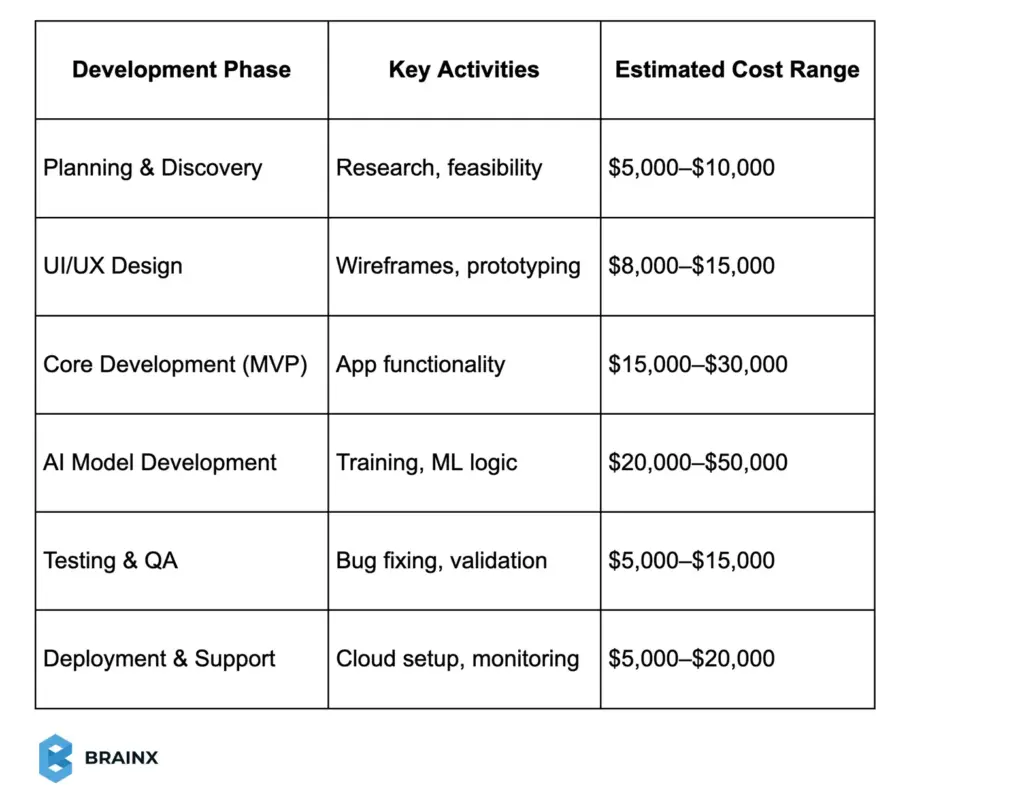
You may use the above given AI app development cost estimate to align scope with your budget.
Having discussed the reasons why pricing may differ, now we will discuss how much AI app development can cost you throughout an average development lifecycle.
Also Read: Fintech App Development Cost Guide With Detailed Breakdown
How Much Does AI App Development Cost? (Breakdown by Stages)
The division of an AI project into distinct stages simplifies budgeting and allows decision-makers to know how time and money are used.
Although actual figures vary depending upon scope and complexity, the following ranges give a viable starting point on which to base a plan on how much does AI app development cost and will it be within your budget.
Planning & Discovery ($5,000–$10,000)
It’s the initial phase concerned with research, requirements gathering, and feasibility analysis. Teams establish the scope of the project, find target users, describe the use cases, and determine the technical and commercial feasibility of the proposed AI solution before the actual development.
Some of the activities involve discovery workshops, interviews with stakeholders, data audits, and, occasionally, a proof of concept or technical feasibility study. During this stage an AI road map is generated, which can be used to make development decisions. Making such an investment saves uncertainty and avoids the painful rework in the future, so it is one of the most useful steps and especially worth it given the comparatively low cost.
UI/UX Design ($8,000–$15,000)
UI/UX design shapes how users engage with AI features and perceive AI-generated outputs. The designers develop wireframes, prototypes, and user flows which facilitate interactions like chatbots conversations, dashboards, recommendations, or visual insights.
A good AI UX design simplifies complex logic and creates trust, since the outputs are easy to understand. The prices vary according to the size of the screens and platforms, as well as the complexity of the interaction, although the majority of AI applications cost between the middle four and lower five figures in terms of design.
Good UX leads to a decrease in friction, increase in adoption, and decrease in future support costs.
Core Development (MVP Build) ($15,000–$30,000)
This stage focuses on building the core application without advanced AI logic. A minimum viable product contains the basic front-end and back-end functionality including authentication, data flows, APIs and basic workflows.
As a case in point, an AI-based eCommerce application MVP can have user accounts, product listing, and checkout with place holders where AI suggestions will appear. The cost depends on platform and architecture, while agile development and strict focus on must-have features keep the costs in control.
Postponement of non-essential functionality makes this phase lean and in line with initial validation objectives.
AI Model Development & Training ($20,000–$50,000)
This is what is at the heart of an AI app and may be the costliest step. Prices will vary based on the pre-built AI APIs or the creation of specific models you need. Ready-to-use services save time and money but have minimal customization. On the other hand, custom models involve data preparation, experimentation, training runs, tuning and integration.
It’s the phase that covers model coding, training infrastructure, validation, and early AI testing. Although the simpler AI use cases can be cheaper, more advanced applications of AI can drive the prices up like computer vision or predictive analytics.Investing here has a direct influence on accuracy, reliability, and value in the long run.
Testing & Quality Assurance ($5,000–$15,000)
Testing has to go beyond traditional software QA. Besides functional checks, performance and security checks, teams have to verify AI behavior and output accuracy. QA engineers test edge cases, bias risks, and model reliability under real-world conditions. It is highly risky to omit or minimize this step because AI errors can cause bad decisions or mistrust of users. Even though testing is an added cost, it saves the company a lot of post-launch fixes. Tested AI applications are more reliable, scalable, and can be trusted by the users.
Deployment & Post-Launch Support ($5,000–$20,000)
Deployment entails installation of cloud infrastructure, databases, model hosting, monitoring, and scaling. It can also include the publication of apps to stores or distribution among internal teams. Expenses include performance tuning, logging, integration of analytics and readiness of real world traffic. Short-term post-launch support is typical immediately after launch so that developers can fix urgent problems and ensure stability of the system. Most contracts contain a short support window, so as to provide a smooth transition into production.
Such statistics are not absolute. Small projects may fall below these ranges, while enterprise AI systems often exceed them. Breaking costs down into phases assists in teams to be more strategic with budget allocations. One such approach is to allocate an average of 10 percent to discovery, 10 percent to design, 30 to 40 percent to development and AI modeling, and the rest to testing and deployment.
The resulting structured view from understanding how much does AI app development cost and why allows for better planning, clearer expectations, and more informed investment decisions.
Breakdown of Costs by Levels of Complexity
Cost ranges shift most when you move from “API-based AI” to “custom-trained AI,” and when your app needs deeper integrations, stricter security, or multi-role workflows. Use this table as a practical AI app development cost estimate by complexity level.
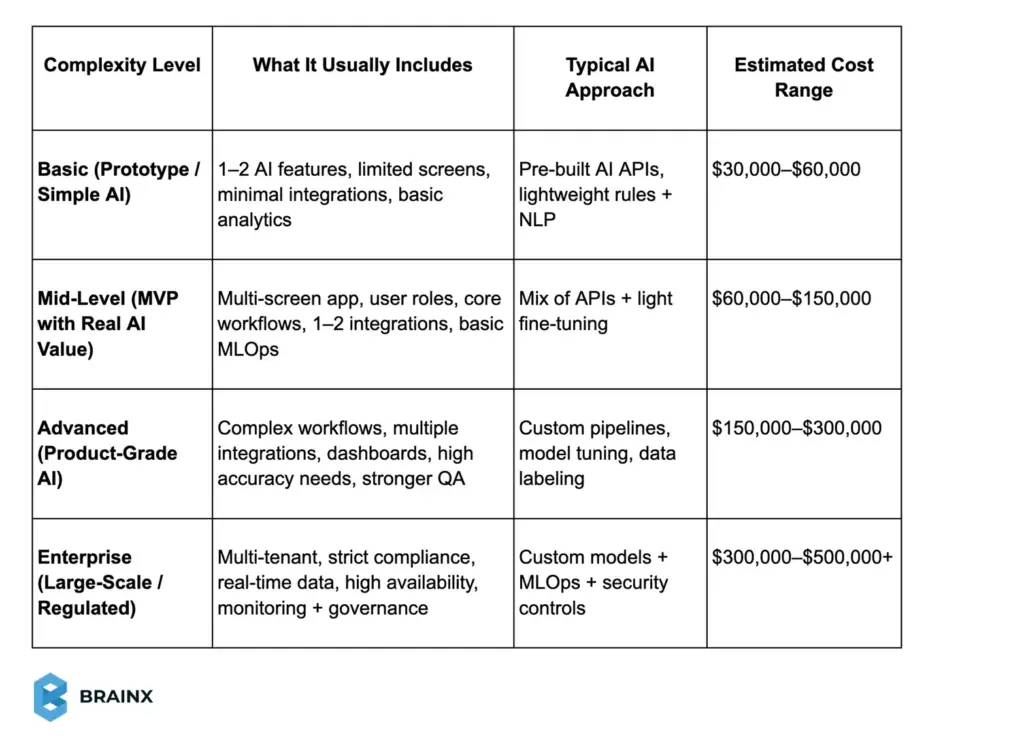
These ranges work best when you already know whether you’re building a focused MVP or a platform that needs enterprise reliability from day one.
Time and Efforts Required
Time is not just about “how fast the developers code.” AI apps take longer when your data is messy, labeling is required, or your team needs repeated model iterations to hit accuracy targets. The table below shows typical effort ranges that influence how much does AI app development cost in real projects.
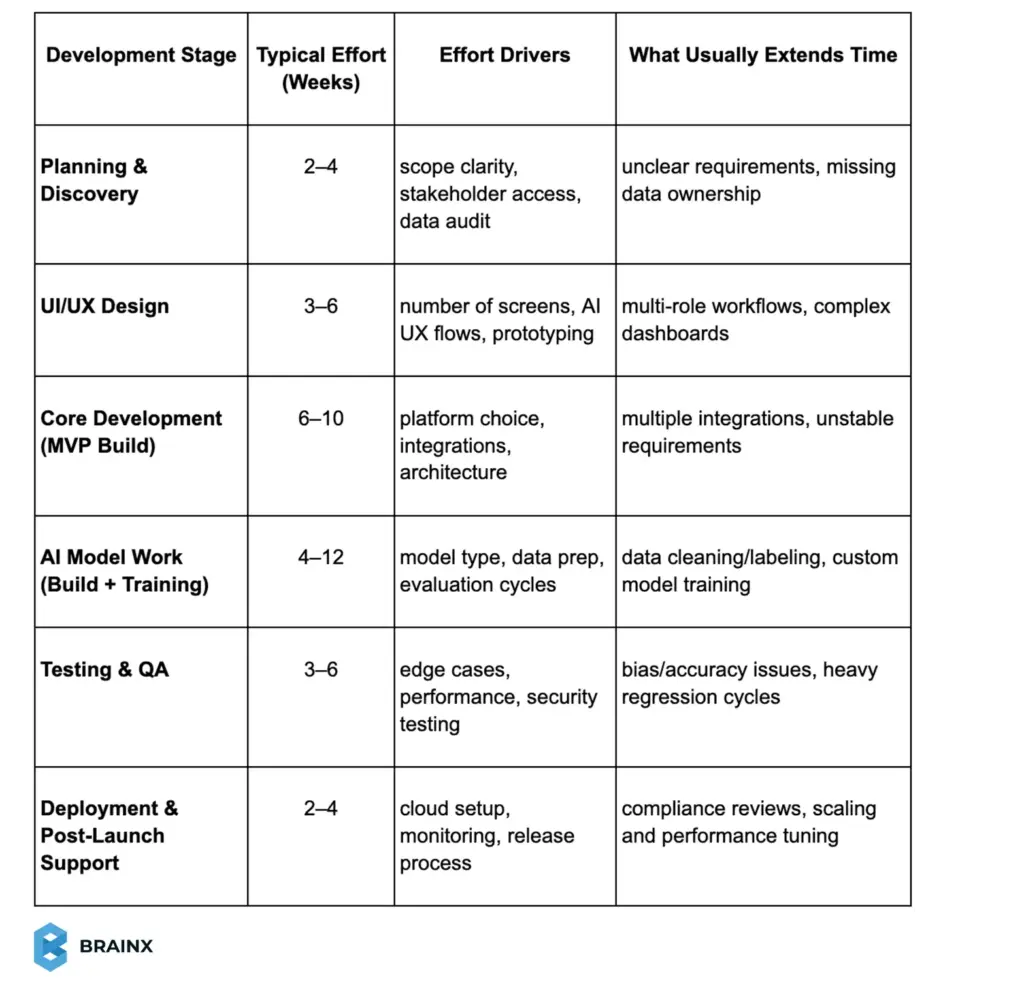
In most cases, an MVP-level AI app lands in the 10–16 week range. Product-grade AI often takes 4–6 months, especially when model tuning and data work are serious parts of the build. The more time you spend validating data and outputs early, the fewer expensive surprises you’ll face after launch.
AI App Cost Examples by Application Type
To narrow down the cost discussion, we will examine some examples of AI applications and how their cost may vary based on their development. Various AI apps are of different complexity, and comparing them can be used to clarify what you should be expecting with your specific AI idea.
AI App Cost by Use Case
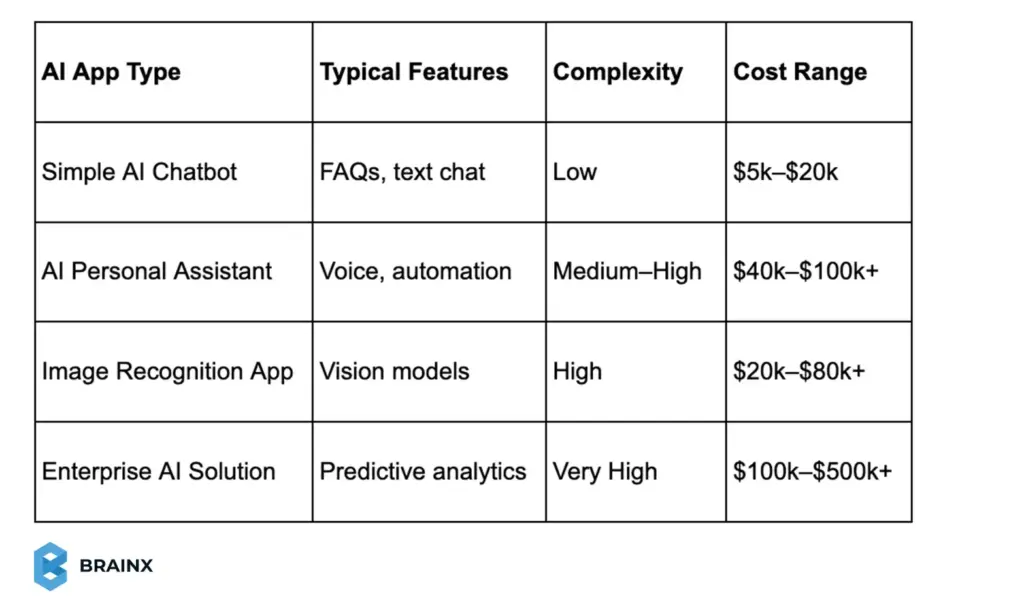
Simple AI Chatbot – Features & Cost Range
One of the most readily available AI applications is a simple AI chatbot. These bots are either rule-based or have simple NLP services to identify the user intent and serve based on a predefined knowledge base. They do not learn dynamically but handle straightforward queries efficiently.
- Features often consist of a simple chat interface, built-in question answer flows, or decision trees. Integration with websites or messaging platforms is possible along with the use of lightweight NLP tools for intent detection. The scope of conversation is restricted to FAQs or simple commands.
- The approximate cost of a simple chatbot is comparatively low. Basic integrations can begin at approximately $5,000-$10,000, whereas more sophisticated chatbots using machine learning and integrations can cost as much as $20,000 or above. Moderately complex custom chatbots can be priced reasonably between $15,000-$50,000, and this is still one of the most affordable AI app types.
AI Personal Assistant App Development Cost – Features & Price Range

AI personal assistant apps are, in comparison, far more complicated than chatbots. These systems rely on voice recognition, natural language understanding and task automation to perform tasks on behalf of users. They are required to deal with context, flow of conversation and integrations with other services or devices.
- Features usually comprise voice command processing, intent recognition, task execution like reminders or searches, and personalized responses. Most of the assistants work across platforms, adapt to user preferences over time, and work with both text and voice inputs.
- Approximate AI personal assistant app development cost can typically range from $40,000 to $100,000 for a basic version. More intelligent assistants with advanced voice AI, natural language generation and wide integrations may cost over $300,000-$500,000. As a result of this complexity, most teams begin with a team assistant focused on handling only a few tasks in order to keep costs manageable .
AI-Based Image Recognition or Vision App – Specialized & Data-Intensive
AI vision apps analyze images or a video feed to identify objects, patterns, or certain conditions. Common examples are product recognition, facial recognition, medical imaging, and augmented reality applications.
- Features focus on a computer vision model that is trained to recognize specific image classes. The users upload or take pictures, and the artificial intelligence interprets them to provide answers. Other features can be image annotation, editing, or real-time detection.
- Approximate cost depends on the usage of the pre-built APIs or custom models. Basic applications using already available APIs can begin at approximately 20,000 dollars, and custom vision applications will cost anywhere from $20,000–$100,000+. Prices increase depending on data labeling requirements, the complexity of model training and hardware, including GPUs. The overall cost of vision apps usually lies between chatbots and enterprise AI.
Enterprise AI Solution (e.g., Predictive Analytics) – Large-Scale & High Cost
Enterprise AI solutions are developed to be used in challenging business environments with huge volumes of data. Examples are predictive analytics platforms, demand forecasting systems, or AI embedded within CRM or ERP software.
- Features offered are deep data integration, multiple AI models, analytics dashboards, robust security controls, and ability to manage high data-volumes or real-time processing.
- Approximate cost for enterprise AI projects usually begins at $100,000 to $200,000 and sometimes goes beyond $500,000 in case of deployments at a larger scale. Such solutions are typically developed in phases and need continuous investment for model tuning, system expansion and maintenance. The overall cost of the initial development is only a portion of the total cost with optimization playing a significant part in the long term.
Hidden and Ongoing Costs of AI App Development that you Shouldn’t Ignore
The budgeting of an AI app should not focus on the initial build only. Numerous costs arise post-launch and they persist throughout the lifecycle of the app. These hidden and ongoing costs can significantly affect the total AI app development cost if they are not taken into account at the initial stage
Post-launch Maintenance and Updates are a Major Ongoing Expense
After release, teams need to fix production bugs or other similar issues, upgrade libraries or operating systems, and improve features. In the case of AI apps, retraining or fine-tuning models also fall under maintenance since data will evolve over time.
A common guideline is to budget 15–25 percent of the initial development cost annually for maintenance. It usually includes support of the developer, regular updates of the model, and small improvements that may be necessary to maintain the app’s reliability and accuracy.
Data Storage, APIs & Cloud Service Fees Contribute to Long-term Costs
AI applications are typically hosted in the cloud, which is billed per storage, compute, and transfer data. Archiving user data, logs, and the training data might be cheap per gigabyte at the initial stages, however, the expenses will rise as more data is gathered,
Adding to all this, AI APIs and model inference are often charged on a per-use or per-request basis. Small per-call charges can grow rapidly as usage grows, particularly when it is time-intensive computational work such as image recognition or natural language processing.
Compute Usage and Bandwidth are Another Consideration
The cost of hosting AI models can be expensive since the CPU or GPU resources needed for the job will cost hundreds or thousands of dollars per month at scale. The transfer of data, notification and third-party services can introduce smaller, yet recurring fees.
All in all, AI apps need continuous investment to be effective. Cloud usage, maintenance, and model update cost are budgeted to prevent the instability, ensure scalability, and preserve cost-effectiveness of your app in the post-launch period.
Model Tuning and Continuous Improvement
AI models are not supposed to be the “set and forget” type. In order to remain precise and useful, they need to be tuned or retrained as the user behavior or data changes and new use cases are introduced. The AI lifecycle includes continuous improvement as one of its core components, and it has a direct impact on the long-term costs.
Ongoing expenses usually include:
- Periodic retraining, where models are updated with fresh data to improve performance. It entails data preparation, training runs, computational usage and deployment.
- Fine-tuning third-party models that add to the costs, particularly when acclimating large language models with domain-specific data.
- Feature improvements, driven by user feedback, which require further development and testing cycles.
It is often included in a yearly maintenance budget of many teams, and is generally about 15–25 percent of the initial development cost. Others set aside a special budget on continuous data science and AI optimization. Unless AI models are updated regularly, they may grow obsolete, making them less accurate and leading to distrust among users and making critical repairs more expensive.
Licensing, Security Monitoring & Compliance Costs
In addition to updating models, AI apps have supporting costs.
- Licensing fees for datasets, models, or enterprise tools that are often paid annually.
- Security monitoring that may involve audits, threat detection, and penetration testing, especially for apps handling sensitive data.
- Compliance maintenance that can also require periodic reviews, legal support, or certifications as regulations evolve.
One-Time vs Ongoing AI Costs
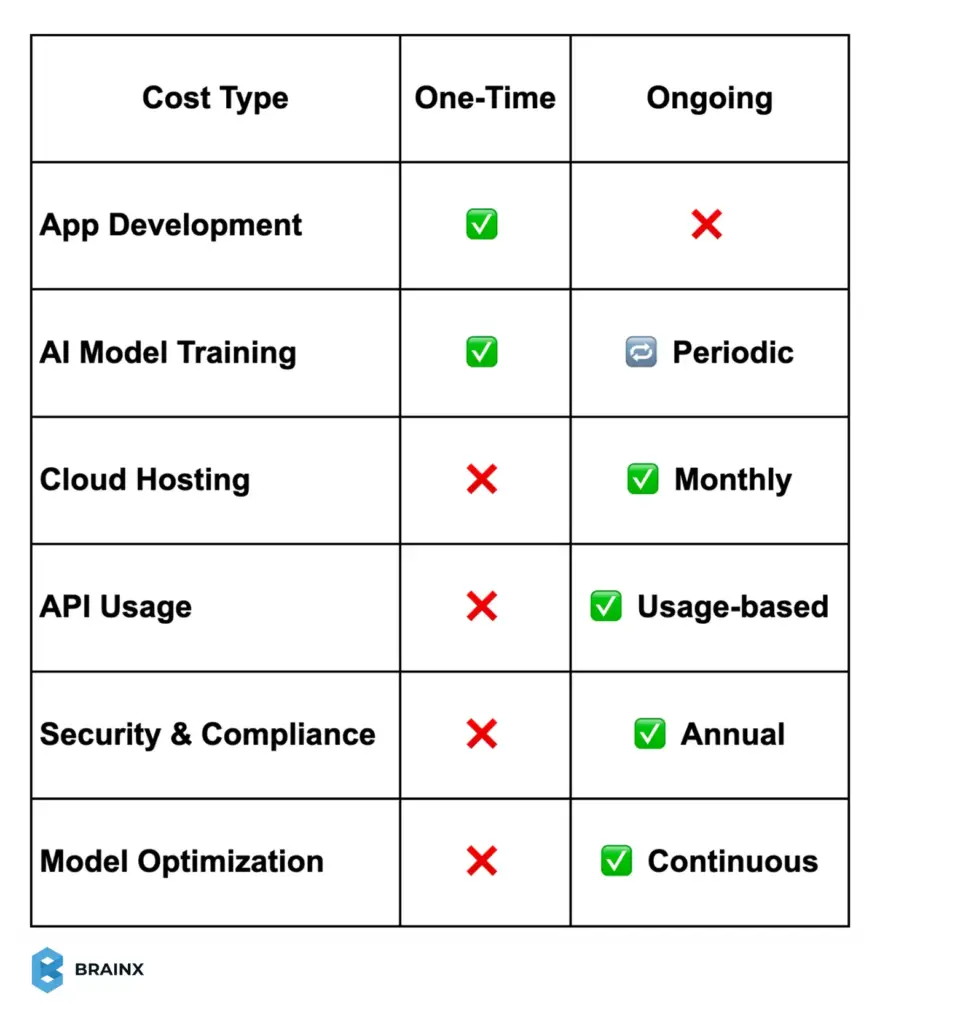
Simply put, recurring expenditures on an AI app generally involve cloud charges, ongoing development/improvement, and professional security and compliance services. An effective solution is to budget your AI app operations every year to accommodate all of these items. By doing so, the initial development cost is insured and the app will be able to keep on providing value without facing a sudden funding crisis in the future.
5 Tips to Reduce AI App Development Cost
Cost optimization is paramount, even more so when budgets are tight. The good news is that you can save money on the development of AI apps without compromising quality by making intelligent technical and process decisions. The following are some of the best-tested methods to ensure you get to keep the costs in check, and at the same time come up with a trustworthy AI application.
1. Leverage Pre-Built AI Models and APIs
When it is not required, avoiding custom AI development is one of the most effective methods of reducing costs. Image recognition, speech-to-text, and conversational AI are some of the many functions of AI that are already offered using mature APIs and pre-trained models.
When your AI needs are not that unique, pre-built API can save a lot of time in development. Your team doesn’t need to train models from scratch, instead, it gets busy with integration and product logic. This transforms high upfront expenses into scaling demand-based expenses.
Although API-based services have recurrent charges, they tend to be cost-effective at small to middle scale. The cloud providers also deal with updates, performance optimization, and scalability which minimizes the effort in maintaining them over the long run.
Open-source models offer another middle ground. They are free of cost and customizable but still need integration and tuning.
In short, build custom models only when differentiation demands it. Existing AI services can deliver faster results at a lower cost for most use cases.
2. Start with an MVP and Scale Gradually
An attempt to roll out a fully functioning AI application on the first day is likely to result in excessive spending. Instead, a more effective solution is to create a minimum viable product which provides essential value using the minimum number of features.
An MVP keeps initial costs down, accelerates time to market, and allows real users to validate assumptions. With early user feedback, the next round of investments is channeled into features that are actually important and not mere speculations of functionality required.
Suppose that an AI assistant can be launched with the ability to schedule and remind only, and advanced features will be launched in later releases. After the MVP demonstrates its worth, you can reinvest the revenue or funding in the growth of its features. It’s a phased approach that spreads cost over time and reduces financial risk.
3. Use Cloud Infrastructure Instead of On-Prem Hardware
Cloud infrastructure prevents massive initial expenditures of servers, GPUs and network devices. You don’t have to spend on capital expenses, instead, you pay regular operating expenses every month and scale the resources on demand.
To optimize cloud spending:
- Use managed services that help reduce DevOps overhead
- Deploy the right-size compute resources and shut them down when not in use
- Keep track of what is being used and get rid of services that are idle
Although cloud may be costly on big data scale, it is the least expensive choice for most small-scale and medium-sized AI apps. It also enables experimentation without any long term commitments.
4. Adopt Agile and Iterative Development Models
Development methodology can directly impact cost. The Agile and iterative methods minimize waste by promoting continuous feedback, early testing, and periodic prioritization.
Agile teams aim to develop the most valued features initially. Plans can be modified easily without significant re-designs even if requirements change or superior solutions are found. This is particularly crucial when it comes to AI projects, in which feasibility may feel unclear until one experiments with things early.
Building small prototypes to test AI techniques before carrying out a large scale implementation lowers risk and avoids costly failure. Effective communication and documentation among product and engineering teams also reduce the number of misunderstandings that can result in wastage of effort.
5. Invest in Quality Testing Early
Reduction of testing can appear a cost saving measure, but it nearly always ends up costing more in the future. Bugs found subsequently after launch are much more costly to remedy and can incite mistrust in the user.
In the case of AI apps, testing should not be restricted to regular QA. Models must be validated on diverse data, edge cases, and real-world scenarios. Fault-tolerance (feedback loops where the user can label the wrong outputs) are useful in enhancing the accuracy over time.
Security testing is equally crucial, specifically when handling sensitive data or using third-party AI services. Comprehensive upfront testing is a protection of your product image and budget in the long term.
With existing AI tools, MVP-based development, cloud computing, agile development, and good testing practices you can save a lot of money in the cost of AI applications yet provide a high-quality, scalable solution.
Conclusion – Maximize Value from Your AI Investment
Understanding the AI app development cost enables you to plan better and make an investment without any hesitations. The costs depend on complexity, data, team organization, and other ongoing needs, which can be difficult to manage without a phased process. With the help of an MVP, focused on quality, and continuous optimization, you can manage your expenditures and get the maximum ROI out of your AI application.
Build Your AI App with BrainX Experts
Estimating AI app development cost is usually the first hard step. At BrainX, we make it easier by turning your idea into a clear scope, a phase-by-phase budget, and an execution plan you can trust. We handle the full journey, from discovery and UX to development, AI integration, QA, and launch.
Whether you’re building a focused MVP using proven AI APIs or a larger product with custom workflows, we align every feature with ROI. Our teams work across machine learning, NLP, and generative AI to automate operations, improve decision-making, and deliver personalization that actually moves KPIs.
A good example is Ponder, an AI-powered mental wellness app we helped evolve into a more complete, mobile-first experience. The platform supports voice and text journaling, guided wellness flows, and GPT-based recommendations that adapt to user intent and emotional triggers. We focused heavily on “emotional UX,” so the AI feels supportive without crossing comfort or safety boundaries.
Frequently Asked Questions About AI App Development Cost
Q1. How much does an AI personal assistant app cost to develop?
An AI personal assistant app typically costs $40,000–$100,000 for a basic version with core voice or chat features. Advanced assistants with multi-platform support and deeper AI capabilities can exceed $300,000–$500,000. Many businesses reduce costs by starting with a focused feature set or customizing existing AI platforms.
Q2. What is the cheapest way to build an AI application?
The most affordable approach is using pre-built AI models or APIs, limiting scope to an MVP, and avoiding custom model training. No-code or low-code platforms and cloud AI services can help launch simple AI apps for a few thousand dollars, though functionality will be limited.
Q3. Do AI apps have ongoing maintenance costs after launch?
Yes. AI apps require continuous maintenance, including bug fixes, updates, cloud hosting, and model retraining. Ongoing costs typically range from 15–25% of the initial development cost per year, depending on usage and complexity.
Q4. Can a small business afford AI app development on a limited budget?
Yes, with careful planning. Small businesses can build affordable AI apps by focusing on a narrow use case, using third-party AI services, or starting with a lightweight MVP. Many successful AI projects begin at a modest scale and expand as ROI grows.

Most Innovative Chatbots in 2026 will reshape user engagement with AI-powered chatbots and conversational AI. The blog highlights real-world virtual assistants enhancing automation of customer support, lead generation, and chatbot ROI. You will find statistics, examples, and tables comparing traditional service to chatbot impact, along with guidelines of implementing chatbots for customized experiences.
A majority of innovative chatbots in 2026 are changing how users interact across industries. Adoption is accelerating. Gartner reported that 85% of customer service leaders planned to explore or pilot a customer-facing conversational generative AI solution in 2025. Such applications have evolved from basic FAQ responders into advanced conversational AI platforms that support natural conversations, customization, and even transactions.
Customer expectations are always on the rise. Almost 60 percent of customers think generative AI will alter the way they engage with companies. This blog takes a look at the most innovative chatbots that will keep the user engaged in 2026. You’ll find real chatbot examples, verified statistics, and case studies showing their impact on customer engagement and customer experience.
We also compare traditional engagement methods with chatbot-powered approaches to show how far user engagement has evolved.
Engaging users is no longer a buzzword. It’s a clear business requirement.
According to a 2014 Rosetta Consulting survey of 4,800 US consumers, highly engaged customers purchased 90% more frequently and spent 60% more per transaction than other customers.
AI chatbots serve to fuel this type of interaction with its instant, personal, and 24/7 responses. It can be the last-minute eCommerce support or assisting a user with a complicated support problem, the current AI chatbots can be fast, convenient, and intelligent in ways that traditional channels cannot.
The Rise of Chatbots as a User Engagement Tool
Not long ago, chatbots were few and frustrating to interact with. Most relied on scripted responses and offered little real value. With significant developments in machine learning and natural language processing, this has changed and ushered in modern conversational AI.
One of the most notable events was the launch of OpenAI’s ChatGPT, which had 100 million users within two months, becoming the fastest-growing consumer application of all time. This confirmed that AI chatbots can be human-like, helpful and interesting to converse with.
Nowadays, companies of any size are using similar AI chatbots on or in their web pages, mobile applications, and messaging systems to transform the way brands manage their interactions with users.
The level of trust and comfort that consumers have in or feel around chatbots has also improved.
Transparency and human support remain important. Salesforce found that nearly 75% of consumers want to know when they are communicating with an AI agent, while 45% are more likely to use one when there is a clear path to a human representative.
Consequently, 58 percent of customers indicate that chatbots have enhanced their expectations of businesses. Consumers are appreciating real-time access and the 24-hour service.
Even when dealing with sensitive or personal questions, a lot of users favor a virtual assistant. Research indicates that customers are more at ease discussing some of their issues with AI chatbots than human operators.
The following are a few examples of the chatbots, which demonstrate how the companies are interacting with the users in 2026, ranging from customer care chatbot solutions to conversational marketing tools.
These are not basic bots. They have an innovative design, a powerful AI capacity, and a good understanding of the actual customer issues. In the following sections, we shall break down how such chatbots operate, their innovativeness, and the outcomes they produce in terms of customer interaction, lead-generation, and customer experience in general.
Some of the Most Innovative Chatbots Transforming Customer Service
One of the biggest impacts of AI chatbots is in customer service and support. Nowadays, conversational AI is capable of addressing a significant portion of common questions at a fraction of the cost and time of the support team. Such systems interpret natural language, search large knowledge bases and give correct responses in real-time.
What is even more essential, a customer service chatbot can also transfer a conversation to a human agent in case the issue is complicated. A hybrid solution allows more consistent, user-friendly customer experience without costing more time.
The following are a few outstanding chatbot examples that will determine customer engagement in 2026.
1. Lemonade’s “Maya” – Insurance Virtual Assistant
Lemonade launched Maya, an artificial intelligence virtual assistant created to streamline the insurance experience. Starting with creating quotes to submitting claims, Maya takes the user through every step. The virtual assistant makes it very easy by using a friendly and deeply understanding tone during all the interactions.
Maya asks simple questions and completes processes in minutes. The process automation made customer experience better and even cut costs of operations by a significant margin. Maya also scales effortlessly to offer 24/7 support without any delays.
2. Capital One’s Eno – Always-On Banking Chatbot
In banking, Capital One’s Eno stands out as a reliable AI chatbot for daily financial interactions. Available via text and mobile app, Eno helps users check balances, track spending, review transactions, and receive fraud alerts.
Eno’s conversational AI allows customers to ask questions naturally and receive instant responses at any time. During the COVID-19 pandemic, Eno supported the distribution of $1.2 billion in PPP loans, proving its value beyond routine banking tasks. This accessibility and speed have driven higher user engagement and satisfaction.
3. Nubank’s AI Customer Support Agents
In 2026, Nubank documented how it deploys AI agents across customer-support workflows for its large global customer base. The agents support areas such as card delivery, debt management, credit limits, card management, and product explanations.
A 2026 study of Nubank’s customer-support AI agents reported that its card-delivery deployment improved transactional Net Promoter Score by 37 percentage points and increased the self-service rate by 29 percentage points compared with earlier agent versions. The results show how structured evaluation, human feedback, and production testing can make conversational AI more useful at scale.
4. KLM’s “BlueBot” – AI Travel Assistant
The BlueBot by KLM helps customers on platforms such as WhatsApp and Facebook Messenger. It can help you book flights, check into hotels, modify itineraries, and find the best places to go. BlueBot serves as a complete travel virtual assistant throughout your trip.
BlueBot is integrated into the KLM backend systems and enables the possibility of booking changes and retrieving a boarding pass. Consequently, KLM increased booking volume by two times on messaging channels and lowered agent workload. The chatbot has a 4.7/5 rating, which demonstrates its effect on the customer experience.
5. Ada Health – AI Health Symptom Checker
Ada Health demonstrates how AI chatbots extend beyond commerce and into healthcare. Ada utilizes conversational AI and medical expertise to evaluate the symptoms and offer personalized advice by asking structured questions.
Over 60 percent of patients using digital health care use AI medical assistants such as Ada, and 80 percent of hospitals currently use AI to improve care workflows. Clinicians frequently respond to complex cases; whereas Ada is often the initial contact with a patient that means they can get faster assistance.
The above mentioned chatbot examples highlight how most innovative chatbots in 2026 are redefining customer service. Users enjoy immediate feedback, one-on-one support and the 24/7 access. Consequently, businesses become more efficient, scalable and consistent.
To have a clear picture of this impact, the following section compares traditional customer support to chatbot-powered methods and demonstrates that conversational AI can provide quantifiable benefits in customer engagement and experience.
Traditional Customer Support vs. AI Chatbot Support
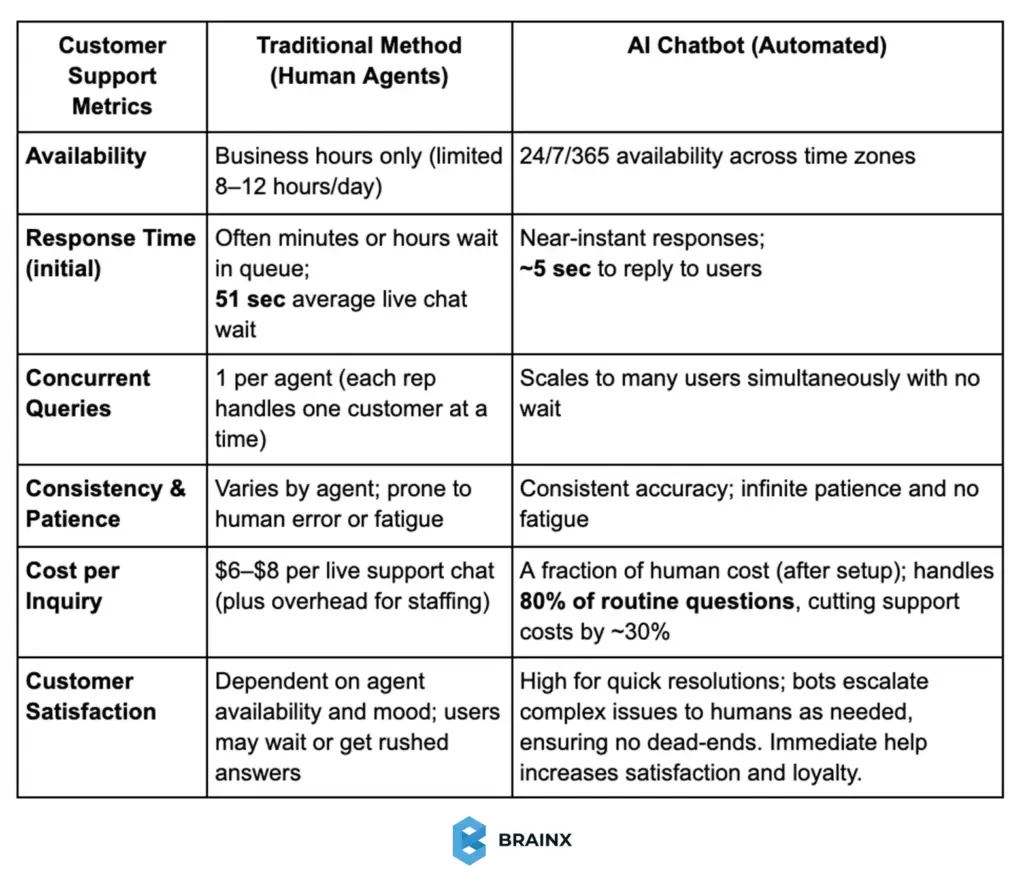
Chatbots are less costly and respond quicker to simple needs, as they support human agents in complex tasks.
The table highlights why companies are deploying chatbots en masse. Gartner predicts that by 2029, agentic AI could resolve 80% of common customer service issues without human intervention, potentially reducing operational costs by 30%. In addition, as opposed to human beings, bots do not sleep so the 24/7 support is indeed a game-changer, given that 75% of consumers expect on-demand help. It is evident that in 2026, customer care chatbots are and will be able to do more than answer the FAQs as they will be serving as frontline service reps to improve customer experience and cut down on operational expenses.
Chatbots Pushing Sales, Marketing & User Engagement
In addition to support, AI chatbots have also become strong digital marketing, sales, and interactive branding assistants. Most innovative chatbots in 2026 can be found on the list of revenue drivers since they are streamlining the discovery process, decision-making, and friction reduction throughout the buying journey.
These bots improve customer engagement by creating real value, either by helping customers discover products, get entertained, or checking out the products at a quicker pace. Below are standout chatbot examples redefining user engagement in the fields of e-commerce, retail, and conversational marketing.
1. Sephora’s Virtual Assistant – Personal Beauty Shopper
Sephora’s virtual assistant is a leading example of personalized shopping powered by conversational AI. Available on web and messaging platforms, it helps users discover products through quizzes and natural conversations.
Key impact highlights:
- Personalized product recommendations and tutorials
- Appointment booking inside chat
- 67% average sales increase reported by brands using similar chatbot shopping assistants
This chatbot enhances the customer experience by replicating in-store consultations at scale.
2. Domino’s “Dom” – Order Pizza with a Chat
Dom is an artificial intelligence-driven ordering assistant that allows chat-based reorders or customization of meals. Customers are able to place their orders within seconds without making a phone call or going through an application.
What makes it tick:
- Remembers past orders, addresses, and payments
- Supports “zero-click” ordering via simple commands
- Handled 1.5+ million conversations and saved $500,000 in support costs
Dom proves how AI chatbots boost user engagement and repeat purchases.
3. Amazon’s Alexa for Shopping
Amazon introduced Alexa for Shopping in May 2026 by combining the product knowledge of Rufus with the personalised capabilities of Alexa+. The conversational assistant is available through Amazon’s app, website, and Echo Show devices for US customers.
Users can ask product questions, compare items, review price histories, create personalised buying guides, build shopping carts, and automate purchases when products reach a selected price.
4. 1-800-Flowers “Gwyn” – Gift Shopping via Chat
Gwyn acts as a conversational shopping guide, asking contextual questions to recommend gifts. Available on Messenger and web, it mimics the role of an in-store associate.
Notable outcomes:
- 70% of chatbot orders came from new customers
- Strong example of a lead generation chatbot
- Effective use of conversational discovery to drive conversions
Gwyn demonstrates how chatbots support both engagement and acquisition.
5. Gopuff’s Go AI Shopping Assistant
Gopuff and SpaceXAI launched Go in June 2026 as an AI shopping assistant built directly into the Gopuff app. Customers can use voice or text to request products, build complete shopping carts, and discover items through personalised recommendations.
According to Gopuff’s official Go launch announcement, the assistant uses order history, location, time of day, local inventory, and real-time contextual signals to predict what a customer may need. It can prepare a suggested cart before checkout and surface products through a personalised visual shopping feed
6. Google Business Agent
Google introduced Business Agent in January 2026 as part of its expansion into conversational and agentic commerce. The feature allows shoppers to communicate directly with participating brands through Google Search, creating an experience similar to chatting with a digital sales associate.
Through Google’s agentic commerce announcement, retailers can answer product questions, guide product discovery, present relevant offers, and support customers within conversational search experiences. This example shows how chatbots are shifting from separate website widgets into the platforms where product research already happens
What These Chatbot Examples Tell Us
In all industries, the trend is similar:
- Chatbots meet users where they already are
- Conversations replace friction-heavy journeys
- Engagement feels personal, not automated
As a result, businesses see:
- Higher conversions
- Stronger customer experience
- Improved loyalty and satisfaction
To demonstrate the effectiveness of chatbot-driven marketing, let’s now compare the conventional outreach to chatbot-backed engagement.
Traditional Email Marketing vs. Chatbot Messaging
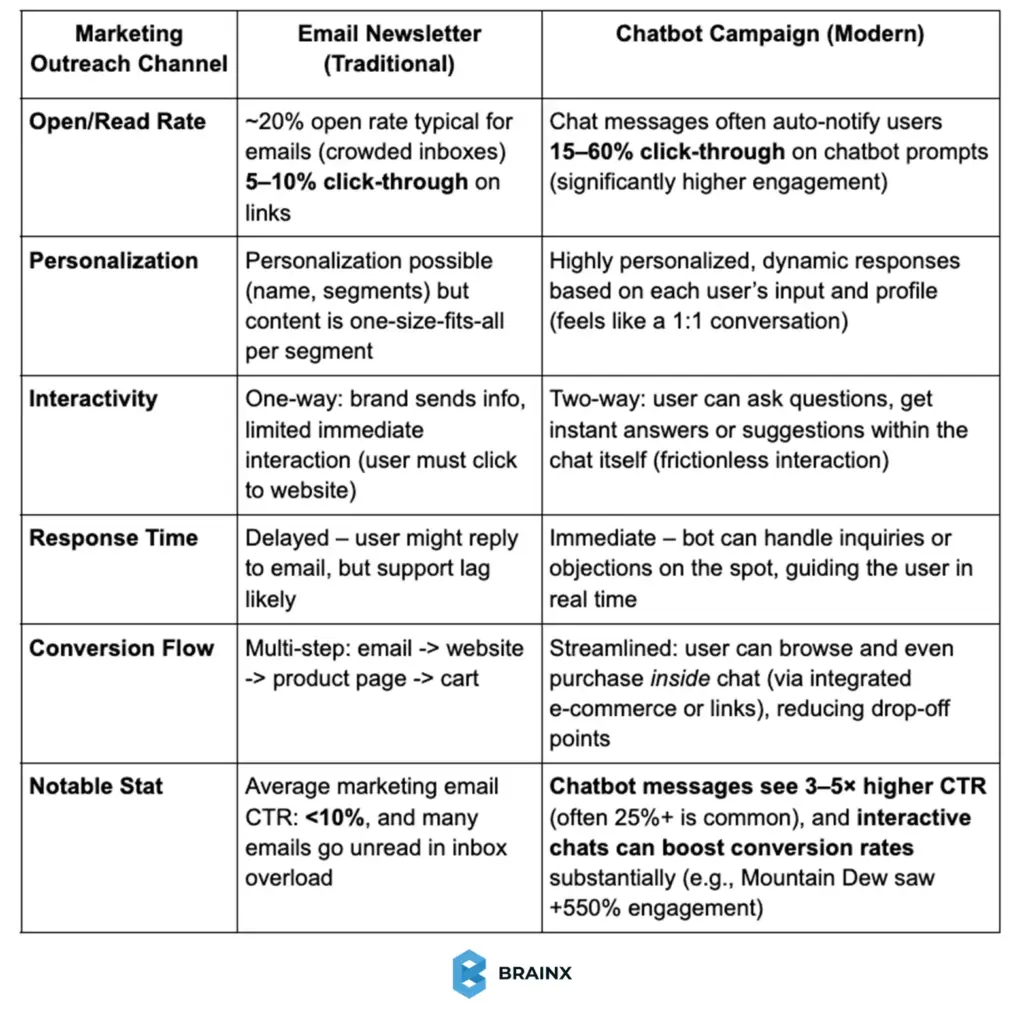
Chatbots offer more interactive and higher-engagement outreach.
As demonstrated, the chatbot-based marketing tends to significantly exceed the traditional channels in terms of engagement metrics. Bots cut through the clutter of the crowded inbox and app notifications with their personalized and interactive designs.
A conversational prompt (i.e., Hi, need gift ideas? 😊 Let me help!) will be responded to more by the users compared to a plain email blast. Additionally, chatbots can filter leads during the conversation and transfer high-intent customers to human sales agents at the optimal time that helps the sales funnel become more efficient.
Creative and Niche Chatbots Enhancing Experiences
Outside of big brands and commerce, it is also notable that there are a number of creative chatbots that are niche in their purposes, or simply pushing the envelope of conversational AI:
1. Casper’s Insomnobot 3000
Insomnobot 3000 is a humorous late-night chatbot designed by the mattress startup company Casper. The insomniac friendly bot is set to chat with users late into the night and usually in the hours between 11 p.m. and 5 a.m. to alleviate the loneliness of sleepless nights.
The chatbot isn’t intended for selling products, advertising or promoting offers. Instead, it focuses purely on conversation, helping humanize the brand. As Lindsay Kaplan of Casper explained, “We wanted to make a bot that made 3 a.m. a little less lonely.” This approach earned strong media attention and demonstrated how chatbots can create emotional customer engagement through simple interactions.
2. Woebot – AI Mental Health Chatbot
Woebot is an artificial intelligence chatbot created to assist with the cognitive-behavioral therapy to help users with anxiety or depression. The chat bot reaches out to the user every day, monitors their mood fluctuations and provides viable coping mechanisms in a conversational, friendly manner.
It has been demonstrated that in a randomised controlled trial published in JMIR Mental Health involving 70 young adults, participants using Woebot for two weeks showed a statistically significant reduction in depression symptoms compared with an information-only control group. The researchers described the results as preliminary and called for further study. As mental health professionals can only be accessed by the global population of no more than 13 per 100,000 people, Woebot bridges the care gap by ensuring a quick, accessible method of support.
3. UNICEF’s U-Report – Chatbots for Social Impact
The U-Report chatbot is a social engagement (not profit-oriented) chatbot created by UNICEF. It allows the youth in third world countries to take part in polls and give their feedback via simple text messages.
U-Report has grown into one of the world’s largest digital youth-engagement platforms. UNICEF reported that it supported more than 41 million U-Reporters worldwide in 2025, enabling young people to access information, participate in polls, and contribute to advocacy. The data directly influenced policy action later. U-Report shows that customer engagement can also mean empowering communities and driving real-world change through accessible chatbot platforms.
4. ChatGPT and its Successors
Although stated previously, it should be reiterated that the most sophisticated AI chatbots (such as ChatGPT) are constantly raising user expectations. In 2026, ChatGPT and other AI chatbots that use generative AI are already deployed in customer-facing services. They can show up either as website assistants capable of answering sophisticated product queries or a voice assistant that is almost human-like.
Such bots are at the leading edge of innovation that can not only respond, but create content, images or code in real time. Companies are trying these to develop even more interactive experiences (like a travel web site chatbot can immediately compose a tailor-made travel plan, or an interior decor chatbot can suggest design concepts based on your description). The opportunities are multiplying at a fast pace, and the firms that are using these AI innovations are likely to capture the market in a new manner.
Reasons Why Chatbots Are a Game-Changer for Engagement
The effects of the current day chatbots extend much further than automation. As we discussed in our deep dive on revamping customer experiences with AI chatbots in 2026, the modern AI chatbots are designed to support, instruct, and engage users in the customer journey across the board:
- On-demand, 24/7 service: 24 hours round-the-clock service lowers wait time and does not allow for users to be dropped.
- Personalization at scale: AI chatbots tailor conversations using context and user behavior.
- Higher engagement rates: Conversational communication works better than the non-interactive communication tools such as email.
- Cost and efficiency gains: Automation of routine queries reduces the cost of support.
- Consistency and patience: Chatbots deliver reliable, brand-aligned responses every time.
- Continuous learning: Ongoing optimization improves accuracy, tone, and user satisfaction.
Chatbots can be used to create scalable, empathetic, and impactful customer experiences along with human support.
However, adoption does not automatically create customer trust. A Gartner survey on AI in customer service found that 64% of customers would prefer companies not to use AI for customer service, while 53% would consider switching to a competitor if they learned that a company planned to introduce it.
Conclusion – Adopt Conversational AI for a Better User Experience
The real takeaway from the most innovative chatbots in 2026 is not creating just smarter AI, but better experiences. AI chatbots have become embedded in the way users explore, interact, and receive support from brands. These examples of chatbots demonstrate one apparent direction towards a consistent, personalized user engagement may it be lead generation or conversational marketing chatbots. With conversational AI developing, those businesses interested in the long-term customer experience rather than short-term automation will establish better and more valuable customer engagement.
Build Innovative AI Chatbots Today
BrainX assists enterprises in designing, building, and scaling AI chatbots and intelligent assistants tailored to real business workflows. Our teams are delivering conversational AI solutions, secure integrations, and lead generation solutions that provide measurable growth in customer engagement, efficiency, and long-term customer experience across the modern digital ecosystem.
Most Asked Chatbot Questions in 2026
1. What are the Most Innovative Chatbots in 2026?
The Most Innovative Chatbots in 2026 are AI chatbots powered by advanced conversational AI, generative models, and real-time data. They go beyond FAQs by delivering personalized user engagement, automating customer service, supporting sales, and acting as virtual assistants across websites, apps, and messaging platforms.
2. How do AI chatbots improve customer engagement?
AI chatbots improve customer engagement by offering instant, 24/7 responses, personalized recommendations, and conversational experiences. Unlike traditional support, a customer service chatbot adapts to user intent, remembers context, and reduces friction, leading to higher satisfaction, retention, and overall customer experience.
3. Are chatbots better than traditional customer support?
Yes, in many cases. AI chatbots handle up to 80% of routine queries faster and at lower cost than human agents. While complex issues still need humans, chatbots enhance efficiency, scalability, and user engagement by resolving common requests instantly and escalating when needed.
4. What industries benefit most from conversational AI?
Conversational AI delivers strong results in finance, healthcare, eCommerce, travel, SaaS, and retail. Industries using virtual assistants, lead generation chatbots, and conversational marketing tools see improvements in response time, conversions, and customer experience across multiple digital touchpoints.
5. How do businesses measure chatbot ROI?
Chatbot ROI is measured through reduced support costs, higher conversion rates, increased lead generation, improved response times, and better customer engagement metrics. Businesses also track customer satisfaction scores and retention to evaluate the long-term impact of AI chatbots on user experience.
Revamping customer experiences with AI chatbots means delivering instant, personalized, and scalable support across every customer touchpoint. The blog addresses the ways businesses can use AI to increase satisfaction, reduce expenses, and improve engagement. Uncover practical examples, trends, and policies to implement AI chatbots in real-world scenarios and transform customer experiences to enhance brand loyalty in 2026 and beyond.
Revamping customer experiences with AI chatbots does not only involve the enhancement, but reinvention as well. Chatbots are going to reshape support from a responsive function into a proactive and intelligent customer journey in 2026.
Chatbots that utilize AI have become popular with over 85% of companies using AI to automate the customer service process. Over 60 percent of the consumers want to use the bots to get immediate and 24/7 service.
These intelligent assistants are changing the customer experience (CX) by providing real-time response, hyper-personalized interaction, and channel consistency.
Progressive brands are already getting quantifiable outcomes, such as higher cost-savings or better customer satisfaction. AI chatbots are rapidly becoming a vital part of the support ecosystem in the present time.
In this guide, we’ll explore how AI chatbots are revolutionizing CX in 2026. You’ll discover key benefits, future or latest trends, real-world case studies, and actionable strategies to implement them successfully.
Why AI Chatbots Are Changing the Customer Experience Landscape
Customers today demand quick, convenient and customized service, and they demand it 24/7. Traditional channels such as phone and email are not always effective, which leads to delays and frustrations.
AI chatbots solve this by offering instant engagement across websites, apps, and messaging platforms. They satisfy current requirements of speed and self-service, where and when the customers ask for them.
Increasing Self-Service Expectations
About 88% of customers want companies to offer self-service options such as chatbots as fast service providers. Many, especially younger users, prefer solving issues themselves via chat instead of waiting on a call.
Multi-Channel Convenience
Modern consumers constantly switch platforms, from web, apps, social to SMS, and want to have a consistent, reliable customer experience everywhere. AI chatbots can work on all of these channels and offer a smooth experience that does not involve any repetitive steps.
Scalability During Peak Demand
Bots do not require breaks as humans do. During surges, like product launches or outages, they scale instantly. This gets rid of the queues and holds messages which ensure that service remains quick and frustration-free.
Businesses are catching on. According to a survey conducted recently, 64% of CX leaders indicated that they intend to invest more in AI and chatbots in 2026.
What used to be a novelty once has turned out to be a strategic advantage, which is a must in meeting increasing expectations and remaining competitive.
Key Benefits of AI Chatbots for Customer Experience
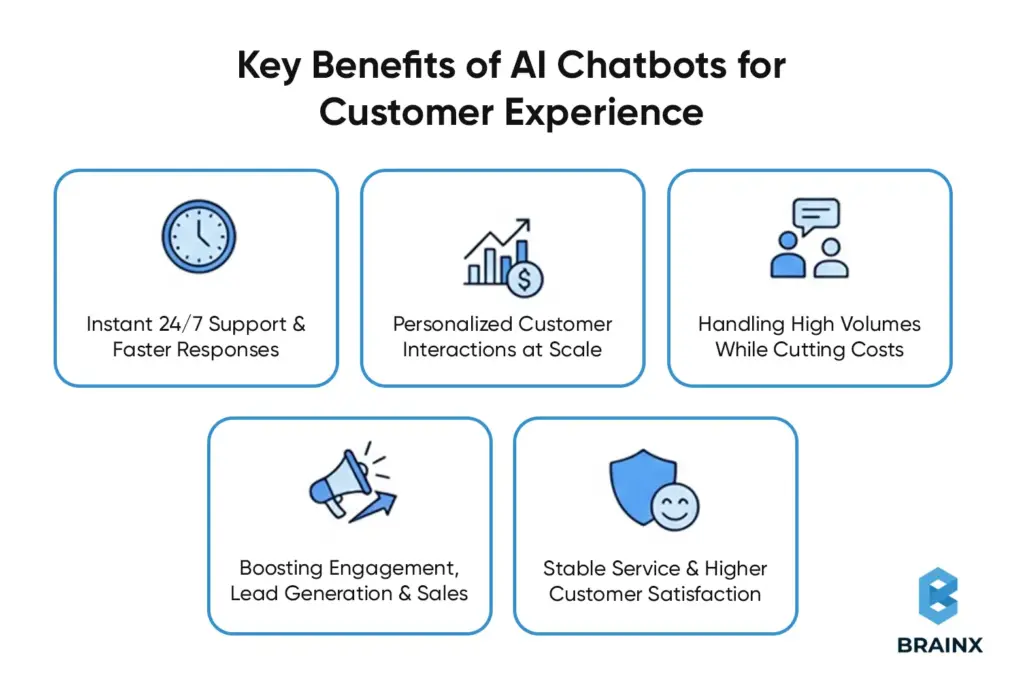
AI chatbots improve CX and provide a real business value. These are the most effective ways that they are changing customer interactions:
1. Instant 24/7 Support & Faster Responses
In the modern on-demand economy, speed is vital. AI chatbots offer real-time services 24/7, and they are able to solve routine questions, even challenging ones, in real time without involving a human agent.
In 2024, chatbots were projected to be in control of 85 percent of customer interactions. That number still continues to grow.
For example, one global retailer saw a 38% reduction in call volume after deploying chatbots across its support channels. Order tracking, return questions, and product questions were solved in minutes, and human agents were free to look into more urgent cases.
Stat Spotlight: After integrating AI, Lyft reduced average customer resolution time by 87% that dramatically improved user satisfaction and operational speed.
2. Personalized Customer Interactions at Scale
Personalization gets customers to feel that they are heard, and that is scalable with AI chatbots.
They have a memory of the context (past orders, preferences) and can customize product recommendations in real-time and even change their tone according to the mood or profile of the customer.
Example: A chatbot might say, “I see you ordered running shoes. Are you looking for similar gear?” Such interactions feel personal and not automated.
Surveys indicate that 70 percent of customers believe that personalization affects brand loyalty. And 80% have a higher chance of purchasing from brands that provide it.
3. Handling High Volumes While Cutting Costs
AI chatbots have the ability to manage thousands of conversations simultaneously, which human agents simply cannot match.
They sort out more than 80 percent of basic support cases, which helps cut manpower and accelerate resolutions for all users.
Cost Savings: Chatbot automation saved one insurance company 22 million in a year. The support cost saved through AI will be up to 11 billion every year, industry-wide.
Agent Productivity: Human agents are able to concentrate on high-value issues rather than responding to repetitive questions. It enhances employment satisfaction and lets them provide better support to customers.
Consistency and Accuracy: Chatbots do not get tired or distracted like human beings. They give straight forward answers that are repeatable in every case and reduce the chances of mistakes so the service quality stays consistent.
4. Boosting Engagement, Lead Generation & Sales
AI chatbots are not only tools of support but also sales assistants.
They are able to take the initiative of welcoming visitors to the website, responding to questions about products and steering users to make purchases.
All of which helps reduce bounce rates and improve conversions.
Proactive Assistance: Bots are able to provide help such as a store associate (e.g., Looking for something specific?). This makes it a more interactive and personalized shopping experience.
Lead Qualification: In B2B, bots can ask qualifying questions (“Team size?” “Pain points?”) and pass warm leads to your sales team automatically.
This happens 24/7—no forms, no delays.
Seamless Transactions: Chatbots can also handle full checkouts. Customers can book a service, place an order, or renew a subscription—all within the chat.
Case Example: Amtrak’s AI assistant “Julie” handled 5 million questions per year, boosting bookings by 25% and saving $1M+ in support costs.
Julie’s smart guidance didn’t just improve service—it drove serious revenue growth.
5. Stable Service & Higher Customer Satisfaction
Chatbots provide high-quality, consistent service at all times, which is difficult to ensure with large human teams.
They are always responsive, stick to the brand tone and never forget to be polite or empathetic. The unparalleled consistency builds long-term trust and sets clear service expectations.
For example, Bank of America’s chatbot Erica has handled 1 billion+ interactions since launch.
With a 98% resolution rate, Erica has elevated customer satisfaction and helped the bank lead in digital service ratings.
AI Chatbot CX Benefits Summary
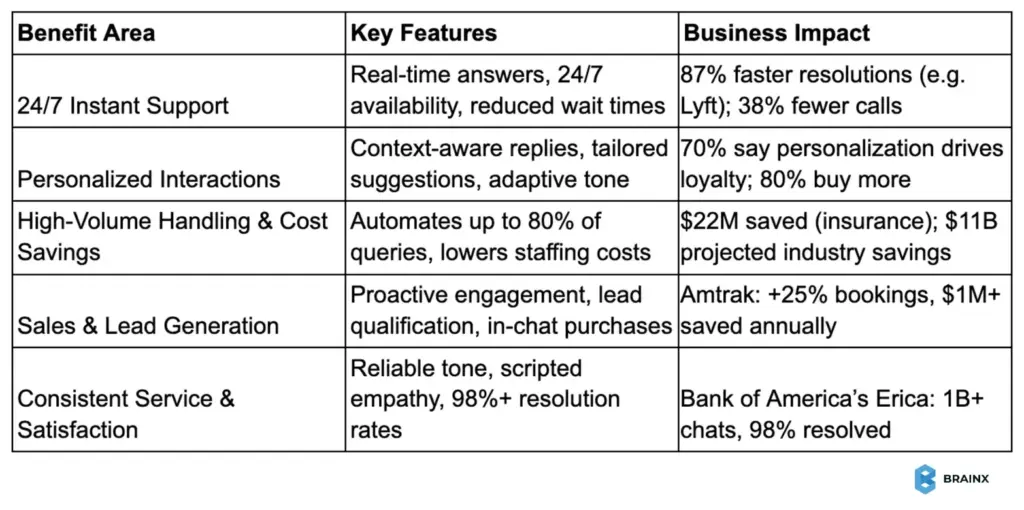
Real-World Examples of AI Chatbots Revamping CX in Action
In order to fully understand the role of the AI chatbots in revolutionizing the customer experience, we can consider the following real-life success stories of companies in different sectors from 2025 and beyond.
Healthcare – Virtual Patient Assistants
There was a case of an AI-driven virtual assistant that was implemented in a healthcare network in a particular region to receive and process the inquiries of patients and triage their symptoms. Patients were no longer held on waiting lists to ask a routine question, and cases of emergency were expedited quicker.
The bot dealt with scheduling appointments, insurance questions and prescription questions, and the human staff was only left to deal with complex cases. Wait times were reduced by more than 60 percent and the number of callers who abandoned calls reduced by almost half.
The assistant achieved an 89% satisfaction score. Patients praised the speed and clarity, while healthcare staff could focus more on critical care, improving overall service quality.
B2B SaaS – Streamlining Customer Support
A growing SaaS provider company integrated a chatbot powered by AI to handle its increasing support tickets. The chatbot, with help of generative AI, now answers approximately 70% of the queries without involving a human agent.
The levels of resolving conflicts on the first contact increased by almost 30 percent, and the support team relied on AI recommendations to process the remaining cases faster and precisely.
The Net Promoter Score (NPS) of the bot also increased significantly and turned from negative to +50. While, the customer support NPS was at an all-time high of 70 and response times were reduced by almost half.
Fintech – Personal Banking at Scale
A digital finance platform introduced an AI chatbot powered through a large language model. The assistant served 2.3 million chats within the first month, which is similar to the effort of approximately 700 agents.
It responded to questions 24/7 regarding accounts and payments and shortened the average time to respond to 11 minutes to just 2.
The bot also offered proactive financial tips, like saving suggestions or spending alerts.
Customers appreciated the fast help, while the company reported $40 million in annual profit improvement linked to faster resolution and increased conversions.
Real Estate – Always-On Sales Concierge
One of the real estate brokers incorporated AI chatbots on its property listing pages. These bots answered questions of the visitors in real-time, booked tours and gathered contact information to nurture leads.
The chatbot increased lead conversion by 1-2 percent to approximately 7 percent producing more than 75 further qualified leads in a month. It replaced outdated contact forms with real-time conversations that felt human.
The firm’s conversion rates increased 3–4× above market averages. Potential buyers and sellers received assistance at any hour, while agents were busy closing deals and not pursuing enquiries.
Industry Comparison Chart
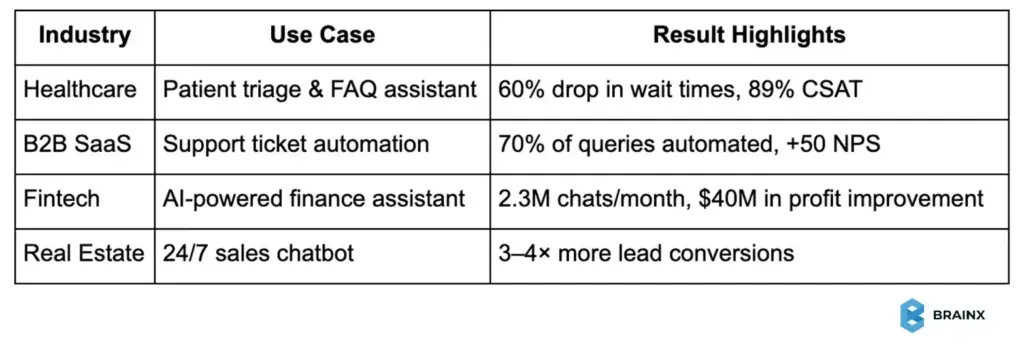
Human-AI Collaboration at Work
Such cases demonstrate how effectively chatbots are used to improve customer experience, which includes quicker service, personalization, and 24-hour support among various industries.
AI manages bulk processing of routine jobs and refers difficult or emotional cases to human operators with complete information. It is a hybrid model that provides the best of both worlds.
Harvard research shows that AI-augmented support teams respond 20 percent faster and are more empathetic. It resulted in an efficient, humanized service that drives satisfaction and loyalty.
Top Trends in AI Chatbots Shaping the Future of CX
AI chatbot technology is evolving at a high rate. Companies that wish to really revamp customer experience need to remain in the forefront of emerging trends in 2026. The following are five paradigm shifts in chatbot capabilities and how they will change CX.
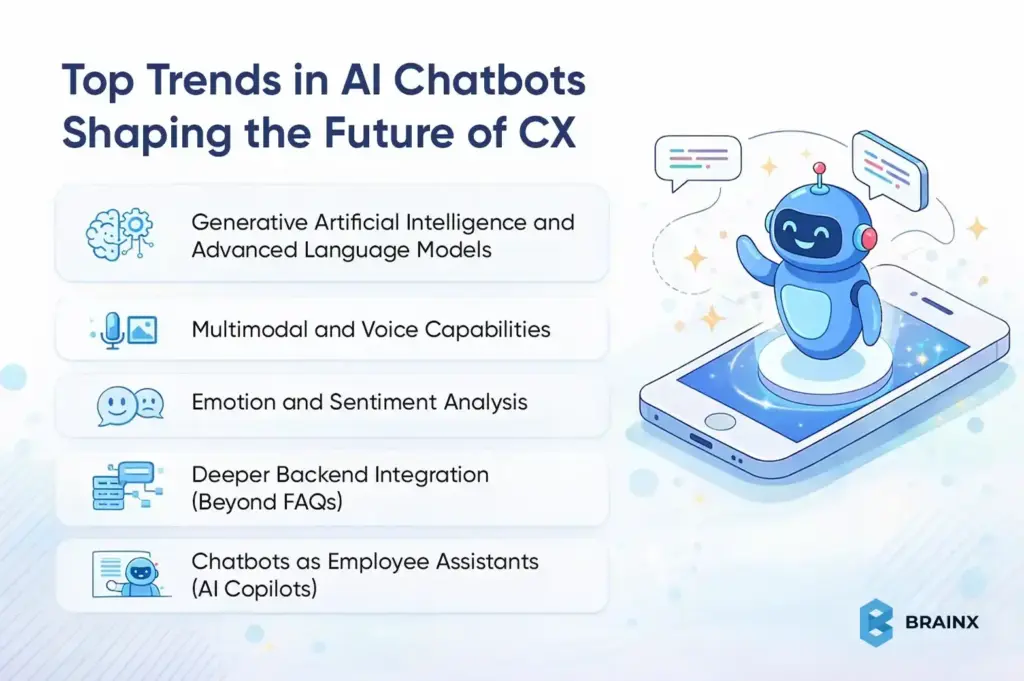
1. Generative Artificial Intelligence and Advanced Language Models
Powerful language models like GPT-5 have enabled AI chatbots to be much more conversational.and context-aware.
The bots are now capable of comprehending natural, human-like sentences and can respond to multi-step and subtle requests without any difficulty. Generative AI allows them to go beyond scripted responses and answer unexpected queries with fluency.
The result? A human-like, intelligent, and interactive chatbot experience that is less robotic and more natural.
Companies are incorporating these models to improve CX at scale. Chatbots are currently able to conduct coherent conversations, emulate human empathy, and provide quicker resolutions, which makes them invaluable to customer service in 2026.
2. Multimodal and Voice Capabilities
Chatbots, which were originally text-based, are now evolving into voice- and image-enabled assistants.
Voice AI enables customers to communicate in natural language (Pay my bill), and the bot reacts immediately, usually, much more quickly than going through complex phone menus.
In the meantime, multimodal bots have the ability to send buttons, carousels, images, or interactive forms within the chat, so conversations are more user-friendly and accessible for all users.
When voice and visual interfaces are combined, the businesses will be able to serve the customers in their preferred manner; particularly the customers who enjoy talking or require a visual orientation when making a purchase or when troubleshooting.
3. Emotion and Sentiment Analysis
The new chatbots are now capable of analyzing customer feelings and mood based on their tone, keywords and wording.
Should the user become angry or frustrated (e.g. “This is the third time this happened!”), the bot can change its tone, empathize, or refer to a human agent instantly.
It helps chatbot communication to become more caring and human-like, which is essential in maintaining trust under frustrating circumstances.
One of the studies found that human agents with bots proposing more empathetic responses significantly elevated the customer sentiment scores. As this trend grows, AI chatbots will create deeper emotional connections with users.
4. Deeper Backend Integration (Beyond FAQs)
The high performing chatbots of today do much more than just answer questions.
They are able to extract real-time information in CRMs, inventory systems or booking platforms. For instance, a client requesting a refund can be taken through the entire process, including creating a shipping label, without leaving the chat window.
Such a level of integration makes bots complete-fledged support agents with the capability to solve issues end-to-end. Although it means you’ll need to invest in connectivity of the systems, the pay-off will be an experience with no friction and less load on the human teams.
5. Chatbots as Employee Assistants (AI Copilots)
AI chatbots are not only used for customers but are now also changing the work experience of the employees.
The agent-assist bots monitor live chats or conversations and propose real time responses, articles or follow-ups. It helps even junior agents in resolving issues like experienced pros.
Harvard research found that agents supported by AI saw a 70% drop in response times and higher sentiment scores. The AI copilots assist teams in providing smarter, quicker and more compassionate service, which ultimately improves the customer experience.
Best Practices for Implementing AI Chatbots in Customer Service
AI chatbots are extremely valuable, except when used without any proper planning. Badly implemented bots can be annoying to the users, particularly when they are unable to comprehend questions or provide a means of communication with a human support agent.
To truly revamp customer experience with AI chatbots, follow these essential best practices:
1. Start by Defining Clear Objectives & Use Cases
Before launching a chatbot, clearly define what you want it to achieve.
Is it supposed to deflect simple support tickets? Help convert leads? Onboard new users?
Begin with a narrow, high-impact use case, e.g. order tracking or FAQ responses. It will simplify testing, refining, and proving its value.
When that works, you can expand it to support more elaborate and large-scale customer journeys in the future.
2. Leverage Existing Knowledge and Systems
Your chatbot is only as smart as the data it has access to.
Integrate it with your CRM, knowledge base, help desk, or order management system. This enables the bot to provide personalized and real-time responses rather than generic ones.
In case you are using platforms such as Salesforce or Zendesk, integrate the chatbot to have a unified support experience.
For example, a well-integrated chatbot can retrieve shipping details, access customer profiles, and respond to billing-related queries instantly that will save time for both users and agents.
3. Create a Conversational Flow with AI Flexibility
Visualize major purposes and flows your chatbot should be able to handle. Apply natural language processing (NLP) to learn about different phrase variations that users may use to make a request.
Write the responses with a friendly, on-brand tone.
At the same time, let AI adapt based on learning. Integrate the designed flow and the capability of AI to personalize and perfect responses as time goes by.
Such a balance will result in customers to have human-like conversations easily without the bot going off-script or losing context.
4. Ensure Smooth Handoff to Human Agents
A bot should not deal with every problem. The construction of a smooth escalation path to live agents is one of the most important best practices.
When a customer includes in his or her message, “agent, please” or the bot does not have the necessary response to give to the customer with high certainty, it should hand over the chat right away.
Pass along all the context, conversation history, user data, intent, etc., so that the customer does not have to repeat themselves. It makes the experience smooth and does not infringe on their time.
A helpful example: certain banks apply AI to redirect the user to a live agent with the full chat history so that the transition is warm and frictionless.
5. Test, Monitor & Continuously Improve
Your chatbot should never stop evolving. Prior to launch, test it with real-world situations and beta users.
Follow up on important metrics such as the rate of resolutions, frequency of fallback, and customer satisfaction after the deployment.
Look through the chat transcripts to understand what is missing, and revise the bot on a regular basis. You will need to add new intents, rephrase the confusing responses, and refine the language.
Most firms plan monthly or quarterly updates depending on the feedback and support trends. This will make your chatbot sharp, relevant and focused on fulfilling customer needs.
6. Be Open & Set Clear Expectations
Never conceal the fact that users are talking to a bot.
The majority of customers do not mind AI, provided they are not misled. Start with a clear intro (e.g. “Hi, I’m Friday, your virtual assistant”) and explain what the bot can and can’t do.
In case the chatbot cannot cover something, it should acknowledge that and provide an alternative like giving a contact form or escalation to a human.
Such sincerity creates trust and assists in managing the expectations of users, which translates into smoother interactions and increased satisfaction.
Chatbots are highly appreciated when implemented correctly. Your customers will like the speed and convenience while your staff will appreciate the decreased load, which will improve concentration.
Remember: AI is a support enhancer, not a replacement. Bots should be utilized in areas where they provide value and human beings in situations where it is necessary to be subtle, empathetic, or creative.
The combination of the two will give the best customer experience.
Conclusion – Embrace the AI Chatbot Revolution in CX
In 2026, AI chatbots are a must-have for delivering fast, personalized, and scalable customer service. They are no longer optional, leading to loyalty, customer satisfaction, cost savings and altering the way businesses create proactive and on-demand experience designs. For leaders and founders, it is now mission-critical to combine AI chatbots with human teams. The businesses that embrace this shift will build deeper customer relationships and gain a lasting edge in the evolving CX landscape.
AI Chatbots Can Revolutionize Your Customer Experience
The development of an AI-based chatbot involves a specific level of skills in machine learning, natural language processing, and artificial intelligence. It is not just that these chatbots should be able to comprehend user input but should also be able to give relevant, personalized responses which can only be achieved through a team of skilled personnel who are able to develop AI systems that are context sensitive, language sensitive as well as emotion sensitive. With the growing role of AI chatbots in customer service, companies must keep up with the trend to keep up with competition.
Although it might be difficult to find the appropriate talent to create such complex systems, AI-based chatbots can be of great benefit to improve customer satisfaction, cut down operational costs, and offer 24/7 support systems. If you’re looking to transform your customer experience with cutting-edge AI, partnering with the right team will make all the difference.
Ask us today how BrainX can assist you in staying ahead of your competitors by deploying AI chatbots to revamp your customer experience and business processes.
FAQs About Revamping Customer Experience With AI Chatbots
1. What are the main benefits of using AI chatbots for customer experience?
AI chatbots improve customer experience by offering 24/7 instant support, reducing response times, personalizing interactions, cutting operational costs, and handling high volumes of queries without compromising service quality.
2. Can AI chatbots fully replace human customer service agents?
Not entirely. AI chatbots excel at handling routine, repetitive tasks, but complex or emotionally sensitive issues still require human intervention. The best approach is a hybrid model that combines both.
3. How do I integrate an AI chatbot with my existing customer service system?
Most modern AI chatbot platforms offer easy integration with CRMs, help desks, and communication tools like Zendesk, Salesforce, and Slack. APIs and plug-ins enable seamless backend connections for unified support.
4. Are AI chatbots suitable for small businesses or just enterprises?
AI chatbots are scalable and cost-effective, making them suitable for both small businesses and large enterprises. Many affordable, low-code solutions are available that require minimal technical expertise to deploy.
5. How can I measure the ROI of implementing an AI chatbot?
Track metrics like reduced support costs, faster resolution times, CSAT scores, chatbot containment rates (queries handled without escalation), and revenue influence through conversions or lead generation.
Overview:
The blog describes how to build an AI chatbot for customer support that actually delivers results, not the one that frustrates users.
It covers:
- Why AI chatbots are becoming essential for modern customer support
- Widely recognized errors that lead to customer support chatbots failure
- A chronological guide to developing, training and deploying an AI chatbot
- How to guarantee accuracy, personalization and smooth human escalation
- Best practices to maximize the performance, trust and customer satisfaction
Supported by the actual statistics as well as practical insights, the guide assists startups, product teams, and enterprise leaders to create scalable, reliable and customer-friendly AI chatbots that deliver real business impact.
According to IBM, well-designed chatbots can handle up to 80% of routine customer service questions – cutting support costs by around 30%.
However, not all companies can achieve real results after implementing their customer support bots. This step-by-step manual will demonstrate how to create an AI chatbot for customer support that doesn’t disappoint your customers. A bot that provides the speedy 24/7 response, and makes customers feel pleased and helps your team to be even more efficient.
We’ve already discussed why AI-powered support is a game-changer in another blog post. So, we will discuss step-by-step implementation, the pitfalls to avoid and a few best practices, all supported by statistics and real-world examples, to make your chatbot reach high customer satisfaction (CSAT) rather than frustration.
How to Create an AI Customer Support Chatbot (Step-by-Step Guide)
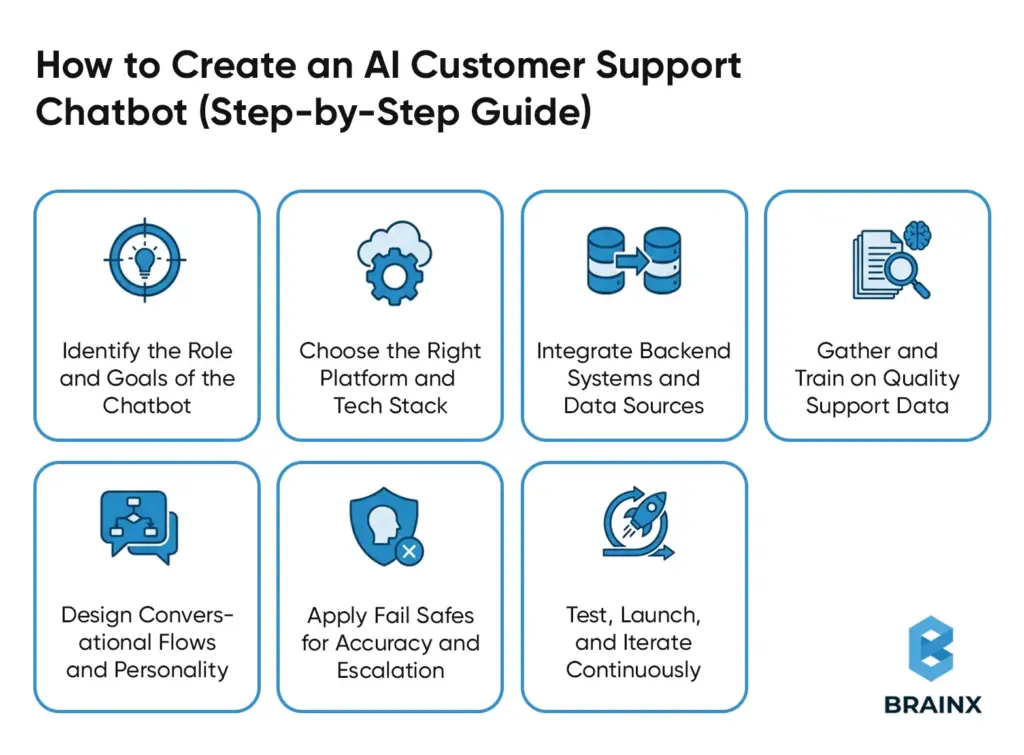
There is no magic involved in designing an effective AI chatbot for customer service, but rather a series of sensible steps and guidelines to follow. Here is a step-by-step outline:
1. Identify the Role and Goals of the Chatbot
The first step is to explicitly know customer support issues that your chatbot can address. A focused use case ensures better outcomes and easier measurement.
Common goals include:
- Responding to commonly posed questions
- Helping in troubleshooting
- Processing order tracking, returns or status updates
As an example, you can work to avoid repetitive “Where is my order?” questions from live agents. The training, the design of conversations and success metrics like decreased number of live chats or first response time have a defined mission.
2. Choose the Right Platform and Tech Stack
Choose between no code platform chatbot or custom development approach. Consider the following:
- No code platforms offer visual builders and pre trained AI models for faster deployment
- Custom builds are flexible when it comes to complex or highly specialized applications
- Make sure that it supports the NLP and AI models including LLMs to understand the language naturally
- Select a scaling cloud infrastructure web backend such as Python or Node.js.
Choose a stack that matches the expertise of your team and that can be easily integrated with your existing systems.
3. Integrate Backend Systems and Data Sources
An AI chatbot would be useful only when it can access real time data and take significant actions.
The important integrations can be:
- CRM systems for customer context
- Order management and inventory systems
- Ticketing tools for case creation and updates
- Knowledge bases for accurate responses
The integrations mentioned above allow the bot to fetch order status, update tickets, and the processing of returns or reset passwords and make it a functional virtual support agent rather than a static FAQ tool.
4. Gather and Train on Quality Support Data
Train your chatbot using accurate, representative support data.
Training sources should include:
- FAQs and help center articles
- Product documentation and manuals
- Past support tickets and chat transcripts
During training:
- Define clear intents and sample user phrases
- Identify things like order numbers or product names
- Add conversational elements like greetings and polite fallbacks
High quality, up to date data ensures the bot understands real customer language and responds accurately.
5. Design Conversational Flows and Personality
Design how conversations should unfold for each major intent, similar to UX design for chat.
Best practices include:
- Step by step guidance through common scenarios
- Fallback options when the bot is unsure
- Clear paths to reach a human agent
The tone of the chatbot must match your brand voice of either being friendly or formal. Encourage natural and human-like interaction with customers through the use of polite language, empathy, and consistency.
6. Apply Fail-Safes for Accuracy and Escalation
Protect customers from incorrect or misleading responses by adding safety mechanisms.
Key safeguards include:
- Retrieval based responses grounded in verified knowledge sources
- Confidence thresholds to detect uncertainty
- Automatic escalation triggers for repeated confusion or user requests
When the bot is unsure, it should clearly hand off to a human agent. Such measures avoid hallucinations, dead ends, and loss of customer trust.
7. Test, Launch, and Iterate Continuously
The chatbot should be tested with real world scenarios before launch in order to identify gaps and edge cases.
After deployment:
- Monitor resolution rate, escalation frequency, and handle time
- Collect user feedback and sentiment signals
- Identify new question patterns and update training data
The chatbot is to be treated like a living product. It requires continuous testing, learning and optimization because customer requirements and the offerings of the business keep changing.
Through these steps, you shall have a customer support chatbot that is not only purpose-driven but also well-integrated and trained and tested comprehensively. But the work doesn’t stop at launch – the best AI support systems are refined constantly.
Now, we will discuss some of the pitfalls that you should avoid while building your customer service chatbot.
6 Pitfalls to Avoid & Reasons Why Many Customer Support Chatbots Fail
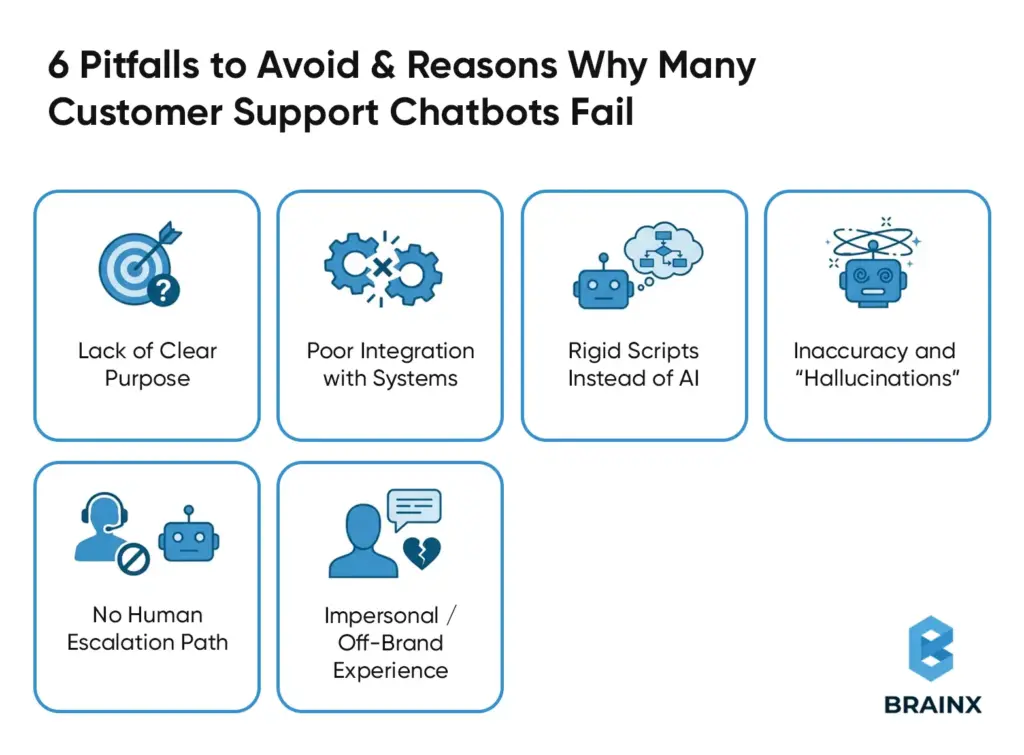
Not all support bots are as good as they are hyped to be. Actually, the poorly developed chatbots will do more damage than benefit to your customer experience. The 2024 survey carried out by PwC reported that 59 percent of consumers have dropped a purchase due to negative chatbots experience.
In order to make your AI chatbot a working product, you should be aware of the following common mistakes and pitfalls:
1. Lack of Clear Purpose
Many bots are launched without a defined scope or goal. If your chatbot tries to do everything out of the gate (or conversely, has no clear capabilities), it will confuse users.
Successful chatbots are goal-driven – for instance, primarily handling FAQs, order tracking, password resets, etc., with well-defined boundaries.
Always define what problems you want the bot to solve first, then design around that.
2. Poor Integration with Systems
A top reason bots fail is they can’t access the information needed to answer questions. Imagine a customer asks “Where’s my order?” and the bot can’t check the order status – that’s a dead end.
In fact, experts note that 80% of AI customer service tools fail in real use due to poor integration or accuracy issues.
Avoid “blind” chatbots by integrating yours with databases, order management, CRM, knowledge bases, etc. An AI support agent must be wired into your data so it can give useful, up-to-date answers (like pulling account details or updating a ticket).
3. Rigid Scripts Instead of AI
Older rule-based chatbots followed strict decision trees and broke as soon as a user went off-script. Their common reply is that they are sorry and they did not get it since they do not understand the language.
Customers today demand a Conversational AI that would be able to deal with natural language and unforeseen inputs. Having a simple decision-tree robot on your support page is bound to annoy the users.
Instead, you need NLP and machine learning so the chatbot interprets intent, even if phrased in various ways, and responds flexibly.
4. Inaccuracy and “Hallucinations”
If an AI chatbot gives incorrect answers or makes up information, customer trust plummets. In one Gartner study, 42% of customers feared getting inaccurate answers from AI support – a valid concern if the bot isn’t properly trained or limited.
Large language model chatbots sometimes confidently spew out fake facts (commonly called hallucinations). In order to avoid this, integrate fact-checking and validation. For example, use a Retrieval-Augmented Generation (RAG) approach where the bot cites from your knowledge base, or implement business rules for critical info (like return policies or pricing).
Some platforms report that adding a fact-validation layer can cut AI false answers by up to 70%, vastly improving reliability.
5. No Human Escalation Path
A major design mistake is creating a “chatbot dead-end” with no option to reach a human agent.
There are always questions that the AI will not be able to answer. When the bot apologises or repeats itself, it irritates the users. Always provide a seamless way to hand off to a human – such as the bot saying “Let me connect you to a support specialist for that.” This safety net is critical:
According to Gartner research, 60 percent of customers are afraid that an AI chatbot will not allow them to contact a human being when necessary, which contributes to distrust. Offering them an option of a quick transfer to live chat or generate a ticket presents your bot as something to assist rather than disrupt, and your customers will not feel confined.
6. Impersonal / Off-Brand Experience
Although it is automated, your chatbot must be in line with the tone and quality of service of your brand. One of the most obvious mistakes is to resort to generic answers that are cold or robotic. Your bot must be a friendly and helpful one, in line with the tone (formal or casual) in which customers expect your company to act. Assign it a character in line with your brand values, and add some polite notices or sympathy to responses (e.g. I feel bad you are having that problem, I can help you).
Moreover, incorporate the chatbot in your webpage design or application as it should seem like an extension of your support team. This cohesion increases customer comfort with the AI. Remember, the goal is a bot that comes across as a knowledgeable virtual assistant, not a glitchy robot.
With all of these pitfalls bypassed and your chatbot structured around purpose, solid integration & NLP, factuality, human fallback and a friendly style, you have preconditioned for success.
Here are some of the best practices that can be sustained and expanded on to ensure the success of your chatbot.
7 Best Practices of an Effective AI Customer Support Chatbot
Building the bot is half of the battle, the other half is to ensure that the bot provides great service in the long-run. Keep these best practices in mind to maximize your chatbot’s effectiveness and user satisfaction:
1. Ensure Accuracy with Real Data
Your chatbot should never guess. Use authoritative sources like your knowledge base, frequently asked questions and product documentation to base its responses on them.
Apply retrieval augmented generation or structured Q&A retrieval in such a way that the answers are based on verified information.
Maintain content with the change of products, prices, or policies. Accuracy, when backed by verified data, minimizes errors and establishes a long term trust in the user.
2. Maintain a Human Touch (Escalate As Needed)
Customer support should be facilitated by a chatbot instead of being hindered. Create it in such a way that it is able to detect frustration or confusion with the help of keywords or sentiment indicators.
When the bot does not assist or when the user requests a human agent repetitively, then the conversation should be escalated.
A fast access to a live agent should always be available. Combination of AI and human model will avoid frustration and boost confidence.
3. Personalize the Experience
Make conversations relevant and useful with customer data.
Greet them by name, call on past orders and use context of similar interactions when and where possible.
The personalization should stay relevant throughout the different channels, and customers should not repeat their words. It can be achieved through CRM and integrations of customer data, which greatly enhances engagement and loyalty.
4. Keep the Tone Friendly and On Brand
Your chatbot becomes the face of your brand. It should be in line with your voice, be it friendly, casual or professional.
It should always be empathetic, patient and use simple language.
Small gestures such as using polite language, apologizing and easy to read formatting make exchanges human-like and friendly.
A consistent tone helps in building comfort and trust.
5. Provide Omnichannel Consistency
The customers can interact through websites, mobile apps, and messaging. The same quality experience should be provided everywhere by your customer support chatbot.
Support multi-channel implementation and provide cross-platform conversation context.
Consistent knowledge, tone and feedback helps avoid confusion and offers a smooth support process.
6. Monitor Metrics and Optimize Continuously
You need to believe your chatbot is a living thing before you can make your customers believe that.
Keep track of resolution rates, escalations, customer satisfaction (CSAT), and cost impact. Identify weak responses, retrain the model using analytics and increase its capabilities with answering new questions.
The continuous improvement is what makes a good chatbot, a great chatbot.
7. Ensure Privacy and Compliance
The level of customer trust hinges on your ability to handle their data responsibly..
Secure confidential data through encryption and hardly any logs. Meet the requirements of regulation like GDPR and adhere to industry-specific requirements under all circumstances. Be open regarding AI applications.
A secure, compliant chatbot makes users feel safe engaging with automation.
These best practices, like accuracy, human fallback, personalization, brand-aligned tone, omnichannel presence, continuous optimization, and security, will provide you with an AI chatbot that earns the trust and delivers value to customers.
The payoff is great. When properly implemented, AI chatbots can make your support department competitive, faster, much more efficient, and unprecedentedly popular with customers.
Competitive Advantage Through AI‑Powered Support
In customer service, experience is king. 64% of customers say service quality is the single most important factor that sets a company apart. AI chatbots give support teams a powerful way to excel on this front. Indeed, AI is not merely a tool of efficiency, but it has now become one of the major competitive advantages of businesses that have adopted it.
The companies with the aid of AI chatbots are able to differentiate themselves by providing faster, more precise, and highly scalable support that satisfies the growing customer expectations. They can better be in a better position to remain ahead of other competitors who are still relying on manual processes, as an AI virtual agent can give answers instantly 24/7, eradicate wait times, and give a consistent response to enhance customer satisfaction. It is an always available reliability-based service where every customer receives support when it is needed, which enables the trust to develop without any efforts.
Another crucial benefit is that AI-based support enhances agility in operations. Chatbots allow support teams to grow without significant head count increases, manage ticket volume surges or business expansions without compromising quality. Even a business that is mid-sized can provide enterprise-level service without the cost of adding overhead of agents, which evens the playing field in terms of customer experience.
Early AI adopters are in a way future-proofing their support strategy, as AI technology advances, such businesses will keep satisfying customers in new ways and stay competitive in a world where automation and personalized service become synonymous.
In a nutshell, the introduction of an AI chatbot is not a simple tech enhancement but rather a strategic decision that turns customer service into a clear advantage.
Cost-Benefit Analysis to Find Out ROI of AI Chatbots in Support
In the analysis of AI chatbots, the use of a cost-benefit perspective helps understand the payback (or the return on investment). These systems drive down operating costs while elevating customer satisfaction – a powerful combination for any support organization.
Following are the reported ROI highlights by companies that use AI for customer support:
- Reduce Support Costs: AI chatbots have the potential to save the customer support costs by 30-40 percent in the first year. Teams that spend more than half a million dollars a year can save $150,000 to $200,000. Large enterprises report even greater efficiency, with cost-per-chat reductions and massive savings by automating high volumes of routine interactions.
- Less Ticket Volume: AI chatbots lower the ticket volume since the chatbots will automatically answer repetitive questions. They turn away about 45 percent of incoming queries on average and in certain industries over 50 percent. Even in more advanced applications, chatbots can answer most of the questions without human intervention so workload is reduced on the part of the agents.
- Better Customer Satisfaction: The customer satisfaction is increased through quick responses and 24/7 availability. The positive CSAT results following the implementation of AI chat support can be measured in many companies. Shorter turnaround times and a consistent service delivery will always minimize frustration, enhance first-contact resolution, and reinforce customer loyalty in the long term.
- High ROI and Efficiency Gains: AI chatbots can provide high ROI as they are able to combine cost savings and efficiency gains. After initial setup, benefits scale quickly. There are companies that illustrate returns in the triple-digit range within 12 months, and this goes to show that well-designed chatbots can make customer care a profit making operation.
In sum, the financial benefits and quality results of investing in AI-powered support have both quantifiable and qualitative results. Gartner analysts even project that conversational AI will save about $80 billion in contact-center labor costs by 2026.
For support leaders, the message is clear: AI chatbots not only reduce costs and workloads – they also improve customer experience in ways that set your business apart. Implementation of this technology will vastly increase the productivity of your team and the satisfaction of your customers giving you an edge over your competitors that continues to pay off in the years to come.
After determining the business value and ROI of AI-powered customer support, the next thing would be to comprehend maturity. Not every chatbot is equal and the success does not always occur overnight. The majority of the organizations develop their chatbot capabilities in phases, progressively transitioning to full-fledged intelligent AI support over simple automation.
The AI Chatbot Maturity Model Evolution From Automation to Strategic Advantage
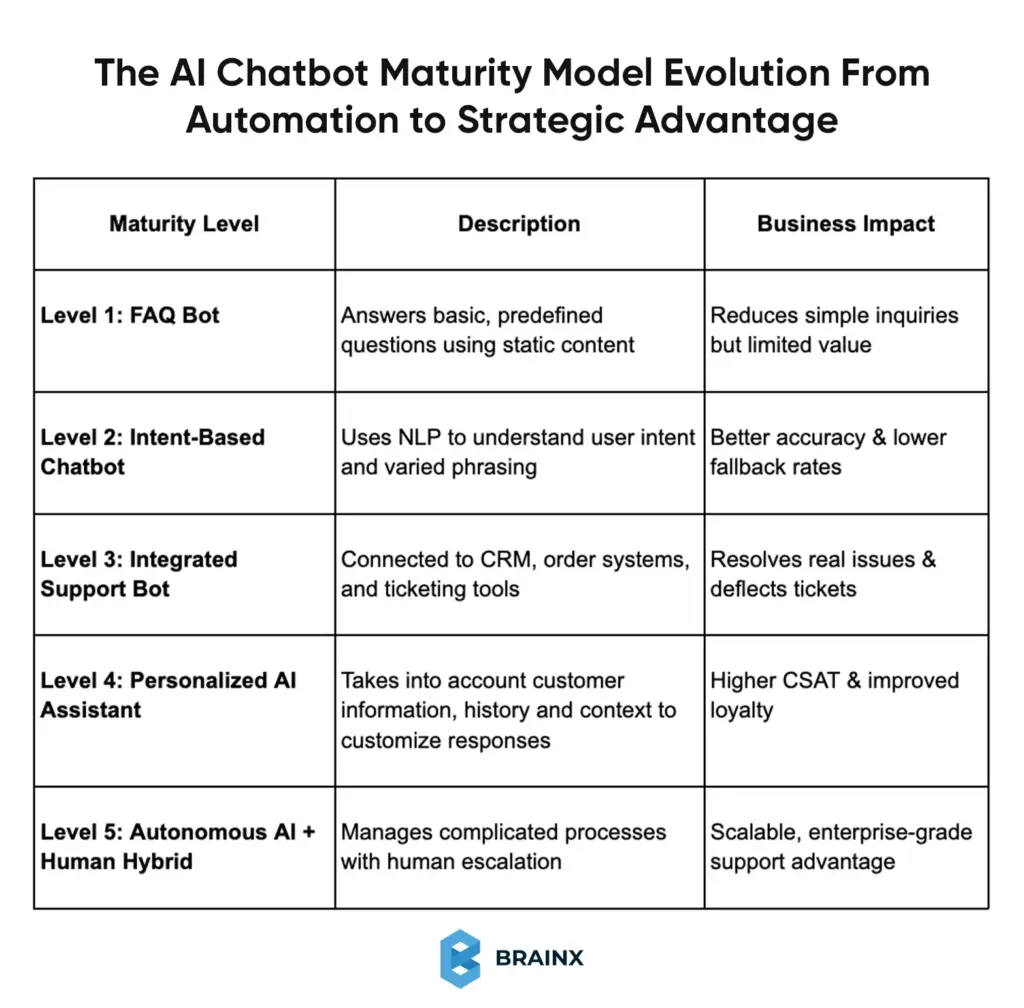
AI chatbots evolve over time. The only difference between high-performing support teams and those trapped in simple automation is their ability to treat them as a long-term capability and not a one-time feature.
The following is a realistic maturity model demonstrating the way customer support chatbots normally progress.
Why This Model Matters
The failure of most chatbots occurs due to the companies having Level 4 or 5 expectations with a Level 1 implementation. The maturity model assists the teams:
- Set realistic expectations
- Prioritize the right investments
- Scale capabilities over time without overwhelming users or teams
There is no need to begin at the top. A lot of companies start with a narrow Level 2 or Level 3 chatbot and develop it through data on usage and customer responses.
Strategic Takeaway
The goal is not to replace human agents. It is to climb up the maturity curve without losing trust, accuracy and quality of experience.
An AI chatbot can be more than a support tool when approached in such a manner. It turns into a strategic asset which expands as your business does.
Therefore, having a clear picture of chatbot maturity development, the businesses can make wiser choices regarding when and how to invest in AI-driven support.
Conclusion
Automation of customer support is now a necessity and not a luxury in an on demand economy. The obvious distinction between a poorly created chatbot and one that customers like is in its smart design and implementation.
When an AI chatbot is built on the basis of true needs of customers and armed with the appropriate data and access to systems, it will be a trustworthy extension of your support staff. It provides round-the-clock customer service, real time support, answers repetitive questions effectively and enhances customer satisfaction by eliminating waiting time.
All these results are achievable by having clear use cases, powerful integrations, constant training, and human conversation design. Properly employed AI chatbots increase CSAT, generate beneficial insights, and generate customer loyalty.
BrainX Powers Smarter Customer Support with AI That Truly Delivers
Ready to make your customer service a competitive advantage?
BrainX designs and develops AI chatbots, exceeding simple automation, providing the correct answer, smooth system connectivity, and natural human dialogue at scale.
We support you in the implementation of AI-based customer support since it reduces costs, increases CSAT, and scales as your business expands, starting with strategy and training up to actual deployment and optimization.
Top Questions Businesses Ask Before Building an AI Support Chatbot
1. How long does it take to build an AI chatbot for customer support?
The timeline depends on complexity. A basic AI chatbot handling FAQs and simple intents can be launched in 2–4 weeks. More advanced chatbots with CRM integrations, personalization, and workflow automation typically take 6–12 weeks. Ongoing optimization continues after launch.
2. Do AI chatbots replace human customer support agents?
No. AI chatbots are designed to support human agents, not replace them. They handle repetitive and high-volume queries, while human agents focus on complex, emotional, or sensitive issues. The most effective customer support teams use a hybrid AI-plus-human approach.
3. How accurate are AI customer support chatbots?
When trained on real support data and connected to verified knowledge sources, AI chatbots can achieve high accuracy. Using retrieval-based responses and regular updates prevents hallucinations. Accuracy improves over time as the chatbot learns from real customer interactions and feedback.
4. What systems should an AI chatbot integrate with?
A customer support chatbot should integrate with your CRM, ticketing system, order management, and knowledge base. These integrations allow the bot to retrieve customer context, check order status, create tickets, and provide personalized, real-time support instead of generic answers.
5. How do you measure the success of an AI chatbot?
Key metrics include deflection rate, first-contact resolution, escalation rate, CSAT, and cost savings. Monitoring these metrics helps teams understand performance, identify gaps, and continuously optimize the chatbot to improve customer experience and operational efficiency.